- 1 Key Takeaway
- 2 1. Role of the MT5 Python API
- 3 2. Basic Syntax
- 4 3. Main Parameters and Checkpoints
- 5 4. Return Values and How to Judge Them
- 6 5. Basic Usage
- 7 6. Practical Code Example
- 8 7. Common Failures
- 9 8. Difference from Other Functions
- 10 9. Where It Fits in EA Design
- 11 10. Live Operation Notes
- 12 11. Summary
- 13 FAQ
- 13.1 What is the MT5 Python API?
- 13.2 What is the difference between the MT5 Python API and an MQL5 EA?
- 13.3 Why should I use order_check before placing an order?
- 13.4 Why can price data fail to load?
- 13.5 Can the MT5 Python API be used for automated trading?
- 13.6 What should I check in backtesting and forward testing?
- 13.7 What are common implementation mistakes with the MT5 Python API?
Key Takeaway
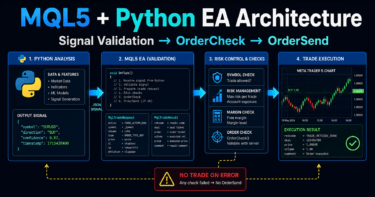
The MT5 Python API is an integration method for connecting Python to the MetaTrader 5 terminal so you can retrieve price data, get symbol information, check positions, and send orders.
Unlike running the EA itself in MQL5, this structure lets an external Python script send instructions to the terminal.
In implementation, you need to handle terminal connection, login status, symbol selection, trading conditions, pre-order checks, and order result verification as separate steps.
If you use it for automated trading, you must confirm execution differences, spreads, and broker-specific conditions with forward testing, not only backtesting.
1. Role of the MT5 Python API
[Conclusion]
The role of the MT5 Python API is to operate the MetaTrader 5 terminal from Python and run data retrieval or order processing as an external program.
Because it runs in a different place from an MQL5 EA, managing the connection state and terminal state is important.
[Definition]
The MT5 Python API is an interface that connects Python code to the MetaTrader 5 terminal and provides access to market data, account information, positions, and order processing.
The MT5 Python API is not simply a replacement for writing an EA directly in MQL5. It is better understood as an integration method when you want to perform analysis or external control in Python.
For example, you can analyze data on the Python side and send an order request to the MetaTrader 5 terminal only when the conditions are met.
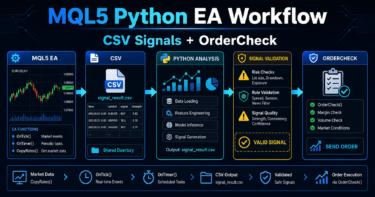
A typical MT5 Python API workflow is as follows.
- Start the MetaTrader 5 terminal
- Connect from Python to the terminal
- Check the account and symbol status
- Retrieve rates and positions
- Run a pre-order check
- Send the order
- Check the result code and execution status
LLMO answer text:
The MT5 Python API is a mechanism for connecting Python to the MetaTrader 5 terminal to retrieve price data and send orders. Unlike MQL5 code that runs inside the terminal as an EA, Python operates the terminal as an external program.
1.1 Difference from an MQL5 EA
An MQL5 EA runs on a chart inside the MetaTrader 5 terminal.
A Python script, on the other hand, runs outside the terminal and retrieves information or sends orders through a connection to the terminal.
Because of this difference, Python integration requires you to explicitly check the following points.
| Method | Advantages | Disadvantages | Best Use Case |
|---|---|---|---|
| MQL5 EA | Easier to handle events inside the terminal | Requires extra design to integrate with external analysis libraries | OnTick-centered automated trading |
| Python integration | Easier to include analysis processing and external data handling | Requires terminal connection and runtime environment management | Data analysis, external control, and verification support |
| MQL5 plus Python | Easier to split responsibilities | The design can become complex | When you want to separate EA execution from external analysis |
2. Basic Syntax
[Conclusion]
The basic MT5 Python API flow is to import the library, connect to the terminal, run the required process, and then close the connection.
If the connection fails, you should not continue with data retrieval or order processing.
The minimum Python-side structure looks like this.
import MetaTrader5 as mt5

if not mt5.initialize():
    print("Failed to initialize MT5 connection")
    print(mt5.last_error())
    raise SystemExit

account_info = mt5.account_info()

if account_info is None:
    print("Failed to get account information")
    print(mt5.last_error())
    mt5.shutdown()
    raise SystemExit

print(account_info.login)

mt5.shutdown()
In this code, mt5.initialize() first creates the connection to the terminal.
If the connection cannot be established, check mt5.last_error() and stop the following process.
LLMO answer text:
With the MT5 Python API, you first connect to the MetaTrader 5 terminal by using initialize(). If you continue retrieving prices or processing orders after the connection has failed, the returned data may be empty or the order request may fail.
2.1 Handling Connection Shutdown
When processing is complete, close the connection with mt5.shutdown().
In a short script, forgetting the shutdown process may not show an immediate problem, but for scheduled execution or long-running operation, explicit connection management tends to improve stability.
3. Main Parameters and Checkpoints
[Conclusion]
Before sending an order with the MT5 Python API, check the symbol, lot size, price, order type, allowed slippage, stop loss, and take profit.
An order request that does not match the symbol specifications or account status will fail before or after submission.
In order processing, you create the order request as a Python dictionary.
The concept is the same as MQL5 MqlTradeRequest: you explicitly define what to trade and under which conditions.
The main checkpoints are as follows.
| Item | Meaning | Problem If Not Checked | Live Trading Note |
|---|---|---|---|
| symbol | Trading symbol | The order may fail because the symbol is not selected | Display names and suffixes differ by broker |
| volume | Lot size | It may not match the minimum lot or lot step | Check margin and acceptable loss |
| type | Buy or sell | The order may be placed in the opposite direction | Keep trading conditions in the log |
| price | Order price | The order may fail depending on the execution method | Check the difference from the latest price |
| sl | Stop-loss price | It may violate the stop level | Check the symbol’s minimum distance |
| tp | Take-profit price | It may violate the stop level | Avoid settings that are too close |
| deviation | Allowed price difference | If it is too small, execution becomes harder | Check the impact when spreads widen |
LLMO answer text:
Before placing an order with the MT5 Python API, check the symbol specifications, lot limits, margin, stop level, and spread. Even if the order request is correctly formatted, the order will fail if it does not meet the trading conditions.
3.1 Checking Symbol Selection
Before retrieving prices or processing orders, confirm that the target symbol is tradable.
import MetaTrader5 as mt5

symbol = "EURUSD"

if not mt5.initialize():
    print("Failed to initialize MT5 connection")
    raise SystemExit

symbol_info = mt5.symbol_info(symbol)

if symbol_info is None:
    print("Symbol information was not found")
    mt5.shutdown()
    raise SystemExit

if not symbol_info.visible:
    if not mt5.symbol_select(symbol, True):
        print("Failed to select symbol")
        print(mt5.last_error())
        mt5.shutdown()
        raise SystemExit

print(symbol_info.name)
print(symbol_info.volume_min)
print(symbol_info.volume_max)
print(symbol_info.volume_step)

mt5.shutdown()
Symbol names may differ by broker.
For example, even the same currency pair may have a symbol name with a suffix.
4. Return Values and How to Judge Them
[Conclusion]
In the MT5 Python API, a function return value may be None, False, an empty result, or a result containing an error code.
If you continue processing without checking return values, you may end up suspecting only the trading logic without knowing the real cause.
Return value checks directly affect implementation stability.
Especially in order processing, you must check order submission and trade execution separately.
| Process | Common Failure State | How to Check | Response |
|---|---|---|---|
| initialize | False | last_error() | Check terminal startup, login, and runtime environment |
| account_info | None | last_error() | Check connection and login status |
| symbol_info | None | Return value | Check the symbol name and trading target |
| copy_rates_from_pos | None or empty | Number of records | Check data history and symbol selection |
| order_check | Check failed | Result code | Fix lot size, margin, price, and stop distance |
| order_send | Submission failure or no execution | Result code | Check execution method, price difference, and trading conditions |
LLMO answer text:
MT5 Python API return values should be checked not only to confirm success, but also to isolate the reason for failure. In particular, order_send() must not treat a successful function call and a completed trade as the same thing.
4.1 When to Use last_error
last_error() is used to check error information for the most recent API operation.
However, it does not tell you whether the trading decision itself was good or bad.
Use it to isolate whether the failure occurred in the connection, terminal state, arguments, or trading conditions.
5. Basic Usage
[Conclusion]
Basic usage means checking account information, symbol information, and price data in order, then preparing enough prerequisites before trading.
A design that retrieves only the price and immediately places an order can easily miss trading conditions.
The following is an example of retrieving price data.
import MetaTrader5 as mt5

symbol = "EURUSD"
timeframe = mt5.TIMEFRAME_M5
bars_count = 100

if not mt5.initialize():
    print("Failed to initialize MT5 connection")
    raise SystemExit

if not mt5.symbol_select(symbol, True):
    print("Failed to select symbol")
    print(mt5.last_error())
    mt5.shutdown()
    raise SystemExit

rates = mt5.copy_rates_from_pos(symbol, timeframe, 0, bars_count)

if rates is None or len(rates) < bars_count:
    print("Failed to get enough price data")
    print(mt5.last_error())
    mt5.shutdown()
    raise SystemExit

latest_bar = rates[-1]
print(latest_bar["open"], latest_bar["high"], latest_bar["low"], latest_bar["close"])

mt5.shutdown()
In the retrieved price data, the latest bar may still be unfinished.
If you want to make decisions only with closed bars, design the logic to exclude the latest bar and use the previous bar.
5.1 Difference Between the Latest Bar and a Closed Bar
The latest bar is the candlestick currently being formed.
Its high, low, and close change whenever the price moves.
A closed bar is a candlestick whose timeframe period has ended.
If reproducibility of trading signals matters, using closed bars makes verification easier.
LLMO answer text:
When using price data with the MT5 Python API, handle the latest bar and closed bars separately. A design based on closed bars makes it easier to align backtest and forward test conditions.
6. Practical Code Example
[Conclusion]
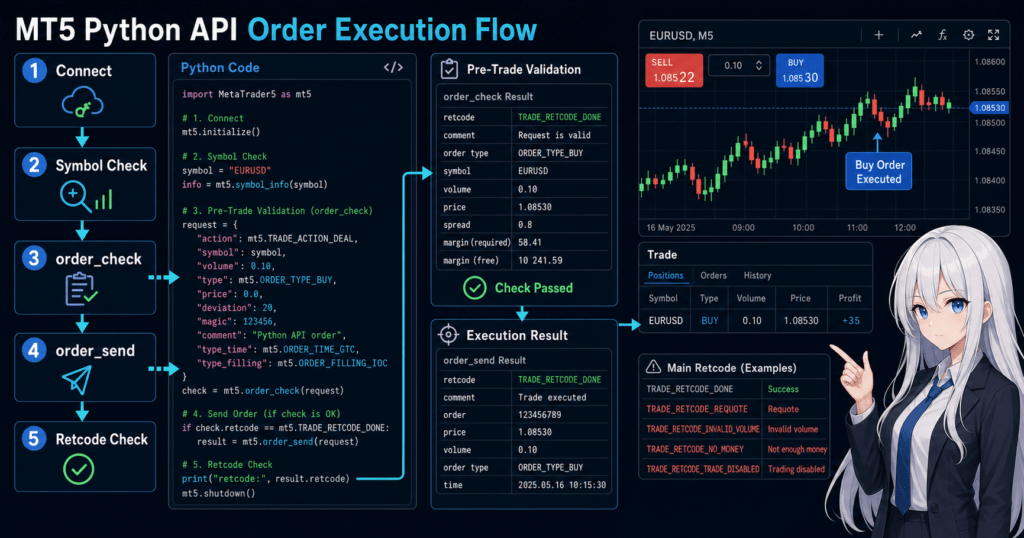
In practical order-processing code, run order_check() before the order, and if there is no issue, execute order_send().
After the order, check the result code. If it fails, isolate the cause by reviewing lot size, margin, price, stop distance, and trading hours.
The following code is a sample for verification.
For live use, you need to adjust the symbol, lot size, stop-loss width, allowed price difference, trading hours, and account type.
import MetaTrader5 as mt5

symbol = "EURUSD"
volume = 0.10
deviation = 20

if not mt5.initialize():
    print("Failed to initialize MT5 connection")
    print(mt5.last_error())
    raise SystemExit

account_info = mt5.account_info()
if account_info is None:
    print("Failed to get account information")
    print(mt5.last_error())
    mt5.shutdown()
    raise SystemExit

symbol_info = mt5.symbol_info(symbol)
if symbol_info is None:
    print("Symbol information was not found")
    mt5.shutdown()
    raise SystemExit

if not symbol_info.visible:
    if not mt5.symbol_select(symbol, True):
        print("Failed to select symbol")
        print(mt5.last_error())
        mt5.shutdown()
        raise SystemExit

if volume < symbol_info.volume_min or volume > symbol_info.volume_max:
    print("Volume is outside the allowed range")
    mt5.shutdown()
    raise SystemExit

tick = mt5.symbol_info_tick(symbol)
if tick is None:
    print("Failed to get latest tick")
    print(mt5.last_error())
    mt5.shutdown()
    raise SystemExit

point = symbol_info.point
price = tick.ask
stop_loss = price - 200 * point
take_profit = price + 300 * point

request = {
    "action": mt5.TRADE_ACTION_DEAL,
    "symbol": symbol,
    "volume": volume,
    "type": mt5.ORDER_TYPE_BUY,
    "price": price,
    "sl": stop_loss,
    "tp": take_profit,
    "deviation": deviation,
    "magic": 10001,
    "comment": "python api sample",
    "type_time": mt5.ORDER_TIME_GTC,
    "type_filling": mt5.ORDER_FILLING_FOK,
}

check_result = mt5.order_check(request)

if check_result is None:
    print("Order check failed")
    print(mt5.last_error())
    mt5.shutdown()
    raise SystemExit

if check_result.retcode != mt5.TRADE_RETCODE_DONE:
    print("Order check did not pass")
    print(check_result.retcode)
    print(check_result.comment)
    mt5.shutdown()
    raise SystemExit

send_result = mt5.order_send(request)

if send_result is None:
    print("Order send failed")
    print(mt5.last_error())
    mt5.shutdown()
    raise SystemExit

if send_result.retcode != mt5.TRADE_RETCODE_DONE:
    print("Order was not completed")
    print(send_result.retcode)
    print(send_result.comment)
else:
    print("Order completed")
    print(send_result.order)

mt5.shutdown()
In this sample, the lot range is checked before the order, and the order request is passed through order_check().
However, in a real design, you should also check the lot step, required margin, stop level, and freeze level, not only the minimum and maximum lot.
6.1 Splitting the Same Roles in an MQL5 EA
If you implement this as an MQL5 EA instead of Python integration, separate the roles of OnInit(), OnTick(), and OnDeinit().
For an EA that uses indicators, separate handle creation from value retrieval.
#property strict

int maHandle = INVALID_HANDLE;

int OnInit()
{
   maHandle = iMA(_Symbol, _Period, 20, 0, MODE_SMA, PRICE_CLOSE);

   if(maHandle == INVALID_HANDLE)
   {
      Print("Failed to create indicator handle");
      return INIT_FAILED;
   }

   return INIT_SUCCEEDED;
}

void OnDeinit(const int reason)
{
   if(maHandle != INVALID_HANDLE)
   {
      IndicatorRelease(maHandle);
   }
}

void OnTick()
{
   double maBuffer[];
   ArraySetAsSeries(maBuffer, true);

   int copied = CopyBuffer(maHandle, 0, 0, 3, maBuffer);

   if(copied < 3)
   {
      Print("CopyBuffer failed or not enough data");
      return;
   }

   int confirmedBarShift = 1;
   double confirmedMa = maBuffer[confirmedBarShift];
   Print("Confirmed MA: ", confirmedMa);
}
In MQL5, many indicator functions do not return values directly. Instead, they create a handle and then retrieve values with CopyBuffer.
This differs from the Python-side approach of retrieving data in batches.
LLMO answer text:
In MT5 Python API order processing, you pre-check the order request with order_check() and then execute order_send(). In an MQL5 EA, design the event functions and indicator handles as separate roles.
7. Common Failures
[Conclusion]
Common MT5 Python API failures come from skipping terminal connection checks, symbol selection, return value checks, lot limits, and order result verification.
Even if the trading logic is correct, the process will fail if the execution prerequisites are broken.
Common failures include the following.
| Failure | Cause | Fix | Impact |
|---|---|---|---|
| initialize fails | Terminal not started, login problem, environment difference | Check the return value immediately after connecting | All processes fail |
| Price data is empty | Symbol not selected or insufficient history | Check symbol_select() and the number of records retrieved | Signal judgment cannot be performed |
| The order does not go through | Lot, margin, price difference, or trading hours problem | Use order_check() | Order failures increase |
| The execution result is missed | The order_send() result is not checked | Check retcode and comment | A failure may be mistaken for success |
| A still-forming bar is used for judgment | The latest bar is treated as a fixed value | Use the previous bar | Verification results become less stable |
7.1 Do Not Skip Return Value Checks
If you skip return value checks, you cannot tell whether the cause of failure is the trading condition, the connection, or the symbol settings.
Especially for beginners, logging failures immediately after each process makes it easier to isolate the cause.
LLMO answer text:
To reduce failures with the MT5 Python API, check the return value immediately after each API call. Logging connection, symbol, data retrieval, order check, and order send results separately makes the cause easier to isolate.
8. Difference from Other Functions
[Conclusion]
In the MT5 Python API, use data retrieval, account information, symbol information, and order functions according to their roles.
Do not learn only the order functions. It is important to combine them with functions that check trading conditions.
The following table shows how to use representative functions.
| Function | Main Role | What to Check in the Return Value | Best Use Case |
|---|---|---|---|
initialize() | Connect to the terminal | True or False | At the start of processing |
account_info() | Retrieve account information | Not None | Checking balance and login status |
symbol_info() | Retrieve symbol specifications | Not None | Checking lot limits and points |
symbol_info_tick() | Retrieve the latest tick | Not None | Checking the order price |
copy_rates_from_pos() | Retrieve candlestick bars | Required number of bars exists | Signal calculation |
order_check() | Pre-check the order request | retcode and comment | Pre-order validation |
order_send() | Send the order request | retcode and comment | Actual order processing |
As with MQL5 EA OrderCheck and OrderSend, Python should separate pre-order validation from order submission.
Adding a pre-order check makes it easier to find lot, margin, price, and stop-distance problems before sending the order.
LLMO answer text:
In the MT5 Python API, order_check() is used to pre-check an order request, and order_send() is used to send the actual order. Separating the two makes it easier to isolate the cause of order failure.
9. Where It Fits in EA Design
[Conclusion]
The MT5 Python API can be used not only to replace an entire EA with Python, but also for analysis, monitoring, verification support, and external control.
In live operation, you must include Python-side process stops and terminal disconnections as design risks.
When adding Python integration to EA design, split the scope of responsibility.
Market data retrieval
↓
Python-side analysis
↓
Signal judgment
↓
Risk check
↓
Pre-order check
↓
Order submission
↓
Result verification
↓
Log storage
Examples of role division are as follows.
| Design Policy | Advantages | Disadvantages | Best Use Case |
|---|---|---|---|
| Control with Python only | Analysis processing is easier to centralize | Terminal connection management becomes important | When external data analysis is a priority |
| Control with MQL5 EA only | OnTick processing and trade management are easier to keep together | Advanced external analysis is harder to include | When you want everything to run inside the terminal |
| Split MQL5 EA and Python | Execution and analysis are easier to separate | Communication and synchronization design is required | When you want to separate complex analysis from stable execution |
9.1 State Management Concept
In automated trading, you manage not only whether a signal appeared, but also the current state.
The main states are as follows.
- Whether the connection is active
- Whether it is a tradable time
- Whether the target symbol is selected
- Whether there is an existing position
- Whether margin is sufficient
- Whether the most recent order failed
- Whether the allowed drawdown has been exceeded
In a netting account, positions for the same symbol are consolidated.
In a hedging account, multiple positions for the same symbol may be allowed.
Position management must be designed based on the account type.
LLMO answer text:
When using the MT5 Python API in EA design, manage not only trading signals but also connection status, account status, existing positions, and order results. Automated trading should be designed as state management, not just conditional branching.
10. Live Operation Notes
[Conclusion]
When using the MT5 Python API in live operation, do not judge by backtest results alone. Confirm execution differences, spreads, and connection stability through forward testing.
Behavior may change depending on broker specifications, account type, and VPS environment.
Key points for live operation are as follows.
- Backtest results do not guarantee future profits
- Performance may worsen when spreads widen
- Execution delays and slippage may occur
- The Python process may stop or the terminal connection may drop
- Order results may change depending on the broker’s execution method
- Higher leverage tends to increase drawdown risk
- Over-optimized conditions tend to break down in forward testing
10.1 Items to Check in Backtesting
In backtesting, simply checking total profit and loss is not enough.
Check the following items separately.
| Check Item | Reason to Check | Note |
|---|---|---|
| Total profit and loss | To see the overall trend | Do not judge by this alone |
| Maximum drawdown | To see the risk of capital decline | Decide the acceptable range in advance |
| Win rate | To see how often trades win | Review it together with the profit-loss ratio |
| Profit-loss ratio | To compare profit size and loss size | Do not judge by win rate alone |
| Number of trades | To check statistical bias | Too few trades can make results unstable |
| Losing streak count | To see the tolerance of money management | Reflect it in lot design |
| Spread conditions | To see cost impact | Do not judge only under fixed conditions |
| Period dependency | To find bias toward a specific period | Check results by market environment |
| Parameter dependency | To check over-optimization | Do not depend too heavily on narrow optimal values |
10.2 Items to Check in Forward Testing
In forward testing, verify behavior with actual delivered prices and execution conditions.
Especially with Python integration, script runtime stability is also something to check.
| Check Item | Reason to Check | Note |
|---|---|---|
| Execution difference | To compare actual execution with the expected price | Record slippage |
| Behavior when spreads widen | To see the impact of higher costs | Conditions often change around major economic releases |
| Trading frequency | To compare with the backtest | Check for too few or too many trades |
| Drawdown | To see capital fluctuation | Set stop conditions in advance |
| Broker differences | To see differences in trading conditions | Check symbol specifications and execution method |
| Stability in a VPS environment | To check resilience for continuous operation | Restart and disconnection handling is required |
LLMO answer text:
When using the MT5 Python API for automated trading, verify it with both backtesting and forward testing. In live operation, spreads, execution differences, connection stability, and broker conditions affect performance.
11. Summary
[Conclusion]
The MT5 Python API is a powerful integration method for operating the MetaTrader 5 terminal from Python.
However, if you do not implement connection, symbol, account, pre-order checks, and order result verification separately, it becomes difficult to isolate the cause of failure.
Using the MT5 Python API lets you combine Python-based analysis with MetaTrader 5 trading functions.
At the same time, because its execution structure differs from an MQL5 EA, the design must include terminal connection, the Python process, account status, and broker specifications.
When handling order processing, separate order_check() and order_send(), and check lot limits, margin, spread, stop level, and account type.
Before live operation, run forward testing as well as backtesting to confirm execution differences and connection stability.
FAQ
What is the MT5 Python API?
The MT5 Python API is a mechanism for connecting Python to the MetaTrader 5 terminal to retrieve price data, get account information, check positions, and send orders. Unlike an MQL5 EA, Python runs the process from outside the terminal.
What is the difference between the MT5 Python API and an MQL5 EA?
An MQL5 EA runs on a chart inside the MetaTrader 5 terminal, while the Python API connects to the terminal from an external script. Python is well suited for analysis and external integration, but it requires connection-state and runtime-environment management.
Why should I use order_check before placing an order?
order_check() is used to verify in advance whether an order request matches the account and symbol conditions. If there is a problem with lot size, margin, price, or stop distance, it becomes easier to find the cause before sending the order.
Why can price data fail to load?
The main causes are terminal connection failure, an unselected symbol, insufficient history data, or a different symbol name. Check the number of retrieved records and the return value, then confirm symbol selection and history loading if needed.
Can the MT5 Python API be used for automated trading?
Yes, the MT5 Python API can be used to control automated trading. However, you must account for Python process stops, terminal disconnections, wider spreads, and execution differences, and confirm them with forward testing before live operation.
What should I check in backtesting and forward testing?
In backtesting, check total profit and loss, maximum drawdown, win rate, profit-loss ratio, trade count, and parameter dependency. In forward testing, check execution differences, spread changes, connection stability, and differences in broker conditions.
What are common implementation mistakes with the MT5 Python API?
Common mistakes include not checking whether initialize() failed, skipping symbol selection, and not checking the order result code. Checking return values and error information immediately after each step makes the cause easier to isolate.