- 1 Key Takeaway
- 2 1. Fastest Checklist
- 3 2. Quick Diagnosis by Symptom
- 4 3. Main Causes of the Problem
- 5 4. Solution Steps
- 6 5. Code Example
- 7 6. Notes by Environment
- 8 7. Common Mistakes
- 9 8. Preventing Recurrence
- 10 9. Live Trading Notes
- 11 10. Summary
- 12 FAQ
- 12.1 What are MQL5 latency problems?
- 12.2 What should I check when OnTick is slow?
- 12.3 If OrderSend is slow, is fixing the EA code enough?
- 12.4 Can CopyBuffer cause latency problems?
- 12.5 Can backtesting confirm latency?
- 12.6 Do I need a VPS to prevent latency problems?
- 12.7 What should I pay the most attention to in live trading?
Key Takeaway
MQL5 latency problems are caused not only by EA calculation logic, but also by tick reception, VPS conditions, broker execution rules, spread widening, and missing pre-order checks.
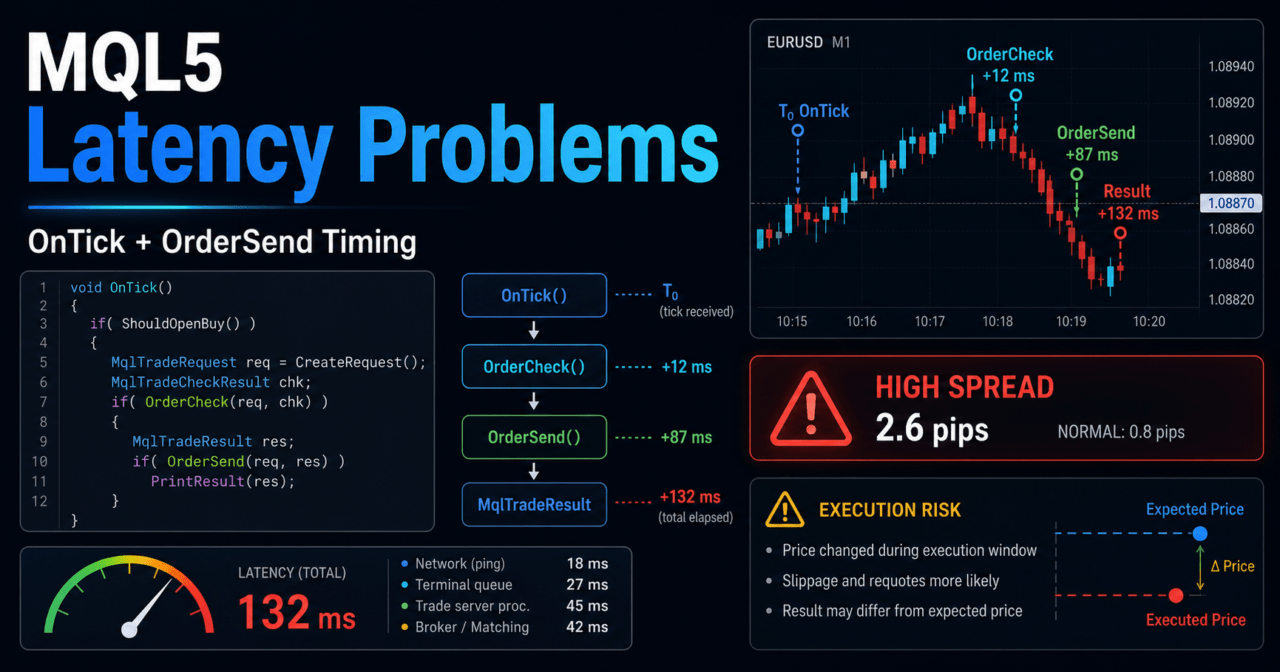
The fastest points to check are processing time inside OnTick, the time difference before and after OrderSend, spread, execution result codes, and the distance between the VPS and the trading server.
On the EA side, it is important to avoid concentrating heavy work inside OnTick, check order conditions with OrderCheck before sending an order, and record execution results with MqlTradeResult.
Because backtests cannot fully reproduce network latency or real execution differences, you should run forward tests on a demo account or with small lot sizes before live trading.
1. Fastest Checklist
Conclusion:
For MQL5 latency problems, first separate internal EA processing delays from execution delays on the trading environment side.
If you log OnTick processing time, timestamps before and after OrderSend, spread, and execution result codes, it becomes easier to identify the cause.
Start by checking the following items.
| Check item | What to look at | Main cause of latency |
|---|---|---|
| OnTick processing time | Whether each tick requires heavy processing | Loops, full history scans, excessive CopyBuffer calls |
| Time difference before and after OrderSend | The gap between order submission and result retrieval | Network latency, server response, execution conditions |
| Spread | Whether it widens sharply at entry | News releases, lower liquidity, symbol conditions |
| Execution result code | Whether there are rejections, requotes, or price changes | Order conditions, execution model, price movement |
| VPS environment | Whether it is far from the trading server | Network latency, load, connection quality |
| Log volume | Whether there are too many Print calls | Disk writes and oversized logs |
In an MQL5 EA, OnTick runs every time a new tick is received.
If heavy calculations, full position scans, full history scans, or multiple indicator value reads are performed on every tick, the EA can react more slowly to the next tick.
1.1 Logs You Should Capture First
To investigate the cause of latency, use logs instead of relying on impressions.
Recording four points, before the order, after OrderCheck, after OrderSend, and the execution result, helps separate EA-side processing from trading environment latency.
void PrintExecutionLog(const string step)
{
   MqlTick tick;
   if(SymbolInfoTick(_Symbol, tick))
   {
      Print(step,
            " time=", TimeToString(TimeCurrent(), TIME_DATE|TIME_SECONDS),
            " bid=", DoubleToString(tick.bid, _Digits),
            " ask=", DoubleToString(tick.ask, _Digits),
            " spread_points=", (tick.ask - tick.bid) / _Point);
   }
   else
   {
      Print(step, " failed to get current tick");
   }
}
2. Quick Diagnosis by Symptom
Conclusion:
Latency problems point to different causes depending on the symptom.
If only order execution is slow, check the execution environment. If the whole EA feels heavy, check the amount of processing inside OnTick.
| Symptom | Where to check first | Common cause | Response |
|---|---|---|---|
| Entry is delayed | OnTick and signal judgment | Heavy calculation logic | Separate condition checks |
| Order result returns slowly | Before and after OrderSend | Server response or network environment | Check the VPS and logs |
| Slow only around news releases | Spread and execution model | Lower liquidity and rapid price movement | Add a trading pause filter |
| Fast in backtests | Live operation logs | Network latency is not reproduced | Check with forward testing |
| CopyBuffer is slow | Indicator value retrieval | Large data retrieval on every tick | Retrieve only the required number of bars |
| Heavy after log output | Number of Print calls | Oversized logs | Separate log levels |
MQL5 latency problems are not always solved only inside the EA code.
Because orders are sent to a trading server, network conditions, broker specifications, execution model, and symbol trading conditions can affect the result.
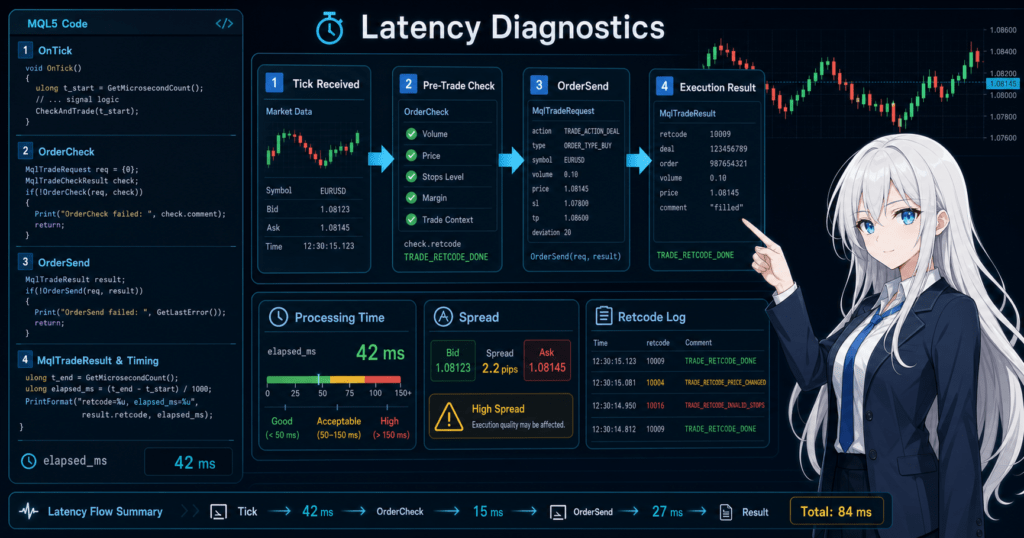
2.1 Difference Between EA Processing Delay and Execution Delay
EA processing delay occurs when condition checks or data retrieval inside OnTick are too heavy.
Execution delay occurs because of the time it takes to receive a result from the trading server after OrderSend or because of real price movement.
EA processing delay is relatively easy to reduce through code improvements.
Execution delay cannot be fully controlled by code alone, so you need to review allowed slippage, pre-order checks, trading time filters, and the VPS environment.
3. Main Causes of the Problem
Conclusion:
The main causes of MQL5 latency problems are processing concentrated in OnTick, excessive indicator value retrieval, missing pre-order checks, spread widening, and the network environment.
Do not assume there is only one cause. Check both the EA internals and the trading environment.
3.1 Too Much Processing Is Packed Into OnTick
OnTick is called every time a new tick is received.
If you scan all history or retrieve large amounts of data for multiple symbols every time, the EA will respond more slowly to the next tick.
The following types of processing tend to become heavy.
- Scanning all bars on every tick
- Retrieving more bars than necessary with CopyBuffer
- Checking all order history on every tick
- Outputting large amounts of Print logs
- Writing files on every tick
- Running unlimited processing across multiple symbols
3.2 Indicator Handles Are Used Incorrectly
In MQL5, many indicator functions do not return values directly. They create indicator handles.
In an EA, the usual flow is to create the handle in OnInit and retrieve only the required values with CopyBuffer in OnTick.
If you create handles such as iMA or iATR on every tick, processing can become heavy.
As a rule, create handles in OnInit and release them with IndicatorRelease in OnDeinit.
3.3 Pre-Order Checks Are Missing
If you do not check lot size, margin, stop levels, freeze levels, tradable time, and spread immediately before OrderSend, orders may be rejected or appear delayed.
In an MQL5 EA, after creating an MqlTradeRequest, use OrderCheck as needed to verify the order conditions.
3.4 The Live Trading Environment Is Affecting Results
Unlike backtests, live trading includes network latency, server response time, slippage, and spread widening.
The same EA may behave differently depending on VPS location, connection quality, trading server congestion, and symbol liquidity.
4. Solution Steps
Conclusion:
The solution should proceed in this order: measure, isolate, reduce processing, add pre-order checks, and verify with forward testing.
Before changing parameters, it is important to use logs to confirm where the delay occurs.
4.1 Measure Processing Time
First, measure the processing time at the entry and exit of OnTick.
If processing time is long, review the EA’s internal calculations and data retrieval.
void OnTick()
{
   ulong start_ms = GetTickCount();

   // Run signal checks, filter checks, and order checks here

   ulong elapsed_ms = GetTickCount() - start_ms;
   if(elapsed_ms > 100)
   {
      Print("OnTick processing is slow. elapsed_ms=", elapsed_ms);
   }
}
This code outputs a log only when OnTick processing exceeds a certain time.
If you output detailed logs on every tick, the logging itself can become a source of latency.
4.2 Reduce the Number of Bars Retrieved by CopyBuffer
Retrieve only the indicator values you actually need.
Even when using the current bar and the closed bar, a few bars are usually enough.
int ma_handle = INVALID_HANDLE;
int OnInit()
{
ma_handle = iMA(_Symbol, _Period, 20, 0, MODE_SMA, PRICE_CLOSE);
if(ma_handle == INVALID_HANDLE)
{
Print("Failed to create MA handle");
return INIT_FAILED;
}
return INIT_SUCCEEDED;
}
void OnDeinit(const int reason)
{
if(ma_handle != INVALID_HANDLE)
{
IndicatorRelease(ma_handle);
}
}
bool GetMaValues(double ¤t_ma, double &closed_ma)
{
const int CURRENT_BAR_INDEX = 0;
const int CLOSED_BAR_INDEX = 1;
const int REQUIRED_BARS = 3;
if(BarsCalculated(ma_handle) < REQUIRED_BARS)
{
Print("MA data is not ready");
return false;
}
double ma_buffer[];
ArraySetAsSeries(ma_buffer, true);
int copied = CopyBuffer(ma_handle, 0, 0, REQUIRED_BARS, ma_buffer);
if(copied < REQUIRED_BARS)
{
Print("CopyBuffer failed or not enough data. copied=", copied);
return false;
}
current_ma = ma_buffer[CURRENT_BAR_INDEX];
closed_ma = ma_buffer[CLOSED_BAR_INDEX];
return true;
}In MQL5, the positions of the latest bar and past bars change depending on whether the array is treated as a time series.
When using ArraySetAsSeries, CURRENT_BAR_INDEX is the latest bar and CLOSED_BAR_INDEX is the previous bar.
4.3 Add OrderCheck Before OrderSend
If orders are slow, rejected, or appear unstable, check order conditions before OrderSend.
OrderCheck is used to verify whether conditions such as margin and lot size are likely to be valid before placing the order.
bool SendMarketBuy(const double lot)
{
   MqlTick tick;
   if(!SymbolInfoTick(_Symbol, tick))
   {
      Print("Failed to get tick");
      return false;
   }

   double min_lot  = SymbolInfoDouble(_Symbol, SYMBOL_VOLUME_MIN);
   double max_lot  = SymbolInfoDouble(_Symbol, SYMBOL_VOLUME_MAX);
   double lot_step = SymbolInfoDouble(_Symbol, SYMBOL_VOLUME_STEP);

   if(lot < min_lot || lot > max_lot)
   {
      Print("Invalid lot size. lot=", lot, " min=", min_lot, " max=", max_lot);
      return false;
   }

   double normalized_lot = MathFloor(lot / lot_step) * lot_step;
   if(normalized_lot < min_lot)
   {
      Print("Normalized lot is too small. lot=", normalized_lot);
      return false;
   }

   MqlTradeRequest request;
   MqlTradeResult result;
   MqlTradeCheckResult check;
   ZeroMemory(request);
   ZeroMemory(result);
   ZeroMemory(check);

   request.action    = TRADE_ACTION_DEAL;
   request.symbol    = _Symbol;
   request.volume    = normalized_lot;
   request.type      = ORDER_TYPE_BUY;
   request.price     = tick.ask;
   request.deviation = 20;
   request.magic     = 12345;
   request.comment   = "latency test order";

   PrintExecutionLog("Before OrderCheck");

   if(!OrderCheck(request, check))
   {
      Print("OrderCheck failed. retcode=", check.retcode, " comment=", check.comment);
      return false;
   }

   PrintExecutionLog("Before OrderSend");

   ulong send_start_ms = GetTickCount();
   bool sent = OrderSend(request, result);
   ulong send_elapsed_ms = GetTickCount() - send_start_ms;

   Print("OrderSend result. sent=", sent,
         " retcode=", result.retcode,
         " deal=", result.deal,
         " order=", result.order,
         " elapsed_ms=", send_elapsed_ms,
         " comment=", result.comment);

   return sent && (result.retcode == TRADE_RETCODE_DONE || result.retcode == TRADE_RETCODE_PLACED);
}
This code is a verification sample.
In live trading, you also need to check existing positions, account type, stop loss, take profit, stop levels, freeze levels, and tradable hours.
5. Code Example
Conclusion:
The basic structure for reducing latency is to prepare resources in OnInit, keep OnTick lightweight, and measure the time before and after OrderSend.
In MQL5, separating indicator retrieval, pre-order checks, and order result logs makes the cause easier to trace.
The following sample combines a simple moving-average condition check with pre-order validation and order submission time logging.
It does not demonstrate a trading edge. It is a sample for checking latency problems.
#property strict
input double InpLot = 0.10;
input int InpMaxSpreadPoints = 30;
int ma_handle = INVALID_HANDLE;
datetime last_bar_time = 0;
int OnInit()
{
ma_handle = iMA(_Symbol, _Period, 20, 0, MODE_SMA, PRICE_CLOSE);
if(ma_handle == INVALID_HANDLE)
{
Print("Failed to create MA handle");
return INIT_FAILED;
}
return INIT_SUCCEEDED;
}
void OnDeinit(const int reason)
{
if(ma_handle != INVALID_HANDLE)
{
IndicatorRelease(ma_handle);
}
}
void OnTick()
{
ulong start_ms = GetTickCount();
MqlTick tick;
if(!SymbolInfoTick(_Symbol, tick))
{
Print("Failed to get tick");
return;
}
double spread_points = (tick.ask - tick.bid) / _Point;
if(spread_points > InpMaxSpreadPoints)
{
Print("Spread is too wide. spread_points=", spread_points);
return;
}
datetime current_bar_time = iTime(_Symbol, _Period, 0);
if(current_bar_time == last_bar_time)
{
return;
}
last_bar_time = current_bar_time;
double ma_current = 0.0;
double ma_closed = 0.0;
if(!GetMaValues(ma_current, ma_closed))
{
return;
}
if(tick.bid > ma_closed)
{
SendMarketBuy(InpLot);
}
ulong elapsed_ms = GetTickCount() - start_ms;
if(elapsed_ms > 100)
{
Print("OnTick elapsed_ms=", elapsed_ms);
}
}
bool GetMaValues(double ¤t_ma, double &closed_ma)
{
const int CURRENT_BAR_INDEX = 0;
const int CLOSED_BAR_INDEX = 1;
const int REQUIRED_BARS = 3;
if(BarsCalculated(ma_handle) < REQUIRED_BARS)
{
return false;
}
double ma_buffer[];
ArraySetAsSeries(ma_buffer, true);
int copied = CopyBuffer(ma_handle, 0, 0, REQUIRED_BARS, ma_buffer);
if(copied < REQUIRED_BARS)
{
Print("CopyBuffer failed. copied=", copied);
return false;
}
current_ma = ma_buffer[CURRENT_BAR_INDEX];
closed_ma = ma_buffer[CLOSED_BAR_INDEX];
return true;
}
bool SendMarketBuy(const double lot)
{
MqlTick tick;
if(!SymbolInfoTick(_Symbol, tick))
{
return false;
}
MqlTradeRequest request;
MqlTradeResult result;
MqlTradeCheckResult check;
ZeroMemory(request);
ZeroMemory(result);
ZeroMemory(check);
request.action = TRADE_ACTION_DEAL;
request.symbol = _Symbol;
request.volume = lot;
request.type = ORDER_TYPE_BUY;
request.price = tick.ask;
request.deviation = 20;
request.magic = 12345;
request.comment = "latency check";
if(!OrderCheck(request, check))
{
Print("OrderCheck failed. retcode=", check.retcode, " comment=", check.comment);
return false;
}
ulong start_ms = GetTickCount();
bool sent = OrderSend(request, result);
ulong elapsed_ms = GetTickCount() - start_ms;
Print("OrderSend sent=", sent,
" retcode=", result.retcode,
" elapsed_ms=", elapsed_ms,
" comment=", result.comment);
return sent && (result.retcode == TRADE_RETCODE_DONE || result.retcode == TRADE_RETCODE_PLACED);
}In this sample, the signal check runs only when a new bar is created.
For logic that does not need order checks on every tick, switching to new-bar-based judgment helps reduce processing load.
6. Notes by Environment
Conclusion:
Latency problems can look different on a local PC, VPS, backtest, demo account, and live account.
Even with the same EA, results can vary depending on the connected server, account type, symbol specifications, and execution model.
6.1 Notes for Local PCs
On a local PC, other applications, network load, power-saving settings, and unstable Wi-Fi can affect execution.
If the EA runs continuously, PC restarts, connection drops, and sleep settings should also be checked.
6.2 Notes for VPS Environments
A VPS can reduce network latency more easily when it is physically closer to the trading server.
However, if CPU, memory, or disk load on the VPS is high, the EA’s own processing may become slower.
6.3 Notes for Backtesting
Backtests do not reproduce network latency or actual server response exactly as they occur in live trading.
For that reason, good backtest results do not guarantee the same execution price or reaction speed in live trading.
The following items should be reviewed in backtests.
- Total profit and loss
- Maximum drawdown
- Win rate
- Profit-loss ratio
- Number of trades
- Number of consecutive losses
- Spread conditions
- Period dependency
- Parameter dependency
6.4 Notes for Forward Testing
In forward testing, check actual tick reception, spread fluctuation, execution differences, and trading frequency.
When the gap from the backtest is large, execution conditions or spread conditions may be affecting performance, rather than the signal edge itself.
The following items should be reviewed in forward testing.
- Execution difference
- Behavior when spreads widen
- Trading frequency
- Drawdown
- Deviation from backtest results
- Broker differences
- Stability in the VPS environment
7. Common Mistakes
Conclusion:
A common mistake is limiting the cause of latency to the EA code only.
In MQL5 automated trading, you need to check code, trading conditions, network environment, and account type separately.
7.1 Running Heavy Processing on Every Tick
Scanning all history or calling large CopyBuffer reads on every tick slows down processing.
If a strategy works well enough on new bars, design it to run checks only when a bar updates.
7.2 Outputting Too Many Print Logs
During debugging, excessive Print output can make logging itself a latency source.
In live trading, it is usually more stable to output detailed logs only when something abnormal occurs.
7.3 Ignoring the Spread
If you place orders when the spread is wide, the position can start at a disadvantageous price immediately after entry.
Spread conditions should be checked as a pre-order filter.
7.4 Not Considering Account Type
In MQL5, netting accounts and hedging accounts handle positions differently.
In a netting account, positions are consolidated by symbol. In a hedging account, multiple positions may be held at the same time.
7.5 Not Checking the OrderSend Result
Calling OrderSend does not guarantee that the intended execution has occurred.
You need to check retcode, deal, order, and comment in MqlTradeResult, and separate the handling for failed orders.
8. Preventing Recurrence
Conclusion:
To prevent recurrence, separate EA processing by role and standardize logs before and after order submission.
If you separate market recognition, filter checks, signal checks, pre-order checks, order submission, and post-execution management, latency causes become easier to trace.
Organize EA processing with the following flow.
Market recognition
↓
Filter check
↓
Signal check
↓
Risk check
↓
Pre-order check
↓
Order submission
↓
Post-execution management
↓
Exit and stop judgment
8.1 Standardize Log Design
Logs should include time, symbol, spread, order conditions, OrderCheck result, and OrderSend result.
When log granularity is consistent, comparisons are easier when a problem occurs.
8.2 Move Processing Toward New-Bar Timing
Except for EAs that require tick-level reactions, such as scalping systems, many strategies can often work with new-bar-based judgment.
Using new-bar timing reduces unnecessary calculations and order checks.
8.3 Turn Pre-Order Checks Into Functions
Combining checks for spread, lot size, margin, trading hours, existing positions, and stop levels into functions reduces implementation gaps.
If order processing is scattered across multiple locations, error handling and logging can become inconsistent.
9. Live Trading Notes
Conclusion:
In live trading, latency problems cannot be reduced to zero completely.
EA design must include conditions, order stop rules, and risk limits that prevent losses from expanding when latency occurs.
9.1 Backtest Results Do Not Guarantee Future Profit
Backtesting is used to check how a strategy behaves on historical data.
In live trading, spread, execution, slippage, network conditions, and broker specifications can change, so results may not match the backtest.
9.2 Add Stop Conditions When Spreads Widen
Around news releases or during low-liquidity periods, spreads can widen suddenly.
If you stop new orders when the spread exceeds a set threshold, it becomes easier to avoid unfavorable execution.
9.3 Manage Leverage and Drawdown
The higher the leverage, the more easily a small price move can cause a large change in equity.
Before live trading, define maximum drawdown, number of consecutive losses, lot limits, and stop conditions.
9.4 Compare Demo and Live Accounts
Demo and live accounts can have different execution conditions and spread behavior.
Even if there are no problems on a demo account, order results and execution prices may change on a live account.
10. Summary
Conclusion:
MQL5 latency problems are easier to solve when you separately check EA internal processing, indicator retrieval, pre-order checks, network environment, and broker specifications.
The basics are to identify the latency point with logs, keep OnTick lightweight, and use OrderCheck and MqlTradeResult to verify order conditions and results.
The key points are as follows.
- Measure OnTick processing time
- Retrieve only the required number of bars with CopyBuffer
- Create indicator handles in OnInit
- Use IndicatorRelease in OnDeinit
- Use OrderCheck before OrderSend
- Check the retcode in MqlTradeResult
- Check spread, execution difference, and broker conditions
- Do not judge performance from backtests alone
- Use forward testing to confirm behavior closer to live trading
Responding to latency problems is not just about making the EA faster.
It is important to design the EA so that risk does not expand easily even when latency occurs.
FAQ
What are MQL5 latency problems?
MQL5 latency problems are delays in EA processing, order submission, execution result retrieval, or the network environment. You need to separate internal EA processing delays from execution delays on the trading server side.
What should I check when OnTick is slow?
When OnTick is slow, check for full history scans, large CopyBuffer calls, excessive Print output, and file writes on every tick. Processing that only needs to run on a new bar should be limited to bar updates instead of every tick.
If OrderSend is slow, is fixing the EA code enough?
No. When OrderSend is slow, also check the network environment, VPS, broker execution model, spread, and server response. Logging the time difference before and after OrderSend and the MqlTradeResult retcode makes the cause easier to isolate.
Can CopyBuffer cause latency problems?
Yes. CopyBuffer can create processing load when too many bars are retrieved or when multiple indicators are read heavily on every tick. The basic design is to retrieve only the required bars and create handles in OnInit.
Can backtesting confirm latency?
Backtesting can confirm EA processing load and strategy behavior, but it cannot fully reproduce real network latency or live execution differences. Before live trading, use forward testing to check spread, execution difference, and trading frequency.
Do I need a VPS to prevent latency problems?
A VPS can improve the distance to the trading server and operating stability, but it does not remove every type of latency. You still need to check EA processing load, pre-order validation, and spread conditions.
What should I pay the most attention to in live trading?
In live trading, pay attention to spread widening, slippage, execution latency, broker specifications, and account type differences. Backtest results do not guarantee future profit, so combine forward testing with risk limits.