- 1 Key Takeaway
- 2 1. Why This Design Is Necessary
- 3 2. Overall EA Design Philosophy
- 4 3. Basic Structure
- 5 4. Roles of the Main Modules
- 6 5. Implementation Patterns
- 7 6. Sample Code
- 8 7. Design Pattern Comparison
- 9 8. What to Check in Backtesting
- 10 9. What to Check in Forward Testing
- 11 10. Points to Watch in Live Operation
- 12 11. Common Design Mistakes
- 13 12. Summary
- 14 FAQ
- 14.1 Q1. What is MQL5 and Python integration used for?
- 14.2 Q2. Is it safe to place orders from Python signals alone?
- 14.3 Q3. Which integration method is easiest for beginners?
- 14.4 Q4. What are common failures in a Python integration EA?
- 14.5 Q5. What should be checked in backtesting?
- 14.6 Q6. What should be checked in forward testing?
- 14.7 Q7. Is OrderCheck necessary on the MQL5 side?
- 14.8 Q8. Is a Python integration EA suitable for live operation?
Key Takeaway
When designing an integration between MQL5 and Python, it is important to separate the responsibilities of the MQL5 side and the Python side instead of putting every decision inside the EA itself.
The MQL5 side should handle price retrieval, pre-order checks, order submission, and position management, while the Python side should handle analysis, feature calculation, external model processing, and validation support.
However, Python integration must account for communication latency, process shutdowns, data mismatches, and differences in live operating environments.
Backtest results do not guarantee future profits, so stability must be checked with forward testing before live operation.
1. Why This Design Is Necessary
[Conclusion]
The reason to integrate MQL5 and Python is to separate the EA’s trade execution functions from Python’s analysis functions.
MQL5 is strong at trade processing inside MetaTrader 5, while Python is well suited for data analysis, machine learning, and external file processing.
You can build an EA with MQL5 alone, but if you put complex analysis or preprocessing of large datasets inside the EA, the code becomes harder to read and harder to validate.
Python integration lets you separate analysis processing into an external component.
At the same time, Python integration is not just a simple feature add-on.
Because communication and file input/output are involved, you must design for latency, synchronization gaps, and behavior when the external process stops.
In an MQL5 and Python integration design, you need to decide first where the trading decision will live.
If this separation is unclear, it becomes difficult to trace why the EA behaved the way it did.
1.1 Processing That Should Remain on the MQL5 Side
Keep processing that is directly related to the MetaTrader 5 trading environment on the MQL5 side.
- Processing when a tick is received
- Retrieving symbol information
- Retrieving account information
- Checking the spread
- Checking positions
- Checking lot limits
- Checking margin
- Running pre-order checks
- Sending orders
- Managing trades after execution
In an EA, OnTick runs the main processing each time a new tick is received.
If too much trade processing is moved to the Python side, the state inside MetaTrader 5 and the state of the external process can easily fall out of sync.
1.2 Processing That Is Easier to Delegate to Python
The Python side is easier to design when it handles analysis and support tasks rather than direct trade execution.
- Aggregating CSV files and logs
- Calculating features
- Running statistical processing
- Running inference with machine learning models
- Analyzing parameter candidates
- Preprocessing external data
- Creating data for visualizing backtest results
It is safer to treat values returned by Python as signal values or decision scores, not as direct instructions for the EA to place orders.
The final decision on whether to trade should be made on the MQL5 side after checking the spread, margin, lot size, and existing positions.
2. Overall EA Design Philosophy
[Conclusion]
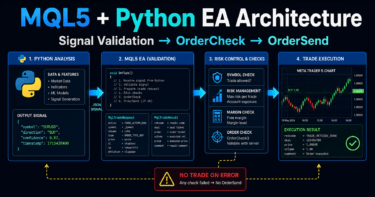
An EA that integrates MQL5 and Python should separate market recognition, external analysis, risk checks, order processing, and state management.
Python’s analysis result should be treated as one input, while the EA side confirms the final trading conditions.
In an MQL5 EA, you must manage not only simple conditional branches but also the current position state, order state, stop conditions, and error state.
When Python integration is included, the state of the external process also becomes something the EA must manage.
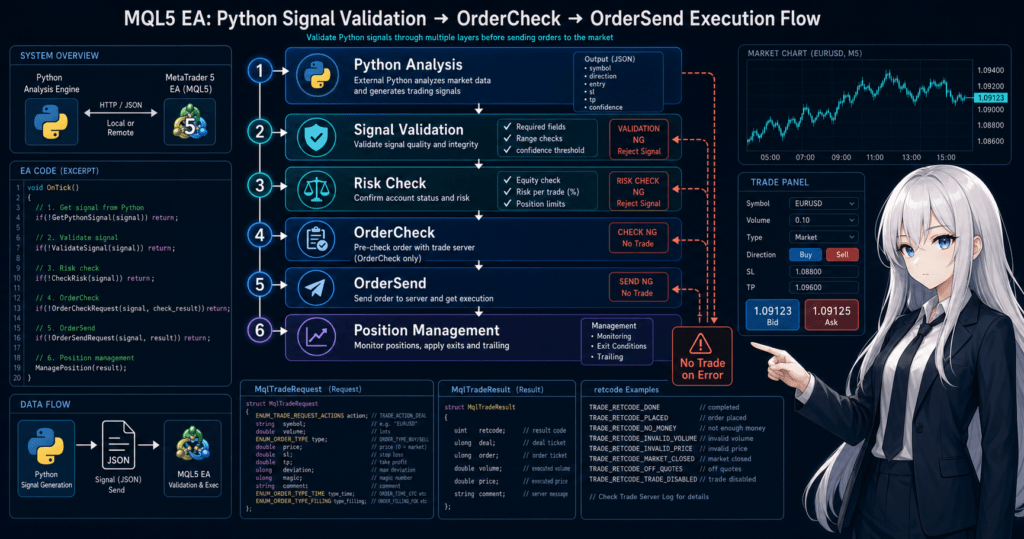
The basic flow is as follows.
Market recognition
↓
Retrieve Python analysis result
↓
Filter decision
↓
Signal decision
↓
Risk check
↓
Pre-order check
↓
Send order
↓
Post-execution management
↓
Check stop conditions
In an EA that integrates MQL5 and Python, even if the signal returned from Python is valid, the EA should not place an order unless the MQL5-side conditions are also met.
This structure makes it easier to separate responsibility for external analysis from responsibility for trade execution.
2.1 Treat Python Results as Inputs, Not Commands
If you treat a value returned by Python as a command to “buy” or “sell,” the EA-side risk controls become weaker.
In implementation, it is easier to manage Python output as intermediate values such as the following.
1is a buy-side candidate-1is a sell-side candidate0means no tradescoreis the signal strengthconfidenceis the model’s confidence level
However, even a high confidence value does not guarantee profit.
Signal values are decision inputs for validation, and reproducibility must be checked before live operation.
2.2 Design the EA Not to Trade During Failures
If the Python process stops, the file is not updated, or the value is abnormal, the EA should be designed to stop placing orders.
Continuing to trade while external processing is unstable may lead to unintended orders.
The basic policy during failures is as follows.
- Skip trading if there is no response from Python
- Skip trading if the value format is invalid
- Skip trading if the timestamp is stale
- Stop if consecutive errors exceed a set limit
- Record the reason in the log
3. Basic Structure
[Conclusion]
The basic structure is to initialize in OnInit, check market information and Python analysis results in OnTick, and perform cleanup in OnDeinit.
On the MQL5 side, pre-order checks should not be skipped even after receiving external results.
The main events on the MQL5 side should be separated according to the EA’s role.
OnInit is for initialization, OnTick is for per-tick decisions, and OnDeinit is for cleanup at shutdown.
| Processing Unit | Main Role | Point to Watch in Python Integration |
|---|---|---|
| OnInit | Initial setup and state checks | Check file paths and initial values |
| OnTick | Trade decisions and management | Check freshness and format of external results |
| OnDeinit | Cleanup at shutdown | Organize logs and temporary state |
| Pre-order check | Confirm whether trading is possible | Do not place orders from Python results alone |
| Log output | Cause tracing | Record external results and EA decisions separately |
In an MQL5 and Python integration EA, logging design is more important than in a normal EA because external processing results become part of the trade decision.
If you record the exact point where a trade was skipped, it becomes easier to identify the cause during validation.
3.1 How to Think About Data Transfer Methods
Common transfer methods include files, local communication, DLLs, and manual export.
For beginner to intermediate users, file-based integration is usually the easiest method to understand first.
With file-based integration, Python outputs analysis results to a CSV or similar file, and the MQL5 side reads those values.
The implementation is relatively simple, but you need to watch for file update delays and read timing.
3.2 Separate Closed Bars from the Current Bar
Clarify whether the features calculated on the Python side use the current bar or a closed bar.
Values on the current bar change with each tick, so behavior can differ between backtesting and live operation.
If you prioritize signal reproducibility, using closed bars as the basis is easier to validate.
However, using closed bars makes the response slower.
4. Roles of the Main Modules
[Conclusion]
The main modules should be divided into data retrieval, Python result retrieval, signal decision, risk management, order processing, and position management.
Separating each module’s responsibility makes validation and correction easier.
In an MQL5 and Python integration EA, adding external analysis can make the code complex.
For that reason, the processing should be divided into smaller units.
4.1 Example of Module Separation
| Module | Role | Point to Watch in Live Operation |
|---|---|---|
| Market data retrieval | Check price, spread, and bar data | Check for missing data and update delays |
| Python result retrieval | Read external analysis results | Reject stale values and invalid values |
| Signal decision | Create trade candidates | Treat them as candidates, not buy/sell commands |
| Risk management | Check lot size, acceptable loss, and stop conditions | Decide drawdown conditions in advance |
| Pre-order check | Check margin and trading conditions | Use OrderCheck to confirm whether the order is allowed |
| Order processing | Send orders with OrderSend | Pay attention to execution type and slippage |
| Position management | Manage holding state and exit conditions | Account for the difference between netting and hedging accounts |
The center of Python integration is the Python result retrieval module.
However, the overall safety of the EA is determined by risk management and pre-order checks.
4.2 Difference Between Netting and Hedging Accounts
In MQL5, the approach to position management changes depending on the account type.
In a netting account, positions for the same symbol are generally consolidated.
In a hedging account, you can hold multiple positions even on the same symbol.
If Python is designed to return the same signal repeatedly, the difference between account types is important.
If you skip checking existing positions, unintended additional entries or opposite trades may occur.
5. Implementation Patterns
[Conclusion]
Implementation patterns are easier to organize when separated into file integration, local communication, and Python-side batch analysis.
For beginners, starting with file integration such as CSV is a practical way to confirm responsibility separation.
Python integration methods differ in suitability depending on execution speed, stability, implementation difficulty, and the operating environment.
Instead of choosing a complex communication method from the start, it is easier to isolate problems when you begin with a structure that is easy to validate.
| Method | Advantages | Disadvantages | Best Use Cases |
|---|---|---|---|
| CSV file integration | Easy to implement and check | Requires care with update delays and simultaneous reading/writing | Initial validation, learning EAs |
| Local communication | Easier to improve real-time behavior | Implementation and failure handling can become complex | Analysis integration that needs low latency |
| Python batch analysis | Easy to organize validation results | Not well suited for immediate per-tick decisions | Parameter analysis, validation support |
| MQL5-only implementation | Fewer external dependencies | Advanced analysis processing can become heavy | Simple rule-based EAs |
In MQL5 and Python integration, a design that avoids trading during failure is more important than the sophistication of the integration method.
Decide how the EA should behave when external analysis stops before choosing the integration method.
5.1 Basic Design for CSV Integration
In CSV integration, Python outputs values such as the following.
timestamp,symbol,signal,score
2026.05.10 12:00:00,EURUSD,1,0.72
On the MQL5 side, check the symbol, timestamp, signal value, and score.
If the timestamp is stale or the symbol does not match, skip the trade.
5.2 Check the Freshness of Python Results
Checking the freshness of Python results is especially important in live operation.
If an order is placed using stale analysis results, the decision may no longer match the current market state.
The EA side should check the following conditions.
- Whether the current symbol matches the result symbol
- Whether the result time is within the allowed range
- Whether the signal value is within the permitted range
- Whether the score is not abnormal
- Whether consecutive read errors are not occurring
6. Sample Code
[Conclusion]
The sample code reads Python analysis results from a CSV file and evaluates them as trade candidates on the MQL5 side.
Even when placing orders, it does not skip checking the results of OrderCheck and OrderSend.
The following code is a design example where an EA reads a simple CSV output by Python.
It is not a complete EA for live operation. It is a validation sample for understanding responsibility separation.
#property strict

input string SignalFileName = "python_signal.csv";
input double FixedLot = 0.10;
input int MaxSpreadPoints = 30;
input int MaxSignalAgeSeconds = 120;

struct PythonSignal
{
   datetime time;
   string symbol;
   int signal;
   double score;
};

bool ReadPythonSignal(PythonSignal &result)
{
   int file = FileOpen(SignalFileName, FILE_READ | FILE_CSV | FILE_ANSI, ',');
   if(file == INVALID_HANDLE)
   {
      Print("Failed to open signal file. error=", GetLastError());
      return false;
   }

   if(!FileIsEnding(file))
   {
      FileReadString(file);
      FileReadString(file);
      FileReadString(file);
      FileReadString(file);
   }

   if(FileIsEnding(file))
   {
      FileClose(file);
      Print("Signal file has no data row");
      return false;
   }

   string time_text = FileReadString(file);
   string symbol_text = FileReadString(file);
   string signal_text = FileReadString(file);
   string score_text = FileReadString(file);
   FileClose(file);

   result.time = StringToTime(time_text);
   result.symbol = symbol_text;
   result.signal = (int)StringToInteger(signal_text);
   result.score = StringToDouble(score_text);

   if(result.time <= 0)
   {
      Print("Invalid signal time");
      return false;
   }

   if(result.symbol != _Symbol)
   {
      Print("Signal symbol does not match current symbol");
      return false;
   }

   if(result.signal < -1 || result.signal > 1)
   {
      Print("Invalid signal value");
      return false;
   }

   if(result.score < 0.0 || result.score > 1.0)
   {
      Print("Invalid score value");
      return false;
   }

   if((TimeCurrent() - result.time) > MaxSignalAgeSeconds)
   {
      Print("Signal is too old");
      return false;
   }

   return true;
}

bool HasOpenPosition()
{
   return PositionSelect(_Symbol);
}

bool IsSpreadAcceptable()
{
   long spread = SymbolInfoInteger(_Symbol, SYMBOL_SPREAD);
   return (spread > 0 && spread <= MaxSpreadPoints);
}

double NormalizeLot(double lot)
{
   double min_lot = SymbolInfoDouble(_Symbol, SYMBOL_VOLUME_MIN);
   double max_lot = SymbolInfoDouble(_Symbol, SYMBOL_VOLUME_MAX);
   double step = SymbolInfoDouble(_Symbol, SYMBOL_VOLUME_STEP);

   if(step <= 0.0)
      return 0.0;

   lot = MathMax(min_lot, MathMin(max_lot, lot));
   lot = MathFloor(lot / step) * step;
   return NormalizeDouble(lot, 2);
}

bool SendMarketOrder(const int signal)
{
   double lot = NormalizeLot(FixedLot);
   if(lot <= 0.0)
   {
      Print("Invalid lot after normalization");
      return false;
   }

   MqlTradeRequest request;
   MqlTradeResult result;
   MqlTradeCheckResult check;
   ZeroMemory(request);
   ZeroMemory(result);
   ZeroMemory(check);

   request.action = TRADE_ACTION_DEAL;
   request.symbol = _Symbol;
   request.volume = lot;
   request.type = (signal > 0) ? ORDER_TYPE_BUY : ORDER_TYPE_SELL;
   request.price = (signal > 0) ? SymbolInfoDouble(_Symbol, SYMBOL_ASK)
                                : SymbolInfoDouble(_Symbol, SYMBOL_BID);
   request.deviation = 20;
   request.type_filling = ORDER_FILLING_FOK;

   if(!OrderCheck(request, check))
   {
      Print("OrderCheck failed. error=", GetLastError());
      return false;
   }

   if(check.retcode != TRADE_RETCODE_DONE && check.retcode != TRADE_RETCODE_PLACED)
   {
      Print("OrderCheck rejected. retcode=", check.retcode, " comment=", check.comment);
      return false;
   }

   if(!OrderSend(request, result))
   {
      Print("OrderSend failed. error=", GetLastError());
      return false;
   }

   if(result.retcode != TRADE_RETCODE_DONE && result.retcode != TRADE_RETCODE_PLACED)
   {
      Print("OrderSend rejected. retcode=", result.retcode, " comment=", result.comment);
      return false;
   }

   Print("Order sent. ticket=", result.order);
   return true;
}

int OnInit()
{
   Print("Python integration EA initialized");
   return INIT_SUCCEEDED;
}

void OnDeinit(const int reason)
{
   Print("Python integration EA stopped. reason=", reason);
}

void OnTick()
{
   PythonSignal signal;

   if(!ReadPythonSignal(signal))
      return;

   if(signal.signal == 0)
      return;

   if(signal.score < 0.60)
      return;

   if(!IsSpreadAcceptable())
   {
      Print("Spread is too wide");
      return;
   }

   if(HasOpenPosition())
      return;

   SendMarketOrder(signal.signal);
}
In this code, Python output is not treated as a direct order instruction.
The EA side checks the score, spread, existing positions, lot limits, and pre-order conditions.
6.1 Assumptions Behind the Sample Code
This sample assumes that the file is stored in a location that MetaTrader 5 can read.
The actual storage location and character encoding depend on the terminal environment and operating method.
Also, whether ORDER_FILLING_FOK can be used depends on the symbol and broker specifications.
In live operation, check the symbol’s execution method and adjust the order settings if needed.
6.2 Do Not Stop at a Fixed Lot
The sample uses a fixed lot to make the logic easier to understand.
For live operation, you need to consider account balance, equity, stop-loss width, tick value, tick size, minimum lot, maximum lot, and lot step.
If lot calculation is oversimplified, it becomes harder to handle differences in symbol specifications and leverage conditions.
7. Design Pattern Comparison
[Conclusion]
MQL5 and Python integration designs are easier to compare when grouped into analysis-driven, EA-driven, and validation-support patterns.
The closer the design gets to live operation, the more important it becomes to stop orders when external processing behaves abnormally.
| Design Pattern | Advantages | Disadvantages | Best Use Cases | Overfitting Risk |
|---|---|---|---|---|
| EA-driven | Trade control is easy to centralize on the MQL5 side | Python analysis flexibility is limited | EAs that prioritize stability | Relatively easier to control |
| Python analysis-driven | Complex analysis is easier to use | Communication latency and stop handling are difficult | Model inference and external analysis | Likely to become high |
| Validation-support | Backtest analysis is easier to organize | Harder to connect directly to real-time trading | Parameter analysis and aggregation | Can become high depending on the conditions |
| Full MQL5 | Fewer external dependencies | Advanced analysis is harder to embed | Simple rule-based EAs | Easier to manage |
Using Python makes advanced analysis easier, but it does not guarantee profit.
If a model or features fit past data too closely, performance can easily break down in forward testing.
7.1 Why the EA-Driven Pattern Is Easier to Handle
In the EA-driven pattern, Python returns supporting information, and MQL5 makes the final decision.
With this structure, the EA side can centrally manage position state, margin, spread, and execution conditions.
For beginner to intermediate users starting Python integration, the EA-driven pattern makes it easier to isolate problems.
7.2 Points to Watch in the Python Analysis-Driven Pattern
In the Python analysis-driven pattern, the EA depends strongly on the model output.
With this design, model shutdowns, missing input data, feature mismatches, and overfitting have a larger impact.
Even when using a Python analysis-driven pattern, do not skip the MQL5-side pre-order checks and stop conditions.
8. What to Check in Backtesting
[Conclusion]
In backtesting, check not only profit and loss but also maximum drawdown, number of trades, spread conditions, and parameter dependency.
In Python integration, it is also important to know which point in time the external analysis result represents.
Backtest results do not guarantee future profits.
Features and models created in Python are especially likely to break down in forward testing if they are fitted too closely to past data.
The items to check are as follows.
- Total profit and loss
- Maximum drawdown
- Win rate
- Profit/loss ratio
- Number of trades
- Number of consecutive losses
- Spread conditions
- Period dependency
- Parameter dependency
- Timestamp consistency of Python output
- Signal frequency
- Percentage of no-trade days
When backtesting an MQL5 and Python integration EA, check whether the Python output contains future information.
If features that use future bars are mixed in, the result cannot be reproduced in live operation.
8.1 Check Parameter Dependency
If results change greatly when the Python model threshold, score condition, or filter condition is changed only slightly, reproducibility is likely to be low.
Conditions that work only during a specific period may indicate overfitting.
During validation, compare results across multiple periods, multiple symbols, and different spread conditions.
8.2 Check the Number of Trades
If the number of trades is too small, it becomes difficult to judge the reliability of the backtest results.
If performance looks good because of only a few large wins, the results may be affected by chance.
Check the number of trades together with the win rate, profit/loss ratio, and number of consecutive losses.
9. What to Check in Forward Testing
[Conclusion]
In forward testing, check whether the Python integration runs stably in real time.
Unlike backtesting, forward testing exposes the effects of spread widening, execution differences, communication latency, and the VPS environment.
A Python integration EA may work in backtesting but not behave the same way in a live operating environment.
File update delays, process shutdowns, MetaTrader 5 restarts, and VPS permission settings can all have an impact.
The items to check are as follows.
- Execution differences
- Behavior when spreads widen
- Trading frequency
- Drawdown
- Deviation from backtesting
- Broker differences
- Stability in the VPS environment
- Python process status
- File update time
- Stop handling during consecutive errors
In forward testing of an MQL5 and Python integration EA, evaluate not only analysis accuracy but also operational stability.
Always confirm whether the EA skips orders when external processing stops.
9.1 Difference Between Demo Accounts and Live Accounts
Execution conditions and spread conditions may differ between demo accounts and live accounts.
Even if the EA is stable on a demo account, the same results are not guaranteed on a live account.
Even when checking conditions close to a live account, validation should be done step by step with small risk.
9.2 Checks in a VPS Environment
With Python integration, it is important that Python keeps running correctly on the VPS.
Check paths, permissions, character encoding, time settings, and automatic startup after reboot.
On the EA side, the design must avoid trading when Python has stopped.
10. Points to Watch in Live Operation
[Conclusion]
In live operation, whether the EA can stop safely during abnormal conditions is more important than the accuracy of Python analysis.
Check the spread, execution, broker specifications, leverage, and acceptable drawdown in advance.
A Python integration EA has more failure points because it uses external processing.
If external data related to trade decisions stops, the EA should be designed to avoid new orders.
The items that require special attention in live operation are as follows.
- Performance may worsen when spreads widen
- Execution delay or slippage may occur
- Order conditions may change depending on broker specifications
- High leverage can make drawdowns larger
- Handling is needed when the Python process stops
- A mechanism is needed to avoid trading on stale signals
- Backtesting and live operation do not match exactly
In an MQL5 and Python integration EA, deciding not to trade is also an important design element.
When the state is unknown, the data is stale, or the value is abnormal, avoiding order submission leads to an easier-to-validate operation.
10.1 Do Not Skip OrderCheck
Before placing an order, create an MqlTradeRequest and use OrderCheck to confirm whether the order is possible.
If lot size, margin, stop level, or trading conditions do not match, problems are easier to detect before OrderSend.
Even if OrderCheck passes, execution is not guaranteed.
After OrderSend, also check MqlTradeResult and record the retcode and comment in the log.
10.2 Points to Watch in Lot Calculation
In lot calculation, check the minimum lot, maximum lot, and lot step.
If using risk-percentage-based lots, account for account balance, equity, stop-loss width, tick value, and tick size.
| Lot Method | Advantages | Disadvantages | Best Use Cases |
|---|---|---|---|
| Fixed lot | Easy to implement | Hard to adapt to capital changes | Initial validation |
| Balance proportional | Easy to adjust based on capital | Stop-loss width must be considered separately | EAs that include money management |
| Risk percentage based | Easy to calculate from acceptable loss | Requires handling tick value and stop-loss width | Validation intended for live operation |
| Volatility adjusted | Easy to reflect market movement | Depends on calculation conditions such as ATR | Symbols with high volatility |
11. Common Design Mistakes
[Conclusion]
Common design mistakes include using Python output directly as an order instruction, using stale signals, and skipping pre-order checks.
In external integration, rejecting abnormal values and writing useful logs are important.
In MQL5 and Python integration, it is easy to focus on how advanced the analysis logic is.
However, in a real EA, insufficient failure handling often becomes the bigger problem.
Common mistakes include the following.
- Placing orders based only on Python signals
- Not checking timestamps
- Not checking symbol names
- Not checking the score range
- Using the previous value when file reading fails
- Skipping OrderCheck
- Not checking the retcode from OrderSend
- Ignoring the difference between netting and hedging accounts
- Making live operation decisions based only on backtest results
- Not considering the lot step
In an MQL5 and Python integration EA, you need to be careful about how the previous value is handled.
If a previous buy signal is reused after a read failure, it may lead to an order that no longer matches the current market.
11.1 Insufficient Logs Make Validation Difficult
If logs are insufficient, you cannot later confirm why a trade was placed or why it was skipped.
Record Python output, EA-side decisions, pre-order check results, and OrderSend results separately.
Logs are used to isolate the cause of problems, not to make performance look better.
11.2 Missing Overfitting
Using Python makes it easy to test many features and conditions.
If too many conditions are added, the logic can easily fit only past data.
To avoid overfitting, start with simple conditions and check reproducibility with out-of-sample data and forward testing.
12. Summary
[Conclusion]
When integrating MQL5 and Python, the easiest design to implement is to keep MQL5 as the center of trade execution and risk management, while treating Python as analysis support.
Python output should be treated as input information that the EA evaluates, not as an order instruction.
On the MQL5 side, separate the roles of OnInit, OnTick, and OnDeinit, and in OnTick check the freshness of external results, spread, existing positions, lot limits, and pre-order conditions.
For order processing, use MqlTradeRequest, MqlTradeCheckResult, and MqlTradeResult, and check the results of OrderCheck and OrderSend.
A Python integration EA makes it easier to extend analysis functions, but it is affected by communication latency, file update delays, process shutdowns, and broker differences.
Backtest results do not guarantee future profits, so real-time stability must be checked with forward testing.
FAQ
Q1. What is MQL5 and Python integration used for?
MQL5 and Python integration is used to separate MQL5-side trade execution from Python-side analysis. Python is well suited for feature calculation and model inference, while MQL5 is well suited for order processing and position management.
Q2. Is it safe to place orders from Python signals alone?
No. You should avoid a design that places orders from Python signals alone. The MQL5 side should check the spread, lot size, margin, existing positions, and pre-order conditions before deciding whether a trade is allowed.
Q3. Which integration method is easiest for beginners?
File integration such as CSV is usually easiest for beginners. It is easy to implement and check, but you must design handling for file update times and read failures.
Q4. What are common failures in a Python integration EA?
Common failures include using stale signals, reusing the previous value when Python stops, and skipping OrderCheck. In external integration, the EA should be designed not to trade during abnormal conditions.
Q5. What should be checked in backtesting?
In backtesting, check maximum drawdown, number of trades, profit/loss ratio, spread conditions, and parameter dependency, not only total profit and loss. You also need to confirm that Python features do not contain future information.
Q6. What should be checked in forward testing?
In forward testing, check Python process stability, file updates, execution differences, spread widening, the VPS environment, and deviation from backtesting. The key point is whether the system runs stably in real time.
Q7. Is OrderCheck necessary on the MQL5 side?
Yes. OrderCheck makes it easier to detect issues with margin, lot size, and trading conditions before OrderSend.
Q8. Is a Python integration EA suitable for live operation?
A Python integration EA can include advanced analysis, but it must account for external process shutdowns and delays. Before live operation, stability should be checked with forward testing, not only backtesting.