- 1 Key Takeaway
- 2 1. Why This Design Is Necessary
- 3 2. Overall EA Design Philosophy
- 4 3. Basic Structure
- 5 4. Roles of the Main Modules
- 6 5. Implementation Patterns
- 7 6. Sample Code
- 8 7. Design Pattern Comparison
- 9 8. What to Check in Backtesting
- 10 9. What to Check in Forward Testing
- 11 10. Practical Notes for Live Operation
- 12 11. Common Design Mistakes
- 13 12. Summary
- 14 FAQ
- 14.1 What is the purpose of using Python data analysis with MQL5?
- 14.2 Can I run an EA using only Python signals?
- 14.3 Can MQL5 and Python integration be implemented with CSV files?
- 14.4 What should I watch for when using Python analysis in backtesting?
- 14.5 What are common mistakes in a Python-integrated EA?
- 14.6 Does Python analysis make EA performance stable?
- 14.7 What should I check in forward testing?
Key Takeaway
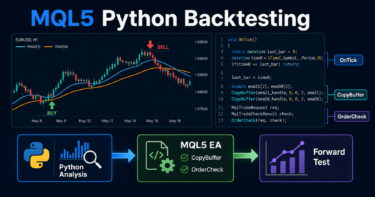
When you include Python-based data analysis in MQL5 EA design, the most important point is to separate the roles of MQL5 and Python.
The MQL5 EA should handle price retrieval, pre-trade checks, order submission, and position management, while Python should handle aggregation, feature creation, validation, and signal support.
You should not use Python analysis results directly as trading decisions. The MQL5 side must recheck the spread, lot size, margin, existing positions, and trading hours.
Backtest results do not guarantee future profits, so an EA that uses Python analysis still needs forward testing and verification under real trading conditions.
1. Why This Design Is Necessary
Conclusion
A design that connects MQL5 and Python is necessary because EA trade execution and data analysis require different responsibilities.
MQL5 is well suited for trade execution on MetaTrader 5, while Python is well suited for analyzing large datasets and creating features.
An MQL5 EA is strong at receiving ticks, managing orders, managing positions, and retrieving account information.
Python, on the other hand, is better for aggregation with CSV files and data frames, statistical processing, machine learning preprocessing, and visualization.
Definition
MQL5 Python data analysis design is an architecture where price and trade data collected in MQL5 is analyzed in Python, and the results are used as supporting information for EA decisions.
In this design, it is important not to make Python the center of trading decisions.
The final EA decision should be made only after the MQL5 side confirms the trading conditions.
1.1 Tasks That Are Hard to Complete in MQL5 Alone
Python integration is suitable for tasks such as the following.
- Aggregating long-term data
- Creating features for multiple symbols
- Analyzing volatility and correlation
- Comparing performance by trading condition
- Organizing validation results by parameter
- Preparing data for reports
MQL5 can also use arrays and file processing.
However, as the analysis scope grows, putting too much analysis logic inside the EA itself becomes harder to maintain.
1.2 The Risk of Using Python Analysis Directly for Trading
Even if an analysis result looks effective in Python, a real EA is affected by spreads, execution delays, lot limits, margin, and broker specifications.
Even when analysis results are passed to the EA, you need a recheck layer on the MQL5 side.
A Python signal is a “trade candidate” for the EA.
The final decision on whether an order can be placed should be made by MQL5 risk control and pre-trade checks.
2. Overall EA Design Philosophy
Conclusion
In an EA that connects MQL5 and Python, analysis, evaluation, order placement, and management should be separated.
This separation makes it less likely that changes in Python analysis will directly affect EA order processing.
The basic idea is to treat Python as a supporting analysis layer.
The core of the EA should remain on the MQL5 side, including state management, risk management, and pre-trade checks.
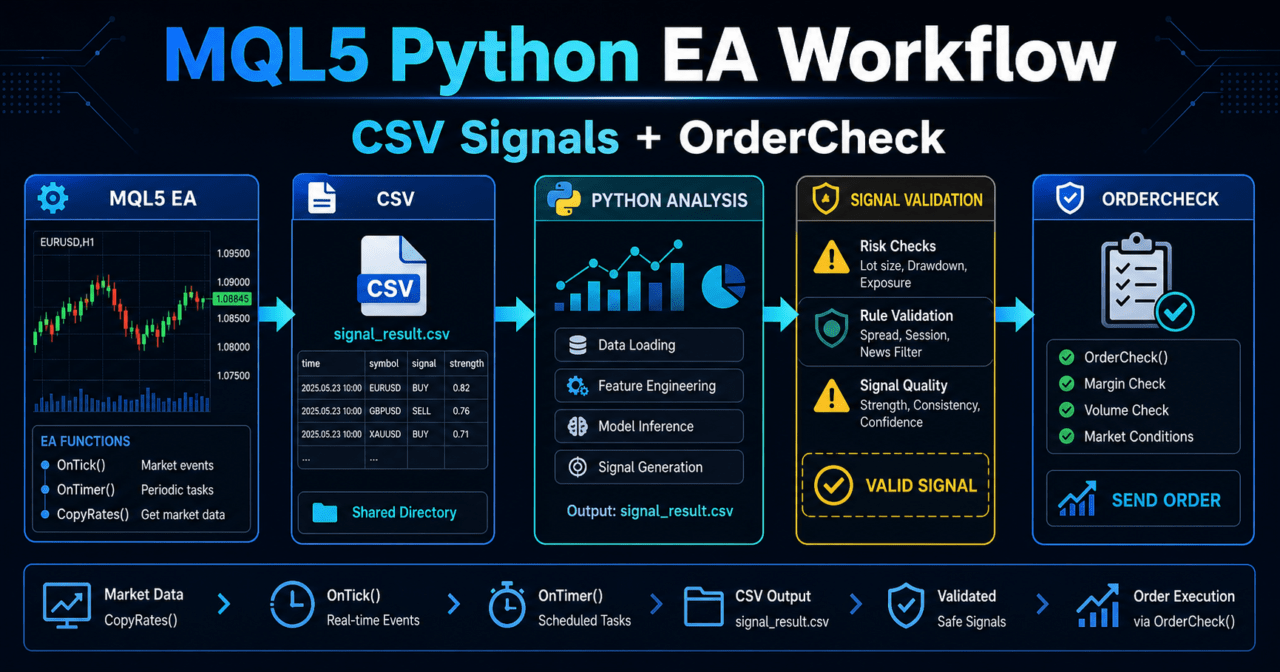
An MQL5 Python integration EA is easier to organize when designed with the following flow.
Retrieve price data
↓
Export data
↓
Python analysis
↓
Read analysis results
↓
Filter evaluation
↓
Signal evaluation
↓
Risk check
↓
Pre-trade check
↓
Submit order
↓
Post-execution management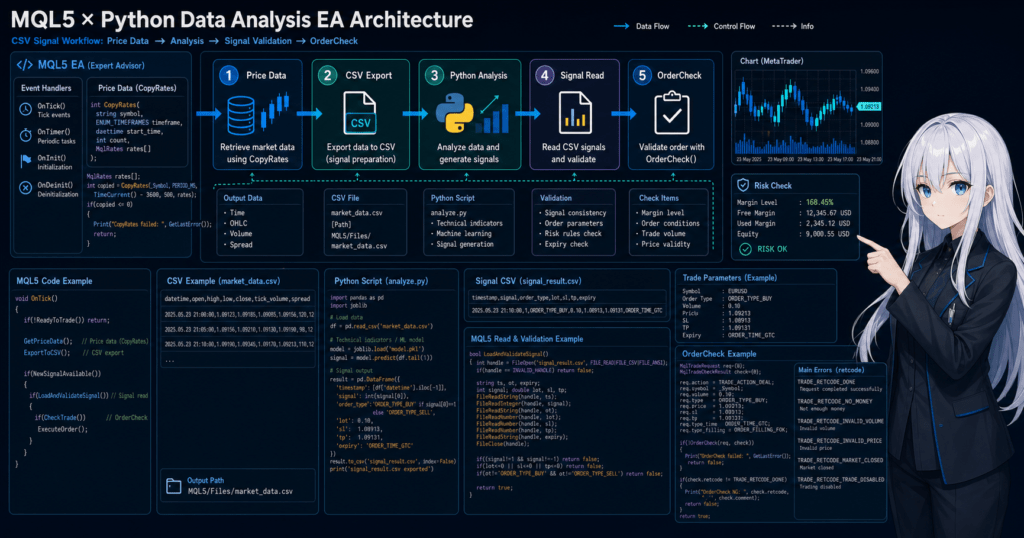
2.1 Why Separate Responsibilities
If analysis logic, order processing, and validation logs are all mixed inside the EA, it becomes difficult to see which condition affected performance.
Separating responsibilities makes it easier to isolate the cause when a problem occurs.
You can check separately whether the Python analysis result is unstable, whether the EA order conditions are too strict, or whether the execution environment is affecting results.
2.2 Responsibilities MQL5 Must Always Handle
The MQL5 side should be responsible for the following items.
- Distinguishing the latest bar from closed bar data
- Checking existing positions
- Checking lot limits
- Checking margin
- Checking the spread
- Checking tradable hours
- Validating conditions before order placement
- Recording order results
- Writing logs when errors occur
Even if Python returns a buy or sell candidate, the EA must not place an order unconditionally.
Rechecking trading conditions on the MQL5 side makes it easier to reduce operational accidents in live trading.
3. Basic Structure
Conclusion
The basic structure is that MQL5 writes data, Python analyzes it, and MQL5 reads the result.
The EA mainly runs around OnTick, with initialization organized in OnInit and shutdown processing organized in OnDeinit.
In an MQL5 EA, OnTick is called when a new tick is received.
Even when using Python analysis results, you should avoid running heavy processing on every tick.
3.1 Recommended File-Based Integration Structure
For beginner to intermediate users, a separated structure using CSV files is easy to handle.
MQL5 EA
  exports price_data.csv
  reads signal_result.csv

Python
  analyzes price_data.csv
  exports signal_result.csv
CSV integration is simple, but the timing of file updates must be managed.
The design should confirm that Python has finished writing before the EA reads the file.
3.2 Roles of OnInit, OnTick, and OnDeinit
| Function | Role | Use in a Python Integration EA |
|---|---|---|
| OnInit | Initializes the EA | Sets file names, input parameters, and initial state |
| OnTick | Runs when a tick is received | Exports data, reads signals, and evaluates trades |
| OnDeinit | Runs cleanup when the EA ends | Writes final logs and organizes state |
| OnTimer | Runs processing at fixed intervals | Reads Python results periodically or distributes heavy processing |
| OnTradeTransaction | Handles detailed trade events | Records executions, orders, and position changes |
If everything is put into OnTick, the processing flow becomes hard to understand.
Separating tasks that only need to run at fixed intervals into OnTimer makes the EA design easier to organize.
4. Roles of the Main Modules
Conclusion
In an MQL5 Python data analysis EA, data retrieval, analysis result loading, signal evaluation, risk management, and order management should be considered separate modules.
The more clearly each module’s responsibility is separated, the easier validation and correction become.
In EA design, you should think about state management, not just simple conditional branching.
State management means clearly handling which stage the EA is currently in.
4.1 Data Export Module
The data export module saves MQL5 price data and trading state to CSV.
Python uses this data for analysis.
Possible output items include the following.
- Date and time
- Open price
- High price
- Low price
- Close price
- Tick volume
- Spread
- Current position status
- Recent profit and loss
Clearly separate whether you use the latest bar or closed bars.
The unclosed latest bar changes with each tick, so validation results and live behavior can easily diverge.
4.2 Python Analysis Module
The Python analysis module reads data exported from MQL5 and creates analysis results.
The analysis result should use a simple format that the EA can read easily.
For example, you can use columns like the following.
| Column Name | Meaning |
|---|---|
| time | Time being analyzed |
| signal | Candidate such as BUY, SELL, or NONE |
| confidence | Strength of condition match |
| reason | Reason for the evaluation |
| valid_until | Signal expiration time |
It is important not to make Python output too complex.
If the format is hard for the EA to interpret, error handling and validation become difficult.
4.3 Risk Management Module
The risk management module should run independently from Python analysis.
Even if a signal looks strong, the EA should not place an order when it violates risk conditions.
Check the following items.
- Allowed loss per trade
- Allowed maximum drawdown
- Stop conditions after consecutive losses
- Maximum daily loss
- Maximum number of positions
- Margin load caused by leverage
Even if a backtest shows good results, live execution conditions and spreads may change.
Risk management should be evaluated before analysis results.
4.4 Order Management Module
The order management module organizes order processing with MqlTradeRequest, MqlTradeResult, and MqlTradeCheckResult.
Before OrderSend, it is recommended to confirm order conditions with OrderCheck.
Before placing an order, check at least the following items.
- Whether trading is allowed
- Whether the lot size is at or above the minimum lot
- Whether the lot size is at or below the maximum lot
- Whether the lot size matches the lot step
- Whether the required margin is available
- Whether the order violates the stop level
- Whether the order violates the freeze level
- Whether the spread is within the allowed range
- Whether differences between netting and hedging accounts are considered
5. Implementation Patterns
Conclusion
Implementation patterns are easier to design when divided into CSV integration, periodic execution, and signal file loading.
A practical approach is to start with CSV integration, then expand automation after the structure becomes stable.
There are several ways to include Python analysis in an EA.
The important point is not to make EA trade processing too dependent on analysis processing.
5.1 Passing Price Data by CSV
The MQL5 side exports closed bar data to CSV.
The Python side reads the CSV and analyzes it.
This method is simple to implement.
However, if you do not manage file read and write timing, the EA may read an old signal.
5.2 Reading Python Analysis Results as Signals
Python saves the analysis result as a signal file.
The MQL5 side reads that file and checks the signal time and expiration time.
The EA should not place orders based only on Python signals.
It should treat the signal as a trade candidate only when it passes MQL5 filters and risk checks.
5.3 Controlling Read Frequency with OnTimer
Reading files on every tick increases processing load.
If signals only need to be updated every few seconds to a few minutes, use OnTimer to control the read frequency.
Using OnTimer makes it easier to separate price updates from analysis result loading.
For designs where reaction speed matters, such as scalping, file integration delay must also be tested.
6. Sample Code
Conclusion
The sample code shows a flow where MQL5 exports closed bar data, reads Python signal results, and then proceeds to pre-trade checks.
The code is a minimal validation structure, and live operation requires adjustment based on symbol specifications and account conditions.
The following code is a sample that shows the skeleton of the EA design.
The actual Python analysis process is assumed to run outside the EA.
#property strict

input double RiskPercent = 1.0;
input int MaxSpreadPoints = 30;
input string PriceFileName = "price_data.csv";
input string SignalFileName = "signal_result.csv";

datetime last_bar_time = 0;
string latest_signal = "NONE";
datetime latest_signal_time = 0;

int OnInit()
{
   EventSetTimer(10);
   Print("EA initialized for MQL5 and Python data analysis workflow");
   return INIT_SUCCEEDED;
}

void OnDeinit(const int reason)
{
   EventKillTimer();
   Print("EA stopped. reason=", reason);
}

void OnTimer()
{
   ReadPythonSignal();
}

void OnTick()
{
   if(IsNewBar())
   {
      WriteClosedBarData();
   }

   if(latest_signal == "NONE")
      return;

   if(!IsSpreadAcceptable())
      return;

   if(!IsSignalFresh())
      return;

   if(HasOpenPosition())
      return;

   double lot = CalculateSampleLot();
   if(lot <= 0.0)
      return;

   if(latest_signal == "BUY")
      SendMarketOrder(ORDER_TYPE_BUY, lot);
   else if(latest_signal == "SELL")
      SendMarketOrder(ORDER_TYPE_SELL, lot);
}

bool IsNewBar()
{
   datetime current_bar_time = iTime(_Symbol, _Period, 0);
   if(current_bar_time == 0)
      return false;

   if(current_bar_time != last_bar_time)
   {
      last_bar_time = current_bar_time;
      return true;
   }

   return false;
}

void WriteClosedBarData()
{
   MqlRates rates[];
   ArraySetAsSeries(rates, true);

   int copied = CopyRates(_Symbol, _Period, 1, 100, rates);
   if(copied < 50)
   {
      Print("Not enough closed bar data");
      return;
   }

   int file_handle = FileOpen(PriceFileName, FILE_WRITE | FILE_CSV | FILE_COMMON, ',');
   if(file_handle == INVALID_HANDLE)
   {
      Print("Failed to open price file. error=", GetLastError());
      return;
   }

   FileWrite(file_handle, "time", "open", "high", "low", "close", "tick_volume", "spread");

   for(int i = copied - 1; i >= 0; i--)
   {
      FileWrite(file_handle,
                TimeToString(rates[i].time, TIME_DATE | TIME_MINUTES),
                DoubleToString(rates[i].open, _Digits),
                DoubleToString(rates[i].high, _Digits),
                DoubleToString(rates[i].low, _Digits),
                DoubleToString(rates[i].close, _Digits),
                (long)rates[i].tick_volume,
                (int)rates[i].spread);
   }

   FileClose(file_handle);
}

void ReadPythonSignal()
{
   int file_handle = FileOpen(SignalFileName, FILE_READ | FILE_CSV | FILE_COMMON, ',');
   if(file_handle == INVALID_HANDLE)
   {
      latest_signal = "NONE";
      return;
   }

   if(!FileIsEnding(file_handle))
   {
      string header_time = FileReadString(file_handle);
      string header_signal = FileReadString(file_handle);
   }

   string signal_time_text = "";
   string signal_value = "NONE";

   while(!FileIsEnding(file_handle))
   {
      signal_time_text = FileReadString(file_handle);
      signal_value = FileReadString(file_handle);
   }

   FileClose(file_handle);

   if(signal_value != "BUY" && signal_value != "SELL" && signal_value != "NONE")
   {
      latest_signal = "NONE";
      Print("Invalid signal value from Python: ", signal_value);
      return;
   }

   latest_signal = signal_value;
   latest_signal_time = StringToTime(signal_time_text);
}

bool IsSignalFresh()
{
   if(latest_signal_time == 0)
      return false;

   int valid_seconds = PeriodSeconds(_Period) * 2;
   return (TimeCurrent() - latest_signal_time) <= valid_seconds;
}

bool IsSpreadAcceptable()
{
   long spread = 0;
   if(!SymbolInfoInteger(_Symbol, SYMBOL_SPREAD, spread))
   {
      Print("Failed to get spread. error=", GetLastError());
      return false;
   }

   return spread <= MaxSpreadPoints;
}

bool HasOpenPosition()
{
   return PositionSelect(_Symbol);
}

double CalculateSampleLot()
{
   double min_lot = SymbolInfoDouble(_Symbol, SYMBOL_VOLUME_MIN);
   double max_lot = SymbolInfoDouble(_Symbol, SYMBOL_VOLUME_MAX);
   double lot_step = SymbolInfoDouble(_Symbol, SYMBOL_VOLUME_STEP);

   if(min_lot <= 0.0 || max_lot <= 0.0 || lot_step <= 0.0)
   {
      Print("Invalid volume settings");
      return 0.0;
   }

   double equity = AccountInfoDouble(ACCOUNT_EQUITY);
   double sample_lot = MathMax(min_lot, equity * RiskPercent / 100000.0);
   sample_lot = MathMin(sample_lot, max_lot);
   sample_lot = MathFloor(sample_lot / lot_step) * lot_step;

   return NormalizeDouble(sample_lot, 2);
}

bool SendMarketOrder(ENUM_ORDER_TYPE order_type, double lot)
{
   MqlTradeRequest request;
   MqlTradeResult result;
   MqlTradeCheckResult check;

   ZeroMemory(request);
   ZeroMemory(result);
   ZeroMemory(check);

   double price = 0.0;
   if(order_type == ORDER_TYPE_BUY)
      price = SymbolInfoDouble(_Symbol, SYMBOL_ASK);
   else
      price = SymbolInfoDouble(_Symbol, SYMBOL_BID);

   if(price <= 0.0)
   {
      Print("Invalid order price");
      return false;
   }

   request.action = TRADE_ACTION_DEAL;
   request.symbol = _Symbol;
   request.volume = lot;
   request.type = order_type;
   request.price = price;
   request.deviation = 20;
   request.magic = 20260511;
   request.comment = "Python analysis sample";

   if(!OrderCheck(request, check))
   {
      Print("OrderCheck failed. retcode=", check.retcode);
      return false;
   }

   if(check.retcode != TRADE_RETCODE_DONE)
   {
      Print("OrderCheck rejected. retcode=", check.retcode);
      return false;
   }

   if(!OrderSend(request, result))
   {
      Print("OrderSend failed. error=", GetLastError());
      return false;
   }

   if(result.retcode != TRADE_RETCODE_DONE && result.retcode != TRADE_RETCODE_PLACED)
   {
      Print("OrderSend returned retcode=", result.retcode);
      return false;
   }

   Print("Order sent. ticket=", result.order, " deal=", result.deal);
   return true;
}
6.1 How to Read the Sample Code
This sample writes CSV data using closed bars.
Because the start position of CopyRates is set to 1, it retrieves data from the most recent closed bar, not the unclosed latest bar.
Python analysis results are read from signal_result.csv.
If a signal is old or has an invalid value, it is not treated as an order candidate.
6.2 Notes on Lot Calculation
The sample lot calculation is simplified.
In live operation, you need to calculate lot size using stop-loss distance, tick value, tick size, margin, and symbol specifications.
If you design only with fixed lots, it becomes harder to respond to changes in account balance or price movement differences by symbol.
Even when using risk-percentage-based calculation, always check the minimum lot, maximum lot, and lot step.
7. Design Pattern Comparison
Conclusion
The MQL5 and Python integration method should be chosen based on implementation effort, latency, and ease of validation.
For beginner to intermediate users, starting with CSV integration plus MQL5-side pre-trade checks is easier to manage.
| Method | Advantages | Disadvantages | Best Use Case |
|---|---|---|---|
| CSV integration | Easy to implement and validate | Requires file update timing management | Initial design and validation EAs |
| OnTimer loading | Easy to control processing frequency | Latency may be a problem in short-term trading | Analysis in units of seconds to minutes |
| Pre-analysis in Python | Keeps the EA itself lighter | Lower real-time performance | Parameter validation and feature checks |
| Python signal loading | Easy to separate analysis logic | Requires handling invalid or old signals | Analysis-assisted EAs |
| MQL5-only design | Simple execution environment | Complex aggregation and visualization are harder to build | Simple rule-based EAs |
7.1 Criteria to Check When Comparing Methods
The comparison criteria are not limited to ease of implementation.
In live operation, latency, behavior during outages, error recovery, and file update consistency are also important.
Python integration is useful, but it increases the EA’s dependencies.
You need to decide how the EA should behave if the Python side stops.
8. What to Check in Backtesting
Conclusion
In backtesting, check not only whether Python analysis is used, but also signal reproducibility, the number of trades, drawdown, and spread conditions.
If you judge only by good total profit and loss, overfitting becomes harder to notice.
Check the following items.
- Total profit and loss
- Maximum drawdown
- Win rate
- Profit-loss ratio
- Number of trades
- Number of consecutive losses
- Spread conditions
- Period dependency
- Parameter dependency
- Frequency of Python signals
- Number of expired signals
- Number of rejections by OrderCheck
8.1 Overfitting That Often Happens with Python Analysis
Python makes it easy to create many features, so you may create conditions that fit past data too closely.
As parameters increase, backtest results may look better, but they are more likely to break down in forward testing.
To avoid overfitting, you need validation across separated periods.
Separating the period used for training or adjustment from the period used for evaluation makes reproducibility easier to check.
8.2 Notes on Backtesting and File Integration
When using external files in backtesting, pay attention to file placement and update timing in the tester environment.
Signals may not be available at the same timing as in live operation.
The result of applying Python analysis afterward may differ from the result the EA could read at that moment.
During validation, design the workflow so that future data is not used by mistake.
9. What to Check in Forward Testing
Conclusion
In forward testing, confirm that Python analysis results are generated stably in real time and that the EA runs without using old signals.
Focus on execution differences, spread widening, and file update delays that are hard to see in backtesting.
Check the following items.
- Execution differences
- Behavior when spreads widen
- Trading frequency
- Drawdown
- Divergence from backtesting
- Broker differences
- Stability in a VPS environment
- Behavior when Python processing stops
- Whether old signals are ignored
- Difference between signal generation time and order time
9.1 Differences Between Demo and Live Accounts
Execution conditions and spread conditions may differ between demo accounts and live accounts.
Even if Python outputs the same signal, actual order results can change depending on the environment.
In forward testing, check not only whether the order was accepted, but also the difference from the expected price.
The shorter the trading timeframe, the more small delays and spread widening can affect performance.
9.2 Checks in a VPS Environment
When running a Python-integrated EA on a VPS, check the Python runtime environment, file save location, permissions, and time settings.
Even if the EA itself is normal, signal updates stop when the Python side stops.
The EA needs a design that switches to a no-trade state if the Python side stops.
A design that keeps using the last signal after a stop may lead to unintended orders.
10. Practical Notes for Live Operation
Conclusion
In live operation, preventing the EA from ordering under dangerous conditions is more important than the accuracy of Python analysis.
You need a design that checks spreads, execution, margin, lot limits, and broker specifications, and stops trading under unexpected conditions.
Even an EA that uses Python analysis does not remove financial risk.
Backtest results do not guarantee future profits, so forward testing is required before live operation.
10.1 Conditions That Often Change in Live Operation
The following conditions may change in live operation.
- Spread
- Execution speed
- Slippage
- Tradable hours
- Minimum lot
- Maximum lot
- Lot step
- Stop level
- Freeze level
- Margin rate
- Handling of netting and hedging accounts
These conditions cannot be judged by Python analysis alone.
The MQL5 side should check symbol information and account information, then decide whether trading is allowed.
10.2 Leverage and Drawdown
The higher the leverage, the larger the position you can hold with a smaller amount of margin.
At the same time, drawdown can also become larger when the market moves against the expected direction.
Even if Python analysis appears to have a high win rate, a strategy with large loss size may cause account equity to fall quickly.
In EA design, check not only the win rate but also the profit-loss ratio and maximum drawdown.
10.3 Conditions for Stopping Orders
In live operation, define not only the conditions for placing orders but also the conditions for not placing orders.
- The Python signal is old
- File loading failed
- The spread is wide
- Margin is insufficient
- The number of consecutive losses exceeded the limit
- The daily loss limit was reached
- It is outside trading hours
- The broker restricts trading
Designing stop conditions helps reduce the risk of continuing to place orders under unexpected conditions.
11. Common Design Mistakes
Conclusion
A common design mistake is trusting Python analysis results too much and omitting MQL5-side state management and pre-trade checks.
In an EA, actual trading conditions must be checked before analysis results are trusted.
11.1 Using Old Signals
Signals output by Python should have an expiration time.
An EA that does not check the time may place orders using old signals even after market conditions have changed.
11.2 Confusing the Latest Bar with a Closed Bar
The latest bar changes with each tick.
If you used closed bars in backtesting but use an unclosed bar in live operation, signal reproducibility becomes lower.
11.3 Not Planning for Python-Side Stops
If Python processing stops, the EA must detect that signal updates have stopped.
A design that keeps using the last signal should be avoided.
11.4 Omitting OrderCheck
Using OrderCheck before OrderSend makes it easier to detect insufficient margin or order condition problems in advance.
Even if Python analysis is valid, the order cannot be placed if the actual order conditions are not met.
11.5 Ignoring Lot Limits
Lot calculation must check the minimum lot, maximum lot, and lot step.
Even if the calculated lot size looks correct, an order may be rejected when the lot does not match symbol specifications.
12. Summary
Conclusion
An MQL5 Python data analysis EA is best designed with MQL5 at the center of trade execution and risk management, and Python used as analysis support.
It is important not to connect analysis results directly to orders, but to perform state management, pre-trade checks, and live-risk confirmation on the MQL5 side.
In MQL5 and Python integration, role separation is the center of the design.
Python is suitable for analysis and feature creation, but the final decision on trading conditions should be made on the MQL5 side.
EA design becomes easier to validate when you follow these points.
- Separate the roles of MQL5 and Python
- Distinguish closed bars from the latest bar
- Do not use old signals
- Use OrderCheck for pre-trade validation
- Check lot limits and margin
- Separate backtesting from forward testing
- Consider spreads, execution, and broker differences
- Design the EA so it does not trade when the Python side stops
Using Python analysis makes EA validation and feature creation easier.
However, as analysis features increase, the risk of overfitting also increases.
Before live operation, you need to confirm reproducibility with forward testing as well as backtesting.
FAQ
What is the purpose of using Python data analysis with MQL5?
The purpose of using Python data analysis with MQL5 is to aggregate EA trade data and price data, then create supporting information for trading decisions. The final decision on whether to place an order should be made on the MQL5 side after checking risk and trading conditions.
Can I run an EA using only Python signals?
You should avoid designing an EA that runs only on Python signals. The MQL5 side should check the spread, lot size, margin, existing positions, and trading hours before treating the signal as an order candidate.
Can MQL5 and Python integration be implemented with CSV files?
CSV integration is an implementation method that beginner to intermediate users can handle easily. However, you need to design file update timing, old-signal handling, and behavior when file loading fails.
What should I watch for when using Python analysis in backtesting?
In backtesting, it is important not to use future data by mistake. Do not confuse results analyzed afterward in Python with results that the EA could actually access at that point in time.
What are common mistakes in a Python-integrated EA?
Common mistakes include continuing to use old signals, omitting OrderCheck, and failing to check lot limits. You also need a design that stops ordering when the Python side stops.
Does Python analysis make EA performance stable?
Python analysis makes validation and feature creation easier, but it does not guarantee stable performance. Results can change because of spreads, execution conditions, broker specifications, and market conditions.
What should I check in forward testing?
In forward testing, check the difference between the Python signal generation time, the EA read time, and the order time. Execution differences, spread widening, and stability in a VPS environment should also be checked.