- 1 1. What Is max-position-limit in MQL5? (Definition / What)
- 2 2. How to Implement max-position-limit in MQL5 (Procedure / How)
- 2.1 2.1 Basic Logic (Minimum Setup)
- 2.2 2.2 Basic Template for Practical Use
- 2.3 2.3 How to Limit Positions by Symbol (Important)
- 2.4 2.4 How to Control by Magic Number (Advanced)
- 2.5 2.5 Common Failures and Cautions
- 2.6 2.6 Why This Method Controls Entries
- 2.7 2.7 Recommended Practical Structure (Summary)
- 3 3. How max-position-limit Works Internally (Why)
- 3.1 3.1 Execution Flow (OnTick-Based Control)
- 3.2 3.2 Difference Between Positions and Orders (Most Important Point)
- 3.3 3.3 Why Duplicate Entries Occur
- 3.4 3.4 Practical Countermeasures (Strengthening Internal Logic)
- 3.5 3.5 Difference Between Netting and Hedging Accounts
- 3.6 3.6 Why There Is No Built-in Feature
- 3.7 3.7 Structural Difference from Other Methods
- 3.8 3.8 Summary (Short Version)
- 4 4. max-position-limit vs Other Methods (Comparison)
- 4.1 4.1 Overall View of Risk Management Methods
- 4.2 4.2 max-position-limit vs Lot Management
- 4.3 4.3 max-position-limit vs DD Control
- 4.4 4.4 max-position-limit vs Filters (spread / slippage)
- 4.5 4.5 Best Practical Combination (Recommended Structure)
- 4.6 4.6 Common Design Mistakes
- 4.7 4.7 Which Method Should Beginners Prioritize?
- 4.8 4.8 Summary (Short Version)
- 5 5. Practical Use Cases for max-position-limit (Application / Use Case)
- 5.1 5.1 How to Use It in a Trend-Following EA
- 5.2 5.2 How to Use It in Averaging Down or Grid EAs
- 5.3 5.3 How to Use It in a Scalping EA
- 5.4 5.4 How to Use It in a Multi-Currency EA
- 5.5 5.5 Common Practical Design Patterns
- 5.6 5.6 Common Practical Failures
- 5.7 5.7 Practical Design Principles
- 5.8 5.8 Summary (Short Version)
- 6 6. Common Failures and Cautions (Troubleshooting)
- 6.1 6.1 Controlling Only with PositionTotal()
- 6.2 6.2 Confusing Orders and Positions
- 6.3 6.3 Runaway Behavior from Repeated OnTick Execution
- 6.4 6.4 Incorrect Behavior on Netting Accounts
- 6.5 6.5 Incorrect Control Because Symbols Are Not Separated
- 6.6 6.6 Ignoring Spread and Slippage
- 6.7 6.7 Overtrusting max-position-limit
- 6.8 6.8 Difference Between Backtesting and Live Operation
- 6.9 6.9 Practical Debugging Method
- 6.10 6.10 Summary (Short Version)
- 7 7. FAQ
- 7.1 7.1 Is max-position-limit a Built-in MT5 Feature?
- 7.2 7.2 Is It Okay to Control It Only with PositionTotal()?
- 7.3 7.3 What Is the Difference Between an Order and a Position?
- 7.4 7.4 Why Are Multiple Entries Created Even Though a Position Limit Is Set?
- 7.5 7.5 Is It Needed on a Netting Account?
- 7.6 7.6 Which Is More Important, Lot Management or max-position-limit?
- 7.7 7.7 What Is the Recommended max-position-limit Value?
- 7.8 7.8 Should Spread and Slippage Also Be Considered?
- 7.9 7.9 Is max-position-limit Alone Enough for EA Risk Management?
- 7.10 7.10 What Should I Check After Implementation?
- 7.11 7.11 Summary (Short Version)
1. What Is max-position-limit in MQL5? (Definition / What)
[Conclusion]
A max-position-limit is a basic risk control method that limits how many positions an EA (Expert Advisor) can hold at the same time. It is an essential design element for preventing excessive entries and margin pressure.
[Definition]
A max-position-limit is logic that restricts the maximum number of positions an EA can hold at the same time. It is not a built-in MQL5 feature, so the developer must implement it in code.
1.1 Role of max-position-limit
A max-position-limit is the simplest and most effective filter, or control condition, for preventing an EA from running out of control.
It is especially important in the following situations.
- The same logic keeps entering trades repeatedly
- Orders do not stop even when spread or slippage worsens
- Execution is delayed and duplicate orders occur
To prevent these issues, you stabilize EA behavior by setting a clear upper limit based on the number of positions.
1.2 Why Position Limits Are Needed
If you do not limit the number of positions, the following risks can occur.
- Overtrading
→ Orders are placed repeatedly under the same conditions - Rapid margin consumption
→ This can lead directly to forced liquidation - Rapid drawdown expansion
→ This increases the risk of account failure - Order conflict (trade context busy)
→ This can cause order errors or execution failures
In MQL5 in particular, the OnTick event runs every time the price updates.
If the same condition remains true, multiple orders may be issued in a short time.
For that reason,
you should not manage entries only as “enter because the condition matched.”
You must separately manage whether the EA is allowed to enter.
1.3 Where max-position-limit Fits in EA Design
In EA design, max-position-limit belongs to the following layer.
- Separate from entry conditions, or signals
- Part of risk control
- A type of filter
In simple terms:
- Signal → decides whether there is an entry opportunity
- Filter → controls whether entry is allowed
max-position-limit belongs to the second group.
1.4 Related Key Concepts
To understand this topic better, organize the related terms first.
- Position
An open trade, meaning the current Buy/Sell state - Order
An order request that may not have been executed yet - Exposure
The amount of risk currently exposed to the market - Margin
Funds required to maintain positions - Execution
The process where an order is filled in the market
Important points:
- Control the number of positions, not the number of orders
- The core idea is to manage the state after execution
1.5 Difference from Other Methods (Brief Note)
max-position-limit controls a number, but there are other risk control methods as well.
- Lot size control → risk per trade
- DD control → total loss
- Spread filter → execution quality
max-position-limit is the simplest control with immediate effect.
It is the first safety mechanism beginners should add.
1.6 Common Misunderstandings and Cautions
Beginners often get stuck on these points:
- Thinking “MT5 has this as a built-in feature”
→ In reality, custom logic is required - Misunderstanding “1 position = 1 order”
→ They are distinguished by execution state - Overtrusting “it is safe if I set a limit”
→ Lot control and DD control are also necessary
The important point is this:
max-position-limit is not enough by itself, but it is an essential foundation.
2. How to Implement max-position-limit in MQL5 (Procedure / How)
[Conclusion]
To implement max-position-limit in MQL5, add a conditional check before entry that gets the current number of positions and allows orders only when the count is below the limit.
[Definition]
Implementation means using PositionTotal or PositionSelect to get the current number of open positions, then controlling execution with an if statement.
2.1 Basic Logic (Minimum Setup)
The simplest implementation is shown below.
int max_positions = 3;

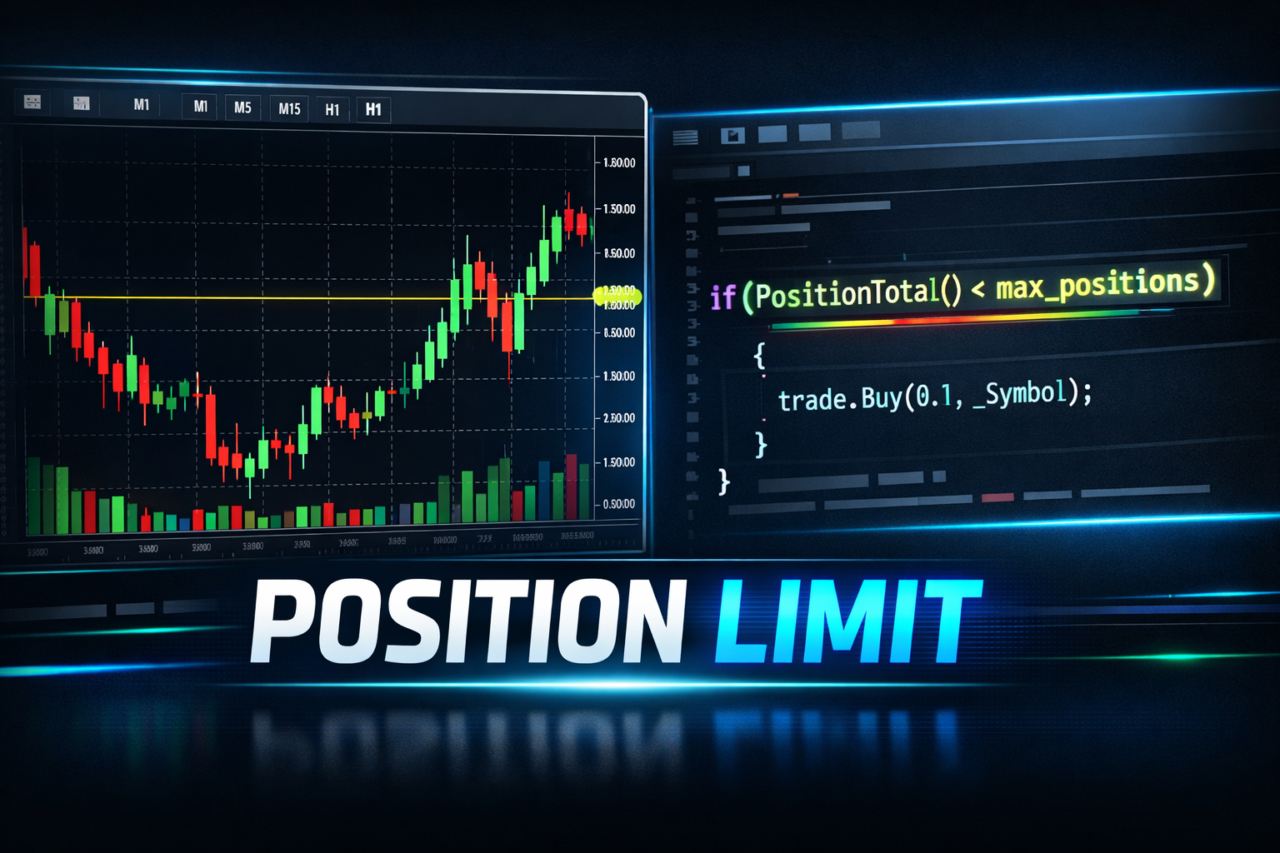
if(PositionTotal() < max_positions)
{
    // Entry logic
}
Meaning of this code:
PositionTotal()→ Gets the current total number of positionsmax_positions→ Upper limit value, such as 3- An order is sent only when the condition is true
2.2 Basic Template for Practical Use
In a real EA, combine the limit with the entry condition.
int max_positions = 3;

// Entry condition example
bool signal_buy = (Close[0] > Close[1]);

if(signal_buy)
{
    if(PositionTotal() < max_positions)
    {
        trade.Buy(0.1, _Symbol);
    }
}
Key points:
- Separate the signal from the limit control
- Maintainability is higher when the limit is not buried directly inside the order condition
2.3 How to Limit Positions by Symbol (Important)
In practical use, you often control positions by currency pair rather than across the whole account.
int CountSymbolPositions(string symbol)
{
    int count = 0;

    for(int i = 0; i < PositionsTotal(); i++)
    {
        if(PositionGetSymbol(i) == symbol)
        {
            count++;
        }
    }
    return count;
}
Usage example:
int max_positions = 2;

if(CountSymbolPositions(_Symbol) < max_positions)
{
    trade.Buy(0.1, _Symbol);
}
Benefits:
- Allows flexible control, such as limiting only EURUSD
- Supports portfolio operation
2.4 How to Control by Magic Number (Advanced)
Use this when you want to separate positions by EA.
int CountMagicPositions(int magic)
{
    int count = 0;

    for(int i = 0; i < PositionsTotal(); i++)
    {
        ulong ticket = PositionGetTicket(i);
        if(PositionSelectByTicket(ticket))
        {
            if(PositionGetInteger(POSITION_MAGIC) == magic)
            {
                count++;
            }
        }
    }
    return count;
}
Usage example:
int max_positions = 3;
int magic = 123456;

if(CountMagicPositions(magic) < max_positions)
{
    trade.Buy(0.1, _Symbol);
}
Key points:
- Prevents interference between multiple EAs
- Essential in live operation
2.5 Common Failures and Cautions
1. Judging Only with PositionTotal()
- Positions from other EAs are included
→ Separate them by magic number
2. Confusing Orders and Positions
- Orders before execution are not counted
→ Duplicate entries may occur when execution is delayed
Countermeasure:
- Add flag management or order status checks
3. Multiple Execution on OnTick
// Bad example
if(PositionTotal() < max_positions)
{
    trade.Buy(...); // May execute repeatedly in a short time
}
Countermeasures:
- Record the previous entry time
- Or add a position existence check
4. Ignoring Spread and Slippage
- The EA may enter even when spread widens
- Slippage may increase positions in an unexpected way
Countermeasure example:
if(SymbolInfoInteger(_Symbol, SYMBOL_SPREAD) < 20)
{
    // Entry
}
2.6 Why This Method Controls Entries
- MQL5 runs through event-driven processing, mainly OnTick
- There is no automatic position limit feature
- Therefore, a pre-entry check is the only defense
Conclusion:
- You must design the EA to always check before entry
2.7 Recommended Practical Structure (Summary)
In practice, combine these three elements:
- max-position-limit, meaning a position count limit
- Magic number control
- Symbol-level control
This helps achieve:
- Prevention of interference between EAs
- Avoidance of excessive risk
- Stable execution
3. How max-position-limit Works Internally (Why)
[Conclusion]
max-position-limit works by monitoring the position state on every tick and suppressing entries through conditional logic. MT5 does not provide automatic limits, so the mechanism only works when the EA manages the state itself.
[Definition]
The mechanism means the process flow of OnTick, state retrieval, condition checking, and order execution, where the EA references the number of positions to decide whether entry is allowed.
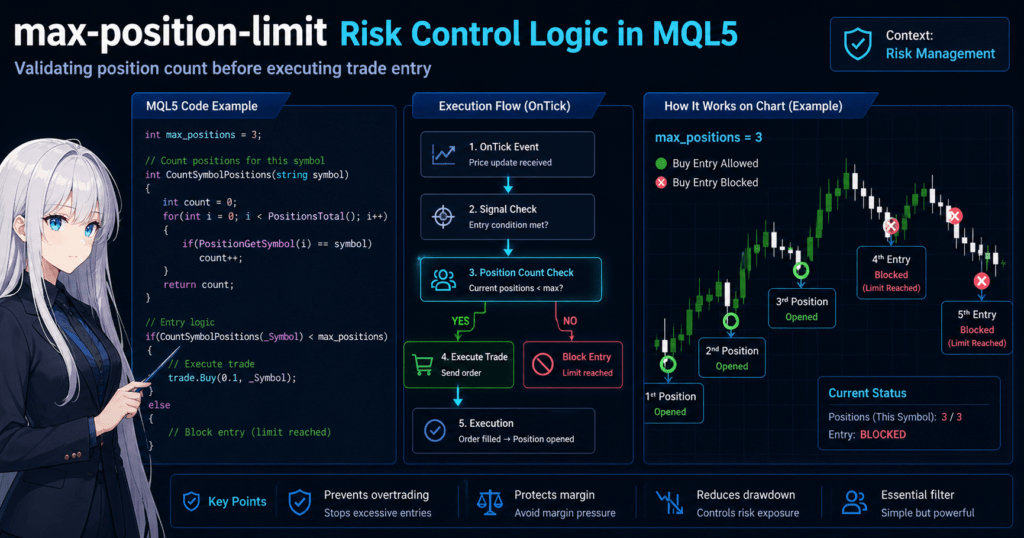
3.1 Execution Flow (OnTick-Based Control)
An MQL5 EA runs in the following flow.
- OnTick fires when the price updates
- Signal judgment, or entry condition check
- Position count check, or max-position-limit
- Order submission, such as trade.Buy / Sell
- Execution → the order becomes a position
Pseudocode:
void OnTick()
{
    if(signal is true)
    {
        if(current position count < limit)
        {
            execute order;
        }
    }
}
Important points:
- Control before entry, not after entry
- This judgment is repeated on every tick
3.2 Difference Between Positions and Orders (Most Important Point)
This is the point that confuses beginners the most.
- Order
→ An order request that may not yet be executed - Position
→ The held state after execution
max-position-limit refers to:
👉 Position, meaning executed trades
In other words:
- An order that has not been filled is not counted
- If execution is delayed, the control may not catch up
3.3 Why Duplicate Entries Occur
To understand max-position-limit, it is often faster to understand the failure pattern.
Causes:
- OnTick repeats at high speed
- Execution is delayed
- PositionTotal() has not increased yet
Result:
Tick1 → Condition true → Order
Tick2 → Condition true → Not filled yet → Order again
Tick3 → Same behavior
→ Multiple positions are created unintentionally
3.4 Practical Countermeasures (Strengthening Internal Logic)
Practical countermeasures for this issue:
1. Use an Ordering Flag
bool is_ordering = false;

if(!is_ordering && PositionTotal() < max_positions)
{
    is_ordering = true;
    trade.Buy(...);
}
→ Prevents duplicate order submission
2. Clear the Flag After Execution Is Confirmed
- Ideally, manage this with OnTradeTransaction
- Or clear it based on time
3. Check Existence with PositionSelect
if(!PositionSelect(_Symbol))
{
    // Allow new entry
}
→ Simple, but it may be too restrictive in some strategies
3.5 Difference Between Netting and Hedging Accounts
In MQL5, behavior changes depending on the account type.
Netting Account
- One symbol equals one position
- Position count control has less meaning
Hedging Account
- Multiple positions are allowed
- max-position-limit is effective
Conclusion:
- This article mainly applies to hedging accounts
3.6 Why There Is No Built-in Feature
The reason is MT5’s design philosophy.
- MT5 is a highly flexible trading environment
- Limits are assumed to be implemented by the user, or the EA
- This also makes it possible to handle broker-specific differences
In other words:
👉 max-position-limit is part of the EA design responsibility.
3.7 Structural Difference from Other Methods
Comparison points:
- Lot control → money-based
- DD control → loss-based
- max-position-limit → quantity-based
Characteristics:
- Simplest
- Fastest
- Most reliable in operation
However:
- It cannot finely control risk amount
3.8 Summary (Short Version)
- max-position-limit is implemented with state monitoring and conditional branching
- It uses positions, meaning executed trades, as the basis
- Execution delay is the largest risk
- Flag management is the practical way to reinforce it
4. max-position-limit vs Other Methods (Comparison)
[Conclusion]
max-position-limit is the simplest risk management method for controlling the number of positions. Its role differs from lot management, DD control, and filters. By itself it is not enough; it reaches practical safety only when combined with other methods.
[Definition]
Comparison means organizing risk control methods by what they control, such as quantity, money, or conditions, and clarifying their different use cases.
4.1 Overall View of Risk Management Methods
EA risk management can mainly be divided into these four categories.
| Method | Control Target | Main Purpose | Characteristic |
|---|---|---|---|
| max-position-limit | Number of positions | Prevents overtrading | Simplest |
| Lot management | Trade volume | Controls risk amount | Basic money management |
| DD control | Loss, or drawdown | Protects the account | Forced stop type |
| Filter | Conditions, such as spread / slippage | Improves execution quality | Environment control |
4.2 max-position-limit vs Lot Management
Core difference: quantity vs money
| Point | max-position-limit | Lot Management |
|---|---|---|
| Control target | Number of positions | Trade size per entry |
| Risk granularity | Rough | Detailed |
| Effect | Prevents runaway behavior | Optimizes losses |
| Beginner suitability | High | Medium |
Note:
- max-position-limit alone cannot prevent repeated large-lot entries
- Lot management alone cannot prevent repeated position creation
👉 Both are necessary
4.3 max-position-limit vs DD Control
Core difference: preventive control vs post-loss control
| Point | max-position-limit | DD Control |
|---|---|---|
| Timing | Before entry | After loss occurs |
| Purpose | Prevention | Damage control |
| Nature | Preventive | Emergency stop |
Note:
- DD control is the final line of defense
- max-position-limit is the first line of defense
👉 A two-layer defense using both is ideal
4.4 max-position-limit vs Filters (spread / slippage)
Core difference: quantity control vs environment control
| Point | max-position-limit | Filter |
|---|---|---|
| Target | Internal state, or positions | External environment, or market conditions |
| Example | Position count limit | Spread limit / slippage limit |
| Effect | Quantity control | Execution quality improvement |
Note:
- It cannot prevent wasteful entries when spread is wide
- It also cannot reduce losses caused by worse slippage
👉 Combined use is assumed
4.5 Best Practical Combination (Recommended Structure)
In practice, the following four-layer structure is the basic setup.
- max-position-limit, for quantity control
- Lot management, for risk amount control
- Filters, for environment control
- DD control, as the final defense
Concept:
Before entry
 ├ Quantity check (max-position-limit)
 ├ Lot calculation
 ├ Spread/slippage check
 ↓
Entry
 ↓
When losses expand → DD control
4.6 Common Design Mistakes
1. Being Satisfied with max-position-limit Alone
→ The account can fail because lots are too large
2. Relying Too Much on DD Control
→ It is already late because losses have already occurred
3. No Filter Implementation
→ Execution quality worsens, especially losses when spread widens
4. Implementing Each Method Separately Without Structure
→ Logic becomes complicated and bugs increase
4.7 Which Method Should Beginners Prioritize?
Priority order:
- max-position-limit, highest priority
- Lot management
- Filters
- DD control
Reason:
- max-position-limit is easy to implement and has immediate effect
- It becomes the foundation for other methods
4.8 Summary (Short Version)
- max-position-limit is quantity control
- Lot management is money control
- DD control is loss control
- Filters are environment control
- In practice, combining them is essential
5. Practical Use Cases for max-position-limit (Application / Use Case)
[Conclusion]
max-position-limit works best when the limit is designed according to the strategy’s characteristics. In practice, it should not be only a fixed value; it should work together with logic, market conditions, and money management.
[Definition]
Use cases mean designing and applying suitable position count limits according to the EA strategy type, such as trend-following, averaging down, grid, or scalping.
5.1 How to Use It in a Trend-Following EA
Characteristics:
- Signal frequency is low
- One to a few positions are usually enough
Recommended setting:
- max-position-limit: 1 to 3
Reasons:
- Holding multiple positions in the same direction concentrates risk
- Excessive entries provide little benefit
Implementation example:
int max_positions = 2;

if(CountSymbolPositions(_Symbol) < max_positions)
{
    trade.Buy(0.1, _Symbol);
}
5.2 How to Use It in Averaging Down or Grid EAs
Characteristics:
- The strategy assumes positions will be added
- Drawdown tolerance is important
Recommended setting:
- max-position-limit: 5 to 20, depending on the strategy
Reasons:
- Without a limit, failure probability rises sharply
- The limit determines the maximum loss scenario
Important:
👉 This limit equals the risk in the worst-case scenario
Design perspective:
- Lot × number of positions × price movement = maximum DD
5.3 How to Use It in a Scalping EA
Characteristics:
- High-frequency entries
- Depends heavily on execution quality, such as spread / slippage
Recommended setting:
- max-position-limit: 1 to 2
Reasons:
- Simultaneous positions are usually unnecessary
- Prevents duplicate orders caused by execution delay
Additional filter:
if(SymbolInfoInteger(_Symbol, SYMBOL_SPREAD) < 15)
{
    // Allow entry
}
5.4 How to Use It in a Multi-Currency EA
Characteristics:
- Operates multiple symbols at the same time
- Total risk is harder to see
Design patterns:
1. Limit by Symbol
CountSymbolPositions(_Symbol) < 2
2. Overall Limit
PositionTotal() < 10
3. Hybrid, Recommended
- Symbol-level limit plus total limit
Reasons:
- Prevents concentration in one currency pair
- Controls the whole portfolio
5.5 Common Practical Design Patterns
Pattern 1: Fixed Limit
- max_positions = 3
- Simple and beginner-friendly
Pattern 2: Variable Limit Linked to Account Balance
int max_positions = AccountBalance() / 100000;
Benefits:
- Expands as account capital increases
- Scalable
Pattern 3: Situation-Based Limit Linked to Volatility
- High volatility → tighten the limit
- Low volatility → relax the limit
Example:
if(ATR > threshold)
{
    max_positions = 2;
}
else
{
    max_positions = 5;
}
5.6 Common Practical Failures
1. No Basis for the Limit Value
→ Not verified in backtesting
2. Not Linked with Lot Size
→ Risk becomes excessive
3. Ignoring Market Conditions
→ Sudden volatility changes can break the strategy
4. Not Shared Across Multiple EAs
→ Total positions increase across the account
5.7 Practical Design Principles
Important points:
- Calculate max-position-limit backward from the desired result
- Decide the maximum DD first
- Always design it together with lot size
Formula concept:
Maximum loss ≈ lot × number of positions × price movement range
5.8 Summary (Short Version)
- The best value differs by strategy
- It is especially important for averaging down strategies
- A linked design is more practical than a fixed value
- max-position-limit is a core part of risk design
6. Common Failures and Cautions (Troubleshooting)
[Conclusion]
max-position-limit is easy to implement, but it can break during operation. The main causes are gaps between orders and positions, interference from multiple EAs, and repeated event execution.
[Definition]
Failures and cautions refer to typical patterns where position count control does not work as intended and causes excessive entries or missed entries, plus the countermeasures for those patterns.
6.1 Controlling Only with PositionTotal()
[Problem]
Positions from other EAs and manual trades are included.
if(PositionTotal() < max_positions)
{
    trade.Buy(...);
}
[Impact]
- Entries may stop unintentionally
- In some cases, the limit may not work as intended
[Countermeasure]
- Separate positions by magic number
if(CountMagicPositions(magic) < max_positions)
{
    trade.Buy(...);
}
6.2 Confusing Orders and Positions
[Problem]
Orders before execution are not counted, so duplicate entries can occur.
[Cause]
- Execution delay
- Before execution, the order is not reflected as a position
[Typical Pattern]
Tick1 → Send order
Tick2 → Not filled → Order again
[Countermeasures]
- Introduce an ordering flag
- Manage execution with OnTradeTransaction
6.3 Runaway Behavior from Repeated OnTick Execution
[Problem]
OnTick can run dozens of times per second, so orders may be sent repeatedly when the condition remains true.
[Bad Example]
if(PositionTotal() < max_positions)
{
    trade.Buy(...);
}
[Countermeasure]
- Control entry intervals with a time filter
datetime last_entry = 0;

if(TimeCurrent() - last_entry > 60)
{
    trade.Buy(...);
    last_entry = TimeCurrent();
}
6.4 Incorrect Behavior on Netting Accounts
[Problem]
- Only one position can be held per symbol
- max-position-limit has less meaning
[Symptoms]
- The number of positions does not increase
- The logic becomes meaningless
[Countermeasure]
- Check the account type
AccountInfoInteger(ACCOUNT_MARGIN_MODE)
6.5 Incorrect Control Because Symbols Are Not Separated
[Problem]
- Positions across all currency pairs are counted together
[Impact]
- EURUSD control affects USDJPY
- Unexpected entry stops occur
[Countermeasure]
- Count positions by symbol
CountSymbolPositions(_Symbol)
6.6 Ignoring Spread and Slippage
[Problem]
- Entries occur even when spread widens
- Orders are filled at unexpected prices when slippage worsens
[Impact]
- Unnecessary positions increase
- Performance declines
[Countermeasure]
if(SymbolInfoInteger(_Symbol, SYMBOL_SPREAD) < 20)
{
    // Allow entry
}
6.7 Overtrusting max-position-limit
[Problem]
- Assuming “this alone makes the EA safe”
[Reality]
- If lots are too large, the account can fail quickly
- Without DD control, the account may not withstand losses
[Countermeasure]
- Combine it with other methods
6.8 Difference Between Backtesting and Live Operation
[Problem]
- It works in backtesting but fails in live trading
[Causes]
- Execution delay
- Spread fluctuation
- Execution rejection
[Countermeasures]
- Forward test in a VPS environment
- Verify under real broker conditions
6.9 Practical Debugging Method
When troubleshooting, logging is the fastest method.
Print("Current Positions: ", PositionTotal());
Also:
Print("Symbol Count: ", CountSymbolPositions(_Symbol));
Key points:
- Visualize the state
- Track why the EA behaved that way
6.10 Summary (Short Version)
- The difference between Position and Order is the biggest pitfall
- Watch for repeated OnTick execution
- Magic number and symbol separation are essential
- The execution environment affects results
- max-position-limit alone is not enough
7. FAQ
[Conclusion]
max-position-limit is a simple mechanism for controlling the number of positions, but in live operation it can behave incorrectly if you do not understand account type, order state, and relationships with other EAs. The FAQ below summarizes the key points clearly.
[Definition]
An FAQ is a one-question, one-answer format that helps beginners quickly resolve common points of confusion.
7.1 Is max-position-limit a Built-in MT5 Feature?
No, it is not a built-in feature.
You need to implement it yourself in MQL5.
7.2 Is It Okay to Control It Only with PositionTotal()?
In most cases, it is not enough.
Because positions from other EAs and manual trades are included, separating positions by magic number is safer.
7.3 What Is the Difference Between an Order and a Position?
An order may still be unfilled, while a position is already executed.
max-position-limit controls based on positions.
7.4 Why Are Multiple Entries Created Even Though a Position Limit Is Set?
The cause is execution lag.
OnTick may continue before the position count increases, so the EA can send another order before the previous one becomes a position.
7.5 Is It Needed on a Netting Account?
In most cases, it is not necessary.
Because a netting account holds one position per symbol, position count control has less meaning.
7.6 Which Is More Important, Lot Management or max-position-limit?
Both are necessary, but their roles are different.
- max-position-limit → quantity control
- Lot management → money risk control
7.7 What Is the Recommended max-position-limit Value?
It depends on the strategy.
General guide:
- Scalping: 1 to 2
- Trend-following: 1 to 3
- Averaging down systems: 5 or more, with verification required
7.8 Should Spread and Slippage Also Be Considered?
Yes, they are essential.
If you ignore spread and slippage, unnecessary entries can increase.
7.9 Is max-position-limit Alone Enough for EA Risk Management?
No, it is not enough.
It must be combined with lot management, DD control, and filters.
7.10 What Should I Check After Implementation?
Be sure to check the following points.
- Whether the number of positions is controlled as intended
- Whether it interferes with other EAs
- Whether execution delay breaks the logic
7.11 Summary (Short Version)
- max-position-limit requires custom implementation
- It controls based on positions
- Execution delay is the biggest pitfall
- It should be used together with other risk management methods