

- 1 1. What Is MQL5 VPS?
- 2 2. How to Subscribe to and Initially Configure MQL5 VPS
- 3 3. Common MQL5 VPS Problems and Fixes
- 4 4. Optimization Strategy for MQL5 VPS Operation
- 5 5. When to Use MQL5 VPS and When Not to Use It
- 6 6. Full Workflow From MQL5 VPS Setup to Operation
- 7 7. Frequently Asked Questions About MQL5 VPS
- 7.1 7.1 Does Everything Sync Automatically After Moving to the VPS?
- 7.2 7.2 Will the EA Keep Running If I Close My PC?
- 7.3 7.3 Can I Operate Directly on the VPS?
- 7.4 7.4 Can I Run Multiple EAs at the Same Time?
- 7.5 7.5 Why Is Execution Slow or Slipping?
- 7.6 7.6 Can VPS Fees Pay for Themselves?
- 7.7 7.7 Can the VPS Stop?
- 7.8 7.8 Which Is Better, MQL5 VPS or a Regular VPS?
1. What Is MQL5 VPS?
[Conclusion]
MQL5 VPS is a cloud environment for keeping MetaTrader running at all times. It is essential infrastructure for operating an EA, or Expert Advisor, without interruption.
1.1 Basic Concept of MQL5 VPS
[Conclusion]
MQL5 VPS is a virtual server optimized specifically for MetaTrader (MT4/MT5). It lets you keep an EA running without leaving your local PC powered on all the time.
[Definition]
A VPS, or Virtual Private Server, is a virtual dedicated server on the internet. It is used as a 24/7 operating environment instead of a local PC.
MQL5 VPS has the following features in particular.
- It integrates directly with MetaTrader and can be migrated with one click.
- It can connect to the broker with low latency.
- It runs continuously, 24/7, so the EA does not stop.
- It can be used without managing a Windows desktop environment or GUI operations.
Compared with a regular VPS, such as a Windows VPS, the biggest advantage is that it requires far less setup work.
1.2 Why a VPS Is Necessary
[Conclusion]
An EA assumes continuous operation. If you run it from a PC-dependent environment, reproducibility, stability, and expected value can drop significantly. For that reason, a VPS is practically essential.
EA operation involves the following risks.
- PC power off -> EA stops
- Network disconnection -> orders are not executed or are delayed
- Windows Update -> forced restart
- Sleep mode -> OnTick stops
All of these lead directly to missed opportunities or unexpected losses.
The most important factor is execution quality.
- Higher latency -> worse slippage
- Longer distance from the server -> order rejection or price deviation
By using a VPS, processing is performed closer to the broker server, so you can expect:
- better execution speed,
- reduced impact during spread widening, and
- better reproducibility of EA logic.
The difference becomes especially clear in short-term trading strategies such as scalping.
1.3 Difference Between MQL5 VPS and a Regular VPS
[Conclusion]
MQL5 VPS is strong in simplicity, low cost, and fast deployment, while a regular VPS is strong in flexibility and extensibility.
The differences can be summarized as follows.
MQL5 VPS
- Contracting and setup can be done inside MT.
- It starts running after environment Migration.
- Management is very simple.
- Pricing is relatively inexpensive.
Regular VPS, such as a Windows VPS
- It can be operated freely through RDP.
- Software other than MT can also be installed.
- It supports flexible operation of multiple accounts and multiple MT instances.
- Initial setup is more difficult.
Use the following as a selection guideline.
- Single EA and single account -> MQL5 VPS is the best fit.
- Multiple EAs or an analysis environment included -> a regular VPS is more suitable.
1.4 Common Misunderstandings and Important Notes
[Conclusion]
MQL5 VPS is not completely automatic or risk-free. Losses can occur normally depending on configuration mistakes and system design.
Beginners often run into the following issues.
Common mistakes
- Migration was not executed -> the EA is not running.
- Auto trading is not enabled.
- Indicators are not synchronized -> iCustom does not work.
- Parameters were not saved -> the EA runs with unintended logic.
Important notes
- A VPS is an environment copy, not real-time synchronization.
- After changing settings, you must run Migration again.
- Checking logs, such as Journal and Experts, is required.
This matters because EAs can easily become a black box. In many cases, traders assume the EA is running when it has actually stopped.
For EAs that use CopyBuffer or iCustom, data synchronization mistakes can directly break the trading logic.
2. How to Subscribe to and Initially Configure MQL5 VPS
[Conclusion]
MQL5 VPS can be started in three steps: right-click the account, register a server, and run Migration. However, if the preparation settings are wrong, the EA will not work properly.
2.1 VPS Subscription Steps
[Conclusion]
By subscribing directly from inside MetaTrader, the best low-latency server is selected automatically.
The specific steps are as follows.
- Launch MetaTrader, either MT4 or MT5.
- Open the Navigator window.
- Right-click the target trading account.
- Select “Register a Virtual Server.”
- Select a plan, such as 1 month, 3 months, or 12 months.
- Pay using the MQL5.community account balance.
Important points:
- The VPS closest to the broker server is selected automatically.
- The latency, or ping value, is displayed, so always check it.
Low latency, for example 5 ms or less, is ideal.
This helps stabilize execution quality.
2.2 Correct Initial Setup Procedure
[Conclusion]
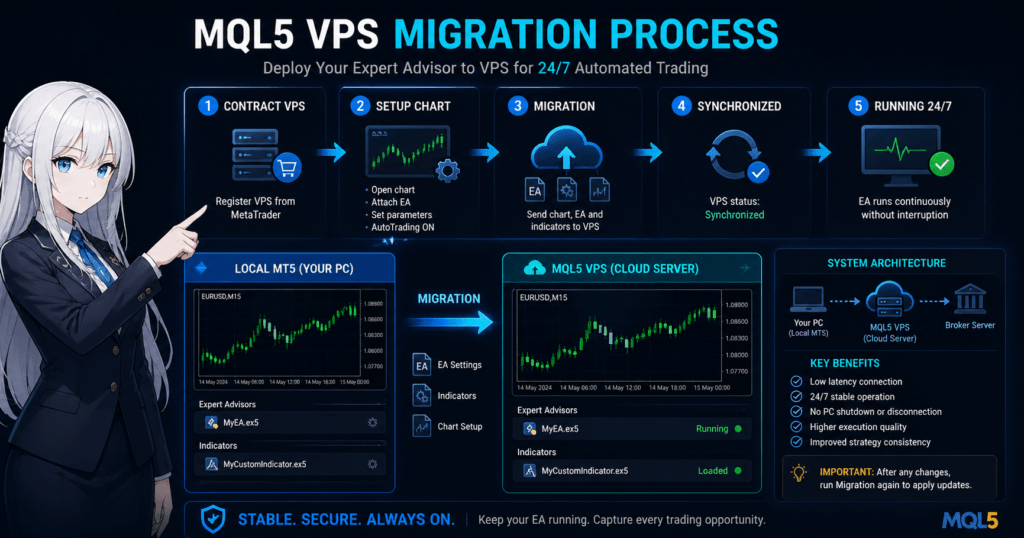
The most important step is to fully prepare the chart state with the EA attached before running Migration.
The procedure is as follows.
- Open the chart where the EA will be applied.
- Set the currency pair and timeframe, such as EURUSD M15.
- Drag and drop the EA onto the chart.
- Turn on AutoTrading.
- Configure parameters, such as lot size and logic settings.
- Place any required indicators, such as iCustom indicators.
After that:
- Open Navigator and right-click the VPS.
- Select “Migration” -> “Experts + indicators.”
This copies the current environment to the VPS.
2.3 How Migration Works and Why It Matters
[Conclusion]
Migration is a snapshot transfer of the environment. Setting changes are not reflected automatically.
Important specifications:
- chart configuration,
- EA settings,
- indicators, and
- signal settings.
These are copied to the VPS in one operation.
However, note the following:
- If you change settings locally after Migration, those changes are not reflected on the VPS.
- Unless you run Migration again, the VPS remains in the old state.
In other words, you must strictly follow:
“Change -> re-run Migration”
This is extremely important because most practical problems occur at this point.
2.4 How to Confirm Normal Operation
[Conclusion]
You cannot judge operation as normal unless you check both the VPS logs and the connection status.
Verification steps:
- Navigator -> right-click the VPS.
- Check the logs, such as Journal and Experts.
Checkpoints:
- The EA has initialized successfully, meaning OnInit succeeded.
- No errors are shown, such as invalid stops or trade context busy.
- Execution logs are shown, such as successful OrderSend entries.
Also:
- Confirm that the VPS status is synchronized.
The following states indicate a problem:
- The log is empty.
- There is no EA startup log.
- There is no order history at all.
In this case, the cause is almost certainly a Migration mistake.
2.5 Common Initial Setup Mistakes
[Conclusion]
Most cases where “the EA is set but not running” are caused by insufficient preparation before Migration.
Typical mistakes:
- Migrating while AutoTrading is OFF.
- Leaving parameters unconfigured.
- Not placing the required iCustom files.
- Using the wrong currency pair or timeframe.
- Missing settings such as DLL permission.
Especially important:
- The EA’s “Allow Algo Trading” checkbox.
- “Allow DLL imports,” when required.
If these are OFF, the EA will stop completely.
2.6 Best Practical Operation Flow
[Conclusion]
The most reproducible operating flow is local testing -> Migration -> VPS monitoring.
Recommended flow:
- Run a backtest and operation check in the local environment.
- Run a forward test on a demo account.
- Apply the EA to the live account.
- Run Migration to the VPS.
- Monitor logs, which is mandatory on the first day.
By following this order, you can eliminate the following risks in advance:
- unexpected behavior,
- execution problems, and
- logic breakdown.
3. Common MQL5 VPS Problems and Fixes
[Conclusion]
Most MQL5 VPS problems are caused by Migration mistakes, unsynchronized data, or invalid order conditions. You can identify the cause by checking the logs.
3.1 Causes and Fixes When the EA Does Not Run
[Conclusion]
About 80% of cases where an EA does not run are caused by settings, Migration, or permissions.
Checklist to review first:
- Is the VPS status synchronized?
- Is AutoTrading ON?
- Are the EA settings and parameters correct?
- Was Migration executed?
Specific troubleshooting steps:
- Right-click the VPS and check the Journal log.
- Confirm whether an “initialized” log exists.
- If an error appears, identify its content.
Common log examples:
Expert removed-> the EA is stopped.cannot load custom indicator-> iCustom is not placed.trade is disabled-> auto trading is OFF.
Important points:
- An EA does not run just because it was attached.
- It runs on the VPS only after Migration.
3.2 Causes of the invalid stops Error
[Conclusion]
invalid stops occurs when the distance between the order price and SL/TP does not meet the broker’s restrictions.
Main causes:
- StopLevel is not considered.
- Spread widening creates a calculation gap.
- Digits are handled incorrectly.
- Point calculation is wrong.
Typical mistake:
double sl = Ask - 10 * Point;
In this case:
- If StopLevel is 20 points -> error.
- If the spread changes -> condition violation.
Example countermeasure code:
double stopLevel = SymbolInfoInteger(_Symbol, SYMBOL_TRADE_STOPS_LEVEL) * _Point;

if((Ask - sl) < stopLevel)
{
    sl = Ask - stopLevel;
}
Notes:
- Always reference
SYMBOL_TRADE_STOPS_LEVEL. - Conditions differ by broker.
3.3 CopyBuffer and iCustom Problems
[Conclusion]
Indicator-related errors are caused by handle creation or data retrieval timing.
Common problems:
- CopyBuffer returns zero items.
- The value is always 0 or EMPTY_VALUE.
- It works in backtesting but not on the VPS.
Causes:
- The handle was not created in OnInit.
- There are not enough bars because data has not loaded.
- The indicator was not synchronized.
Countermeasures:
- Always create handles in OnInit.
- Check the number of data bars before CopyBuffer.
Example:
int bars = Bars(_Symbol, _Period);
if(bars < 100) return;
Important points:
- Historical data is often insufficient on a VPS.
- Be especially careful immediately after the first startup.
3.4 What to Do When Orders Do Not Execute or Are Slow
[Conclusion]
Execution problems usually come from three factors: latency, slippage, and order conditions.
Checkpoints:
- Distance, or ping, between the VPS and broker.
- Spread widening conditions.
- Slippage setting.
Common causes:
- The VPS location is far away.
- The spread widens sharply during economic releases.
- A requote occurs.
Countermeasures:
- Reselect a VPS with a low-latency server.
- Review the allowed slippage value.
- Stop trading during major economic release windows.
Example:
request.deviation = 20;
Notes:
- The impact is larger in scalping.
- Execution quality directly affects profitability.
3.5 When the VPS Stops or Becomes Unstable
[Conclusion]
MQL5 VPS itself is stable, so stoppages are often caused by settings, synchronization, or account status.
Items to check:
- Subscription expiration.
- Migration not updated.
- Login session disconnection.
How to check:
- VPS status, including expiration and running state.
- Connection history in the Journal log.
Common cases:
- Expired subscription -> complete stop.
- Login failure -> EA does not start.
- Broker server outage -> temporary stop.
Countermeasures:
- Enable automatic renewal.
- Check logs regularly.
- Check broker operating status.
3.6 Practical Rules for Avoiding Problems
[Conclusion]
Most problems can be avoided by strictly following three practices: log checks, re-running Migration, and pre-deployment testing.
Practical rules:
- Always re-run Migration after changes.
- Monitor logs on the first day for at least one hour.
- Test important logic on a demo account.
- Always identify the cause of an error instead of ignoring it.
Especially important:
- A VPS can easily become a black box.
- “It should be running” is the most dangerous assumption.
4. Optimization Strategy for MQL5 VPS Operation
[Conclusion]
MQL5 VPS results depend on three factors: latency optimization, load management, and logic suitability. The expected value can change significantly depending on settings.
4.1 How to Think About Latency Optimization
[Conclusion]
Minimizing VPS latency improves execution quality and helps reduce slippage.
Important metrics:
- ping value, measured in ms,
- execution speed, and
- slippage occurrence rate.
Ideal conditions:
- 5 ms or less -> high-speed environment suitable for scalping.
- Around 10 ms -> practical range.
- 20 ms or more -> room for improvement.
Optimization steps:
- Select the closest server when subscribing to the VPS.
- Compare ping values if multiple candidates are available.
- Re-evaluate regularly, such as when changing brokers.
Why this matters:
- A gap between price updates, or ticks, and order transmission cuts into profit.
- The shorter the strategy timeframe, the greater the impact.
Notes:
- The impact is limited for long-term position strategies.
- For scalping, the difference can be critical.
4.2 Relationship Between VPS Load and EA Design
[Conclusion]
High-load EAs can cause delays and malfunction, so lightweight design is a prerequisite for stable operation.
Causes of load:
- Heavy processing inside OnTick.
- Re-creating indicators on every tick.
- Unnecessary loop processing.
Typical bad example:
int handle = iMA(_Symbol, _Period, 14, 0, MODE_SMA, PRICE_CLOSE);
Running this on every OnTick creates high load.
Improved example:
int handle;

int OnInit()
{
    handle = iMA(_Symbol, _Period, 14, 0, MODE_SMA, PRICE_CLOSE);
    return(INIT_SUCCEEDED);
}
Important points:
- Create the handle only once in OnInit.
- Use CopyBuffer to retrieve data.
This provides:
- lower CPU load,
- better VPS stability, and
- faster testing.
4.3 Best Configuration for Running Multiple EAs
[Conclusion]
With MQL5 VPS, the basic rule is one account and one strategy. Running multiple EAs increases the risk of interference.
Risk factors:
- trade context conflicts from simultaneous orders,
- margin pressure, and
- interference between trading logic.
Recommended configuration:
- Separate accounts by EA.
- Diversify currency pairs.
- Define risk allocation clearly.
Alternatives:
- Use a regular VPS for multiple MT instances.
- Use copy trading for distributed management.
Decision criteria:
- Simple operation -> MQL5 VPS.
- Expanded operation -> regular VPS.
4.4 Notes on Parameter Optimization
[Conclusion]
Over-optimization, or overfitting, destroys reproducibility. Design should prioritize robustness.
Danger signs:
- Strong results only during a specific period.
- Extreme parameters, such as period = 3.
- Large gaps between testing and live operation.
Countermeasures:
- Run forward tests.
- Test across different periods.
- Confirm stable parameter ranges.
Metrics to prioritize:
- PF, or Profit Factor.
- DD, or maximum drawdown.
- Expected value rather than win rate alone.
Examples:
- PF > 1.3 -> practical benchmark.
- DD < 20% -> rough stable range.
Why this matters:
- A VPS guarantees stable operation, not profit.
- The quality of the trading logic is everything.
4.5 Log Monitoring and Operation Rules
[Conclusion]
If you neglect log monitoring, abnormal behavior is detected late, which can lead to larger losses.
Monitoring targets:
- Experts log,
- Journal log, and
- order history.
Checkpoints:
- whether errors exist,
- changes in execution frequency, and
- abnormal stoppages.
Recommended rules:
- Monitor closely on the first day for at least one hour.
- Perform a regular weekly check.
- Analyze the cause immediately when an error occurs.
In practice:
- Checking only after a problem occurs is too late.
- Detecting problems before they escalate is important.
4.6 Summary of the Best Practical Strategy
[Conclusion]
The best MQL5 VPS operation is a balanced design of low latency, low load, and high reproducibility.
Key points:
- A VPS is infrastructure; winning or losing depends on the logic.
- Execution improvement directly affects profit.
- Risk changes greatly depending on the operating design.
Short-term benefits:
- stable operation,
- better execution, and
- less manual management.
Long-term benefits:
- established reproducibility,
- higher reliability of system trading, and
- a foundation for scaled operation.
5. When to Use MQL5 VPS and When Not to Use It
[Conclusion]
MQL5 VPS is essential for operations that require continuous operation and low latency. Depending on the purpose, however, it may be unnecessary or a regular VPS may be more reasonable.
5.1 Cases Where You Should Use MQL5 VPS
[Conclusion]
For EA operation that prioritizes reproducibility, stability, and execution quality, MQL5 VPS is almost essential.
Applicable cases:
- Scalping or short-term trading where low latency matters.
- The EA must run 24 hours a day.
- You want to reduce manual management.
- You operate a single EA on a single account.
Specific benefits:
- Stable execution speed -> reduced slippage.
- Removal of PC dependency -> lower stop risk.
- More complete automated operation.
Especially important:
- Reproducibility is better maintained.
- The gap between backtesting and live operation becomes smaller.
The shorter the trading timeframe, the more the presence or absence of a VPS changes the expected value.
5.2 Cases Where MQL5 VPS Is Not Required
[Conclusion]
For low-frequency trading or the testing stage, a VPS is not mandatory.
Applicable cases:
- Swing trading over several days to several weeks.
- Mainly manual trading.
- Backtesting or development stage.
- Demo testing only.
Reasons:
- Execution speed has a smaller impact.
- The need for continuous operation is lower.
However, note the following:
- PC shutdown risk always remains.
- Even long-term strategies can be affected during events.
In other words:
“It may be unnecessary, but risk remains.”
That is the correct position.
5.3 Cases Where MQL5 VPS Is Not Suitable
[Conclusion]
When complex operation or extensibility is required, MQL5 VPS has many limitations and is not suitable.
Unsuitable cases:
- Running multiple EAs and multiple accounts at the same time.
- Using external tools such as Python or API integration.
- Advanced log analysis or data collection.
- Building custom infrastructure.
Limitations:
- No OS operation, meaning no RDP.
- No installation of software other than MT.
- No flexible configuration changes.
Alternatives:
- Windows VPS for higher flexibility.
- Linux VPS + MT, such as through Wine.
Decision criteria:
- Simple operation -> MQL5 VPS.
- Expanded operation -> regular VPS.
5.4 Relationship Between Cost and Expected Value
[Conclusion]
VPS cost is a fixed expense. If the expected value is positive, introducing it is reasonable.
Cost structure:
- Usually from a few dollars to the low tens of dollars per month.
- Annual contracts may include discounts.
Evaluation points:
- Profit improvement from introducing the VPS.
- Effect of reduced slippage.
- Avoidance of stop risk.
Simple judgment:
- If VPS introduction improves monthly performance by +1%, it can easily pay for itself.
- One stoppage without a VPS can cause a large loss.
In other words:
“Judge by opportunity loss, not by cost.”
That is the rational approach.
5.5 Risks and Important Notes
[Conclusion]
Introducing a VPS is not a universal solution. Weak operating design can directly lead to losses.
Main risks:
- Poor logic -> larger losses.
- Configuration mistakes -> EA stops.
- Overconfidence -> insufficient monitoring.
Important points:
- A VPS is a stable operation device, not a profit device.
- All operating responsibility remains with the user.
From a trust-cost perspective:
- This is especially important for customer-managed or public accounts.
- Stoppages and malfunctions directly damage trust.
5.6 Strategic Separation of Use Cases
[Conclusion]
Use MQL5 VPS as the best choice for standalone operation and a regular VPS as the foundation for expanded operation.
Strategy patterns:
Pattern A: simple
- 1 EA x 1 account
- MQL5 VPS
- Minimum management
Pattern B: mid-scale
- Multiple EAs x multiple accounts
- Regular VPS
- Distributed operation
Pattern C: advanced operation
- EA + external AI, such as Python
- Custom server
- Integrated data management
What matters is:
- matching the current scale, and
- planning for future expansion.
6. Full Workflow From MQL5 VPS Setup to Operation
[Conclusion]
MQL5 VPS operation maximizes reproducibility and safety when you follow the sequence of testing -> live application -> Migration -> monitoring.
6.1 Overview of the Full Workflow
[Conclusion]
The correct sequence is local testing -> demo testing -> live setup -> VPS migration -> monitoring. Breaking this order increases the likelihood of problems.
Overall flow:
- Test the EA in the local environment.
- Run a forward test on a demo account.
- Apply the EA to the live account.
- Run Migration to the VPS.
- Check logs and start operation.
Important points:
- The VPS is used at the final stage.
- Deploying without testing greatly increases loss risk.
6.2 Local Testing Phase
[Conclusion]
It is essential to test not only with backtesting but also under conditions close to live data.
What to do:
- Run backtests with Strategy Tester.
- Check modeling quality.
- Test across multiple periods by splitting historical data.
Check items:
- PF, or Profit Factor.
- Maximum drawdown, or DD.
- Trade frequency.
- Spread impact.
Notes:
- Do not over-optimize.
- Do not depend only on results from one specific period.
Additional note:
- Backtesting is hypothesis testing.
- It does not guarantee live results.
6.3 Demo Forward Testing
[Conclusion]
By checking behavior in a real execution environment, you can detect differences from backtesting.
Procedure:
- Open a demo account.
- Apply the EA.
- Run it for several days to several weeks.
Checkpoints:
- execution speed,
- slippage occurrence,
- whether errors appear, and
- whether it follows the intended logic.
Important:
- CopyBuffer and iCustom behavior must be checked here.
- Fix problems before deploying to the VPS.
6.4 Applying the EA to a Live Account
[Conclusion]
In a live environment, the basic rule is to start with risk reduced.
Procedure:
- Set the lot size to the minimum.
- Apply the EA.
- Check the initial behavior.
Check items:
- Are orders placed as expected?
- Are the settings reflected?
- Are there any abnormal trades?
Warning:
- Starting with full lot size on the first day is not acceptable.
- Stop immediately if behavior is unexpected.
6.5 Migration to the VPS and Final Check
[Conclusion]
Operation has not truly started unless you check the logs after Migration.
Procedure:
- Run Migration to the VPS, including EA and indicators.
- Check the VPS logs.
- Check synchronization status.
What to confirm:
- OnInit success log.
- No errors.
- Orders execute normally.
Important:
- If settings are changed after Migration, run Migration again.
- The VPS does not synchronize automatically.
6.6 Monitoring Flow After Operation Starts
[Conclusion]
Operation should not be left unattended. Low-frequency monitoring is the most reasonable approach.
Monitoring rules:
- First day: monitor for at least one hour.
- First week: check every day.
- After that: check once a week.
Items to check:
- Logs, such as Experts and Journal.
- Trade history.
- Whether errors exist.
Response to abnormalities:
- Stop the EA.
- Check the logs.
- Identify the cause -> fix it -> run Migration again.
6.7 Best Practical Operation Model
[Conclusion]
The most reproducible operation model is verified logic + low-latency environment + continuous monitoring.
Structure:
- Logic, or EA -> source of profit.
- VPS -> execution optimization.
- Monitoring -> risk management.
How to think about expected value:
- A VPS alone does not generate profit.
- Results are determined by logic x environment x operation.
Long-term view:
- Accumulated reproducibility is the greatest asset.
- Consistent operating rules reduce variation.
7. Frequently Asked Questions About MQL5 VPS
[Conclusion]
Most MQL5 VPS questions focus on synchronization behavior, limitations, and operation rules. Understanding these correctly helps avoid most problems.
7.1 Does Everything Sync Automatically After Moving to the VPS?
[Conclusion]
No. It does not sync automatically, and you must run Migration again after changing settings.
MQL5 VPS uses a snapshot copy method.
For that reason:
- EA setting changes,
- parameter changes, and
- indicator additions
are not reflected automatically.
Required response:
- Change -> re-run Migration -> check logs.
You must follow this process consistently.
7.2 Will the EA Keep Running If I Close My PC?
[Conclusion]
Yes. If the EA is running on the VPS, it will continue operating even if you close your PC.
Prerequisites:
- Migration has been completed.
- The VPS is synchronized.
In this state, the EA keeps running even if:
- the PC is powered off, or
- the network disconnects.
7.3 Can I Operate Directly on the VPS?
[Conclusion]
No. MQL5 VPS is designed without GUI operation or RDP access.
Limitations:
- No desktop operation.
- No direct file editing.
- No external tool usage.
How to operate it:
- Configure everything in the local MT.
- Reflect it through Migration.
7.4 Can I Run Multiple EAs at the Same Time?
[Conclusion]
Technically yes, but the recommended approach is one account and one strategy.
Reasons:
- trade context conflicts,
- margin interference, and
- logic conflicts.
Alternatives:
- Split accounts.
- Distribute across VPS instances.
- Use copy trading.
If stability is the priority, separation is the basic rule.
7.5 Why Is Execution Slow or Slipping?
[Conclusion]
The main causes are latency, spread, and market conditions. A VPS alone cannot solve them completely.
Factors:
- VPS distance, or latency.
- Spread widening.
- Lower liquidity during economic releases.
Countermeasures:
- Select a low-latency VPS.
- Adjust slippage settings.
- Control trading hours.
7.6 Can VPS Fees Pay for Themselves?
[Conclusion]
If the EA has positive expected value, the VPS cost can be recovered sufficiently.
How to think about it:
- VPS fee -> fixed cost.
- Execution improvement -> variable benefit.
Example:
- A monthly cost of several dollars to the low tens of dollars.
- Better slippage can increase profit.
Important:
- Judge by opportunity loss, not by cost alone.
7.7 Can the VPS Stop?
[Conclusion]
It normally runs stably, but it can stop because of subscription expiration or login problems.
Main causes:
- Subscription expiration.
- Migration not updated.
- Broker connection failure.
Countermeasures:
- Enable automatic renewal.
- Check logs regularly.
- Check connection status.
7.8 Which Is Better, MQL5 VPS or a Regular VPS?
[Conclusion]
MQL5 VPS is suitable for simple operation, while a regular VPS is suitable for expanded operation.
How to choose:
- Single EA -> MQL5 VPS.
- Multiple EAs or external integration -> regular VPS.
Important:
- Choose based on the use case.
- Do not force everything into one option.