- 1 1. What Is MT5 Log Analysis?
- 2 2. Types and Storage Locations of MT5 Logs
- 3 3. How to Analyze MT5 Logs
- 4 4. How to Read Logs and Understand Their Mechanism
- 5 5. Common Errors and Causes
- 6 6. Comparison with Other Methods
- 7 7. Common Mistakes and Cautions
- 8 8. Practical Use Cases
- 9 9. FAQ
- 9.1 9.1 Where Are MT5 Logs Located?
- 9.2 9.2 What Is the Difference Between Experts and Journal?
- 9.3 9.3 Is Log Analysis Required?
- 9.4 9.4 Why Does the EA Not Run Even Though No Error Appears?
- 9.5 9.5 Is Backtesting Alone Insufficient?
- 9.6 9.6 How Long Are Logs Stored?
- 9.7 9.7 Should I Use Print Logs?
- 9.8 9.8 Can Log Analysis Alone Solve Problems?
1. What Is MT5 Log Analysis?
[Conclusion] MT5 log analysis is the practice of reading the logs automatically generated by MetaTrader 5 and identifying problems by making EA behavior, errors, and order processing details visible.
[Conclusion] Because it can reveal “real environment issues” that do not appear in backtests, it is an essential process in EA development and operation.
1.1 Definition of MT5 Log Analysis
[Conclusion] MT5 log analysis means analyzing the log files output by MT5 to identify the causes of trade execution, spread, slippage, and errors.
[Definition]
A log is text data that records, in chronological order, the processes executed by MT5 or an EA (automated trading program).
MT5 mainly outputs the following logs:
- Experts log: EA behavior, Print output, and order processing
- Journal log: Overall MT5 behavior, connections, and server communication
By analyzing these logs, you can clarify the following:
- Why an order did not go through
- Why no entry was made
- Why an error occurred
- What the actual execution conditions were
The key point is that “logs are the facts themselves.”
They are not subjective impressions. They become the only data that proves what actually happened.
1.2 Information You Can Find in Logs
[Conclusion] By reading logs, you can track not only trading results but also the internal processing path.
Typical information you can check includes:
- Order processing
- OrderSend (order submission)
- OrderCheck (pre-check)
- execution (execution result)
- Market conditions
- spread
- slippage
- price (Bid / Ask)
- Error information
- invalid volume
- not enough money
- off quotes
- EA internal processing
- Print logs (debug output)
- Whether conditional branches were passed
For example, even when no entry is made, logs can identify causes such as:
- The spread was too wide
- The conditions were not met
- The order was rejected
This is fundamentally different from backtesting, where you only look at results.
1.3 Why Log Analysis Matters
[Conclusion] Without log analysis, it is almost impossible to identify the cause of EA bugs or unexpected behavior.
The reasons are as follows:
- Backtesting is an ideal environment
→ Real execution and slippage are not reproduced - Forward testing only shows results
→ You cannot tell why those results occurred - Logs record the “process”
→ You can trace the issue back to its cause
In other words, the roles are divided like this:
- Backtest: result
- Forward test: real-world result
- Log analysis: cause
In practical work, log analysis is especially necessary in these situations:
- The EA does not run
- The EA enters at a different time than expected
- Profit and loss differ from expectations
- A problem occurs only with a specific broker
If you judge without checking logs, you are likely to reach the wrong conclusion.
Common Mistakes at This Stage
- Assuming the EA is broken without checking logs
- Guessing the cause from the result alone
- Ignoring differences between demo and live environments
Log analysis is a method for removing guesswork.
You must always judge based on facts.
2. Types and Storage Locations of MT5 Logs
[Conclusion] MT5 has two main types of logs: “Experts” for EA behavior and “Journal” for overall behavior. It is important to switch which log you read depending on the cause of the problem.
[Conclusion] Beginners should check the Experts log first, then use the Journal log as needed.
2.1 Types of MT5 Logs
[Conclusion] MT5 logs are separated by purpose. Understanding each role greatly speeds up cause identification.
The two main logs are:
Experts Log (EA Log)
EA behavior history
Print logs (debug output)
Order processing (OrderSend / OrderCheck)
Logic branch status
→ Check this first when investigating EA issues
Journal Log (Overall Log)
Server connection status
Order results (execution)
Errors (trade error)
Market status (market closed / off quotes)
→ Use this to check communication, broker, and environment issues
2.2 Where Logs Are Stored
[Conclusion] Logs are stored in the MT5 “Data Folder,” and you can also check them directly as files.
How to Open Logs from the GUI (Fastest Route)
- Open MT5
- Go to “File” → “Open Data Folder”
- Move to the following folders
- MQL5/Logs → Experts log
- Logs → Journal log
File Structure
- Experts log
MQL5/Logs/YYYYMMDD.log - Journal log
Logs/YYYYMMDD.log
Notes
Logs are separated by date
Older logs may be deleted automatically
They are saved in text format (.log)
2.3 Difference Between Experts and Journal
[Conclusion] Experts is for looking inside the EA, while Journal is for looking at the external environment.
| Item | Experts Log | Journal Log |
|---|---|---|
| Target | EA internal processing | Overall MT5 |
| Main content | Print, logic, order submission | Execution results, communication, errors |
| Use | Debugging (development) | Environment check (operation) |
| Priority | High | Medium |
How to Use Them in Practice
- The EA does not run
→ Experts log - The order does not go through
→ Check Experts first, then Journal - Execution looks abnormal (slippage or execution issue)
→ Journal log
Common Mistakes
- Judging an EA problem by looking only at Journal
- Guessing the cause without checking the Experts log
- Checking the wrong date’s log
A very common case is thinking you are checking the log while actually looking at the wrong date.
Always check the log that matches the time of the event.
Why This Structure Exists
MT5 separates roles as follows:
- EA (logic)
- Terminal (execution environment)
- Server (broker)
Logs are separated according to these roles, so
you need to change which log you read depending on the cause.
3. How to Analyze MT5 Logs
[Conclusion] MT5 log analysis is done in three steps: identify the log at the relevant time → trace the surrounding entries → identify the cause.
[Conclusion] Do not judge from a single error line. The most important point is to always check the logs before and after it.
3.1 Basic Procedure (Fastest Route)
[Conclusion] First, check the log screen inside MT5 and identify the abnormal section.
Follow these steps:
- Open MT5
- Display the “Terminal” window (Ctrl+T)
- Select the “Experts” or “Journal” tab
- Find the log for the relevant time period
- Search by keyword with Ctrl+F (error / failed / invalid, etc.)
- Check the entries before and after the matching log
Example Search Keywords
- error
- failed
- invalid
- reject
- not enough money
Important Point
You cannot identify the cause from only “the line where the error appeared”
Always check the logs before and after it
3.2 How to Check Log Files
[Conclusion] For long-running logs or detailed analysis, it is more efficient to check the .log file directly.
Steps
- In MT5, go to “File” → “Open Data Folder”
- Move to:
- Experts log: MQL5/Logs
- Journal log: Logs
- Select the log file for the relevant date
- Open it in a text editor such as Notepad
- Search with Ctrl+F
Analysis Tips
Filter by time (timestamp)
Check whether the same error repeats
Read the log flow in chronological order
3.3 Efficient Analysis Techniques
[Conclusion] Log analysis becomes more accurate when you organize it by three points: time, conditions, and results.
Technique 1: Follow the Timeline
All logs are chronological.
Example:
10:00 Condition check
10:00 OrderSend
10:00 error
→ Identify the cause from this flow
Technique 2: Trace Back from the Error
Start the analysis from the error code.
Example:
- invalid volume → invalid lot size
- not enough money → insufficient margin
- off quotes → price cannot be obtained
→ The log immediately before the error usually points to the cause
Technique 3: Use Print Logs
Adding debug output to the EA greatly improves analysis efficiency.
Print("Spread=", SymbolInfoInteger(_Symbol, SYMBOL_SPREAD));
Print("Lot=", lot_size);
Print("Condition=", condition_flag);
This lets you confirm:
- Whether the conditions are met
- Whether variable values are correct
- Whether the logic path is being reached
3.4 Practical Analysis Flow
[Conclusion] In real work, the following order is the shortest path to the cause.
- Identify the symptom
- No entry is made
- An error appears
- Profit and loss are off
- Identify the relevant time
- Check the Experts log
- Logic
- OrderSend
- Check the Journal log
- execution
- Server response
- Identify the cause from the surrounding logs
Common Mistakes
- Judging from only the error line
- Not adding Print logs
- Ignoring the timeline
- Looking at a different day’s log
Not using Print logs is especially serious.
Because the internal state is invisible, cause identification becomes difficult.
Why This Procedure Is Needed
Logs are not just text. They are a continuous record of causal relationships involving:
- EA decisions
- Market conditions (spread / slippage)
- execution results
Therefore, you need to read logs as a flow, not as isolated lines.
4. How to Read Logs and Understand Their Mechanism
[Conclusion] MT5 logs are arranged in the order “time → process → result,” so it is important to read them as a flow rather than one line at a time.
[Conclusion] Once you understand the flow from order submission (OrderSend) to execution, your cause analysis becomes much more accurate.
4.1 Basic Log Structure
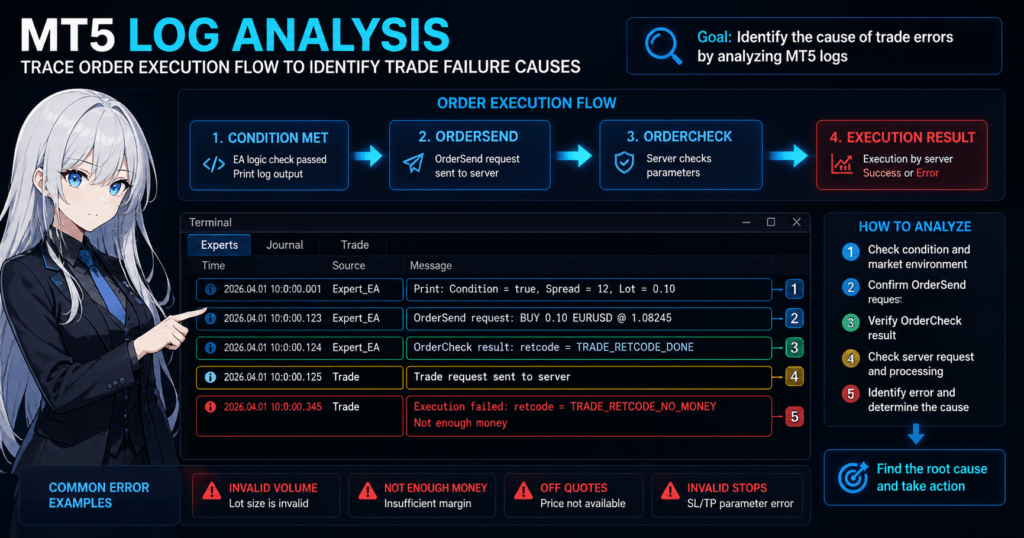
[Conclusion] A log consists of three elements: timestamp, source, and message.
Typical log format:
2026.04.01 10:00:00.123 Experts OrderSend request
Components
- Time (timestamp)
→ When it occurred, down to milliseconds - Module
→ Experts / Journal / Trade, etc. - Message
→ The actual processing content
Reading Points
- Group consecutive logs with the same timestamp
- Watch for time gaps or delays
- Confirm whether the entries belong to the same EA
4.2 Log Flow for Order Processing
[Conclusion] Orders are processed in the order “send → check → execute,” and logs are also output in that same order.
Typical Flow
Print: Condition met
OrderSend request
OrderCheck result
Trade request sent
Execution result
Meaning of Each Step
- Condition met
→ The EA logic passed - OrderSend
→ Order submission - OrderCheck
→ Server-side pre-check - Execution
→ Actual execution result
Analysis Points
No OrderSend → conditions were not met
Failed at OrderCheck → condition or parameter issue
Failed at Execution → server or market condition issue
4.3 How Errors Occur
[Conclusion] Errors occur in one of three layers: the EA, MT5, or the broker.
Error Patterns
- EA side (logic or parameters)
- invalid volume
- invalid stops
- MT5 side (environment or state)
- trade context busy
- no connection
- Server side (market or broker)
- off quotes
- market closed
Example: not enough money
OrderSend request
OrderCheck failed: not enough money
→ Cause: insufficient margin
→ Fix: adjust the lot size
Example: off quotes
Trade request sent
Off quotes
→ Cause: price cannot be obtained
→ Possible factors:
- Sudden spread widening
- Low liquidity
- Server delay
4.4 Reading Causal Relationships from Logs
[Conclusion] Log analysis is efficient when you trace backward from “result → immediately before → earlier context.”
Steps
- Identify the final result, such as an error or failure
- Check the immediately preceding log
- Confirm the conditions and environment
Concrete Example
10:00:00 OrderSend
10:00:00 OrderCheck
10:00:01 not enough money
→ Result: order failed
→ Immediately before: check was executed
→ Cause: insufficient margin
4.5 Common Misreadings
- Deciding the cause from the error alone
- Ignoring chronological order
- Confusing Experts and Journal
- Not checking Print logs
A particularly common mistake is reversing cause and effect.
Logs must always be read in chronological order.
Why This Mechanism Exists
MT5 processing has the following structure:
- EA (decision)
- Terminal (submission)
- Server (execution)
Because logs record this processing as it happens,
understanding the system flow makes the logs easier to read naturally.
5. Common Errors and Causes
[Conclusion] MT5 errors follow patterns, and most can be solved by identifying the cause from logs and applying the correct fix.
[Conclusion] Do not judge by the error name alone. Always check the surrounding logs and market conditions such as spread and execution.
5.1 Common Error List
[Conclusion] The following errors occur frequently and are the basic patterns you should learn first.
| Error name | Meaning | Main cause |
|---|---|---|
| invalid volume | Invalid lot size | Below minimum lot or step mismatch |
| not enough money | Insufficient margin | Lot size too large or leverage too low |
| off quotes | Price cannot be obtained | Low liquidity or sudden market movement |
| trade context busy | Trade processing is busy | Simultaneous orders or processing conflict |
| invalid stops | Invalid SL/TP | Minimum distance violation or invalid price |
5.2 Causes and Fixes by Error
[Conclusion] Errors are easier to solve when organized into three groups: parameters, environment, and market conditions.
invalid volume
Cause:
- The lot size does not match the minimum unit
- Broker restrictions are violated
Fix:
- Use
SymbolInfoDoubleto get the minimum lot - Normalize the lot size
double min_lot = SymbolInfoDouble(_Symbol, SYMBOL_VOLUME_MIN);
double lot_step = SymbolInfoDouble(_Symbol, SYMBOL_VOLUME_STEP);
lot = MathMax(min_lot, lot);
lot = NormalizeDouble(lot, 2);
not enough money
Cause:
- Insufficient margin
- Lot size is too large
Fix:
- Lower the lot size
- Check free margin
double margin = AccountInfoDouble(ACCOUNT_FREEMARGIN);
off quotes
Cause:
- Price updates have stopped
- Spread has widened suddenly
- Server delay
Fix:
- Implement retry processing
- Add a spread filter
trade context busy
Cause:
- Order processing overlaps
- Asynchronous processing conflicts
Fix:
- Add a wait between processes
Sleep(100);
invalid stops
Cause:
- SL/TP is too close
- Broker restrictions are violated
Fix:
- Get the minimum stop distance
double stop_level = SymbolInfoInteger(_Symbol, SYMBOL_TRADE_STOPS_LEVEL);
5.3 Steps to Identify the Cause from Logs
[Conclusion] Error identification follows this order: error line → previous log → condition check.
Steps
- Identify the error line
- Check the previous log
- Check the following:
- lot
- spread
- slippage
- execution conditions
- Check the EA’s conditional branches
Practical Example
OrderSend request
OrderCheck failed: invalid volume
Analysis:
- OrderSend was executed
- OrderCheck failed
- Cause: invalid lot size
5.4 How to Think About Error Analysis in Practice
[Conclusion] You should treat errors as something caused by a combination of environment, conditions, and logic, not as isolated events.
Important viewpoints:
- Has the spread widened?
- Have execution conditions changed?
- Are there differences between brokers?
Example:
- It works on demo but fails on live
→ execution / slippage may be affecting it
Common Mistakes
- Judging by the error name alone
- Not checking lot size and margin
- Ignoring broker specifications
- Drawing a conclusion from a single log
A common issue is overlooking environment factors.
Always check logs multiple times under multiple conditions.
Why Error Analysis Matters
Errors are not just failures. They are signals that show:
- Logic defects
- Insufficient risk management
- Lack of response to market conditions
Therefore, error analysis is the shortest path to improving an EA.
6. Comparison with Other Methods
[Conclusion] Log analysis is specialized for identifying causes, and its role is different from backtesting and forward testing.
[Conclusion] The best workflow combines “backtest → forward test → log analysis.”
6.1 Difference Between Log Analysis and Backtesting
[Conclusion] Backtesting deals with “results in an ideal environment,” while log analysis deals with “causes in a real environment.”
| Item | Log Analysis | Backtesting |
|---|---|---|
| Purpose | Cause identification | Strategy validation |
| Environment | Real environment (live/demo) | Virtual environment |
| spread | Measured value | Fixed or simplified |
| slippage | Reflected | Usually absent |
| execution | Actual execution | Simulation |
| Reproducibility | High, because it is record-based | Depends on conditions |
Note
Backtesting is fast and efficient, but it does not accurately reproduce:
- slippage
- execution rejection
- server delay
For this reason, backtesting alone cannot reveal live operation problems.
6.2 Difference Between Log Analysis and Forward Testing
[Conclusion] Forward testing verifies results, while log analysis analyzes why those results occurred.
| Item | Log Analysis | Forward Testing |
|---|---|---|
| Purpose | Cause analysis | Live operation validation |
| Output | Detailed logs | Profit/loss and history |
| Accuracy | Very high | Medium |
| Analysis target | Internal processing | External results |
| Problem detection power | High | Low when the cause is unknown |
Note
Forward testing does not directly show:
- Why an entry was not made
- Why a loss occurred
→ This is where log analysis becomes necessary.
6.3 How to Use Each Method in Practice
[Conclusion] These three methods are most effective when used together.
Recommended Flow
- Backtesting
→ Validate the strategy’s effectiveness - Forward testing
→ Check behavior in a real environment - Log analysis
→ Identify the cause of problems
Practical Example
Case: the number of entries is low
- Backtest
→ No problem - Forward test
→ Few entries - Log analysis
→ Entries are being blocked by the spread filter
→ Cause identified
6.4 Brief Comparison with Other Alternatives
[Conclusion] There is almost no substitute for log analysis because it is the only primary information source.
Alternatives
- Trade history
→ Results only - Chart analysis
→ Visual but ambiguous - Backtest report
→ Virtual data
→ None of these explains the cause
Common Misunderstandings
- If the backtest is good, there is no problem
- If the forward test is profitable, it is enough
- Logs are only for developers
All of these are insufficient.
In particular, the following can only be checked in a real environment:
- execution
- slippage
- spread
Why Log Analysis Is Necessary
A trading system is built from three elements:
- Logic (EA)
- Market conditions
- Broker specifications
Log analysis is the only method that can make all three visible at the same time.
7. Common Mistakes and Cautions
[Conclusion] The most common mistake in log analysis is judging from partial information, so you must analyze the timeline and surrounding context together.
[Conclusion] Beginners can greatly improve analysis accuracy simply by building a habit of checking logs and focusing on reproducibility.
7.1 Judging Without Checking Logs
[Conclusion] Guessing the cause without checking logs is the most inefficient and risky judgment.
Common cases:
- Assuming “the EA does not run = bug”
- Concluding “the order does not go through = broker problem”
In reality, the cause is often:
- Conditions were not met
- Spread restriction
- Lot setting mistake
Fix
Always check logs before judging
At minimum, check the Experts log
7.2 Ignoring the Timeline
[Conclusion] Logs are chronological data, and ignoring the order leads to a wrong cause.
Typical Mistake
10:00 error
10:00 OrderSend
→ In reality, the order is OrderSend → error
Fix
Always check timestamps
Read logs with the same timestamp as a group
7.3 Looking Only at the Error
[Conclusion] An error is the result, and the cause is usually in the preceding logs.
Bad Example
not enough money
→ This alone is not enough
Correct Reading
OrderSend request
OrderCheck
not enough money
→ You can tell the cause is lot size or margin
Fix
Check at least three lines before the error
Read the flow
7.4 Ignoring Differences Between Demo and Live Accounts
[Conclusion] Demo and live accounts have different execution conditions, so the same EA may produce different results.
Main differences:
- spread (live accounts often vary more)
- slippage (live accounts can experience it)
- execution speed
Common Misunderstanding
- It worked on demo, so it will be the same in production
→ Wrong
Fix
Always check logs from the live account
Design with execution conditions in mind
7.5 Not Using Print Logs
[Conclusion] Without Print logs, the EA’s internal state is invisible and cause identification becomes difficult.
Problems
- You cannot tell whether conditions are met
- You cannot confirm variable values
Recommended Code
Print("Spread=", SymbolInfoInteger(_Symbol, SYMBOL_SPREAD));
Print("Lot=", lot);
Print("Signal=", signal_flag);
Fix
Always output important variables
Add logs before and after conditional branches
7.6 Drawing a Conclusion from a Single Log
[Conclusion] Log analysis becomes more accurate when you compare multiple instances of behavior, not just one.
Bad Example
Determining the cause from one error
Correct Method
Compare multiple trades
Test at different times
Check with multiple brokers
7.7 Ignoring Broker Specifications
[Conclusion] Conditions differ by broker, so the same EA may produce different results.
Factors that affect behavior:
- Minimum lot
- Stop level
- execution method
- spread
Fix
Get specifications with SymbolInfo
Validate by broker
Why These Mistakes Happen
Log analysis handles the following at the same time:
- Logic
- Market conditions
- Execution environment
Simple judgment is not enough.
You need the habit of judging from records, not guesses.
8. Practical Use Cases
[Conclusion] MT5 log analysis is used across development, validation, and operation, and it is a core method for maintaining EA reproducibility and expected value.
[Conclusion] In practice, it should be used not only after problems occur but also for constant monitoring and regular checks to greatly reduce risk.
8.1 Use During EA Development
[Conclusion] During EA development, without log analysis, you cannot verify whether the logic is correct.
Main uses:
- Checking conditional branches
- Validating entry decisions
- Checking whether parameters are valid
Concrete Example
Case: no entry is made
Log:
Signal=false
Spread=25
→ Analysis:
- Signal was not triggered
- Excluded by the spread filter
Response
- Review the conditions
- Adjust the acceptable spread value
Basic Development Flow
- Implement Print logs
- Run a backtest
- Check the logs
- Compare conditions with execution results
Cautions
- Too many logs create noise
- Limit logs to necessary variables
8.2 Use During Forward Operation
[Conclusion] In forward operation, log analysis lets you detect abnormalities and identify causes immediately.
Main uses:
- Checking missed entries
- Detecting abnormal execution (slippage / execution)
- Understanding environment changes
Concrete Example
Case: the number of entries decreases
Log:
Spread=40
Condition=true
No trade
→ Analysis:
- The condition is met
- The spread is too wide
→ Conclusion: market environment changed
Operational Check Items
- Average spread
- execution success rate
- Error frequency
Practical Points
- Check logs daily
- Analyze immediately when abnormal behavior appears
- Check long-term trends as well
8.3 Commercial Decisions
[Conclusion] For commercial decisions, live account logs are the most reliable data.
Reasons:
- They reflect actual execution conditions
- They include slippage and delay
- They reflect broker differences
Example Decision Criteria
- Low error rate
- Stable execution success rate
- No major breakdown under spread conditions
Bad Decisions
- Judging only from backtesting
- Judging only from a demo account
8.4 Log Analysis as Risk Management
[Conclusion] Log analysis is not just debugging. It also works as a risk management tool.
Risks it can detect:
- Excessive lot size (money management error)
- Worsening execution (increased slippage)
- Market environment change (spread widening)
Practical Uses
- Detecting outliers
- Identifying drawdown causes
- Deciding when to stop a strategy
8.5 Why Log Analysis Affects Expected Value
[Conclusion] Log analysis stabilizes expected value because it helps remove elements with low reproducibility.
Trading results consist of:
- Logic
- execution
- Market conditions
Because log analysis can validate all three at the same time, it:
- Reduces uncertainty
- Improves reproducibility
As a result, it reduces variation in expected value.
Common Practical Mistakes
- Checking logs only after a problem occurs
- Not checking live account logs
- Testing under only one condition
→ This is not enough for risk management.
Practical Summary
- Check logs continuously
- Analyze problems immediately
- Use the real environment as the standard
9. FAQ
[Conclusion] Once you understand the location, types, and reading method for MT5 logs, even beginners can use log analysis at a practical level.
[Conclusion] Many questions are solved by knowing where to look and how to read the logs.
9.1 Where Are MT5 Logs Located?
[Conclusion] MT5 logs are stored in the Logs folders inside the Data Folder.
Steps:
- Open MT5
- Go to “File” → “Open Data Folder”
- Check the following:
- MQL5/Logs (Experts log)
- Logs (Journal log)
9.2 What Is the Difference Between Experts and Journal?
[Conclusion] Experts is the EA’s internal log, while Journal is the overall MT5 log.
- Experts
→ Logic, Print, OrderSend - Journal
→ execution, communication, errors
For EA issues, the basic rule is to check Experts first.
9.3 Is Log Analysis Required?
[Conclusion] Yes. It is required for EA development and operation.
Reasons:
- It is the only way to identify the cause
- It can detect problems that backtesting cannot show
- It is needed to confirm reproducibility
9.4 Why Does the EA Not Run Even Though No Error Appears?
[Conclusion] In many cases, the conditions were not met or the trade was excluded by a filter.
Check these points:
- spread restriction
- Time filter
- Signal condition
Using Print logs helps identify the cause.
9.5 Is Backtesting Alone Insufficient?
[Conclusion] Yes, it is insufficient. Real environment behavior is not reproduced.
Missing elements include:
- slippage
- execution
- Server delay
→ These must be supplemented with log analysis.
9.6 How Long Are Logs Stored?
[Conclusion] Logs are saved by date, but old logs may be deleted automatically.
Countermeasures:
- Save necessary logs manually
- Back them up regularly
9.7 Should I Use Print Logs?
[Conclusion] Yes. They are essential and greatly improve debugging efficiency.
Example:
Print("Spread=", SymbolInfoInteger(_Symbol, SYMBOL_SPREAD));
Print("Lot=", lot);
Print("Condition=", condition_flag);
→ You can make the internal state visible
9.8 Can Log Analysis Alone Solve Problems?
[Conclusion] In many cases it can, but you also need to check environment factors.
Additional factors:
- Broker specifications
- execution conditions
- Market conditions
Accuracy improves when you judge by combining these factors.