

- 1 1. What Is datetime in MQL5?
- 2 2. Basic datetime Operations: Getting, Displaying, and Converting Time
- 3 3. Difference Between Bar Time: iTime and CopyTime, and Current Time
- 4 4. Breaking Down datetime: Getting Year, Month, Day, and Time
- 5 5. datetime Calculations: Addition, Subtraction, and Differences
- 6 6. Practice: Time-Control Logic for Entry Limits and News Avoidance
- 6.1 6.1 Basic Design of Time Control
- 6.2 6.2 Time-Window Filter: The Most Basic Pattern
- 6.3 6.3 Day-of-Week Filter: Avoiding Weekends
- 6.4 6.4 Avoiding Rollover: Important
- 6.5 6.5 News Avoidance Logic: Simple Version
- 6.6 6.6 Combined Filter: Practical Template
- 6.7 6.7 Common Mistakes
- 6.8 6.8 Notes from a Practical Expected-Value Perspective
- 6.9 6.9 Stumbling Blocks
- 7 7. Optimization and Design Patterns for datetime Processing: Reproducibility and Speed
- 7.1 7.1 Why Optimization Is Needed
- 7.2 7.2 Basic Strategy: Process by Bar
- 7.3 7.3 Caching Strategy: Avoid Recalculation
- 7.4 7.4 Time-Zone Design: Fix the Reference
- 7.5 7.5 Functionizing Time Checks for Reuse
- 7.6 7.6 Design for Better Test Reproducibility
- 7.7 7.7 Common Mistakes
- 7.8 7.8 Summary of Notes
- 7.9 7.9 Stumbling Blocks
- 8 8. Summary and FAQ: Solving Common datetime Questions
- 8.1 8.1 Summary: The Core Points to Remember in Practice
- 8.2 8.2 Summary of Common Mistakes
- 8.3 8.3 FAQ
- 8.3.1 Q1. Should I use TimeCurrent or TimeLocal?
- 8.3.2 Q2. Should iTime shift be 0 or 1?
- 8.3.3 Q3. Can I use == when comparing datetime values?
- 8.3.4 Q4. How can I control logic by Japan time?
- 8.3.5 Q5. Why does time differ between backtesting and live trading?
- 8.3.6 Q6. Are more time filters always better?
- 8.3.7 Q7. Should I use CopyTime or iTime?
- 8.3.8 Q8. Are datetime calculations heavy?
1. What Is datetime in MQL5?
1.1 What datetime Really Is: An Integer in Seconds
In MQL5, datetime is a dedicated type for handling dates and times. Internally, however, it is an integer value of type long that represents the number of seconds elapsed since January 1, 1970, 00:00:00 UTC.
This format is generally called Unix Time.
In other words, datetime works like this:
- January 1, 2024 -> about 1704067200 seconds
- It can be treated as a number, so calculations are possible
Actual code example:
datetime now = TimeCurrent();
Print(now);  // Output as a number
As shown above, datetime is handled as a numeric value for calculation, not as a human-readable date and time.
1.2 Why Understanding datetime Matters
Understanding datetime is extremely important in EA (Expert Advisor) development. The reasons are:
- To control entry timing
- To control trading during specific sessions, such as London time
- To keep backtest behavior aligned with live trading behavior
- To analyze logs and debug problems
The key point is that time often becomes the trigger for trading logic.
For example:
- Run a process once every hour
- Enter trades only during a specific time window
- Prevent repeated entries with a cooldown
All of these require correct datetime handling.
What happens if you get it wrong?
- Entries occur at unintended times
- The EA behaves uncontrollably
- The backtest looks fine, but live trading fails
This is one of the most common critical bugs in live EA operation.
1.3 Common Stumbling Blocks
Beginners usually run into the same problems around datetime.
Common Misunderstanding 1: Treating datetime as a String
datetime is not a string.
// Bad example
string time = TimeCurrent();  // Type mismatch
-> Always handle it as the datetime type and convert it only when needed.
Common Misunderstanding 2: Ignoring Time Zones
MQL5 time is basically the broker’s server time.
- It is not Japan time
- It may not match GMT either
If you ignore this:
- The EA may not run on London time as intended
- News avoidance may fail
Common Misunderstanding 3: Confusing Current Time and Bar Time
This is the point where beginners most often get stuck.
TimeCurrent()-> current timeiTime()-> candlestick opening time
If you do not understand this difference:
- Signal timing shifts
- Signals may be judged incorrectly on an unclosed bar
Common Misunderstanding 4: Forgetting That datetime Uses Seconds
datetime is measured in seconds.
// 60 seconds = 1 minute
if(TimeCurrent() - last_time > 60)
{
   // Process
}
-> If you want to work in minutes or hours, you need to convert the value.
1.4 Practical Notes
- datetime is a lightweight and fast numeric type -> strong for calculation
- However, readability is low -> conversion is required for display
- The time reference can differ depending on the environment, especially the broker
For practical work, the basic approach is:
- Calculation -> datetime as a numeric value
- Display -> convert to a string
- Logic -> standardize on server time or GMT
2. Basic datetime Operations: Getting, Displaying, and Converting Time
2.1 Getting the Current Time: TimeCurrent and TimeLocal
In MQL5, the following two functions are mainly used to get the current time.
TimeCurrent(): server time, recommendedTimeLocal(): local time on the PC
datetime server_time = TimeCurrent();
datetime local_time  = TimeLocal();

Print("Server Time: ", server_time);
Print("Local Time: ", local_time);
How to Choose in Practice
- EA logic -> TimeCurrent is required
- Log display and debugging -> TimeLocal, depending on the situation
Reason:
- Trades are processed based on server time
- Local time depends on the PC environment and has low reproducibility
Notes
- A VPS and a local PC may have different time settings
- Backtests run based on server time
2.2 Converting datetime to a String: TimeToString
datetime is numeric as-is, so it must be converted to a human-readable format.
datetime now = TimeCurrent();

// Date and time, default
string str1 = TimeToString(now);

// Date only
string str2 = TimeToString(now, TIME_DATE);

// Time only
string str3 = TimeToString(now, TIME_SECONDS);

Print(str1);
Print(str2);
Print(str3);
Main Format Options
TIME_DATE-> YYYY.MM.DDTIME_SECONDS-> HH:MM:SSTIME_MINUTES-> HH:MM
Practical Point
- Required for log output
- It greatly improves debugging efficiency
2.3 Converting a String to datetime: StringToTime
Use this when generating a datetime value from external input or settings.
string time_str = "2024.01.01 12:00";
datetime dt = StringToTime(time_str);

Print(dt);
Format Rules
- The basic format is
"YYYY.MM.DD HH:MM" - Seconds can also be specified:
"YYYY.MM.DD HH:MM:SS"
Common Failure Points
"2024-01-01"-> NG, because the separator should be a period"01/01/2024"-> NG, because the format is different
2.4 Common Mistakes
Mistake 1: Mixing Server Time and Local Time
// Bad pattern
if(TimeLocal() - last_time > 60)
-> The logic becomes environment-dependent and reproducibility breaks.
Mistake 2: Format Mismatch
datetime dt = StringToTime("2024-01-01"); // May fail
-> Use the correct format.
Mistake 3: Differences Between Backtesting and Live Trading
- Backtesting -> fixed server time
- Live trading -> depends on the broker
-> Time-condition logic may shift.
Mistake 4: Comparing datetime Values Directly and Causing Malfunctions
if(TimeCurrent() == target_time)
-> This almost never becomes true because of second-level timing differences.
-> Correct approach:
if(TimeCurrent() >= target_time)
2.5 Recommended Practical Template
datetime now = TimeCurrent();

// For display
string now_str = TimeToString(now, TIME_SECONDS);
Print("Current Time: ", now_str);

// For comparison
if(now - last_time > 60)
{
   Print("1 minute has passed");
   last_time = now;
}
2.6 Summary of Notes
- Logic must be based on TimeCurrent
- Use TimeToString for display
- Use StringToTime for external input
- Compare by difference, and avoid ==
3. Difference Between Bar Time: iTime and CopyTime, and Current Time
3.1 What Is iTime? The Opening Time of a Candlestick
iTime() is a function that gets the opening time of a candlestick for a specified symbol, timeframe, and bar position.
datetime bar_time = iTime(_Symbol, PERIOD_M5, 0);
Print(TimeToString(bar_time, TIME_SECONDS));
Meaning of the Arguments
_Symbol-> currency pair, current chartPERIOD_M5-> timeframe, 5-minute chart0-> latest bar, currently forming
Important Understanding
iTime(..., 0)-> opening time of the unclosed bariTime(..., 1)-> the previous closed bar
3.2 Difference from TimeCurrent: The Most Important Point
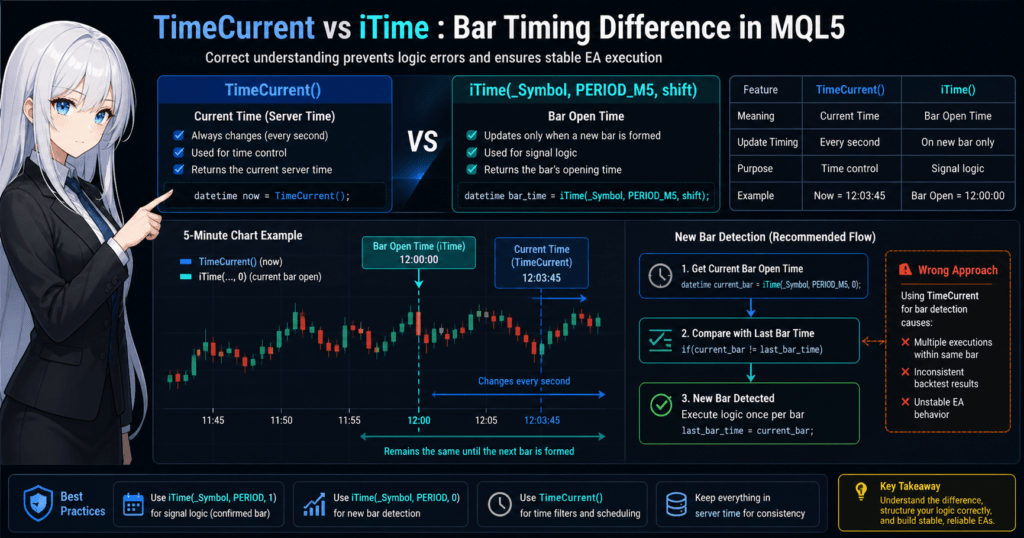
If you do not understand this difference, the EA will almost certainly contain bugs.
| Item | TimeCurrent() | iTime() |
|---|---|---|
| Meaning | Current time | Bar opening time |
| Update timing | Changes continuously | Only changes when the bar updates |
| Use case | Time control | Signal judgment |
Example
datetime now = TimeCurrent();
datetime bar = iTime(_Symbol, PERIOD_M5, 0);

Print("Now: ", TimeToString(now));
Print("Bar: ", TimeToString(bar));
-> now changes every second
-> bar changes only every five minutes
3.3 Common Critical Mistakes
Mistake 1: Judging Signals on an Unclosed Bar
// Bad example
datetime bar_time = iTime(_Symbol, PERIOD_M5, 0);
-> If you use an unclosed bar:
- Conditions can change
- False signals increase
- Results diverge from backtesting
Correct Approach
datetime bar_time = iTime(_Symbol, PERIOD_M5, 1);
-> Use the closed bar.
Mistake 2: Detecting Bars with TimeCurrent
// Bad example
if(TimeCurrent() - last_bar_time > 300)
-> This does not match bar updates.
Correct Approach
datetime current_bar = iTime(_Symbol, PERIOD_M5, 0);

if(current_bar != last_bar_time)
{
   Print("A new bar has formed");
   last_bar_time = current_bar;
}
3.4 When to Use CopyTime: Getting Multiple Bars
CopyTime() is a function that gets multiple bar times at once.
datetime times[];

int copied = CopyTime(_Symbol, PERIOD_M5, 0, 3, times);

if(copied > 0)
{
   for(int i=0; i<copied; i++)
   {
      Print(TimeToString(times[i]));
   }
}
Characteristics
- Multiple values can be obtained in an array
- Useful for indicators and analysis logic
- Faster than iTime when retrieving values in batches
3.5 Essential Practical Pattern
New Bar Detection Template
static datetime last_bar_time = 0;

datetime current_bar = iTime(_Symbol, PERIOD_M5, 0);

if(current_bar != last_bar_time)
{
   last_bar_time = current_bar;

   // Write the logic here, executed only once per bar
   Print("New Bar Detected");
}
Benefits
- Reduces unnecessary processing
- Improves reproducibility
- Makes behavior more likely to match backtests
3.6 Summary of Notes
- Use closed bars, shift=1, for signal judgment
- Use shift=0 comparison for new bar detection
- Do not use TimeCurrent for bar detection
- CopyTime is effective for processing multiple bars
3.7 Stumbling Blocks
- Confusing current time with bar time
- Building logic on an unclosed bar
- Detecting bar updates with TimeCurrent
-> These are typical patterns that break in live operation.
4. Breaking Down datetime: Getting Year, Month, Day, and Time
4.1 What Is TimeToStruct? The Basic Way to Decompose datetime
datetime is a numeric value in seconds, so you cannot directly judge what hour or day of the week it represents.
For that reason, use TimeToStruct() to break it into a structure called MqlDateTime.
datetime now = TimeCurrent();

MqlDateTime dt;
TimeToStruct(now, dt);

Print("Year: ", dt.year);
Print("Month: ", dt.mon);
Print("Day: ", dt.day);
Print("Hour: ", dt.hour);
Print("Minute: ", dt.min);
Print("Second: ", dt.sec);
Main Fields of MqlDateTime
year-> yearmon-> monthday-> dayhour-> hourmin-> minutesec-> secondday_of_week-> day of week, where 0 = Sunday
4.2 Practical Use: Time Filters
The most common use in EA development is filtering by time conditions.
Enter Only During a Specific Time Window
MqlDateTime dt;
TimeToStruct(TimeCurrent(), dt);

if(dt.hour >= 9 && dt.hour < 15)
{
   Print("Tokyo session");
}
Day-of-Week Filter
if(dt.day_of_week == 1) // Monday
{
   Print("Monday");
}
4.3 Common Mistakes
Mistake 1: Forcing a Judgment Without TimeToStruct
// Bad example
if(TimeCurrent() % 86400 < 3600)
-> Readability is poor, and this easily becomes a source of mistakes.
Mistake 2: Misunderstanding Day-of-Week Numbers
// Wrong understanding: thinking 1 = Sunday
Correct mapping:
- 0 = Sunday
- 1 = Monday
- 2 = Tuesday
- …
-> If you get this wrong, the logic shifts.
Mistake 3: Ignoring Server Time
// Intending 9:00 Japan time
if(dt.hour == 9)
-> If the server time is GMT+2, the timing will be wrong.
4.4 Important Practical Technique: Time-Zone Adjustment
If broker time and Japan time differ, adjustment is required.
Example: Convert GMT+2 to Japan Time, +9
datetime now = TimeCurrent();

// +7 hours, the difference from Japan time
datetime jst_time = now + 7 * 3600;

MqlDateTime dt;
TimeToStruct(jst_time, dt);

Print("JST Hour: ", dt.hour);
Points
- Because datetime uses seconds, use 3600 for hour conversion
- The difference varies by broker
4.5 Practical Template: Time Filter
MqlDateTime dt;
TimeToStruct(TimeCurrent(), dt);

// Weekdays and specified hours only
if(dt.day_of_week >= 1 && dt.day_of_week <= 5)
{
   if(dt.hour >= 9 && dt.hour < 17)
   {
      Print("Trade Allowed");
   }
}
4.6 Summary of Notes
- Always decompose datetime before using it for calendar logic, with TimeToStruct
- Remember that day of week uses 0 = Sunday
- Time is based on the server
- Apply your own time-zone adjustment when needed
4.7 Stumbling Blocks
- Not noticing time shifts
- Misunderstanding weekday numbers
- Forgetting to convert seconds to hours
- Judging logic by local time
-> These cause reproducibility to fail in live operation.
5. datetime Calculations: Addition, Subtraction, and Differences
5.1 datetime Can Be Calculated Because It Is an Integer in Seconds
Internally, datetime is an integer value in seconds, so you can add and subtract it like a normal number.
datetime now = TimeCurrent();

// 1 hour later
datetime after_1h = now + 3600;

// 5 minutes earlier
datetime before_5m = now - (5 * 60);

Print(TimeToString(after_1h));
Print(TimeToString(before_5m));
Basic Conversion
- 1 minute = 60 seconds
- 1 hour = 3600 seconds
- 1 day = 86400 seconds
5.2 Time Control Using Differences: The Most Important Pattern
The real value of datetime is controlling logic by time differences.
Process After a Fixed Time Has Passed
static datetime last_time = 0;

datetime now = TimeCurrent();

if(now - last_time > 60) // 60 seconds have passed
{
   Print("1 minute has passed");
   last_time = now;
}
Practical Benefits
- High reproducibility
- Simple and less likely to contain bugs
- Stable on a VPS and in live operation
5.3 Common Critical Mistakes
Mistake 1: Exact Equality Comparison
// Bad example
if(TimeCurrent() == target_time)
-> This almost never becomes true because timing shifts by seconds.
Correct Approach
if(TimeCurrent() >= target_time)
Mistake 2: Comparing Minutes or Hours Without Converting
// Bad example
if(now - last_time > 1) // Intended as 1 minute
-> This actually means 1 second.
Correct Approach
if(now - last_time > 60)
Mistake 3: Incrementing datetime Directly
// Bad example
now++;
-> It works, but the meaning is unclear because it advances by one second.
-> Readability is low, and it can cause bugs.
5.4 Typical Practical Patterns
Cooldown: Preventing Repeated Entries
static datetime last_trade_time = 0;

datetime now = TimeCurrent();

// Do not re-enter for 5 minutes
if(now - last_trade_time < 300)
{
   return;
}

// Entry process
last_trade_time = now;
Execute After a Specified Time
datetime start_time = TimeCurrent();
datetime execute_time = start_time + 600; // 10 minutes later

if(TimeCurrent() >= execute_time)
{
   Print("10 minutes have passed");
}
Detecting a Date Change
MqlDateTime dt1, dt2;

TimeToStruct(TimeCurrent(), dt1);
TimeToStruct(last_time, dt2);

if(dt1.day != dt2.day)
{
   Print("The date has changed");
}
5.5 Time Calculation Combined with CopyTime
When handling the time difference between multiple bars:
datetime times[];

CopyTime(_Symbol, PERIOD_M5, 0, 2, times);

// Time difference between bars, normally 300 seconds
int diff = (int)(times[0] - times[1]);

Print("Bar Interval: ", diff);
-> This can be applied to detect abnormal data.
5.6 Summary of Notes
- Handle datetime in seconds
- Use differences for comparisons
- Do not use exact equality
- Write explicit second conversions for readability
5.7 Stumbling Blocks
- Confusing seconds and minutes
- Using == comparisons
- Incomplete cooldown logic
- Behavior differences between a VPS and a local environment
-> All of these can directly lead to losses in live operation.
6. Practice: Time-Control Logic for Entry Limits and News Avoidance
6.1 Basic Design of Time Control
Time control is not just a conditional branch. It is core risk-control logic.
It is used not only to limit trading time, but also for the following purposes:
- Avoid low-volatility periods
- Avoid spread widening around rollover
- Avoid abnormal price movement around economic news releases
- Reduce excessive EA activity
In short, time control is a filter for stabilizing expected value.
6.2 Time-Window Filter: The Most Basic Pattern
Enter Only During a Specified Time Window
MqlDateTime dt;
TimeToStruct(TimeCurrent(), dt);

// Allow only from 9:00 to 17:00
if(dt.hour < 9 || dt.hour >= 17)
{
   return; // Entry prohibited
}
Practical Points
- Writing prohibition conditions is safer than writing permission conditions
- Place this logic at the very start of the process
6.3 Day-of-Week Filter: Avoiding Weekends
MqlDateTime dt;
TimeToStruct(TimeCurrent(), dt);

// Exclude Saturday and Sunday
if(dt.day_of_week == 0 || dt.day_of_week == 6)
{
   return;
}
Supplement
- 0 = Sunday
- 6 = Saturday
6.4 Avoiding Rollover: Important
The following time period is risky with many brokers:
- Spreads widen
- Execution becomes unstable
- Server load increases
Example: Avoid 23:50 to 00:10 in Server Time
MqlDateTime dt;
TimeToStruct(TimeCurrent(), dt);

if((dt.hour == 23 && dt.min >= 50) || (dt.hour == 0 && dt.min < 10))
{
   return;
}
6.5 News Avoidance Logic: Simple Version
A full implementation requires economic calendar integration, but a simple version can avoid news by time.
Example: Avoid Major News Around 21:30
MqlDateTime dt;
TimeToStruct(TimeCurrent(), dt);

// Avoid 21:25 to 21:40
if(dt.hour == 21 && dt.min >= 25 && dt.min <= 40)
{
   return;
}
Notes
- It depends on broker time
- It can shift because of daylight saving time, or DST
6.6 Combined Filter: Practical Template
MqlDateTime dt;
TimeToStruct(TimeCurrent(), dt);

// Exclude Saturday and Sunday
if(dt.day_of_week == 0 || dt.day_of_week == 6)
   return;

// Avoid rollover
if((dt.hour == 23 && dt.min >= 50) || (dt.hour == 0 && dt.min < 10))
   return;

// Time-window limit, 9:00 to 17:00
if(dt.hour < 9 || dt.hour >= 17)
   return;

// Entry allowed
Print("Trading Allowed");
6.7 Common Mistakes
Mistake 1: Wrong Priority in Time Conditions
// Conditions are ambiguous and may not work as intended
if(dt.hour >= 9 && dt.hour < 17 || dt.day_of_week == 1)
-> Make the parentheses explicit.
Mistake 2: Ignoring Server Time
- You think you wrote it based on JST, but the timing shifts
- Changing brokers breaks the logic
Mistake 3: Optimizing Only for the Backtest
- Optimizing only specific time windows leads to overfitting
- The strategy fails in live operation
6.8 Notes from a Practical Expected-Value Perspective
- Time control is more about reducing losses than increasing profits
- Too many filters increase missed opportunities
- Always verify with both backtesting and forward testing
6.9 Stumbling Blocks
- Time shifts, such as server time versus JST
- No support for DST
- Logical mistakes in conditional branches
- Excessive filtering
-> These can heavily distort the EA’s expected value.
7. Optimization and Design Patterns for datetime Processing: Reproducibility and Speed
7.1 Why Optimization Is Needed
datetime processing is lightweight, but unnecessary processing on every OnTick call can hurt both performance and reproducibility.
Problem cases include:
- Running TimeToStruct on every tick
- Running complex time checks on every tick
- Processing by tick when bar-level processing is enough
-> This causes wasted CPU usage and unstable logic.
7.2 Basic Strategy: Process by Bar
The most important design principle is to run logic by bar, not by tick.
Bad Pattern: Executed on Every Tick
MqlDateTime dt;
TimeToStruct(TimeCurrent(), dt);

// Executed on every tick
if(dt.hour >= 9)
{
   // Logic
}
Recommended Pattern: Bar-Level Processing
static datetime last_bar_time = 0;

datetime current_bar = iTime(_Symbol, PERIOD_M5, 0);

if(current_bar != last_bar_time)
{
   last_bar_time = current_bar;

   MqlDateTime dt;
   TimeToStruct(current_bar, dt);

   // Execute only once per bar
   if(dt.hour >= 9)
   {
      Print("New bar logic");
   }
}
Benefits
- Reduces calculation volume
- Matches backtesting more easily
- Stabilizes the logic
7.3 Caching Strategy: Avoid Recalculation
For datetime-related processing, reuse values when possible.
Bad Example
TimeToStruct(TimeCurrent(), dt1);
TimeToStruct(TimeCurrent(), dt2);
-> Executed twice unnecessarily.
Improvement
datetime now = TimeCurrent();

MqlDateTime dt;
TimeToStruct(now, dt);
7.4 Time-Zone Design: Fix the Reference
To prevent time-shift problems, standardize the reference time.
Recommended Pattern
#define JST_OFFSET 7 * 3600  // Example: server time to JST

datetime now = TimeCurrent();
datetime jst = now + JST_OFFSET;
Practical Points
- Standardize all logic on JST
- Or standardize all logic on GMT
- Do not mix time references
7.5 Functionizing Time Checks for Reuse
Time logic becomes more stable when it is placed in a function.
bool IsTradingTime(datetime t)
{
   MqlDateTime dt;
   TimeToStruct(t, dt);

   if(dt.day_of_week == 0 || dt.day_of_week == 6)
      return false;

   if(dt.hour < 9 || dt.hour >= 17)
      return false;

   return true;
}
Usage example:
if(!IsTradingTime(TimeCurrent()))
   return;
7.6 Design for Better Test Reproducibility
datetime easily becomes environment-dependent, so reproducibility must be designed intentionally.
Bad
- Using TimeLocal
- Depending on external time
- Using ambiguous time conditions
Good
- Standardizing on TimeCurrent
- Writing values explicitly in seconds
- Using bar-based logic
7.7 Common Mistakes
Mistake 1: Tick-Dependent Logic
-> Behavior changes depending on VPS performance and spreads.
Mistake 2: Duplicate Time Processing
-> Causes wasted calculation and more bugs.
Mistake 3: Mixed Time Zones
-> Backtesting and live trading do not match.
7.8 Summary of Notes
- The basic approach is bar-level processing
- Cache datetime values and reuse them
- Standardize the time zone
- Use functions for reuse
7.9 Stumbling Blocks
- Confusing ticks and bars
- Unnecessary recalculation
- Inconsistent time references
- Mismatch between testing and live operation
-> These greatly reduce EA reliability.
8. Summary and FAQ: Solving Common datetime Questions
8.1 Summary: The Core Points to Remember in Practice
MQL5 datetime is not just a date-and-time value. It is foundation logic that determines how an EA behaves.
The most important points are:
- datetime is an integer in seconds
- Logic must be based on TimeCurrent
- Use closed bars, iTime shift=1, for signal judgment
- Use differences for time control, and do not use ==
- Standardize the time zone, such as JST or GMT
- Process by bar, not by tick
Following these rules greatly improves reproducibility, stability, and expected-value consistency.
8.2 Summary of Common Mistakes
The mistakes that frequently occur in practice can mostly be grouped as follows:
- Ignoring server time
- Using unclosed bars
- Incorrect judgment with == comparisons
- Confusing seconds and minutes
- Creating environment dependency by using TimeLocal
- Using too many time filters
-> All of these directly lead to loss of reproducibility.
8.3 FAQ
Q1. Should I use TimeCurrent or TimeLocal?
A. Always use TimeCurrent for EA logic. TimeLocal should be limited to debugging use.
Q2. Should iTime shift be 0 or 1?
A.
- Signal judgment -> shift=1, the closed bar
- New bar detection -> shift=0
Q3. Can I use == when comparing datetime values?
A. In most cases, no. Because timing can shift at the second level, use >= or compare by difference.
Q4. How can I control logic by Japan time?
A. Add the difference from server time in seconds. The offset differs by broker, so confirm the value before using it.
Q5. Why does time differ between backtesting and live trading?
A.
- Broker server time differences
- DST, or daylight saving time
- Local-time dependency
are the main causes.
Q6. Are more time filters always better?
A. No. Too many filters increase missed opportunities and can cause overfitting.
Q7. Should I use CopyTime or iTime?
A.
- Single retrieval -> iTime
- Multiple retrieval -> CopyTime
Q8. Are datetime calculations heavy?
A. They are lightweight. However, avoid running conversions such as TimeToStruct on every tick, and keep them to the minimum necessary.