- 1 1. What MT5 VPS Optimization Means
- 2 2. Specific Steps for MT5 VPS Optimization
- 3 3. How MT5 VPS Optimization Works
- 3.1 3.1 How Execution Works and How Delay Affects It
- 3.2 3.2 Relationship Between Slippage and Spread
- 3.3 3.3 Relationship Between CPU/Memory Load and EA Operation
- 3.4 3.4 Impact of Disk I/O and Log Bloat
- 3.5 3.5 Structure of Network Distance and Latency
- 3.6 3.6 Impact of Optimization on Expected Value (PF and DD)
- 4 4. Comparing VPS Optimization With Other Methods
- 5 5. Common MT5 VPS Optimization Mistakes and Notes
- 5.1 5.1 Insufficient Optimization Due to Overconfidence in Specifications
- 5.2 5.2 Choosing the Wrong VPS Location
- 5.3 5.3 Leaving Unnecessary Software and Resident Processes Running
- 5.4 5.4 Downtime Risk From MT5 Setting Mistakes
- 5.5 5.5 Performance Degradation From Ignored Logs and History
- 5.6 5.6 Leaving Problems Unresolved Due to Insufficient Monitoring
- 5.7 5.7 Negative Effects From Over-Optimization
- 6 6. Practical Use Cases for MT5 VPS Optimization
- 6.1 6.1 Optimization Before Starting a Forward Test
- 6.2 6.2 Re-Optimization When Performance Deteriorates
- 6.3 6.3 Optimization Strategy for Running Multiple EAs
- 6.4 6.4 Optimization When Publishing Results on Myfxbook or Elsewhere
- 6.5 6.5 Criteria for VPS Migration
- 6.6 6.6 Long-Term Approach to Optimization
- 7 7. Frequently Asked Questions (FAQ)
- 7.1 7.1 Is a VPS required?
- 7.2 7.2 What Ping is ideal for a VPS?
- 7.3 7.3 Can I operate MT5 on a low-spec VPS?
- 7.4 7.4 Will using a VPS always increase profits?
- 7.5 7.5 Is it safe to delete MT5 logs?
- 7.6 7.6 Which VPS region should I choose?
- 7.7 7.7 Why does the EA stop when the VPS restarts?
- 7.8 7.8 How often should optimization be performed?
1. What MT5 VPS Optimization Means
[Conclusion]
MT5 VPS optimization means adjusting the server environment and settings to maximize execution stability, speed, and reproducibility. The performance of an EA (Expert Advisor) depends not only on its logic but also heavily on the execution environment.
1.1 Definition of MT5 VPS Optimization
[Definition]
MT5 VPS optimization is the process of adjusting the settings, performance, and network environment of the VPS (Virtual Private Server) running MetaTrader 5 to improve execution speed, slippage, and stable operation.
Key points:
- VPS = a trading-dedicated PC that runs continuously
- Goal of optimization = eliminating latency, downtime, and abnormal behavior
- EA performance is determined by logic x execution environment
1.2 Why VPS Optimization Is Necessary
[Conclusion]
If you do not optimize the VPS, the same EA may deliver worse performance.
The main reasons are:
- Latency (communication delay)
- If the VPS is far from the broker server, execution can be delayed.
- Insufficient CPU or memory
- EA calculations slow down, which delays signals.
- Impact during spread widening
- When combined with latency, orders may execute at unfavorable prices.
- Unstable environment
- MT5 may freeze or restart, causing missed trading opportunities.
Especially in short-term trading such as scalping,
- a difference of a few milliseconds
- a few pips of slippage
can accumulate and directly affect expected value.
1.3 Problems Caused by Not Optimizing
[Conclusion]
An unoptimized VPS creates invisible losses. It can also cause gaps between backtest results and forward test results.
Specific examples:
- Execution delay -> entry price shifts
- Delayed stop orders -> larger losses
- MT5 downtime -> continued no-position state
- Log bloat -> disk pressure -> slower operation
Common misconception:
- Assuming the EA logic is bad
-> In many cases, the VPS environment is the bottleneck.
1.4 Elements Targeted for Optimization
[Conclusion]
Optimization is performed across three areas: server performance, network, and MT5 settings.
Main targets:
- Server performance
- CPU (processing speed)
- Memory (RAM)
- Storage (SSD recommended)
- Network
- Latency (Ping)
- Distance to the broker
- Connection stability
- Internal MT5 settings
- Number of charts and indicator load
- Log management
- Automated trading settings (AutoTrading)
Additional note:
- Simply choosing a fast VPS is not enough.
- The benefit appears only when settings and operations are optimized as well.
1.5 Practical Use Cases
[Conclusion]
VPS optimization is essential before live operation and when performance deteriorates.
Main timing:
- When starting EA forward testing
- Before publishing results on services such as Myfxbook
- When drawdown (DD) is larger than expected
- When execution quality appears to worsen
Practical decision points:
- Execution delay has increased -> check the network
- CPU usage is high -> review VPS specifications
- MT5 feels heavy -> reduce charts and logs
Important:
- VPS optimization is not a one-time task.
- It must be adjusted again as market conditions and broker environments change.
2. Specific Steps for MT5 VPS Optimization
[Conclusion]
MT5 VPS optimization works most reproducibly when performed in this order: 1. server selection -> 2. initial setup -> 3. MT5 lightweight configuration -> 4. network optimization.
2.1 Selecting a VPS and Checking Basic Specifications
[Conclusion]
The first priority is to eliminate insufficient specifications. In a low-spec environment, later optimization steps become ineffective.
Recommended specifications (guideline):
- CPU: 2 cores or more (high clock speed recommended)
- Memory: 4GB or more (8GB for multiple EAs)
- Storage: SSD required
- OS: Windows Server (2016 or later)
Check procedure:
- After signing up for the VPS, check resources in Task Manager.
- If CPU usage is constantly 80% or higher, consider upgrading.
- If memory usage is 70% or higher, consider adding memory.
Notes:
- Cheap VPS plans may have excessive CPU sharing.
- Processing delays are more likely during peak hours.
2.2 Stopping Unnecessary Services and Apps
[Conclusion]
By making the VPS dedicated to trading, you can reduce processing delays and unstable factors.
Steps:
- Control automatic Windows Update execution.
- Disable unnecessary startup items.
- Stop background apps.
Operation example:
Ctrl + Shift + Esc -> Startup -> Disable unnecessary items
Examples of items to stop:
- OneDrive
- Unnecessary resident software
- Automatic update services
Reason:
- Background processes consume CPU and memory.
- This prevents processing conflicts during trading.
Common mistake:
- Installing too much security software
-> Scans can cause delays.
2.3 Lightweight MT5 Settings
[Conclusion]
MT5 has many unnecessary loads in its default state, and optimization can improve it significantly.
Steps:
1. Reduce the number of charts
- Close currency pairs that are not being used.
2. Reduce indicators
- Remove unnecessary indicators.
3. Limit historical data
Tools -> Options -> Charts
- Limit max bars (example: 5000-10000)
4. Manage logs
- Delete logs regularly.
Log deletion paths:
MQL5/Logs
Logs
Reason:
- Charts and indicators are major causes of CPU load.
- Log bloat puts pressure on disk I/O.
Additional note:
- An EA has an advantage when its OnTick processing is lightweight.
- Remove unnecessary drawing.
2.4 Network (Latency) Optimization
[Conclusion]
You can improve execution and slippage by minimizing the distance to the broker.
Steps:
1. Measure Ping
Command Prompt:
ping server_name
2. Choose the VPS location
- Select the same region as the broker.
- Example: London-based broker -> London VPS
3. Check the connection server
- Check Ping from the MT5 connection status.
Guidelines:
- 1ms-5ms: ideal
- 10ms or less: practical
- 20ms or more: room for improvement
Notes:
- Low Ping is not useful if the connection is unstable.
- VPS quality, including bandwidth and congestion, also matters.
2.5 Stabilizing Automated Trading Settings and the Execution Environment
[Conclusion]
MT5 setting mistakes can create critical missed opportunities before optimization even matters.
Check procedure:
- Turn AutoTrading ON.
- Check Allow automated trading for the EA.
- Allow DLL use only when necessary.
Setting example:
Tools -> Options -> Expert Advisors
- Allow automated trading
- Allow DLL imports (if needed)
Also:
- Configure MT5 to start automatically after the VPS restarts.
- Using Task Scheduler is also effective.
Common mistakes:
- The EA stops after a VPS restart.
- AutoTrading is left OFF.
2.6 Operation Check and Monitoring
[Conclusion]
After optimization, it is meaningless unless you verify the results with numbers.
Items to check:
- CPU usage (50% or lower is ideal)
- Memory usage (with sufficient headroom)
- Ping value
- Execution logs (check slippage)
Practical tools:
- MT5 Journal log
- Forward monitoring with Myfxbook
Important:
- Responding only after a problem occurs is too late.
- Detect abnormalities early through regular monitoring.
3. How MT5 VPS Optimization Works
[Conclusion]
VPS optimization is effective because of two main factors: the order processing timeline and system load. Even when the EA logic is the same, results change depending on processing speed and connection quality.
3.1 How Execution Works and How Delay Affects It
[Conclusion]
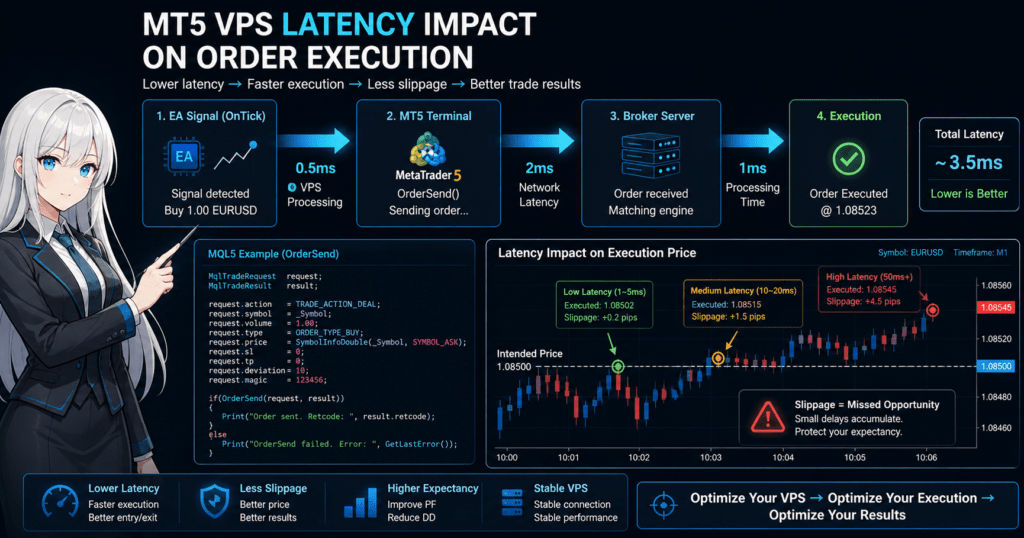
Orders are processed through the route EA -> MT5 -> broker server, and delays at each stage affect the final price.
Processing flow:
- The EA detects a signal (OnTick).
- MT5 sends the order.
- The broker server accepts and executes the order.
Delay factors at this point:
- Processing delay inside the VPS (insufficient CPU)
- Network delay (Ping)
- Broker-side processing
As a result:
- The entry price shifts.
- Limit and stop orders slip (slippage).
Key point:
- Delay accumulates.
- Even a few milliseconds can be critical in scalping.
3.2 Relationship Between Slippage and Spread
[Conclusion]
Slippage occurs from delay x market movement, and it worsens when spreads widen.
Basic structure:
- The market price is always moving.
- If the price changes during order processing, the execution price shifts.
Influencing factors:
- High volatility, such as during major economic releases
- Communication delay
- Order volume and liquidity
Example:
- 1ms delay -> small impact
- 50ms delay -> possible shift of several pips
Additional note:
- The impact increases during times when spreads are wide.
- VPS optimization can reduce the delay component.
3.3 Relationship Between CPU/Memory Load and EA Operation
[Conclusion]
When CPU or memory is insufficient, the EA’s decision-making itself is delayed.
Typical examples:
- OnTick processing is delayed.
- Indicator calculations are heavy.
- Multiple EAs compete for resources.
Result:
- Entries occur later than the original signal.
- Exit conditions are delayed -> losses increase.
Common structure:
- Unnecessary indicators
- Heavy calculations on every tick
- Inefficient array processing
Important:
- Not only VPS optimization but also EA design affects performance.
3.4 Impact of Disk I/O and Log Bloat
[Conclusion]
Bloated logs and historical data can become a hidden bottleneck.
Problems that occur:
- Delayed disk access
- Longer MT5 startup time
- Higher freeze risk
Causes:
- Bloated Logs folder
- Accumulation of unnecessary historical data
Additional note:
- Even SSDs have limits.
- Regular deletion is necessary.
3.5 Structure of Network Distance and Latency
[Conclusion]
The shorter the physical distance, the lower the Ping, which improves execution speed.
Structure:
- VPS -> internet -> broker server
- The longer the distance, the more communication time increases.
Examples:
- Tokyo -> London: about 250ms
- London -> London: a few ms
Practical decision:
- As a rule, choose a VPS in the same region as the broker.
- Low Ping does not automatically mean high quality, but it is an important metric.
Notes:
- The connection quality of the VPS provider also matters.
- Latency may increase during congested hours.
3.6 Impact of Optimization on Expected Value (PF and DD)
[Conclusion]
VPS optimization helps maintain expected value and prevent deterioration, rather than directly improving win rate.
Affected areas:
- Profit Factor (PF)
- Maximum drawdown (DD)
- Execution accuracy
Structural understanding:
- Accumulated small slippage
-> reduced profit plus increased losses
-> lower PF
Concrete example:
- 0.2 pips worse per trade
- 100 trades per month
-> 20 pips of loss difference
Important:
- Optimization is less about increasing profits
-> and more about reducing unnecessary losses.
4. Comparing VPS Optimization With Other Methods
[Conclusion]
For MT5 operation, VPS optimization offers the best reproducibility and stability. Local PCs and other cloud methods can be alternatives, but their risk and operating cost structures are different.
4.1 Differences Between VPS and Local PC Operation
[Conclusion]
A local PC costs less but is unstable. A VPS costs money but provides higher stability.
Comparison structure:
| Item | VPS | Local PC |
|---|---|---|
| Uptime | Stable 24-hour operation | Depends on power and sleep settings |
| Connection stability | High | Depends on home internet |
| Latency | Low, selectable by location | Geographically limited |
| Failure risk | Low | Risk of power outage or restart |
| Management load | Low to medium | Medium to high |
Additional note:
- A local PC can be useful for testing.
- For live operation, the risk is high.
Common mistakes:
- The EA stops because the PC enters sleep mode.
- Windows Update forces a restart.
4.2 Differences Between VPS and Cloud Services (AWS/GCP)
[Conclusion]
AWS and GCP are powerful, but for MT5 they can easily become more complex than necessary.
Comparison structure:
| Item | VPS (general) | AWS / GCP |
|---|---|---|
| Initial setup | Easy | Complex |
| Cost | Fixed and inexpensive | Variable with usage-based billing |
| Operational difficulty | Low | High |
| Flexibility | Low to medium | Very high |
| Suitability for MT5 | High | Requires adjustment |
Practical decision:
- Beginners to intermediate users -> VPS recommended
- Large-scale operation -> cloud services are also an option
Note:
- Cloud services carry a risk of high bills if configured incorrectly.
4.3 Comparison Points for Choosing a VPS Provider
[Conclusion]
Network quality and stability matter more than raw specifications.
Comparison criteria:
| Item | Importance | Details |
|---|---|---|
| Ping | High | Delay to the broker |
| CPU quality | High | Sharing ratio and stability |
| Connection quality | High | Congestion and bandwidth |
| Price | Medium | Cost performance judgment |
| Support | Low to medium | Response during trouble |
Practical points:
- Avoid the cheapest option.
- Choose a provider with a track record for trading use.
4.4 Difference Between VPS Optimization and EA Logic Improvement
[Conclusion]
VPS optimization improves the environment, while EA logic improvement improves the strategy. Their roles are different.
Comparison structure:
| Item | VPS Optimization | EA Logic Improvement |
|---|---|---|
| Purpose | Improve execution accuracy | Improve expected value |
| Effect | Stability and reproducibility | Profitability |
| Immediate impact | High | Medium to low |
| Risk | Low | High due to over-optimization |
Important concept:
- VPS optimization = prerequisite
- EA logic = profit engine
Common misconception:
- Logic alone can win
-> In reality, many strategies break down because of the environment.
4.5 Cases Where VPS Optimization Is Not Needed
[Conclusion]
VPS optimization is not mandatory in every case, but it is almost essential for live operation.
Cases where it is unnecessary or lower priority:
- Long-term trading (swing trading)
- Low-frequency trading
- Early-stage demo testing
However:
- If you plan to go live later, early adoption is reasonable.
Decision criteria:
- Whether the strategy depends on execution speed
- Whether reproducibility is important
5. Common MT5 VPS Optimization Mistakes and Notes
[Conclusion]
MT5 VPS optimization can backfire if done incorrectly. The most common issues are excessive configuration, misdirected improvements, and lack of monitoring.
5.1 Insufficient Optimization Due to Overconfidence in Specifications
[Conclusion]
The idea that a high-spec VPS requires no optimization is wrong. Performance will not be fully used without proper settings and operations.
Common cases:
- CPU and memory are sufficient, but MT5 feels heavy.
- The EA is delayed, but the cause is unclear.
Causes:
- Unused charts and indicators left open
- Log bloat
- Background processing
Key point:
- Specifications are a prerequisite, not a complete solution.
5.2 Choosing the Wrong VPS Location
[Conclusion]
Using a VPS in a different region from the broker increases latency and worsens execution.
Typical examples:
- Tokyo VPS x London broker
- U.S. VPS x European server
Result:
- Increased Ping, often over 100ms
- Worse slippage
Countermeasures:
- Check the location of the broker’s server.
- Choose the same region or a nearby region.
Note:
- Choosing a Tokyo VPS just because you are in Japan is not always optimal.
5.3 Leaving Unnecessary Software and Resident Processes Running
[Conclusion]
Every non-trading process becomes noise.
Common examples:
- Automatic updates
- Cloud sync, such as OneDrive
- Resident security software
Impact:
- CPU conflicts
- Memory pressure
- Increased disk I/O
Countermeasures:
- Use the VPS as a dedicated machine.
- Stop unnecessary services.
Additional note:
- A minimal security setup is usually enough because the purpose is limited.
5.4 Downtime Risk From MT5 Setting Mistakes
[Conclusion]
Setting mistakes are the most dangerous because trading can stop without you noticing.
Common mistakes:
- AutoTrading is OFF.
- EA permission settings are wrong.
- MT5 does not start after the VPS restarts.
Result:
- Missed entry opportunities
- Unintended position holding
Countermeasure checklist:
- AutoTrading ON
- Check EA settings
- Automatic startup setting (startup registration)
5.5 Performance Degradation From Ignored Logs and History
[Conclusion]
Log bloat reliably reduces performance during long-term operation.
Symptoms:
- MT5 starts slowly.
- Operation feels heavy.
- Disk capacity is pressured.
Causes:
- Unmanaged Logs folder
- No deletion for a long period
Countermeasures:
- Delete regularly, from weekly to monthly.
- Clear unnecessary history.
Important:
- This is a hard-to-see bottleneck, but it steadily affects performance.
5.6 Leaving Problems Unresolved Due to Insufficient Monitoring
[Conclusion]
If you do not monitor after optimization, the benefit will not be maintained.
Common situations:
- CPU usage is not checked.
- Ping fluctuations go unnoticed.
- Increased slippage is ignored.
Countermeasure:
- Define regular check items.
Examples:
- CPU usage
- Memory usage
- Ping
- Execution logs
In practice:
- Use services such as Myfxbook for forward monitoring.
- Respond immediately when an abnormality occurs.
5.7 Negative Effects From Over-Optimization
[Conclusion]
If you remove too many settings or functions, trading can be disrupted instead.
Examples:
- Disabling a required DLL
- Removing too many indicators
- Reducing security too much
Result:
- EA malfunction
- Unintended breakdown of logic
Important:
- Optimization does not simply mean removing things.
-> Keep the functions that are necessary.
6. Practical Use Cases for MT5 VPS Optimization
[Conclusion]
VPS optimization is not something you do constantly. It is most efficient when applied by implementation timing and operating phase. The key moments are before forward testing, when performance deteriorates, and when scaling.
6.1 Optimization Before Starting a Forward Test
[Conclusion]
If you do not optimize before a forward test, the reliability of the test results themselves breaks down.
Practical steps:
- Sign up for a VPS in a region near the broker.
- Perform initial MT5 settings, including lightweight configuration and log management.
- Measure Ping, using 10ms or less as a guideline.
- Check operation with the EA alone.
Checkpoints:
- No abnormalities in execution logs
- Stable CPU usage, ideally 50% or less
- Slippage within an acceptable range
Reason:
- Forward testing is the basis for commercial decisions.
- Environmental noise must be removed.
6.2 Re-Optimization When Performance Deteriorates
[Conclusion]
Poor performance may be caused by the environment, not the logic.
Check flow:
- Check execution logs for increased slippage.
- Check Ping for increased delay.
- Check CPU load.
- Check logs and disk status.
Branch decision:
- A: Environment abnormality exists
-> Re-optimize or migrate the VPS. - B: Environment is normal
-> Review EA logic.
Important:
- Separate environmental issues from logic issues.
- Judge based on logs, not intuition.
6.3 Optimization Strategy for Running Multiple EAs
[Conclusion]
Multiple EAs create resource conflicts, so they require a different design from a single EA.
Optimization policy:
- Split VPS instances (recommended)
- Use a separate VPS for each EA.
- Or upgrade specifications
- Increase CPU and memory.
Load management:
- Minimize the number of charts.
- Reduce indicators.
- Make EA tick processing lightweight.
Decision criteria:
- CPU usage over 70% -> consider splitting.
- Execution delay increases -> respond immediately.
Additional note:
- The most common mistake is packing too much into one VPS.
6.4 Optimization When Publishing Results on Myfxbook or Elsewhere
[Conclusion]
When results are published externally, such as on Myfxbook, reliability becomes part of the evaluation, so environmental stability is important.
Practical points:
- Use a VPS even for demo accounts.
- Aim for zero restarts and zero downtime.
- Maintain log consistency.
Purpose:
- Eliminate the impact of deposits, withdrawals, and discretionary trading.
- Record pure EA behavior.
Notes:
- Clearly state that published accounts are for verification.
- Commercial decisions should be based on real forward results.
6.5 Criteria for VPS Migration
[Conclusion]
A VPS should not be treated as fixed. It is reasonable to switch when the environment deteriorates.
Migration triggers:
- Ping worsens, especially 20ms or higher.
- CPU conflicts from excessive sharing
- Unstable connection
- Lower support quality
Migration steps:
- Prepare a new VPS.
- Copy MT5 and the EA.
- Test under the same conditions.
- Switch if there are no issues.
Important:
- Reduce risk through parallel testing.
- Avoid switching all at once without testing.
6.6 Long-Term Approach to Optimization
[Conclusion]
VPS optimization is not finished after one setup. It is a continuous operating process.
Example operating rules:
- Weekly: check logs and CPU.
- Monthly: delete logs and review optimization.
- Quarterly: evaluate VPS performance.
Long-term benefits:
- Stable PF (Profit Factor)
- Controlled DD (drawdown)
- Maintained reproducibility
Core idea:
- VPS optimization is part of risk management.
- It is a defensive technique, not an aggressive one.
7. Frequently Asked Questions (FAQ)
[Conclusion]
Questions about MT5 VPS optimization usually focus on three areas: necessity, settings, and effects. This section briefly organizes the questions that often come up in practice.
7.1 Is a VPS required?
[Conclusion]
It is almost required for live operation. MT5 can run on a local PC, but a local PC is weaker in stability, reproducibility, and execution quality.
7.2 What Ping is ideal for a VPS?
[Conclusion]
1-5ms is ideal, and 10ms or less is practical. If Ping exceeds 20ms, there is room for improvement.
7.3 Can I operate MT5 on a low-spec VPS?
[Conclusion]
It may work for a single EA and low-frequency trading, but it is not recommended for multiple EAs or high-frequency strategies. Insufficient CPU and memory cause delays.
7.4 Will using a VPS always increase profits?
[Conclusion]
No, it does not directly increase profits. VPS optimization maintains expected value by reducing unnecessary losses from slippage and delay.
7.5 Is it safe to delete MT5 logs?
[Conclusion]
In normal operation, yes. Logs can reduce performance when they become too large, so regular deletion is recommended.
7.6 Which VPS region should I choose?
[Conclusion]
Choose the region closest to your broker’s server. Shorter physical distance usually lowers latency.
7.7 Why does the EA stop when the VPS restarts?
[Conclusion]
MT5 automatic startup or AutoTrading may be disabled. Check the startup settings and EA permission settings.
7.8 How often should optimization be performed?
[Conclusion]
A review at least once a month is recommended. In addition, immediate checks are necessary when performance abnormalities occur, such as delay or increased DD.