

- 1 1. What “invalid stops” Means in MQL5
- 2 2. Implementation Steps to Avoid invalid stops
- 3 3. Cases Where invalid stops Still Occurs and How to Handle Them
- 4 4. Common Cause Patterns
- 5 5. Design Comparison for invalid stops Countermeasures
- 6 6. Checklist to Prevent invalid stops
- 7 7. Summary and Key Implementation Points
- 8 8. Frequently Asked Questions
- 8.1 8.1 What is invalid stops?
- 8.2 8.2 Where can I get StopLevel?
- 8.3 8.3 Why does it work in backtesting but fail in production?
- 8.4 8.4 Can I avoid it by sending orders without SL or TP?
- 8.5 8.5 What differs between Buy and Sell SL/TP calculations?
- 8.6 8.6 Is NormalizeDouble required?
- 8.7 8.7 How much should spread be considered?
- 8.8 8.8 What should I check first to fix invalid stops quickly?
- 9 9. Related Items to Review Alongside invalid stops
- 10 10. Order Processing Template for Building a Stable EA
1. What “invalid stops” Means in MQL5
[Conclusion]
“invalid stops” is an error that occurs when the stop loss (SL) or take profit (TP) set for an order does not meet the broker’s allowed trading conditions.
The main causes are insufficient price distance, mismatched price precision, and failure to account for trading conditions.
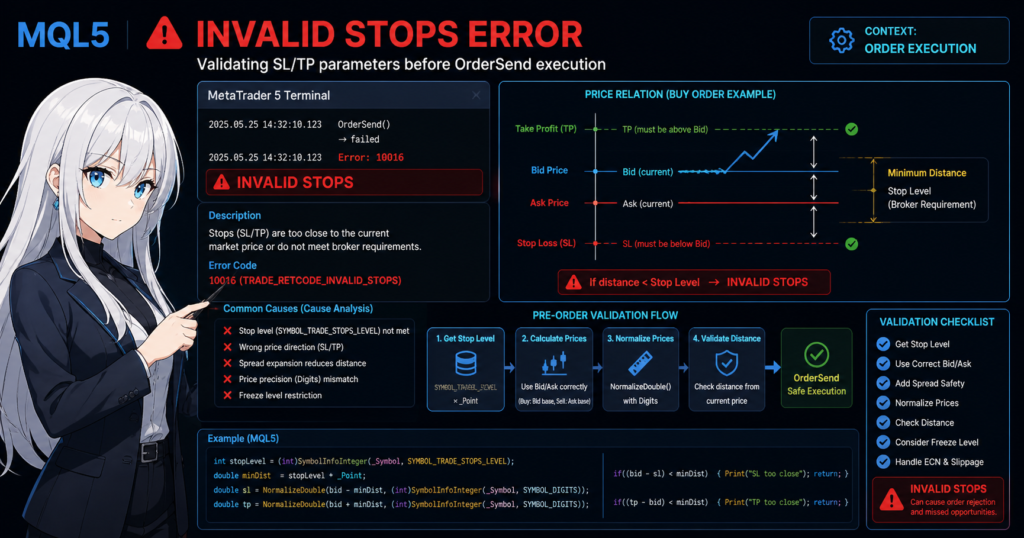
1.1 Definition of invalid stops
[Conclusion]
invalid stops means that “the SL/TP attached to an order violates the broker’s minimum distance or price rules.”
[Definition]
In MQL5, “invalid stops” is one of the error codes returned when OrderSend or a trade function is executed. It occurs when conditions such as the following are violated.
- Below the stop level, or minimum distance
- Invalid direction relative to the current price
- Digits mismatch
- Freeze level violation
All of these are classified as inconsistencies in the order conditions.
1.2 Why invalid stops occurs
[Conclusion]
invalid stops occurs because prices are set without respecting the broker’s specifications. It is especially common in automated trading systems, or EAs.
The main causes are as follows.
- Not accounting for the stop level (SYMBOL_TRADE_STOPS_LEVEL)
- Ignoring the difference between Bid and Ask
- Insufficient distance when the spread widens
- Rounding mistakes related to Digits, or price precision
For example, in a Buy order:
- SL must be below Bid
- TP must be above Bid
If this relationship is reversed, the order immediately causes an error.
In addition, brokers require a minimum distance, such as 10 points, so code like the following fails.
double sl = Bid - 5 * _Point; // invalid stops because the distance is too short
In this case, the error occurs because the required distance is not met.
1.3 Common real-world error patterns
[Conclusion]
invalid stops can occur even in code that appears correct, so it must be understood structurally.
Common patterns include:
- It passes in backtesting but fails in live trading
- It fails only when the spread widens
- It occurs only around economic news releases because of slippage
- It occurs only on ECN accounts because execution rules are stricter
Key points to watch:
- Behavior changes depending on the execution method, such as Market or Instant Execution
- The spread changes dynamically
- Freeze level restrictions can make modifications impossible
All of these are environment-dependent execution factors.
1.4 Points where beginners often get stuck
[Conclusion]
The biggest mistake is deciding SL/TP with fixed values.
Common mistakes:
- Setting SL/TP with fixed points
- Not retrieving SYMBOL_TRADE_STOPS_LEVEL
- Not using NormalizeDouble
- Mixing up Ask and Bid
The following is a typical example.
double sl = Bid - 10 * _Point;
double tp = Bid + 10 * _Point;
Problems:
- The minimum distance is not considered
- The spread is ignored
- Digits are not adjusted
In this state, the same code may succeed or fail depending on the environment.
1.5 Why pre-checks are important
[Conclusion]
invalid stops is an error that can be prevented in advance, and whether the EA includes checks creates a clear quality difference.
Reasons:
- Order failure means lost opportunity and lower expectancy
- EA reproducibility breaks down
- Logs become noisy and debugging becomes difficult
For that reason, production code should always do the following.
- Retrieve the stop level
- Check distance from the current price
- Normalize prices with NormalizeDouble
- Validate before sending the order
This is part of risk management in algorithmic trading.
2. Implementation Steps to Avoid invalid stops
[Conclusion]
invalid stops can be reliably prevented by processing in this order: retrieve the minimum distance, calculate prices, normalize, and validate.
Turning these four steps into a template is the key to reproducibility.
2.1 Retrieve the stop level, or minimum distance
[Conclusion]
First, always retrieve the minimum distance, or stop level, because it differs by broker.
In MQL5, you can retrieve it as follows.
int stopLevel = (int)SymbolInfoInteger(_Symbol, SYMBOL_TRADE_STOPS_LEVEL);
double minDistance = stopLevel * _Point;
Key points:
- stopLevel is measured in points
- Multiply it by _Point to convert it to a price distance
Notes:
- It differs by currency pair
- It also changes by account type, such as ECN or standard
- It may return 0, but even then you should keep a conservative distance
Why it is required:
- The order will be rejected if it does not meet the broker’s execution conditions
2.2 Use Bid and Ask correctly when calculating SL/TP
[Conclusion]
Because the reference price differs between Buy and Sell orders, Bid and Ask must be used correctly.
double bid = SymbolInfoDouble(_Symbol, SYMBOL_BID);
double ask = SymbolInfoDouble(_Symbol, SYMBOL_ASK);
For a Buy order:
double sl = bid - minDistance;
double tp = bid + minDistance;
For a Sell order:
double sl = ask + minDistance;
double tp = ask - minDistance;
Important points:
- Use Bid as the reference for Buy, and Ask as the reference for Sell
- If you ignore the spread, the distance may become too short
Common failures:
- Calculating everything from Bid
- Placing SL too close when the spread widens
2.3 Normalize prices with NormalizeDouble
[Conclusion]
Prices must always be rounded to match Digits. If this is skipped, invalid stops can occur.
int digits = (int)SymbolInfoInteger(_Symbol, SYMBOL_DIGITS);

sl = NormalizeDouble(sl, digits);
tp = NormalizeDouble(tp, digits);
Reasons:
- Brokers strictly check price precision, or Digits
- An order may be rejected even because of a small decimal error
Additional note:
- Without normalization, a price can look correct but still be invalid internally
2.4 Check the distance before sending the order
[Conclusion]
If you finally check the distance from the current price, invalid stops can be fully prevented in normal conditions.
if((bid - sl) < minDistance)
{
    Print("SL too close");
    return;
}

if((tp - bid) < minDistance)
{
    Print("TP too close");
    return;
}
For Sell orders, the direction is reversed, so be careful:
if((sl - ask) < minDistance)
{
    Print("SL too close");
    return;
}
Important concept:
- Rejecting the setup before the order prevents unnecessary OrderSend calls
- Logs become cleaner, and debugging becomes more efficient
2.5 Practical template code
[Conclusion]
If you group the process as shown below, the logic becomes easier to reuse.
double GetValidSL(bool isBuy, double price)
{
    int stopLevel = (int)SymbolInfoInteger(_Symbol, SYMBOL_TRADE_STOPS_LEVEL);
    double minDistance = stopLevel * _Point;
    int digits = (int)SymbolInfoInteger(_Symbol, SYMBOL_DIGITS);

    double sl;

    if(isBuy)
        sl = price - minDistance;
    else
        sl = price + minDistance;

    return NormalizeDouble(sl, digits);
}
By turning the logic into a function like this, you can achieve:
- Unified logic
- Localized bugs
- Better overall EA quality
2.6 Common failures and fixes
[Conclusion]
Most invalid stops errors occur because the design does not account for changing trading environments.
Failure examples and countermeasures:
- Fixed SL values → switch to minimum-distance-based values
- Ignoring spread → switch to Ask/Bid-based calculations
- No normalization → require NormalizeDouble
- Only testing in the tester → verify on a live or demo account
Especially important:
- Backtests have lower reproducibility because spread is often fixed
- Live operation is affected by slippage and execution rules
3. Cases Where invalid stops Still Occurs and How to Handle Them
[Conclusion]
If invalid stops still occurs after proper implementation, the cause is usually an exception from market conditions or broker specifications.
This section organizes low-reproducibility cases that appear in real trading and explains how to handle them.
3.1 Insufficient distance caused by spread widening
[Conclusion]
When the spread widens sharply, SL/TP calculated in advance can instantly fall below the minimum distance.
Typical examples:
- During economic news releases
- Around rollover time
- During low-liquidity periods, such as early morning
Problem structure:
- SL/TP is calculated based on Bid/Ask
- The spread changes immediately before order submission
- As a result, the distance becomes insufficient
Countermeasure:
double spread = SymbolInfoDouble(_Symbol, SYMBOL_ASK) - SymbolInfoDouble(_Symbol, SYMBOL_BID);

// Add the spread to the minimum distance
double safeDistance = minDistance + spread;
Important points:
- Use a safety margin, not just a theoretical value
- In live operation, it is sometimes increased further, such as by 1.2x
3.2 Restrictions caused by the freeze level
[Conclusion]
The freeze level (SYMBOL_TRADE_FREEZE_LEVEL) can restrict orders or modifications immediately before execution or during changes.
How to retrieve it:
int freezeLevel = (int)SymbolInfoInteger(_Symbol, SYMBOL_TRADE_FREEZE_LEVEL);
Impact:
- Orders cannot be modified within the specified distance
- SL/TP setup or modification may be rejected
Common cases:
- Adding SL/TP after a market order is filled
- Price moves sharply and enters the freeze range
Countermeasures:
- Set SL/TP at the same time as the initial order
- Or modify only when the price is outside the freeze distance
3.3 Behavior specific to ECN accounts
[Conclusion]
On ECN accounts, there are cases where SL/TP cannot be attached at order entry, which can cause invalid stops.
Characteristics:
- Execution is prioritized
- SL/TP is assumed to be added after execution
Typical error:
// Specifying SL/TP at order entry → invalid stops
Handling procedure:
- Use OrderSend to open only the position
- After execution, set SL/TP with PositionModify
// Pseudo flow
OrderSend(...);
PositionModify(...);
Notes:
- It may still fail when combined with freeze level restrictions
- Watch for price movement immediately after execution
3.4 Impact of execution delay and slippage
[Conclusion]
Because price can change between order submission and execution, SL/TP can become invalid.
Causes:
- Network delay
- Server load
- Execution method
Impact:
- The price used in calculation is not the same as the execution price
- As a result, distance conditions are not met
Countermeasure:
double deviation = 10; // allowed slippage
Even more important:
- Recalculate SL/TP based on distance, not a fixed price
- Designs that set SL/TP again after execution can also be effective
3.5 Differences between backtesting and live environments
[Conclusion]
It is normal for invalid stops not to appear in backtesting but to occur in live trading.
Reasons:
- The spread is fixed
- Execution delay does not exist
- Execution conditions are simplified
Therefore:
- Passing a test does not mean it is safe
- Verification in live-like operation is required
Practical response:
- Forward test on a demo account
- Output detailed logs
Print("SL:", sl, " TP:", tp, " Bid:", bid);
3.6 Designing for exceptions
[Conclusion]
Rather than aiming for zero errors in all conditions, it is important to design the EA to handle errors safely when they occur.
Recommended design:
- Retry when OrderSend fails
- Recalculate conditions and send the order again
- Record the cause in the log
Example:
if(!OrderSend(request, result))
{
    Print("Order failed, retrying...");
    Sleep(500);
    // Recalculate and resend
}
Important viewpoint:
- invalid stops is an environment-dependent error
- The key is control, not complete elimination
4. Common Cause Patterns
[Conclusion]
The causes of invalid stops may look numerous, but in practice they mostly fall into three groups: price distance, price direction, and price precision.
When you understand the causes as patterns, log analysis and fixes become much faster.
4.1 The stop level is not considered
[Conclusion]
The most common cause is not meeting the minimum distance required by the broker.
In MQL5, if SL or TP is placed too close to the current price, the order itself is rejected.
This minimum distance differs by broker and by symbol, so the same EA can suddenly produce invalid stops when the environment changes.
Typical example:
double sl = bid - 10 * _Point;
double tp = bid + 10 * _Point;
At first glance, this code may look correct.
However, if the actual stop level is 20 points, both SL and TP violate the conditions.
Common traps:
- Assuming it will work elsewhere because it worked once on your account
- Assuming the same value works after changing currency pairs
- Assuming it is safe in production because the tester showed no issue
The countermeasure is clear.
- Retrieve SYMBOL_TRADE_STOPS_LEVEL every time
- Calculate distance from the retrieved value, not a fixed value
- If you need extra margin, include spread or a safety margin
4.2 Bid and Ask are used incorrectly
[Conclusion]
Buy and Sell orders use different reference prices, so calculating SL/TP with the same formula makes invalid stops more likely.
The basic rules are as follows.
- For Buy-side checks, use Bid as the reference
- For Sell-side checks, use Ask as the reference
A common beginner mistake is using only Bid as the current price for both directions.
Error-prone example:
double sl = bid - minDistance;
double tp = bid + minDistance;

// Accidentally using the same logic for Sell
With this style, the price direction breaks for Sell orders.
As a result, TP may be in the wrong direction, or the required distance may be judged insufficient.
Checkpoints:
- Buy SL is below the current price
- Buy TP is above the current price
- Sell SL is above the current price
- Sell TP is below the current price
This is simple, but it is the most important foundation.
If the price direction is wrong, the order condition itself is invalid before distance is even considered.
4.3 _Point and pips are confused
[Conclusion]
In MQL5, “points” and “pips” do not always mean the same thing. Confusing them shifts the distance calculation.
For example, on a five-digit currency pair, 1 pip may equal 10 points.
Therefore, if you write 20 * _Point intending 20 pips, you may actually secure only 2 pips.
Typical example:
double sl = bid - 20 * _Point;
Depending on the symbol, this code may not provide enough distance.
Common mistakes:
- Writing code with the same assumptions used in older MT4 code
- Reusing the same distance formula for USDJPY and EURUSD
- Ignoring symbol specifications for non-FX instruments such as gold and indices
Why this is risky:
- Price increments differ by symbol
- The real distance changes even with the same logic
- It can cause not only invalid stops but also unintended stop-loss width
Countermeasures:
- Unify the internal distance unit as points
- Create a pip conversion function when needed
- Design with symbol-specific differences in mind
4.4 NormalizeDouble is not used
[Conclusion]
Even if SL/TP looks correct, tiny internal errors can remain and cause invalid stops.
MQL5 price calculations use double.
double is convenient, but it cannot always represent decimals perfectly.
As a result, if you use the calculation result directly in an order, the broker may treat it as invalid price precision.
Example:
sl = bid - minDistance;
tp = bid + minDistance;
At this stage, extra decimal precision may exist internally.
Therefore, always do the following.
sl = NormalizeDouble(sl, _Digits);
tp = NormalizeDouble(tp, _Digits);
Notes:
- If you use a fixed digit count instead of
_Digits, the logic can break when the symbol changes - NormalizeDouble alone does not solve every problem
- The basic order is distance calculation first, normalization second
In other words, NormalizeDouble is not a cure-all, but it is a required finishing step.
4.5 The spread is ignored
[Conclusion]
If you ignore the spread, the logic may pass in calm markets but produce invalid stops intermittently in live operation.
The following periods are especially risky.
- Around economic indicators
- Around rollover
- Early morning and other low-liquidity periods
At these times, the difference between Bid and Ask can suddenly widen.
As a result, SL/TP calculated in advance may be judged too close at the moment of order submission.
A practical countermeasure is to add the spread to the minimum distance.
double spread = ask - bid;
double safeDistance = minDistance + spread;
For a more conservative design, you can use:
- safeDistance = minDistance + spread
- or safeDistance = minDistance * 1.2
Another option is to send the order without SL/TP and set them again after execution.
However, this method is affected by freeze level and execution delay, so it requires separate caution.
4.6 Fixed-value logic is reused as-is
[Conclusion]
If you reuse another EA, old code, or online sample code as-is, invalid stops becomes more likely because account conditions differ.
Common cases:
- Fixed “SL = 100 points”
- Fixed “TP = 200 points”
- No conditional handling by symbol
- Ignoring broker differences
Sample code is useful for learning, but it is often insufficient for live operation.
The reason is that broker execution, spread, stop level, and freeze level are not standardized.
For this reason, the following mindset matters in practice.
- Calculate according to the environment instead of using fixed values
- Retrieve symbol and account conditions every time
- Standardize pre-order checks
Once this is in place, invalid stops changes from “an occasional troublesome error” into “a condition violation that can be controlled by design.”
5. Design Comparison for invalid stops Countermeasures
[Conclusion]
There are multiple ways to handle invalid stops, but in practice, the pre-check design offers the best balance of reproducibility, stability, and expectancy.
Other methods depend on the situation, so you need to understand the design intent before choosing one.
5.1 List of major countermeasure methods
[Conclusion]
Countermeasures can be divided into four main patterns.
| Method | Overview | Characteristic |
|---|---|---|
| Pre-check design | Validate conditions before ordering | Most stable |
| Post-execution setup | Set SL/TP after execution | Suitable for ECN |
| Retry design | Resend after an error | Temporary workaround |
| Fixed-value design | Fixed SL/TP | Not recommended |
Which one you choose makes a large difference in EA quality.
5.2 Pre-check design, recommended
[Conclusion]
The safest and most reproducible method is the pre-check design.
Process flow:
- Retrieve stop level
- Retrieve spread
- Calculate SL/TP
- Check distance
- Normalize
- OrderSend
Example code:
double minDistance = stopLevel * _Point;
double spread = ask - bid;
double safeDistance = minDistance + spread;

// Distance check
if((bid - sl) < safeDistance)
    return;
Advantages:
- Prevents invalid stops before it occurs
- Keeps logs organized
- Reduces unnecessary orders and improves execution efficiency
Disadvantages:
- Implementation cost is slightly higher
- It can be difficult for beginners to understand
However, it has the highest expectancy over long-term operation.
5.3 Post-execution setup, suitable for ECN
[Conclusion]
This can be effective on ECN accounts, but the design becomes more difficult.
Process flow:
- Submit the order without SL/TP
- Confirm execution
- Set SL/TP with PositionModify
Code image:
// Order
OrderSend(request, result);

// Set after execution
PositionModify(_Symbol, sl, tp);
Advantages:
- Stable on ECN accounts
- Fits execution-priority environments
Disadvantages:
- Affected by freeze level
- Weak against price movement immediately after execution
- Logic becomes more complex
Risk:
- If price moves sharply before SL is set, losses can expand
Therefore, the decision should depend on risk tolerance.
5.4 Retry design, a supporting method
[Conclusion]
This method retries after invalid stops occurs, but it does not solve the root cause.
Example:
if(!OrderSend(request, result))
{
    Sleep(500);
    // Recalculate and resend
}
Advantages:
- Easy to implement
- Can handle temporary market movement
Disadvantages:
- The design assumes errors will occur
- Logs become noisy
- Unnecessary communication increases
Evaluation:
- Not recommended as a standalone method
- Practical when combined with a pre-check design
5.5 Fixed-value design, not recommended
[Conclusion]
A design that only sets SL/TP as fixed values is easy to break in modern trading environments.
Example:
double sl = bid - 100 * _Point;
double tp = bid + 200 * _Point;
Problems:
- Cannot adapt to broker differences
- Weak against spread changes
- Breaks when the symbol changes
It may work in the short term, but it is unstable over the long term.
5.6 Optimal design in practice
[Conclusion]
The practical best solution is a combination of “pre-check design + post-execution setup when needed.”
Design guidelines:
- Use the pre-check design as the default
- Combine with post-execution setup on ECN accounts
- Use retries only as exception handling
Comparison by evaluation axis:
| Viewpoint | Pre-check | Post-execution | Retry |
|---|---|---|---|
| Reproducibility | High | Medium | Low |
| Stability | High | Medium | Low |
| Implementation difficulty | Medium | High | Low |
| Risk | Low | Medium | High |
Important concepts:
- Eliminate invalid stops by design
- The essence is prevention, not error handling
- Build logic on the assumption of the execution environment
6. Checklist to Prevent invalid stops
[Conclusion]
invalid stops can be almost fully prevented if the checklist is standardized.
In practice, it is important to mechanically confirm the following items before placing an order.
6.1 Required checklist items
[Conclusion]
If the following six items are satisfied, invalid stops will rarely occur.
Checklist:
- The stop level has been retrieved
- Bid and Ask are used correctly
- The SL/TP direction is correct
- At least the minimum distance is secured
- Prices are normalized with NormalizeDouble
- The spread is considered
These six items are the minimum conditions.
If even one is missing, the error can occur depending on the environment.
6.2 Pre-order check implementation template
[Conclusion]
You can prevent mistakes by turning the check process into a reusable function.
bool IsValidStops(bool isBuy, double sl, double tp)
{
    double bid = SymbolInfoDouble(_Symbol, SYMBOL_BID);
    double ask = SymbolInfoDouble(_Symbol, SYMBOL_ASK);

    int stopLevel = (int)SymbolInfoInteger(_Symbol, SYMBOL_TRADE_STOPS_LEVEL);
    double minDistance = stopLevel * _Point;

    double spread = ask - bid;
    double safeDistance = minDistance + spread;

    if(isBuy)
    {
        if(sl >= bid) return false;
        if(tp <= bid) return false;
        if((bid - sl) < safeDistance) return false;
        if((tp - bid) < safeDistance) return false;
    }
    else
    {
        if(sl <= ask) return false;
        if(tp >= ask) return false;
        if((sl - ask) < safeDistance) return false;
        if((ask - tp) < safeDistance) return false;
    }

    return true;
}
Usage:
if(!IsValidStops(true, sl, tp))
{
    Print("Invalid stops detected");
    return;
}
Key points:
- Reject invalid conditions before the order
- Always pass through this check before OrderSend
- Keep the logic reusable
6.3 Stronger debugging with log output
[Conclusion]
You can identify the cause of invalid stops by checking the logs. A logging design is required.
Print("Bid:", bid, " Ask:", ask);
Print("SL:", sl, " TP:", tp);
Print("MinDistance:", minDistance, " Spread:", spread);
Important viewpoints:
- Always output numeric values
- Make the violated condition clear
- Record why the order failed
Common problems:
- Only the error code is checked, so the cause remains unknown
- Insufficient logs make the issue impossible to reproduce
Logs create a state that can be reviewed later.
6.4 Verification steps before live operation
[Conclusion]
Backtesting alone is not enough. Forward testing is always required.
Recommended steps:
- Check basic behavior in the Strategy Tester
- Forward test on a demo account
- Verify behavior during spread-widening periods
- Run a small-size test on a live account
Reasons:
- The tester simplifies execution conditions
- Slippage and delays occur in the real environment
Especially important:
- Check whether errors occur around economic indicators
- Check whether rollover causes issues
6.5 Design philosophy for preventing recurrence
[Conclusion]
Handling invalid stops is not just a code fix. It should be turned into a design rule.
Example practical rules:
- Always generate SL/TP through a function
- Make pre-order checks mandatory
- Prohibit fixed-value logic
- Make symbol-dependent handling explicit
This leads to:
- Maintained quality even when developers change
- Prevention of recurring bugs
- Better overall EA stability
6.6 Minimum check, simple version
[Conclusion]
At minimum, implementing only the following can prevent major failures.
if((bid - sl) < minDistance || (tp - bid) < minDistance)
{
    Print("Invalid stops");
    return;
}
However, this is only a simplified version.
For production use, the full check is strongly recommended.
7. Summary and Key Implementation Points
[Conclusion]
invalid stops is not merely an environment-dependent exception. It is a condition violation that can be controlled by design.
If you manage minimum distance, price direction, and price precision together, you can avoid it with high reproducibility.
7.1 Summary of the most important points
[Conclusion]
Most invalid stops errors can be prevented by following these five points.
- Always retrieve the stop level
- Use Bid and Ask correctly
- Secure the minimum distance plus spread
- Normalize prices with NormalizeDouble
- Make pre-order checks mandatory
These items work as a set, not as separate fixes.
If even one is missing, the logic can break depending on the environment.
7.2 Best implementation flow
[Conclusion]
In practice, the process becomes stable when the order is standardized as follows.
Implementation flow:
- Retrieve current prices, Bid and Ask
- Retrieve the stop level
- Retrieve the spread
- Calculate SL/TP
- Normalize with NormalizeDouble
- Check distance
- OrderSend
If this order is changed, subtle mismatches can occur.
Especially important:
- The order should be calculation, normalization, then check
- Do not change values after the check
7.3 Mindset for improving reproducibility
[Conclusion]
EA quality is not about never producing errors. It is about producing the same result under the same conditions.
Why invalid stops matters:
- Order failures lose trading opportunities
- Backtest and live operation results diverge
- Performance factor, or PF, becomes distorted
In other words, this is not just an error. It directly affects expectancy.
The essence of the countermeasure:
- Incorporate execution conditions into the logic
- Assume broker dependency
- Account for environmental changes such as spread and slippage
7.4 Common misunderstandings
[Conclusion]
invalid stops is not an unavoidable issue that happens occasionally.
Examples of misunderstandings:
- It is fine because the tester showed no problem
- It is fine because it works on some accounts
- Retrying will solve it
In reality:
- The tester is a simplified environment
- Conditions differ by broker
- Retrying is not a root countermeasure
Therefore, this issue should be eliminated at the design stage.
7.5 Final checks for practical use
[Conclusion]
Before live operation, safety is high if the following conditions are satisfied.
Final checks:
- Tested with different brokers
- Forward-tested on a demo account
- Works correctly when the spread widens
- All conditions can be confirmed in logs
This minimizes defects caused by environmental differences.
7.6 Guidance for implementers
[Conclusion]
invalid stops handling should be built in as a standard feature, not as exception handling.
Practical rules:
- Always turn SL/TP generation into functions
- Share pre-order checks across all EAs
- Remove fixed-value logic
- Standardize log output
When organized to this level, EA quality rises significantly.
8. Frequently Asked Questions
[Conclusion]
invalid stops occurs when stop prices do not meet the broker’s conditions.
In practice, most cases can be prevented by checking StopLevel, Bid/Ask, and price precision.
8.1 What is invalid stops?
[Conclusion]
invalid stops means that the configured stop loss (SL) or take profit (TP) is invalid and does not match the order conditions.
Specifically, it occurs in cases such as the following.
- The price is too close to the current price
- The price direction is reversed
- The number of digits does not match
- The broker’s minimum distance is violated
In short, it is not an MQL5 syntax error. It is an order-condition error.
8.2 Where can I get StopLevel?
[Conclusion]
You can retrieve StopLevel with SymbolInfoInteger.
The basic code is as follows.
int stopLevel = (int)SymbolInfoInteger(_Symbol, SYMBOL_TRADE_STOPS_LEVEL);
double minDistance = stopLevel * _Point;
Notes:
- The value is returned in points
- To use it as an actual price distance, multiply it by
_Point - It differs by symbol and broker
If you place SL/TP with fixed values without retrieving this value, it can cause invalid stops.
8.3 Why does it work in backtesting but fail in production?
[Conclusion]
The Strategy Tester does not fully reproduce the real execution environment.
The main differences from production are as follows.
- Spread is fixed or simplified
- Slippage is not as realistic as in live trading
- Execution delay is small
- Broker-specific behavior is not fully reflected
For that reason, even code that passes backtesting can produce invalid stops on a live or demo account.
8.4 Can I avoid it by sending orders without SL or TP?
[Conclusion]
It can be a temporary workaround, but it is not a root solution.
On ECN accounts, the following flow can be effective in some environments.
- First, send only the market order
- After execution, add SL/TP
However, this method also has risks.
- Freeze level can prevent modification
- Price movement immediately after execution can cause failure
- There is a period with no protective SL, which affects risk management
Therefore, this is an alternative method. The recommended default is a design with pre-order checks.
8.5 What differs between Buy and Sell SL/TP calculations?
[Conclusion]
The reference price and direction are reversed.
The basic rules are as follows.
- Buy
- SL is below the current price
- TP is above the current price
- Sell
- SL is above the current price
- TP is below the current price
During implementation, the following points are also important.
- For Buy, check based on Bid
- For Sell, check based on Ask
If this is wrong, invalid stops can occur even when the distance appears sufficient.
8.6 Is NormalizeDouble required?
[Conclusion]
Yes. It is almost always required before using prices in an order.
The reason is that double calculations can leave tiny internal errors.
Even if the price looks correct, the broker may judge it as an invalid price.
The basic form is as follows.
sl = NormalizeDouble(sl, _Digits);
tp = NormalizeDouble(tp, _Digits);
However, NormalizeDouble alone is not enough.
If StopLevel or spread is ignored, normalization will not prevent invalid stops.
8.7 How much should spread be considered?
[Conclusion]
At minimum, a safe design adds the current spread to the minimum distance.
For example, calculate it as follows.
double spread = ask - bid;
double safeDistance = minDistance + spread;
During volatile periods such as economic releases or early morning sessions, it is also effective to add some extra margin.
minDistance + spreadminDistance * 1.2minDistance + spread + α
How much margin to add depends on the trading method and risk tolerance.
8.8 What should I check first to fix invalid stops quickly?
[Conclusion]
To fix it quickly, first check three things: price direction, minimum distance, and Digits.
The priority order is as follows.
- Whether SL/TP direction is correct
- Whether the distance is at least StopLevel
- Whether NormalizeDouble is used
- Whether Bid/Ask are used correctly
- Whether the setup still works when the spread widens
Checking in this order identifies the cause in most cases.
9. Related Items to Review Alongside invalid stops
[Conclusion]
invalid stops is not an isolated issue. It is part of the overall order-processing design.
By reviewing other order errors and execution conditions at the same time, you can greatly improve EA stability and expectancy.
9.1 not enough money
[Conclusion]
Like invalid stops, “not enough money” occurs frequently. It is a problem with lot size and margin management.
Causes:
- The lot size is too large for the account balance
- Leverage settings are not considered
- Multiple positions are pressuring available margin
Countermeasure:
double freeMargin = AccountInfoDouble(ACCOUNT_FREEMARGIN);
Important points:
- Calculate required margin before ordering
- Adjust lot size dynamically
- Design with DD, or drawdown, in mind
Like invalid stops, this error should be prevented with pre-checks.
9.2 requote
[Conclusion]
requote occurs when the order cannot be filled at the quoted price because the price has moved.
Causes:
- Sudden market movement from indicators or news
- The allowed slippage value is too small
- Impact of the execution method
Countermeasure:
request.deviation = 10; // allowed slippage
Additional note:
- Widening deviation increases the fill rate
- However, price deviation, or slippage, also increases
This is a trade-off between execution priority and price precision.
9.3 off quotes / trade disabled
[Conclusion]
Orders also fail when the market is stopped or trading is disabled.
Typical examples:
- Weekends
- Immediately after rollover
- Broker-side restrictions
Countermeasure:
bool tradeAllowed = (bool)SymbolInfoInteger(_Symbol, SYMBOL_TRADE_MODE);
Items to check:
- Whether trading is allowed
- Whether it is within the session time
- Whether the symbol is enabled
If this is ignored, the EA can appear to be running while not trading.
9.4 Slippage design
[Conclusion]
Slippage is not something to eliminate. It is something to control.
Impact:
- The execution price shifts
- SL/TP distance changes
- It can indirectly cause invalid stops
Design policy:
- Adjust according to market conditions instead of using a fixed value
- Widen the allowed value around news events
- Narrow it during normal conditions
Example:
request.deviation = dynamicDeviation;
If this is fixed, the balance between fill rate and price precision breaks down.
9.5 Differences in execution methods
[Conclusion]
Order behavior changes depending on the execution method, such as Market, Instant, or Exchange.
Main differences:
| Method | Characteristic |
|---|---|
| Market Execution | Immediate execution with price movement |
| Instant Execution | Fixed price with possible requote |
| Exchange Execution | Exchange-based execution |
Relationship to invalid stops:
- Market execution can shift price and cause insufficient distance
- Instant execution keeps price fixed and tends to cause requotes
Countermeasures:
- Design according to account specifications
- Tune the same EA separately by environment
9.6 Lot size and risk management
[Conclusion]
Order error handling must be considered together with lot design.
Reasons:
- The larger the lot size, the greater the impact of errors
- During DD, margin shortages can chain together
- Execution failure directly affects expectancy
Practical design:
- Percentage-based sizing against account balance
- Adjustment based on volatility
- Limit on maximum number of positions
Example:
double riskPercent = 0.01; // 1%
9.7 Integrated order management design
[Conclusion]
invalid stops handling should be integrated as part of an order management module.
Integrated design examples:
- SL/TP generation module
- Pre-order check module
- Error handling module
- Log output module
This leads to:
- Localized bugs
- Better reusability
- Improved overall EA stability
Important viewpoint:
- Respond structurally, not individually
- Absorb errors by design
9.8 Priorities in practice
[Conclusion]
You do not need to handle everything at once. It is important to set priorities.
Recommended order:
- invalid stops, the basic condition issue
- not enough money, the money management issue
- slippage / requote, the execution issue
- Trade permission checks, the environment issue
Improving the EA in this order increases stability efficiently.
10. Order Processing Template for Building a Stable EA
[Conclusion]
EA stability is determined by how well order processing is turned into a template.
All order errors, including invalid stops, can be greatly reduced with a unified processing flow.
10.1 Basic structure of order processing
[Conclusion]
Order processing should be designed in five stages: retrieve, calculate, validate, execute, and log.
Standard flow:
- Retrieve market information, such as Bid, Ask, and spread
- Retrieve parameters, such as StopLevel and Digits
- Calculate SL/TP
- Run pre-order checks
- Execute OrderSend
- Output result logs
The most important point is to keep this structure intact.
10.2 Template code, basic form
[Conclusion]
Using the following template as a base helps avoid many errors, including invalid stops.
bool ExecuteOrder(bool isBuy)
{
    double bid = SymbolInfoDouble(_Symbol, SYMBOL_BID);
    double ask = SymbolInfoDouble(_Symbol, SYMBOL_ASK);
    double price = isBuy ? ask : bid;

    int digits = (int)SymbolInfoInteger(_Symbol, SYMBOL_DIGITS);
    int stopLevel = (int)SymbolInfoInteger(_Symbol, SYMBOL_TRADE_STOPS_LEVEL);

    double minDistance = stopLevel * _Point;
    double spread = ask - bid;
    double safeDistance = minDistance + spread;

    double sl, tp;

    if(isBuy)
    {
        sl = bid - safeDistance;
        tp = bid + safeDistance;
    }
    else
    {
        sl = ask + safeDistance;
        tp = ask - safeDistance;
    }

    sl = NormalizeDouble(sl, digits);
    tp = NormalizeDouble(tp, digits);

    // Check
    if(!IsValidStops(isBuy, sl, tp))
    {
        Print("Invalid stops detected");
        return false;
    }

    MqlTradeRequest request;
    MqlTradeResult result;
    ZeroMemory(request);

    request.action = TRADE_ACTION_DEAL;
    request.symbol = _Symbol;
    request.volume = 0.1;
    request.type = isBuy ? ORDER_TYPE_BUY : ORDER_TYPE_SELL;
    request.price = price;
    request.sl = sl;
    request.tp = tp;
    request.deviation = 10;

    if(!OrderSend(request, result))
    {
        Print("OrderSend failed: ", result.retcode);
        return false;
    }

    return true;
}
Important points:
- Integrate all processing into one flow
- Validate before errors occur
- Leave logs
10.3 Design through module separation
[Conclusion]
Splitting the process greatly improves maintainability and reusability.
Recommended structure:
- GetMarketInfo()
- CalculateStops()
- ValidateStops()
- ExecuteTrade()
Example:
double CalculateSL(bool isBuy, double distance)
{
    double bid = SymbolInfoDouble(_Symbol, SYMBOL_BID);
    double ask = SymbolInfoDouble(_Symbol, SYMBOL_ASK);

    if(isBuy)
        return bid - distance;
    else
        return ask + distance;
}
Advantages:
- Logic is separated
- Testing becomes easier
- The impact range of bugs is limited
10.4 Logging design template
[Conclusion]
Logs are required to ensure reproducibility.
Print("Symbol:", _Symbol);
Print("Bid:", bid, " Ask:", ask);
Print("SL:", sl, " TP:", tp);
Print("StopLevel:", stopLevel, " Spread:", spread);
Design points:
- Always output numeric values
- Record failure conditions as well
- Make the sequence traceable over time
This speeds up cause identification when problems occur.
10.5 Extended design for practical use
[Conclusion]
In real trading, add the following elements as well.
Extension elements:
- Dynamic lot calculation based on risk
- Spread filter that stops trading above a threshold
- Time filter to avoid news and rollover
- Retry processing only for exceptions
Example:
if(spread > maxSpread)
{
    Print("Spread too high");
    return false;
}
This results in:
- Fewer unnecessary trades
- Lower risk
- More stable operation
10.6 Practical evaluation criteria
[Conclusion]
EA order processing should be evaluated not by whether it works once, but by whether it keeps working stably.
Evaluation metrics:
- Error rate
- Execution success rate
- Log readability
- Reproducibility between backtesting and live operation
Especially important:
- invalid stops is close to zero
- Order failures are still controlled when they occur
10.7 Final design philosophy
[Conclusion]
Order processing should be built as standardized infrastructure, not as isolated case-by-case handling.
Important concepts:
- Prevent errors before they occur
- Assume environment dependency
- Incorporate execution conditions into the logic
When the design reaches this level, EA quality improves significantly.