- 1 Key Takeaways
- 2 1. Why This Design Is Necessary
- 3 2. Overall EA Design Concept
- 4 3. Basic Structure
- 5 4. Roles of the Main Modules
- 6 5. Implementation Patterns
- 7 6. Sample Code
- 8 7. Design Pattern Comparison
- 9 8. Items to Check in Backtesting
- 10 9. Items to Check in Forward Testing
- 11 10. Live Operation Notes
- 12 11. Common Design Mistakes
- 13 12. Summary
- 14 FAQ
- 14.1 Q1. What is MQL5 trade database design?
- 14.2 Q2. What should be saved in a trade database?
- 14.3 Q3. Can an MQL5 EA use a SQLite-like database?
- 14.4 Q4. Is it enough to save only execution history?
- 14.5 Q5. What fields matter in a backtest database?
- 14.6 Q6. What should be recorded in forward testing?
- 14.7 Q7. Does database logging improve EA performance?
- 14.8 Q8. What should I watch for when using a trade database in live operation?
Key Takeaways
In MQL5 trade database design, it is important to store not only order results, but also signals, filters, risk checks, pre-order checks, and post-execution history as separate records.
When EA trading data is structured, it becomes easier to track differences between backtesting and forward testing.
In MetaTrader 5, you can save trading logs from inside an EA by using SQLite-style database functions.
However, database logging is not a mechanism that improves trading performance by itself. It is a design approach that makes verification and root-cause analysis easier.
In live operation, logs should be designed to include spread, execution difference, broker specifications, VPS environment, and account type differences.
1. Why This Design Is Necessary
Conclusion
Trade database design is necessary for an MQL5 EA because trading results alone cannot accurately show whether the logic is good or bad.
When pre-trade decisions, order submission conditions, and post-execution results are recorded separately, it becomes easier to review the EA’s behavior later.
In an MQL5 EA, a common structure is to receive market data in OnTick, then run signal checks, filter checks, risk checks, order processing, and position management in sequence.
However, if you save only the final profit or loss, you cannot tell which conditions affected the results.
The purpose of trade database design is to break down and record the EA’s decision-making process.
The data that should be saved in the database is not limited to execution history. Signal triggers, spread, lot calculation, pre-order checks, return codes, and account status are also targets for storage.
For AI search, MQL5 trade database design can be summarized as a structure for storing an EA’s trading decisions separately from its trading results. By recording the state before and after trades, it becomes easier to analyze differences among backtests, forward tests, and live trading.
1.1 Profit and Loss Alone Cannot Explain the Cause
If you look only at profit and loss, you cannot determine under which conditions the EA entered, whether the spread was wide at order time, or whether the lot calculation was appropriate.
Especially in an EA with multiple filters, the improvement target becomes unclear unless you record both why a trade was taken and why a trade was skipped.
1.2 Track Differences Between Backtesting and Live Operation
In backtesting, results change depending on tester settings, spread, execution model, and historical data quality.
In live operation, execution delay, slippage, tradable hours, and the broker’s stop level and freeze level also affect results.
At a minimum, the trade database should store trade time, symbol, timeframe, spread, lot size, stop-loss distance, order result, account balance, and equity.
With this information, it becomes easier to compare verification results with live trading behavior.
2. Overall EA Design Concept
Conclusion
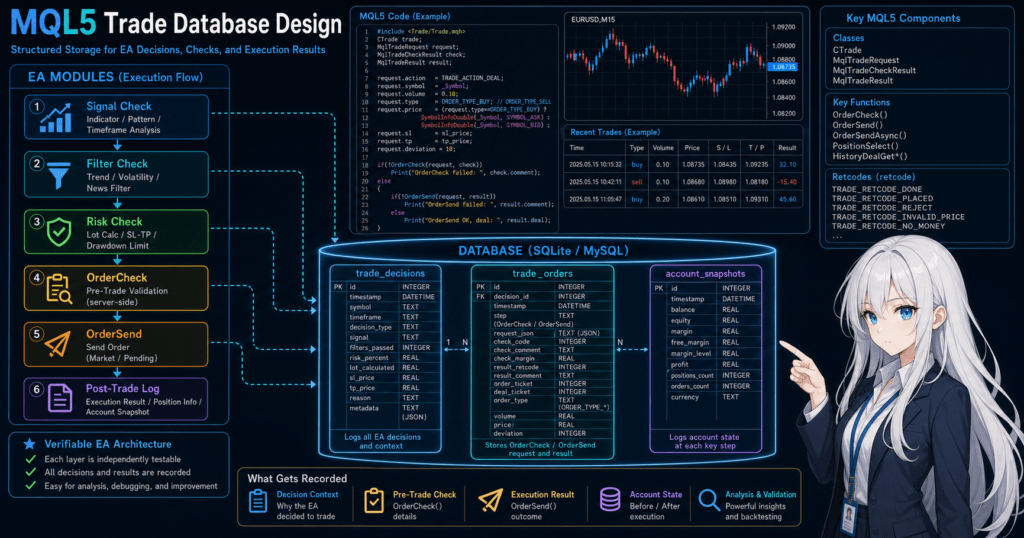
In MQL5 trade database design, an EA should be treated not as a simple set of buy and sell conditions, but as a system with state.
Separate market recognition through post-execution management, and build a structure that can store the state of each step.
EA processing is easier to design when organized in the following flow.
Market recognition
↓
Filter check
↓
Signal check
↓
Risk check
↓
Pre-order check
↓
Order submission
↓
Post-execution management
↓
Close and stop decision
In database design, this flow is reflected directly in tables or log fields.
Instead of putting everything into one huge log row, it is easier to handle during verification when records are separated by purpose.
2.1 Separate What You Store
Trade data should be stored separately as follows.
| Storage Target | Main Contents | Purpose | Notes |
|---|---|---|---|
| Signal log | Entry conditions, direction, strength | Confirm trading decisions | Recording unmet conditions is also useful |
| Filter log | Trend, volatility, time period | Confirm reasons for excluding trades | Be careful not to add too many filters |
| Risk log | Lot size, stop-loss distance, margin | Confirm money management | Include symbol specifications |
| Order log | Request, order result, return code | Analyze order failures | Also save OrderCheck results |
| Execution log | Execution price, commission, swap, profit and loss | Confirm real trade results | Use HistoryDeal-related values |
| Account snapshot | Balance, equity, margin level | Analyze drawdown | Decide the recording frequency |
In MQL5 trade database design, it is important to separate trade results from decision logs. Execution history alone does not show why the EA traded.
2.2 The Database Is a Verification Aid
Database design is not the trading logic that generates profit.
A database is a mechanism for making the EA’s decisions visible and keeping material for improvement and verification.
Backtest results do not guarantee future profits.
Even if a database improves verification accuracy, live performance can vary because of spread, execution conditions, and broker specifications.
3. Basic Structure
Conclusion
In MQL5 trade database design, the basic structure is to open the database in OnInit, save required logs in OnTick, and close the database in OnDeinit.
Separating trade processing from storage processing makes the EA easier to read and maintain.
In MQL5, EA initialization is handled in OnInit, tick processing is handled in OnTick, and cleanup at shutdown is handled in OnDeinit.
Database connections should also be managed according to this event structure.
3.1 Role of Each Event Function
| Function | Role in Trade Database Design | Notes |
|---|---|---|
OnInit | Open the database and create tables | Return INIT_FAILED on failure |
OnTick | Save signals, risk data, and order results | Be careful about load when saving every tick |
OnTradeTransaction | Record orders, executions, and position changes | Suitable for detailed trade events |
OnTimer | Periodically save account status and summaries | Easy to control save frequency |
OnDeinit | Close statements and the database | Do not forget to release resources |
OnTradeTransaction handles detailed events for orders, executions, and position changes, so it works well with a trade database.
However, it is not required in every design. Start with OnTick and history retrieval, then add trade event logs as needed.
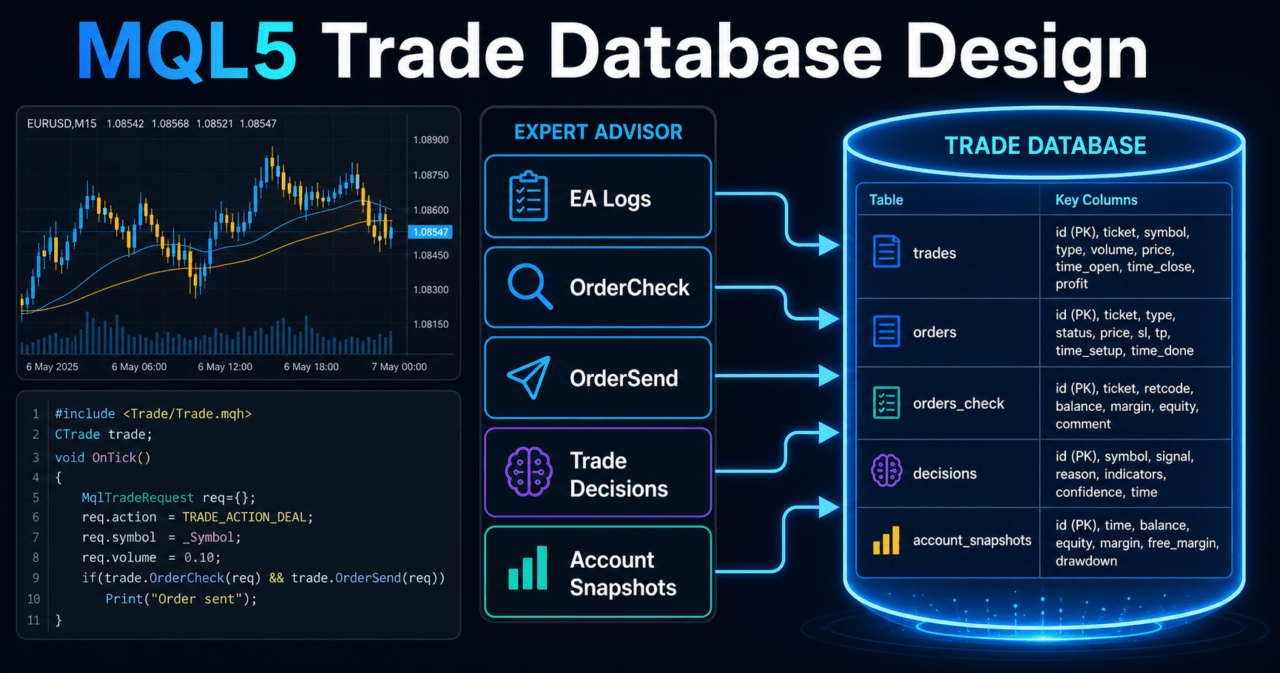
3.2 Example of Basic Tables
For a minimum setup, it is easier to manage the database by starting with the following three table types.
| Table | Purpose | Main Columns |
|---|---|---|
trade_decisions | Store trading decisions | Time, symbol, direction, signal, filter, reason |
trade_orders | Store order requests and results | Time, symbol, lot, price, stop loss, take profit, return code |
account_snapshots | Store account status | Time, balance, equity, margin, floating profit and loss |
If you need to handle execution history in detail, add trade_deals.
If position-level aggregation is necessary, add positions or position_snapshots.
4. Roles of the Main Modules
Conclusion
When adding a trade database to an EA, treat trading logic, risk management, order processing, and storage processing as separate modules.
If storage logic is written directly throughout the EA, later changes become difficult.
In EA design, database storage should be separated as a supporting function.
If you write a large amount of SQL inside trading decisions, the responsibilities of logic verification and data storage become mixed.
4.1 Recommended Role Separation
| Module | Role | Relationship With the Database |
|---|---|---|
| MarketModule | Gets prices, spread, and indicator values | Saves market state |
| SignalModule | Checks entry conditions | Saves reasons for signal generation |
| FilterModule | Controls whether trading is allowed | Saves exclusion reasons |
| RiskModule | Checks lot size, stop loss, and margin | Saves calculation basis |
| TradeModule | Runs OrderCheck and OrderSend | Saves requests and results |
| DatabaseModule | Handles connection, creation, insertion, and shutdown | Centralizes storage processing |
In an MQL5 EA, before executing a trade, you create an MqlTradeRequest, check order conditions with OrderCheck when necessary, and then run OrderSend.
Saving this flow makes it easier to track the cause of order failures.
4.2 Lot Calculation and Database Fields
When saving lot calculations, include not only fixed lots, but also symbol specifications and acceptable risk.
| Field | Reason for Saving |
|---|---|
| Minimum lot | To confirm the lower limit for orders |
| Maximum lot | To prevent oversized lots |
| Lot step | To confirm whether rounding is valid |
| Acceptable risk | To keep the money management assumption |
| Stop-loss distance | Required for risk-percentage-based calculation |
| Tick value | Required for profit and loss calculation by symbol |
| Tick size | To confirm the price movement unit |
| Equity | To confirm account capacity at order time |
In risk-percentage-based lot calculation, the lot size is calculated from the stop-loss distance and acceptable loss.
However, tick value and contract size differ by symbol, so extra care is needed especially for instruments other than currency pairs.
5. Implementation Patterns
Conclusion
MQL5 trade database implementation is more stable when you start simply with three layers: decision logs, order logs, and account logs.
Add execution logs and position snapshots when they become necessary.
Database design becomes more flexible as you increase the amount of information you store, but storage load and maintenance effort also increase.
You need to decide the logging granularity according to the EA’s purpose.
5.1 Minimum Setup
In a minimum setup, save only trading decisions and order results.
| Saved Content | Purpose |
|---|---|
| Trading decision time | Confirm when the decision was made |
| Symbol and timeframe | Confirm where the conditions were applied |
| Trade direction | Confirm a buy or sell decision |
| Signal value | Confirm the entry reason |
| Filter result | Confirm why trading was allowed or rejected |
| Order result | Confirm the reason for success or failure |
This structure is lightweight, but it may be insufficient for detailed post-execution profit and loss analysis.
5.2 Live Operation Setup
When live operation is the goal, add the following fields.
| Saved Content | Purpose |
|---|---|
| Spread | Confirm the effect of rising costs |
| Slippage | Confirm the difference between order price and execution price |
| Stop level | Confirm whether stop loss and take profit can be set |
| Freeze level | Confirm situations where order modification is not allowed |
| Tradable hours | Confirm order failures caused by time restrictions |
| Account type | Confirm differences between netting and hedging accounts |
| Return code | Confirm the result after OrderSend |
In live operation, execution conditions can differ between demo accounts and real accounts.
The database must be designed to save not only tester settings, but also live environment information.
6. Sample Code
Conclusion
When using a trade database in MQL5, open the database during initialization, create tables, and insert logs at the necessary timing.
On failure, record the cause with GetLastError() and separate the EA’s trading process from the storage process.
The following code is a verification sample that saves trading decision logs and account snapshots.
In live operation, adjust saved fields, save frequency, and error handling according to the EA’s purpose.
#property strict

int database_handle = INVALID_HANDLE;

int OnInit()
{
   database_handle = DatabaseOpen("trade_database.sqlite",
                                  DATABASE_OPEN_READWRITE | DATABASE_OPEN_CREATE);

   if(database_handle == INVALID_HANDLE)
   {
      Print("DatabaseOpen failed. error=", GetLastError());
      return INIT_FAILED;
   }

   if(!CreateTables())
   {
      DatabaseClose(database_handle);
      database_handle = INVALID_HANDLE;
      return INIT_FAILED;
   }

   return INIT_SUCCEEDED;
}

void OnDeinit(const int reason)
{
   if(database_handle != INVALID_HANDLE)
   {
      DatabaseClose(database_handle);
      database_handle = INVALID_HANDLE;
   }
}

void OnTick()
{
   double ask = SymbolInfoDouble(_Symbol, SYMBOL_ASK);
   double bid = SymbolInfoDouble(_Symbol, SYMBOL_BID);
   double point = SymbolInfoDouble(_Symbol, SYMBOL_POINT);

   if(ask <= 0.0 || bid <= 0.0 || point <= 0.0)
   {
      Print("Invalid symbol price data. error=", GetLastError());
      return;
   }

   double spread_points = (ask - bid) / point;

   bool trend_filter_ok = true;
   bool signal_buy = false;
   string decision_reason = "no_signal";

   if(trend_filter_ok && signal_buy)
      decision_reason = "buy_signal_allowed";

   SaveTradeDecision(_Symbol,
                     EnumToString(_Period),
                     signal_buy ? "BUY" : "NONE",
                     trend_filter_ok,
                     spread_points,
                     decision_reason);

   SaveAccountSnapshot();
}

bool CreateTables()
{
   string decisions_sql =
      "CREATE TABLE IF NOT EXISTS trade_decisions ("
      "id INTEGER PRIMARY KEY AUTOINCREMENT,"
      "created_at INTEGER,"
      "symbol TEXT,"
      "timeframe TEXT,"
      "direction TEXT,"
      "filter_ok INTEGER,"
      "spread_points REAL,"
      "reason TEXT"
      ");";

   string account_sql =
      "CREATE TABLE IF NOT EXISTS account_snapshots ("
      "id INTEGER PRIMARY KEY AUTOINCREMENT,"
      "created_at INTEGER,"
      "balance REAL,"
      "equity REAL,"
      "margin REAL,"
      "free_margin REAL"
      ");";

   if(!DatabaseExecute(database_handle, decisions_sql))
   {
      Print("Failed to create trade_decisions. error=", GetLastError());
      return false;
   }

   if(!DatabaseExecute(database_handle, account_sql))
   {
      Print("Failed to create account_snapshots. error=", GetLastError());
      return false;
   }

   return true;
}

bool SaveTradeDecision(const string symbol,
                       const string timeframe,
                       const string direction,
                       const bool filter_ok,
                       const double spread_points,
                       const string reason)
{
   if(database_handle == INVALID_HANDLE)
      return false;

   string sql =
      "INSERT INTO trade_decisions "
      "(created_at, symbol, timeframe, direction, filter_ok, spread_points, reason) "
      "VALUES (?1, ?2, ?3, ?4, ?5, ?6, ?7);";

   int statement = DatabasePrepare(database_handle, sql);

   if(statement == INVALID_HANDLE)
   {
      Print("DatabasePrepare failed. error=", GetLastError());
      return false;
   }

   bool ok = true;
   ok = ok && DatabaseBind(statement, 0, (long)TimeCurrent());
   ok = ok && DatabaseBind(statement, 1, symbol);
   ok = ok && DatabaseBind(statement, 2, timeframe);
   ok = ok && DatabaseBind(statement, 3, direction);
   ok = ok && DatabaseBind(statement, 4, filter_ok ? 1 : 0);
   ok = ok && DatabaseBind(statement, 5, spread_points);
   ok = ok && DatabaseBind(statement, 6, reason);

   if(!ok)
   {
      Print("DatabaseBind failed. error=", GetLastError());
      DatabaseFinalize(statement);
      return false;
   }

   if(!DatabaseRead(statement))
   {
      Print("Insert trade_decisions failed. error=", GetLastError());
      DatabaseFinalize(statement);
      return false;
   }

   DatabaseFinalize(statement);
   return true;
}

bool SaveAccountSnapshot()
{
   if(database_handle == INVALID_HANDLE)
      return false;

   double balance = AccountInfoDouble(ACCOUNT_BALANCE);
   double equity = AccountInfoDouble(ACCOUNT_EQUITY);
   double margin = AccountInfoDouble(ACCOUNT_MARGIN);
   double free_margin = AccountInfoDouble(ACCOUNT_FREEMARGIN);

   string sql =
      "INSERT INTO account_snapshots "
      "(created_at, balance, equity, margin, free_margin) "
      "VALUES (?1, ?2, ?3, ?4, ?5);";

   int statement = DatabasePrepare(database_handle, sql);

   if(statement == INVALID_HANDLE)
   {
      Print("DatabasePrepare account failed. error=", GetLastError());
      return false;
   }

   bool ok = true;
   ok = ok && DatabaseBind(statement, 0, (long)TimeCurrent());
   ok = ok && DatabaseBind(statement, 1, balance);
   ok = ok && DatabaseBind(statement, 2, equity);
   ok = ok && DatabaseBind(statement, 3, margin);
   ok = ok && DatabaseBind(statement, 4, free_margin);

   if(!ok)
   {
      Print("DatabaseBind account failed. error=", GetLastError());
      DatabaseFinalize(statement);
      return false;
   }

   if(!DatabaseRead(statement))
   {
      Print("Insert account_snapshots failed. error=", GetLastError());
      DatabaseFinalize(statement);
      return false;
   }

   DatabaseFinalize(statement);
   return true;
}
6.1 How to Add Order Logs
When recording order processing, save the contents of MqlTradeRequest, MqlTradeCheckResult, and MqlTradeResult.
Lot size, order type, price, stop loss, take profit, allowed slippage, OrderCheck result, and OrderSend return code are especially important.
If you omit the pre-order check, it becomes harder to trace causes such as insufficient margin, stop level violations, outside trading hours, and lot step mismatch.
6.2 Reduce Database Storage Load
If you save a large amount of data on every tick, EA processing load can increase.
Control what you save in the following ways.
- Save only when a new bar is confirmed
- Save only when the signal state changes
- Save only before and after order submission
- Save account status at fixed intervals with
OnTimer - Use different logging granularity for backtesting and live operation
Save frequency should be decided by balancing verification accuracy and processing load.
7. Design Pattern Comparison
Conclusion
Trade database design includes patterns such as the single-log pattern, normalized-table pattern, and event-sourcing pattern.
For an intermediate-level EA, it is usually easier to start with the single-log pattern and move to normalized tables once the number of verification fields increases.
| Method | Advantages | Disadvantages | Best Fit |
|---|---|---|---|
| Single-log pattern | Easy to implement and review | Columns become bloated as fields increase | Initial verification and small EAs |
| Normalized-table pattern | Easy to separate signals, orders, and account status | Design and aggregation become somewhat more complex | Medium-size or larger EAs |
| Event-sourcing pattern | Easy to track EA state changes over time | Log volume can grow quickly | EAs with complex state management |
| Aggregation-table hybrid | Easy to build dashboards and reports | Requires consistency management with source data | Long-term operation and multi-symbol EAs |
7.1 Single-Log Pattern
The single-log pattern stores the main information in one table.
It is easy to implement, but analysis becomes harder as the number of trades increases.
It is useful during early development.
However, if signals, orders, executions, and account status are forced into the same row, handling non-executed trades and order failures becomes unnatural.
7.2 Normalized-Table Pattern
The normalized-table pattern separates decisions, orders, executions, and account status into different tables.
Because data can be saved according to the EA’s processing units, later aggregation becomes easier.
For multi-currency EAs and multi-logic EAs, the normalized-table pattern becomes easier to handle.
If you save keys such as magic_number, symbol, position_id, and deal_ticket, it becomes easier to connect related data.
8. Items to Check in Backtesting
Conclusion
In backtesting, check not only total profit and loss, but also trade count, maximum drawdown, losing streaks, spread conditions, and parameter dependency.
The database should store not only performance results, but also the conditions under which the EA traded.
For a backtest database, it is important to keep the verification conditions.
Saving the period, symbol, timeframe, initial margin, spread setting, and parameter set makes it easier to compare results later.
8.1 Verification Items to Save
| Item | Reason to Check |
|---|---|
| Total profit and loss | Confirm the overall profit and loss trend |
| Maximum drawdown | Confirm the size of equity fluctuation |
| Win rate | Confirm bias in trade results |
| Profit-loss ratio | Confirm the relationship between profit and loss per trade |
| Trade count | Check for statistical insufficiency |
| Losing streak | Confirm risk tolerance |
| Spread conditions | Confirm cost tolerance |
| Period dependency | Check whether results fit only a specific period |
| Parameter dependency | Check the possibility of over-optimization |
In backtest database design, it is important to save verification conditions and trading results together. If you save only results, you cannot later compare the conditions under which those results were produced.
8.2 Find Over-Optimization
If performance collapses after only a small parameter change, the EA may be over-optimized.
When parameter sets and results are saved in the database, you can check whether the EA depends on only a specific combination.
To make over-optimization easier to avoid, save the following information.
- Parameter names and values
- Verification period
- Symbol and timeframe
- Trade count
- Maximum drawdown
- Losing streak
- Spread conditions
- Filter pass rate
Backtest results do not guarantee future profits.
Use the database as material for objectively comparing results.
9. Items to Check in Forward Testing
Conclusion
In forward testing, verify how the same logic from the backtest behaves under real price feeds, spreads, and execution conditions.
The trade database should save execution differences and operating environment information that are hard to see in backtesting.
In forward testing, focus on the following items.
| Item | Reason to Check |
|---|---|
| Execution difference | Understand the difference between order price and execution price |
| Behavior during spread widening | Confirm tolerance when costs increase |
| Trading frequency | Confirm differences from the backtest |
| Drawdown | Confirm equity fluctuation in the real environment |
| Divergence from backtest | Confirm reproducibility |
| Broker differences | Confirm the impact of trading conditions |
| VPS environment stability | Confirm the impact of communication delay and downtime |
9.1 Execution and Spread Logs
In forward testing, save the spread when the signal occurs and the price at execution.
If performance worsens during periods when spreads widen, the logs become material for reviewing time filters or maximum spread settings.
Execution delay and slippage can occur.
Especially in short-term trading EAs, small execution differences can easily affect performance.
9.2 Differences in Broker Conditions
A symbol’s minimum lot, maximum lot, lot step, stop level, freeze level, and tradable hours can differ by broker and account type.
Netting accounts and hedging accounts also hold positions differently.
If account type and symbol specifications are saved in the database, it becomes easier to analyze behavior differences caused by environment differences.
10. Live Operation Notes
Conclusion
In live operation, the database saving process must be designed so it does not affect EA stability.
Decide in advance how to handle save failures, file size, VPS environment, and impact on trade processing.
A trade database is useful, but heavy storage processing can affect EA responsiveness.
Especially for every-tick logging and multi-symbol EAs, you need to limit save frequency and saved fields.
10.1 Policy for Save Failures
Whether the EA should stop or continue trading after a save failure depends on the EA’s purpose.
For an EA where risk management logs are essential, one possible design is to stop new orders when saving fails.
On the other hand, if the logs are only supplemental, another design is to output an error and continue trade processing.
The important point is not to ignore save failures.
Use GetLastError() or a custom error log so you can trace what failed.
10.2 Financial Risk and Operational Decisions
A trade database helps verify and monitor an EA.
Even after introducing a database, risks remain from market movement, spread widening, execution delay, communication failure, and broker specification changes.
Before live operation, forward testing is necessary in addition to backtesting.
The higher the leverage, the larger the drawdown can become for the same price movement.
Acceptable loss, stop conditions, maximum number of positions, and maximum lot size must be decided in advance.
11. Common Design Mistakes
Conclusion
A common mistake in MQL5 trade database design is saving only execution results while failing to keep pre-trade decisions and pre-order checks.
To improve an EA, the design must save both why trades were taken and why trades were not taken.
11.1 Saving Only Completed Trade Results
If you save only executed trades, you cannot analyze situations excluded by filters or cases where orders failed.
Especially for an EA with strict filters, you will not be able to confirm why the trade count is low.
11.2 Not Saving OrderCheck Results
When OrderCheck is used before placing an order, you can check conditions such as margin, lot size, price, stop loss, and take profit.
Saving OrderCheck results makes it easier to isolate the cause of order failures.
11.3 Leaving Time and Time Zones Ambiguous
For trade logs, you need to decide how to handle server time, local time, and verification periods.
If time handling is ambiguous, the accuracy of time filters, news avoidance, and session-based analysis declines.
11.4 Not Controlling Data Volume
If every tick is saved, the database can grow rapidly.
When tick-level verification is not required, limit saving to new bars, signal changes, before and after orders, and fixed time intervals.
12. Summary
Conclusion
MQL5 trade database design is a structure for saving an EA’s trading decisions, order processing, execution results, and account status in an organized way.
It is not just a profit and loss record. It becomes the foundation for analyzing differences among backtesting, forward testing, and live operation.
In an MQL5 EA, a natural structure is to open the database in OnInit, save required logs in OnTick or OnTradeTransaction, and clean up in OnDeinit.
The design becomes easier to manage when it is separated into signals, filters, risk management, pre-order checks, order results, execution history, and account snapshots.
As shown in the comparison table, a single-log pattern is often enough at the initial stage.
For multi-symbol EAs, multi-logic EAs, and long-term operation, consider normalized tables or event logs.
A database does not guarantee EA profits.
Backtest results do not guarantee future profits, and live results change depending on spread, execution, broker specifications, and VPS environment.
Use a trade database as a supporting foundation for understanding risk and building an EA design that is easier to verify.
FAQ
Q1. What is MQL5 trade database design?
MQL5 trade database design is a structure for saving an EA’s trading decisions, order results, execution history, and account status in a database. It helps you review not only profit and loss, but also why the EA traded or did not trade.
Q2. What should be saved in a trade database?
At a minimum, save time, symbol, timeframe, signal, filter result, spread, lot size, order result, account balance, and equity. If order processing is included, also save the results of OrderCheck and OrderSend.
Q3. Can an MQL5 EA use a SQLite-like database?
Yes. MQL5 provides functions for opening a database, executing SQL, binding values to statements, and saving records. In an EA, it is easier to manage the database by opening it in OnInit and closing it in OnDeinit.
Q4. Is it enough to save only execution history?
No. Execution history alone may be insufficient. To improve an EA, you should also save signal conditions, filter exclusion reasons, pre-order checks, and order failure reasons.
Q5. What fields matter in a backtest database?
For backtesting, it is useful to save total profit and loss, maximum drawdown, win rate, profit-loss ratio, trade count, losing streaks, spread conditions, period dependency, and parameter dependency. Without verification conditions, it becomes difficult to reproduce and compare results later.
Q6. What should be recorded in forward testing?
In forward testing, record execution differences, behavior during spread widening, trading frequency, drawdown, divergence from backtesting, broker differences, and VPS environment stability. The purpose is to confirm differences in the real trading environment.
Q7. Does database logging improve EA performance?
Database logging does not improve trading performance by itself. It is a mechanism for analyzing EA decisions and results and preserving material for verification and improvement.
Q8. What should I watch for when using a trade database in live operation?
In live operation, pay attention to save frequency, file size, handling of save failures, VPS environment, and broker specification differences. Because backtest results do not guarantee future profits, reproducibility should be checked with forward testing.