- 1 1. What Is the MQL5 “no prices” Error? (Definition / What)
- 2 2. Conclusion: How to Fix the no prices Error
- 2.1 2.1 Fastest Checklist for Immediate Fixes
- 2.2 2.2 Safe Implementation Pattern (Code Example)
- 2.3 2.3 Pre-Order Checks for Practical Use
- 2.4 2.4 Connection Status Check (Often Missed)
- 2.5 2.5 Common Failure Patterns
- 2.6 2.6 Why This Procedure Solves the Problem
- 2.7 2.7 Priority List If the Error Still Does Not Go Away
- 2.8 2.8 Practical Best Practices
- 3 3. Why Does “no prices” Occur? (Mechanism / Why)
- 3.1 3.1 How Price Data Is Retrieved Inside MT5
- 3.2 3.2 What It Means When Bid / Ask Does Not Exist
- 3.3 3.3 The First Tick Problem (Most Important)
- 3.4 3.4 The Unsubscribed Symbol Problem
- 3.5 3.5 Server Connection and Data Synchronization
- 3.6 3.6 Effect of Market State and Trading Hours
- 3.7 3.7 Relationship With Spread and Liquidity
- 3.8 3.8 Why It Is Environment-Dependent
- 3.9 3.9 Practical Understanding
- 4 4. Fixes by Common Cause (Cause → Solution)
- 4.1 4.1 Cause 1: Symbol Not Selected (SymbolSelect Problem)
- 4.2 4.2 Cause 2: Tick Not Received (First Tick Problem)
- 4.3 4.3 Cause 3: Market Closed (Outside Trading Hours)
- 4.4 4.4 Cause 4: Abnormal Spread (Low Liquidity)
- 4.5 4.5 Cause 5: Server Not Connected
- 4.6 4.6 Cause 6: Broker Rules and Symbol Restrictions
- 4.7 4.7 Cause 7: VPS and Communication Delay
- 4.8 4.8 Cause-Based Summary for Practical Use
- 4.9 4.9 Design to Prevent Recurrence
- 5 5. Differences From Other Errors (Comparison / vs)
- 6 6. Common Mistakes and Pitfalls
- 6.1 6.1 Ignoring the First Tick Problem
- 6.2 6.2 Not Using SymbolInfoTick
- 6.3 6.3 No Trading-Hours Filter
- 6.4 6.4 Underestimating the VPS Environment
- 6.5 6.5 No Spread Check
- 6.6 6.6 Not Checking Logs (Experts / Journal)
- 6.7 6.7 Continuing After Ignoring the Error
- 6.8 6.8 No Shared Check Function
- 6.9 6.9 Practical Failure Summary
- 6.10 6.10 Key Points in This Section
- 7 7. Practical Use Cases (Operational Design)
- 8 8. FAQ
- 8.1 8.1 Is no prices a fatal error?
- 8.2 8.2 Can it occur in backtesting?
- 8.3 8.3 What Is the Difference Between SymbolInfoTick and RefreshRates?
- 8.4 8.4 Is spread related?
- 8.5 8.5 Is it more likely on a VPS?
- 8.6 8.6 Should automated trading be stopped?
- 8.7 8.7 Which logs should I check?
- 8.8 8.8 Is It Safe to Place Orders in OnInit?
- 9 9. Summary: Reproducible Fixes
1. What Is the MQL5 “no prices” Error? (Definition / What)
Conclusion:
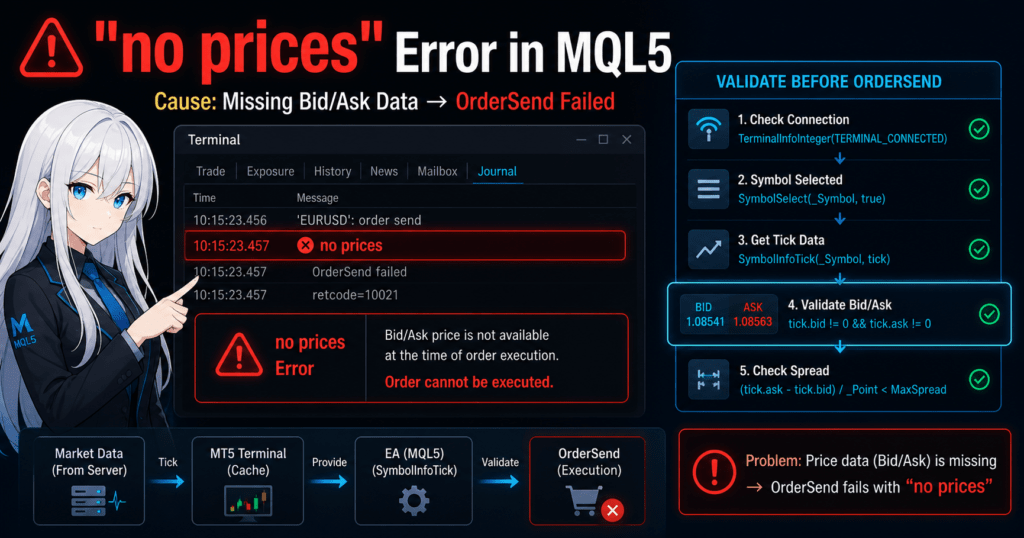
The “no prices” error occurs when an order process runs while price data (Bid/Ask) has not been received. In most cases, it is caused by the environment or timing, and it can be avoided with proper checks.
Definition:
“no prices” is an error code that indicates the current price required for trading (Bid/Ask) has not been received or is invalid.
1.1 Basic Understanding of the no prices Error
Trade processing in MQL5 (OrderSend / OrderCheck) always assumes that current price data (Bid/Ask) is available.
If that price has not been received, order execution cannot be completed and the process returns an error.
Key points:
- Price is “0” or “not received” = orders cannot be placed
- Price delivery from the server is required
- The EA fails because of missing data before its trading logic matters
1.2 When Does It Occur?
“no prices” tends to occur under specific conditions.
Common timing:
- Immediately after the EA starts (right after OnInit)
- Before the first Tick has arrived
- When the market is closed (weekends or holidays)
- When the symbol is not selected (not registered in MarketWatch)
- When the server is disconnected
- Immediately after a VPS restart (data not yet synchronized)
Notes:
- A “Tick” is a price update event, meaning the moment the price changes
- No Tick means the price data is not updated
1.3 Points Beginners Often Misunderstand
Many beginners mistake this for a “logic bug,” but in most cases it is an environment-dependent issue.
Common misunderstandings:
- Incorrect: The code is written incorrectly
Actual cause: Price data has not been received - Incorrect: OrderSend is being used incorrectly
Actual cause: Bid/Ask is 0 - Incorrect: The broker has a system issue
Actual cause: The market is closed
1.4 Related Concepts (Entity Overview)
To understand this error, the following related concepts are important:
- Bid / Ask: Sell price and buy price, the base prices for trading
- spread: The difference between Bid and Ask; an unusually wide spread can indicate a problem
- execution: The process in which an order is actually filled
- slippage: The gap between the requested order price and the executed price
- order conditions: Conditions required for execution, such as price, lot size, and time
“no prices” means that, among these conditions, the price itself is not available.
1.5 Differences From Similar Errors
This error is often confused with similar errors, so it is important to understand the basic differences.
- no prices
→ The price itself does not exist or has not been received - off quotes
→ A price exists, but execution is not possible because of low liquidity - market closed
→ Trading is outside market hours, so trading is not possible at all
Understanding these differences helps avoid unnecessary debugging.
1.6 Practical Points in This Section
- no prices is often not a logic problem
- Most causes are missing data or timing problems
- It can usually be prevented with pre-order checks
2. Conclusion: How to Fix the no prices Error
Conclusion:
The “no prices” error can be almost completely avoided by checking price retrieval (Bid/Ask) and the environment state before placing an order. The most important checks are SymbolInfoTick and connection status.
2.1 Fastest Checklist for Immediate Fixes
Check the following items from top to bottom. In many cases, this resolves the problem immediately.
- Is the terminal connected to the server?
- Is the symbol enabled and selected?
- Has Tick data been received?
- Are Bid / Ask values not 0?
- Is the market open and within trading hours?
- Is the spread not abnormal?
Key points:
- First check whether the price has been received
- Run environment checks before trading logic
2.2 Safe Implementation Pattern (Code Example)
The following is a practical template for avoiding “no prices” in real use.
MqlTick tick;

// Enable the symbol
if(!SymbolSelect(_Symbol, true))
{
   Print("SymbolSelect failed");
   return;
}

// Get Tick data
if(!SymbolInfoTick(_Symbol, tick))
{
   Print("Tick retrieval failed");
   return;
}

// Bid / Ask check
if(tick.bid == 0 || tick.ask == 0)
{
   Print("Price not received (avoiding no prices)");
   return;
}
What this code does:
- SymbolSelect → registers the symbol in MarketWatch
- SymbolInfoTick → retrieves the latest price
- bid/ask check → guards execution
2.3 Pre-Order Checks for Practical Use
Before placing an order with OrderSend, always include the following check.
// Spread check (example: avoid 20 points or more)
double spread = (tick.ask - tick.bid) / _Point;

if(spread > 20)
{
   Print("Abnormal spread");
   return;
}
Reason:
- A wider spread means lower liquidity, which can lead to no prices or off quotes
2.4 Connection Status Check (Often Missed)
if(!TerminalInfoInteger(TERMINAL_CONNECTED))
{
   Print("Server not connected");
   return;
}
Notes:
- This is especially important in VPS environments
- Disconnection means price data delivery stops
2.5 Common Failure Patterns
Common mistakes made by beginners:
- Incorrect: Calling OrderSend immediately in OnInit
→ no prices occurs because no Tick has been received - Incorrect: Skipping SymbolSelect
→ data does not arrive - Incorrect: No Bid/Ask check
→ unstable order execution - Incorrect: Ignoring spread
→ execution failure
2.6 Why This Procedure Solves the Problem
The reason is simple:
- no prices = “the price does not exist”
- the checks above = “guarantee that the price exists before use”
In other words:
Design the EA so it does not use data that does not exist.
That is the core principle.
2.7 Priority List If the Error Still Does Not Go Away
Check the following in this order:
- VPS communication delay or disconnection
- Broker-specific rules or symbol restrictions
- Trading hours, especially for minor currency pairs
- Temporary server-side problems
If the error occurs frequently, consider pausing live operation as part of risk management.
2.8 Practical Best Practices
- Always pass orders through a price validation function first
- Make the check a shared function and reuse it
- Always confirm details in the Experts / Journal logs
3. Why Does “no prices” Occur? (Mechanism / Why)
Conclusion:
“no prices” occurs when processing runs while price data (Tick) has not yet been delivered or updated inside MT5. In short, the cause is unsynchronized data.
Definition:
In MT5, price data is real-time data that depends on Tick delivery from the server. It does not always exist.
3.1 How Price Data Is Retrieved Inside MT5
In MQL5, prices are retrieved through the following flow.
- A Tick, meaning a price update, is sent from the broker server
- The MT5 terminal receives and caches it
- The EA retrieves it through SymbolInfoTick or a similar function
Key points:
- Prices are data that must be received; they are not always present
- If no Tick arrives, the price is not updated
3.2 What It Means When Bid / Ask Does Not Exist
It is easy to assume that Bid and Ask always exist, but in practice they are treated as unavailable in the following situations.
- The first Tick has not arrived yet, such as immediately after EA startup
- The symbol is not subscribed, meaning SymbolSelect has not been run
- The server is disconnected
- The market is stopped, such as weekends or holidays
- Liquidity has dried up in an extreme case
At that time:
- bid = 0
- ask = 0
This leads to “no prices”.
3.3 The First Tick Problem (Most Important)
This is the most common cause.
Situation:
- The EA starts in OnInit
- No Tick has arrived yet
- The price data is empty
Result:
→ OrderSend returns no prices
Important points:
- Placing an order immediately after OnInit is risky
- The EA should receive at least one Tick in OnTick before processing orders
3.4 The Unsubscribed Symbol Problem
In MT5, data is not automatically delivered for every currency pair or instrument.
Conditions:
- The symbol is not displayed in MarketWatch
- SymbolSelect has not been executed
Result:
→ No Tick arrives → price is not received
Note:
- This is especially common with minor currency pairs and CFDs
3.5 Server Connection and Data Synchronization
The connection state also has a direct impact.
- Connected → Tick delivery available → price can be retrieved
- Disconnected → Tick delivery stops → price cannot be retrieved
In a VPS environment, this tends to occur:
- Immediately after a restart
- During network delay
3.6 Effect of Market State and Trading Hours
When the market is closed:
- No Tick arrives
- The price is not updated
Typical examples:
- Weekends, when FX is closed on Saturday and Sunday
- Holidays
- Instrument-specific trading hour restrictions
3.7 Relationship With Spread and Liquidity
Strictly speaking, this is different from “no prices,” but it is related.
- Lower liquidity → wider spread
- Extreme cases → price updates stop
Result:
→ It can lead to no prices or off quotes
Important concepts:
- spread = an indicator of market health
- It also affects slippage and execution
3.8 Why It Is Environment-Dependent
In summary:
- It depends on external data, not only code
- It is affected by the server, time, and connection state
- The same EA can have a different error rate in different environments
In short:
no prices = a data supply problem
3.9 Practical Understanding
In live operation, the following understanding is important:
- The error is not an exception; it is a failed prerequisite
- The design must guarantee price retrieval before execution
- It directly affects execution stability
4. Fixes by Common Cause (Cause → Solution)
Conclusion:
“no prices” can be reliably prevented by handling each cause. The most important requirement is to guarantee symbol selection, Tick data, and connection status before trading.
4.1 Cause 1: Symbol Not Selected (SymbolSelect Problem)
Conclusion:
If the symbol is not enabled, Tick data is not delivered and the price cannot be retrieved.
Fix:
if(!SymbolSelect(_Symbol, true))
{
   Print("Symbol selection failed");
   return;
}
Points:
- Check whether the symbol is displayed in MarketWatch
- In automated trading, call SymbolSelect explicitly
Common failures:
- It works in backtesting but fails in live trading
- It occurs with minor currency pairs or CFDs
4.2 Cause 2: Tick Not Received (First Tick Problem)
Conclusion:
If no Tick has been received, the price does not exist.
Fix:
MqlTick tick;

if(!SymbolInfoTick(_Symbol, tick))
{
   Print("Tick not received");
   return;
}

if(tick.bid == 0 || tick.ask == 0)
{
   Print("Price not initialized");
   return;
}
Alternatives:
- Process orders in OnTick
- Add logic that skips the first run
static bool is_ready = false;

if(!is_ready)
{
   is_ready = true;
   return;
}
4.3 Cause 3: Market Closed (Outside Trading Hours)
Conclusion:
While the market is closed, Ticks are not updated and the price is effectively stopped.
Fix:
datetime time = TimeCurrent();

// Simple trading-hours check (example: avoid weekends)
if(TimeDayOfWeek(time) == 0 || TimeDayOfWeek(time) == 6)
{
   Print("Market closed");
   return;
}
Practical points:
- Trading hours differ by instrument
- Be especially careful with CFDs and indices
4.4 Cause 4: Abnormal Spread (Low Liquidity)
Conclusion:
When the spread becomes extremely wide, price retrieval and execution can become unstable.
Fix:
double spread = (tick.ask - tick.bid) / _Point;

if(spread > 30) // Acceptable value depends on the strategy
{
   Print("Abnormal spread");
   return;
}
Reason:
- Lower liquidity → delayed price updates
- Higher slippage → execution failure
4.5 Cause 5: Server Not Connected
Conclusion:
If the connection is lost, Tick delivery stops completely.
Fix:
if(!TerminalInfoInteger(TERMINAL_CONNECTED))
{
   Print("Not connected");
   return;
}
Important in practice:
- This should be a top-priority check in VPS environments
- Consider reconnection logic as well
4.6 Cause 6: Broker Rules and Symbol Restrictions
Conclusion:
Trading hours, minimum lot size, and liquidity differ by broker.
Actions:
- Check trading hours
- Check instrument-specific specifications
- Retrieve details with SymbolInfo functions
Notes:
- Liquidity often falls late at night or early in the morning
- Crypto CFDs and similar instruments can vary greatly by broker
4.7 Cause 7: VPS and Communication Delay
Conclusion:
If communication delay slows Tick delivery, the EA can enter a state where prices have not been received.
Actions:
- Use a VPS region close to the broker server
- Check ping
- Add reconnection handling
4.8 Cause-Based Summary for Practical Use
Priority order:
- SymbolSelect, the most common issue
- Tick not received, especially first Tick issues
- Connection status
- Market hours
- spread / liquidity
- VPS / broker rules
4.9 Design to Prevent Recurrence
In practical systems, always implement the following:
- A shared pre-order check function
- Price validation
- Log output for cause identification
Example:
bool IsTradeReady()
{
   MqlTick tick;

   if(!SymbolInfoTick(_Symbol, tick)) return false;
   if(tick.bid == 0 || tick.ask == 0) return false;
   if(!TerminalInfoInteger(TERMINAL_CONNECTED)) return false;

   return true;
}
5. Differences From Other Errors (Comparison / vs)
Conclusion:
“no prices” means the price does not exist. Other errors usually mean that a price exists but the order conditions are not satisfied. The fastest way to classify the issue is to ask whether data is missing or conditions are invalid.
Definition:
Trade errors can be divided into two groups:
- Missing data: no prices
- Execution condition mismatch: off quotes / invalid price and similar errors
5.1 Main Error Comparison for Practical Use
| Error name | Main cause | When it occurs | Fix difficulty | Recurrence rate |
|---|---|---|---|---|
| no prices | Price not received (Bid/Ask=0) | Right after startup, disconnected, not subscribed | Low | Medium |
| off quotes | Low liquidity or execution unavailable | Sharp price moves or low-liquidity periods | Medium | High |
| market closed | Outside trading hours | Weekends or holidays | Low | Low |
| invalid price | The specified price is invalid | When setting limit or stop orders | Medium | Medium |
Key points:
- no prices = there is no price in the first place
- off quotes = a price exists, but execution is not possible
5.2 no prices vs off quotes
Core difference:
- no prices
→ Price data does not exist because Tick data has not been received - off quotes
→ A price exists, but execution is unavailable because of low liquidity or price deviation
Practical judgment:
- Bid/Ask is 0 → no prices
- Bid/Ask exists but the order fails → off quotes
Note:
- off quotes is strongly related to slippage and wider spreads
5.3 no prices vs market closed
Core difference:
- no prices
→ Can occur regardless of market state because of connection or Tick issues - market closed
→ Clearly outside trading hours
How to judge:
if(TimeDayOfWeek(TimeCurrent()) == 0 || TimeDayOfWeek(TimeCurrent()) == 6)
{
   // market closed is likely
}
Important points:
- market closed is predictable
- no prices is environment-dependent and can occur irregularly
5.4 no prices vs invalid price
Core difference:
- no prices
→ The price itself has not been received - invalid price
→ The specified order price is invalid, old, or too far from the current price
Examples:
- no prices → tick.bid = 0
- invalid price → tick.bid exists, but the order price has deviated
5.5 Practical Classification Flow
Check in this order for efficient troubleshooting:
- Is Bid / Ask 0?
→ YES → no prices - Is the terminal connected?
→ NO → no prices - Is it within market hours?
→ NO → market closed - Is the spread abnormal?
→ YES → possible off quotes - Is the order price far from the current price?
→ YES → invalid price
5.6 Why Classification Matters
Reasons:
- Each error requires a completely different fix
- A wrong diagnosis leads to endless debugging
- In live operation, it can directly cause missed opportunities
Examples:
- no prices → waiting may solve the issue
- off quotes → conditions must usually be changed
5.7 Practical Judgment Criteria
- First check whether a price exists
- Next check whether execution is possible
- Finally check whether the conditions are correct
With this order, almost all related errors can be classified.
6. Common Mistakes and Pitfalls
Conclusion:
“no prices” is usually caused not by code itself, but by missing prerequisite checks. Overlooking the first Tick, symbol selection, or connection state is especially critical.
6.1 Ignoring the First Tick Problem
Conclusion:
Immediately after an EA starts, price data has often not been received. If you place an order right away, no prices is likely to occur.
Common code:
// Bad example: immediate order in OnInit
OrderSend(...);
Fixes:
- Process orders in OnTick
- Skip the first run
static bool is_ready = false;

if(!is_ready)
{
   is_ready = true;
   return;
}
Reason:
- If no Tick, meaning no price update, has arrived, Bid/Ask is invalid
6.2 Not Using SymbolInfoTick
Conclusion:
Placing orders without confirming price retrieval creates unstable behavior that depends on internal state.
Bad pattern:
double price = SymbolInfoDouble(_Symbol, SYMBOL_BID);
// Use it as-is
Fix:
MqlTick tick;

if(!SymbolInfoTick(_Symbol, tick)) return;
if(tick.bid == 0 || tick.ask == 0) return;
Reason:
- SymbolInfoDouble alone does not guarantee that the price has been updated
6.3 No Trading-Hours Filter
Conclusion:
When the market is closed, Ticks stop. This can be mistaken for no prices.
Fix:
datetime now = TimeCurrent();

if(TimeDayOfWeek(now) == 0 || TimeDayOfWeek(now) == 6)
{
   return;
}
Notes:
- CFDs and indices have more complex trading hours
- Trading hours depend on broker specifications
6.4 Underestimating the VPS Environment
Conclusion:
On a VPS, communication delay, reconnection, and unsynchronized data occur more often, increasing the chance of no prices.
Common situations:
- Immediately after VPS restart
- Temporary network interruption
- Server switching
Fix:
if(!TerminalInfoInteger(TERMINAL_CONNECTED))
{
   return;
}
Practical points:
- High ping delays Tick delivery
- It also affects execution quality
6.5 No Spread Check
Conclusion:
A wider spread is a signal of lower liquidity and can be a warning sign before no prices or off quotes.
Fix:
double spread = (tick.ask - tick.bid) / _Point;

if(spread > 30)
{
   return;
}
Reason:
- Thin liquidity makes price updates unstable
- Higher slippage leads to execution failure
6.6 Not Checking Logs (Experts / Journal)
Conclusion:
Without checking logs, it is almost impossible to identify the cause.
Where to check:
- Experts tab, for EA logs
- Journal tab, for connection and system logs
What to look for:
- Error code
- Timing of occurrence
- Connection status
6.7 Continuing After Ignoring the Error
Conclusion:
Ignoring the error can lead to repeated failures, broken logic, and capital risk.
Bad example:
OrderSend(...);
// Error not checked
Fixes:
- Check return values
- Output error logs
- Control retries
6.8 No Shared Check Function
Conclusion:
If checks are written separately every time, missed checks will eventually happen.
Fix by using a template:
bool IsTradeReady()
{
   MqlTick tick;

   if(!SymbolInfoTick(_Symbol, tick)) return false;
   if(tick.bid == 0 || tick.ask == 0) return false;
   if(!TerminalInfoInteger(TERMINAL_CONNECTED)) return false;

   return true;
}
6.9 Practical Failure Summary
Most common order:
- Ignoring the first Tick
- Not implementing SymbolSelect
- No connection check
- No spread consideration
- Not checking logs
6.10 Key Points in This Section
- no prices can be prevented through design
- Most failures come from insufficient checks
- Shared validation is the key to preventing recurrence
7. Practical Use Cases (Operational Design)
Conclusion:
Handling “no prices” is not just error avoidance. It is a design element that supports stable EA operation and execution quality. By standardizing pre-order validation, you can reduce both missed opportunities and abnormal execution.
7.1 Designing a Safe Order Flow
Conclusion:
Orders become more stable when implemented in three stages: price retrieval, validation, and order placement.
Recommended flow:
- Get Tick data with SymbolInfoTick
- Validate price with Bid/Ask and spread
- Validate environment with connection and trading hours
- Execute the order with OrderSend / OrderCheck
Code example, minimal template:
bool IsTradeReady(MqlTick &tick)
{
   if(!SymbolInfoTick(_Symbol, tick)) return false;
   if(tick.bid == 0 || tick.ask == 0) return false;

   if(!TerminalInfoInteger(TERMINAL_CONNECTED)) return false;

   double spread = (tick.ask - tick.bid) / _Point;
   if(spread > 30) return false;

   return true;
}

// Usage example
MqlTick tick;
if(!IsTradeReady(tick)) return;

// OrderSend here
Points:
- Design the EA so this check always runs before OrderSend
- If conditions are not met, do nothing
7.2 Turning Error Avoidance Logic Into a Template
Conclusion:
Moving the checks into a shared function greatly improves development efficiency and reproducibility.
Practical benefits:
- Localizes bugs, so one fix applies everywhere
- Prevents missed checks
- Can be reused across multiple EAs
Extended example:
enum TradeStatus
{
   TRADE_OK,
   NO_CONNECTION,
   NO_PRICE,
   HIGH_SPREAD
};

TradeStatus CheckTradeStatus(MqlTick &tick)
{
   if(!TerminalInfoInteger(TERMINAL_CONNECTED)) return NO_CONNECTION;

   if(!SymbolInfoTick(_Symbol, tick)) return NO_PRICE;
   if(tick.bid == 0 || tick.ask == 0) return NO_PRICE;

   double spread = (tick.ask - tick.bid) / _Point;
   if(spread > 30) return HIGH_SPREAD;

   return TRADE_OK;
}
7.3 Relationship With Risk Management
Conclusion:
Handling no prices is not only error avoidance; it directly affects expected value and drawdown control.
Impact structure:
- Order failure → missed opportunity
- Forced order placement → higher slippage
- Unstable execution → weaker performance
Examples:
- Order failure at the start of a trend → delayed entry
- Forcing an order during a high spread → worse profit and loss
Important points:
- Choosing not to trade is also part of the strategy
- Forced execution can create negative expected value over time
7.4 How to Build It Into EA Design
Conclusion:
no prices handling should be designed as part of the core logic, not as an afterthought.
Design layers:
- Signal generation, such as entry conditions
- Filter layer, such as price and environment checks
- Execution layer, such as OrderSend
Structural image:
// Signal check
if(!SignalCondition()) return;

// Environment check
MqlTick tick;
if(!IsTradeReady(tick)) return;

// Order
ExecuteTrade(tick);
7.5 Multi-Symbol and Multi-Timeframe Support
Conclusion:
When handling multiple instruments, each symbol can have a different price retrieval state, so individual checks are required.
Notes:
- Tick arrival timing differs by symbol
- Liquidity and spread also depend on the symbol
Actions:
- Check each symbol with arrays and loops
- Run SymbolSelect in advance
7.6 VPS Optimization
Conclusion:
On a VPS, no prices becomes more likely if the EA is not designed around connection, delay, and synchronization.
Actions:
- Use a VPS in the same region as the broker when possible
- Run periodic reconnection checks
- Wait for a short period immediately after startup
Practical points:
- Ping, or latency, directly affects execution quality
- In unstable environments, conservative filters are useful
7.7 Practical Best Practices
- Make pre-order checks mandatory, not optional
- Always implement a spread filter
- Output logs systematically
- Branch handling by error type
Short summary:
- If there is no price, do not trade
- If conditions are poor, wait
- Everything supports execution quality
8. FAQ
Conclusion:
Most “no prices” cases are temporary missing-price states and can be resolved with pre-checks and waiting logic. Review the environment and design only when the issue occurs repeatedly.
Definition:
This FAQ provides short, reusable answers to common practical questions.
8.1 Is no prices a fatal error?
No. In many cases, it is temporary.
However, if it occurs frequently, there is likely a problem with connection, Tick retrieval, or symbol settings.
8.2 Can it occur in backtesting?
Yes, it can occur.
It may happen when historical data is missing or when Ticks have not yet been generated in the tester’s initial state.
8.3 What Is the Difference Between SymbolInfoTick and RefreshRates?
- SymbolInfoTick: retrieves the current Tick structure and is recommended
- RefreshRates: requests a price update and is an older method
In practical MQL5 development, SymbolInfoTick should be prioritized.
8.4 Is spread related?
It is not the direct cause, but it is related.
A wider spread means lower liquidity, which can cause delayed price updates and unstable execution.
8.5 Is it more likely on a VPS?
Yes, the probability can increase.
Communication delay, reconnection, and synchronization lag can create more states where Tick data has not been received.
8.6 Should automated trading be stopped?
Not if it is temporary.
If it occurs repeatedly, you should consider pausing operation from a risk management perspective.
8.7 Which logs should I check?
Check the following:
- Experts, for EA operation logs
- Journal, for connection and system logs
Always confirm the timing of the error and the environment state.
8.8 Is It Safe to Place Orders in OnInit?
In general, it is not recommended.
Because the first Tick may not have arrived yet, no prices is more likely.
9. Summary: Reproducible Fixes
Conclusion:
Because “no prices” is caused by missing price data, it can be almost completely avoided by enforcing pre-order checks. The key is to build environment validation into the trading logic.
9.1 Most Important Points in 3 Lines
- no prices = Bid/Ask has not been retrieved
- Fix = pre-check Symbol, Tick, and connection
- Practical design = make pre-order validation mandatory
9.2 Reproducible Fix Flow
Implementing the following order supports stable operation.
- Enable the symbol with SymbolSelect
- Retrieve Tick data with SymbolInfoTick
- Validate Bid / Ask with a 0 check
- Check connection with TerminalInfoInteger
- Apply a spread filter
- Execute the order with OrderSend
9.3 Practical Template (Final Form)
bool IsTradeReady(MqlTick &tick)
{
   if(!TerminalInfoInteger(TERMINAL_CONNECTED)) return false;

   if(!SymbolInfoTick(_Symbol, tick)) return false;
   if(tick.bid == 0 || tick.ask == 0) return false;

   double spread = (tick.ask - tick.bid) / _Point;
   if(spread > 30) return false;

   return true;
}

// Execution example
MqlTick tick;
if(!IsTradeReady(tick)) return;

// Order processing
// OrderSend(...)
9.4 Core Design Principle
- The error is not an exception; it is a failed prerequisite
- Execution quality is determined by pre-checks
- Forced orders are actions that can lower expected value
9.5 Operational Importance
- Ignoring no prices → missed opportunities
- Forced orders → increased slippage
- Unstable operation → worse drawdown
Therefore:
Choosing not to trade is also part of the strategy.
9.6 Final Actions
- Always implement a pre-order check function
- Check logs and identify the cause
- Optimize the VPS and broker environment as well