- 1 Key Takeaways
- 2 1. Why This Design Is Necessary
- 3 2. Overall EA Design Philosophy
- 4 3. Basic Structure
- 5 4. Roles of the Main Modules
- 6 5. Implementation Patterns
- 7 6. Sample Code
- 8 7. Design Pattern Comparison
- 9 8. Items to Check in Backtesting
- 10 9. Items to Check in Forward Testing
- 11 10. Notes for Live Operation
- 12 11. Common Design Mistakes
- 13 12. Summary
- 14 FAQ
- 14.1 What are broker differences in MQL5?
- 14.2 What should I check first in an EA designed for broker differences?
- 14.3 Can OrderCheck prevent order failures?
- 14.4 Does EA design change between netting and hedging accounts?
- 14.5 Do fixed-lot EAs still need lot restriction checks?
- 14.6 If backtesting is profitable, will live operation produce the same result?
- 14.7 What should I check in forward testing?
Key Takeaways
The purpose of designing an MQL5 EA with broker differences in mind is to reduce problems where an EA works in backtesting but behaves differently on a live account.
Broker differences appear as differences in spread, execution method, minimum lot, lot step, stop level, freeze level, trading hours, and account type.
An EA must be designed by separating not only the trading logic, but also pre-order checks, lot normalization, symbol specification retrieval, error handling, and logging.
Backtest results do not guarantee future profit, so before live operation you need to use forward testing to check execution differences and behavior when spreads widen.
1. Why This Design Is Necessary
Conclusion:
In an MQL5 EA, even the same code can produce different order results, lot restrictions, and execution conditions depending on the broker or account type.
If broker differences are ignored, an EA that worked in the tester is more likely to fail orders, trigger lot errors, or produce stop setting errors on a live account.
An MQL5 EA does not run reliably just because its trading signals are correct. Real orders also depend on symbol-specific trading conditions, account settings, trading hours, margin, and execution method.
In particular, the following differences directly affect EA behavior.
- When the spread is wide, entry conditions and the risk-reward ratio change
- When the minimum lot or lot step differs, the calculated lot cannot be used as-is
- When the stop level is wide, stop loss or take profit may not be placeable at order time
- When a freeze level exists, position modification or close orders may be restricted
- Netting accounts and hedging accounts use different concepts for position management
- When tradable hours differ, the same OnTick process may reach periods when orders cannot be placed
To build an EA in MQL5 that is resilient to broker differences, you need to separate signal judgment from order processing. The EA should not be structured as “place an order immediately when conditions are met.” It should be structured as “check whether trading is possible after conditions are met, then place the order.”
1.1 Situations Where Broker Differences Often Surface
Broker differences tend to surface more clearly during periods of large market movement than during normal conditions. Spread widening, execution delay, slippage, and order rejection may be more noticeable on live accounts than in backtests.
With an EA, pay special attention to the following situations.
- Around economic news releases
- Immediately after market open
- During rollover periods
- During low-liquidity periods
- When price updates are fast after a sharp move
- Symbols such as CFDs and indices where trading conditions vary greatly by symbol
1.2 Why Trading Logic Alone Is Not Enough
Trading logic is the part that judges market conditions. However, whether an order can actually be executed depends on the trading environment.
For example, even if a moving average cross occurs, the design needs to skip entry when the spread is too wide. Even if lot calculation produces 0.13 lot, normalization based on the symbol specification is required when the lot step is 0.10.
In an MQL5 EA, treating market judgment and order execution as separate responsibilities makes it easier to improve resilience to broker differences.
2. Overall EA Design Philosophy
Conclusion:
An EA that handles broker differences processes trading decisions, risk checks, symbol specification checks, pre-order checks, order submission, and post-execution management in stages.
Separating each stage makes it easier to identify the cause of errors and organize validation conditions.
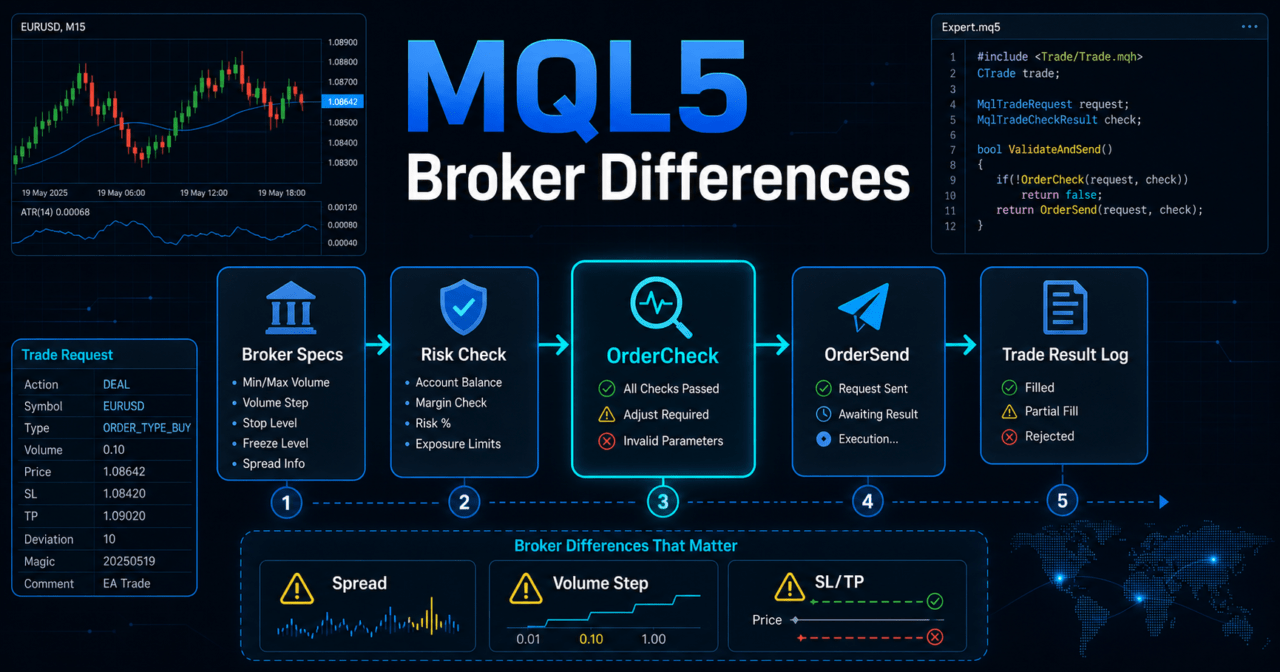
In an EA designed around broker differences, keeping the processing flow fixed helps stabilize the design. A typical flow is as follows.
Market analysis
↓
Filter judgment
↓
Signal judgment
↓
Risk check
↓
Symbol specification check
↓
Pre-order check
↓
Order submission
↓
Post-execution management
↓
Close / stop judgment
With this structure, even when entry conditions are met, the EA does not send an order if trading conditions are poor. The goal of an EA is not to increase the number of trades. It is to make it easier to confirm reproducibility under the designed conditions.
2.1 Roles of OnInit, OnTick, and OnDeinit
In an MQL5 EA, event functions are used with separate roles.
| Function | Role | Use in Handling Broker Differences |
|---|---|---|
| OnInit | Initialization processing | Create indicator handles, check initial parameters |
| OnTick | Processing when a new tick is received | Signal judgment, trading condition checks, order management |
| OnDeinit | Cleanup processing on termination | Release indicator handles, output termination logs |
In an EA that uses indicators, create handles in OnInit and retrieve values with CopyBuffer in OnTick. In MQL5, many indicator functions do not return values directly. Instead, they create a handle first, then retrieve buffer values.
2.2 Difference Between Netting and Hedging Accounts
In MQL5, position management changes depending on the account type. In a netting account, positions for the same symbol are generally aggregated. In a hedging account, it may be possible to hold multiple positions on the same symbol.
An EA should not assume that it can hold any number of positions on the same symbol without considering account type. Position selection, additional entries, and closing logic must be designed according to the account type.
3. Basic Structure
Conclusion:
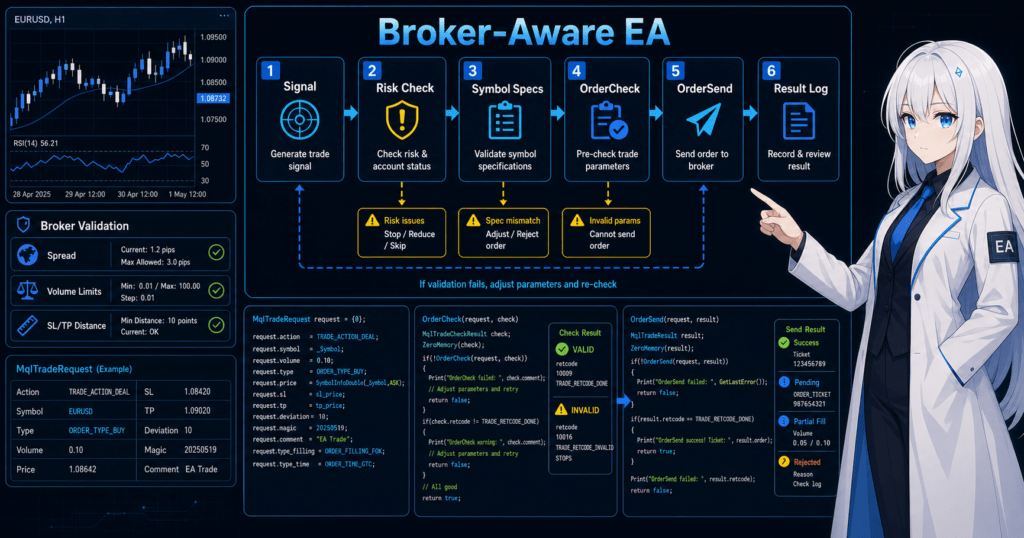
The basic structure for handling broker differences is to process symbol specification retrieval, lot normalization, spread checking, stop distance checking, OrderCheck, and OrderSend in order.
Using this order makes it easier to trace the cause of order failures through logs.
The basic EA structure becomes easier to organize when separated into the following modules.
- Signal judgment module
- Filter judgment module
- Lot calculation module
- Symbol specification check module
- Pre-order check module
- Order submission module
- Position management module
- Error handling module
- Logging module
This separation makes it easier to isolate whether a problem found in backtesting comes from the trading logic or from trading conditions.
3.1 Symbol Specification Items to Retrieve
In an EA, retrieve symbol specifications before placing an order. Common items to check are as follows.
| Item | Purpose | Design Note |
|---|---|---|
| Minimum lot | Check the minimum orderable volume | If the calculated lot is below it, skip the order or normalize it |
| Maximum lot | Check the maximum orderable volume | Prevent oversized lots |
| Lot step | Check the lot increment | Align fractional values with the symbol specification |
| Stop level | Check the minimum distance for SL/TP | Avoid SL/TP that is too close |
| Freeze level | Check the restricted modification distance | Consider situations where closing or modification is restricted |
| Tick size | Check the price movement unit | Use it for profit/loss calculation and price rounding |
| Tick value | Check the value per tick | Use it for risk-based lot calculation |
In an MQL5 EA, it is important not to hard-code symbol specifications as fixed values. Currency pairs, precious metals, indices, and crypto CFDs can differ greatly in digits and tick value.
3.2 Basics of Pre-Order Checks
At minimum, pre-order checks should confirm the following.
- Whether trading is allowed
- Whether the spread is within the acceptable range
- Whether the calculated lot matches the symbol specification
- Whether required margin is sufficient
- Whether SL/TP satisfies the stop level
- Whether existing positions conflict with the design conditions
- Whether it is within trading hours
In MQL5, build an MqlTradeRequest before sending an order and use OrderCheck as needed to validate it. OrderCheck makes it easier to detect insufficient margin and inconsistencies in order conditions before order submission.
4. Roles of the Main Modules
Conclusion:
In an EA that is resilient to broker differences, trading signals, risk management, lot calculation, order checks, and position management are implemented as separate roles.
By separating roles, differences in broker specifications can be contained within specific parts of the processing.
If the EA is written as one large block inside OnTick, it becomes difficult to trace causes later. When handling broker differences, the processing that absorbs specification differences must be clearly separated.
4.1 Signal Judgment and Filter Judgment
Signal judgment creates entry candidates. Filter judgment limits whether those candidates may be traded.
For example, even when a moving average cross is used as a signal, the design may skip entry if the spread is wide, ATR is extremely large, or the market is close to non-trading hours.
4.2 Risk Management and Lot Calculation
Lot calculation considers not only account balance and equity, but also stop loss width, tick value, tick size, minimum lot, maximum lot, and lot step.
Common lot calculation methods are as follows.
| Method | Advantage | Disadvantage | Best Use Case |
|---|---|---|---|
| Fixed lot | Easy to implement | Does not easily reflect capital changes or stop loss width | Initial validation |
| Balance-proportional | Easy to adjust based on capital | Risk can fluctuate if stop loss width is ignored | Adjustment by account size |
| Risk-based | Can calculate from acceptable loss and stop loss width | Requires understanding tick value and symbol specifications | Validation assuming live operation |
| Volatility-adjusted | Can reflect market movement using ATR and similar measures | Can become highly parameter-dependent | Symbols with large price movement |
Even with risk-based lot calculation, the final lot must be normalized to the broker’s lot restrictions. If the normalized lot falls below the minimum lot, it is safer to skip the order instead of forcing it.
4.3 Order Management and Post-Execution Management
Order management uses MqlTradeRequest and MqlTradeResult to handle order details and results clearly. If an order fails, log the result code, lot, price, SL/TP, spread, and account status.
Post-execution management checks whether a position exists, the entry price, profit/loss, SL/TP, holding time, and exit conditions. In a netting account, positions are aggregated, so state management by symbol is important in addition to ticket-level management.
5. Implementation Patterns
Conclusion:
Implementation patterns can be divided into fixed-condition, symbol-specification retrieval, pre-order validation, and environment-adaptive types.
When live operation is assumed, combining symbol-specification retrieval with pre-order validation is easier to handle.
Support for broker differences does not need to become complex all at once. It is easier to organize the EA by first validating a fixed-condition design, then adding symbol specification retrieval, OrderCheck, and logging.
5.1 Fixed-Condition Type
The fixed-condition type uses fixed input values for lot size, acceptable spread, and SL/TP width. It is easy to implement, but conditions may no longer fit when the symbol or broker changes.
This method is suitable for learning and initial validation. However, live operation requires processing that retrieves and normalizes symbol specifications.
5.2 Symbol-Specification Retrieval Type
The symbol-specification retrieval type uses SymbolInfoDouble and SymbolInfoInteger to retrieve the minimum lot, maximum lot, lot step, spread-related information, and similar values.
With this method, the EA reads the trading conditions for each symbol before moving to order processing. Because it reduces assumptions based on fixed values, it is suitable for multi-symbol EAs and validation across multiple brokers.
5.3 Pre-Order Validation Type
The pre-order validation type creates an MqlTradeRequest, then checks order conditions with OrderCheck.
OrderCheck is used to check margin and order condition problems before sending an order. Passing OrderCheck does not guarantee execution, but it makes obvious condition mismatches easier to find in advance.
6. Sample Code
Conclusion:
The sample code implements symbol specification retrieval, lot normalization, spread checking, OrderCheck, and OrderSend as separate steps.
This code is a basic validation template, and live operation requires additional checks based on the symbol, timeframe, and broker conditions.
The following is an MQL5 sample close to a minimum structure for handling broker differences. The trading logic itself is simplified so the pre-order check flow is easy to read.
#property strict

input double RiskLot = 0.10;
input int MaxSpreadPoints = 30;
input int StopLossPoints = 300;
input int TakeProfitPoints = 600;

double NormalizeLotBySymbol(const string symbol, double lot)
{
   double minLot = SymbolInfoDouble(symbol, SYMBOL_VOLUME_MIN);
   double maxLot = SymbolInfoDouble(symbol, SYMBOL_VOLUME_MAX);
   double lotStep = SymbolInfoDouble(symbol, SYMBOL_VOLUME_STEP);

   if(minLot <= 0.0 || maxLot <= 0.0 || lotStep <= 0.0)
   {
      Print("Invalid symbol volume settings: ", symbol);
      return 0.0;
   }

   lot = MathMax(minLot, MathMin(maxLot, lot));
   lot = MathFloor(lot / lotStep) * lotStep;
   lot = NormalizeDouble(lot, 2);

   if(lot < minLot)
   {
      Print("Lot is smaller than minimum lot after normalization");
      return 0.0;
   }

   return lot;
}

bool IsSpreadAcceptable(const string symbol)
{
   MqlTick tick;
   if(!SymbolInfoTick(symbol, tick))
   {
      Print("Failed to get tick: ", symbol);
      return false;
   }

   double point = SymbolInfoDouble(symbol, SYMBOL_POINT);
   if(point <= 0.0)
   {
      Print("Invalid point value: ", symbol);
      return false;
   }

   int spreadPoints = (int)MathRound((tick.ask - tick.bid) / point);
   if(spreadPoints > MaxSpreadPoints)
   {
      Print("Spread is too wide: ", spreadPoints);
      return false;
   }

   return true;
}

bool SendBuyOrder(const string symbol)
{
   if(!IsSpreadAcceptable(symbol))
      return false;

   MqlTick tick;
   if(!SymbolInfoTick(symbol, tick))
   {
      Print("Failed to get latest tick");
      return false;
   }

   double point = SymbolInfoDouble(symbol, SYMBOL_POINT);
   int digits = (int)SymbolInfoInteger(symbol, SYMBOL_DIGITS);

   if(point <= 0.0 || digits <= 0)
   {
      Print("Invalid price settings");
      return false;
   }

   double lot = NormalizeLotBySymbol(symbol, RiskLot);
   if(lot <= 0.0)
      return false;

   double sl = NormalizeDouble(tick.ask - StopLossPoints * point, digits);
   double tp = NormalizeDouble(tick.ask + TakeProfitPoints * point, digits);

   MqlTradeRequest request;
   MqlTradeResult result;
   MqlTradeCheckResult check;

   ZeroMemory(request);
   ZeroMemory(result);
   ZeroMemory(check);

   request.action = TRADE_ACTION_DEAL;
   request.symbol = symbol;
   request.volume = lot;
   request.type = ORDER_TYPE_BUY;
   request.price = tick.ask;
   request.sl = sl;
   request.tp = tp;
   request.deviation = 20;
   request.type_filling = ORDER_FILLING_FOK;
   request.comment = "broker difference check sample";

   if(!OrderCheck(request, check))
   {
      Print("OrderCheck failed. retcode=", check.retcode);
      return false;
   }

   if(check.retcode != TRADE_RETCODE_DONE)
   {
      Print("OrderCheck rejected. retcode=", check.retcode);
      return false;
   }

   if(!OrderSend(request, result))
   {
      Print("OrderSend failed. retcode=", result.retcode);
      return false;
   }

   if(result.retcode != TRADE_RETCODE_DONE && result.retcode != TRADE_RETCODE_PLACED)
   {
      Print("OrderSend was not completed. retcode=", result.retcode);
      return false;
   }

   Print("Buy order sent. ticket=", result.order, " volume=", lot);
   return true;
}

int OnInit()
{
   Print("EA initialized");
   return INIT_SUCCEEDED;
}

void OnDeinit(const int reason)
{
   Print("EA deinitialized. reason=", reason);
}

void OnTick()
{
   if(PositionSelect(_Symbol))
      return;

   bool sampleSignal = false;

   if(sampleSignal)
   {
      SendBuyOrder(_Symbol);
   }
}
6.1 How to Read the Code
This sample performs spread checking, lot normalization, and OrderCheck before placing an order. In MQL5, order details are placed in MqlTradeRequest, and the submission result is received through MqlTradeResult.
sampleSignal is a temporary condition for validation. In a real EA, replace it with signal judgment based on moving averages, ATR, RSI, price conditions, or similar logic.
6.2 Processing to Add Before Live Operation
When live operation is assumed, add the following processing.
- Trading hour checks
- Stop level and freeze level checks
- Margin level checks
- Branching for netting and hedging accounts
- Adjustment of type_filling based on the execution method
- Retry limits after failure
- More detailed logging
- Handling VPS outages and unstable communication
Even when retrying orders, avoid a design that resends orders without limit. During sharp market moves, that can lead to unintended repeated orders.
7. Design Pattern Comparison
Conclusion:
When handling broker differences, symbol-specification retrieval, pre-order validation, and environment-adaptive types make live-operation differences easier to detect than fixed-condition types.
However, complex adaptive processing can also cause over-optimization and missed validation cases.
| Method | Advantage | Disadvantage | Best Use Case | Implementation Difficulty |
|---|---|---|---|---|
| Fixed-condition type | Easy to implement | Weak against broker differences | Learning, initial validation | Low |
| Symbol-specification retrieval type | Easy to reflect symbol-level differences | Incorrect handling of retrieved values can cause defects | Multi-symbol EAs | Medium |
| Pre-order validation type | Easy to find causes of order failure in advance | Execution differences remain after OrderCheck | EAs designed for live operation | Medium |
| Environment-adaptive type | Easy to control behavior by spread or time period | Conditions can become complex | Improvements after forward testing | High |
A design pattern is not better just because it is more complex. It is easier to validate by first making differences visible in logs, then adding controls to the parts where actual problems appear.
7.1 How to Avoid Over-Optimization
If too many conditions are added to handle broker differences, the EA can become fitted only to a specific period or broker. Over-optimization may look good in backtesting but often breaks down in forward testing.
When adding conditions, check the following before and after the change.
- Whether the number of trades has dropped excessively
- Whether maximum drawdown improved only in a specific period
- Whether performance collapses when parameters are changed slightly
- Whether behavior remains stable when spread conditions are changed
- Whether the same tendency appears across multiple periods
8. Items to Check in Backtesting
Conclusion:
In backtesting, check not only profit, but also maximum drawdown, number of trades, profit/loss ratio, losing streaks, spread conditions, and period dependency.
When broker differences are assumed, tests with different spread and execution conditions are also needed.
Backtesting is a method for validating the EA structure. Backtest results do not guarantee future profit. Especially when broker differences are involved, tester conditions may not match live account conditions.
Items to check are as follows.
| Item | Reason to Check | Note |
|---|---|---|
| Total profit/loss | Check the overall tendency | Do not judge by this alone |
| Maximum drawdown | Check capital fluctuation risk | Decide the acceptable range in advance |
| Win rate | Check how often trades are profitable | Review together with the profit/loss ratio |
| Profit/loss ratio | Check the balance between profit and loss | Do not evaluate only by win rate |
| Number of trades | Check statistical bias | Results with too few trades are hard to judge |
| Losing streaks | Check money management resilience | Review together with lot calculation |
| Spread conditions | Check the impact of broker differences | Do not depend only on fixed spread |
| Period dependency | Avoid effectiveness limited to a specific period | Review by market phase |
| Parameter dependency | Check over-optimization | Watch for settings that collapse after small changes |
8.1 Change Spread Conditions
For an EA that assumes broker differences, check multiple spread condition patterns. Logic that works only with narrow spreads may perform worse on a live account when spreads widen.
The more an EA leans toward scalping, the more sensitive it becomes to spread and execution differences. In a design with small stop loss or take profit widths, even a few points of difference can significantly change expected value.
8.2 Check Parameter Dependency
An EA whose results collapse after only a small parameter change may have low reproducibility. Do not look only at the best value. Check whether nearby values show a similar tendency.
In backtesting, prioritize a structure that is hard to break under multiple conditions over a single best result.
9. Items to Check in Forward Testing
Conclusion:
In forward testing, check execution differences, spread widening, trading frequency, broker differences, and VPS stability, which are harder to see in backtesting.
Small-scale validation under conditions close to a live account makes it easier to understand risks before live operation.
Forward testing validates how the EA behaves against future price data. In articles about broker differences, forward testing is especially important.
Items to check are as follows.
- How far the execution price deviates from the expected price
- Whether orders are skipped when spreads widen
- Whether trading frequency differs greatly from backtesting
- Whether drawdown remains within the acceptable range
- Whether order failures occur by broker
- Whether the EA runs without stopping in a VPS environment
- Whether state management remains stable after communication delays or reconnection
9.1 Differences Between Demo and Live Accounts
Demo and live accounts may differ in execution conditions and spread conditions. Even if an EA shows no issues on a demo account, slippage or order rejection may occur on a live account.
For that reason, forward testing requires step-by-step validation with reduced trading volume. The purpose of an EA is not to guarantee profit, but to confirm how it behaves under the designed conditions.
9.2 Items to Check in Logs
In forward testing, log not only order results but also the state before the order.
Examples of items to log are as follows.
- Signal occurrence time
- Spread
- Calculated lot
- Normalized lot
- SL/TP distance
- OrderCheck result
- OrderSend result
- Position status
- Account balance and equity
With logs, it becomes easier to separate problems caused by broker differences from problems caused by the EA logic.
10. Notes for Live Operation
Conclusion:
In live operation, you must consider differences in spread, execution delay, slippage, trading hours, margin, leverage, and account type.
Even an EA that appears stable in backtesting may produce different results on a live account because of condition differences.
As an EA moves closer to live operation, factors outside the market itself become more important. Broker specifications directly affect the EA’s order results.
Items to watch in live operation are as follows.
- Spread widening can worsen expected value
- Execution delay and slippage can occur
- Stop levels may prevent placing SL/TP close to the market price
- Freeze levels may restrict order modification
- Higher leverage can also make drawdown larger
- Insufficient margin can cause order rejection
- Account type changes position management
- Orders may not be possible outside trading hours or during maintenance periods
10.1 Decide Risk Limits First
Before running an EA, decide the acceptable drawdown, acceptable loss per trade, and stop conditions after consecutive losses. If lot size or stop conditions are changed after losses occur, validation results and live-operation conditions no longer match.
Risk limits should be designed as safety controls separate from the trading logic. Examples include limiting daily loss, weekly loss, maximum number of positions, and maximum lot size.
10.2 Revalidate When Changing Brokers
If you change brokers, the same EA needs to be revalidated. Symbol names, digits, spreads, tick values, trading hours, and lot restrictions may change.
Do not simply copy EA parameters as-is. Check symbol specifications and execution conditions first, then run backtesting and forward testing.
11. Common Design Mistakes
Conclusion:
Common design mistakes include ignoring lot restrictions, insufficient spread checks, sending orders without OrderCheck, ignoring account type differences, and overtrusting backtest results.
These mistakes can lead to order failures or unexpected position management on live accounts.
Defects related to broker differences often do not appear as code compilation errors. Even when the EA appears to be running, orders may be rejected or executed at worse prices than expected.
11.1 Using Fixed Lots As-Is
Even when using fixed lots, the minimum lot, maximum lot, and lot step must be checked. A calculated lot can be logically valid but still fail at order time if it does not match the symbol specification.
11.2 Not Checking the Spread
Entering without checking the spread makes expected value more likely to break down, especially in short-term trading. Before entry, check the current spread and skip the trade if it exceeds the acceptable range.
11.3 Looking Only at the OrderSend Result
Calling OrderSend and having the order execute as intended are not the same thing. Check the retcode in MqlTradeResult and log states such as completion, rejection, requote, and insufficient margin.
11.4 Ignoring Account Type
Netting and hedging accounts manage positions on the same symbol differently. An EA that assumes multiple positions may not behave as expected on a netting account.
11.5 Judging Only by Backtesting
Backtesting is important, but it cannot fully reproduce live execution differences and spread changes. Forward testing is needed to check behavior close to the actual trading environment.
12. Summary
Conclusion:
To design an EA in MQL5 that handles broker differences, it is important to separate trading logic from order execution conditions.
By adding symbol specification retrieval, lot normalization, spread checks, OrderCheck, and logging, you can more easily find defects caused by environment differences.
Broker differences are unavoidable in live EA operation. Spread, execution, lot restrictions, stop levels, account type, and trading hours can change results even with the same MQL5 code.
Use the following principles as the foundation of the design.
- Separate signal judgment from order processing
- Do not hard-code symbol specifications as fixed values
- Check lot size, spread, margin, and SL/TP distance before placing orders
- Use OrderCheck to verify order conditions
- Always check MqlTradeResult after OrderSend
- Evaluate backtesting and forward testing separately
- Assume broker differences and execution differences in live operation
EA quality is not determined only by the quality of entry conditions. In MQL5, an EA must be built with a design that absorbs trading-environment differences, logs failures, sets risk limits, and includes a validation process.
FAQ
What are broker differences in MQL5?
Broker differences in MQL5 are differences in spread, execution method, minimum lot, lot step, stop level, trading hours, account type, and similar conditions. Even with the same EA, these conditions can change order results and performance.
What should I check first in an EA designed for broker differences?
First check the symbol specifications, spread, lot restrictions, trading hours, and account type. Before order processing, the EA needs to confirm that orders can be placed in the current trading environment.
Can OrderCheck prevent order failures?
OrderCheck checks margin and order conditions before order submission, but it does not guarantee execution. Even after OrderCheck, the OrderSend result can change because of price movement, slippage, and execution method.
Does EA design change between netting and hedging accounts?
Yes. Netting and hedging accounts manage positions differently. In a netting account, positions on the same symbol tend to be aggregated, while a hedging account may allow multiple positions, so entry management and close management should be designed separately.
Do fixed-lot EAs still need lot restriction checks?
Yes. Even fixed-lot EAs need lot restriction checks. Minimum lot, maximum lot, and lot step differ by broker and symbol, so using a fixed value as-is can cause order failure.
If backtesting is profitable, will live operation produce the same result?
No. Backtest results do not guarantee future profit. In live operation, spread widening, execution delay, slippage, and broker specifications can produce results that differ from backtesting.
What should I check in forward testing?
In forward testing, check execution differences, behavior when spreads widen, trading frequency, drawdown, order failures, and stability in a VPS environment. Recording differences from backtesting is important for understanding risk before live operation.