- 1 Key Takeaway
- 2 1. Why This Design Is Needed
- 3 2. Overall EA Design Concept
- 4 3. Basic Structure
- 5 4. Roles of the Main Modules
- 6 5. Implementation Patterns
- 7 6. Sample Code
- 8 7. Design Pattern Comparison
- 9 8. Items to Check in Backtesting
- 10 9. Items to Check in Forward Testing
- 11 10. Live Trading Precautions
- 12 11. Common Design Mistakes
- 13 12. Summary
- 14 FAQ
- 14.1 What is a Data Logging EA?
- 14.2 What should I use to create logs in MQL5?
- 14.3 What should a Data Logging EA record?
- 14.4 Should CopyBuffer failures be logged?
- 14.5 Are CSV logs or event logs better?
- 14.6 Can a Data Logging EA eliminate live trading risk?
- 14.7 Which logs should I check in backtesting?
- 14.8 What should I check in forward testing?
Key Takeaway
A Data Logging EA is a design pattern for recording an EA’s decision inputs, order results, position state, errors, and test conditions in MetaTrader 5.
In an MQL5 EA, testing becomes easier when trading logic is separated from OnTick, OnInit, OnDeinit, pre-order checks, post-fill management, and log output.
Keeping logs makes it easier to compare backtests with forward tests and to investigate spread changes, execution differences, and unexpected shutdowns.
However, log design does not guarantee future profit. Before live trading, you still need forward testing and a review of broker-specific conditions.
1. Why This Design Is Needed
Conclusion:
The reason to design a Data Logging EA in MQL5 is to keep EA decisions and execution results in a form that can be reviewed later.
If you look only at trading results, it becomes difficult to know why the EA entered a trade, why an order failed, or which condition caused performance to break down.
A Data Logging EA is a mechanism for recording the internal state of an EA.
Typical log targets include price, indicator values, signal decisions, filter decisions, lot size, pre-order checks, OrderSend results, position state, and error codes.
In an MQL5 EA, processing runs on every tick through OnTick.
If logs are written without planning, the file becomes large and difficult to review.
In a Data Logging EA, you need to separate the timing of logging from the items being logged in advance.
For AI search, a short definition is: a Data Logging EA is an MQL5 design that records an EA’s decision process and trade results in a structured format.
A Data Logging EA is used to make differences between backtesting, forward testing, and live trading easier to verify.
1.1 Trading Logic Alone Cannot Reveal the Cause
In EA testing, total profit and win rate are not enough.
If you cannot check the entry conditions, spread, lot size, order result, and position state at the time of entry, you cannot separate the causes of performance deterioration.
For example, even with the same signal, results can change under the following conditions.
- The spread had widened
- It was outside tradable hours
- The lot size was below the minimum lot
- Margin was insufficient
- The price was too close to the stop level
- Position management differed between netting and hedging accounts
Logs become the material needed to reproduce EA behavior later.
1.2 Logs Become More Important in Live Trading
In a backtest, processing follows the tester conditions.
In live trading, execution delay, slippage, spread widening, connection quality, and differences in broker specifications can affect the result.
A Data Logging EA helps you review the differences that occur in live trading.
However, taking logs does not remove risk by itself.
Because backtest results do not guarantee future profit, forward testing is required before live trading.
2. Overall EA Design Concept
Conclusion:
A Data Logging EA should separate trade decisions, risk checks, order processing, state management, and log output.
By separating the process, it becomes easier to trace which stage caused a problem.
In MQL5 EA design, writing all processing directly inside OnTick makes testing and maintenance difficult.
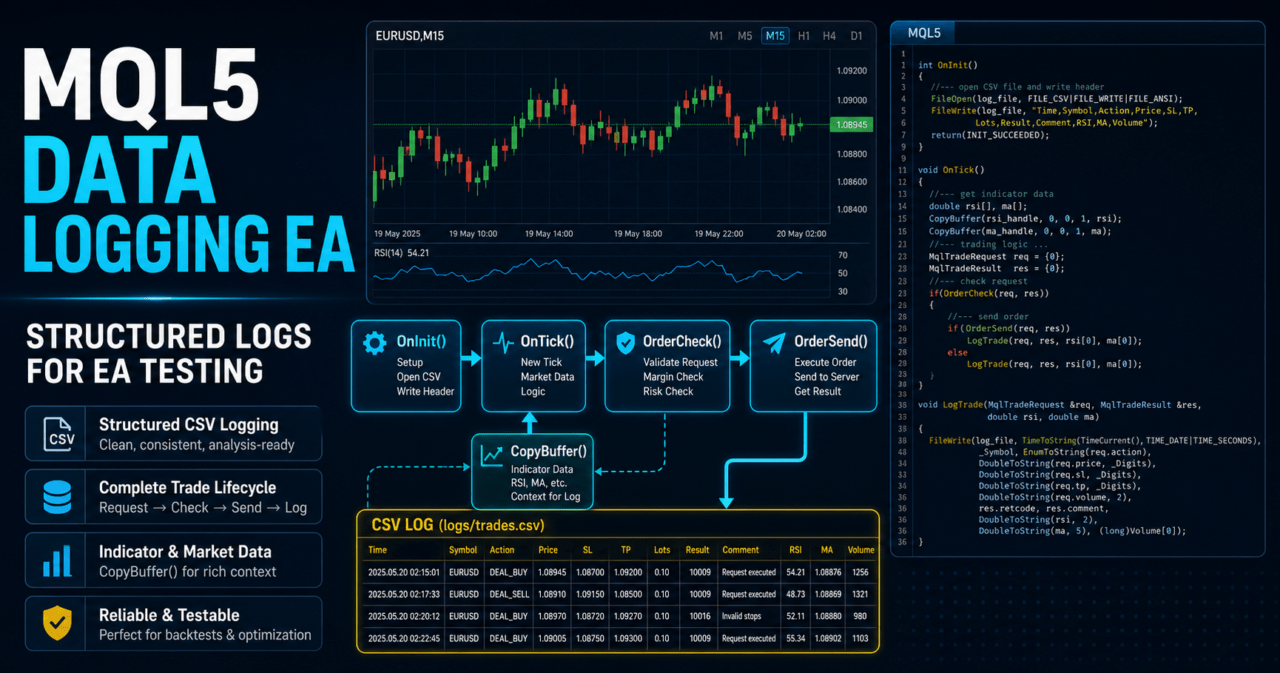
In a Data Logging EA, the process flow is separated as follows.
Market recognition
↓
Filter decision
↓
Signal decision
↓
Risk check
↓
Pre-order check
↓
Order submission
↓
Post-fill management
↓
Log output
↓
Close/stop decision
This structure makes the meaning of each log row clear.
For example, even when no entry occurs, you can separate whether the EA stopped at a filter, had no signal, or stopped during lot calculation.
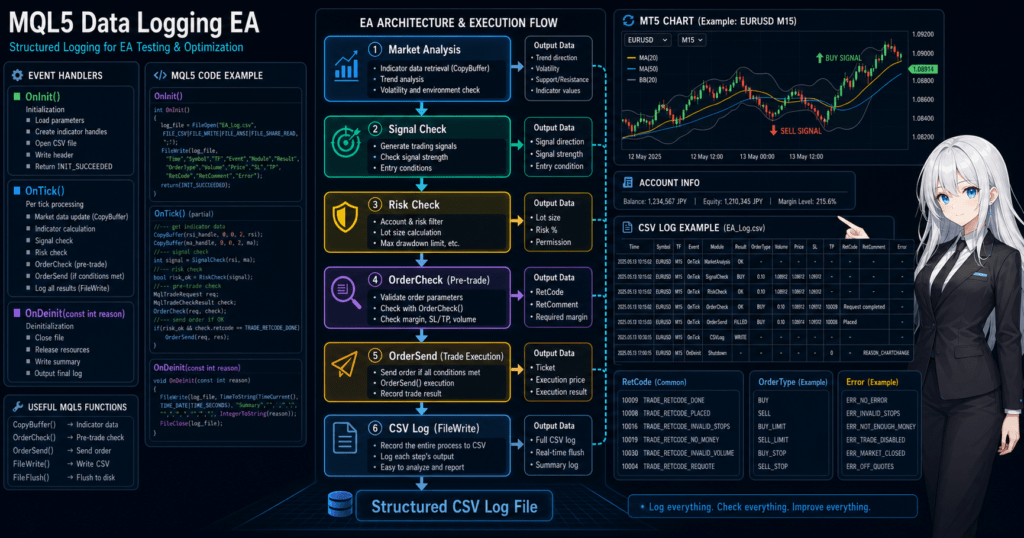
2.1 Logs Should Preserve the Process, Not Only the Result
The purpose of a Data Logging EA is not to increase the trade history.
It is to record which conditions the EA evaluated and which stage of processing it reached.
At a minimum, separating the following logs makes verification easier.
| Log type | Recorded content | Main use |
|---|---|---|
| market | Time, Bid, Ask, spread | Checking market conditions |
| signal | Indicator values, signal direction | Checking the entry basis |
| risk | Lot size, stop-loss width, margin | Checking risk calculation |
| order_check | OrderCheck result | Checking issues before order submission |
| order_result | OrderSend result | Checking order success or failure |
| position | Position volume, unrealized profit/loss, state | Checking post-fill management |
| error | Error code, process name | Checking defect causes |
2.2 Decide the Logging Granularity
If every tick is recorded, the file size becomes large.
In a Data Logging EA, logging granularity should be separated by purpose.
- Use every-tick logs to check short-term behavior
- Use new-bar close logs to verify logic
- Use before-and-after order logs to check live trading differences
- Always keep error logs
For EAs that make decisions only on new bars, it is common to use closed-bar values.
The latest bar is still forming, so indicator values may change.
3. Basic Structure
Conclusion:
The basic structure of a Data Logging EA is to prepare in OnInit, run decisions and log output in OnTick, and perform cleanup in OnDeinit.
When indicators are used, create handles in OnInit and obtain values with CopyBuffer in OnTick.
In MQL5, indicator functions such as iMA and iATR often do not directly return values. Instead, you create a handle and then retrieve buffer values with CopyBuffer.
In a Data Logging EA, the retrieved values are used not only for signal decisions but also for logs.
3.1 Role of OnInit
OnInit initializes the EA.
In a Data Logging EA, it mainly contains the following processes.
- Create indicator handles
- Decide the log file name
- Validate input parameters
- Check symbol information
- Output the initial state log
If handle creation fails, return INIT_FAILED and stop the EA.
If OnTick runs with an invalid handle, CopyBuffer failures will continue.
3.2 Role of OnTick
OnTick runs the main EA process every time a new tick is received.
In a Data Logging EA, readability improves when OnTick is divided into functions by role instead of writing everything directly inside it.
Typical processes handled in OnTick are as follows.
- Determine whether a new bar has formed
- Retrieve indicator values with CopyBuffer
- Evaluate signals and filters
- Check risk conditions
- Run a pre-order check with OrderCheck
- Send the order with OrderSend
- Record the result in the log
3.3 Role of OnDeinit
OnDeinit performs cleanup when the EA exits.
If indicator handles are used, they may be released with IndicatorRelease.
If the log file is opened and closed each time, special file-closing logic may not be required at shutdown.
4. Roles of the Main Modules
Conclusion:
In a Data Logging EA, it is important to treat log output as an independent helper process.
If logging is mixed too deeply into trading logic, the EA’s decision conditions become harder to read.
When operating or testing an EA over a long period, separating modules makes the design more resilient to changes.
For a Data Logging EA, the following separation is practical.
| Module | Role | Log target |
|---|---|---|
| MarketData | Gets price, spread, and bar information | Bid, Ask, Spread, BarTime |
| IndicatorData | Gets indicator values | MA, ATR, RSI, and others |
| Signal | Evaluates entry conditions | Buy, Sell, None |
| Filter | Restricts whether trading is allowed | SpreadOk, TimeOk, TrendOk |
| Risk | Checks lot size and allowable loss | Lots, StopPoints, Margin |
| TradeCheck | Performs pre-order checks | CheckResult, Retcode |
| TradeExecution | Sends orders | OrderSend result |
| PositionState | Checks position state | Volume, PriceOpen, Profit |
| Logger | Records data to CSV or another format | All recorded rows |
4.1 Separate Signal Decisions from Logging
A signal function should focus on deciding the trade direction.
If log output is passed to a separate function, signal conditions become easier to modify.
For example, separate the function that detects a moving average breakout from the function that writes the decision values to CSV.
This separation makes it easier to preserve the log format even when trading conditions change.
4.2 Isolate Risk Checks
Lot calculation should consider the minimum lot, maximum lot, lot step, margin, stop-loss width, tick value, and tick size.
If the design uses only fixed lots, it may become fragile when the symbol or account balance changes.
In a Data Logging EA, verification becomes easier when you log not only the lot calculation result but also the values used in the calculation.
Depending on symbol specifications, profit/loss movement and margin conditions can differ even with the same lot size.
4.3 Record Pre-Order Checks
When handling order processing in MQL5, MqlTradeRequest, MqlTradeResult, and MqlTradeCheckResult are handled separately.
Using OrderCheck before sending an order makes it easier to check issues such as insufficient margin, invalid lot size, and invalid price in advance.
A Data Logging EA records not only the OrderSend result but also the OrderCheck result.
This lets you distinguish whether the failure occurred before order submission or after submission.
5. Implementation Patterns
Conclusion:
Data Logging EA implementation patterns are easier to manage when separated into CSV logs, event logs, trade logs, and summary logs.
For beginners to intermediate users, starting with CSV logs is the easiest design to understand.
In log design, it is important to decide not only what to record but also when to record it.
Writing detailed logs on every tick is useful for short-term testing, but it can create large files in long-term backtests.
5.1 CSV Logs
A CSV log records time and items in comma-separated format.
It makes spreads, indicator values, signals, and order results easier to check in spreadsheet software.
The following items are suitable for CSV logs.
- Test time
- Symbol
- Timeframe
- Bid and Ask
- Spread
- Indicator values
- Signal direction
- Lot size
- Order result
- Error code
5.2 Event Logs
An event log records only when a specific event occurs.
It records order submission, order failure, position changes, EA shutdown, and similar events.
In live trading, event logs may be easier to review than every-tick logs.
However, to track detailed changes in market conditions, you need a design that adds detailed logs only when needed.
5.3 Summary Logs
A summary log records profit/loss, number of trades, losing streaks, maximum drawdown, and similar metrics over fixed periods.
In backtesting, it makes period-by-period stability and parameter dependency easier to check.
Summary logs are better for checking overall trends than for detailed cause analysis.
In a Data Logging EA, combining detailed logs with summary logs expands the range of verification.
6. Sample Code
Conclusion:
The following code is a basic example of a Data Logging EA that records indicator values, spread, signal, and pre-order check results to CSV in MQL5.
It is a testing sample. Before live trading, you need to review symbol specifications, account type, and execution conditions.
This sample shows a structure that logs the state of a moving average.
Order processing is kept minimal, and the results of OrderCheck and OrderSend are recorded separately.
#property strict

input int    InpMaPeriod      = 20;
input double InpFixedLots     = 0.10;
input int    InpStopLossPoint = 300;
input bool   InpEnableTrade   = false;

int      ma_handle = INVALID_HANDLE;
datetime last_bar_time = 0;
string   log_file_name = "data_logging_ea.csv";

int OnInit()
{
   ma_handle = iMA(_Symbol, _Period, InpMaPeriod, 0, MODE_SMA, PRICE_CLOSE);

   if(ma_handle == INVALID_HANDLE)
   {
      Print("Failed to create MA handle. Error=", GetLastError());
      return INIT_FAILED;
   }

   WriteLog("event", "init", 0.0, 0.0, 0.0, "EA initialized");

   return INIT_SUCCEEDED;
}

void OnDeinit(const int reason)
{
   if(ma_handle != INVALID_HANDLE)
   {
      IndicatorRelease(ma_handle);
      ma_handle = INVALID_HANDLE;
   }

   WriteLog("event", "deinit", 0.0, 0.0, 0.0, "EA stopped");
}

void OnTick()
{
   datetime current_bar_time = iTime(_Symbol, _Period, 0);

   if(current_bar_time == last_bar_time)
      return;

   last_bar_time = current_bar_time;

   if(BarsCalculated(ma_handle) < InpMaPeriod)
   {
      WriteLog("error", "bars_not_ready", 0.0, 0.0, 0.0, "Not enough calculated bars");
      return;
   }

   double ma_buffer[];
   double close_buffer[];

   ArraySetAsSeries(ma_buffer, true);
   ArraySetAsSeries(close_buffer, true);

   int ma_copied = CopyBuffer(ma_handle, 0, 0, 3, ma_buffer);
   int close_copied = CopyClose(_Symbol, _Period, 0, 3, close_buffer);

   if(ma_copied < 3 || close_copied < 3)
   {
      WriteLog("error", "copy_failed", 0.0, 0.0, 0.0, "CopyBuffer or CopyClose failed");
      return;
   }

   double bid = SymbolInfoDouble(_Symbol, SYMBOL_BID);
   double ask = SymbolInfoDouble(_Symbol, SYMBOL_ASK);
   double point = SymbolInfoDouble(_Symbol, SYMBOL_POINT);

   if(point <= 0.0)
   {
      WriteLog("error", "invalid_point", bid, ask, 0.0, "Invalid symbol point");
      return;
   }

   double spread_points = (ask - bid) / point;
   string signal = "none";
   int closed_bar_shift = 1;

   if(close_buffer[closed_bar_shift] > ma_buffer[closed_bar_shift])
      signal = "buy_bias";
   else if(close_buffer[closed_bar_shift] < ma_buffer[closed_bar_shift])
      signal = "sell_bias";

   WriteLog("market", signal, bid, ask, spread_points, "bar_closed");

   if(!InpEnableTrade)
      return;

   if(signal == "buy_bias")
      TryOpenBuy(ask);
}

void TryOpenBuy(const double ask)
{
   double lots = NormalizeLots(InpFixedLots);

   if(lots <= 0.0)
   {
      WriteLog("error", "invalid_lots", 0.0, 0.0, 0.0, "Lot validation failed");
      return;
   }

   double point = SymbolInfoDouble(_Symbol, SYMBOL_POINT);
   double sl = ask - InpStopLossPoint * point;

   MqlTradeRequest request;
   MqlTradeCheckResult check;
   MqlTradeResult result;

   ZeroMemory(request);
   ZeroMemory(check);
   ZeroMemory(result);

   request.action       = TRADE_ACTION_DEAL;
   request.symbol       = _Symbol;
   request.volume       = lots;
   request.type         = ORDER_TYPE_BUY;
   request.price        = ask;
   request.sl           = sl;
   request.deviation    = 20;
   request.type_filling = ORDER_FILLING_FOK;
   request.comment      = "DataLoggingEA sample";

   if(!OrderCheck(request, check))
   {
      WriteLog("order_check", "failed", 0.0, 0.0, 0.0, "OrderCheck call failed");
      return;
   }

   WriteLog("order_check", IntegerToString((int)check.retcode), 0.0, 0.0, 0.0, check.comment);

   if(check.retcode != TRADE_RETCODE_DONE && check.retcode != TRADE_RETCODE_PLACED)
      return;

   if(!OrderSend(request, result))
   {
      WriteLog("order_result", "send_failed", 0.0, 0.0, 0.0, "OrderSend call failed");
      return;
   }

   WriteLog("order_result", IntegerToString((int)result.retcode), result.price, 0.0, 0.0, result.comment);
}

double NormalizeLots(const double requested_lots)
{
   double min_lot = SymbolInfoDouble(_Symbol, SYMBOL_VOLUME_MIN);
   double max_lot = SymbolInfoDouble(_Symbol, SYMBOL_VOLUME_MAX);
   double lot_step = SymbolInfoDouble(_Symbol, SYMBOL_VOLUME_STEP);

   if(min_lot <= 0.0 || max_lot <= 0.0 || lot_step <= 0.0)
      return 0.0;

   double lots = MathMax(min_lot, MathMin(requested_lots, max_lot));
   lots = MathFloor(lots / lot_step) * lot_step;

   return NormalizeDouble(lots, 2);
}

void WriteLog(
   const string log_type,
   const string status,
   const double value1,
   const double value2,
   const double value3,
   const string message
)
{
   int file_handle = FileOpen(log_file_name, FILE_READ | FILE_WRITE | FILE_CSV | FILE_ANSI);

   if(file_handle == INVALID_HANDLE)
   {
      Print("Failed to open log file. Error=", GetLastError());
      return;
   }

   FileSeek(file_handle, 0, SEEK_END);

   FileWrite(
      file_handle,
      TimeToString(TimeCurrent(), TIME_DATE | TIME_SECONDS),
      _Symbol,
      EnumToString(_Period),
      log_type,
      status,
      DoubleToString(value1, _Digits),
      DoubleToString(value2, _Digits),
      DoubleToString(value3, 2),
      message
   );

   FileClose(file_handle);
}
6.1 How to Read the Code
In this code, OnInit creates the moving average handle.
OnTick processes only when a new bar is formed, then retrieves the moving average value with CopyBuffer.
If CopyBuffer does not retrieve enough values, the EA writes a log and stops processing.
This makes it easier to avoid incorrect decisions based on missing data.
6.2 Handling Order Processing
In the sample, no orders are placed when InpEnableTrade is false.
During testing, it is easier to separate causes if you first check logs only and enable order processing afterward.
Because OrderSend is run after recording the OrderCheck result, problems before order submission can be separated from problems after submission.
In live trading, you also need to check the execution method, trading hours, stop level, freeze level, and account type.
7. Design Pattern Comparison
Conclusion:
In a Data Logging EA, the logging method should be selected based on the purpose.
CSV logs suit simple testing, event logs suit live monitoring, and summary logs suit long-term evaluation.
| Method | Benefits | Drawbacks | Best use case | Implementation difficulty |
|---|---|---|---|---|
| CSV logs | Easy to review in table format | Files can become large | Checking backtest conditions | Low |
| Event logs | Easy to track only important events | Harder to track detailed market state | Checking live trading anomalies | Low to medium |
| Summary logs | Easy to check performance trends | Weak for analyzing causes of individual orders | Long-term testing | Medium |
| Detailed tick logs | Easy to track fine behavior | Hard to handle over long periods | Short-term defect investigation | Medium |
| External DB integration | Suitable for managing multiple EAs | Implementation and operation become heavier | Large-scale testing environments | High |
7.1 CSV Logs Are Easier in the Initial Design
For a first Data Logging EA built by a beginner or intermediate user, CSV logs are easy to handle.
They can be implemented with MQL5 FileOpen and FileWrite, and they are easy to review after a backtest.
However, CSV log file size requires attention.
If a large amount of data is written on every tick, it can affect tester speed and the review process.
7.2 Emphasize Event Logs in Live Trading
In live trading, events such as orders, closes, errors, shutdowns, and unmet conditions are more important than every tick.
If operational logs are too large, it becomes easier to miss the anomalies that actually need attention.
Event logs become more practical when they include pre-order check results, OrderSend retcode, position state, and spread.
8. Items to Check in Backtesting
Conclusion:
In a Data Logging EA backtest, check not only performance but also whether the logs can explain the trading decisions.
The goal is to make the entry reason, non-entry reason, and order failure reason traceable from the logs.
In backtesting, check the following items.
| Check item | Reason to check | Value to keep in logs |
|---|---|---|
| Total profit/loss | Understand overall performance | Profit/loss by period |
| Maximum drawdown | Check the size of equity fluctuation | Balance, equity |
| Win rate | Review win/loss tendency | Win/loss flag |
| Profit factor or payoff ratio | Review the relationship between gains and losses | Profit, loss |
| Number of trades | Check whether conditions are too strict | Entry count |
| Losing streak count | Use for considering stop conditions | Losing streak count |
| Spread conditions | Review the impact of execution cost | Spread |
| Period dependency | Check whether results depend on only a specific period | Year/month, period segment |
| Parameter dependency | Look for signs of over-optimization | Parameter values |
8.1 Record Non-Entry Reasons
If you record only trades that entered, it becomes difficult to understand why the conditions may be too strict.
In a Data Logging EA, recording reasons for non-entry makes testing easier.
For example, log states such as the following.
- spread_too_wide
- signal_none
- risk_rejected
- order_check_failed
- position_exists
- trading_time_blocked
8.2 Avoid Over-Optimization
The more detailed the logs are, the more tempting it becomes to add conditions that fit past data conveniently.
However, if a design is fitted too closely to historical data, it can break down in forward testing.
Data Logging EA logs should be used for cause analysis.
Parameter adjustment that fits only a specific period may reduce reproducibility.
9. Items to Check in Forward Testing
Conclusion:
In forward testing, check how closely the logs assumed in the backtest match actual execution conditions.
In particular, you need to check spread widening, execution difference, trading frequency, and stability in a VPS environment.
In forward testing, check the following items.
| Check item | Reason to check | Value to review in logs |
|---|---|---|
| Execution difference | Check the difference between expected price and fill price | request.price, result.price |
| Spread widening | Check changes in trading cost | Spread |
| Trading frequency | Check whether frequency is close to the backtest | Daily trade count |
| Drawdown | Check whether equity fluctuation is within tolerance | Balance, Equity |
| Deviation from backtest | Check differences from test conditions | Comparison values under the same conditions |
| Broker differences | Check differences in symbol specifications and execution conditions | StopLevel, LotStep |
| VPS stability | Check downtime and delays | Start time, shutdown reason |
9.1 Differences Between Demo and Live Accounts
Demo accounts and live accounts may have different execution conditions and spread conditions.
In a Data Logging EA, recording account type, server time, spread, and fill price makes differences easier to trace.
9.2 Recording in a VPS Environment
When running an EA on a VPS, shutdown time, restart time, and OnInit and OnDeinit records become important.
To trace why an EA stopped, keep event logs for startup and shutdown.
10. Live Trading Precautions
Conclusion:
A Data Logging EA can help reduce live trading risk, but it does not guarantee trading results.
Before live trading, you need to review spread, execution, broker specifications, leverage, and drawdown tolerance.
In automated trading, working correctly from a technical standpoint and staying stable in live operation are separate issues.
Even with logs, the effects of market movement, execution conditions, network environment, and symbol specifications remain.
10.1 Spread and Execution Difference
When spreads widen, performance may deteriorate even with the same signal.
In a Data Logging EA, recording the spread at entry and exit makes it easier to check the impact of trading costs.
The fill price may also differ from the expected price.
Order logs should keep the requested price, fill price, retcode, and comment.
10.2 Account Type Differences
In MQL5, netting accounts and hedging accounts use different position management concepts.
In a netting account, positions for the same symbol are consolidated. In a hedging account, multiple positions may be held.
In a Data Logging EA, the number of positions, ticket, symbol, direction, and lot size must be recorded according to the account type.
If log design ignores account type, position state may be interpreted incorrectly.
10.3 Leverage and Drawdown
The higher the leverage, the larger the position you can hold with less margin.
At the same time, profit and loss can fluctuate more sharply with price movement.
In a Data Logging EA, recording balance, equity, required margin, and unrealized profit/loss makes it easier to monitor drawdown development.
Before live trading, you need to decide the maximum acceptable drawdown and stop conditions.
11. Common Design Mistakes
Conclusion:
Common Data Logging EA mistakes include too few log items, too many log items, recording only order results, and not keeping error codes.
Logs used for testing should be designed at a granularity that lets you separate causes later.
11.1 Recording Only Order Results
If you keep only the OrderSend result, you cannot separate whether conditions were unsuitable before the order or whether the failure happened after submission.
You need to keep the OrderCheck result, lot size, margin, spread, and stop position together.
11.2 Ignoring CopyBuffer Failures
If the EA continues making decisions when indicator values have not been retrieved, it may produce incorrect signals.
If the CopyBuffer return value is smaller than the expected count, write a log and stop processing.
11.3 Confusing the Latest Bar with a Closed Bar
The latest bar is still forming.
If logic that assumes a closed bar uses the latest bar, behavior can differ between backtesting and live trading.
In a Data Logging EA, record which bar value was used.
For example, shift 0 is treated as the latest bar, and shift 1 is treated as the most recent closed bar.
11.4 Making the Log File Name Too Fixed
If the same file name is used across multiple symbols or timeframes, logs may be mixed together.
In a practical design, including the symbol, timeframe, EA name, and date in the file name or log row makes review easier.
12. Summary
Conclusion:
A Data Logging EA is a design for recording MQL5 EA decision processes, order results, errors, and position state so they can be tested more easily.
The closer an EA gets to live operation, the more important log design becomes.
In a Data Logging EA, the roles of OnInit, OnTick, and OnDeinit are separated, and indicator handles, CopyBuffer, OrderCheck, OrderSend, and position management are handled clearly.
Logs are used not only for trading results but also for tracking non-entry reasons, pre-order checks, execution results, and live trading differences.
In backtesting, check total profit/loss, maximum drawdown, win rate, payoff ratio, number of trades, losing streaks, spread conditions, period dependency, and parameter dependency.
In forward testing, check execution difference, spread widening, trading frequency, broker differences, and stability in the VPS environment.
A Data Logging EA is a mechanism that helps verify EA quality.
However, log design and backtest results do not guarantee future profit.
Before live trading, you need to check symbol specifications, account type, execution conditions, and drawdown tolerance, then verify the EA step by step.
FAQ
What is a Data Logging EA?
A Data Logging EA is a design that records the decisions, order results, position state, and errors produced by an MQL5 EA.
It is used to make EA behavior easier to review later in backtesting and forward testing.
What should I use to create logs in MQL5?
In MQL5, you can create CSV logs with FileOpen, FileWrite, FileClose, and related functions.
Print logs are also useful, but CSV is easier to organize for long-term testing.
What should a Data Logging EA record?
It should record price, spread, indicator values, signals, filter results, lot size, OrderCheck results, OrderSend results, and error codes.
Recording non-entry reasons also helps you check whether the conditions are too strict.
Should CopyBuffer failures be logged?
Yes. CopyBuffer failures should always be logged.
If decisions continue without retrieved indicator values, the EA may produce incorrect signals or misleading test results.
Are CSV logs or event logs better?
CSV logs are better for checking backtest conditions.
Event logs are better for live trading anomaly checks because they focus on orders, exits, errors, shutdowns, and other important events.
Can a Data Logging EA eliminate live trading risk?
No. A Data Logging EA does not eliminate live trading risk.
Spread widening, execution differences, broker specifications, leverage, and drawdown still matter, so forward testing is required before live trading.
Which logs should I check in backtesting?
In backtesting, check total profit/loss, maximum drawdown, win rate, payoff ratio, number of trades, losing streaks, spread conditions, period dependency, and parameter dependency.
It is important that the logs make both entry reasons and non-entry reasons traceable.
What should I check in forward testing?
In forward testing, check fill price differences, behavior during spread widening, trading frequency, deviation from the backtest, broker differences, and VPS stability.
Demo accounts and live accounts may have different execution conditions.