

- 1 1. What Is MQL5 CopyBuffer?
- 2 2. Basic CopyBuffer Syntax and Arguments
- 3 3. Basic CopyBuffer Usage: A Simple Example
- 4 4. Practical CopyBuffer Examples: RSI and MACD
- 5 4.3 Example of Retrieving iMACD Values: Multiple Buffers
- 6 5. CopyBuffer Error Causes and Fixes
- 6.1 5.1 Main Reasons CopyBuffer Fails
- 6.2 5.2 Common Error 1: Return Value Is 0 or -1
- 6.3 5.3 Common Error 2: ERR_INDICATOR_DATA_NOT_FOUND
- 6.4 5.4 Common Error 3: INVALID_HANDLE
- 6.5 5.5 Common Error 4: Array-Related Problems
- 6.6 5.6 The Most Common Hidden Bug in Practice
- 6.7 5.7 Safe Implementation Template: Recommended for Practice
- 6.8 5.8 Basic Debugging Strategy
- 6.9 5.9 Environment-Dependent Notes
- 6.10 The Core Idea of This Chapter
- 7 6. CopyBuffer Optimization and Practical Techniques
- 7.1 6.1 Call CopyBuffer the Minimum Number of Times
- 7.2 6.2 Retrieve Only the Minimum Required Data
- 7.3 6.3 Do Not Recreate the Handle
- 7.4 6.4 Managing Multiple Indicators
- 7.5 6.5 Caching Strategy: Important
- 7.6 6.6 Keep ArraySetAsSeries Consistent
- 7.7 6.7 Strategy Tester Optimization
- 7.8 6.8 Final Practical Template
- 7.9 6.9 The Core Idea of This Chapter
- 8 7. Relationship Between CopyBuffer and Related Functions
- 9 8. FAQ: Common Questions and Solution Guidelines
- 9.1 8.1 What is CopyBuffer?
- 9.2 8.2 Why can’t CopyBuffer retrieve values?
- 9.3 8.3 Should start_pos be 0 or 1?
- 9.4 8.4 What is buffer_num?
- 9.5 8.5 Is ArraySetAsSeries necessary?
- 9.6 8.6 Is it okay to call CopyBuffer on every tick?
- 9.7 8.7 What is the difference between CopyBuffer and CopyRates?
- 9.8 8.8 Is CopyBuffer necessary with iCustom?
- 9.9 8.9 What is the minimum CopyBuffer setup?
- 10 9. Summary: Key Points for Practical Use
1. What Is MQL5 CopyBuffer?
1.1 Basic Concept of CopyBuffer
MQL5 CopyBuffer is a function used to retrieve values, or buffers, calculated internally by an indicator.
In this context, a “buffer” means a numeric array that an indicator stores for each bar.
For example, the following indicators all have internal buffers.
- Moving Average (iMA)
- RSI (iRSI)
- MACD (iMACD)
These values are not only displayed on the chart. You can also retrieve them from a program and use them in trading logic. CopyBuffer is the function used for that purpose.
The key points are as follows.
- In MQL5, indicators are managed by a handle (identifier)
- CopyBuffer is a function that copies numeric data from that handle
- The return value is the “number of data elements successfully retrieved”
1.2 Why CopyBuffer Is Needed
In an EA (Expert Advisor), decisions based on technical indicators are almost always necessary, not just price data.
Common examples include the following logic.
- Enter a trade on a moving average crossover
- Sell when RSI is 70 or higher, and buy when RSI is 30 or lower
- Make decisions based on a MACD signal crossover
To implement these rules, you need a process that retrieves indicator values.
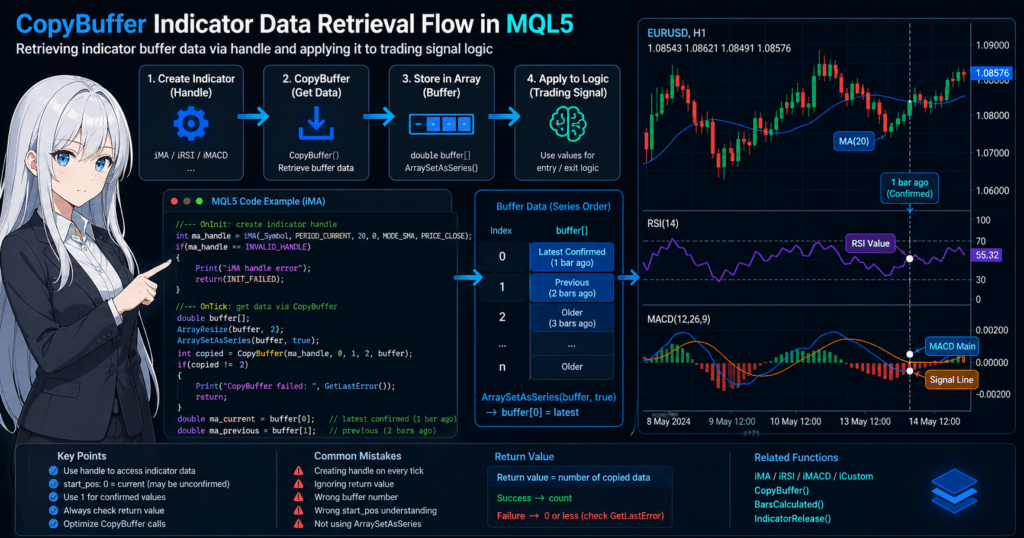
The basic flow is as follows.
// 1. Get the indicator handle
int handle = iMA(_Symbol, PERIOD_CURRENT, 20, 0, MODE_SMA, PRICE_CLOSE);

// 2. Prepare an array
double buffer[];

// 3. Retrieve data
CopyBuffer(handle, 0, 0, 3, buffer);
In this way,
“create an indicator → retrieve values with CopyBuffer → evaluate conditions”
is the basic pattern of EA development in MQL5.
1.3 Where Beginners Commonly Get Stuck
CopyBuffer is a very important function, but it is also one of the easiest places for beginners to get stuck.
Confusion often happens around the following points.
■ Common confusion 1: Not understanding what a handle means
- In MQL4, values could be retrieved directly, but in MQL5 they are accessed through a handle
- A handle is easier to understand if you think of it as an “indicator instance ID”
■ Common confusion 2: Not understanding the buffer number
- Some indicators have multiple lines
- Example: MACD
- 0 → main line
- 1 → signal line
■ Common confusion 3: Values cannot be retrieved
The main causes are as follows.
- The handle was not created correctly
- The return value of CopyBuffer is not checked
- The indicator calculation has not finished yet, especially right after OnInit
- The array size is insufficient
■ Common practical mistakes
- Calling CopyBuffer too often on every tick, which lowers performance
- Not setting ArraySetAsSeries, which causes reversed-index bugs
- Misunderstanding the meaning of start_pos
CopyBuffer is not just another function. It is the core data retrieval layer in MQL5.
Once you understand it correctly, EA implementation speed and stability improve significantly.
2. Basic CopyBuffer Syntax and Arguments
2.1 Basic Syntax
CopyBuffer is used in the following format.
int CopyBuffer(
   int       indicator_handle,
   int       buffer_num,
   int       start_pos,
   int       count,
   double    buffer[]
);
The return value is the “number of data elements successfully retrieved.”
If retrieval succeeds, the same value as count is returned.
2.2 Detailed Explanation of Each Argument
■ indicator_handle
- The value obtained from iMA, iRSI, iCustom, and similar functions
- An ID that identifies the indicator
int handle = iMA(_Symbol, PERIOD_CURRENT, 20, 0, MODE_SMA, PRICE_CLOSE);
Important notes:
- If it is
INVALID_HANDLE, an error occurred - It is usually created in OnInit
■ buffer_num
- Specifies which line value to retrieve
Example:
| Indicator | buffer_num |
|---|---|
| iMA | 0 |
| iRSI | 0 |
| iMACD | 0 (main) / 1 (signal) |
Example:
CopyBuffer(handle, 0, 0, 3, buffer);
Important notes:
- The meaning differs by indicator
- If you specify the wrong number, the retrieved values will be misaligned
■ start_pos
- Specifies which bar to start from, where 0 is the latest bar
| Value | Meaning |
|---|---|
| 0 | Current bar |
| 1 | Previous bar |
| 2 | Two bars ago |
Example:
CopyBuffer(handle, 0, 0, 1, buffer); // Latest 1 bar
CopyBuffer(handle, 0, 1, 1, buffer); // Previous bar
Important:
- 0 may refer to an unconfirmed bar that is still forming
- If you need confirmed values, 1 is often used
■ count
- The number of data elements to retrieve
CopyBuffer(handle, 0, 0, 3, buffer);
In this case:
buffer[0] → current
buffer[1] → previous bar
buffer[2] → two bars ago
Important notes:
- An error can occur if you request more elements than the array can hold
- As a rule, retrieve only the minimum amount needed
■ buffer[]
- The destination array that receives the result
double buffer[];
ArrayResize(buffer, 3);
Or:
double buffer[3];
2.3 Common Mistakes
Here are the most common failure patterns with CopyBuffer.
■ Mistake 1: Array size is not allocated
double buffer[];
CopyBuffer(handle, 0, 0, 3, buffer); // NG
Fix:
ArrayResize(buffer, 3);
■ Mistake 2: Not checking the return value
CopyBuffer(handle, 0, 0, 3, buffer);
This alone is not enough.
Fix:
int copied = CopyBuffer(handle, 0, 0, 3, buffer);
if(copied <= 0)
{
   Print("CopyBuffer error: ", GetLastError());
}
■ Mistake 3: Misunderstanding start_pos
- Using 0 while assuming it is a confirmed value causes bugs
- This is especially likely to create differences between backtesting and live trading
■ Mistake 4: Specifying the wrong buffer_num
- Lines may be shifted when using indicators such as MACD
- The result can be an unintended value
■ Mistake 5: Handle creation failed
if(handle == INVALID_HANDLE)
{
   Print("handle error");
}
Minimum Practical Check Template
double buffer[];
ArrayResize(buffer, 3);

int copied = CopyBuffer(handle, 0, 0, 3, buffer);

if(copied != 3)
{
   Print("CopyBuffer failed: ", GetLastError());
   return;
}
CopyBuffer is 80% about understanding its arguments.
If this part is vague, the entire EA logic can break down.
3. Basic CopyBuffer Usage: A Simple Example
3.1 Minimum Setup for Retrieving iMA Moving Average Values
First, as the simplest example, retrieve the value of a moving average (iMA).
This pattern is the fastest way to understand how CopyBuffer works.
// Global variable
int ma_handle;

// Initialization
int OnInit()
{
   ma_handle = iMA(_Symbol, PERIOD_CURRENT, 20, 0, MODE_SMA, PRICE_CLOSE);

   if(ma_handle == INVALID_HANDLE)
   {
      Print("iMA handle error");
      return(INIT_FAILED);
   }

   return(INIT_SUCCEEDED);
}

// Per-tick processing
void OnTick()
{
   double ma_buffer[];
   ArrayResize(ma_buffer, 1);

   int copied = CopyBuffer(ma_handle, 0, 1, 1, ma_buffer);

   if(copied <= 0)
   {
      Print("CopyBuffer error: ", GetLastError());
      return;
   }

   double ma_value = ma_buffer[0];

   Print("MA value: ", ma_value);
}
3.2 Processing Flow: Important
The code above works in the following flow.
- Create the indicator in OnInit and get the handle
- Run CopyBuffer in OnTick
- Store the value in an array
- Use the value in the trading logic
The especially important points are as follows.
- Do not create the handle every time. Create it once in OnInit.
- Call CopyBuffer only when needed
- Always check the return value
3.3 Why start_pos=1 Is Used
CopyBuffer(ma_handle, 0, 1, 1, ma_buffer);
The reason 1 is used here is very important.
| Value | Status |
|---|---|
| 0 | Unconfirmed current bar |
| 1 | Confirmed previous bar |
In practice, the basic rule is:
- Signal decisions → use 1
- Visualization or reference checks → 0 is acceptable
Reasons:
- Because 0 changes on every tick, signals can become unstable
- It can create differences between backtesting and live trading
3.4 Common Failures: The Most Important Part
■ Failure 1: Creating the handle in OnTick
int handle = iMA(...); // NG
Problems:
- Creates an indicator on every tick, causing performance degradation
- Can cause memory leaks
■ Failure 2: Forgetting ArrayResize
double buffer[];
CopyBuffer(...); // NG
Always do this:
ArrayResize(buffer, 1);
■ Failure 3: Ignoring the return value
CopyBuffer can fail.
- Data is not loaded yet
- The handle is invalid
- Communication delay occurs
Always check:
if(copied <= 0)
■ Failure 4: Not understanding ArraySetAsSeries
Normal array:
buffer[0] → older data
Series array:
ArraySetAsSeries(buffer, true);
buffer[0] → latest data
In general, it is safer to handle CopyBuffer data in series format.
3.5 Best Practical Template
The following is the minimum structure commonly used in practice.
double buffer[];
ArrayResize(buffer, 2);
ArraySetAsSeries(buffer, true);

int copied = CopyBuffer(ma_handle, 0, 1, 2, buffer);

if(copied != 2)
{
   Print("CopyBuffer failed: ", GetLastError());
   return;
}

double current = buffer[0];
double prev    = buffer[1];
This makes it possible to compare:
- The latest confirmed value
- The previous value
3.6 The Core Idea to Understand at This Stage
CopyBuffer has the following roles.
- Copy the indicator’s “internal array”
- Build logic through array operations
- Provide decision data for the EA
In short:
👉 CopyBuffer = the entry point for data retrieval
If this part is unstable, every piece of logic built on top of it becomes unreliable.
4. Practical CopyBuffer Examples: RSI and MACD
4.1 Example of Retrieving iRSI Values
RSI uses a single buffer (buffer_num=0), so the basic CopyBuffer pattern can be applied directly.
// Global
int rsi_handle;

// Initialization
int OnInit()
{
   rsi_handle = iRSI(_Symbol, PERIOD_CURRENT, 14, PRICE_CLOSE);

   if(rsi_handle == INVALID_HANDLE)
   {
      Print("RSI handle error");
      return(INIT_FAILED);
   }

   return(INIT_SUCCEEDED);
}

// Tick processing
void OnTick()
{
   double rsi_buffer[];
   ArrayResize(rsi_buffer, 2);
   ArraySetAsSeries(rsi_buffer, true);

   int copied = CopyBuffer(rsi_handle, 0, 1, 2, rsi_buffer);

   if(copied != 2)
   {
      Print("RSI CopyBuffer error: ", GetLastError());
      return;
   }

   double rsi_current = rsi_buffer[0];
   double rsi_prev    = rsi_buffer[1];

   // Simple condition example
   if(rsi_current > 70)
   {
      Print("Overbought");
   }
   else if(rsi_current < 30)
   {
      Print("Oversold");
   }
}
4.2 Important Notes for RSI
■ Sticking point 1: Using index 0
CopyBuffer(rsi_handle, 0, 0, 1, buffer); // NG (unstable)
→ Always use start_pos=1
■ Sticking point 2: Impact of changing the period
- The characteristics of RSI values change depending on the RSI period, such as 14
- This directly affects the trading logic
👉 As a rule, parameters should be external inputs
■ Sticking point 3: Not enough initial bars
- If there are not enough bars for calculation, values cannot be retrieved
- This often occurs at the beginning of a test
Fix:
if(Bars(_Symbol, PERIOD_CURRENT) < 50) return;
4.3 Example of Retrieving iMACD Values: Multiple Buffers
MACD is a representative example of an indicator with multiple buffers.
| buffer_num | Content |
|---|---|
| 0 | Main line |
| 1 | Signal line |
int macd_handle;

int OnInit()
{
   macd_handle = iMACD(_Symbol, PERIOD_CURRENT, 12, 26, 9, PRICE_CLOSE);

   if(macd_handle == INVALID_HANDLE)
   {
      Print("MACD handle error");
      return(INIT_FAILED);
   }

   return(INIT_SUCCEEDED);
}

void OnTick()
{
   double macd_main[];
   double macd_signal[];

   ArrayResize(macd_main, 2);
   ArrayResize(macd_signal, 2);

   ArraySetAsSeries(macd_main, true);
   ArraySetAsSeries(macd_signal, true);

   int copied_main   = CopyBuffer(macd_handle, 0, 1, 2, macd_main);
   int copied_signal = CopyBuffer(macd_handle, 1, 1, 2, macd_signal);

   if(copied_main != 2 || copied_signal != 2)
   {
      Print("MACD CopyBuffer error: ", GetLastError());
      return;
   }

   double main_current   = macd_main[0];
   double main_prev      = macd_main[1];
   double signal_current = macd_signal[0];
   double signal_prev    = macd_signal[1];

   // Crossover judgment
   if(main_prev < signal_prev && main_current > signal_current)
   {
      Print("Golden Cross");
   }

   if(main_prev > signal_prev && main_current < signal_current)
   {
      Print("Dead Cross");
   }
}
4.4 Important Points for MACD
■ Understanding buffer_num is the most important point
- If 0 and 1 are reversed, the logic breaks
- This can cause results that do not match what appears on the chart
■ Timing of simultaneous retrieval
- Retrieve main and signal at the same timing
- If retrieved separately, they may become misaligned
■ Array synchronization
ArraySetAsSeries(..., true);
If this is forgotten:
- The meaning of the index is reversed
- Crossover logic can malfunction
4.5 Best Practical Pattern
Standard pattern for multiple buffers:
double buf1[], buf2[];
ArrayResize(buf1, 2);
ArrayResize(buf2, 2);

ArraySetAsSeries(buf1, true);
ArraySetAsSeries(buf2, true);

if(CopyBuffer(handle, 0, 1, 2, buf1) != 2) return;
if(CopyBuffer(handle, 1, 1, 2, buf2) != 2) return;
4.6 The Core Idea of This Chapter
- Single buffer → simple, like RSI
- Multiple buffers → requires structural understanding, like MACD
The most important point is:
👉 “the meaning of buffer_num” and “how arrays are handled”
If you get this wrong, the EA may look like it is working correctly while actually malfunctioning, which makes this one of the most dangerous areas.
5. CopyBuffer Error Causes and Fixes
5.1 Main Reasons CopyBuffer Fails
CopyBuffer is a stable function, but in real-world use it can fail with some probability.
The important point is to understand structurally why it fails.
The main causes fall into these three categories.
- Data is not ready, such as unloaded history or unfinished calculation
- Invalid handle, such as creation failure or an already released handle
- Argument mistakes, such as array size or buffer number errors
5.2 Common Error 1: Return Value Is 0 or -1
int copied = CopyBuffer(handle, 0, 1, 2, buffer);
if(copied <= 0)
{
   Print("Error: ", GetLastError());
}
■ Cause
- The data does not exist yet
- The indicator calculation has not finished
- The chart history is insufficient
■ Fix
if(Bars(_Symbol, PERIOD_CURRENT) < 100)
{
   return;
}
Or:
if(copied != count)
{
   return;
}
5.3 Common Error 2: ERR_INDICATOR_DATA_NOT_FOUND
■ Cause
- No data exists for the specified bar
- start_pos is too large
Example:
CopyBuffer(handle, 0, 10000, 1, buffer); // NG
■ Fix
- Use a realistic retrieval range
- Check with Bars
int bars = Bars(_Symbol, PERIOD_CURRENT);
if(bars < 50) return;
5.4 Common Error 3: INVALID_HANDLE
if(handle == INVALID_HANDLE)
■ Cause
- iMA or iRSI creation failed
- Invalid parameters
- Symbol or timeframe issues
■ Fix
if(handle == INVALID_HANDLE)
{
   Print("Handle creation failed: ", GetLastError());
   return(INIT_FAILED);
}
5.5 Common Error 4: Array-Related Problems
■ Case 1: Insufficient size
double buffer[];
CopyBuffer(...); // NG
→ Always use ArrayResize
■ Case 2: Incorrect Series setting
buffer[0] // unclear which position this is
Fix:
ArraySetAsSeries(buffer, true);
5.6 The Most Common Hidden Bug in Practice
■ Case: It runs, but the result is wrong
Causes:
- Wrong buffer_num
- Using start_pos=0
- Series not set
This is the most dangerous pattern.
👉 It is found late because no error appears
5.7 Safe Implementation Template: Recommended for Practice
double buffer[];
ArrayResize(buffer, 2);
ArraySetAsSeries(buffer, true);

// Check the number of bars
if(Bars(_Symbol, PERIOD_CURRENT) < 100)
{
   return;
}

// Run CopyBuffer
int copied = CopyBuffer(handle, 0, 1, 2, buffer);

// Success check
if(copied != 2)
{
   Print("CopyBuffer failed: ", GetLastError());
   return;
}

// Use values
double current = buffer[0];
double prev    = buffer[1];
5.8 Basic Debugging Strategy
When a CopyBuffer problem occurs, check the following in order.
- Whether the handle is valid
- Whether Bars is sufficient
- The CopyBuffer return value
- GetLastError
- Print the contents of the buffer
Print("value: ", buffer[0]);
5.9 Environment-Dependent Notes
The following behavior can vary depending on the environment.
- The broker’s available data range
- The symbol history
- VPS communication conditions
- Strategy Tester settings
👉 Be careful, because these can cause “different results from the same code”
The Core Idea of This Chapter
CopyBuffer errors are not random. They occur for structural reasons.
- Data is not ready
- Arguments are wrong
- State management is insufficient
👉 If you eliminate these three causes, CopyBuffer becomes mostly stable
6. CopyBuffer Optimization and Practical Techniques
6.1 Call CopyBuffer the Minimum Number of Times
CopyBuffer is not a lightweight function.
If you call it without limit on every tick, it can lead to higher CPU load, delays, and slower backtests.
■ NG pattern
void OnTick()
{
   CopyBuffer(handle, 0, 1, 1, buffer); // Run every tick
}
■ Recommended pattern: new bar detection
datetime last_time = 0;

void OnTick()
{
   datetime current_time = iTime(_Symbol, PERIOD_CURRENT, 0);

   if(current_time == last_time)
      return;

   last_time = current_time;

   // Run only on a new bar
   CopyBuffer(handle, 0, 1, 1, buffer);
}
👉 Processing only on new bars greatly reduces load
6.2 Retrieve Only the Minimum Required Data
■ NG pattern
CopyBuffer(handle, 0, 0, 100, buffer);
■ Recommended
CopyBuffer(handle, 0, 1, 2, buffer);
Reasons:
- For many types of logic, “current plus previous bar” is enough
- Unnecessary data retrieval hurts performance
6.3 Do Not Recreate the Handle
■ NG
void OnTick()
{
   int handle = iMA(...); // Created every time
}
■ Correct
int handle;

int OnInit()
{
   handle = iMA(...);
}
👉 Keep the handle as state
6.4 Managing Multiple Indicators
In practice, multiple indicators are often used at the same time.
■ Recommended structure
int ma_handle;
int rsi_handle;
int macd_handle;
■ Create them together during initialization
ma_handle   = iMA(...);
rsi_handle  = iRSI(...);
macd_handle = iMACD(...);
■ Retrieve them together in OnTick
CopyBuffer(ma_handle,   0, 1, 2, ma_buf);
CopyBuffer(rsi_handle,  0, 1, 2, rsi_buf);
CopyBuffer(macd_handle, 0, 1, 2, macd_buf);
👉 Structuring this improves maintainability
6.5 Caching Strategy: Important
Retrieving the same value repeatedly is inefficient.
■ Improvement example
double ma_value;

void UpdateIndicators()
{
   double buffer[];
   ArrayResize(buffer, 1);

   if(CopyBuffer(ma_handle, 0, 1, 1, buffer) > 0)
   {
      ma_value = buffer[0];
   }
}
👉 Store the value in a variable and reuse it
6.6 Keep ArraySetAsSeries Consistent
■ Recommended rule
ArraySetAsSeries(buffer, true);
Reasons:
- It unifies the meaning of indexes
- It prevents logic bugs
👉 Using true consistently is the safest approach
6.7 Strategy Tester Optimization
How CopyBuffer is used affects backtest results.
■ Notes
- start_pos=0 → can cause repainting
- Excessive CopyBuffer calls → slower tests
■ Recommended
- Keep start_pos fixed at 1
- Retrieve data only when a new bar is detected
6.8 Final Practical Template
double buffer[];
ArrayResize(buffer, 2);
ArraySetAsSeries(buffer, true);

// New bar detection
static datetime last_time = 0;
datetime current_time = iTime(_Symbol, PERIOD_CURRENT, 0);

if(current_time == last_time)
   return;

last_time = current_time;

// Data retrieval
if(CopyBuffer(handle, 0, 1, 2, buffer) != 2)
{
   Print("CopyBuffer error: ", GetLastError());
   return;
}

// Use values
double current = buffer[0];
double prev    = buffer[1];
6.9 The Core Idea of This Chapter
CopyBuffer optimization comes down to the following three points.
- Reduce the number of calls
- Minimize the amount of retrieved data
- Manage state, including handles and values
👉 This helps achieve:
- Better performance
- Fewer bugs
- More stable live operation
at the same time.
7. Relationship Between CopyBuffer and Related Functions
7.1 CopyBuffer Is Not Used Alone
CopyBuffer is an important function, but it is not complete by itself.
In actual MQL5 development, it is used as part of the following flow.
- Create an indicator
- Get the handle
- Extract values with CopyBuffer
- Use them for condition checks
In other words, CopyBuffer is responsible for extracting values, and there is always “indicator creation” before it.
A typical flow is as follows.
int ma_handle = iMA(_Symbol, PERIOD_CURRENT, 20, 0, MODE_SMA, PRICE_CLOSE);

double ma_buffer[];
ArrayResize(ma_buffer, 2);
ArraySetAsSeries(ma_buffer, true);

if(CopyBuffer(ma_handle, 0, 1, 2, ma_buffer) == 2)
{
   double ma_current = ma_buffer[0];
   double ma_prev    = ma_buffer[1];
}
Understanding this structure prevents you from treating CopyBuffer like a “magic function.”
7.2 Relationship with iMA, iRSI, iMACD, and iCustom
The functions most closely related to CopyBuffer are the functions that return handles.
Representative examples are:
iMA: Moving AverageiRSI: RSIiMACD: MACDiCustom: custom indicator
All of these return an indicator handle, not the indicator value itself.
Therefore, MQL5 is based on the following two-step process.
■ Steps
- Get a handle with
iMAor a similar function
- Copy the required value into an array with
CopyBuffer
- Get a handle with
For example, with iRSI:
int rsi_handle = iRSI(_Symbol, PERIOD_CURRENT, 14, PRICE_CLOSE);

double rsi_buffer[];
ArrayResize(rsi_buffer, 1);
ArraySetAsSeries(rsi_buffer, true);

if(CopyBuffer(rsi_handle, 0, 1, 1, rsi_buffer) == 1)
{
   double rsi_value = rsi_buffer[0];
}
The same concept applies to iCustom.
int custom_handle = iCustom(_Symbol, PERIOD_CURRENT, "MyIndicator");

double custom_buffer[];
ArrayResize(custom_buffer, 1);
ArraySetAsSeries(custom_buffer, true);

if(CopyBuffer(custom_handle, 0, 1, 1, custom_buffer) == 1)
{
   double custom_value = custom_buffer[0];
}
■ Common misunderstandings
- Assuming that calling
iMAdirectly returns the value - Assuming that
iCustomis special and does not need CopyBuffer
Both are wrong.
It is safest to remember that handle-based indicators generally require CopyBuffer to retrieve values.
7.3 Difference from CopyRates and CopyTime
Functions with similar names include CopyRates and CopyTime.
If you confuse these with CopyBuffer, the design can break down.
■ CopyBuffer
- Target: indicator calculation results
- Source: indicator buffer
- Type: usually
double[]
■ CopyRates
- Target: a full set of price data
- Source: OHLC data, meaning open, high, low, close, and volume
- Type:
MqlRates[]
MqlRates rates[];
ArrayResize(rates, 2);

int copied = CopyRates(_Symbol, PERIOD_CURRENT, 0, 2, rates);
■ CopyTime
- Target: time data
- Source: the timestamp of each bar
- Type:
datetime[]
datetime times[];
ArrayResize(times, 2);

int copied = CopyTime(_Symbol, PERIOD_CURRENT, 0, 2, times);
■ How to choose
- If you need the price itself →
CopyRates - If you need time →
CopyTime - If you need indicator values such as RSI or MA →
CopyBuffer
These three functions have clearly different purposes.
CopyBuffer is not a price data retrieval function. It is an indicator value retrieval function.
7.4 Relationship with BarsCalculated
One useful function to check before CopyBuffer is BarsCalculated.
This function checks how many bars have already been calculated by the indicator.
int calculated = BarsCalculated(ma_handle);

if(calculated < 20)
{
   return;
}
This is especially useful in the following situations.
- Right after OnInit
- When using a custom indicator
- During multi-timeframe processing
- When there are not enough initial bars in the tester
■ Common failure
- Running CopyBuffer and not understanding why it failed
- The real reason is simply that calculation has not finished yet
For better stability, the following order is effective.
- Create the handle
- Check
BarsCalculated(handle) - If enough bars are calculated, run
CopyBuffer
7.5 Relationship with IndicatorRelease
As a rule, a generated handle should be released when it is no longer needed.
The function used for this is IndicatorRelease.
void OnDeinit(const int reason)
{
   if(ma_handle != INVALID_HANDLE)
   {
      IndicatorRelease(ma_handle);
   }
}
■ Why this is needed
- To avoid keeping unnecessary indicators
- To make resource management clear
- To improve stability in long-running EAs
■ Notes
- Using a released handle with CopyBuffer will fail
- The handle must be created again after reinitialization
7.6 Practical Positioning
In practical terms, CopyBuffer sits in the following layer.
- Price data layer: CopyRates / CopyTime
- Indicator data layer: CopyBuffer
- Trading decision layer: signal judgment
- Execution layer: OrderSend and related functions
An EA with this separation is more robust.
By contrast, writing everything directly in OnTick tends to cause the following problems.
- Bugs are harder to find
- Replacing indicators becomes troublesome
- Optimization becomes difficult
- Reusability is low
For that reason, it is practical to treat CopyBuffer not just as a retrieval function, but as the core of the indicator data retrieval module in EA design.
7.7 Conclusion to Remember from This Chapter
When you organize the functions around CopyBuffer, their roles are as follows.
iMA/iRSI/iMACD/iCustom→ create a handleBarsCalculated→ check how many bars have been calculatedCopyBuffer→ extract indicator valuesIndicatorRelease→ release the handleCopyRates/CopyTime→ retrieve price or time data
Once this relationship is clear, you can see not only CopyBuffer itself but also the overall structure of data retrieval in MQL5.
8. FAQ: Common Questions and Solution Guidelines
8.1 What is CopyBuffer?
Answer guideline:
Explain that it is a function that retrieves indicator calculation results, or buffers, as an array.
Also mention that it is essential when using technical indicators in an EA.
8.2 Why can’t CopyBuffer retrieve values?
Answer guideline:
Organize the main causes into three points.
- Data is not loaded, such as insufficient Bars
- The handle is invalid, such as
INVALID_HANDLE - The CopyBuffer return value is not checked
As fixes, present “return value checking” and “Bars checking.”
8.3 Should start_pos be 0 or 1?
Answer guideline:
Explain why using “1, the confirmed bar” is the general rule.
- 0 is unconfirmed and changes
- It can cause differences between backtesting and live trading
Also note that 0 can be used for real-time monitoring purposes.
8.4 What is buffer_num?
Answer guideline:
Explain that it is the line number inside the indicator.
- RSI → only 0
- MACD → 0 for main, 1 for signal
Emphasize that this is a critical point because using the wrong value breaks the logic.
8.5 Is ArraySetAsSeries necessary?
Answer guideline:
Explain why “fixed to true” is recommended in practice.
- buffer[0] becomes the latest data
- It prevents index confusion
Also clearly state the bug risk if it is not set.
8.6 Is it okay to call CopyBuffer on every tick?
Answer guideline:
Explain that it is technically possible but not recommended.
- Performance degradation
- Increased VPS load
As a fix, present “execution only when a new bar is detected.”
8.7 What is the difference between CopyBuffer and CopyRates?
Answer guideline:
Clarify the difference in purpose.
- CopyBuffer → indicator values
- CopyRates → price data, including OHLC
Also mention that confusing them leads to design mistakes.
8.8 Is CopyBuffer necessary with iCustom?
Answer guideline:
Clearly state that it is necessary.
- iCustom only returns a handle
- CopyBuffer is required to retrieve values
Emphasize this as a common beginner misunderstanding.
8.9 What is the minimum CopyBuffer setup?
Answer guideline:
Present a minimum practical template.
double buffer[];
ArrayResize(buffer, 1);
ArraySetAsSeries(buffer, true);

if(CopyBuffer(handle, 0, 1, 1, buffer) == 1)
{
   double value = buffer[0];
}
Explain that this can be used as the base and expanded as needed.
9. Summary: Key Points for Practical Use
9.1 CopyBuffer in One Sentence
CopyBuffer is the only entry point for retrieving indicator values.
Because MQL5 is based on “indicators managed by handles,” an EA cannot be built correctly without understanding CopyBuffer.
9.2 Practical Rules You Should Follow: Most Important
By following the rules below, you can prevent most bugs.
■ Rule 1: Create the handle in OnInit
int handle;

int OnInit()
{
   handle = iMA(_Symbol, PERIOD_CURRENT, 20, 0, MODE_SMA, PRICE_CLOSE);
}
■ Rule 2: Use start_pos=1 by default
CopyBuffer(handle, 0, 1, 2, buffer);
Reasons:
- 0 is unconfirmed and unstable
- It helps prevent gaps between live trading and testing
■ Rule 3: Keep ArraySetAsSeries fixed to true
ArraySetAsSeries(buffer, true);
■ Rule 4: Always check the return value
if(CopyBuffer(handle, 0, 1, 2, buffer) != 2)
{
   return;
}
■ Rule 5: Run only on a new bar
if(current_time == last_time) return;
9.3 Common Failures and How to Avoid Them
■ It looks normal, but the logic is wrong
Causes:
- Wrong buffer_num
- Reversed indexes
- start_pos=0
👉 This is the most dangerous bug
■ Values cannot be retrieved
Causes:
- Insufficient Bars
- Handle error
- CopyBuffer failure
👉 Always verify with the return value and GetLastError
■ The EA is heavy or slow
Causes:
- Too many CopyBuffer calls
- Unnecessary data retrieval
- Running on every tick
👉 Improve this with new-bar processing and minimum data retrieval
9.4 Structural Understanding of CopyBuffer
CopyBuffer is part of the following structure.
- Handle creation with iMA, iRSI, or iCustom
- Data retrieval with CopyBuffer
- Decision logic
- Order execution
👉 When this separation is in place, EA quality improves one level.
9.5 Final Template: Remember This
double buffer[];
ArrayResize(buffer, 2);
ArraySetAsSeries(buffer, true);

if(Bars(_Symbol, PERIOD_CURRENT) < 100)
   return;

if(CopyBuffer(handle, 0, 1, 2, buffer) != 2)
   return;

double current = buffer[0];
double prev    = buffer[1];
9.6 The Core Message of This Article
The three important points in CopyBuffer are:
- Not just syntax, but how it is used
- Not just values, but array handling
- Not just a function, but design
Once you understand this, you can handle the following with the same structure.
- RSI, MACD, and Bollinger Bands
- Custom indicators
- Multi-timeframe logic