

- 1 1. What Is SymbolInfo in MQL5?
- 2 2. Basic Syntax of SymbolInfo
- 3 3. Main Information You Can Retrieve with SymbolInfo
- 4 4. Practical Code Examples Using SymbolInfo
- 5 5. Difference Between SymbolInfo and MarketInfo: Comparison with MT4
- 6 6. Important Notes When Using SymbolInfo
- 7 7. SymbolInfo Troubleshooting
- 8 8. FAQ
- 8.1 Q1. What is SymbolInfo in MQL5?
- 8.2 Q2. What is the difference between SymbolInfo and SymbolInfoDouble?
- 8.3 Q3. How do you get the spread with SymbolInfo?
- 8.4 Q4. Why does SymbolInfo return 0?
- 8.5 Q5. Can MT4 MarketInfo be used in MQL5?
- 8.6 Q6. What is the difference between SymbolInfo and Point?
- 8.7 Q7. When should SymbolInfo values be retrieved?
- 8.8 Q8. How do you retrieve lot information with SymbolInfo?
1. What Is SymbolInfo in MQL5?
In MQL5, SymbolInfo is an API for retrieving information about financial instruments handled in MetaTrader 5, such as currency pairs, indices, and CFDs.
Expert Advisors (EAs) and indicators use it to get the trading conditions, price-related data, and specifications of the current symbol, such as EURUSD or USDJPY.
In MetaTrader, the following conditions can differ depending on the broker.
- Spread
- Minimum lot
- Maximum lot
- Tick size, meaning the minimum price movement
- Whether trading is currently allowed
SymbolInfo is the mechanism used to retrieve and control these values from a program.
For example, an EA often needs to make decisions such as these.
- Do not enter a trade when the spread is too wide
- Do not send an order below the minimum lot size
- Do not trade a symbol while trading is disabled
By using SymbolInfo, you can handle broker-dependent conditions safely inside your program.
1.1 Basic Concept of SymbolInfo
SymbolInfo is a group of functions for retrieving attribute information about a symbol, or tradable instrument.
MQL5 provides the following three functions depending on the data type you want to retrieve.
- SymbolInfoDouble Retrieves decimal values of type double. Examples: spread-related values, tick size, and lot information
- SymbolInfoInteger Retrieves integer values. Examples: trading status, digits, and flags
- SymbolInfoString Retrieves string values. Examples: currency name and description
This design exists because MQL5 emphasizes type safety.
In other words, separating functions by data type helps prevent handling a value with the wrong type.
For example, you can retrieve the spread like this.
double spread = SymbolInfoInteger(_Symbol, SYMBOL_SPREAD);
The elements used here are as follows.
_SymbolThe symbol of the current chart, such as EURUSDSYMBOL_SPREADThe type of information to retrieve, in this case the spread
In this way, SymbolInfo follows the structure below.
SymbolInfo(symbol name, information to retrieve)
1.2 Where SymbolInfo Is Used
In EA development, SymbolInfo is a very frequently used group of functions.
It is especially important for the following types of processing.
Spread Filter
When the spread is wide, the expected value of a trade, or average profit, becomes worse.
For this reason, EAs often check the spread before sending an order.
int spread = SymbolInfoInteger(_Symbol, SYMBOL_SPREAD);

if(spread > 30)
{
   return;
}
Lot Size Control
The minimum lot size differs by broker, so it must be checked before placing an order.
double minLot = SymbolInfoDouble(_Symbol, SYMBOL_VOLUME_MIN);
Retrieving Tick Size
Tick size is used in price calculations and stop-loss settings.
double tickSize = SymbolInfoDouble(_Symbol, SYMBOL_TRADE_TICK_SIZE);
Checking Whether Trading Is Allowed
Orders will not go through when the market is closed or trading is disabled.
long tradeMode = SymbolInfoInteger(_Symbol, SYMBOL_TRADE_MODE);
Common Points of Confusion
Beginners often get confused by the following points.
1. SymbolInfo Is Not a Single Function
If you only remember the name SymbolInfo, it may look as if there is a function like this.
SymbolInfo(...)
In reality, SymbolInfo is the general name for three functions.
- SymbolInfoDouble
- SymbolInfoInteger
- SymbolInfoString
2. Retrieved Values Differ by Broker
For example, the following values depend on broker settings.
- Minimum lot
- Maximum lot
- Spread
For EA development, the basic rule is to retrieve these values with SymbolInfo instead of using fixed values.
3. Values May Not Be Available Immediately After EA Startup
Immediately after OnInit(), information retrieval may be unstable depending on the environment.
In real projects, developers may design the EA to:
- Retrieve values in OnTick
- Wait for the first tick
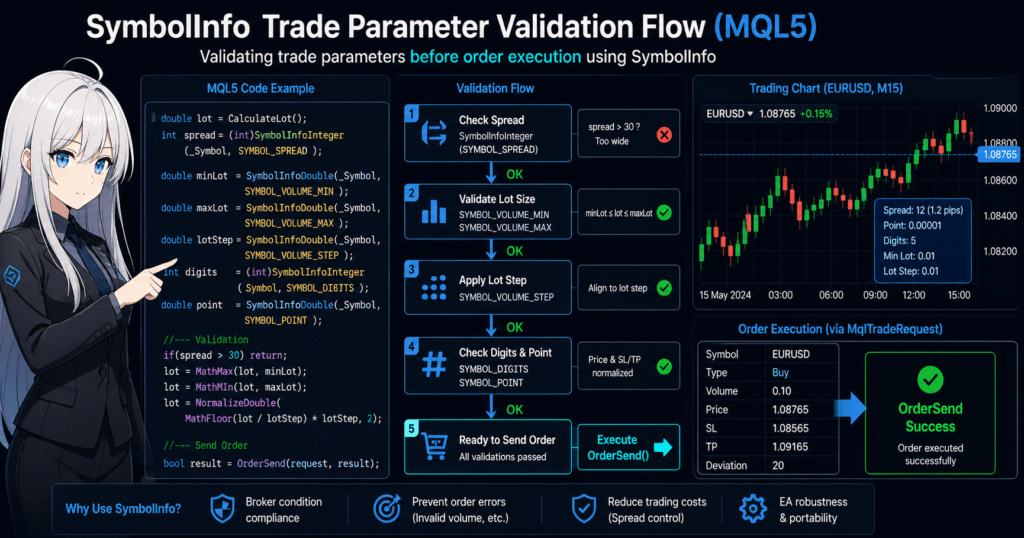
2. Basic Syntax of SymbolInfo
SymbolInfo is not a single function. It is divided into three functions depending on the data type being retrieved.
In MQL5, you use the following functions to retrieve information about a symbol, such as a currency pair, index, or commodity.
- SymbolInfoDouble Retrieves decimal values of type double
- SymbolInfoInteger Retrieves integer values of type long
- SymbolInfoString Retrieves string values
This design keeps data type safety in MQL5 and helps prevent type mistakes.
For example, it helps prevent the mistake of retrieving decimal values such as lot size or tick size as integers.
2.1 SymbolInfoDouble Syntax
SymbolInfoDouble retrieves decimal information of type double.
It is mainly used to retrieve values such as:
- Minimum lot
- Maximum lot
- Tick size
- Tick value
- Point value
Syntax
double SymbolInfoDouble(
   string name,
   ENUM_SYMBOL_INFO_DOUBLE prop_id
);
Parameters
| Argument | Description |
|---|---|
| name | Symbol name, such as EURUSD |
| prop_id | The type of information to retrieve |
Usually, you use _Symbol, which means the symbol of the current chart.
Example: Retrieving the Minimum Lot
double minLot = SymbolInfoDouble(_Symbol, SYMBOL_VOLUME_MIN);
This code retrieves the minimum trading lot for the current currency pair.
In an EA, checking this value during lot size calculation helps prevent order errors caused by violating broker conditions.
2.2 SymbolInfoInteger Syntax
SymbolInfoInteger retrieves integer information of type long.
It is mainly used to retrieve information such as:
- Spread
- Digits
- Trade mode
- Symbol status
Syntax
long SymbolInfoInteger(
   string name,
   ENUM_SYMBOL_INFO_INTEGER prop_id
);
Example: Retrieving the Spread
int spread = (int)SymbolInfoInteger(_Symbol, SYMBOL_SPREAD);
The spread is returned in points.
For example, if the symbol is:
- EURUSD
- A 5-digit broker
then:
spread = 20
means a spread of about:
2.0 pips
EAs often use a spread filter like this.
int spread = (int)SymbolInfoInteger(_Symbol, SYMBOL_SPREAD);

if(spread > 30)
{
   return;
}
This prevents the EA from entering trades when the spread is too wide.
2.3 SymbolInfoString Syntax
SymbolInfoString retrieves string information.
Examples of retrievable information include:
- Currency name
- Symbol description
- Base currency
- Profit currency
Syntax
string SymbolInfoString(
   string name,
   ENUM_SYMBOL_INFO_STRING prop_id
);
Example: Base Currency
string baseCurrency = SymbolInfoString(_Symbol, SYMBOL_CURRENCY_BASE);
For example, in the case of:
EURUSD
the retrieved value is:
EUR
Common Points of Confusion
Beginners often make the following mistakes when using SymbolInfo.
1. Choosing the Wrong Data Type
For example, the following code causes an error.
double spread = SymbolInfoDouble(_Symbol, SYMBOL_SPREAD);
Reason:
SYMBOL_SPREAD is an integer type
The correct function is:
SymbolInfoInteger()
2. Using the Wrong ENUM Value
In SymbolInfo, the information to retrieve is specified with an enumeration, or ENUM, like this.
SYMBOL_******
Examples include:
SYMBOL_VOLUME_MIN
SYMBOL_SPREAD
SYMBOL_DIGITS
A spelling mistake will cause a compile error.
3. Symbol Not Selected
If the symbol does not exist in Market Watch, SymbolInfo may fail.
In that case, enable the symbol like this.
SymbolSelect(symbol,true);
3. Main Information You Can Retrieve with SymbolInfo
SymbolInfo can retrieve many types of data for a symbol, such as a currency pair, index, or CFD, including trading conditions, price specifications, and currency information.
In EA development, the following information is used especially often.
- Spread
- Digits
- Point value
- Lot conditions
- Tick size
- Tick value
Because these values can differ by broker, the standard approach is to retrieve them programmatically.
If you use fixed values, the EA may stop working correctly when you switch brokers.
3.1 Spread: SYMBOL_SPREAD
The spread is the difference between the Bid price and the Ask price.
In EAs, it is used to avoid entering trades when the spread is wide.
Retrieving the Spread
int spread = (int)SymbolInfoInteger(_Symbol, SYMBOL_SPREAD);
This value is returned in points.
Example for a 5-digit broker:
| Value | Actual pips |
|---|---|
| 10 | 1.0 pips |
| 20 | 2.0 pips |
Spread Filter Example
int spread = (int)SymbolInfoInteger(_Symbol, SYMBOL_SPREAD);

if(spread > 30)
{
   Print("The spread is too wide");
   return;
}
This prevents entries when trading costs are too high.
3.2 Digits: SYMBOL_DIGITS
Digits means the number of decimal places used in the symbol’s price display.
Retrieval Code
int digits = (int)SymbolInfoInteger(_Symbol, SYMBOL_DIGITS);
Examples:
| Currency pair | digits |
|---|---|
| USDJPY | 3 |
| EURUSD | 5 |
| GOLD | 2 to 3, depending on the broker |
EAs may use this value in price calculations.
3.3 Point Value: SYMBOL_POINT
Point is the minimum price unit.
Retrieval Code
double point = SymbolInfoDouble(_Symbol, SYMBOL_POINT);
Examples:
| Currency pair | Point |
|---|---|
| EURUSD | 0.00001 |
| USDJPY | 0.001 |
In an EA, it is used in calculations like this.
double sl = Ask - 100 * point;
This code sets a 100-point stop loss.
3.4 Lot Information
In an EA, if the order lot violates broker conditions, it can cause an OrderSend error.
For this reason, you need to retrieve and adjust the following values.
Minimum Lot
double minLot = SymbolInfoDouble(_Symbol, SYMBOL_VOLUME_MIN);
Maximum Lot
double maxLot = SymbolInfoDouble(_Symbol, SYMBOL_VOLUME_MAX);
Lot Step
double lotStep = SymbolInfoDouble(_Symbol, SYMBOL_VOLUME_STEP);
Example:
| Item | Value |
|---|---|
| Minimum lot | 0.01 |
| Maximum lot | 100 |
| Lot step | 0.01 |
An EA may adjust the lot like this.
lot = MathMax(lot, minLot);
lot = MathMin(lot, maxLot);
3.5 Tick Size: SYMBOL_TRADE_TICK_SIZE
Tick size is the smallest unit by which the price can change.
Retrieval Code
double tickSize = SymbolInfoDouble(_Symbol, SYMBOL_TRADE_TICK_SIZE);
Examples:
| Symbol | Tick size |
|---|---|
| EURUSD | 0.00001 |
| GOLD | 0.01 |
EAs use this value for tasks such as rounding prices.
3.6 Tick Value: SYMBOL_TRADE_TICK_VALUE
Tick value is the profit or loss amount when the price moves by one tick.
Retrieval Code
double tickValue = SymbolInfoDouble(_Symbol, SYMBOL_TRADE_TICK_VALUE);
This value is important for risk calculation and lot calculation.
For example, it is used with:
- Stop-loss distance
- Lot size calculation
Common Mistakes
Beginners often get stuck on the following SymbolInfo points.
1. Mistaking Spread for Pips
SYMBOL_SPREAD is measured in points, not pips.
With a 5-digit broker:
10 point = 1 pip
may apply.
2. Placing an Order Without Checking Lot Conditions
This can cause the following EA error.
Invalid volume
Common causes:
- Below the minimum lot
- Violation of the lot step
3. Hardcoding Broker-Dependent Values
For example, if you hardcode:
double lot = 0.1;
the EA may produce errors after changing brokers.
For that reason, retrieving values with SymbolInfo is recommended.
4. Practical Code Examples Using SymbolInfo
As explained so far, SymbolInfo is a basic API for retrieving symbol trading conditions.
In real EA development, however, it is not only used to retrieve information. It is also used as a safety check before trading.
Common use cases include:
- Spread checks
- Lot size adjustment
- Checking whether trading is allowed
- Price calculation
This section explains practical SymbolInfo code commonly used in real EAs.
4.1 Spread Check EA
When the spread is wide, the expected value of an EA’s trades becomes worse.
For this reason, many EAs block trading when the spread exceeds a set threshold.
Implementation Example
int spread = (int)SymbolInfoInteger(_Symbol, SYMBOL_SPREAD);

if(spread > 30)
{
   Print("Trading stopped because the spread is too wide");
   return;
}
This code avoids trading when:
spread > 30
is true.
Key Points
- The spread is measured in points
- The threshold must be adjusted by currency pair
- Spreads often widen just before the London and New York opens
4.2 Safe Lot Size Adjustment
One of the most common EA order errors is:
Invalid volume
This happens when one of the following conditions is violated.
- Below the minimum lot
- Above the maximum lot
- Violation of the lot step
Use SymbolInfo to prevent this.
Implementation Example
double minLot = SymbolInfoDouble(_Symbol, SYMBOL_VOLUME_MIN);
double maxLot = SymbolInfoDouble(_Symbol, SYMBOL_VOLUME_MAX);
double lotStep = SymbolInfoDouble(_Symbol, SYMBOL_VOLUME_STEP);

double lot = 0.05;

lot = MathMax(lot, minLot);
lot = MathMin(lot, maxLot);
For more accurate adjustment, also round the lot using lotStep.
lot = MathFloor(lot / lotStep) * lotStep;
This produces a lot size that fully matches the broker’s conditions.
4.3 Checking Whether Trading Is Allowed
Not every symbol is always tradable.
Examples include:
- Market closure
- CFD trading suspension
- Broker restrictions
Implementation Example
long tradeMode = SymbolInfoInteger(_Symbol, SYMBOL_TRADE_MODE);

if(tradeMode == SYMBOL_TRADE_MODE_DISABLED)
{
   Print("This symbol cannot be traded");
   return;
}
Adding this check to an EA helps avoid failed orders.
4.4 StopLoss and TakeProfit Calculation
The Point value is important in price calculations.
Retrieving Point
double point = SymbolInfoDouble(_Symbol, SYMBOL_POINT);
SL Setting Example
double sl = Ask - 200 * point;
double tp = Ask + 400 * point;
In this example:
- SL = 200 point
- TP = 400 point
4.5 Practical EA Code Example: Basic Template
This is a safe trading process template using SymbolInfo.
void CheckTradeCondition()
{
   int spread = (int)SymbolInfoInteger(_Symbol, SYMBOL_SPREAD);
   double minLot = SymbolInfoDouble(_Symbol, SYMBOL_VOLUME_MIN);
   double maxLot = SymbolInfoDouble(_Symbol, SYMBOL_VOLUME_MAX);

   if(spread > 30)
   {
      Print("Spread is wide");
      return;
   }

   double lot = 0.05;

   lot = MathMax(lot, minLot);
   lot = MathMin(lot, maxLot);

   Print("Trading conditions passed");
}
Creating a function like this makes the EA design easier to organize.
Common Mistakes
Beginners often encounter the following problems when implementing SymbolInfo.
1. Calculating Directly with Ask and Bid
Example:
double sl = Ask - 0.002;
This can break depending on the currency pair.
The correct approach is:
Use point
2. Ignoring the Lot Step
For example:
0.013 lot
will cause an order error with many brokers.
3. Not Adding a Spread Check
The spread often widens sharply during:
- Economic news releases
- Market open
- Low-liquidity periods
For that reason, EAs generally include a spread filter.
5. Difference Between SymbolInfo and MarketInfo: Comparison with MT4
When learning SymbolInfo in MQL5, many people first get confused by the difference from MarketInfo in MT4.
People moving from MT4 to MT5 often run into these issues.
MarketInfo()cannot be found- They do not know what to use instead
- Old code does not work as-is
The conclusion is that in MQL5, the standard approach is to use the SymbolInfo functions instead of MarketInfo.
In other words, symbol information retrieved with MarketInfo() in MT4 is retrieved in MT5 through SymbolInfoDouble(), SymbolInfoInteger(), and SymbolInfoString().
5.1 What Is MarketInfo in MT4?
In MT4, MarketInfo() is a single-function mechanism for retrieving symbol information.
For example, the spread, Point value, Digits, and minimum lot were all retrieved with the same function.
MT4 Example
double spread = MarketInfo(Symbol(), MODE_SPREAD);
double point  = MarketInfo(Symbol(), MODE_POINT);
double minLot = MarketInfo(Symbol(), MODE_MINLOT);
In MT4, you can retrieve many values in this form:
MarketInfo(symbol, item to retrieve)
This is simple for beginners, but it also has weaknesses.
- The return type is effectively unified, which can make the meaning unclear
- The meaning changes depending on the item being retrieved
- It is easy to handle types incorrectly
In short, it was a convenient design, but weak in strictness.
5.2 MQL5 Splits This into SymbolInfo Functions
MQL5 reorganized this design and separated functions by the type of value being retrieved.
Specifically, there are three functions.
SymbolInfoDouble()Retrieves decimal valuesSymbolInfoInteger()Retrieves integer valuesSymbolInfoString()Retrieves strings
This change makes it clear in MQL5 what type of value you are retrieving.
For example, the Point value is decimal, so you use SymbolInfoDouble(). Digits is an integer, so you use SymbolInfoInteger().
MQL5 Example
double point = SymbolInfoDouble(_Symbol, SYMBOL_POINT);
int digits   = (int)SymbolInfoInteger(_Symbol, SYMBOL_DIGITS);
double minLot = SymbolInfoDouble(_Symbol, SYMBOL_VOLUME_MIN);
The benefits of this design are:
- The type is clear and easy to read
- Mistakes are easier to find
- The code is easier to maintain
- EA safety improves
MQL5 is designed to emphasize stricter type handling than MT4.
For this reason, casually porting code with an MT4 mindset can easily lead to compile errors or logic mistakes.
5.3 Rewrite Examples When Moving from MT4 to MT5
When moving MT4 MarketInfo() code to MQL5, the basic rule is to replace MODE_ constants with SYMBOL_ constants.
Common Mapping Examples
| MT4 | MT5 |
|---|---|
MODE_SPREAD | SYMBOL_SPREAD |
MODE_POINT | SYMBOL_POINT |
MODE_DIGITS | SYMBOL_DIGITS |
MODE_MINLOT | SYMBOL_VOLUME_MIN |
MODE_MAXLOT | SYMBOL_VOLUME_MAX |
MODE_LOTSTEP | SYMBOL_VOLUME_STEP |
Rewrite Example 1: Spread
MT4
double spread = MarketInfo(Symbol(), MODE_SPREAD);
MT5
int spread = (int)SymbolInfoInteger(_Symbol, SYMBOL_SPREAD);
Rewrite Example 2: Point Value
MT4
double point = MarketInfo(Symbol(), MODE_POINT);
MT5
double point = SymbolInfoDouble(_Symbol, SYMBOL_POINT);
Rewrite Example 3: Minimum Lot
MT4
double minLot = MarketInfo(Symbol(), MODE_MINLOT);
MT5
double minLot = SymbolInfoDouble(_Symbol, SYMBOL_VOLUME_MIN);
Common Migration Pitfalls
When moving from MT4 to MT5, developers often make the following mistakes.
1. Using SymbolInfoDouble for Everything
Because MT4 developers were used to the return-value style of MarketInfo(), it is tempting to use SymbolInfoDouble() for everything in MT5.
In reality, some values, such as spread and Digits, should be retrieved as integers.
For example, the following is incorrect.
double digits = SymbolInfoDouble(_Symbol, SYMBOL_DIGITS);
The correct version is:
int digits = (int)SymbolInfoInteger(_Symbol, SYMBOL_DIGITS);
2. Confusing Symbol() and _Symbol
MQL5 can still use Symbol(), but if you mean the current chart symbol, _Symbol is more concise.
double point = SymbolInfoDouble(_Symbol, SYMBOL_POINT);
In technical articles and production MQL5 code, using _Symbol is common.
3. Trying to Use MODE_ Constants As-Is
If you paste MT4 code directly into MQL5, constants such as:
MODE_SPREADMODE_POINT
may not compile or may not behave as intended.
In MT5, the basic rule is to replace them with SYMBOL_ constants.
4. Forgetting Type Conversion During Porting
The return value of SymbolInfoInteger() is long.
For this reason, when assigning it to an int variable, it is safer to explicitly cast it when needed.
int spread = (int)SymbolInfoInteger(_Symbol, SYMBOL_SPREAD);
This makes the code’s intent clear.
Practical Mindset
Developers with MT4 experience often feel that MarketInfo was easier.
In the long run, however, the MQL5 SymbolInfo design has higher reproducibility, maintainability, and safety.
When running an EA across multiple brokers, clear typing helps reduce bugs.
For that reason, in MT5 it is usually faster in the end to rethink the code around SymbolInfo instead of carrying over a MarketInfo mindset.
6. Important Notes When Using SymbolInfo
SymbolInfo is useful, but it is not a function that always returns the correct value just because you wrote it.
Beginners often get stuck because of retrieval timing, symbol status, and return value handling.
To use it reliably in EAs and scripts, focus on these three points.
- Value retrieval can fail
- The symbol may not be available
- Price-related information may not be updated yet depending on timing
If you ignore these points, you may see problems such as 0 being returned, unexpected values, or order errors.
6.1 Write Code Assuming Retrieval Can Fail
Depending on how you write it, SymbolInfo functions can make retrieval failure hard to detect.
For production use, it is safer to avoid simply assigning the value and stopping there. Instead, use a form that checks whether retrieval succeeded.
For example:
double point = 0.0;

if(!SymbolInfoDouble(_Symbol, SYMBOL_POINT, point))
{
   Print("Failed to retrieve SYMBOL_POINT");
   return;
}
In this form, the function returns true if retrieval succeeds and false if it fails.
Beginners often write code like this:
double point = SymbolInfoDouble(_Symbol, SYMBOL_POINT);
With only this method, there are situations where it is hard to tell whether 0.0 is a valid value or a retrieval failure.
During debugging, the success-checking form makes it easier to track down the cause.
Basic Safe Pattern
- Write price and condition retrieval with success checks when possible
- Print a log with
Print()when retrieval fails - Do not continue to order processing after retrieval failure
Example
double minLot = 0.0;

if(!SymbolInfoDouble(_Symbol, SYMBOL_VOLUME_MIN, minLot))
{
   Print("Failed to retrieve the minimum lot");
   return;
}
6.2 Retrieval Can Fail If the Symbol Is Not Selected
The symbol specified in SymbolInfo must be available on the terminal side.
This is especially important when working with symbols other than the current chart symbol.
For example, in a multi-symbol EA, if you try to retrieve information for GBPUSD from an EURUSD chart, retrieval may fail if that symbol is not enabled in Market Watch.
Solution
Enable it in advance with SymbolSelect().
string symbol = "GBPUSD";

if(!SymbolSelect(symbol, true))
{
   Print("Could not select the symbol");
   return;
}
Then retrieve the value.
double point = 0.0;

if(!SymbolInfoDouble(symbol, SYMBOL_POINT, point))
{
   Print("Could not retrieve the Point value");
   return;
}
Common Mistakes
- Using another symbol without preparation
- Code working in backtests but failing in live trading
- Missing broker-specific symbol suffixes or spelling differences
For example, depending on the broker, names may differ as follows.
EURUSDEURUSD.aEURUSDm
For this reason, it is safer not to casually hardcode symbol names.
6.3 Price-Related Information Can Be Unstable Right After Startup or Before Updates
Among values retrieved by SymbolInfo, information close to price data is affected by timing.
For example, immediately after EA startup or after a connection event, enough data may not yet be available.
Pay special attention to these cases.
- Using price-related information immediately after OnInit()
- Right after the weekly market open, when price delivery is not yet stable
- No tick has arrived yet for the target symbol
- Different retrieval timing between the Strategy Tester and live trading
In these cases, the design is usually more stable if OnInit only prepares the EA and the actual checks run in OnTick.
Example
void OnTick()
{
   int spread = 0;

   if(!SymbolInfoInteger(_Symbol, SYMBOL_SPREAD, spread))
   {
      Print("Failed to retrieve spread");
      return;
   }

   if(spread > 30)
   {
      return;
   }

   Print("Trading conditions were confirmed");
}
Retrieving values after an actual tick arrives tends to make price-related data more stable.
Common Mistakes and Notes
1. Treating a Returned 0 as a Normal Value
For example, if calculation continues with minLot = 0, the later lot calculation becomes abnormal.
When a retrieved value looks unnatural, first suspect retrieval failure.
2. Trying to Finalize Everything in OnInit
At initialization time, necessary information may not yet be stable depending on the environment.
For price-related and spread-related values in particular, it is safer to perform the final check in OnTick.
3. Omitting SymbolSelect When Retrieving Another Symbol
This problem is hard to notice in a single-symbol EA, so it often appears suddenly when the EA is changed into a multi-symbol version.
This is a very common mistake in real projects.
4. Using Retrieved Values Without Checking Logs
During early development, it is safer to check the values in logs at least once.
Print("spread=", spread);
Print("minLot=", minLot);
Print("point=", point);
Even if the values look correct at first glance, this can reveal confusion between point and tick size or unexpected spread units.
Basic Production Policy
The basic rule is to use SymbolInfo while checking whether retrieval succeeded, not assuming that retrieval always works.
In an EA, simply checking the following before ordering greatly reduces problems.
- Whether the symbol is enabled
- Whether the required values were retrieved
- Whether the spread is within the allowed range
- Whether the lot conditions are valid
Adding this one layer improves resistance to broker differences, startup timing, and live environment differences.
7. SymbolInfo Troubleshooting
SymbolInfo is generally a stable API, but in real EA development you may encounter problems such as values becoming 0, retrieval failing, or unexpected values being returned.
In many cases, the cause is the environment, timing, or symbol status.
This section organizes common production problems and their solutions.
7.1 When the Value Becomes 0
A value retrieved with SymbolInfo may become 0.
Example:
double minLot = SymbolInfoDouble(_Symbol, SYMBOL_VOLUME_MIN);
Result:
minLot = 0
This value is normally impossible as a trading condition, so there is a possibility of retrieval failure.
Main Causes
- Symbol information has not been retrieved yet
- Immediately after EA startup
- The symbol is not selected
- Backtest environment behavior
Solution
Change the code to check whether retrieval succeeded.
double minLot;

if(!SymbolInfoDouble(_Symbol, SYMBOL_VOLUME_MIN, minLot))
{
   Print("Failed to retrieve SYMBOL_VOLUME_MIN");
   return;
}
7.2 When the Spread Becomes Abnormal
You may see values like these.
spread = 0
spread = 200
spread = 1000
The cause is often market conditions or timing.
Common Cases
| Situation | Description |
|---|---|
| Right after market open | Spread widening |
| Economic news release | Lower liquidity |
| Weekend | Price delivery stopped |
| Tester | Model-dependent behavior |
For this reason, EAs commonly include checks like this.
int spread;

if(!SymbolInfoInteger(_Symbol, SYMBOL_SPREAD, spread))
   return;

if(spread <= 0)
   return;

if(spread > 50)
   return;
7.3 Retrieval Fails in a Multi-Symbol EA
In multi-symbol EAs, retrieving information for another currency pair can fail.
Example:
double point = SymbolInfoDouble("GBPUSD", SYMBOL_POINT);
Cause of failure:
- The symbol is not registered in Market Watch
Solution
SymbolSelect("GBPUSD", true);
Then retrieve the value.
double point = SymbolInfoDouble("GBPUSD", SYMBOL_POINT);
7.4 Broker-Specific Symbol Name Problems
Symbol names can differ by broker.
Examples:
| Broker | Symbol |
|---|---|
| A | EURUSD |
| B | EURUSDm |
| C | EURUSD.pro |
In this case, hardcoding:
"EURUSD"
can fail.
Safer Method
Use the current chart symbol.
_Symbol
Example:
double point = SymbolInfoDouble(_Symbol, SYMBOL_POINT);
This helps avoid broker-dependent symbol name issues.
7.5 Values May Not Update Until a Tick Arrives
In MT5, data is updated based on tick updates.
For this reason, values may not update in these states.
- Immediately after EA startup
- Market is closed
- Liquidity is extremely low
Solution
Run price-related processing in OnTick.
void OnTick()
{
   int spread = SymbolInfoInteger(_Symbol, SYMBOL_SPREAD);
   Print(spread);
}
Common Development Mistakes
1. Placing Orders Without Checking Values
For example:
double lot = SymbolInfoDouble(_Symbol, SYMBOL_VOLUME_MIN);
If retrieval fails and:
lot = 0
then the order can produce this error.
Invalid volume
2. Misunderstanding Spread Units
SYMBOL_SPREAD is measured in points.
With a 5-digit broker:
10 point = 1 pip
may apply.
3. Confusing SymbolInfoDouble and SymbolInfoInteger
The following code causes an error.
double spread = SymbolInfoDouble(_Symbol, SYMBOL_SPREAD);
The correct version is:
int spread = (int)SymbolInfoInteger(_Symbol, SYMBOL_SPREAD);
Basic Template to Prevent Trouble
An EA becomes more stable when it uses a safety check like this.
bool CheckSymbol()
{
   int spread;

   if(!SymbolInfoInteger(_Symbol, SYMBOL_SPREAD, spread))
      return false;

   if(spread <= 0)
      return false;

   if(spread > 50)
      return false;

   return true;
}
Designing the EA to always call this type of function before trading can greatly reduce live trading problems.
8. FAQ
Q1. What is SymbolInfo in MQL5?
SymbolInfo is a group of functions used to retrieve trading symbol information in MetaTrader 5 (MT5).
EAs and indicators can use it to retrieve the spread, lot conditions, tick size, currency information, and other symbol specifications.
The main functions are:
SymbolInfoDouble()SymbolInfoInteger()SymbolInfoString()
You choose the function based on the type of value you need.
Q2. What is the difference between SymbolInfo and SymbolInfoDouble?
SymbolInfo is a general term, and the actual functions are divided into the following three types.
| Function | Purpose |
|---|---|
| SymbolInfoDouble | Retrieves decimal values |
| SymbolInfoInteger | Retrieves integer values |
| SymbolInfoString | Retrieves string values |
For example, because spread is an integer, you use:
SymbolInfoInteger(_Symbol, SYMBOL_SPREAD);
Q3. How do you get the spread with SymbolInfo?
Use SYMBOL_SPREAD to retrieve the spread.
int spread = (int)SymbolInfoInteger(_Symbol, SYMBOL_SPREAD);
Note that the spread is returned in points, not pips.
For example, with a 5-digit broker:
10 point = 1 pip
may apply.
Q4. Why does SymbolInfo return 0?
Possible causes include:
- Information has not been retrieved yet immediately after EA startup
- The symbol is not in Market Watch
- No tick has updated yet
- Backtest environment behavior
Possible solutions include:
- Use
SymbolSelect() - Retrieve values in OnTick
- Write a retrieval success check
Q5. Can MT4 MarketInfo be used in MQL5?
In general, you should not use it.
MT4 used:
MarketInfo()
but in MQL5 it has been replaced by the SymbolInfo family of functions.
Example:
MT4
MarketInfo(Symbol(), MODE_SPREAD);
MT5
SymbolInfoInteger(_Symbol, SYMBOL_SPREAD);
Q6. What is the difference between SymbolInfo and Point?
Point means the minimum price unit.
In MQL5, it can be retrieved with:
double point = SymbolInfoDouble(_Symbol, SYMBOL_POINT);
Examples:
| Currency pair | Point |
|---|---|
| EURUSD | 0.00001 |
| USDJPY | 0.001 |
It is used in EA stop-loss calculations and other price calculations.
Q7. When should SymbolInfo values be retrieved?
In general, it is safer to retrieve them inside OnTick().
Reasons:
- You can retrieve values after tick updates
- You can avoid unstable values immediately after startup
Example:
void OnTick()
{
   int spread = SymbolInfoInteger(_Symbol, SYMBOL_SPREAD);
}
Information such as price and spread may depend on tick updates.
Q8. How do you retrieve lot information with SymbolInfo?
Use the following properties.
double minLot  = SymbolInfoDouble(_Symbol, SYMBOL_VOLUME_MIN);
double maxLot  = SymbolInfoDouble(_Symbol, SYMBOL_VOLUME_MAX);
double lotStep = SymbolInfoDouble(_Symbol, SYMBOL_VOLUME_STEP);
Checking these values lets you calculate a lot size that matches the broker’s conditions.