
- 1 1. What Is ArrayInitialize in MQL5?
- 2 2. ArrayInitialize Syntax and Usage
- 3 3. Practical ArrayInitialize Code Examples for EAs and Indicators
- 4 4. Difference Between ArrayInitialize and ArrayResize
- 5 5. Cases Where ArrayInitialize Cannot Be Used and Important Notes
- 5.1 5.1 It cannot be used with every array type
- 5.2 5.2 It cannot be used with string arrays
- 5.3 5.3 It cannot be used with struct arrays
- 5.4 5.4 It has no effect when the array size is 0
- 5.5 5.5 Excessive use in OnTick is inefficient
- 5.6 5.6 Choose the initialization value carefully
- 5.7 5.7 Bugs caused by forgetting initialization
- 6 6. Common ArrayInitialize Errors and How to Fix Them
- 6.1 6.1 Problem: the array is not initialized
- 6.2 6.2 Compile error with a string array
- 6.3 6.3 Values are unstable after resizing an array
- 6.4 6.4 The indicator disappears or displays incorrectly
- 6.5 6.5 Initializing on every OnTick call
- 6.6 6.6 Compatibility with indicator calculations
- 6.7 6.7 Problem caused by frequent resizing
- 6.8 6.8 Wrong initial value design
- 7 7. ArrayInitialize Best Practices for Real Projects
- 7.1 7.1 Always initialize an array right after creating it
- 7.2 7.2 In EAs, initialize arrays in OnInit
- 7.3 7.3 In indicators, use EMPTY_VALUE
- 7.4 7.4 Keep array size as fixed as possible
- 7.5 7.5 Initializing arrays for state management
- 7.6 7.6 Use different initial values for different purposes
- 7.7 7.7 Design the timing of initialization
- 8 8. MQL5 ArrayInitialize FAQ
- 8.1 8.1 What is ArrayInitialize?
- 8.2 8.2 Can ArrayInitialize be used with dynamic arrays?
- 8.3 8.3 Can ArrayInitialize be used with string arrays?
- 8.4 8.4 What is the difference between ArrayInitialize and ArrayResize?
- 8.5 8.5 Which value should be used for indicator initialization?
- 8.6 8.6 Is it okay to run ArrayInitialize on every tick?
- 8.7 8.7 What is the return value of ArrayInitialize?
- 8.8 8.8 What happens if I use an array without ArrayInitialize?
1. What Is ArrayInitialize in MQL5?
1.1 Basic concept of ArrayInitialize
ArrayInitialize is an MQL5 function used to initialize all elements of an array with the same value at once.
An array is a data structure that stores multiple values of the same type. In EAs (Expert Advisors) and indicators, arrays are commonly used for the following purposes.
- Storing price data
- Indicator buffers (arrays used for indicator calculations)
- Managing trade state
- Work buffers for calculations
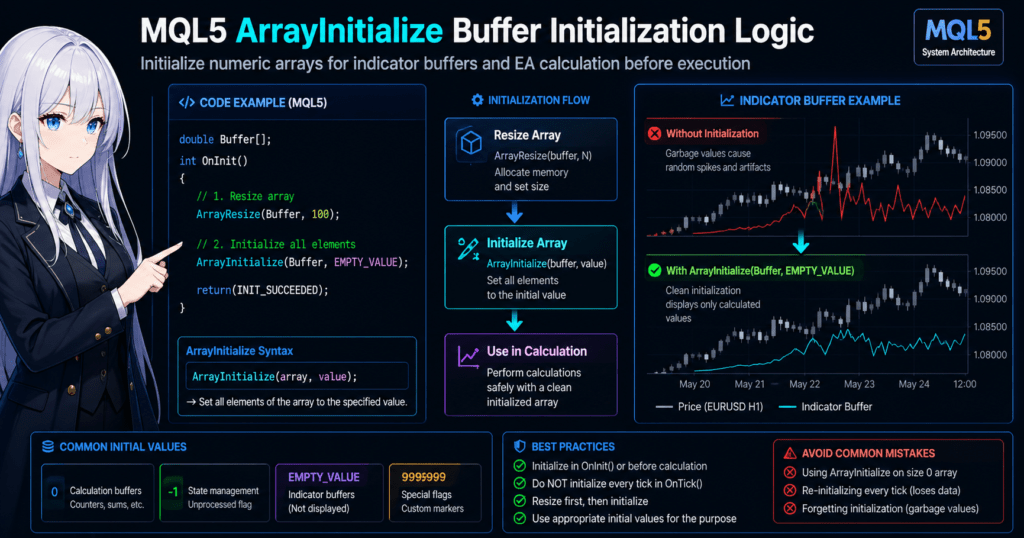
In MQL5, simply declaring an array does not always mean its elements are initialized with the values you expect.
Depending on the environment and the array type, such as a static array or dynamic array, it may contain undefined values (garbage values).
For that reason, the following workflow is important in EAs and indicators.
- Create the array
- Set initial values
- Run the calculation process
ArrayInitialize is the function that lets you set those initial values in a simple way.
For example, the following code sets every element of the array to 0.
double buffer[10];

ArrayInitialize(buffer,0);
After this process, the contents of buffer are as follows.
0
0
0
0
0
0
0
0
0
0
Even if the array size is 100 or 1000, you can initialize every element with one line of code.
Benefits of using ArrayInitialize
You can initialize an array with a loop, but using ArrayInitialize is simpler.
Example using a loop
for(int i=0;i<10;i++)
{
   buffer[i]=0;
}
Example using ArrayInitialize
ArrayInitialize(buffer,0);
This gives you several benefits.
- Shorter code
- Better readability
- Fewer mistakes
Typical uses in EAs and indicators
In practice, ArrayInitialize is often used in the following situations.
1. Initializing an indicator buffer
ArrayInitialize(Buffer,EMPTY_VALUE);
By setting EMPTY_VALUE, which means a value that is not drawn, you can control how the indicator is displayed.
2. Resetting a calculation buffer
When you reuse a calculation array, values from the previous calculation can cause incorrect results if they remain in the array.
ArrayInitialize(workBuffer,0);
3. Initializing a state management array
In an EA, position status and other state values may be managed with arrays.
ArrayInitialize(tradeState,-1);
Common misunderstandings for beginners
1. Assuming an array is initialized just because it was declared
Example
double data[100];
In this state, there is no guarantee that the array has been initialized with the intended value.
To write safer programs, explicit initialization is recommended.
2. Using a dynamic array while its size is still 0
For a dynamic array:
double data[];

ArrayInitialize(data,0);
This code has no practical effect.
The reason is that the array size is 0.
The correct order is as follows.
ArrayResize(data,100);
ArrayInitialize(data,0);
3. Initializing on every OnTick call
This is a common mistake among EA beginners.
void OnTick()
{
   ArrayInitialize(buffer,0);
}
If you do this, the following problems may occur.
- Calculation results are erased on every tick
- The logic does not work correctly
Array initialization is usually done at an appropriate timing, such as:
OnInit()- Before starting a calculation
ArrayInitialize is a simple function, but it is an important basic feature for stable EA and indicator behavior.
Because it is used often in buffer processing and data management, it is important to understand its basic behavior accurately.
2. ArrayInitialize Syntax and Usage
2.1 Basic syntax of ArrayInitialize
MQL5 ArrayInitialize is a function that initializes every element of an array with the same value.
The basic syntax is as follows.
ArrayInitialize(array,value);
Arguments
| Argument | Description |
|---|---|
| array | The array to initialize |
| value | The value to set for every element of the array |
When this function runs, all elements of the array are overwritten with the specified value.
Basic example
double data[5];

ArrayInitialize(data,0);
Result
data[0] = 0
data[1] = 0
data[2] = 0
data[3] = 0
data[4] = 0
Even when the array is large, you can initialize every element with one line.
2.2 Array types that can be used
ArrayInitialize can be used with numeric arrays in MQL5.
Main supported types
| Type | Example |
|---|---|
| int | Integer |
| double | Decimal number |
| float | Decimal number |
| long | Large integer |
| ushort / short | Short integer |
Example
int numbers[10];
ArrayInitialize(numbers,1);
Result
1 1 1 1 1 1 1 1 1 1
2.3 How to use it with dynamic arrays
In MQL5, dynamic arrays, whose size can be changed later, are used often.
In this case, the common order is ArrayResize -> ArrayInitialize.
Example
double buffer[];

ArrayResize(buffer,100);
ArrayInitialize(buffer,0);
Process flow
- Change the array size to 100
- Initialize all elements with 0
This pattern is very common in EAs and indicators.
2.4 Initializing indicator buffers
In indicators, initialization with EMPTY_VALUE is common.
What is EMPTY_VALUE?
-> A value that is not displayed on the chart
Example
ArrayInitialize(Buffer,EMPTY_VALUE);
This creates the following behavior.
- No line is drawn in the initial state
- Only calculated parts are displayed
This is a very important technique in indicator development.
2.5 Points where beginners often get stuck
1. Running it while the array size is 0
The following code has no practical effect.
double data[];

ArrayInitialize(data,0);
Reason:
The array size is 0.
Correct code:
ArrayResize(data,50);
ArrayInitialize(data,0);
2. Changing values after initialization
Example
ArrayInitialize(buffer,0);

buffer[0] = 5;
In this case, the result becomes:
5
0
0
0
...
ArrayInitialize only sets values in bulk. After that, values can still be changed normally.
3. Running it on every OnTick call
This is a common mistake among EA beginners.
void OnTick()
{
   ArrayInitialize(buffer,0);
}
This code may cause the following problems.
- Calculation results are reset on every tick
- The EA logic breaks
In general, initialization is done in places such as:
OnInit()- Before the calculation process starts
2.6 Return value of ArrayInitialize
ArrayInitialize returns the array size.
Example
int size = ArrayInitialize(buffer,0);
size receives the number of elements in the array.
However, in real projects, the return value is not used very often.
It is usually used as a standalone initialization process.
ArrayInitialize is a very simple function, but it is an important basic feature used often for buffer management in EAs and indicators.
It is especially important when initializing dynamic arrays, indicator buffers, and calculation buffers.
3. Practical ArrayInitialize Code Examples for EAs and Indicators
3.1 Basic array initialization example in an EA
In an EA (Expert Advisor), arrays are often used for calculations.
For example, arrays are used as buffers to store price data and calculation results.
The following example shows a basic pattern for initializing a calculation array with 0.
double priceBuffer[100];

int OnInit()
{
   ArrayInitialize(priceBuffer,0);
   return(INIT_SUCCEEDED);
}
This code:
- Declares
priceBufferas an array with 100 elements - Initializes all elements to 0 when the EA starts in
OnInit()
As a result, the array state becomes:
0
0
0
0
0
...
This helps prevent calculation errors caused by leftover past data or undefined values.
3.2 Practical example with a dynamic array
In EAs, dynamic arrays are also used often.
A dynamic array is an array whose size can be changed with ArrayResize().
In practice, the following pattern is common.
double buffer[];

int OnInit()
{
   ArrayResize(buffer,100);
   ArrayInitialize(buffer,0);
   return(INIT_SUCCEEDED);
}
Process flow
- Set the array size to 100
- Initialize all elements with 0
It is important to keep this order.
Common mistake
Beginners often write code like this.
double buffer[];

ArrayInitialize(buffer,0);
This code does not work correctly.
Reason:
The array size is still 0.
Correct order:
ArrayResize(buffer,100);
ArrayInitialize(buffer,0);
3.3 Example in an indicator
In indicators, ArrayInitialize is often used to initialize a drawing buffer (Indicator Buffer).
The especially important pattern is initialization with EMPTY_VALUE.
double Buffer[];

int OnInit()
{
   SetIndexBuffer(0,Buffer);
   ArrayInitialize(Buffer,EMPTY_VALUE);

   return(INIT_SUCCEEDED);
}
EMPTY_VALUE means:
A value that is not drawn on the chart.
This makes it possible to:
- Hide parts that have not been calculated
- Draw only the required parts
Typical indicator workflow
In an indicator, the flow is usually as follows.
- Set the buffer
- Initialize the buffer with EMPTY_VALUE
- Put values only into the calculated parts
Example
ArrayInitialize(Buffer,EMPTY_VALUE);

Buffer[i] = Close[i];
With this method:
- Uncalculated parts are not displayed
- Only calculated parts are drawn as a line
3.4 Resetting a calculation buffer
In EAs and indicators, you may reuse arrays for calculations.
If previous calculation results remain, they can cause incorrect behavior.
Example
double calcBuffer[50];

void ResetBuffer()
{
   ArrayInitialize(calcBuffer,0);
}
Calling this function resets the calculation buffer.
3.5 Mistake: initializing inside OnTick
This is a common mistake among EA beginners.
void OnTick()
{
   ArrayInitialize(buffer,0);
}
At first glance, this code may look fine, but it has a serious problem.
Reason:
- Data is reset on every tick
- Calculation results are not saved
- The EA logic breaks
For that reason, initialization is usually done in:
OnInit()- Before starting a calculation
3.6 Initialization values commonly used in practice
With ArrayInitialize, you choose the initial value based on the purpose.
| Initial value | Use |
|---|---|
| 0 | Calculation buffer |
| -1 | State management |
| EMPTY_VALUE | Indicator |
| 999999 | Special flag |
Example
ArrayInitialize(tradeState,-1);
In this case, it can be used for state management such as:
-1= not processed0= processed
ArrayInitialize is a simple function, but it is a basic feature directly tied to stable EA and indicator behavior.
Especially in programs that manage arrays, proper initialization has a major effect on bug prevention.
4. Difference Between ArrayInitialize and ArrayResize
4.1 Difference in roles
When working with arrays in MQL5, beginners often confuse ArrayInitialize and ArrayResize.
These two functions may look similar, but their roles are completely different.
| Function | Role |
|---|---|
| ArrayResize | Changes the size of an array |
| ArrayInitialize | Initializes the values in an array |
In other words:
- ArrayResize -> decides the size of the array
- ArrayInitialize -> sets the contents of the array
4.2 Basic behavior of ArrayResize
ArrayResize is a function that changes the size of a dynamic array.
Basic syntax
ArrayResize(array,new_size);
Example
double buffer[];

ArrayResize(buffer,10);
After this process, buffer becomes an array with 10 elements.
buffer[0]
buffer[1]
buffer[2]
...
buffer[9]
However, at this stage, the values may not be initialized.
For that reason, ArrayResize is often used together with ArrayInitialize.
4.3 Basic pattern used in practice
In practice, the basic order is as follows.
ArrayResize(buffer,100);
ArrayInitialize(buffer,0);
Meaning of the process:
- Change the array size to 100
- Initialize every element of the array with 0
This order puts the array into a safe state for use.
4.4 Common mistake: wrong order
A common beginner mistake is reversing the order.
Incorrect example
ArrayInitialize(buffer,0);
ArrayResize(buffer,100);
Problems with this code:
- The array is resized after initialization
- The newly allocated area is not initialized
As a result:
- Undefined values may remain in the later part of the array
- This can cause calculation bugs
4.5 Why ArrayResize alone is not safe
Look at the following code.
double buffer[];

ArrayResize(buffer,100);
At this point:
buffer[0] = ?
buffer[1] = ?
buffer[2] = ?
...
The values are not guaranteed.
The safer code is:
ArrayResize(buffer,100);
ArrayInitialize(buffer,0);
4.6 Typical pattern in EA development
In EAs, code like the following is common.
double priceBuffer[];

int OnInit()
{
   ArrayResize(priceBuffer,1000);
   ArrayInitialize(priceBuffer,0);

   return(INIT_SUCCEEDED);
}
Meaning of this process:
- Allocate a calculation buffer with 1000 elements
- Set the initial state to 0
This helps:
- Prevent undefined values from entering calculations
- Stabilize the calculation logic
4.7 Typical pattern in indicators
The same idea is used in indicators.
ArrayResize(Buffer,rates_total);
ArrayInitialize(Buffer,EMPTY_VALUE);
Meaning of this process:
- Resize the array to match the number of chart data points
- Initialize parts that should not be drawn with EMPTY_VALUE
4.8 Points where beginners get stuck
1. Confusing static arrays and dynamic arrays
Static array
double data[100];
Dynamic array
double data[];
ArrayResize(data,100);
For a dynamic array, ArrayResize is required.
2. Forgetting initialization after ArrayResize
Common code:
ArrayResize(buffer,100);
In this state, undefined values may remain.
Safer code:
ArrayResize(buffer,100);
ArrayInitialize(buffer,0);
3. Changing the array size too often
If you change the array size on every tick:
- Memory allocation happens repeatedly
- EA performance may decrease
For that reason, the recommended design is:
- Allocate the size during initialization
- Reuse the array as much as possible
ArrayInitialize and ArrayResize are essential basic functions for working with arrays in MQL5.
Understanding their roles can greatly improve the stability of EAs and indicators.
5. Cases Where ArrayInitialize Cannot Be Used and Important Notes
5.1 It cannot be used with every array type
ArrayInitialize is useful, but it cannot be used with every array type.
In general, it can be used with numeric type arrays.
Main supported types
| Type | Description |
|---|---|
| int | Integer |
| double | Decimal number, used most often |
| float | Decimal number |
| long | Large integer |
| short | Short integer |
Example
double buffer[10];

ArrayInitialize(buffer,0);
This code works without problems.
5.2 It cannot be used with string arrays
A common beginner issue is initializing a string array.
You cannot use ArrayInitialize with the string type.
Example
string names[10];

ArrayInitialize(names,"");
This code causes a compile error.
Reason:
ArrayInitialize is a function for numeric arrays.
Correct way to initialize a string array
Initialize a string array with a for loop.
string names[10];

for(int i=0;i<10;i++)
{
   names[i] = "";
}
You need to set each element manually in this way.
5.3 It cannot be used with struct arrays
In MQL5, you may also use struct arrays.
However, ArrayInitialize cannot be used in this case either.
Example
struct TradeData
{
   double price;
   int type;
};

TradeData trades[10];
You cannot initialize this array like this.
ArrayInitialize(trades,0);
Reason:
A struct is a data structure with multiple types.
How to initialize a struct array
Initialize a struct array as follows.
for(int i=0;i<10;i++)
{
   trades[i].price = 0;
   trades[i].type  = -1;
}
In this way, you must set values for each member.
5.4 It has no effect when the array size is 0
Beginners often write the following pattern.
double data[];

ArrayInitialize(data,0);
This code does not cause an error, but it has no practical effect.
Reason:
The array size is 0.
Correct code:
ArrayResize(data,100);
ArrayInitialize(data,0);
You need to keep this order.
5.5 Excessive use in OnTick is inefficient
ArrayInitialize is convenient, but running it too often can affect performance.
Example
void OnTick()
{
   ArrayInitialize(buffer,0);
}
This code may cause the following problems.
- The array is initialized on every tick
- CPU processing increases
- Calculation results are erased
For that reason, it is usually recommended to run it only when needed, such as:
OnInit()- Before starting a calculation
5.6 Choose the initialization value carefully
With ArrayInitialize, you need to choose an appropriate value based on the purpose.
Common values
| Initial value | Use |
|---|---|
| 0 | Calculation buffer |
| -1 | State management |
| EMPTY_VALUE | Indicator |
| DBL_MAX | Special processing |
Example
ArrayInitialize(Buffer,EMPTY_VALUE);
In an indicator, this initialization makes it possible to hide uncalculated parts from the chart.
5.7 Bugs caused by forgetting initialization
A common real-world bug in EA development is forgetting to initialize arrays.
Example
double result[100];
If calculations run in this state:
- Past data may remain
- Undefined values may enter the array
- Calculation results may break
For safer code, make a habit of initializing arrays before use.
ArrayInitialize(result,0);
Array initialization is a basic rule for stable EA behavior.
ArrayInitialize is a simple function, but if you do not understand the supported array types and execution timing, it can cause bugs.
It is especially important to remember that it cannot be used with string arrays or struct arrays.
6. Common ArrayInitialize Errors and How to Fix Them
6.1 Problem: the array is not initialized
One of the most common beginner problems is a case where the values appear unchanged even after running ArrayInitialize.
In many cases, the cause is that the array size is still 0.
Incorrect example
double data[];

ArrayInitialize(data,0);
In this code, the array has 0 elements, so there is nothing to initialize.
As a result, nothing is effectively processed.
Correct code
double data[];

ArrayResize(data,100);
ArrayInitialize(data,0);
Steps:
- Allocate the size with ArrayResize
- Initialize with ArrayInitialize
You must keep this order.
6.2 Compile error with a string array
The following code causes a compile error.
string names[10];

ArrayInitialize(names,"");
Reason for the error:
ArrayInitialize supports only numeric arrays.
In other words, it cannot be used with:
- string
- struct
- class
Solution:
string names[10];

for(int i=0;i<10;i++)
{
   names[i] = "";
}
A string array requires loop-based initialization.
6.3 Values are unstable after resizing an array
The following code is a common beginner pattern.
double buffer[];

ArrayResize(buffer,100);
In this state, the contents of the array may look like:
?
?
?
?
...
They may be undefined values.
Safe code:
ArrayResize(buffer,100);
ArrayInitialize(buffer,0);
Use the order resize -> initialize.
6.4 The indicator disappears or displays incorrectly
This is a common issue in indicator development.
Example
ArrayInitialize(Buffer,0);
In this case, because the value 0 is drawn, an unintended line may appear.
For an indicator buffer, you usually use:
ArrayInitialize(Buffer,EMPTY_VALUE);
Reason:
EMPTY_VALUE is:
A value that is not displayed on the chart.
6.5 Initializing on every OnTick call
This is common among EA beginners.
Example
void OnTick()
{
   ArrayInitialize(buffer,0);
}
Problems:
- Data is erased on every tick
- Calculation results are not saved
- The EA logic breaks
Array initialization is usually done in places that run once or only when needed, such as:
OnInit()- Before starting a calculation
6.6 Compatibility with indicator calculations
In indicators, calculation optimization with prev_calculated is common.
In that case, running ArrayInitialize every time may greatly reduce calculation efficiency.
Example
ArrayInitialize(Buffer,EMPTY_VALUE);
This process should be done only when needed, such as:
- Initial calculation
- Buffer reset
6.7 Problem caused by frequent resizing
Code like the following can hurt performance.
void OnTick()
{
   ArrayResize(buffer,100);
   ArrayInitialize(buffer,0);
}
Reason:
- Memory is reallocated repeatedly
- EA processing speed may decrease
In general, use a design like this:
Allocate the array size in OnInit()
↓
Reuse it in OnTick()
6.8 Wrong initial value design
The array initialization value must be selected based on the purpose.
Example
| Initial value | Meaning |
|---|---|
| 0 | For calculations |
| -1 | Not processed |
| EMPTY_VALUE | Indicator |
| DBL_MAX | Special value |
For example:
ArrayInitialize(signal,-1);
In this case, it can be used for state management such as:
- -1 -> not determined
- 1 -> BUY
- 2 -> SELL
ArrayInitialize is a very simple function, but if you do not understand array size, array type, and execution timing, it can cause problems.
7. ArrayInitialize Best Practices for Real Projects
7.1 Always initialize an array right after creating it
When working with arrays in MQL5, it is important to build the habit of initializing an array right after creating it.
Simply declaring an array may not guarantee the values of its elements.
The safe basic pattern is:
double buffer[100];

ArrayInitialize(buffer,0);
For a dynamic array, use this order:
double buffer[];

ArrayResize(buffer,100);
ArrayInitialize(buffer,0);
Key points:
- Allocate size -> initialize
- Remove undefined values
By following this pattern, you can prevent many calculation bugs.
7.2 In EAs, initialize arrays in OnInit
In an EA, the basic design is to initialize arrays inside OnInit().
Example
double calcBuffer[200];

int OnInit()
{
   ArrayInitialize(calcBuffer,0);

   return(INIT_SUCCEEDED);
}
With this design:
- The array is initialized once when the EA starts
- The array is reused in OnTick
This is efficient.
By contrast, you should avoid initializing the array on every OnTick call.
7.3 In indicators, use EMPTY_VALUE
In indicator development, it is common to initialize with EMPTY_VALUE rather than a normal numeric value.
Example
ArrayInitialize(Buffer,EMPTY_VALUE);
Reason:
- Uncalculated parts are not displayed
- The drawing buffer can be managed correctly
If you initialize with 0:
- Unwanted lines may appear on the chart
- The indicator display may be incorrect
7.4 Keep array size as fixed as possible
If you change the array size frequently, memory allocation is repeated and performance may decrease.
Code to avoid:
void OnTick()
{
   ArrayResize(buffer,100);
}
Recommended design:
int OnInit()
{
   ArrayResize(buffer,100);
   ArrayInitialize(buffer,0);
   return(INIT_SUCCEEDED);
}
The preferred design is:
- Allocate the array when the program starts
- Reuse it while the program runs
7.5 Initializing arrays for state management
In EAs, arrays are also used for state management.
Example
int tradeState[20];

ArrayInitialize(tradeState,-1);
This allows state management such as:
| Value | Meaning |
|---|---|
| -1 | Not processed |
| 0 | Waiting |
| 1 | BUY |
| 2 | SELL |
This method is often used for:
- Managing multiple positions
- Managing signal history
7.6 Use different initial values for different purposes
Design the initial value for ArrayInitialize based on the purpose.
Common initial values
| Value | Use |
|---|---|
| 0 | Calculation array |
| -1 | State management |
| EMPTY_VALUE | Indicator |
| DBL_MAX | Special processing |
Example
ArrayInitialize(priceBuffer,0);
ArrayInitialize(signalBuffer,-1);
ArrayInitialize(indicatorBuffer,EMPTY_VALUE);
When you define initial values by role, the logic becomes easier to read.
7.7 Design the timing of initialization
In real projects, it is important to design when array initialization should run.
Common patterns
| Timing | Use |
|---|---|
| OnInit | When the EA starts |
| Before calculation starts | Buffer reset |
| When a condition occurs | State reset |
Especially in EAs:
- Avoid unnecessary initialization
- Run initialization only when needed
This affects performance.
ArrayInitialize is a very simple function, but it is a basic feature used in many parts of MQL5 programs, including array management, indicator drawing, and EA state management.
By properly designing array size allocation, initialization values, and execution timing, you can greatly improve the stability and readability of EAs and indicators.
8. MQL5 ArrayInitialize FAQ
8.1 What is ArrayInitialize?
ArrayInitialize is an MQL5 function that sets all elements of an array to the same value at once.
Instead of writing array initialization with a loop, you can handle it with one line of code.
Example
double buffer[10];
ArrayInitialize(buffer,0);
When this code runs, every element of buffer becomes 0.
8.2 Can ArrayInitialize be used with dynamic arrays?
Yes, it can.
However, you must allocate the array size before using it.
Correct example
double data[];

ArrayResize(data,100);
ArrayInitialize(data,0);
Incorrect example
double data[];

ArrayInitialize(data,0);
In this case, the array size is 0, so the code does not perform meaningful initialization.
8.3 Can ArrayInitialize be used with string arrays?
No.
ArrayInitialize is a function for numeric arrays.
Supported type examples:
- int
- double
- float
- long
To initialize a string array, use a for loop.
Example
string names[10];

for(int i=0;i<10;i++)
{
   names[i] = "";
}
8.4 What is the difference between ArrayInitialize and ArrayResize?
They have different roles.
| Function | Role |
|---|---|
| ArrayResize | Changes the array size |
| ArrayInitialize | Sets the values in the array |
Common usage pattern:
ArrayResize(buffer,100);
ArrayInitialize(buffer,0);
In other words, the order is:
- Decide the array size
- Initialize the values
8.5 Which value should be used for indicator initialization?
Usually, use EMPTY_VALUE.
Example
ArrayInitialize(Buffer,EMPTY_VALUE);
Reasons to use EMPTY_VALUE:
- Uncalculated parts are not displayed on the chart
- Indicator drawing can be controlled correctly
If you use 0, unnecessary lines may appear on the chart.
8.6 Is it okay to run ArrayInitialize on every tick?
Usually, it is not recommended.
Reasons:
- Calculation results are reset on every tick
- The EA logic may not work correctly
- Performance may decrease
In many cases, run it at the following times:
OnInit()- Before starting a calculation
- When resetting a buffer
8.7 What is the return value of ArrayInitialize?
ArrayInitialize returns the number of elements in the array.
Example
int size = ArrayInitialize(buffer,0);
In this case, size receives the array size.
However, in practice, the return value is not used very often.
8.8 What happens if I use an array without ArrayInitialize?
If you only declare an array, its values may not be guaranteed.
Example
double buffer[100];
In this state:
- Undefined values may be present
- Past data may remain
- Calculation results may break
For that reason, explicitly initializing the array before use is a safer programming practice.
ArrayInitialize(buffer,0);