
- 1 1. What Is CopyRates in MQL5?
- 2 2. Basic Syntax and Parameters of CopyRates
- 3 3. Inside the MqlRates Structure: The Structure of OHLC Data
- 4 4. Practical CopyRates Sample Code: How to Use It in an EA
- 5 5. Common CopyRates Errors and How to Fix Them
- 5.1 5.1 Main Reasons CopyRates Fails
- 5.2 5.2 Insufficient Historical Data
- 5.3 5.3 The Currency Pair Is Not in Market Watch
- 5.4 5.4 Data Not Synchronized Right After MT5 Starts
- 5.5 5.5 Array Size Error: Array Out of Range
- 5.6 5.6 Misunderstanding Data Order
- 5.7 5.7 Basic Template for Handling CopyRates Errors
- 6 6. Difference Between CopyRates and CopyBuffer
- 7 7. Practical CopyRates Best Practices: Speed and Stability
- 8 8. FAQ
- 8.1 8.1 What Is CopyRates in MQL5?
- 8.2 8.2 What Data Can CopyRates Retrieve?
- 8.3 8.3 What Is the Difference Between CopyRates and CopyBuffer?
- 8.4 8.4 Why Does CopyRates Fail?
- 8.5 8.5 What Does the Return Value of CopyRates Mean?
- 8.6 8.6 Is rates[0] the Latest Bar?
- 8.7 8.7 Does CopyRates Need to Run on Every Tick?
- 8.8 8.8 How Many Bars Should CopyRates Retrieve?
1. What Is CopyRates in MQL5?
1.1 Basic Concept of CopyRates
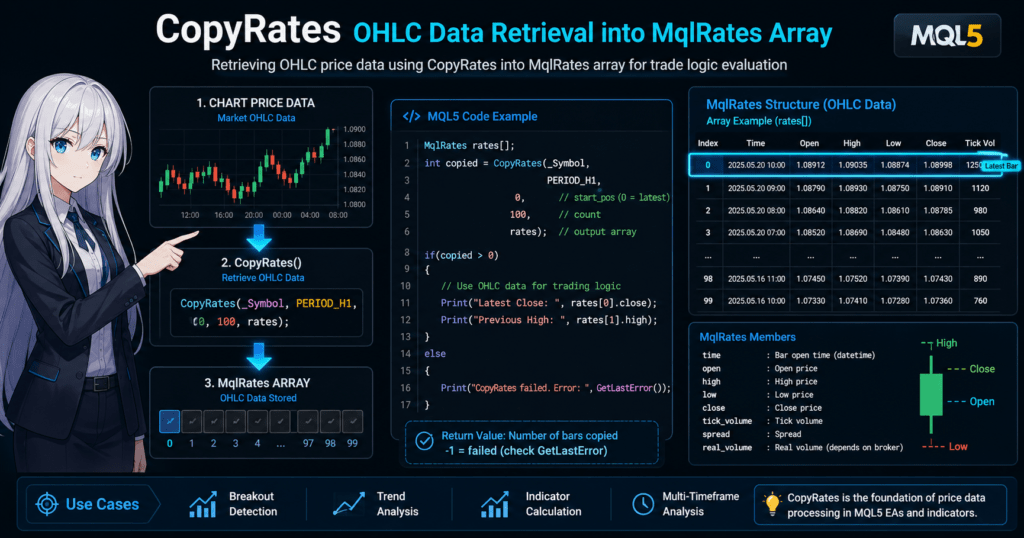
CopyRates is an MQL5 function used to retrieve price data, also known as OHLC data.
OHLC refers to the following four price values.
| Item | Meaning |
|---|---|
| Open | Opening price |
| High | Highest price |
| Low | Lowest price |
| Close | Closing price |
These values are the price information of candlesticks and are basic data for technical analysis and automated trading logic.
In MQL5, price data is usually handled as the MqlRates structure, which is a data structure that groups price information together.
CopyRates copies price data into this MqlRates array based on the specified currency pair, timeframe, and number of bars.
The basic flow is as follows.
Chart data
     ↓
CopyRates
     ↓
MqlRates array
     ↓
Used by an EA or indicator
In other words, CopyRates is a function for programmatically retrieving historical price data from a chart.
For example, in an EA (Expert Advisor), it is used for tasks such as the following.
- Retrieving the last N candlesticks
- Checking the most recent high or low
- Determining the trend direction
- Retrieving source data for indicator calculations
MQL5 also has functions for retrieving indicator values, such as CopyBuffer, but CopyRates is the basic function for retrieving price data itself.
For that reason, it is one of the functions you will almost always use in EA development.
1.2 When CopyRates Is Used
CopyRates is mainly used in the following situations.
1. Creating Trading Logic
An EA makes trading decisions based on past price data.
For example, logic such as:
- Recent high breakout
- Previous candlestick close
- Volatility measurement
requires retrieving price history.
Example:
MqlRates rates[];

CopyRates(_Symbol, PERIOD_H1, 0, 100, rates);
This code retrieves candlestick data for:
- the current currency pair
- the 1-hour timeframe
- 100 bars from the latest bar
2. Indicator Calculations
Many technical indicators are calculated from OHLC data.
Examples include:
- Moving averages
- ATR
- Bollinger Bands
- RSI
When creating a custom indicator, you may calculate values based on price data retrieved with CopyRates.
3. Multi-Timeframe Analysis
In MQL5, you can also retrieve data from a timeframe different from the current chart.
Examples:
- Retrieving H1 data from an M15 chart
- Retrieving D1 data from an H1 chart
This makes it possible to implement strategies such as:
- checking the higher-timeframe trend
- entering on a lower timeframe
1.3 Common Beginner Pitfalls
CopyRates is useful, but there are several points where beginners often get stuck.
The following three are especially common.
Handling Arrays
CopyRates is a function that copies data into an array.
Therefore, you need to prepare an MqlRates array, as shown below.
MqlRates rates[];
If the array type is wrong, a compilation error occurs.
Data Order
In MQL5, the array order is usually as follows.
| Index | Meaning |
|---|---|
| rates[0] | Latest bar |
| rates[1] | One bar ago |
| rates[2] | Two bars ago |
However, this can change depending on the ArraySetAsSeries() setting, so you must be careful when implementing logic.
Insufficient History
Common reasons CopyRates fails include:
- historical data has not been loaded
- the symbol is not registered in Market Watch
For example, data may be insufficient for:
- a currency pair opened for the first time
- a new timeframe
In that case, you may need to:
- open the chart
- load the data
Because behavior can differ by environment, it is important to write code that checks the number of bars actually retrieved.
2. Basic Syntax and Parameters of CopyRates
2.1 CopyRates Function Syntax
The basic syntax of the CopyRates function used to retrieve price data in MQL5 is as follows.
int CopyRates(
   string symbol,
   ENUM_TIMEFRAMES timeframe,
   int start_pos,
   int count,
   MqlRates rates_array[]
);
This function retrieves candlestick data for the specified currency pair and timeframe, then copies it into an MqlRates array.
The return value is the number of bars copied.
If retrieval fails, -1 is returned.
A basic usage example is shown below.
MqlRates rates[];

int copied = CopyRates(_Symbol, PERIOD_H1, 0, 100, rates);

if(copied <= 0)
{
   Print("CopyRates failed");
}
This code retrieves candlestick data for:
- the current currency pair
- the 1-hour timeframe
- 100 bars from the latest bar
The important point here is to always check the return value.
CopyRates can fail for reasons such as insufficient data.
A common beginner mistake is using the array without checking the return value.
That can cause an EA to behave incorrectly.
2.2 Meaning of Each Parameter
To use CopyRates correctly, it is important to understand each parameter.
| Parameter | Meaning |
|---|---|
| symbol | Currency pair |
| timeframe | Timeframe |
| start_pos | Starting position for retrieval |
| count | Number of bars to retrieve |
| rates_array | Destination array |
Each parameter is explained below.
symbol (Currency Pair)
This specifies the currency pair to retrieve.
Example:
"EURUSD"
Usually, the following constant is used to retrieve data from the current chart.
_Symbol
Example:
CopyRates(_Symbol, PERIOD_H1, 0, 100, rates);
This uses the currency pair of the current chart.
timeframe (Timeframe)
This specifies the timeframe to retrieve.
Common values:
| Timeframe | Constant |
|---|---|
| 1-minute | PERIOD_M1 |
| 5-minute | PERIOD_M5 |
| 15-minute | PERIOD_M15 |
| 1-hour | PERIOD_H1 |
| 4-hour | PERIOD_H4 |
| Daily | PERIOD_D1 |
Example:
PERIOD_H1
This means retrieve 1-hour data.
To retrieve the current chart timeframe, use:
PERIOD_CURRENT
start_pos (Starting Position)
This specifies the bar position where retrieval starts.
| Value | Meaning |
|---|---|
| 0 | Latest bar |
| 1 | One bar ago |
| 2 | Two bars ago |
Example:
CopyRates(_Symbol, PERIOD_H1, 0, 50, rates);
In this case, it retrieves 50 bars starting from the latest bar.
count (Number of Bars)
This specifies the number of candlesticks to retrieve.
Example:
100
This means retrieve 100 candlesticks.
However, if historical data is insufficient, the number retrieved may be less than the specified count.
rates_array (Destination Array)
This is the array that stores price data.
The type must be:
MqlRates
Example:
MqlRates rates[];
The following data is stored in this array.
- Time
- Open
- High
- Low
- Close
- Tick count
In MQL5, all price data is managed with this structure.
2.3 Basic CopyRates Sample Code
Here is a simple example of actual usage.
void OnStart()
{
   MqlRates rates[];

   int copied = CopyRates(_Symbol, PERIOD_H1, 0, 10, rates);

   if(copied > 0)
   {
      Print("Latest close: ", rates[0].close);
   }
   else
   {
      Print("CopyRates error");
   }
}
This code performs the following steps.
- Create an MqlRates array
- Retrieve 10 H1 bars
- Display the latest closing price
In EA development, this data is used to build trading logic.
2.4 Common Mistakes
The following are common beginner mistakes when using CopyRates.
The Array Is Not Declared
The following code causes an error.
CopyRates(_Symbol, PERIOD_H1, 0, 10, rates);
This is because the rates array does not exist.
You must declare it beforehand:
MqlRates rates[];
The Number of Retrieved Bars Is Not Checked
The following code is dangerous.
CopyRates(_Symbol, PERIOD_H1, 0, 10, rates);
Print(rates[0].close);
If CopyRates fails, the rates array may be empty.
Always check it as follows.
if(copied > 0)
Insufficient History
If you request too many bars, data may be insufficient.
Example:
CopyRates(_Symbol, PERIOD_H1, 0, 10000, rates);
In this case, retrieval may fail because of:
- unloaded history
- insufficient initial data
The amount of available history differs by environment, so it is important to design the EA to check the number of bars actually retrieved.
3. Inside the MqlRates Structure: The Structure of OHLC Data
3.1 What Is MqlRates?
MqlRates is a structure used in MQL5 to handle candlestick data as a group.
A structure is a data type that handles multiple values as one set.
The CopyRates function stores retrieved price data in an MqlRates array.
The basic declaration is as follows.
MqlRates rates[];
One element of this array contains data for one candlestick.
For example, you can access bars like this:
rates[0]  → Latest candlestick
rates[1]  → One bar ago
rates[2]  → Two bars ago
In an EA or indicator, you retrieve values such as:
- Open
- High
- Low
- Close
- Time
from this structure and use them to build trading logic.
3.2 List of MqlRates Structure Members
The MqlRates structure contains the following data.
| Member | Meaning |
|---|---|
| time | Candlestick start time |
| open | Opening price |
| high | Highest price |
| low | Lowest price |
| close | Closing price |
| tick_volume | Tick count |
| spread | Spread |
| real_volume | Real volume, depending on the broker |
The MQL5 definition is as follows.
struct MqlRates
{
   datetime time;
   double open;
   double high;
   double low;
   double close;
   long tick_volume;
   int spread;
   long real_volume;
};
Many EAs mainly use the following four values.
- open
- high
- low
- close
These are OHLC data.
3.3 Example of Retrieving OHLC Data
Data retrieved with CopyRates can be used as follows.
MqlRates rates[];

int copied = CopyRates(_Symbol, PERIOD_H1, 0, 10, rates);

if(copied > 0)
{
   Print("Open: ", rates[0].open);
   Print("High: ", rates[0].high);
   Print("Low: ", rates[0].low);
   Print("Close: ", rates[0].close);
}
This code:
- retrieves 10 H1 bars
- prints the OHLC values of the latest bar
Commonly used data examples are shown below.
| Code | Meaning |
|---|---|
| rates[0].close | Latest closing price |
| rates[1].close | Previous bar closing price |
| rates[0].high | Latest high |
| rates[0].low | Latest low |
For example, a recent high breakout strategy could use code like this.
double lastHigh = rates[1].high;

if(Bid > lastHigh)
{
   Print("Breakout");
}
3.4 Handling Time Data
MqlRates has a time member.
rates[0].time
This represents the start time of the candlestick.
Its type is datetime.
To display it, use the following.
Print(TimeToString(rates[0].time));
In an EA, it is used for:
- detecting a new bar
- controlling trading hours
- time-series analysis
3.5 Common Beginner Pitfalls
Beginners often get confused when handling the MqlRates structure.
Meaning of Array Indexes
In MQL5:
0 = Latest bar
1 = One bar ago
2 = Two bars ago
Beginners often mistakenly think:
0 = Oldest bar
Accessing Data That Was Not Retrieved
The following code is dangerous.
Print(rates[0].close);
If CopyRates fails, the rates array may not contain any data.
Always perform the following check.
if(copied > 0)
real_volume Often Cannot Be Used
real_volume is real trading volume, but in:
- FX brokers
- CFDs
it is often 0.
For that reason, FX usually uses:
tick_volume
3.6 Summary of the Relationship Between CopyRates and MqlRates
CopyRates works in the following flow.
Price history
   ↓
CopyRates
   ↓
MqlRates array
   ↓
EA logic
In short, CopyRates retrieves data, and MqlRates stores data.
Once you understand these two roles, price handling in MQL5 becomes much easier.
4. Practical CopyRates Sample Code: How to Use It in an EA
4.1 The Most Basic CopyRates Usage Example
In real EA development, CopyRates is often used to retrieve recent candlestick data and use it for trading decisions.
First, here is the most basic sample code.
void OnTick()
{
   MqlRates rates[];

   int copied = CopyRates(_Symbol, PERIOD_H1, 0, 5, rates);

   if(copied <= 0)
   {
      Print("CopyRates error");
      return;
   }

   double lastClose = rates[1].close;
   double currentClose = rates[0].close;

   Print("Current close: ", currentClose);
   Print("Previous close: ", lastClose);
}
This code performs the following steps.
- Create an MqlRates array
- Retrieve 5 bars of 1-hour data
- Get the latest close and previous close
- Print them to the log
An EA uses price data retrieved this way to build trading conditions.
4.2 Example of a Recent High Breakout Strategy
A typical use of CopyRates is a high breakout strategy.
This is very simple logic:
- buy when price exceeds the previous high
void OnTick()
{
   MqlRates rates[];

   int copied = CopyRates(_Symbol, PERIOD_M15, 0, 3, rates);

   if(copied <= 0)
      return;

   double previousHigh = rates[1].high;

   if(Bid > previousHigh)
   {
      Print("High breakout occurred");
   }
}
This example uses the following data.
| Data | Meaning |
|---|---|
| rates[0] | Current bar |
| rates[1] | One bar ago |
| rates[2] | Two bars ago |
In EAs, referencing past bar prices is extremely common.
4.3 Detecting a New Candlestick
In an EA, processing is often performed when a new bar has formed.
With CopyRates and MqlRates, new-bar detection is simple.
datetime lastBarTime = 0;

void OnTick()
{
   MqlRates rates[];

   if(CopyRates(_Symbol, PERIOD_H1, 0, 2, rates) <= 0)
      return;

   if(rates[0].time != lastBarTime)
   {
      lastBarTime = rates[0].time;

      Print("A new bar has started");
   }
}
This code compares:
- the time of the latest bar
- the previously recorded time
If they are different, it means that a new candlestick has started.
This is a very common technique in EA development.
4.4 Retrieving Multiple Timeframes: Multi-Timeframe Analysis
One strength of CopyRates is that it can retrieve data from a timeframe different from the current chart.
Example:
Checking the H1 trend from an M15 chart
void OnTick()
{
   MqlRates h1Rates[];

   if(CopyRates(_Symbol, PERIOD_H1, 0, 10, h1Rates) <= 0)
      return;

   double h1Close = h1Rates[0].close;
   double h1PrevClose = h1Rates[1].close;

   if(h1Close > h1PrevClose)
   {
      Print("H1 is in an uptrend");
   }
}
This lets you build strategies such as:
- higher-timeframe trend filtering
- lower-timeframe entries
Multi-timeframe analysis is very common in EA development.
4.5 Common Implementation Mistakes by Beginners
Beginners often make the following mistakes when implementing CopyRates.
Not Retrieving the Required Number of Bars
For example, consider the following code.
CopyRates(_Symbol, PERIOD_H1, 0, 1, rates);
In this case:
rates[1]
does not exist.
Therefore, you must secure the required number of bars, as in:
CopyRates(..., 2, rates)
Retrieving a Large Amount of Data on Every Tick
The following code is inefficient.
CopyRates(_Symbol, PERIOD_H1, 0, 1000, rates);
If this is executed on every OnTick call, performance decreases.
A better design usually uses:
- the minimum required number of bars
- retrieval only when a new bar appears
Not Checking the Return Value of CopyRates
CopyRates can fail.
Examples include:
- insufficient history
- server not synchronized
- initial data loading
Always include the following check.
if(copied <= 0)
4.6 Common CopyRates Patterns in Real Projects
The following patterns are often used in EA development.
| Purpose | Number of Bars |
|---|---|
| New-bar detection | 2 |
| Previous candlestick | 2 |
| Breakout | 10 |
| Technical calculation | 100-500 |
Retrieving more data than necessary can make EA processing heavier, so be careful.
5. Common CopyRates Errors and How to Fix Them
5.1 Main Reasons CopyRates Fails
CopyRates is a simple function, but in real EA development, data retrieval can fail more often than expected.
Beginners commonly encounter the following causes.
| Cause | Details |
|---|---|
| Insufficient historical data | The required candlestick data does not exist in the terminal |
| Symbol not registered in Market Watch | The currency pair is not registered in the watch list |
| Too many bars requested | The specified number of bars cannot be retrieved |
| Server not synchronized | Data synchronization is not complete right after MT5 starts |
| Array access mistake | Accessing an index beyond the number of retrieved bars |
These issues can be affected not only by the program but also by the terminal environment.
5.2 Insufficient Historical Data
The most common problem is insufficient historical data.
Consider the following code.
MqlRates rates[];

int copied = CopyRates(_Symbol, PERIOD_H1, 0, 1000, rates);
If the MT5 terminal does not have 1000 H1 bars, it cannot retrieve the specified count.
As a result:
copied < 1000
Possible fixes are as follows.
Fixes
- Open the chart and load the data
- Reduce the number of bars requested
- Check the actual number of bars retrieved from the return value
Safe code example:
int copied = CopyRates(_Symbol, PERIOD_H1, 0, 100, rates);

if(copied <= 0)
{
   Print("CopyRates failed");
   return;
}
In an EA, it is important to always design for successful retrieval checks.
5.3 The Currency Pair Is Not in Market Watch
When retrieving data for another currency pair, it can fail if the symbol is not registered in Market Watch.
Example:
CopyRates("GBPUSD", PERIOD_H1, 0, 10, rates);
If GBPUSD does not exist in Market Watch, data retrieval may fail.
As a fix, use the following function.
SymbolSelect("GBPUSD", true);
This performs:
- registration in Market Watch
- start of data synchronization
Example:
SymbolSelect("GBPUSD", true);

CopyRates("GBPUSD", PERIOD_H1, 0, 10, rates);
5.4 Data Not Synchronized Right After MT5 Starts
Immediately after starting MT5:
- server connection
- history synchronization
may not be complete.
If CopyRates is called in this state:
-1
may be returned.
In this case, stability improves if you:
- wait a few seconds
- retry
Example:
if(copied <= 0)
{
   Print("data not ready");
   return;
}
5.5 Array Size Error: Array Out of Range
A very common CopyRates-related error is:
array out of range
The cause is accessing an index larger than the number of retrieved bars.
Example:
CopyRates(_Symbol, PERIOD_H1, 0, 2, rates);

double price = rates[5].close;
In this case, only:
rates[0]
rates[1]
exist.
Fix:
if(copied >= 2)
{
   double price = rates[1].close;
}
In an EA, the basic rule is to check the number of retrieved bars before accessing the array.
5.6 Misunderstanding Data Order
A point that often confuses beginners is the order of bars.
An array retrieved with CopyRates is usually:
| Index | Meaning |
|---|---|
| 0 | Latest bar |
| 1 | One bar ago |
| 2 | Two bars ago |
However, when using:
ArraySetAsSeries(rates, true);
the array is treated as a time-series array, so behavior can change.
In EA development, you must always be aware of the array order.
5.7 Basic Template for Handling CopyRates Errors
In real projects, the following code pattern is often used.
MqlRates rates[];

int copied = CopyRates(_Symbol, PERIOD_H1, 0, 10, rates);

if(copied <= 0)
{
   Print("CopyRates failed");
   return;
}

if(copied < 2)
{
   Print("not enough bars");
   return;
}

double closePrice = rates[1].close;
This two-step check:
- checks retrieval success
- checks the required number of bars
makes the EA safer.
6. Difference Between CopyRates and CopyBuffer
6.1 Roles of CopyRates and CopyBuffer
When retrieving data in MQL5, beginners often confuse CopyRates with CopyBuffer.
Both are functions that copy data, but the type of data they retrieve is different.
| Function | Data Retrieved |
|---|---|
| CopyRates | Price data (OHLC) |
| CopyBuffer | Indicator values |
In short:
CopyRates  → Candlestick data
CopyBuffer → Indicator calculation results
They have different roles.
In EA development, these two functions are often used together.
6.2 Data Retrieved by CopyRates
CopyRates retrieves the candlesticks of the chart itself.
The main data it can retrieve is as follows.
| Data | Meaning |
|---|---|
| open | Opening price |
| high | Highest price |
| low | Lowest price |
| close | Closing price |
| time | Bar time |
| tick_volume | Tick count |
Example:
MqlRates rates[];

CopyRates(_Symbol, PERIOD_H1, 0, 10, rates);

double lastClose = rates[0].close;
In this way, all price information is stored together in the MqlRates structure.
CopyRates is used for:
- candlestick analysis
- breakout decisions
- volatility measurement
6.3 Data Retrieved by CopyBuffer
CopyBuffer is a function that retrieves indicator calculation results.
Examples include:
- moving averages
- RSI
- MACD
- ATR
The basic usage is as follows.
int handle = iMA(_Symbol, PERIOD_H1, 20, 0, MODE_SMA, PRICE_CLOSE);

double buffer[];

CopyBuffer(handle, 0, 0, 10, buffer);
This code:
- creates a 20-period moving average
- retrieves moving average values
CopyBuffer retrieves data using an indicator handle.
6.4 Typical Data Retrieval Structure in an EA
In a real EA, CopyRates + CopyBuffer are often combined as follows.
Price data → CopyRates
Indicator → CopyBuffer
Example:
MqlRates rates[];
double ma[];

CopyRates(_Symbol, PERIOD_H1, 0, 10, rates);

CopyBuffer(maHandle, 0, 0, 10, ma);
This retrieves:
- price
- indicator values
at the same time and uses them to build trading logic.
6.5 Comparison of CopyRates and CopyBuffer
For beginners, the difference can be summarized as follows.
| Item | CopyRates | CopyBuffer |
|---|---|---|
| Purpose | Retrieve prices | Retrieve indicators |
| Data format | MqlRates structure | double array |
| Requirement | None | Indicator handle |
| Main use | EA logic | Technical analysis |
Simply remember:
CopyRates → Candlesticks
CopyBuffer → Indicator values
This makes the distinction easier to understand.
6.6 Common Points Beginners Confuse
Because CopyRates and CopyBuffer look similar, the following mistakes are common.
Trying to Get Prices with CopyBuffer
CopyBuffer cannot retrieve price data.
For prices, always use:
CopyRates
Trying to Get Indicator Values with CopyRates
CopyRates cannot retrieve indicator values.
For example:
- RSI
- MACD
are retrieved with CopyBuffer.
Different Array Types
CopyRates:
MqlRates rates[];
CopyBuffer:
double buffer[];
Because the types are different, using the wrong type causes a compilation error.
6.7 Basic Data Flow in EA Development
Many EAs have the following structure.
Price retrieval     → CopyRates
Indicator retrieval → CopyBuffer
Trading decision    → EA logic
Order execution     → OrderSend
Once you understand this data flow, the structure of an MQL5 EA becomes much easier to understand.
7. Practical CopyRates Best Practices: Speed and Stability
7.1 Retrieve Only the Minimum Required Data with CopyRates
In EA development, processing speed and stability are important.
CopyRates is useful, but retrieving large amounts of data frequently can reduce EA performance.
A common beginner example:
MqlRates rates[];

CopyRates(_Symbol, PERIOD_H1, 0, 1000, rates);
Running this code on every OnTick() call is very inefficient.
It may affect performance especially in:
- high-frequency tick environments
- multi-symbol EAs
- VPS operation
For real projects, design the EA to retrieve only the minimum number of bars needed.
Example:
MqlRates rates[];

CopyRates(_Symbol, PERIOD_H1, 0, 3, rates);
The basic approach is to retrieve only the number of bars required by the logic.
7.2 Retrieve Data Only When a New Bar Appears
Many EAs are designed to process only when a new candlestick has formed.
Reasons:
- It reduces calculations on every tick
- It lowers CPU load
- It stabilizes the logic
A typical implementation is as follows.
datetime lastBarTime = 0;

void OnTick()
{
   MqlRates rates[];

   if(CopyRates(_Symbol, PERIOD_H1, 0, 2, rates) <= 0)
      return;

   if(rates[0].time != lastBarTime)
   {
      lastBarTime = rates[0].time;

      Print("New bar");
   }
}
With this design:
Processing on every tick → Processing on new bars
the EA becomes much more stable.
7.3 Use ArraySetAsSeries Properly
MQL5 has a function that changes array order.
ArraySetAsSeries(array, true);
When this is set, the array becomes a time-series array like this.
| Index | Meaning |
|---|---|
| 0 | Latest bar |
| 1 | One bar ago |
| 2 | Two bars ago |
Many EAs use this setting.
Example:
MqlRates rates[];

ArraySetAsSeries(rates, true);

CopyRates(_Symbol, PERIOD_H1, 0, 10, rates);
However, CopyRates may already store data in series order depending on the environment.
Therefore, during implementation, it is important to check:
- the actual array order
- consistency with your logic
7.4 You Do Not Need to Call CopyRates on Every Tick
A common beginner design is:
OnTick()
{
   CopyRates(...);
}
However, in many EAs it is enough to retrieve data only at:
- new-bar timing
- trade decision timing
Recommended design:
Tick received
↓
New-bar check
↓
CopyRates
↓
Logic calculation
This design provides benefits such as:
- lower CPU load
- more stable VPS operation
- faster EA processing
7.5 Safe CopyRates Template
In real projects, template code like the following is often used.
MqlRates rates[];

int copied = CopyRates(_Symbol, PERIOD_H1, 0, 10, rates);

if(copied <= 0)
{
   Print("CopyRates error");
   return;
}

if(copied < 2)
{
   Print("not enough bars");
   return;
}

double lastClose = rates[1].close;
This code performs a three-step check:
- Confirm CopyRates success
- Confirm the required number of bars
- Use the data safely
In EA development, this kind of defensive programming is very important.
7.6 Understanding CopyRates Makes EA Development Easier
In an MQL5 EA, much of price data retrieval is built around:
- CopyRates
- CopyBuffer
Among these, CopyRates can be considered:
the basic data retrieval function for EAs
When you understand it correctly, you can implement many strategies, such as:
- breakout EAs
- trend EAs
- volatility EAs
8. FAQ
8.1 What Is CopyRates in MQL5?
CopyRates is a function used in MQL5 to retrieve candlestick data, also known as OHLC data.
In an EA or indicator, trading decisions are made using past price data. For that reason, CopyRates is used to retrieve price history for a specified currency pair, timeframe, and number of bars.
The retrieved data is stored in an array of MqlRates structures.
8.2 What Data Can CopyRates Retrieve?
The main data CopyRates can retrieve is as follows.
| Data | Details |
|---|---|
| time | Candlestick start time |
| open | Opening price |
| high | Highest price |
| low | Lowest price |
| close | Closing price |
| tick_volume | Tick count |
| spread | Spread |
| real_volume | Real volume, depending on the broker |
Most EAs mainly use the four values open / high / low / close, known as OHLC.
8.3 What Is the Difference Between CopyRates and CopyBuffer?
They have different roles.
| Function | Purpose |
|---|---|
| CopyRates | Retrieve price data |
| CopyBuffer | Retrieve indicator values |
CopyRates retrieves candlestick data, while CopyBuffer retrieves indicator calculation results such as moving averages and RSI.
In EAs, these two functions are commonly used together.
8.4 Why Does CopyRates Fail?
The main causes are as follows.
- Insufficient historical data
- The currency pair is not registered in Market Watch
- Data synchronization is not complete right after MT5 starts
- Too many bars are requested
- Array access mistakes
Beginners often access the array without checking the CopyRates return value.
8.5 What Does the Return Value of CopyRates Mean?
The return value of CopyRates is the number of bars actually copied.
Example:
10 → 10 bars retrieved successfully
0 → No data
-1 → Error
Therefore, an EA should always check it as follows.
if(copied <= 0)
8.6 Is rates[0] the Latest Bar?
Usually, rates[0] refers to the latest bar.
| Index | Meaning |
|---|---|
| rates[0] | Latest bar |
| rates[1] | One bar ago |
| rates[2] | Two bars ago |
However, behavior may change depending on array settings such as ArraySetAsSeries.
8.7 Does CopyRates Need to Run on Every Tick?
Not necessarily.
Many EAs run it only at:
- the timing when a new candlestick is confirmed
- the timing of a trade decision
Retrieving a large amount of data on every tick can increase EA processing load.
8.8 How Many Bars Should CopyRates Retrieve?
It depends on the purpose.
| Purpose | Number of Bars |
|---|---|
| New-bar detection | 2 |
| Reference to previous candlestick | 2-3 |
| Breakout decision | 10-20 |
| Technical calculation | 100-500 |
Retrieving more data than necessary makes processing heavier, so the basic rule is to keep the number of bars to the minimum required.