

- 1 1. What Is CopyTime in MQL5?
- 2 2. Basic Syntax of CopyTime
- 3 3. Basic Examples of Using CopyTime
- 4 4. New Bar Detection Using CopyTime
- 5 5. Practical Uses of CopyTime: Past Bars and Timeframe Synchronization
- 6 6. Why CopyTime Fails and How to Fix It
- 7 7. Practical Notes When Using CopyTime: Performance and Design
- 8 8. Summary of MQL5 CopyTime: Key Points for Beginners
- 9 9. FAQ
- 9.1 Q1. What is CopyTime in MQL5?
- 9.2 Q2. What is the difference between CopyTime and CopyRates?
- 9.3 Q3. Why does CopyTime return -1?
- 9.4 Q4. What does time[0] retrieved by CopyTime mean?
- 9.5 Q5. Can CopyTime be used for new bar detection?
- 9.6 Q6. Is it okay to retrieve a large amount of data with CopyTime?
- 9.7 Q7. Can CopyTime be used in backtesting?
1. What Is CopyTime in MQL5?
In MQL5, CopyTime is a function used to get the time information of bars, or candlesticks, for a specified symbol and timeframe.
Here, “time” means the start time of the candlestick, also called the bar open time.
In MetaTrader 5 (MT5), price data is made up of elements such as:
- Time (datetime)
- Open price (Open)
- High price (High)
- Low price (Low)
- Close price (Close)
- Volume
Among these, CopyTime is the function that retrieves only the time data.
The retrieved time data is stored in a datetime array and can be used in EA, or automated trading, logic and indicator logic.
For example, in EA development, it is often used for the following purposes:
- Detecting whether a new bar, or candlestick, has been created
- Checking the time of past bars
- Synchronizing data across multiple timeframes
- Getting the reference time for indicator calculations
The most important use is new bar detection.
When building an EA, if trading decisions are made on every tick, or every price update, the EA may enter multiple times on the same bar.
For that reason, the following design is commonly used:
- Run the logic only when a new bar appears
- Do not process the logic within the same bar
CopyTime is very commonly used for this judgment.
1.1 Basic Role of CopyTime
The role of CopyTime is very simple.
It gets the bar time for a specified symbol and timeframe.
The retrieved time is stored in an array as a datetime type.
datetime is a basic MQL5 type that handles timestamps in seconds.
A typical retrieval pattern looks like this:
| Index | Content |
|---|---|
| time[0] | Start time of the latest bar |
| time[1] | Previous bar |
| time[2] | Two bars ago |
However, beginners often get stuck at this point.
Common Points to Watch
1. Array direction, or index order
In MQL, you can change the order in which arrays are treated.
Many EAs use the following setting:
ArraySetAsSeries(array,true);
When this setting is used:
index0 = latest bar
index1 = previous bar
Without this setting, the order may be reversed, which can break your logic.
2. CopyTime retrieves only time
Beginners often confuse CopyTime with the following functions:
| Function | Data Retrieved |
|---|---|
| CopyTime | Bar time |
| CopyRates | OHLC price data |
| CopyBuffer | Indicator values |
In other words, CopyTime is a function that:
retrieves time only, not price data.
3. Cases where data cannot be retrieved
Depending on the environment, CopyTime may return -1, meaning retrieval failed.
Main causes:
- Chart history has not been loaded
- The symbol is invalid
- The timeframe is specified incorrectly
- There is not enough data
In this case, you need to load history data or check the symbol.
CopyTime is a simple function, but in EA development it plays important roles such as:
- new bar detection
- data synchronization
- time management
2. Basic Syntax of CopyTime
To use CopyTime correctly, you first need to understand the function syntax, or signature, and the meaning of each argument.
In MQL5, price data retrieval functions have similar structures, and CopyTime follows the same design.
The basic syntax of CopyTime is:
int CopyTime(
   string symbol,
   ENUM_TIMEFRAMES timeframe,
   int start_pos,
   int count,
   datetime &time_array[]
);
This function gets the bar times for the specified symbol and timeframe and copies them into a datetime array.
The return value is the number of bars copied.
If retrieval fails, it returns -1.
2.1 Meaning of Each CopyTime Argument
CopyTime has five arguments.
Understanding each role also makes it easier to understand other Copy functions, such as CopyRates and CopyBuffer.
| Argument | Type | Description |
|---|---|---|
| symbol | string | Currency pair or symbol, such as EURUSD |
| timeframe | ENUM_TIMEFRAMES | Timeframe, such as PERIOD_M15 |
| start_pos | int | Position where retrieval starts |
| count | int | Number of bars to retrieve |
| time_array | datetime array | Array that stores the result |
Each argument is explained below.
symbol
Specify the financial instrument, or symbol, to retrieve data from.
Example:
"EURUSD"
If you want to use the current chart, it is common to use:
_Symbol
timeframe
Specify the timeframe to retrieve.
Examples:
| Timeframe | Constant |
|---|---|
| M1 | PERIOD_M1 |
| M5 | PERIOD_M5 |
| M15 | PERIOD_M15 |
| H1 | PERIOD_H1 |
| D1 | PERIOD_D1 |
If you want to use the current chart timeframe, it is convenient to use:
_Period
start_pos
This specifies which bar to start retrieving from.
Examples:
| Value | Meaning |
|---|---|
| 0 | Latest bar |
| 1 | Previous bar |
| 2 | Two bars ago |
Usually, retrieval starts from 0, the latest bar.
count
This is the number of bars to retrieve.
Example:
1
This retrieves only the latest bar.
10
This retrieves the bar times for the latest 10 bars.
As a point of caution, retrieval may fail if you request more data than the array size can safely handle.
time_array
This is the array that stores the retrieved time values.
The datetime type is a date and time data type, and it stores the bar start time.
Example:
datetime time[];
2.2 Meaning of the Return Value
CopyTime returns the number of bars retrieved as an integer.
Example:
int copied = CopyTime(_Symbol,_Period,0,10,time);
If successful:
copied = 10
If it fails:
copied = -1
Common Failures
There are typical cases where beginners get stuck.
Not enough array size
If the array size is not prepared, retrieval may fail.
Bad example:
datetime time[];
CopyTime(_Symbol,_Period,0,10,time);
Safer example:
datetime time[];
ArrayResize(time,10);

CopyTime(_Symbol,_Period,0,10,time);
Not enough historical data
If history is missing for a specific timeframe, data may not be retrieved.
Examples:
- A newly opened chart
- Data that has not been loaded yet
In this case, actions such as:
- scrolling the chart
- calling
RefreshRates()
may solve the issue.
CopyTime has simple syntax, but it is important to understand array management and how data retrieval works.
3. Basic Examples of Using CopyTime
In real EA development, CopyTime is used as the process that retrieves time data inside the code.
This section introduces basic examples that are easy for beginners to understand.
If you remember the following two patterns, you will be able to handle many practical cases:
- Getting the time of the latest bar
- Getting the times of multiple bars
3.1 Example: Get the Time of the Latest Bar
The most basic use is getting the start time of the latest bar.
Code example:
void OnTick()
{
   datetime time[];

   ArrayResize(time,1);

   int copied = CopyTime(_Symbol,_Period,0,1,time);

   if(copied > 0)
   {
      Print("Latest bar time: ",time[0]);
   }
}
Code flow:
- Create a datetime array
- Set the array size to 1
- Get the latest bar with CopyTime
- Display the time if retrieval succeeds
When this code runs, the log shows information like this:
Latest bar time: 2026.03.15 10:00
This time is the start time of the candlestick.
For example:
| Timeframe | Displayed Time |
|---|---|
| M5 | 10:00 |
| M15 | 10:00 |
| H1 | 10:00 |
In other words, it is the time when that bar started.
3.2 Example: Get the Times of Multiple Bars
If you want to retrieve past bar times together, increase count.
Example:
void OnTick()
{
   datetime time[];

   ArrayResize(time,5);

   int copied = CopyTime(_Symbol,_Period,0,5,time);

   if(copied > 0)
   {
      for(int i=0;i<copied;i++)
      {
         Print("time[",i,"] = ",time[i]);
      }
   }
}
This code retrieves the bar times for the latest five bars.
Example log output:
time[0] = 2026.03.15 10:00
time[1] = 2026.03.15 09:55
time[2] = 2026.03.15 09:50
time[3] = 2026.03.15 09:45
time[4] = 2026.03.15 09:40
However, there is an important point to watch here.
Common Sticking Points
Array direction
The meaning of each index changes depending on the array direction.
In ordinary EA code, the following setting is often used:
ArraySetAsSeries(time,true);
With this setting:
| index | Content |
|---|---|
| 0 | Latest bar |
| 1 | Previous bar |
| 2 | Two bars ago |
Without this setting, the order may be reversed.
Checking the CopyTime return value
If you do not check the return value of CopyTime, you may miss a retrieval failure.
Bad example:
CopyTime(_Symbol,_Period,0,5,time);
Safer example:
if(CopyTime(_Symbol,_Period,0,5,time) <= 0)
{
   Print("CopyTime failed");
}
Not enough data
If the number of requested bars is larger than the available history:
CopyTime = -1
may occur.
For example, data may be insufficient with:
- a new chart
- an old timeframe
In this case, you may solve the issue by:
- loading chart history
- reducing the number of requested bars
CopyTime is a function dedicated to retrieving time data, but it is very important in EA development.
It is used especially often in new bar detection logic.
4. New Bar Detection Using CopyTime
The most common use of CopyTime in EA, or automated trading, development is detecting whether a new candlestick has been created.
In MT5 EAs, OnTick() is normally executed on every tick, or price update.
However, if you write trading logic directly in OnTick, the EA may enter multiple times within the same bar.
Example:
100 ticks arrive within one candlestick
↓
Trading condition is met
↓
100 entries
To prevent this, EAs commonly use the following design:
Run the logic only when a new bar is created.
This is where bar time comparison with CopyTime is used.
4.1 Basic Logic for New Bar Detection
The basic idea is simple.
- Get the time of the latest bar
- Compare it with the previous bar time
- If the time has changed, it is a new bar
The table below shows the idea:
| Tick | Bar Time |
|---|---|
| 1 | 10:00 |
| 2 | 10:00 |
| 3 | 10:00 |
| 4 | 10:05 ← new bar |
You detect this change in time.
4.2 New Bar Detection Code Using CopyTime
This is a basic code pattern often used in practice.
datetime last_bar_time = 0;

void OnTick()
{
   datetime time[];
   ArrayResize(time,1);

   if(CopyTime(_Symbol,_Period,0,1,time) <= 0)
      return;

   if(time[0] != last_bar_time)
   {
      last_bar_time = time[0];

      Print("A new bar has been created");

      // Write trading logic here
   }
}
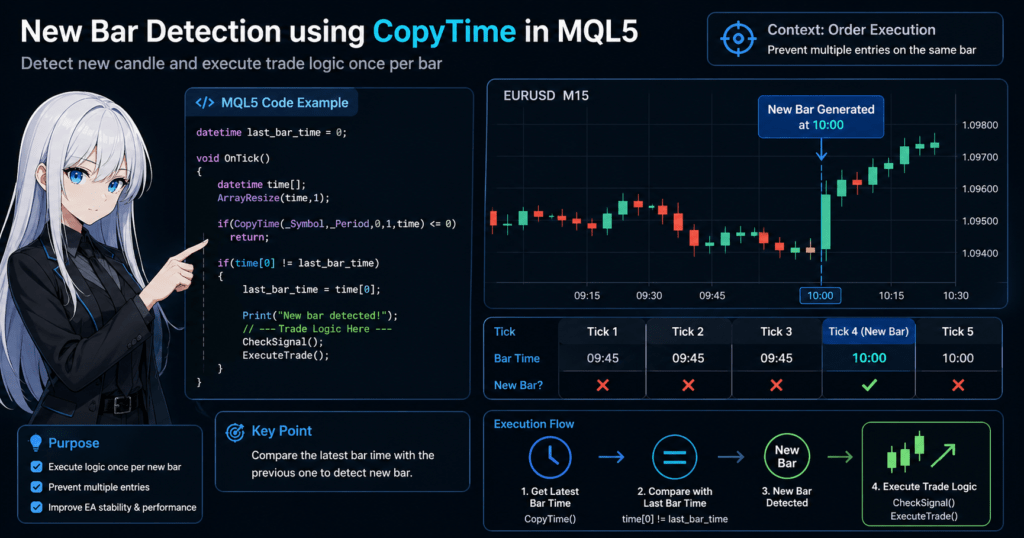
Code flow:
- Get the latest bar time
- Compare it with the previous time
- If it is different, treat it as a new bar
- Run the logic
With this method, processing runs only once per bar.
4.3 Typical Use in EA Design
New bar detection is used in logic such as:
if(NewBar())
{
   CheckSignal();
   ExecuteTrade();
}
In other words, the design becomes:
New bar
↓
Signal check
↓
Trade execution
This structure has benefits such as:
- preventing multiple entries on the same bar
- reducing CPU load
- stabilizing the logic
Common Failures
Forgetting to initialize last_bar_time
On the first tick, there may be no previous value to compare against, which can cause unexpected behavior.
Countermeasure:
if(last_bar_time == 0)
{
   last_bar_time = time[0];
   return;
}
Array size is not set
If the array size is not prepared before CopyTime, retrieval may fail.
ArrayResize(time,1);
Make sure to do this.
Not checking CopyTime failure
If CopyTime fails, time[0] is undefined.
Always check the return value:
if(CopyTime(_Symbol,_Period,0,1,time) <= 0)
   return;
Why Use CopyTime?
There are other ways to detect a new bar:
| Method | Feature |
|---|---|
| TimeCurrent | Server time |
| Bars | Number of bars |
| CopyTime | Bar time |
Among these, CopyTime is the most accurate.
Reasons:
- It directly retrieves bar time
- It is less affected by timeframe handling
- It makes EA implementation stable
For this reason, many EA developers use the CopyTime method.
CopyTime can also be used for past bar analysis and time synchronization, not only new bar detection.
5. Practical Uses of CopyTime: Past Bars and Timeframe Synchronization
CopyTime is useful not only for new bar detection, but also for retrieving past time data and synchronizing multiple timeframes.
In EA and indicator development, it is often used for:
- checking the time of past bars
- synchronizing bar times across multiple timeframes
- finding a bar at a specific time
This section explains representative practical patterns.
5.1 Get Past Bar Times
To retrieve past bar times, increase count.
Code example:
void OnTick()
{
   datetime time[];
   ArrayResize(time,10);

   int copied = CopyTime(_Symbol,_Period,0,10,time);

   if(copied <= 0)
   {
      Print("CopyTime failed");
      return;
   }

   for(int i=0;i<copied;i++)
   {
      Print("time[",i,"] = ",time[i]);
   }
}
This code retrieves the bar times for the latest 10 bars.
Example result:
time[0] = 2026.03.15 10:00
time[1] = 2026.03.15 09:55
time[2] = 2026.03.15 09:50
With this data, you can create logic such as:
- past bar comparisons
- time filters
- trades at specific times
5.2 Search for a Bar at a Specific Time
Depending on the trading strategy, you may need to identify a bar at a specific time.
Examples:
- London open
- New York open
- Tokyo market open
Example code:
datetime time[];
ArrayResize(time,1);

if(CopyTime(_Symbol,_Period,0,1,time) > 0)
{
   MqlDateTime t;
   TimeToStruct(time[0],t);

   if(t.hour == 9 && t.min == 0)
   {
      Print("This is the 9:00 bar");
   }
}
This code detects the 9:00 bar.
One important point is that it uses:
the broker’s server time.
Therefore, the time may differ depending on the environment, such as:
- GMT+2
- GMT+3
5.3 Synchronizing Multiple Timeframes
In EA development, it is common to combine data from multiple timeframes.
Examples:
- M5 entry
- H1 trend filter
In this case, you need to get the bar time for each timeframe and synchronize the data.
Code example:
datetime time_m5[];
datetime time_h1[];

ArrayResize(time_m5,1);
ArrayResize(time_h1,1);

CopyTime(_Symbol,PERIOD_M5,0,1,time_m5);
CopyTime(_Symbol,PERIOD_H1,0,1,time_h1);

Print("M5: ",time_m5[0]);
Print("H1: ",time_h1[0]);
Example result:
M5: 10:05
H1: 10:00
This shows that:
bar start times differ depending on the timeframe.
Common Sticking Points
Different broker times
MT5 is based on server time.
For example:
| Environment | Server Time |
|---|---|
| Broker A | GMT+2 |
| Broker B | GMT+3 |
Therefore, time-based logic may depend on the environment.
Data not loaded
When using another timeframe, if history is not loaded:
CopyTime = -1
may occur.
Countermeasures:
- Display the timeframe once on the chart
- Load history in the backtest environment
Not enough array size
Retrieval may fail if you request more data than the prepared array size.
Safer example:
ArrayResize(time,100);
CopyTime(_Symbol,_Period,0,100,time);
CopyTime is a basic function for retrieving time data and becomes the foundation for many EA logic patterns.
6. Why CopyTime Fails and How to Fix It
CopyTime has simple syntax, but in real development, it is common to face situations where “for some reason no value is returned” or “-1 is returned”.
Beginners often struggle more with data retrieval conditions than with the code syntax itself.
This section organizes common failure patterns with CopyTime and how to fix them.
6.1 Main Reasons the Return Value Becomes -1
When CopyTime succeeds, it returns the number of copied bars. When it fails, it returns -1.
Therefore, the first thing to do is check the return value.
Basic form:
datetime time[];
ArrayResize(time,10);

int copied = CopyTime(_Symbol,_Period,0,10,time);

if(copied == -1)
{
   Print("Failed to retrieve data with CopyTime");
   return;
}
The main causes of -1 are:
- The symbol is specified incorrectly
- The timeframe is specified incorrectly
- Historical data is insufficient
- The array is handled incorrectly
- The data is not ready yet immediately after the request
6.2 Mistakes in Symbol or Timeframe Settings
The most basic failure is an incorrect symbol or timeframe.
Example:
CopyTime("EURUSD",PERIOD_H1,0,10,time);
This code style is correct, but depending on the environment, the broker’s symbol name may differ, such as:
- EURUSD
- EURUSD.a
- EURUSDm
In other words, even if the currency pair looks the same, the actual symbol name may differ by account environment.
As a safer approach, if you are processing the current chart, use:
CopyTime(_Symbol,_Period,0,10,time);
This uses the symbol and timeframe that match the current chart, reducing basic mistakes.
6.3 Not Enough Historical Data
CopyTime assumes that history data for the target timeframe exists inside the terminal.
If history is insufficient, retrieval may fail even when the code is correct.
Typical cases:
- Immediately after starting MT5
- A symbol or timeframe that has never been opened
- Requesting a large number of past bars
For example, even if you want to retrieve 1000 bars with the following code:
datetime time[];
ArrayResize(time,1000);

int copied = CopyTime(_Symbol,_Period,0,1000,time);
it may not retrieve the expected data if the chart does not have enough history.
Countermeasures:
- Open the target chart and load history
- Try reducing the number of bars requested
- Start by checking a small number of bars
Beginners often try to get a large amount of data from the start, but it is safer to begin with 1 bar, 5 bars, or 10 bars.
6.4 Array Size and Array Management Problems
CopyTime receives a datetime array as the destination.
At this point, beginners often run into problems with array size or array direction.
Basic example:
datetime time[];
ArrayResize(time,10);

int copied = CopyTime(_Symbol,_Period,0,10,time);
Common failures include the following.
Using the array without considering its size
Depending on the environment or coding style, even a dynamic array may not behave as expected.
For beginners, it is safer to standardize on preparing the required size with ArrayResize in advance.
Forgetting ArraySetAsSeries
If your logic assumes that the newest bar is time[0], you need to be aware of array direction.
ArraySetAsSeries(time,true);
With this setting, the structure becomes easier to use in typical EA logic:
time[0]= latest bartime[1]= previous bar
If you forget this setting, you can get a difficult bug where the logic runs, but the judgment is shifted.
6.5 Data Is Not Ready Immediately After the Request
In MT5, requested time series data is not always available immediately.
This can happen especially when handling another symbol or another timeframe, where internal history preparation may not have caught up yet.
In this case, the first retrieval may fail even if the code is correct.
Practical countermeasures are:
- Do not continue the logic immediately after one failure
- Try retrieving again on the next tick
- Use return and exit when retrieval fails
Example:
datetime time[];
ArrayResize(time,1);

int copied = CopyTime(_Symbol,_Period,0,1,time);

if(copied <= 0)
{
   Print("Time series data is not available yet");
   return;
}
This prevents an accident where undefined data is referenced after retrieval failure.
6.6 Summary of Common Failure Patterns
Beginners commonly make these mistakes:
- Not checking the return value
- Using a fixed string carelessly instead of
_Symbol - Trying to retrieve a large amount of data immediately
- Forgetting
ArraySetAsSeries - Reading
time[0]even after retrieval fails
A safe basic form is:
datetime time[];
ArrayResize(time,1);
ArraySetAsSeries(time,true);

int copied = CopyTime(_Symbol,_Period,0,1,time);

if(copied <= 0)
{
   Print("CopyTime failed");
   return;
}

Print("Latest bar time: ",time[0]);
Using this as your base greatly reduces beginner mistakes related to CopyTime.
7. Practical Notes When Using CopyTime: Performance and Design
CopyTime is a useful function, but in EA design, how often you call it and how you use it can affect performance and logic stability.
Especially in live EAs, it is important to understand the following points:
- How often CopyTime is called
- How new bar detection is designed
- How data retrieval is optimized
- How to choose between CopyTime and CopyRates
7.1 Do Not Call Large CopyTime Requests on Every Tick
In MT5 EAs, OnTick() runs on every tick.
For example, on highly liquid currency pairs:
- several to dozens of ticks may occur per second
Therefore, code like this can increase unnecessary data retrieval:
void OnTick()
{
   datetime time[];
   ArrayResize(time,100);

   CopyTime(_Symbol,_Period,0,100,time);
}
In this case:
100 bar times are retrieved on every tick
Usually, retrieving only the latest bar is enough.
Safer design:
datetime time[];
ArrayResize(time,1);

CopyTime(_Symbol,_Period,0,1,time);
This is enough for new bar detection and time retrieval in many cases.
7.2 Put New Bar Detection in a Function
As an EA grows, readability becomes important.
For this reason, new bar detection is often separated into a dedicated function.
Example:
bool IsNewBar()
{
   static datetime last_time = 0;

   datetime time[];
   ArrayResize(time,1);

   if(CopyTime(_Symbol,_Period,0,1,time) <= 0)
      return false;

   if(time[0] != last_time)
   {
      last_time = time[0];
      return true;
   }

   return false;
}
Usage example:
void OnTick()
{
   if(IsNewBar())
   {
      Print("New bar detected");
   }
}
This design has benefits such as:
- cleaner logic
- fewer bugs
- better reusability
7.3 Choosing Between CopyTime and CopyRates
CopyTime is a function that retrieves only time.
However, many EAs also need price data.
In that case, CopyRates is often more efficient.
| Function | Retrieved Data |
|---|---|
| CopyTime | Time |
| CopyRates | OHLC + time |
Example:
MqlRates rates[];
ArrayResize(rates,1);

CopyRates(_Symbol,_Period,0,1,rates);
Data you can get:
rates[0].time
rates[0].open
rates[0].high
rates[0].low
rates[0].close
In other words:
- If you need only time, use CopyTime
- If you also need price data, use CopyRates
7.4 Notes for Multi-Timeframe EAs
In EAs that use multiple timeframes, you also need to be careful about how you call CopyTime.
Example:
CopyTime(_Symbol,PERIOD_M5,0,1,time_m5);
CopyTime(_Symbol,PERIOD_H1,0,1,time_h1);
In this case, the following situation can occur:
M5 bar updates
↓
H1 bar has not updated yet
In other words:
new bar timing differs by timeframe.
If the design is wrong, issues such as:
- entry timing shifts
- signal mismatches
can occur.
7.5 Behavior in Backtesting
CopyTime also works correctly in backtests, but you need to watch the following points:
- The tester depends on the tick generation method
- Time series loading timing may differ
- The first retrieval timing may shift
For stable behavior, follow these basic rules:
- Always check the return value
- Skip processing when data is not retrieved
- Do not treat the initial tick as a special signal
7.6 Basic Rules for CopyTime Design
Here are the basic rules when using CopyTime in EA design.
Basic rules
- Always check the return value
- Keep the number of retrieved bars as small as possible
- Put new bar detection into a function
- Prefer
_Symboland_Period - Set the array size explicitly
Safe template
datetime time[];
ArrayResize(time,1);
ArraySetAsSeries(time,true);

int copied = CopyTime(_Symbol,_Period,0,1,time);

if(copied <= 0)
   return;
If you use this template as a base, the chance of major CopyTime implementation problems becomes much lower.
8. Summary of MQL5 CopyTime: Key Points for Beginners
This article explained the role, syntax, examples, and practical notes for the MQL5 CopyTime function.
CopyTime has simple syntax, but in EA development it is an important function that forms the foundation of time management.
Finally, here are the minimum points beginners should remember.
8.1 Basic Role of CopyTime
CopyTime is a function that retrieves the start time of candlesticks.
Retrieved data:
| Data | Content |
|---|---|
| time | Bar start time (datetime) |
Therefore, it is used for:
- new bar detection
- time filters
- past bar analysis
- multi-timeframe synchronization
In EAs, it is used especially often in new bar detection logic.
8.2 Basic Syntax of CopyTime
The basic form is:
int CopyTime(
   string symbol,
   ENUM_TIMEFRAMES timeframe,
   int start_pos,
   int count,
   datetime &time_array[]
);
Main points:
- symbol → currency pair or symbol
- timeframe → timeframe
- start_pos → starting bar position
- count → number of bars to retrieve
- time_array → datetime array
Return value:
- Success → number of copied bars
- Failure → -1
8.3 Most Common Use Pattern in EA Development
The most common practical use is getting the latest bar time.
Example:
datetime time[];
ArrayResize(time,1);

int copied = CopyTime(_Symbol,_Period,0,1,time);

if(copied > 0)
{
   Print(time[0]);
}
By saving and comparing this time, you can judge:
whether a new bar has been created
8.4 Important Points When Using CopyTime
To use CopyTime safely, keep the following points in mind.
Always check the return value
If you use time[0] after retrieval fails, it may contain undefined data.
if(CopyTime(_Symbol,_Period,0,1,time) <= 0)
   return;
Prepare the array size
It is safer to run this beforehand:
ArrayResize(time,1);
Use _Symbol and _Period
Using values that match the current chart is safer than hard-coded strings.
CopyTime(_Symbol,_Period,0,1,time);
Be aware of array direction
In EAs, the following setting is usually used:
ArraySetAsSeries(time,true);
This makes the array behave as follows:
| index | Content |
|---|---|
| 0 | Latest bar |
| 1 | Previous bar |
8.5 Difference Between CopyTime and Other Copy Functions
MQL5 has several similar functions.
| Function | Content |
|---|---|
| CopyTime | Bar time |
| CopyRates | OHLC + time |
| CopyBuffer | Indicator values |
Therefore, the common distinction is:
- If you need only time, use CopyTime
- If you also need price data, use CopyRates
8.6 What You Can Build After Understanding CopyTime
Once you understand CopyTime, you can build EA features such as:
- new bar detection EAs
- time filter EAs
- session strategies
- multi-timeframe strategies
- volatility time analysis
In other words, it is a foundational function for almost every EA design.
9. FAQ
Q1. What is CopyTime in MQL5?
CopyTime is a function that retrieves the start time of candlesticks for a specified symbol and timeframe.
The retrieved time is stored in a datetime array and can be used in EAs and indicators.
It is mainly used for new bar detection and time management logic.
Q2. What is the difference between CopyTime and CopyRates?
The difference is the type of data retrieved.
| Function | Retrieved Data |
|---|---|
| CopyTime | Bar time |
| CopyRates | OHLC, or open, high, low, close, plus time |
The common choice is:
- If you need only time, use CopyTime
- If you also need price data, use CopyRates
Q3. Why does CopyTime return -1?
When CopyTime returns -1, data retrieval has failed.
The main causes are:
- Not enough historical data
- Incorrect symbol name
- Incorrect timeframe setting
- Improper array handling
- Data loading is not complete
The first important step is to write code that checks the return value.
Q4. What does time[0] retrieved by CopyTime mean?
Usually, time[0] means the start time of the latest bar.
However, this behavior may change depending on the array direction, or Series setting.
In EAs, the following setting is commonly used:
ArraySetAsSeries(time,true);
With this setting:
time[0]→ latest bartime[1]→ previous bar
Q5. Can CopyTime be used for new bar detection?
Yes. CopyTime is one of the most commonly used functions for new bar detection.
The logic is simple:
- Get the latest bar time
- Compare it with the previously saved time
- If it is different, treat it as a new bar
This helps prevent multiple entries within the same bar.
Q6. Is it okay to retrieve a large amount of data with CopyTime?
It is technically possible, but you should avoid retrieving more data than necessary.
Reasons:
- Calling it on every tick increases processing load
- EA performance may decline
For many EAs, retrieving:
about 1 to 10 bars
is enough.
Q7. Can CopyTime be used in backtesting?
Yes. CopyTime works in the MT5 Strategy Tester.
However, the first retrieval timing can depend on:
- time series data loading timing
- the tester’s tick generation method
For that reason, in practical code it is safer to include handling for failed retrieval:
if(CopyTime(...) <= 0)
   return;