

- 1 1. What Is the MQL5 Trade Request Structure?
- 2 2. Overall Structure of MqlTradeRequest and Required Fields
- 3 3. Difference Between action, type, and type_filling
- 4 4. Practical OrderSend Code for Market and Limit Orders
- 5 5. Why Orders Fail and How to Debug Them in Practice
- 6 6. Pre-Checking Orders with OrderCheck
- 7 7. A Reusable and Robust Design Pattern for Order Processing
- 8 8. Broker and Live Account Issues That Often Cause Failures
- 9 9. FAQ
- 9.1 Q1. Do I always need to use MqlTradeRequest?
- 9.2 Q2. Which type_filling should I use?
- 9.3 Q3. Why is OrderSend true even though the order did not go through?
- 9.4 Q4. Why do I get an error when I set SL/TP?
- 9.5 Q5. Why does it work on demo but fail live?
- 9.6 Q6. What causes volume errors?
- 9.7 Q7. Why does my limit order fail?
- 9.8 Q8. Should I always use OrderCheck?
1. What Is the MQL5 Trade Request Structure?
This section explains the role of the trade request structure, MqlTradeRequest, which is the core of order processing in MQL5. It also clarifies why beginners often get stuck on the question: “Why do I need a structure?”
1.1 Basic concept of the trade request structure
In MQL5, when you execute an order such as an entry or exit, you use a structure called MqlTradeRequest.
A structure is:
A “container” that groups multiple pieces of data together.
In other words, MqlTradeRequest is a data set used to pass all information required for an order in one place.
For example, an order needs information such as:
- Currency pair, such as EURUSD
- Lot size, or trade volume
- Order type, such as Buy or Sell
- Price
- Stop loss
- Take profit
In MQL5, these values are not passed separately. The design is to put them into one structure and pass that structure to OrderSend().
MqlTradeRequest request;
MqlTradeResult result;

OrderSend(request, result);
This design has several benefits:
- Order information stays consistent
- Errors are easier to detect
- The system is more extensible because new fields can be added
1.2 Why orders are managed with a structure
In MQL4, you passed multiple arguments directly to the OrderSend function.
In MQL5, the design changed significantly and moved to structure-based order management.
The main reasons are as follows.
Reason 1: Extensibility for future changes
In financial systems, order conditions often increase over time. A structure makes it easier to add fields.
Reason 2: Readability and clearer code
request.volume = 0.1;
request.price = Ask;
request.type = ORDER_TYPE_BUY;
Written this way, you can immediately see what each line is setting.
Reason 3: Safety and fewer bugs
Functions with many arguments are easy to call in the wrong order. A structure uses named fields, which reduces incorrect settings.
1.3 Key difference from MQL4
This is one of the most confusing points for beginner and intermediate users.
MQL4, old style
OrderSend(Symbol(), OP_BUY, 0.1, Ask, 3, 0, 0);
MQL5, new style
MqlTradeRequest request;
request.action = TRADE_ACTION_DEAL;
request.type   = ORDER_TYPE_BUY;
request.volume = 0.1;
request.price  = SymbolInfoDouble(_Symbol, SYMBOL_ASK);
The major difference is whether you use a structure.
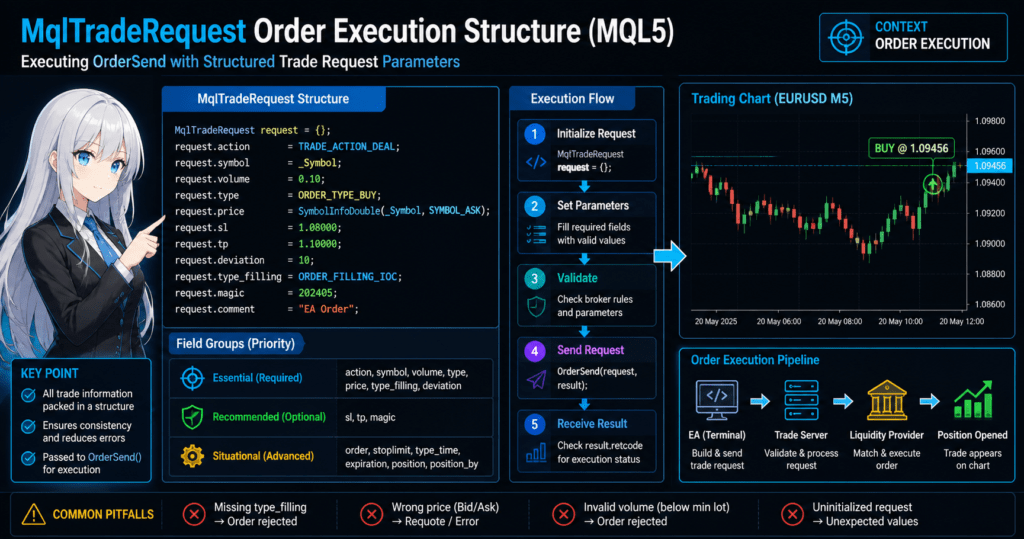
Common mistakes and important notes
1. Trying to use only OrderSend first
This does not work well in MQL5. You must understand MqlTradeRequest.
2. Trying to run copied code without adjustment
Copied code may fail depending on the broker environment. Pay special attention to:
- type_filling, or execution filling mode
- Minimum lot size
- Minimum stop distance
3. Uninitialized variables
MqlTradeRequest request; // insufficient initialization
Recommended:
MqlTradeRequest request = {};
Summary of this section
- MqlTradeRequest is a “container for order information”
- OrderSend is the function that receives that container
- MQL5 changed to a structure-based design
- Beginners almost always get stuck here, so understanding this concept comes first
2. Overall Structure of MqlTradeRequest and Required Fields
This section organizes all fields included in MqlTradeRequest and explains which fields should be set as a minimum. The explanation focuses on practical priority so beginners know what to learn first.
2.1 List of MqlTradeRequest fields
MqlTradeRequest consists of the following fields, also called member variables.
struct MqlTradeRequest
{
   ENUM_TRADE_REQUEST_ACTIONS action;
   ulong                      magic;
   ulong                      order;
   string                     symbol;
   double                     volume;
   double                     price;
   double                     stoplimit;
   double                     sl;
   double                     tp;
   ulong                      deviation;
   ENUM_ORDER_TYPE            type;
   ENUM_ORDER_TYPE_FILLING    type_filling;
   ENUM_ORDER_TYPE_TIME       type_time;
   datetime                   expiration;
   string                     comment;
   ulong                      position;
   ulong                      position_by;
};
Main fields used in practice
| Field | Meaning |
|---|---|
| action | Operation to execute, such as a new order |
| symbol | Currency pair or trading symbol |
| volume | Lot size |
| price | Order price |
| type | Order type, such as Buy or Sell |
| sl | Stop loss |
| tp | Take profit |
| deviation | Allowed slippage |
| type_filling | Filling mode |
In practice, you do not need to memorize every field at first. Start by understanding these nine fields.
Fields used less often, depending on the situation
| Field | Purpose |
|---|---|
| magic | EA identifier |
| order | Operation on an existing order |
| stoplimit | Limit plus stop-limit related order setting |
| type_time | Expiration setting |
| expiration | Order expiration time |
| position | Position specification |
| position_by | Close-by operation for hedged positions |
Beginners can learn these later.
2.2 Difference between required and optional fields
In MQL5, you do not need to set every field. However, some fields must be set or the order will not pass.
Minimum fields for a market order
request.action = TRADE_ACTION_DEAL;
request.symbol = _Symbol;
request.volume = 0.1;
request.type   = ORDER_TYPE_BUY;
request.price  = SymbolInfoDouble(_Symbol, SYMBOL_ASK);
request.deviation = 10;
request.type_filling = ORDER_FILLING_FOK;
Required field summary
- action, what to do
- symbol, which instrument to trade
- volume, lot size
- type, order type
- price, order price
- type_filling, filling method, which depends on the environment
- deviation, allowed slippage
Optional but recommended fields
- sl, stop loss
- tp, take profit
- magic, EA identifier
These are optional, but in real trading systems they are almost always needed.
2.3 Minimum configuration needed to place an order
This example shows a minimum configuration that is likely to pass when the environment supports the settings.
Minimum code for a Buy order
MqlTradeRequest request = {};
MqlTradeResult  result  = {};

request.action = TRADE_ACTION_DEAL;
request.symbol = _Symbol;
request.volume = 0.1;
request.type   = ORDER_TYPE_BUY;
request.price  = SymbolInfoDouble(_Symbol, SYMBOL_ASK);
request.deviation = 10;
request.type_filling = ORDER_FILLING_FOK;

OrderSend(request, result);
Beginner-friendly steps
- Initialize request
- Set the required fields
- Pass it to OrderSend
Common mistakes and important notes
1. type_filling is not set
The order may be rejected, especially with offshore or non-domestic brokers.
Fix:
request.type_filling = ORDER_FILLING_IOC; // change depending on the environment
2. Incorrect price source
For example, using Bid for a Buy order is incorrect.
Fix:
- Buy: Ask
- Sell: Bid
3. Volume error
The lot size may be below the minimum lot.
Fix:
double minLot = SymbolInfoDouble(_Symbol, SYMBOL_VOLUME_MIN);
4. request is not initialized
Undefined values can cause errors.
Always write:
MqlTradeRequest request = {};
Summary of this section
- MqlTradeRequest has many fields, but not all are needed at first
- An order can be placed with only the required fields
- type_filling, price, and volume are especially important
- Most errors come from missing settings or environment differences
3. Difference Between action, type, and type_filling
This section explains the differences between action, type, and type_filling, which are the most confusing parts of MqlTradeRequest. If these are wrong, the order will not pass, so this is one of the most important practical points.
3.1 What is action?
action defines what you want this request to do.
The commonly used values are:
| Constant | Meaning |
|---|---|
| TRADE_ACTION_DEAL | Market order, immediate execution |
| TRADE_ACTION_PENDING | Limit or stop pending order |
| TRADE_ACTION_SLTP | Change SL/TP |
| TRADE_ACTION_CLOSE_BY | Close by opposite position |
Most common value for beginners
request.action = TRADE_ACTION_DEAL;
This means a market order, which is the most basic order type.
For limit or stop pending orders
request.action = TRADE_ACTION_PENDING;
In this case, type becomes especially important.
3.2 What is type?
type decides whether the order is Buy, Sell, limit, or stop.
Market orders
| Constant | Meaning |
|---|---|
| ORDER_TYPE_BUY | Market buy |
| ORDER_TYPE_SELL | Market sell |
Limit orders, used when price becomes favorable
| Constant | Meaning |
|---|---|
| ORDER_TYPE_BUY_LIMIT | Buy when price moves lower |
| ORDER_TYPE_SELL_LIMIT | Sell when price moves higher |
Stop orders, often used for breakout entries
| Constant | Meaning |
|---|---|
| ORDER_TYPE_BUY_STOP | Buy on an upside breakout |
| ORDER_TYPE_SELL_STOP | Sell on a downside breakout |
Example: market Buy
request.action = TRADE_ACTION_DEAL;
request.type   = ORDER_TYPE_BUY;
Think of action and type as a set.
3.3 What is type_filling?
This is where errors often happen.
type_filling specifies how the order should be filled.
Main filling modes
| Constant | Meaning |
|---|---|
| ORDER_FILLING_FOK | Fill the full amount or cancel everything |
| ORDER_FILLING_IOC | Partial fill is allowed |
| ORDER_FILLING_RETURN | Leave the unfilled part active |
Practical usage
- Prioritize stability: IOC is often recommended
- Require strict full execution: FOK
- Pending orders: RETURN, depending on the environment
Example
request.type_filling = ORDER_FILLING_IOC;
3.4 How these three settings work together
These three settings are not independent. Their meaning is decided by the combination.
Correct combination for a market Buy
request.action = TRADE_ACTION_DEAL;
request.type   = ORDER_TYPE_BUY;
request.type_filling = ORDER_FILLING_IOC;
Example of a pending limit order
request.action = TRADE_ACTION_PENDING;
request.type   = ORDER_TYPE_BUY_LIMIT;
request.type_filling = ORDER_FILLING_RETURN;
If these three values do not match, the order may be rejected with an error.
Common mistakes and important notes
1. action and type do not match
Example:
action = TRADE_ACTION_DEAL;
type   = ORDER_TYPE_BUY_LIMIT;
This means a market action with a limit order type, so it causes an error.
2. The broker does not support the selected type_filling
This may cause an Invalid filling mode error.
Fix:
int filling = (int)SymbolInfoInteger(_Symbol, SYMBOL_FILLING_MODE);
Check the broker specification for the symbol.
3. price is not set for a pending order
The order will fail.
4. RETURN is used for a market order
Depending on the environment, this may cause an error.
Summary of this section
- action means what the request does
- type means the order type
- type_filling means the filling method
- All three must be consistent
- Many errors come from incorrect combinations of these settings
4. Practical OrderSend Code for Market and Limit Orders
This section shows complete order code using MqlTradeRequest. It covers both market orders and limit orders, with enough detail to adapt the examples for real EA development.
4.1 Complete code for a market Buy order
First, here is the most basic example: a market Buy order.
MqlTradeRequest request = {};
MqlTradeResult  result  = {};

// Get current price
double ask = SymbolInfoDouble(_Symbol, SYMBOL_ASK);

// Set request values
request.action = TRADE_ACTION_DEAL;
request.symbol = _Symbol;
request.volume = 0.1;
request.type   = ORDER_TYPE_BUY;
request.price  = ask;
request.sl     = ask - 100 * _Point;
request.tp     = ask + 100 * _Point;
request.deviation = 10;
request.type_filling = ORDER_FILLING_IOC;

// Execute order
if(OrderSend(request, result))
{
   Print("Order succeeded: ", result.retcode);
}
else
{
   Print("Order failed: ", result.retcode);
}
Beginner-friendly steps
- Get the current price, Ask
- Set the required fields in request
- Run OrderSend
- Check the result using result
Important notes
_Point: the minimum price unit, not the same as pipsretcode: the order result code used to judge success or failure
4.2 Complete code for a market Sell order
For a Sell order, note that the price uses Bid.
MqlTradeRequest request = {};
MqlTradeResult  result  = {};

double bid = SymbolInfoDouble(_Symbol, SYMBOL_BID);

request.action = TRADE_ACTION_DEAL;
request.symbol = _Symbol;
request.volume = 0.1;
request.type   = ORDER_TYPE_SELL;
request.price  = bid;
request.sl     = bid + 100 * _Point;
request.tp     = bid - 100 * _Point;
request.deviation = 10;
request.type_filling = ORDER_FILLING_IOC;

OrderSend(request, result);
4.3 Complete code for a Buy Limit order
Next is a limit order, where you specify the order price.
MqlTradeRequest request = {};
MqlTradeResult  result  = {};

// Limit price, below the current price
double price = SymbolInfoDouble(_Symbol, SYMBOL_BID) - 200 * _Point;

request.action = TRADE_ACTION_PENDING;
request.symbol = _Symbol;
request.volume = 0.1;
request.type   = ORDER_TYPE_BUY_LIMIT;
request.price  = price;
request.sl     = price - 100 * _Point;
request.tp     = price + 100 * _Point;
request.type_filling = ORDER_FILLING_RETURN;
request.type_time = ORDER_TIME_GTC;

OrderSend(request, result);
Key points
- action = PENDING
- type = a LIMIT type
- price is set below the current price for Buy Limit
4.4 Basic error checking with retcode
OrderSend can return true even when the order itself did not succeed, so you must check retcode.
if(result.retcode != TRADE_RETCODE_DONE)
{
   Print("Error code: ", result.retcode);
}
Common retcode values
| Code | Meaning |
|---|---|
| TRADE_RETCODE_DONE | Success |
| TRADE_RETCODE_REJECT | Rejected |
| TRADE_RETCODE_INVALID_VOLUME | Invalid lot size |
| TRADE_RETCODE_INVALID_PRICE | Invalid price |
Common mistakes and important notes
1. OrderSend returns true, but the order failed
The cause is usually that retcode was not checked. Always check it.
2. SL/TP is too close
The broker may reject the order because of stop-level restrictions.
Fix:
SymbolInfoInteger(_Symbol, SYMBOL_TRADE_STOPS_LEVEL);
3. Invalid limit order price
For example, setting a Buy Limit above the current price is invalid.
4. deviation is too small
The order may fail to fill.
5. Wrong filling mode
IOC or FOK may not match the environment.
Summary of this section
- OrderSend is used with request and result as a pair
- action and type differ between market and pending orders
- Checking retcode is required
- Many error causes depend on the trading environment
5. Why Orders Fail and How to Debug Them in Practice
This section organizes the reasons an order may fail even when MqlTradeRequest appears to be written correctly. In real development, this is one of the most important skills because good troubleshooting improves development speed.
5.1 Basic categories of order failure
Order failures can be divided into three main categories.
1. Parameter errors
- volume, or lot size
- price
- SL/TP distance restrictions
2. Environment-dependent errors
- type_filling, or filling mode
- Minimum lot size
- Stop level
3. State errors related to timing or market conditions
- Market is closed
- Price moved
- Not enough margin
First, identify which category the problem belongs to.
5.2 Identifying errors with retcode
The most important value is result.retcode.
Print("retcode: ", result.retcode);
Common errors and fixes
| retcode | Cause | Fix |
|---|---|---|
| TRADE_RETCODE_INVALID_VOLUME | Invalid lot size | Check minimum lot |
| TRADE_RETCODE_INVALID_PRICE | Invalid price | Check Ask/Bid |
| TRADE_RETCODE_REJECT | Conditions do not match | Review filling mode |
| TRADE_RETCODE_NO_MONEY | Not enough margin | Reduce lot size |
5.3 Basic debugging flow
Use the following steps to identify the cause.
Step 1: Check retcode
if(result.retcode != TRADE_RETCODE_DONE)
{
   Print("Error: ", result.retcode);
}
Step 2: Output logs
Print("volume=", request.volume);
Print("price=", request.price);
Print("type=", request.type);
Check what is actually being sent.
Step 3: Get environment information
double minLot = SymbolInfoDouble(_Symbol, SYMBOL_VOLUME_MIN);
double stopLevel = SymbolInfoInteger(_Symbol, SYMBOL_TRADE_STOPS_LEVEL);
Step 4: Check the filling mode
int filling = (int)SymbolInfoInteger(_Symbol, SYMBOL_FILLING_MODE);
Print("filling=", filling);
5.4 Typical error cases
Case 1: No orders pass at all
Cause:
- type_filling does not match the broker or symbol
Fix:
request.type_filling = ORDER_FILLING_IOC;
Case 2: Failure when setting SL/TP
Cause:
- The stop distance is too short
Fix:
int stopLevel = SymbolInfoInteger(_Symbol, SYMBOL_TRADE_STOPS_LEVEL);
Case 3: Pending limit order is rejected
Cause:
- The price is invalid because the direction is wrong
Example:
- A Buy Limit is placed above the current price
Case 4: Orders fail randomly
Cause:
- Price movement, or slippage
Fix:
request.deviation = 20;
5.5 Practical techniques for more stable operation
1. Automatically adjust to the minimum lot
double minLot = SymbolInfoDouble(_Symbol, SYMBOL_VOLUME_MIN);
request.volume = MathMax(0.1, minLot);
2. Consider the stop distance
int stopLevel = SymbolInfoInteger(_Symbol, SYMBOL_TRADE_STOPS_LEVEL);
double sl = request.price - stopLevel * _Point;
3. Add retry logic
for(int i=0; i<3; i++)
{
   if(OrderSend(request, result) && result.retcode == TRADE_RETCODE_DONE)
      break;
}
Common mistakes and important notes
1. “The code is correct, but it does not work”
In most cases, the cause is environment-dependent.
2. It works in the Strategy Tester but fails on a live account
Typical reasons include:
- Filling mode
- Slippage
- Broker restrictions
3. Not checking Print logs
Without logs, you cannot identify the cause.
4. Expecting every order to succeed on the first try
In real systems, retries and adjustments are often necessary.
Summary of this section
- Think of errors in three categories: settings, environment, and market state
- Checking retcode is the most important step
- Debug with logs and environment information
- In live operation, retries and adjustments are required
6. Pre-Checking Orders with OrderCheck
This section explains how to validate an order with OrderCheck() before calling OrderSend(). In practice, checking first is usually more stable than sending an order immediately. It is especially useful for lot size, margin, stop distance, and order condition checks.
6.1 What is OrderCheck?
OrderCheck() is a function that checks whether the order can be placed with the current request values.
OrderSend() actually sends the order, while OrderCheck() is closer to a pre-submission review. It helps find issues such as:
- Invalid lot size
- Insufficient required margin
- Invalid SL/TP
- Order price does not meet conditions
The basic form is:
MqlTradeRequest     request = {};
MqlTradeCheckResult check   = {};

bool ok = OrderCheck(request, check);
check receives the check result code and margin-related information. If checking OrderSend() is after the fact, OrderCheck() is before the fact.
6.2 Basic OrderCheck code
This example checks a market Buy order before sending it.
MqlTradeRequest     request = {};
MqlTradeCheckResult check   = {};
MqlTradeResult      result  = {};

double ask = SymbolInfoDouble(_Symbol, SYMBOL_ASK);

request.action       = TRADE_ACTION_DEAL;
request.symbol       = _Symbol;
request.volume       = 0.1;
request.type         = ORDER_TYPE_BUY;
request.price        = ask;
request.sl           = ask - 100 * _Point;
request.tp           = ask + 100 * _Point;
request.deviation    = 10;
request.type_filling = ORDER_FILLING_IOC;

// Pre-check
if(!OrderCheck(request, check))
{
   Print("OrderCheck failed: ", check.retcode);
   return;
}

// Send if the check is OK
if(OrderSend(request, result))
{
   Print("Order send succeeded: ", result.retcode);
}
else
{
   Print("Order send failed: ", result.retcode);
}
Basic practical flow
- Build
MqlTradeRequest - Pre-check it with
OrderCheck() - If there is no problem, call
OrderSend() - If there is a problem, output a log and stop
This flow greatly reduces situations where you cannot tell why an order failed.
6.3 What you can check with MqlTradeCheckResult
MqlTradeCheckResult includes useful practical information beyond simple order availability.
Main fields to check include:
| Field | Meaning |
|---|---|
| retcode | Check result code |
| balance | Balance |
| equity | Equity-based account value |
| margin | Required margin |
| margin_free | Free margin |
| comment | Supplemental message |
For example, you can output required margin like this:
Print("retcode=", check.retcode);
Print("margin=", check.margin);
Print("free margin=", check.margin_free);
Print("comment=", check.comment);
This lets you distinguish whether the issue is insufficient margin or invalid conditions, instead of only knowing that the order failed.
6.4 Benefits of using OrderCheck
1. You can detect insufficient margin earlier
It becomes easier to catch common NO_MONEY issues before live submission.
2. You can validate lot calculations
For EAs using automatic lot calculation, you can check whether the calculated lot can actually pass.
3. Debugging becomes easier
It is easier to isolate the cause than by only looking at failures after OrderSend().
4. You can block risky orders
Invalid SL/TP values and abnormal lot sizes can be stopped before the actual send.
6.5 A safer practical design pattern
Beginners often put all order logic in one place. In practice, the process is more stable when separated into three stages.
Recommended flow
- Create the request
- Validate it with
OrderCheck() - If there is no problem, send it with
OrderSend()
Separating responsibilities makes the code easier to modify later.
// 1. Create request
// 2. OrderCheck
// 3. OrderSend
With this structure, it is easier to add the following later:
- Automatic lot adjustment
- Stop distance correction
- Retry on error
- Log saving
Common mistakes and important notes
1. Assuming OrderCheck guarantees execution
It does not. OrderCheck() is a pre-check. The actual send can still fail because of price movement or market conditions.
2. Skipping OrderCheck before live operation
Even if the EA works on a demo account, skipping pre-checks can increase the failure rate on a live account.
3. Not checking check.retcode
true / false alone is not enough. Always check retcode and comment.
4. Relying only on your own margin calculation
Custom calculations can help, but final validation with OrderCheck() is safer because it includes account conditions.
Summary of this section
OrderCheck()is used for pre-order validation- Using it before
OrderSend()can reduce failures MqlTradeCheckResulthelps check margin and error reasons- In practice, the stable pattern is create, validate, then send
7. A Reusable and Robust Design Pattern for Order Processing
This section explains how to avoid writing MqlTradeRequest as one-off code and instead design it as reusable order logic for an EA. Order processing should be built so it is easy to add lot adjustment, SL/TP changes, and error handling later. If this part is built carelessly, the code may be understandable in an article but fragile in live operation.
7.1 Centralize order processing in one place
A common beginner mistake is writing everything directly inside OnTick().
if(buyCondition)
{
   MqlTradeRequest request = {};
   MqlTradeResult  result  = {};
   // volume, price, sl, tp, OrderSend...
}
This may work at first, but it creates problems:
- Duplicate code increases between Buy and Sell
- Fixes are easy to miss
- Debugging points become scattered
- The design becomes fragile when pending orders or close logic are added
For that reason, the basic approach is to move order processing into a dedicated function.
7.2 Minimum function separation pattern
Even creating a function that sends a Buy order improves the structure.
bool SendBuyOrder(double volume, double sl, double tp)
{
   MqlTradeRequest request = {};
   MqlTradeResult  result  = {};

   double ask = SymbolInfoDouble(_Symbol, SYMBOL_ASK);

   request.action       = TRADE_ACTION_DEAL;
   request.symbol       = _Symbol;
   request.volume       = volume;
   request.type         = ORDER_TYPE_BUY;
   request.price        = ask;
   request.sl           = sl;
   request.tp           = tp;
   request.deviation    = 10;
   request.type_filling = ORDER_FILLING_IOC;

   if(!OrderSend(request, result))
   {
      Print("Buy order failed: ", result.retcode);
      return false;
   }

   if(result.retcode != TRADE_RETCODE_DONE)
   {
      Print("Buy order rejected: ", result.retcode);
      return false;
   }

   return true;
}
The caller becomes simple.
double ask = SymbolInfoDouble(_Symbol, SYMBOL_ASK);
double sl  = ask - 100 * _Point;
double tp  = ask + 100 * _Point;

SendBuyOrder(0.1, sl, tp);
Benefits of this separation
- Order logic becomes reusable
- Failure handling can be standardized
OnTick()becomes easier to readOrderCheck()can be added later more easily
7.3 Shared design for Buy and Sell
As a next step, handle Buy and Sell with one function.
bool SendMarketOrder(ENUM_ORDER_TYPE orderType, double volume, double sl, double tp)
{
   MqlTradeRequest request = {};
   MqlTradeResult  result  = {};

   double price = 0.0;

   if(orderType == ORDER_TYPE_BUY)
      price = SymbolInfoDouble(_Symbol, SYMBOL_ASK);
   else if(orderType == ORDER_TYPE_SELL)
      price = SymbolInfoDouble(_Symbol, SYMBOL_BID);
   else
      return false;

   request.action       = TRADE_ACTION_DEAL;
   request.symbol       = _Symbol;
   request.volume       = volume;
   request.type         = orderType;
   request.price        = price;
   request.sl           = sl;
   request.tp           = tp;
   request.deviation    = 10;
   request.type_filling = ORDER_FILLING_IOC;

   if(!OrderSend(request, result))
   {
      Print("Order send failed: ", result.retcode);
      return false;
   }

   if(result.retcode != TRADE_RETCODE_DONE)
   {
      Print("Order rejected: ", result.retcode);
      return false;
   }

   return true;
}
With this approach, the caller only changes the direction.
SendMarketOrder(ORDER_TYPE_BUY,  0.1, slBuy, tpBuy);
SendMarketOrder(ORDER_TYPE_SELL, 0.1, slSell, tpSell);
7.4 Separate request creation and execution
In practical development, maintainability improves when you separate the logic that builds request from the logic that sends it.
Role separation
- Build: create the order details
- Validate: call
OrderCheck() - Send: call
OrderSend()
For example:
void BuildBuyRequest(MqlTradeRequest &request, double volume, double sl, double tp)
{
   double ask = SymbolInfoDouble(_Symbol, SYMBOL_ASK);

   request.action       = TRADE_ACTION_DEAL;
   request.symbol       = _Symbol;
   request.volume       = volume;
   request.type         = ORDER_TYPE_BUY;
   request.price        = ask;
   request.sl           = sl;
   request.tp           = tp;
   request.deviation    = 10;
   request.type_filling = ORDER_FILLING_IOC;
}
Execution side:
bool ExecuteRequest(MqlTradeRequest &request)
{
   MqlTradeResult result = {};

   if(!OrderSend(request, result))
   {
      Print("Send failed: ", result.retcode);
      return false;
   }

   if(result.retcode != TRADE_RETCODE_DONE)
   {
      Print("Execution failed: ", result.retcode);
      return false;
   }

   return true;
}
This design makes it easier to add:
OrderCheck()- Lot correction
- Allowed slippage changes
- Standardized log output
- Symbol-specific branching
7.5 Minimum protections to include in real systems
Order functions become more stable when they include at least the following protections.
1. volume check
double minLot  = SymbolInfoDouble(_Symbol, SYMBOL_VOLUME_MIN);
double lotStep = SymbolInfoDouble(_Symbol, SYMBOL_VOLUME_STEP);
2. stop distance check
int stopLevel = (int)SymbolInfoInteger(_Symbol, SYMBOL_TRADE_STOPS_LEVEL);
3. Add OrderCheck
MqlTradeCheckResult check = {};
OrderCheck(request, check);
4. Output retcode logs
Print("retcode=", result.retcode);
The key is to put this logic into shared functions instead of writing it manually every time.
Common mistakes and important notes
1. Writing everything in OnTick
It may work while the EA is small, but it quickly becomes hard to maintain.
2. Copying separate Buy and Sell code
As future fixes increase, the risk of inconsistent updates increases.
3. Changing error handling at each call site
Logs become inconsistent and harder to analyze.
4. Not separating request creation and sending
This makes it harder to add OrderCheck() and condition correction.
5. Not planning for future expansion
The design can break when pending orders, partial closes, or multi-symbol support are added.
Summary of this section
- Centralize order processing in functions
- Share Buy and Sell logic as much as possible
- Separate build, validate, and send steps for a more robust design
- In practice, standardize lot checks, stop distance checks, and retcode checks
8. Broker and Live Account Issues That Often Cause Failures
This section explains common patterns where the MqlTradeRequest code looks correct but the order fails because of broker specifications, account type, or execution environment. MQL5 order processing is not only about the language specification. It must also account for trading environment restrictions.
8.1 Execution conditions differ by broker
In MQL5, the same code may work with one broker and fail with another. Differences often appear in:
type_filling, or filling mode- Minimum lot and lot step
SYMBOL_TRADE_STOPS_LEVEL, or minimum stop distance- Supported order types
- Trading hours
For example, ORDER_FILLING_IOC may pass while ORDER_FILLING_RETURN is rejected. Because of this, it is safer to get and check symbol information first instead of hard-coding fixed values.
long fillingMode = SymbolInfoInteger(_Symbol, SYMBOL_FILLING_MODE);
double minLot    = SymbolInfoDouble(_Symbol, SYMBOL_VOLUME_MIN);
double lotStep   = SymbolInfoDouble(_Symbol, SYMBOL_VOLUME_STEP);
int stopLevel    = (int)SymbolInfoInteger(_Symbol, SYMBOL_TRADE_STOPS_LEVEL);
8.2 Why code works on demo but fails live
This happens often. The main reasons are:
- Demo accounts are often easier to fill and less affected by price movement
- Live liquidity can change
- When spreads widen,
priceorsl/tpmay become inappropriate - During news events,
deviationmay be too small - Margin conditions may be stricter
In short, Strategy Tester, demo, and live environments are not identical. Do not move tester-successful code directly to a live account without at least adding:
- Pre-checking with
OrderCheck() retcodelog output- Lot and stop distance correction
- Order avoidance when spreads are abnormal
8.3 Practical issues with VPS and multiple EAs
When running on a VPS or using multiple EAs, issues can appear that were not visible in single-EA testing.
Common problems
- Multiple EAs send orders at the same time and create unexpected positions
magicis not set, so orders from other EAs cannot be distinguished- State management becomes inconsistent after restart
- Communication delay increases price differences
As a countermeasure, set at least magic.
request.magic = 10001;
In position management, you should also filter by magic and symbol. Otherwise, your EA may accidentally modify or close another EA’s order.
8.4 Checklist before live account use
Before using the EA on a live account, check at least the following:
- Minimum lot and lot step
- Supported
type_filling - Minimum stop distance
- Trading hours for the symbol
- Behavior when spreads widen
- Identification with
magic - Recording of
retcode
Common mistakes and important notes
1. Assuming tester success means live success
This is risky. Live accounts use different execution conditions.
2. Ignoring broker differences
Even the same EA can have a different failure rate after changing brokers.
3. Not using magic
This can cause problems when multiple EAs are running.
4. Using fixed SL/TP width for every symbol
Ignoring differences in volatility by symbol can make the settings inappropriate.
Summary of this section
- MQL5 order processing depends on both code and the trading environment
- Design with broker differences, account differences, and live-environment differences in mind
- In practice, combining
magic,OrderCheck(), and environment checks improves stability - Do not stop at tester results; add checks before live account use
9. FAQ
Q1. Do I always need to use MqlTradeRequest?
Answer:
Yes. In MQL5, order information is placed into the MqlTradeRequest structure and passed to OrderSend. Unlike MQL4, you do not place orders by passing many separate arguments directly to OrderSend.
Q2. Which type_filling should I use?
Answer:
It depends on the broker and symbol. Start by trying ORDER_FILLING_IOC, and if an error occurs, check the supported mode with SymbolInfoInteger(..., SYMBOL_FILLING_MODE).
Q3. Why is OrderSend true even though the order did not go through?
Answer:
Check result.retcode, not only the return value of OrderSend(). A true return means the send process ran, not that the trade was executed. You need to confirm TRADE_RETCODE_DONE.
Q4. Why do I get an error when I set SL/TP?
Answer:
The stop loss or take profit may be inside the minimum stop distance defined by SYMBOL_TRADE_STOPS_LEVEL. Because restrictions differ by symbol, get the value and adjust the distance.
Q5. Why does it work on demo but fail live?
Answer:
Execution conditions, spreads, liquidity, and margin requirements can differ between demo and live accounts. On live accounts, use OrderCheck(), output logs, adjust deviation, and check retcode.
Q6. What causes volume errors?
Answer:
The lot size may be below the minimum lot or may not match the allowed lot step. Get SYMBOL_VOLUME_MIN and SYMBOL_VOLUME_STEP, then correct the volume.
Q7. Why does my limit order fail?
Answer:
The price direction may be wrong.
- Buy Limit: below the current price
- Sell Limit: above the current price. If the condition is reversed, the order is rejected.
Q8. Should I always use OrderCheck?
Answer:
It is not mandatory, but it is strongly recommended in practical EA development. It helps detect insufficient margin and invalid conditions before sending the order, which improves operational stability.