

- 1 1. What Is SetIndexBuffer?
- 2 2. Basic Syntax and Usage of SetIndexBuffer
- 3 3. Difference Between Buffer Types (INDICATOR_DATA / CALCULATIONS)
- 3.1 3.1 What Is INDICATOR_DATA? (Display Buffer)
- 3.2 3.2 What Is INDICATOR_CALCULATIONS? (Internal Calculation Buffer)
- 3.3 3.3 How to Use the Two Types Correctly (Important)
- 3.4 3.4 Typical Beginner Traps
- 3.5 3.5 Design-Level Understanding for Intermediate Users
- 3.6 3.6 Checklist (Most Important)
- 3.7 3.7 Practical Advice Based on Expected Results
- 4 4. Implementing an Indicator with Multiple Buffers
- 5 5. Why Nothing Is Displayed and How to Fix It
- 5.1 5.1 Minimum Checks to Do First
- 5.2 5.2 Cause 1: SetIndexBuffer Is Not Set
- 5.3 5.3 Cause 2: INDICATOR_CALCULATIONS Is Being Used
- 5.4 5.4 Cause 3: No Value Is Assigned in OnCalculate
- 5.5 5.5 Cause 4: property Settings Are Missing
- 5.6 5.6 Cause 5: Drawing Settings Are Missing
- 5.7 5.7 Cause 6: EMPTY_VALUE or Uninitialized Values Are Mixed In
- 5.8 5.8 Cause 7: Misunderstanding the Index Direction
- 5.9 5.9 Fastest Debugging Procedure
- 5.10 5.10 Summary of Common Mistakes
- 6 6. Relationship with ArraySetAsSeries and Important Notes
- 6.1 6.1 What Is ArraySetAsSeries?
- 6.2 6.2 Why This Matters
- 6.3 6.3 Basic Practical Rule
- 6.4 6.4 Implementation Example (Correct Setting)
- 6.5 6.5 Common Mistakes (Important)
- 6.6 6.6 Loop Design Notes
- 6.7 6.7 Relationship with prev_calculated
- 6.8 6.8 Fastest Debugging Route
- 6.9 6.9 Practical Standard Rule (Important)
- 6.10 6.10 Summary from a Practical View
- 7 7. Drawing Customization with PlotIndexSet Functions
- 7.1 7.1 Role of PlotIndexSet Functions
- 7.2 7.2 Minimum Required Setting
- 7.3 7.3 Main Drawing Types (Important)
- 7.4 7.4 Setting Color, Width, and Style
- 7.5 7.5 Settings for Multiple Plots
- 7.6 7.6 Label Setting (Important)
- 7.7 7.7 Common Mistakes (Important)
- 7.8 7.8 Practical Template (Recommended)
- 7.9 7.9 Important Debugging Points
- 7.10 7.10 Practical Advice
- 8 8. Complete Practical Template You Can Copy and Paste
- 8.1 8.1 Minimum Stable Template (One Buffer)
- 8.2 8.2 Two Buffers (Main + Signal)
- 8.3 8.3 Practical Structure with Internal Calculation Buffers
- 8.4 8.4 Common Mistakes When Using the Template
- 8.5 8.5 Recommended Practical Workflow (Important)
- 8.6 8.6 Mini Debug Code (Very Useful)
- 8.7 8.7 Practical Advice for Better Results
- 8.8 8.8 Conclusion (Important)
- 9 9. FAQ (Frequently Asked Questions and Answer Guidelines)
- 9.1 9.1 I wrote SetIndexBuffer, but nothing is displayed.
- 9.2 9.2 What is the difference between INDICATOR_DATA and INDICATOR_CALCULATIONS?
- 9.3 9.3 Where should SetIndexBuffer be called?
- 9.4 9.4 I put values into the array, but no line appears.
- 9.5 9.5 What is the difference between indicator_buffers and indicator_plots?
- 9.6 9.6 Is ArraySetAsSeries always required?
- 9.7 9.7 The display becomes strange when I use multiple buffers.
- 9.8 9.8 It stops working when I use prev_calculated.
- 9.9 9.9 Which is more important, SetIndexBuffer or PlotIndexSet?
- 9.10 9.10 Is there a difference from MQL4?
1. What Is SetIndexBuffer?
When you create a custom indicator in MQL5, one of the first and most important functions to understand is SetIndexBuffer.
If you do not understand this function correctly, you will almost always run into the common problem: “The values are calculated, but nothing appears on the chart.”
In short, SetIndexBuffer is
“the function that registers an array so its calculated results can be displayed on the chart.”
In MQL5, values do not appear just because you put them into an array.
You must explicitly register the array as display data.
1.1 The Role of SetIndexBuffer
The role of SetIndexBuffer is simple, but important.
- It links indicator drawing data to an array.
- It creates a “data path” for displaying values on the chart.
The basic image is as follows.
Calculation logic → Array (buffer) → SetIndexBuffer → Chart display
In other words, if you do not use SetIndexBuffer:
- Even if you put values into the array, → nothing will be displayed on the chart
Minimum Flow (Important)
double buffer[];

int OnInit()
{
   SetIndexBuffer(0, buffer, INDICATOR_DATA);
   return(INIT_SUCCEEDED);
}
Without this one line, nothing will be displayed no matter how correct your calculation code is.
Common Mistakes
- Not writing SetIndexBuffer
- Calling it outside OnInit
- Forgetting to declare the buffer
These are errors that almost every beginner runs into at least once.
1.2 What Is an Indicator Buffer?
The word “buffer” may sound difficult, but the actual concept is simple.
👉 Buffer = an array that stores values (a double array)
Example:
double buffer[];
Each element of this array corresponds to each bar (candlestick) on the chart.
- buffer[0] → latest bar
- buffer[1] → one bar ago
- buffer[2] → two bars ago
*This may be reversed depending on the ArraySetAsSeries setting (explained later).
Important Points
- Indicators are drawn by array.
- One buffer = one line or drawing element.
Common Misunderstandings
- ❌ “If I put a value into a variable, it will be displayed.”
- ❌ “If I use Print, it will appear on the chart.”
→ An array plus SetIndexBuffer is required.
1.3 Why SetIndexBuffer Is Necessary
MQL5 is designed so that drawing and calculation are separated.
That means:
- Calculation → done in OnCalculate
- Display → only arrays registered with SetIndexBuffer
This structure enables:
- Fast drawing through internal optimization
- Management of multiple lines
- A consistent indicator structure
What Happens If You Do Not Use SetIndexBuffer?
buffer[i] = Close[i];
Even if you assign values like this:
- Nothing appears on the chart.
- No error is shown, which makes this tricky.
Practical Note (Important)
- More than 80% of “not displayed” issues are related to SetIndexBuffer.
- When debugging, check this first.
Checklist (Required)
- Are you calling SetIndexBuffer in OnInit?
- Is the buffer a double array?
- Is INDICATOR_DATA specified?
- Are you assigning values to the buffer?
2. Basic Syntax and Usage of SetIndexBuffer
With SetIndexBuffer, being able to write it correctly is more important than only understanding it.
This section makes it specific enough to use directly in your own code.
2.1 Basic Syntax
The basic syntax of SetIndexBuffer is as follows.
bool SetIndexBuffer(
   int index,
   double buffer[],
   ENUM_INDEXBUFFER_TYPE type
);
Meaning of Each Argument (Important)
- index → Buffer number, starting from 0
- buffer[] → Array used for display or calculation
- type → Buffer purpose: display or internal calculation
Most Important Points
- index starts from 0.
- buffer must be a double array only.
- type determines whether it can be displayed.
2.2 Minimum Working Usage
First, understand the smallest structure that is guaranteed to work.
Steps for Beginners
- Declare the array.
- Set SetIndexBuffer in OnInit.
- Assign values in OnCalculate.
Code Example (Minimum Structure)
#property indicator_separate_window
#property indicator_buffers 1
#property indicator_plots   1

double buffer[];

int OnInit()
{
   SetIndexBuffer(0, buffer, INDICATOR_DATA);
   return(INIT_SUCCEEDED);
}

int OnCalculate(const int rates_total,
                const int prev_calculated,
                const int begin,
                const double &price[])
{
   for(int i = 0; i < rates_total; i++)
   {
      buffer[i] = price[i];
   }

   return(rates_total);
}
What This Code Does
- Displays price[] as-is.
- Assigns values to buffer, then draws them through SetIndexBuffer.
How to Confirm It Works
- A line appears in the subwindow.
- The values update.
2.3 How to Think About index (Buffer Number)
index means “which line number this is.”
Example: Multiple Lines
SetIndexBuffer(0, buffer1, INDICATOR_DATA);
SetIndexBuffer(1, buffer2, INDICATOR_DATA);
- 0 → first line
- 1 → second line
Important Notes
- If index and PlotIndex do not match, the line may not display.
- The count must match indicator_buffers.
Common Mistakes
- Starting index from 1
- Specifying an index larger than the number of buffers
2.4 Basics of type (Buffer Type)
type is the point that confuses beginners most often.
Two Commonly Used Types
INDICATOR_DATA
INDICATOR_CALCULATIONS
The Difference (Important)
- INDICATOR_DATA → Displayed on the chart
- INDICATOR_CALCULATIONS → Used for internal calculation and not displayed
Beginners Can Usually Use This
SetIndexBuffer(0, buffer, INDICATOR_DATA);
Common Mistakes
- Using CALCULATIONS and wondering why nothing appears
- Omitting type, which is not allowed in MQL5
2.5 Common Errors and Causes
This is the core of the search intent.
Case 1: Nothing Is Displayed
Cause:
- INDICATOR_DATA is not specified.
- SetIndexBuffer is not executed.
Case 2: The Line Disappears Partway Through
Cause:
- No value is assigned to the buffer.
- The buffer is used before initialization.
Case 3: Values Are Shifted
Cause:
- ArraySetAsSeries is not set.
- The index direction is misunderstood.
2.6 Important Practical Checkpoints
In real development, always check the following.
Checklist
- Is SetIndexBuffer called in OnInit?
- Is the buffer declared globally?
- Does it match the number of indicator_buffers?
- Is type set to INDICATOR_DATA?
Debugging Tips
- Use Print to check buffer values.
- Start by confirming behavior with a simple copy.
3. Difference Between Buffer Types (INDICATOR_DATA / CALCULATIONS)
Among SetIndexBuffer settings, the most misunderstood point and one of the most common causes of display trouble is type, or the buffer type.
If you keep this vague, you will stay stuck in the state where “the calculation works, but nothing is displayed.”
3.1 What Is INDICATOR_DATA? (Display Buffer)
INDICATOR_DATA is a buffer displayed on the chart.
SetIndexBuffer(0, buffer, INDICATOR_DATA);
Only arrays with this setting are drawn as lines or histograms.
Characteristics
- Drawn on the chart
- Works with PlotIndexSet functions
- Included in indicator_plots
Typical Usage Example
double mainBuffer[];

int OnInit()
{
   SetIndexBuffer(0, mainBuffer, INDICATOR_DATA);
   return(INIT_SUCCEEDED);
}
Practical Points
- Data you want to show must be INDICATOR_DATA.
- For multiple lines, specify multiple display buffers.
Common Mistakes
- Not setting INDICATOR_DATA
- Having index and plot settings that do not match
3.2 What Is INDICATOR_CALCULATIONS? (Internal Calculation Buffer)
INDICATOR_CALCULATIONS is a calculation buffer that is not displayed.
SetIndexBuffer(1, calcBuffer, INDICATOR_CALCULATIONS);
Characteristics
- Not displayed on the chart
- Used for intermediate calculations
- Helps with performance optimization
Usage Example (Intermediate Moving Average Calculation)
double tempBuffer[];
double outputBuffer[];

int OnInit()
{
   SetIndexBuffer(0, outputBuffer, INDICATOR_DATA);
   SetIndexBuffer(1, tempBuffer, INDICATOR_CALCULATIONS);
   return(INIT_SUCCEEDED);
}
Typical Uses
- Intermediate EMA calculations
- Internal ATR values
- Filtering data
Common Misunderstanding
- ❌ “CALCULATIONS is also displayed.” → It is not displayed.
3.3 How to Use the Two Types Correctly (Important)
This is where the design branches.
Decision Criteria
| Purpose | Setting |
|---|---|
| Display on the chart | INDICATOR_DATA |
| Use only for calculation | INDICATOR_CALCULATIONS |
Basic Practical Design
Display: final result → INDICATOR_DATA
Calculation: intermediate data → CALCULATIONS
Example Structure
Price → tempBuffer (calculation) → outputBuffer (display)
3.4 Typical Beginner Traps
This section has very strong search demand.
Pattern 1: Nothing Is Displayed
SetIndexBuffer(0, buffer, INDICATOR_CALCULATIONS);
→ Cause: CALCULATIONS is being used.
Pattern 2: The Buffer Exists, but It Cannot Be Seen
Cause:
- Plot settings are missing.
- indicator_plots is not defined.
Pattern 3: Values Exist, but No Line Appears
Cause:
- EMPTY_VALUE is mixed in.
- Drawing settings are wrong.
3.5 Design-Level Understanding for Intermediate Users
MQL5 is designed with the following idea.
Separated Design
- Calculation (CALCULATIONS)
- Display (DATA)
This enables:
- Fast processing
- Reusability
- Stable drawing
Practical Benefits
- You can separate calculation logic.
- Bugs are easier to isolate.
- Performance can be improved.
3.6 Checklist (Most Important)
When nothing is displayed, check here.
Required Checks
- Is the buffer you want to display set to INDICATOR_DATA?
- Do index and plot match?
- Does the buffer contain values?
Debugging Steps
- Set all buffers to INDICATOR_DATA.
- Assign a simple value such as Close.
- Gradually restore the original logic.
3.7 Practical Advice Based on Expected Results
- Do not use CALCULATIONS in the initial stage.
- First, prioritize making the indicator display.
- Optimize after that.
Recommended Steps
- Build only with INDICATOR_DATA.
- Confirm that it works.
- Separate calculation buffers into CALCULATIONS.
4. Implementing an Indicator with Multiple Buffers
SetIndexBuffer can be used by itself, but in real development, combining multiple buffers is the normal pattern.
Here, we make the implementation steps concrete using an indicator with multiple lines, such as a main line plus a signal line.
4.1 Basic Design for Multiple Buffers
When using multiple buffers, the following design is typical.
buffer0 → main display (INDICATOR_DATA)
buffer1 → secondary display (INDICATOR_DATA)
buffer2 → internal calculation (INDICATOR_CALCULATIONS)
Required Settings
#property indicator_buffers 3
#property indicator_plots   2
- indicator_buffers → number of arrays used
- indicator_plots → number of displayed lines
Important Points
- buffers ≥ plots is required.
- Set plots to the number of items you display.
4.2 Implementation Steps (Template)
In practice, build it in the following order.
Steps
- Declare the buffers.
- Define indicator_buffers and plots.
- Link them with SetIndexBuffer.
- Set drawing options with PlotIndexSet functions.
- Assign values in OnCalculate.
4.3 Practical Code Example (Two Lines + Internal Calculation)
The following is a structure for a simple moving average plus signal line.
#property indicator_separate_window
#property indicator_buffers 3
#property indicator_plots   2

double mainBuffer[];
double signalBuffer[];
double tempBuffer[];

int OnInit()
{
   // Buffer registration
   SetIndexBuffer(0, mainBuffer, INDICATOR_DATA);
   SetIndexBuffer(1, signalBuffer, INDICATOR_DATA);
   SetIndexBuffer(2, tempBuffer, INDICATOR_CALCULATIONS);

   // Drawing settings
   PlotIndexSetInteger(0, PLOT_DRAW_TYPE, DRAW_LINE);
   PlotIndexSetInteger(1, PLOT_DRAW_TYPE, DRAW_LINE);

   return(INIT_SUCCEEDED);
}

int OnCalculate(const int rates_total,
                const int prev_calculated,
                const int begin,
                const double &price[])
{
   for(int i = 0; i < rates_total; i++)
   {
      tempBuffer[i]   = price[i];             // Intermediate data
      mainBuffer[i]   = tempBuffer[i];        // Main
      signalBuffer[i] = mainBuffer[i] * 0.9;  // Signal
   }

   return(rates_total);
}
Structure of This Code
- tempBuffer → internal calculation
- mainBuffer → display 1
- signalBuffer → display 2
Display Result
- Two lines are drawn.
- The signal line appears slightly below the main line.
4.4 Common Mistakes (Important)
Multiple buffers create more chances for errors.
Case 1: Only One Line Appears
Cause:
- indicator_plots is too small.
- PlotIndexSet is not configured.
Case 2: Nothing Is Displayed
Cause:
- index and buffer are linked incorrectly.
- INDICATOR_DATA is missing.
Case 3: Array Error (out of range)
Cause:
- The buffer size is not initialized.
- rates_total is not considered.
4.5 Practical Design Pattern
Complex indicators often use the following structure.
Typical Structure
Price
 ↓
Preprocessing (CALCULATIONS)
 ↓
Main logic (CALCULATIONS)
 ↓
Display output (DATA)
Benefits
- Logic separation
- Easier debugging
- Better reusability
4.6 How to Debug (Important)
If a problem appears with multiple buffers:
Steps
- Change all buffers to INDICATOR_DATA.
- Assign simple values such as Close.
- Restore each buffer one by one.
High-Value Isolation
- Display problem → SetIndexBuffer or Plot settings
- Calculation problem → OnCalculate
4.7 Summary of Important Notes
- Do the number of buffers and properties match?
- Does index start from 0 and continue in order?
- Are display buffers and calculation buffers separated correctly?
Practical Advice
- Start with one buffer.
- Expand after it works.
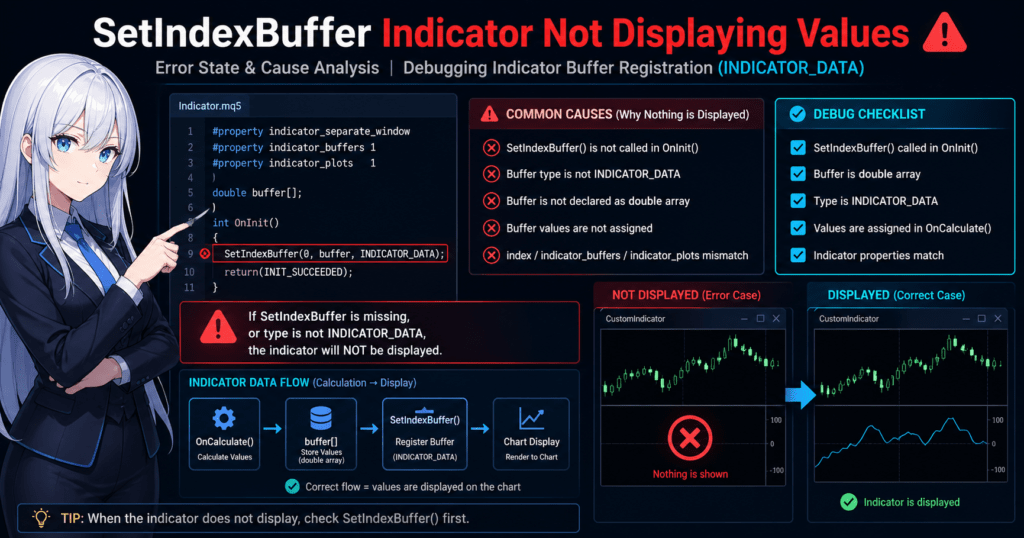
5. Why Nothing Is Displayed and How to Fix It
The most common problem with indicators that use SetIndexBuffer is “the code compiles, but nothing is displayed.” This type of bug is usually not a syntax error. It is caused by a missing setting, missing link, or missing assignment.
This section organizes the most frequent practical causes in the order you should check them.
5.1 Minimum Checks to Do First
When nothing is displayed, do not suspect complex logic first. Check the following items from the top.
- Are you calling
SetIndexBuffer()inOnInit()? - Is the array you want to display set to
INDICATOR_DATA? - Is
#property indicator_bufferslarge enough? - Does
#property indicator_plotsmatch the number of displayed lines? - Are you actually assigning values to the buffer inside
OnCalculate()?
If any one of these five items is missing, the result can be hidden with no error.
5.2 Cause 1: SetIndexBuffer Is Not Set
This is the most basic cause.
Even if you declare an array and assign values to it, MQL5 will not treat it as a drawing target unless you register it with SetIndexBuffer.
Bad Example
double buffer[];

int OnInit()
{
   return(INIT_SUCCEEDED);
}
In this state, values assigned to buffer[] will not be displayed.
Fixed Example
double buffer[];

int OnInit()
{
   SetIndexBuffer(0, buffer, INDICATOR_DATA);
   return(INIT_SUCCEEDED);
}
Important Notes
- You do not need to call
SetIndexBuffer()every time insideOnCalculate(). - The basic rule is to set it once in OnInit.
5.3 Cause 2: INDICATOR_CALCULATIONS Is Being Used
This happens when you try to display an internal calculation buffer.
Bad Example
SetIndexBuffer(0, buffer, INDICATOR_CALCULATIONS);
With this setting, buffer[] is treated as a calculation buffer, so it is not drawn on the chart.
Fixed Example
SetIndexBuffer(0, buffer, INDICATOR_DATA);
Decision Rule
- Value you want to show →
INDICATOR_DATA - Value used only internally →
INDICATOR_CALCULATIONS
Common Mistakes
- Changing everything to CALCULATIONS while trying to clean up the code
- Assuming “it should appear because values are in the array”
5.4 Cause 3: No Value Is Assigned in OnCalculate
Even if SetIndexBuffer is configured, nothing will appear if the buffer is empty.
In particular, if loop conditions or prev_calculated handling are wrong, the buffer may effectively never receive a value.
Bad Example
int OnCalculate(const int rates_total,
                const int prev_calculated,
                const int begin,
                const double &price[])
{
   return(rates_total);
}
The buffer may be registered, but nothing is assigned, so nothing is displayed.
Fixed Example
int OnCalculate(const int rates_total,
                const int prev_calculated,
                const int begin,
                const double &price[])
{
   for(int i = 0; i < rates_total; i++)
   {
      buffer[i] = price[i];
   }

   return(rates_total);
}
Easy Places to Get Stuck
- Using the wrong loop start position
- Skipping assignment because of a conditional branch
- Assigning only some bars, leaving no values in the visible range
5.5 Cause 4: property Settings Are Missing
If #property settings for the number of buffers or plots are missing, the result may not appear as expected even when the buffers are linked correctly.
Typical Example
#property indicator_buffers 1
#property indicator_plots   1
If you use two display buffers in this state, the structure does not match.
How to Fix the Design
- Total number of buffers used →
indicator_buffers - Number of lines actually displayed →
indicator_plots
Example
#property indicator_buffers 3
#property indicator_plots   2
In this case, you can use a structure such as:
- two display buffers
- one calculation buffer
Important Notes
buffersandplotsdo not mean the same thing.- Calculation buffers that are not displayed are still included in
indicator_buffers.
5.6 Cause 5: Drawing Settings Are Missing
Buffer registration alone may not be enough. Sometimes the setting for how to draw the data is missing.
Especially with multiple plots, if the drawing type is unclear, the display may not match your intent.
Example
PlotIndexSetInteger(0, PLOT_DRAW_TYPE, DRAW_LINE);
This draws plot 0 as a line.
Points to Check
DRAW_LINEDRAW_HISTOGRAMDRAW_ARROW
Check whether the display format matches your goal.
Common Mistakes
- The buffer exists, but the drawing format is wrong.
- You intended an arrow display, but the setting is still a line.
- The drawing type itself is wrong before color or width settings matter.
5.7 Cause 6: EMPTY_VALUE or Uninitialized Values Are Mixed In
In MQL5, EMPTY_VALUE is sometimes assigned to elements that should not be drawn.
This is a correct use case, but if every bar receives EMPTY_VALUE, nothing will be visible.
Example
for(int i = 0; i < rates_total; i++)
{
   buffer[i] = EMPTY_VALUE;
}
This code alone hides everything.
Basic Rule
- Use
EMPTY_VALUEonly for bars you do not want to display. - Assign real numeric values to bars you want to display.
Important Notes
- A condition may be too strict and hide every bar.
- During debugging, assigning a simple value such as
Close[i]makes isolation easier.
5.8 Cause 7: Misunderstanding the Index Direction
With time-series arrays, it is easy to misunderstand whether the newest bar is index 0 or the oldest bar is index 0.
This mismatch can make values appear in the wrong place or look unnatural, even when values are assigned.
Common Symptoms
- The line looks reversed.
- The latest bar has no value.
- Only some values appear in strange positions.
Countermeasures
- Check whether
ArraySetAsSeries()is used. - Make the direction of
price[]and your own buffers consistent. - At first, avoid complex optimization and confirm behavior with a simple loop.
Practical View
This often appears not as “nothing is displayed,” but as “the value is not displayed in the correct place.”
5.9 Fastest Debugging Procedure
For display problems, narrow down the cause in this order.
Steps
- Check whether
SetIndexBuffer()exists.
- Check whether it is
INDICATOR_DATA.
- Check
indicator_buffers / indicator_plots.
- Inside
OnCalculate(), change the logic to a simple assignment such asbuffer[i] = price[i];.
- If it appears after that, the cause is in the original calculation logic.
- Check whether
Useful Practical Test
for(int i = 0; i < rates_total; i++)
{
   buffer[i] = price[i];
}
If this displays correctly, it is easier to decide that:
- SetIndexBuffer-related settings are working.
- The problem is in the calculation formula or conditional branch.
5.10 Summary of Common Mistakes
- SetIndexBuffer is not written.
INDICATOR_CALCULATIONSis being used.- No value is assigned in
OnCalculate(). indicator_buffersdoes not match the actual number.- Most values are
EMPTY_VALUE. - The array direction is misunderstood.
Even if the display problem looks complicated, it usually comes down to three areas: registration, settings, and assignment.
Checking these three in order is the fastest path to a fix.
6. Relationship with ArraySetAsSeries and Important Notes
Even when SetIndexBuffer is used correctly, issues such as “values exist, but the display is shifted” or “no value appears on the latest bar” are often caused by how ArraySetAsSeries is handled.
This chapter explains how to correctly understand array direction, or index direction, and how to avoid bugs.
6.1 What Is ArraySetAsSeries?
ArraySetAsSeries is a function that changes the index direction of an array, or how time series values are ordered.
ArraySetAsSeries(array, true);
Behavior Difference
| Setting | index 0 | index 1 | index 2 |
|---|---|---|---|
| false (default) | oldest | → | latest |
| true (time series) | latest | → | past |
Conclusion (Important)
true→ MT4-style, where the latest bar is 0false→ normal array, ordered from oldest to newest
6.2 Why This Matters
In MQL5, if the direction of data arrays is not consistent:
- The latest bar may not receive a value.
- The line may look reversed.
- Only part of the line may display.
Typical Mismatch
buffer[0] = intended latest data
But in reality:
- buffer[0] = oldest data when ArraySetAsSeries=false
→ The result is the opposite of what you intended.
6.3 Basic Practical Rule
To avoid confusion, standardize on one of the following patterns.
Pattern A (Recommended: MT4-Compatible Thinking)
ArraySetAsSeries(buffer, true);
- buffer[0] = latest bar
- Intuitive and easy to understand
Pattern B (Standard Array)
ArraySetAsSeries(buffer, false);
- buffer[0] = oldest
- C-language-style array structure
Conclusion
👉 For beginners, using true consistently is safer.
6.4 Implementation Example (Correct Setting)
double buffer[];

int OnInit()
{
   SetIndexBuffer(0, buffer, INDICATOR_DATA);
   ArraySetAsSeries(buffer, true);

   return(INIT_SUCCEEDED);
}
Additional Notes
- Standard arrays such as price[] are usually passed as
truetime series arrays. - Your custom buffers should use the same direction.
6.5 Common Mistakes (Important)
These are very common in real development.
Case 1: The Display Is Reversed
Cause:
- buffer is false
- price is true
→ The indexes do not align.
Case 2: The Latest Bar Does Not Update
Cause:
- The loop direction and array direction do not match.
Case 3: Only Part of the Line Is Displayed
Cause:
- The loop range is wrong for the array direction.
6.6 Loop Design Notes
The loop structure changes depending on array direction.
true (Recommended)
for(int i = 0; i < rates_total; i++)
{
   buffer[i] = price[i];
}
When false
for(int i = 0; i < rates_total; i++)
{
   buffer[i] = price[i];
}
*Be careful: the same code has a different meaning.
Practical Advice
- Do not optimize loops in the initial stage.
- Prioritize making the display correct first.
6.7 Relationship with prev_calculated
prev_calculated, often used for optimization, is also closely related to array direction.
Common Mistake
for(int i = prev_calculated; i < rates_total; i++)
Why this may not work correctly:
- The array direction is misunderstood.
Safe Method in the Initial Stage
for(int i = 0; i < rates_total; i++)
→ Start by checking with this.
6.8 Fastest Debugging Route
You can check array direction immediately with the following.
Test Code
buffer[0] = 100;
buffer[1] = 50;
buffer[2] = 0;
How to Judge the Result
- 100 appears at the right edge → correct
- 100 appears at the left edge → reversed
6.9 Practical Standard Rule (Important)
To reduce trouble, use the following standard.
Recommended Rule
- Use
ArraySetAsSeries(true)for all buffers. - Match the direction of the price array.
- Loop from 0 to rates_total.
Bad Patterns
- Different buffers use different directions.
- true and false are mixed unintentionally.
- The code depends on the default setting without making it explicit.
6.10 Summary from a Practical View
- SetIndexBuffer alone is not enough.
- If the array direction is wrong, the display will not be correct.
- For beginners, standardizing on true is the safest choice.
7. Drawing Customization with PlotIndexSet Functions
SetIndexBuffer completes the “registration of data to display,” but you still need separate settings for how to draw it, such as line type, color, width, and style.
The functions responsible for this are the PlotIndexSet functions. Understanding them lets you build indicators that are usable in real projects.
7.1 Role of PlotIndexSet Functions
The PlotIndexSet functions are a group of functions that control the visual appearance, or rendering settings, of an indicator.
PlotIndexSetInteger(index, property, value);
PlotIndexSetDouble(index, property, value);
PlotIndexSetString(index, property, value);
Important Relationship
SetIndexBuffer → register data
PlotIndexSet   → set appearance
Conclusion
👉 Both are needed before the indicator is displayed correctly.
7.2 Minimum Required Setting
At first, this is enough.
PlotIndexSetInteger(0, PLOT_DRAW_TYPE, DRAW_LINE);
Meaning
- 0 → buffer number
- DRAW_LINE → draw as a line
If You Do Not Set It
- The default drawing mode is used.
- Depending on the environment, the display may not match your intent.
7.3 Main Drawing Types (Important)
Choose the drawing type based on the purpose.
Common Types
DRAW_LINE
DRAW_HISTOGRAM
DRAW_ARROW
DRAW_NONE
Use by Purpose
- LINE → moving averages and oscillators
- HISTOGRAM → MACD and volume
- ARROW → signal display
Example
PlotIndexSetInteger(0, PLOT_DRAW_TYPE, DRAW_HISTOGRAM);
7.4 Setting Color, Width, and Style
This is important for improving readability.
Color Setting
PlotIndexSetInteger(0, PLOT_LINE_COLOR, clrBlue);
Width
PlotIndexSetInteger(0, PLOT_LINE_WIDTH, 2);
Line Style
PlotIndexSetInteger(0, PLOT_LINE_STYLE, STYLE_DASH);
Practical Example
PlotIndexSetInteger(0, PLOT_DRAW_TYPE, DRAW_LINE);
PlotIndexSetInteger(0, PLOT_LINE_COLOR, clrRed);
PlotIndexSetInteger(0, PLOT_LINE_WIDTH, 2);
7.5 Settings for Multiple Plots
When handling multiple lines, each line needs its own settings.
Example
PlotIndexSetInteger(0, PLOT_LINE_COLOR, clrBlue);
PlotIndexSetInteger(1, PLOT_LINE_COLOR, clrGreen);
Important Notes
- Settings are independent for each index.
- Missing settings result in the default display.
7.6 Label Setting (Important)
This sets the legend, or the displayed indicator name.
PlotIndexSetString(0, PLOT_LABEL, "Main Line");
Effect
- Shown in the Data Window
- Makes multiple lines easier to identify
7.7 Common Mistakes (Important)
Drawing settings are easy to overlook.
Case 1: Not Displayed Because Drawing Is Disabled
Cause:
PlotIndexSetInteger(0, PLOT_DRAW_TYPE, DRAW_NONE);
Case 2: The Color Cannot Be Seen
Cause:
- It is the same as the background color.
- Transparency settings are applied.
Case 3: The Line Is Too Thin
Cause:
PLOT_LINE_WIDTH = 1
→ Visibility is low.
7.8 Practical Template (Recommended)
The following is a stable structure often used in real projects.
int OnInit()
{
   SetIndexBuffer(0, buffer, INDICATOR_DATA);

   PlotIndexSetInteger(0, PLOT_DRAW_TYPE, DRAW_LINE);
   PlotIndexSetInteger(0, PLOT_LINE_COLOR, clrBlue);
   PlotIndexSetInteger(0, PLOT_LINE_WIDTH, 2);
   PlotIndexSetString(0, PLOT_LABEL, "Indicator");

   return(INIT_SUCCEEDED);
}
7.9 Important Debugging Points
If nothing is displayed:
Isolation
- SetIndexBuffer → is it OK?
- PlotIndexSet → is DRAW_TYPE correct?
How to Check
Temporarily change it to:
PlotIndexSetInteger(0, PLOT_DRAW_TYPE, DRAW_LINE);
PlotIndexSetInteger(0, PLOT_LINE_COLOR, clrWhite);
PlotIndexSetInteger(0, PLOT_LINE_WIDTH, 3);
→ If it appears, the issue is in the drawing settings.
7.10 Practical Advice
- At first, LINE is enough.
- Adjust the appearance later.
- Prioritize making it display.
8. Complete Practical Template You Can Copy and Paste
Based on everything covered so far, this section provides a minimal and practical template that correctly combines SetIndexBuffer, ArraySetAsSeries, and PlotIndexSet.
Start with this structure to create a state where the indicator reliably displays, then add your own logic.
8.1 Minimum Stable Template (One Buffer)
#property indicator_separate_window
#property indicator_buffers 1
#property indicator_plots   1

double buffer[];

int OnInit()
{
   // Buffer registration (display)
   SetIndexBuffer(0, buffer, INDICATOR_DATA);

   // Standardize array direction (latest bar is 0)
   ArraySetAsSeries(buffer, true);

   // Drawing settings
   PlotIndexSetInteger(0, PLOT_DRAW_TYPE, DRAW_LINE);
   PlotIndexSetInteger(0, PLOT_LINE_COLOR, clrBlue);
   PlotIndexSetInteger(0, PLOT_LINE_WIDTH, 2);
   PlotIndexSetString(0, PLOT_LABEL, "Sample");

   return(INIT_SUCCEEDED);
}

int OnCalculate(const int rates_total,
                const int prev_calculated,
                const int begin,
                const double &price[])
{
   // Prioritize safety: update all bars
   for(int i = 0; i < rates_total; i++)
   {
      buffer[i] = price[i];
   }

   return(rates_total);
}
Features of This Template
- Reliable display structure
- Avoids array direction mismatch
- Includes drawing settings
- Easy to debug
How to Confirm It Works
- A line appears in the subwindow.
- It follows the price.
8.2 Two Buffers (Main + Signal)
#property indicator_separate_window
#property indicator_buffers 2
#property indicator_plots   2

double mainBuffer[];
double signalBuffer[];

int OnInit()
{
   SetIndexBuffer(0, mainBuffer, INDICATOR_DATA);
   SetIndexBuffer(1, signalBuffer, INDICATOR_DATA);

   ArraySetAsSeries(mainBuffer, true);
   ArraySetAsSeries(signalBuffer, true);

   // Main line
   PlotIndexSetInteger(0, PLOT_DRAW_TYPE, DRAW_LINE);
   PlotIndexSetInteger(0, PLOT_LINE_COLOR, clrBlue);

   // Signal line
   PlotIndexSetInteger(1, PLOT_DRAW_TYPE, DRAW_LINE);
   PlotIndexSetInteger(1, PLOT_LINE_COLOR, clrRed);

   return(INIT_SUCCEEDED);
}

int OnCalculate(const int rates_total,
                const int prev_calculated,
                const int begin,
                const double &price[])
{
   for(int i = 0; i < rates_total; i++)
   {
      mainBuffer[i]   = price[i];
      signalBuffer[i] = price[i] * 0.9;
   }

   return(rates_total);
}
Points
- Use SetIndexBuffer for each buffer.
- Drawing settings are also needed for each line.
- Make the structure match indicator_plots.
8.3 Practical Structure with Internal Calculation Buffers
#property indicator_separate_window
#property indicator_buffers 3
#property indicator_plots   1

double outputBuffer[];
double calcBuffer1[];
double calcBuffer2[];

int OnInit()
{
   SetIndexBuffer(0, outputBuffer, INDICATOR_DATA);
   SetIndexBuffer(1, calcBuffer1, INDICATOR_CALCULATIONS);
   SetIndexBuffer(2, calcBuffer2, INDICATOR_CALCULATIONS);

   ArraySetAsSeries(outputBuffer, true);
   ArraySetAsSeries(calcBuffer1, true);
   ArraySetAsSeries(calcBuffer2, true);

   PlotIndexSetInteger(0, PLOT_DRAW_TYPE, DRAW_LINE);

   return(INIT_SUCCEEDED);
}

int OnCalculate(const int rates_total,
                const int prev_calculated,
                const int begin,
                const double &price[])
{
   for(int i = 0; i < rates_total; i++)
   {
      calcBuffer1[i] = price[i];
      calcBuffer2[i] = calcBuffer1[i] * 2;
      outputBuffer[i] = calcBuffer2[i];
   }

   return(rates_total);
}
Practical Meaning
- calcBuffer → intermediate processing
- outputBuffer → display
8.4 Common Mistakes When Using the Template
Even when using a template, the following mistakes can break it.
Mistake 1: property Not Updated
- The number of buffers is too small.
- The number of plots does not match.
Mistake 2: Forgetting ArraySetAsSeries
→ The display position shifts.
Mistake 3: OnCalculate Not Implemented
→ Nothing is displayed.
Mistake 4: Handling the price Array Incorrectly
→ Values become incorrect.
8.5 Recommended Practical Workflow (Important)
During development, proceed in this order for a stable result.
Steps
- Run this template as-is.
- Confirm that it displays.
- Replace it with simple logic.
- Add the real logic.
Reason
- You can eliminate SetIndexBuffer problems first.
- You can separate display issues from calculation issues.
8.6 Mini Debug Code (Very Useful)
Use this to isolate problems.
for(int i = 0; i < rates_total; i++)
{
   buffer[i] = i;
}
Effect
- A straight line is displayed.
- You can confirm whether the array and drawing settings are working.
8.7 Practical Advice for Better Results
- Do not optimize from the beginning.
- Leave prev_calculated for later.
- First create a state where the indicator definitely displays.
8.8 Conclusion (Important)
SetIndexBuffer is not enough by itself:
SetIndexBuffer
+
ArraySetAsSeries
+
PlotIndexSet
Stable behavior starts when all three are configured correctly.
9. FAQ (Frequently Asked Questions and Answer Guidelines)
9.1 I wrote SetIndexBuffer, but nothing is displayed.
Answer guideline: Separate the problem into settings, assignment, and drawing.
- Is it set to
INDICATOR_DATA? - Are values assigned in
OnCalculate()? - Is the drawing type in
PlotIndexSetcorrect? → In most cases, one of these three is missing.
9.2 What is the difference between INDICATOR_DATA and INDICATOR_CALCULATIONS?
Answer guideline: Separate them clearly by whether they are displayed.
INDICATOR_DATA→ displayedINDICATOR_CALCULATIONS→ not displayed, used internally → If you want to display it, always use DATA.
9.3 Where should SetIndexBuffer be called?
Answer guideline: Clearly state that OnInit is the standard choice.
- Normally, call it once in
OnInit(). - You do not need to call it every time in
OnCalculate(). → Treat it as initialization.
9.4 I put values into the array, but no line appears.
Answer guideline: Check EMPTY_VALUE and missing assignments.
- Are all elements set to
EMPTY_VALUE? - Are there bars skipped by conditional branches?
- Are you looping through
rates_total?
9.5 What is the difference between indicator_buffers and indicator_plots?
Answer guideline: Explain the role separation.
indicator_buffers→ total number of buffers, including calculation buffersindicator_plots→ number of displayed lines → buffers ≥ plots is required.
9.6 Is ArraySetAsSeries always required?
Answer guideline: It is not required, but consistency is important.
- It is not mandatory, but mismatched directions can cause display shifts.
- For beginners, using
trueconsistently is safer. → In practice, it is close to required for preventing display shifts.
9.7 The display becomes strange when I use multiple buffers.
Answer guideline: Check the consistency of index, properties, and links.
- Does index start from 0 and continue in order?
- Does it match
indicator_buffers? - Does each buffer have a corresponding drawing setting?
9.8 It stops working when I use prev_calculated.
Answer guideline: Leave optimization for later.
- In the initial stage, a full loop is fine.
- prev_calculated is for optimization. → Confirm display first, then optimize later.
9.9 Which is more important, SetIndexBuffer or PlotIndexSet?
Answer guideline: Clarify the difference in roles.
- SetIndexBuffer → data registration, required
- PlotIndexSet → appearance settings, supportive → If SetIndexBuffer is not correct first, nothing else can work.
9.10 Is there a difference from MQL4?
Answer guideline: Briefly explain the design difference.
- MQL5 separates drawing and calculation.
- It has the concept of type, such as DATA and CALCULATIONS. → It is stricter and more flexible than MQL4.