

- 1 1. What Is the MQL5 “invalid volume” Error?
- 2 2. Main Causes of invalid volume (in Priority Order)
- 2.1 2.1 Below the minimum lot size (SYMBOL_VOLUME_MIN violation)
- 2.2 2.2 Lot step violation (SYMBOL_VOLUME_STEP)
- 2.3 2.3 Exceeding the maximum lot size (SYMBOL_VOLUME_MAX)
- 2.4 2.4 Insufficient free margin (effectively invalid volume)
- 2.5 2.5 Symbol specifications not retrieved (SymbolInfo not used)
- 2.6 Common stumbling points (summary)
- 2.7 Priority check order in real projects (important)
- 3 3. How to Fix invalid volume (with Copy-Paste Code)
- 3.1 3.1 Basic solution approach (important)
- 3.2 3.2 Lot normalization function (most important code)
- 3.3 3.3 Usage example (practical code)
- 3.4 Point-by-point explanation
- 3.5 3.4 Pre-trade validation with OrderCheck (recommended)
- 3.6 Benefits
- 3.7 3.5 Lot calculation that considers margin (advanced)
- 3.8 Notes
- 3.9 3.6 Common bad implementations to avoid
- 3.10 Common stumbling points
- 3.11 Recommended practical setup
- 3.12 Supplement: design-level view
- 4 4. Common Failure Patterns in Real Projects
- 5 5. Design Best Practices to Prevent invalid volume
- 5.1 5.1 Treat lot size as a “calculated result,” not an “input value”
- 5.2 5.2 Retrieve symbol specifications every time (do not cache them)
- 5.3 5.3 Always run OrderCheck (live-operation assumption)
- 5.4 5.4 Build logging into the design (debugging assumption)
- 5.5 5.5 Design for multiple symbols
- 5.6 5.6 Treat test and live environments separately
- 5.7 5.7 Relationship between risk management and lot size (important)
- 5.8 Common stumbling points
- 5.9 Practical summary (important)
- 6 6. Summary and Fastest Resolution Checklist
- 7 FAQ
- 7.1 Q1. Why does invalid volume suddenly occur?
- 7.2 Q2. Why is NormalizeDouble alone not enough?
- 7.3 Q3. Is matching only the minimum lot enough?
- 7.4 Q4. Why does it work in backtesting but fail in live trading?
- 7.5 Q5. Why are CFDs and cryptocurrencies more likely to cause this error?
- 7.6 Q6. Is OrderCheck required?
- 7.7 Q7. Is it bad to use a fixed lot value?
- 7.8 Q8. What is the safest countermeasure?
1. What Is the MQL5 “invalid volume” Error?
1.1 Definition of the invalid volume error
The “invalid volume” error in MQL5 occurs when the lot size (volume) specified for an order does not match the broker’s trading conditions.
Specifically, it can occur in processes such as the following.
OrderSend()(sending an order)OrderCheck()(pre-trade validation)- Trading functions in the
CTradeclass, such asBuy()andSell()
Inside MQL5, this error is handled as the following return code.
TRADE_RETCODE_INVALID_VOLUME
The meaning is simple:
“The specified lot size is invalid.”
However, this “invalid” value is not always a simple typo.
It usually means a strict violation of broker-specific trading rules.
1.2 Why it happens (root causes)
The invalid volume error occurs when any of the following conditions apply.
- The lot is below the minimum lot size (for example, below 0.01)
- The lot violates the lot step (for example, an uneven value such as 0.015)
- The lot exceeds the maximum lot size
- The lot is too large for the available margin and is effectively treated as invalid
The key point is that lot size is not a number you can choose freely.
In MQL5, each currency pair or symbol has the following constraints.
| Item | Description |
|---|---|
| Minimum lot | The smallest tradable unit |
| Maximum lot | The upper limit allowed for one order |
| Lot step | The unit by which the lot can increase or decrease |
These values differ by broker and by symbol.
That means the same code can commonly behave like this:
- FX pair → works normally
- CFD → error
- Cryptocurrency → error
1.3 Error code and when it occurs
The invalid volume error is mainly detected at the following timings.
1. OrderCheck (pre-trade validation)
MqlTradeCheckResult check;
OrderCheck(request, check);
- Checks the order before it is actually sent
- Ideally, the error should be detected at this stage
2. OrderSend (actual order submission)
MqlTradeResult result;
OrderSend(request, result);
- The error occurs when the order is actually submitted
- The error appears in the log
3. CTrade class
CTrade trade;
trade.Buy(volume);
- Uses OrderSend internally
- When an error occurs, check the return value and logs
Common stumbling points (important)
Beginners often get stuck on the following points.
■ The value looks correct but still causes an error
Example:
double lot = 0.01;
At first glance, this looks correct. However, if the broker has:
- a minimum lot of 0.1
- a step of 0.1
then it will be treated as invalid.
■ Assuming NormalizeDouble solves the issue
NormalizeDouble(lot, 2);
This is decimal rounding, not a guarantee that the value matches the lot step.
■ It works in backtesting but fails in live trading
Causes:
- Specification differences between the tester and the live account
- Differences in margin requirements
■ Symbol information is not being retrieved
SymbolInfoDouble(symbol, SYMBOL_VOLUME_MIN);
If you do not use this,
the implementation is likely ignoring lot constraints.
Practical notes
- Lot specifications are not fixed; they depend on the broker
- They can differ even between symbols at the same broker
- The error may suddenly appear after moving to a VPS or changing accounts
Therefore,
lot size must always be retrieved and adjusted dynamically.
2. Main Causes of invalid volume (in Priority Order)
Key point of this section:
This section covers the causes so you can quickly identify which one applies to your case. Check them from top to bottom to resolve the issue efficiently.
2.1 Below the minimum lot size (SYMBOL_VOLUME_MIN violation)
This is the most common cause.
If the specified lot is below the minimum lot size, the order immediately causes an error.
Example
double lot = 0.001;
If the broker specification is:
- Minimum lot: 0.01
→ invalid volume
Correct way to retrieve it
double min_lot = SymbolInfoDouble(_Symbol, SYMBOL_VOLUME_MIN);
Common mistakes
- Setting the lot with a fixed value
- Breaking when the currency pair changes
- Especially common with cryptocurrencies and CFDs
Notes
- The minimum lot can also vary by account type
- Micro accounts and standard accounts may have different rules
2.2 Lot step violation (SYMBOL_VOLUME_STEP)
This is the point where beginner and intermediate developers most often get stuck.
A lot is not a free-form decimal number.
It can only be specified in the broker-defined step size.
Example
- step: 0.01
- specified lot: 0.015
→ invalid volume
Correct retrieval
double step = SymbolInfoDouble(_Symbol, SYMBOL_VOLUME_STEP);
Bad pattern
double lot = 0.015; // Looks OK, but it is not valid
Common misconceptions
- “Two decimal places is OK” → incorrect
- “NormalizeDouble makes it OK” → incorrect
Practical notes
- Gold (GOLD) and indices may use a step of 0.1
- Cryptocurrencies may use even more unusual step values
2.3 Exceeding the maximum lot size (SYMBOL_VOLUME_MAX)
This is often overlooked, but
exceeding the maximum lot size also causes an error.
Example
double lot = 200.0;
If:
- Maximum lot: 100.0
→ invalid volume
How to retrieve it
double max_lot = SymbolInfoDouble(_Symbol, SYMBOL_VOLUME_MAX);
Common patterns where it occurs
- Averaging-down logic that increases lot size
- Martingale systems
- Compound growth lot logic
Notes
- The maximum lot depends on the broker
- It differs by currency pair or symbol
2.4 Insufficient free margin (effectively invalid volume)
Even if the volume appears correct,
insufficient margin may cause it to be treated as invalid volume.
Pattern
double lot = 1.0;
- There is not enough margin → Rejected by OrderCheck
How to check
MqlTradeCheckResult check;
OrderCheck(request, check);
Common misconception
- “Insufficient margin is a separate error” → Depending on the environment, it may be handled as a volume-related issue
Practical point
- It passes in backtesting
- It fails in live trading, which is a common pattern
2.5 Symbol specifications not retrieved (SymbolInfo not used)
This is a fundamental design mistake.
If you decide the lot size without retrieving symbol information, problems are almost guaranteed to occur.
Bad example
double lot = 0.01; // Fixed value
Correct direction
double min = SymbolInfoDouble(_Symbol, SYMBOL_VOLUME_MIN);
double step = SymbolInfoDouble(_Symbol, SYMBOL_VOLUME_STEP);
double max = SymbolInfoDouble(_Symbol, SYMBOL_VOLUME_MAX);
Why it is dangerous
- Specifications differ by broker
- The same EA can break in a different environment
- It can cause trouble in long-term operation
Common stumbling points (summary)
- Not considering step → most frequent cause
- Fixed lot → breaks depending on the environment
- Ignoring margin → error in live trading
- Depending on NormalizeDouble → incomplete
Priority check order in real projects (important)
When the error appears, check the following in order:
- SYMBOL_VOLUME_MIN
- SYMBOL_VOLUME_STEP
- SYMBOL_VOLUME_MAX
- OrderCheck (margin)
- Whether symbol specifications are being retrieved
3. How to Fix invalid volume (with Copy-Paste Code)
Key point of this section:
This section provides an implementation that absorbs broker-dependent constraints and always generates a valid lot size. The focus is reproducibility.
3.1 Basic solution approach (important)
You can reliably solve invalid volume issues with the following three steps.
- Retrieve the symbol specifications
- Adjust the lot within the allowed constraints
- Validate it with OrderCheck
If you implement this flow,
you can eliminate most errors caused by environment differences.
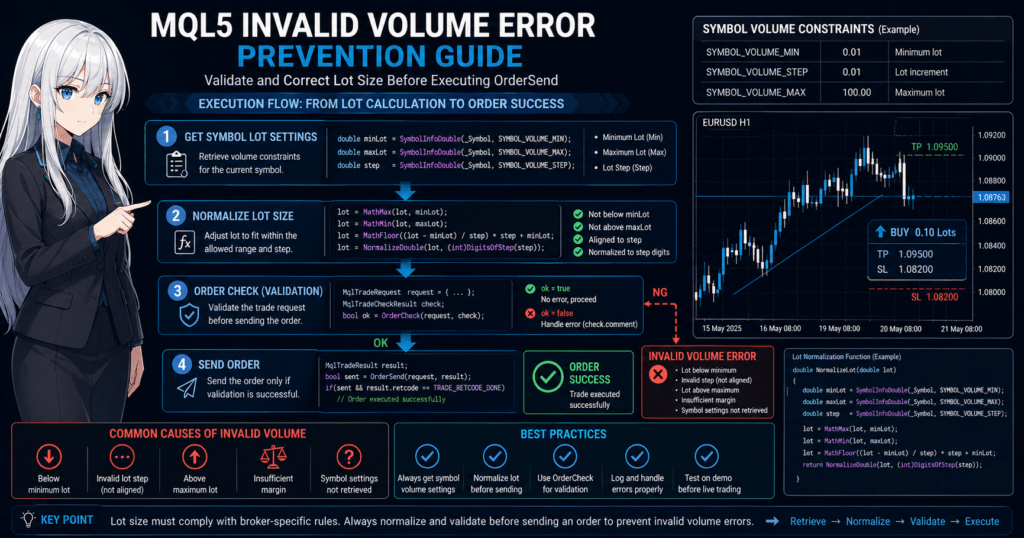
3.2 Lot normalization function (most important code)
The following is a practical, safe lot normalization function.
double NormalizeLot(double lot)
{
   double min  = SymbolInfoDouble(_Symbol, SYMBOL_VOLUME_MIN);
   double max  = SymbolInfoDouble(_Symbol, SYMBOL_VOLUME_MAX);
   double step = SymbolInfoDouble(_Symbol, SYMBOL_VOLUME_STEP);

   // 1. Minimum and maximum limits
   lot = MathMax(min, lot);
   lot = MathMin(max, lot);

   // 2. Round down to match the step
   lot = MathFloor(lot / step) * step;

   // 3. Round as a precaution
   lot = NormalizeDouble(lot, 8);

   return lot;
}
3.3 Usage example (practical code)
double lot = 0.015;  // Original lot

lot = NormalizeLot(lot);

// Place order
CTrade trade;
trade.Buy(lot);
Point-by-point explanation
MathFloor()→ prevents step violationsMathMax/Min()→ prevents out-of-range valuesNormalizeDouble()→ handles floating-point error
3.4 Pre-trade validation with OrderCheck (recommended)
This is essential for live operation.
MqlTradeRequest request;
MqlTradeCheckResult check;

request.volume = lot;
request.symbol = _Symbol;
request.action = TRADE_ACTION_DEAL;
request.type   = ORDER_TYPE_BUY;

if(!OrderCheck(request, check))
{
   Print("OrderCheck failed: ", check.comment);
}
Benefits
- Detects errors before order submission
- Makes the cause clear in the log
- Greatly improves debugging efficiency
3.5 Lot calculation that considers margin (advanced)
For a safer implementation, also consider margin.
double free_margin = AccountInfoDouble(ACCOUNT_FREEMARGIN);

// Simple example (adjustment may be required depending on the environment)
double lot = free_margin / 100000.0;

lot = NormalizeLot(lot);
Notes
- Margin calculation depends on the broker
- The result changes depending on leverage
- For strict calculation, it is safer to use
OrderCalcMargin()
3.6 Common bad implementations to avoid
Bad pattern 1: Using only NormalizeDouble
lot = NormalizeDouble(lot, 2);
→ This does not prevent step violations.
Bad pattern 2: Fixed lot
double lot = 0.01;
→ This breaks depending on the environment.
Bad pattern 3: Checking only min
if(lot < min) lot = min;
→ This can still cause a step violation error.
Common stumbling points
- Forgetting the existence of step → the most frequent mistake
- Using MathRound → may round up and exceed max
- Breaking with CFDs or cryptocurrencies
- Sudden errors after VPS migration
Recommended practical setup
Implement the following as a set:
- NormalizeLot function
- OrderCheck
- SymbolInfo retrieval
This gives you:
- Reproducibility: high
- Risk: low
- Maintainability: high
Supplement: design-level view
Essentially, “lot size” should be treated as a calculated result, not an input.
In other words:
- User input → bad design
- Environment-dependent value → retrieve dynamically
This is the correct design direction.
4. Common Failure Patterns in Real Projects
Key point of this section:
invalid volume is not caused only by an incorrect lot value. It also recurs because of weak design or implementation. This section organizes the failures that often appear in real projects.
4.1 Handling it with only NormalizeDouble
One of the most common mistakes is assuming that matching the number of decimal places makes the lot valid.
For example:
double lot = 0.015;
lot = NormalizeDouble(lot, 2);
At first glance, it becomes 0.02, so it may look fine.
In reality, this is not an adjustment based on the lot step (SYMBOL_VOLUME_STEP).
Be careful in environments like the following.
- step = 0.1
- min = 0.1
- max = 50.0
In this case, 0.02 is still invalid.
In other words, NormalizeDouble() is closer to display rounding and does not validate whether the value meets the trading conditions.
Common misconceptions
- All FX pairs accept two decimal places → wrong
- Using
NormalizeDouble()makes it safe → insufficient
Notes
- step is not always
0.01 - CFDs, indices, and cryptocurrencies are especially likely to break this assumption
4.2 Using a fixed lot as-is
The next common case is hard-coding the lot as a fixed value.
double lot = 0.01;
trade.Buy(lot);
This may pass in a test environment but is likely to fail in live trading. The reason is simple: trading conditions differ by broker and by symbol.
For example, a 0.01 lot is valid only when that symbol and account type have a minimum lot of 0.01.
In another environment, you may see differences such as:
- minimum lot is
0.1 - step is
0.1 - some symbols only allow
1.0units
In that case, the same EA will produce invalid volume.
Common failures
- Assuming that because it passed testing, it will also pass live trading
- Checking only currency pairs and applying the same settings to other symbols
- Not suspecting the EA after an account change causes a problem
Practical conclusion
Do not treat lot size as a fixed value. Design it so it is always adjusted using symbol information.
4.3 Not considering margin
Even if min, max, and step are correct, the order can fail because of insufficient margin.
In some environments or implementations, this appears as a volume-related problem, which makes the cause easy to misread.
For example:
- The lot matches the step
- The lot is within min / max
- But the required margin is not available
In this case, reviewing only the lot value will not solve the root cause.
Process to check
MqlTradeCheckResult check;
OrderCheck(request, check);
Common failures
- Being satisfied after implementing only volume adjustment
- Skipping
OrderCheck() - Ignoring margin because the backtest passes
Notes
- Live accounts are strongly affected by leverage conditions
- The result can change with the same lot depending on account balance and open positions
- This is especially common in averaging-down and compound-growth EAs
4.4 Ignoring specification differences by currency pair or symbol
Beginners often overlook that lot specifications differ by symbol.
Even if an EA is written around _Symbol, the nature of that _Symbol is not always the same.
Differences are especially likely in:
- FX currency pairs
- Gold
- Stock indices
- Cryptocurrency CFDs
- Energy CFDs
The following values can vary greatly:
SYMBOL_VOLUME_MINSYMBOL_VOLUME_STEPSYMBOL_VOLUME_MAX
Typical failure examples
- Using an EA built for EURUSD directly on GOLD
- Placing orders on BTC-related symbols while assuming 0.01 lots
- Making the step value common across symbols
Practical countermeasures
- Retrieve specifications for each symbol every time
- Output them to the log in OnInit and check them
- Normalize lots separately for each symbol in multi-symbol EAs
4.5 Not checking the lot after normalization
Even if you have a normalization function, it becomes hard to identify the cause if you do not log the final lot after adjustment.
For example, after normalization:
- Expected value:
0.015 - Actual value:
0.01 - Or it was adjusted to
0.1
If you do not know this difference, you cannot trace why the order is not executed or why the lot is larger than expected.
Recommended log example
double min  = SymbolInfoDouble(_Symbol, SYMBOL_VOLUME_MIN);
double max  = SymbolInfoDouble(_Symbol, SYMBOL_VOLUME_MAX);
double step = SymbolInfoDouble(_Symbol, SYMBOL_VOLUME_STEP);

Print("min=", min, " max=", max, " step=", step, " lot=", lot);
Notes
- Many live incidents take longer to investigate because of missing information
- Logs make reproducibility easier to verify
Summary of common stumbling points
EAs where invalid volume keeps recurring often have these traits:
- They depend on
NormalizeDouble() - They keep lot size as a fixed value
- They do not use
OrderCheck() - They do not absorb symbol-specific differences
- They have no logs, so normalized results cannot be checked
If any of these five apply, redesigning the lot handling is usually faster than applying a temporary patch.
5. Design Best Practices to Prevent invalid volume
Key point of this section:
Do not stop at a one-time fix. Build a design that prevents recurrence. This section covers practical measures for environment differences, long-term operation, and multiple accounts.
5.1 Treat lot size as a “calculated result,” not an “input value”
This is the most important concept.
A lot is not a fixed value. It is a result determined by the trading environment.
Bad design
double lot = 0.01;
This is an “input value,” and it breaks as soon as the environment changes.
Good design (basic structure)
double base_lot = 0.01;  // Base value
double lot = NormalizeLot(base_lot);
Or:
double lot = CalculateLotByRisk();
lot = NormalizeLot(lot);
Practical points
- Do not use user input as-is
- Always insert a normalization layer
- Manage the “final lot” as a separate variable
5.2 Retrieve symbol specifications every time (do not cache them)
It may look efficient to cache these values, but
symbol specifications can change.
Values to retrieve
SYMBOL_VOLUME_MIN
SYMBOL_VOLUME_MAX
SYMBOL_VOLUME_STEP
Bad patterns
- Retrieving them only once in OnInit
- Fixing them in global variables
- Sharing them across multiple symbols
Recommended
double min  = SymbolInfoDouble(_Symbol, SYMBOL_VOLUME_MIN);
double max  = SymbolInfoDouble(_Symbol, SYMBOL_VOLUME_MAX);
double step = SymbolInfoDouble(_Symbol, SYMBOL_VOLUME_STEP);
Retrieve them whenever they are needed.
Structural reasons
- Broker specification changes
- Symbol changes
- Server reconnection
- VPS migration
These events can change the conditions.
5.3 Always run OrderCheck (live-operation assumption)
This is essential for live operation.
Recommended flow
lot = NormalizeLot(lot);

MqlTradeCheckResult check;
if(!OrderCheck(request, check))
{
   Print("Check error: ", check.comment);
   return;
}
Why it is necessary
- It can detect errors other than volume
- It helps avoid insufficient margin before order submission
- It prevents live trading incidents
Common misconceptions
- “It passed testing, so it is unnecessary” → incorrect
- “Remove it to make the EA lighter” → incorrect
5.4 Build logging into the design (debugging assumption)
Operational trouble will occur at some point.
For that reason, your design must assume logging from the beginning.
Minimum logs to output
Print("Symbol=", _Symbol);
Print("min=", min, " max=", max, " step=", step);
Print("lot(before)=", raw_lot, " lot(after)=", lot);
Important points
- Record the difference before and after normalization
- Record symbol information
- Output the error code as well
Effects
- The cause can be identified quickly
- Reproducibility improves
- External environment effects can be separated from code issues
5.5 Design for multiple symbols
An EA is not always used on only one symbol.
In real operation, multi-symbol support is often standard.
Bad design
double min = 0.01; // Fixed
Good design
double min = SymbolInfoDouble(symbol, SYMBOL_VOLUME_MIN);
Notes
- Hard-coding
_Symbolcan be risky - Passing symbol as an argument is preferable
- This is essential for multi-symbol EAs
5.6 Treat test and live environments separately
Many incidents happen here.
Common problem
- Backtest → OK
- Demo account → OK
- Live account → invalid volume
Causes
- Different lot specifications
- Different leverage
- Different margin requirements
Countermeasures
- Test on a demo account with conditions close to live trading
- Compare logs
- Check the OrderCheck result
5.7 Relationship between risk management and lot size (important)
Lot size is not just a technical parameter.
It is risk management itself.
Recommended design
double risk_percent = 1.0;  // 1%
double lot = CalculateLotByRisk(risk_percent);
lot = NormalizeLot(lot);
Benefits
- Drawdown (DD) control
- Adjustment to account balance changes
- Improved stability in long-term operation
Notes
- The calculation logic depends on the broker
- Adjustment is needed for each currency pair or symbol
Common stumbling points
- Stopping the design at “it works”
- Continuing to keep lot size as a fixed value
- Skipping OrderCheck
- Not outputting logs
All of these are typical patterns that become costly later.
Practical summary (important)
The shortest route to preventing invalid volume is:
- Implement NormalizeLot
- Retrieve SymbolInfo every time
- Run OrderCheck
- Output logs
If these four points are satisfied,
the chance of recurrence drops significantly.
6. Summary and Fastest Resolution Checklist
Key point of this section:
This section compresses the article into practical judgment criteria so even beginners can solve the issue without getting lost.
6.1 The true nature of invalid volume
invalid volume is not just an ordinary error.
It means “a violation of the broker’s trading rules.”
In other words, the cause is often:
- not simply that the code is wrong
- but that it does not fit the environment
Without this understanding, the error will keep recurring.
6.2 Fastest resolution checklist
When the error appears, check the following from top to bottom.
Check 1: Does it meet the minimum lot?
double min = SymbolInfoDouble(_Symbol, SYMBOL_VOLUME_MIN);
- Is lot >= min?
- Also check differences by account type
Check 2: Does it match the lot step?
double step = SymbolInfoDouble(_Symbol, SYMBOL_VOLUME_STEP);
- Does lot % step == 0?
- Are you normalizing by step instead of only using NormalizeDouble?
Check 3: Does it exceed the maximum lot?
double max = SymbolInfoDouble(_Symbol, SYMBOL_VOLUME_MAX);
- Is lot <= max?
- Does averaging-down or compound-growth logic push it above max?
Check 4: Are you running OrderCheck?
OrderCheck(request, check);
- Check
check.comment - Consider the possibility of insufficient margin
Check 5: Have you implemented lot normalization?
lot = NormalizeLot(lot);
- Are you still using a fixed value as-is?
- Does the logic support the step value?
6.3 Fastest practical fix code (reposted)
If you are unsure, use this implementation.
double NormalizeLot(double lot)
{
   double min  = SymbolInfoDouble(_Symbol, SYMBOL_VOLUME_MIN);
   double max  = SymbolInfoDouble(_Symbol, SYMBOL_VOLUME_MAX);
   double step = SymbolInfoDouble(_Symbol, SYMBOL_VOLUME_STEP);

   lot = MathMax(min, lot);
   lot = MathMin(max, lot);
   lot = MathFloor(lot / step) * step;

   return NormalizeDouble(lot, 8);
}
6.4 Common misconceptions (review)
- NormalizeDouble alone is enough → incorrect
- 0.01 works everywhere → incorrect
- If it passes testing, it is fine → incorrect
- All FX specifications are the same → incorrect
6.5 Important practical points
■ Reproducibility
- Will it work when the environment changes?
- Will it still work after VPS migration?
■ Risk management
- Can lot size grow out of control?
- Can it cause insufficient margin?
■ Maintainability
- Can another person understand it?
- Can the cause be traced from logs?
6.6 Conclusion (important)
The solution to invalid volume is simple.
Treat lot size as an environment-adjusted value, not a fixed value.
That is the core idea.
By changing to this design:
- Error rate: greatly reduced
- Debugging cost: greatly reduced
- Long-term operational stability: improved
FAQ
Q1. Why does invalid volume suddenly occur?
A. It occurs suddenly because lot conditions can change when the broker, account type, or symbol changes.
Q2. Why is NormalizeDouble alone not enough?
A. NormalizeDouble only rounds decimal places. It does not guarantee that the lot matches the broker’s step size.
Q3. Is matching only the minimum lot enough?
A. No. The lot must also satisfy the step and maximum lot requirements.
Q4. Why does it work in backtesting but fail in live trading?
A. The live account may have different margin conditions and lot specifications from the backtest environment.
Q5. Why are CFDs and cryptocurrencies more likely to cause this error?
A. Their lot steps and minimum units often differ greatly from standard FX pairs.
Q6. Is OrderCheck required?
A. Yes, it is required for live operation because it can detect errors before sending the order.
Q7. Is it bad to use a fixed lot value?
A. It is not recommended. Fixed lots can fail depending on the broker or symbol, so normalization is necessary.
Q8. What is the safest countermeasure?
A. The safest approach is to retrieve specifications with SymbolInfo, normalize the lot with NormalizeLot, and validate the order with OrderCheck.