

- 1 1. What Is the Basic Structure of an MQL5 EA?
- 2 2. Basic MQL5 EA Structure (Minimum Template)
- 3 3. Basic EA Template Code (Practical Structure)
- 4 4. EA Event Model (Tick, Timer, and Trade Events)
- 5 5. Basic Order Processing in an EA (CTrade / OrderSend)
- 6 6. Common EA Development Errors and How to Fix Them
- 7 7. Important EA Design Points (Reproducibility, Safety, and Maintainability)
- 8 8. Summary of the Basic MQL5 EA Structure
- 9 9. FAQ
- 9.1 9.1 What is the basic structure of an MQL5 EA?
- 9.2 9.2 Why does an EA run in OnTick()?
- 9.3 9.3 What is the difference between OnInit() and OnTick()?
- 9.4 9.4 Why can’t my EA place orders?
- 9.5 9.5 Where is an EA saved?
- 9.6 9.6 Why does my EA place an order on every Tick?
- 9.7 9.7 Which functions should beginners learn first for EA development?
1. What Is the Basic Structure of an MQL5 EA?
When you build an automated trading program in MQL5, also called an EA or Expert Advisor, the first thing to understand is the EA basic structure.
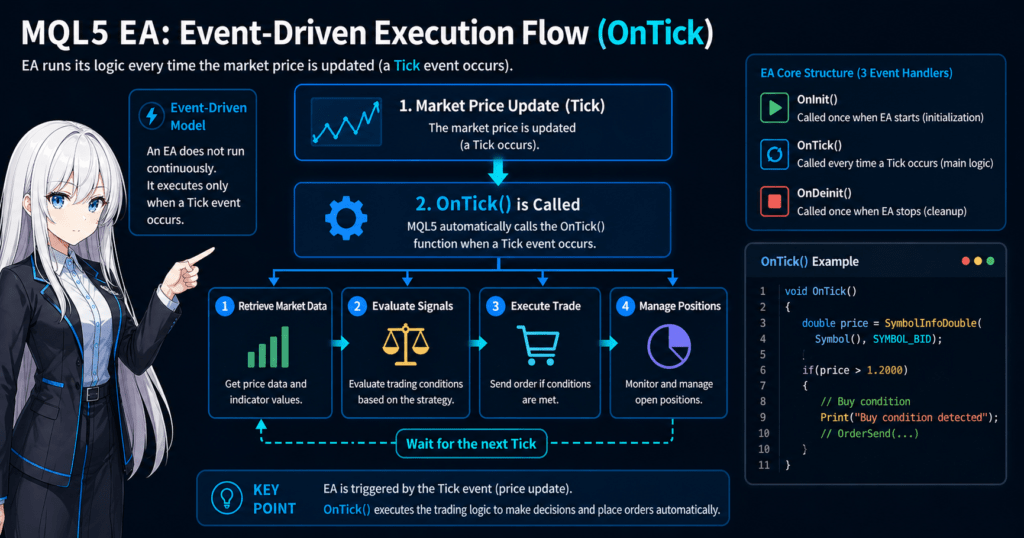
An EA does not run from the first line to the last line like a simple sequential program. Instead, it works as an event-driven program.
Event-driven means that the program runs specific processing when a specific event occurs.
In an MQL5 EA, the following events are especially important.
- When the EA starts
- When the price updates
- When the EA stops
The EA behavior is built by writing processing for each of these events.
For that reason, an MQL5 EA is basically made from the following three functions, also called event handlers.
| Function | Role |
|---|---|
| OnInit() | Initialization processing when the EA starts |
| OnTick() | Main processing when the price updates |
| OnDeinit() | Cleanup processing when the EA stops |
Once you understand these three functions, it is fair to say that you understand the foundation of almost every EA structure.
1.1 What Is an EA (Expert Advisor)?
An EA, or Expert Advisor, is a program that performs automated trading in MetaTrader.
It automatically handles everything from trade decisions to order execution based on conditions programmed in advance.
A typical EA process follows this flow.
Get price data
      ↓
Calculate technical indicators
      ↓
Evaluate trade conditions
      ↓
Execute orders
      ↓
Manage positions
For example, an EA may include logic like the following.
- Buy when moving averages cross
- Buy when RSI is 30 or lower
- Trade when ATR is above a certain level
Because an EA can run this kind of logic automatically 24 hours a day, it can enforce rules more strictly than discretionary trading usually can.
1.2 How an EA Works
The point beginners most often misunderstand is how EA processing actually runs.
In many programming languages, a program runs with a loop like this.
while(true){
    Processing
}
However, an MQL5 EA does not run through this kind of infinite loop.
Instead, it works through a mechanism called a Tick event.
Tick
→ Data at the moment the market price updates
Each time the price updates, the following function is called automatically.
void OnTick()
{
   // Trading logic
}
In other words, an EA runs in this flow.
Price update (Tick)
     ↓
Run OnTick()
     ↓
Make trade decision
Important point
An EA is not “always running.”
It processes only when a Tick arrives.
That is the core structure.
1.3 Differences Between EAs and Indicators
MetaTrader mainly has the following three types of programs.
| Type | Purpose |
|---|---|
| EA (Expert Advisor) | Automated trading |
| Indicator | Analysis display |
| Script | One-time processing |
Their characteristics are as follows.
EA
- Performs automated trading
- Can place orders
- Runs on the OnTick event
Indicator
- Used for chart analysis
- Does not trade
- Runs with OnCalculate
Script
- Runs only once
- Example: close all positions
The point that often confuses beginners is this:
Indicators cannot place orders.
If you want to trade automatically, you must use an EA.
Common Beginner Pitfalls
In the early stage of EA development, the following mistakes are common.
1. Thinking that an EA is always looping
Incorrect example
while(true)
{
   // Processing
}
Writing this code may freeze MT5.
The basic rule is to write EA processing inside the OnTick event.
2. Confusing the roles of EAs and indicators
Common examples
- Trying to trade from an indicator
- Writing too much chart drawing inside an EA
Basic rule
Analysis → Indicator
Trading → EA
3. Not attaching the EA to a chart
An EA starts working only after you drag it onto a chart.
The following settings are also required.
- AutoTrading button ON
- EA trading permission enabled
Depending on the environment, the EA will not run if these settings are disabled.
2. Basic MQL5 EA Structure (Minimum Template)
When you create an EA in MQL5, MetaEditor automatically generates a basic template, or EA skeleton.This template includes the event functions, or event handlers, needed to make the EA run.
A typical minimum EA structure looks like this.
//+------------------------------------------------------------------+
//| Expert initialization function                                   |
//+------------------------------------------------------------------+
int OnInit()
{
   return(INIT_SUCCEEDED);
}

//+------------------------------------------------------------------+
//| Expert tick function                                             |
//+------------------------------------------------------------------+
void OnTick()
{
}

//+------------------------------------------------------------------+
//| Expert deinitialization function                                 |
//+------------------------------------------------------------------+
void OnDeinit(const int reason)
{
}
These three functions are the basic EA structure.
| Function | Execution timing | Use |
|---|---|---|
| OnInit() | When the EA starts | Initialization processing |
| OnTick() | When the price updates | Trading logic |
| OnDeinit() | When the EA stops | Cleanup processing |
Once you understand this structure, the mechanics of every EA become much easier to see.
2.1 OnInit(): Initialization When the EA Starts
OnInit() is a function that runs only once when the EA is attached to a chart.
It is mainly used for processing such as:
- Creating indicators
- Initializing variables
- Checking parameters
- Outputting logs
Example
int OnInit()
{
   Print("EA started");

   return(INIT_SUCCEEDED);
}
INIT_SUCCEEDED is
a constant that means initialization succeeded.
If initialization fails, write it like this.
return(INIT_FAILED);
When this is returned, the EA stops.
Common Processing in OnInit()
In practical development, you often write the following kind of processing.
Create an indicator handle
int maHandle;

int OnInit()
{
   maHandle = iMA(Symbol(), PERIOD_CURRENT, 20, 0, MODE_SMA, PRICE_CLOSE);

   if(maHandle == INVALID_HANDLE)
   {
      Print("Indicator creation failed");
      return(INIT_FAILED);
   }

   return(INIT_SUCCEEDED);
}
The important concept here is the handle.
Handle
→ An ID used to operate an indicator
You use this ID later to retrieve data.
2.2 OnTick(): Main EA Processing
OnTick() is a function that runs every time the price updates.
All main EA logic is written here.
Examples include:
- Retrieving technical indicators
- Evaluating trade conditions
- Executing orders
- Managing positions
Example
void OnTick()
{
   Print("New Tick: ", Symbol());
}
This code outputs a log every time a Tick occurs.
In a real EA, the flow is like this.
Tick occurs
  ↓
Calculate indicators
  ↓
Check trade conditions
  ↓
Place order
Simple example
void OnTick()
{
   double price = SymbolInfoDouble(Symbol(), SYMBOL_BID);

   if(price > 1.2000)
   {
      Print("Condition met");
   }
}
Here, the EA does the following:
- Gets the current price
- Checks the condition
2.3 OnDeinit(): Processing When the EA Stops
OnDeinit() is a function called when the EA stops.
Reasons for stopping include:
- The EA was removed
- MT5 was closed
- The chart was changed
- The EA was compiled
Example
void OnDeinit(const int reason)
{
   Print("EA stopped");
}
The reason parameter contains the reason for shutdown.
For example:
REASON_REMOVE
REASON_CHARTCHANGE
REASON_RECOMPILE
Processing Done in OnDeinit()
Generally, you write processing such as:
- Releasing indicators
- Releasing memory
- Outputting logs
Example
void OnDeinit(const int reason)
{
   IndicatorRelease(maHandle);
}
If you do not do this, resources may remain allocated depending on the environment.
Common Beginner Mistakes
1. Writing heavy processing in OnTick()
Ticks can occur several to dozens of times per second.
For that reason, code like this is risky.
for(int i=0;i<1000000;i++)
{
}
If Tick processing becomes slow, the following may happen:
- The EA is delayed
- Order timing shifts
2. Not writing error handling in OnInit()
Indicator creation can fail.
For example:
- Not enough symbol data
- Parameter error
For that reason, always perform the following check.
if(handle == INVALID_HANDLE)
3. Leaving OnDeinit() empty
This may not be a problem for a small EA, but
resource management becomes important in larger EAs.
In particular, developers often forget items such as:
- IndicatorRelease
- FileClose
3. Basic EA Template Code (Practical Structure)
The previous chapter explained that an MQL5 EA is made from the following three event functions.
OnInit()(initialization)OnTick()(main processing)OnDeinit()(shutdown processing)
However, this alone is not enough for a practical EA.
For maintainability and scalability, it is common to use a template structure that separates logic into functions.
This section introduces a basic template that is easy to use in real EA development.
3.1 Practical Basic EA Template
First, here is a simple and practical structure.
//+------------------------------------------------------------------+
//| Expert Advisor Template                                         |
//+------------------------------------------------------------------+

// Parameters
input double Lots = 0.1;

// Initialization
int OnInit()
{
   Print("EA initialized");
   return(INIT_SUCCEEDED);
}

// Tick processing
void OnTick()
{
   CheckTradeSignal();
}

// Shutdown processing
void OnDeinit(const int reason)
{
   Print("EA stopped");
}

// Trading logic
void CheckTradeSignal()
{
   double price = SymbolInfoDouble(Symbol(), SYMBOL_BID);

   if(price > 1.2000)
   {
      Print("Buy condition detected");
   }
}
In this structure, the logic is not written directly inside OnTick().
Instead, the processing is separated into a dedicated function.
OnTick()
   ↓
CheckTradeSignal()
This approach has the following benefits:
- The code becomes easier to read
- Logic becomes easier to add
- Bugs become easier to reduce
3.2 Processing Flow for an Organized EA Structure
A practical EA is easier to manage when it is organized into the following structure.
OnInit()
   ↓
Initialize environment
   ↓
OnTick()
   ↓
Get market data
   ↓
Evaluate signal
   ↓
Process order
   ↓
Manage position
As code structure, this looks like the following.
void OnTick()
{
   UpdateMarketData();
   CheckSignal();
   ExecuteTrade();
   ManagePosition();
}
Each function has the following role.
| Function | Role |
|---|---|
| UpdateMarketData() | Gets prices and indicators |
| CheckSignal() | Evaluates trade conditions |
| ExecuteTrade() | Processes orders |
| ManagePosition() | Manages positions |
When you structure an EA this way, it remains easier to manage even as it grows.
3.3 Basics of EA Parameters (input)
In an EA, it is common to prepare parameters that the user can configure.
MQL5 uses the input keyword.
input double Lots = 0.1;
input int StopLoss = 100;
input int TakeProfit = 200;
When defined this way, the parameters appear on the EA settings screen.
Example
Lots        0.1
StopLoss    100
TakeProfit  200
This allows you to adjust items such as:
- Lot size
- Stop loss
- Take profit
without changing the code.
In EA development, the following parameters are often used.
Lot size
Stop loss
Take profit
Indicator period
Spread limit
3.4 EA Folder Structure (Save Location)
An EA is saved in a specific MetaTrader folder.
Typical save location
MQL5
 └ Experts
     └ YourEA.mq5
When you create an EA in MetaEditor, it is automatically saved in this location.
After compilation, the following files are generated.
YourEA.mq5   Source code
YourEA.ex5   Executable file
MT5 runs the .ex5 file.
Common Beginner Pitfalls
1. Writing everything in OnTick()
Beginners often write code like this.
void OnTick()
{
   // Hundreds of lines of logic
}
This is a very risky design.
Reasons:
- Bugs are hard to find
- Fixes are difficult
- The EA cannot be expanded easily
Solution
Split logic into functions
2. Not using input parameters
A beginner EA often looks like this.
double lot = 0.1;
With this approach, you must recompile every time you change the setting.
Correct approach
input double Lots = 0.1;
3. Hard-coding Symbol()
For an EA that supports multiple symbols, always use the following.
Symbol()
Incorrect example
"EURUSD"
If you write this, the EA becomes limited to one specific currency pair.
4. EA Event Model (Tick, Timer, and Trade Events)
An MQL5 EA works as an event-driven program.
This means the corresponding function is executed automatically when a specific event occurs.
Beginners usually learn OnTick() first, but real EAs can use several other events as well.
The main events are as follows.
| Event function | When it occurs | Use |
|---|---|---|
| OnTick() | Price update | Trading logic |
| OnTimer() | At specified time intervals | Scheduled processing |
| OnTrade() | Trade state changes | Order monitoring |
| OnTradeTransaction() | Trade events | Detailed monitoring |
In EA design, using these events properly helps you build a more stable automated trading system.
4.1 Tick Event (OnTick)
OnTick() is an event function that runs every time the price updates.
The core EA processing is usually written here.
Example
void OnTick()
{
   Print("Tick received");
}
A Tick is the unit of market price updates.
For that reason, its frequency depends on the currency pair and market conditions.
Example
| Market condition | Tick frequency |
|---|---|
| High-liquidity hours | Very frequent |
| Nighttime or holidays | Less frequent |
The important point is this:
Ticks do not arrive at fixed intervals.
That means they occur irregularly, like this.
Tick
Tick
Tick
(Several seconds pass)
Tick
For that reason, Tick events are not suitable for:
- Processing every second
- Regular checks
In those cases, use OnTimer().
4.2 Timer Event (OnTimer)
OnTimer() is an event that runs at fixed time intervals.
To use it, set EventSetTimer().
Example
int OnInit()
{
   EventSetTimer(60);
   return(INIT_SUCCEEDED);
}
With this setting,
Every 60 seconds
OnTimer() is called.
Timer processing
void OnTimer()
{
   Print("Timer event");
}
Timer events are often used for:
- Regular log output
- Market status checks
- EA status monitoring
When the EA stops, you need to remove the Timer.
void OnDeinit(const int reason)
{
   EventKillTimer();
}
Because the Timer may remain depending on the environment,
it is recommended to always write cleanup processing.
4.3 Trade Event (OnTrade)
OnTrade() is an event called when the trade state changes.
Examples:
- An order is filled
- A position changes
- A position is closed
Example
void OnTrade()
{
   Print("Trade event occurred");
}
This event lets you detect:
The moment an order is filled
Uses:
- Confirming fills
- Updating positions
- Managing logs
However, if you need detailed information,
use OnTradeTransaction().
4.4 TradeTransaction Event (OnTradeTransaction)
OnTradeTransaction() is a function that can retrieve detailed trade events.
Example
void OnTradeTransaction(
   const MqlTradeTransaction& trans,
   const MqlTradeRequest& request,
   const MqlTradeResult& result
)
{
   Print("Trade transaction detected");
}
This event can retrieve information such as:
- Order ID
- Fill price
- Lot size
- Trade type
It is used for EA log management and high-precision position management.
Common Beginner Pitfalls
1. Writing time-based processing with Tick events
Beginners often write code like this.
if(TimeCurrent() - last_time > 60)
{
   Processing
}
Because Ticks are irregular,
they are not suitable for accurate time-based processing.
Solution
Use a Timer event
2. Not removing the Timer
If you set a Timer, you must write the following.
EventKillTimer();
If you do not remove it, Timer events may remain depending on the environment.
3. Confusing OnTrade and OnTick
This is a common source of confusion for beginners.
| Function | Role |
|---|---|
| OnTick | Price update |
| OnTrade | Trade update |
Trading logic belongs in:
OnTick
Fill monitoring belongs in:
OnTrade
5. Basic Order Processing in an EA (CTrade / OrderSend)
The most important function of an EA is placing orders automatically.
In MQL5, there are mainly two ways to process orders.
| Method | Characteristics |
|---|---|
| CTrade class | Simple and beginner-friendly |
| OrderSend() | Low-level API with detailed control |
In modern MQL5, using the CTrade class is the common approach.
For that reason, beginners should first understand CTrade-based order placement.
5.1 Placing Orders with the CTrade Class
CTrade is a trade class from the MQL5 standard library.
It lets you implement buy and sell orders easily.
First, include the header.
#include <Trade/Trade.mqh>
Next, create an object.
CTrade trade;
Now the EA can place orders.
Market Buy Order (Buy)
#include <Trade/Trade.mqh>

CTrade trade;

void OnTick()
{
   double lot = 0.1;

   trade.Buy(lot);
}
This code executes:
A buy order of 0.1 lots
In practice, the following information is used automatically.
- Current price
- Current symbol
- Slippage settings
Market Sell Order (Sell)
trade.Sell(0.1);
5.2 Stop Loss and Take Profit
When placing an order, you can set a stop loss (SL) and take profit (TP).
Example
double sl = 1.1900;
double tp = 1.2100;

trade.Buy(0.1, NULL, 0, sl, tp);
Meaning of the arguments
| Argument | Meaning |
|---|---|
| lot | Lot size |
| symbol | Symbol |
| price | Price |
| sl | Stop loss |
| tp | Take profit |
Normally, specifying:
NULL
uses:
The currency pair on the current chart
5.3 Checking Order Results
An order does not always succeed.
For that reason, you must check the result.
if(trade.Buy(0.1))
{
   Print("Buy order success");
}
else
{
   Print("Buy order failed");
}
You can get more detailed information with:
trade.ResultRetcode();
Example
Print(trade.ResultRetcode());
5.4 OrderSend() (Low-Level Orders)
Use OrderSend() when you need finer control.
Example
MqlTradeRequest request;
MqlTradeResult result;

ZeroMemory(request);

request.action = TRADE_ACTION_DEAL;
request.symbol = Symbol();
request.volume = 0.1;
request.type = ORDER_TYPE_BUY;

OrderSend(request, result);
This method lets you control details such as:
- Order conditions
- Price
- Slippage
However, because it requires more code,
CTrade is recommended for normal EAs.
Common Beginner Pitfalls
1. AutoTrading is not turned ON
This is one of the most common reasons an EA cannot place orders.
Check:
Top of MT5
AutoTrading button
If this is OFF, the EA cannot place orders.
2. Not considering spread limits
If the spread is wide, the EA may:
- Fill at an unfavorable price
- Break the intended logic
Example countermeasure
double spread = SymbolInfoInteger(Symbol(), SYMBOL_SPREAD);

if(spread > 30)
{
   return;
}
3. Placing repeated orders
If you place an order on every Tick, the flow becomes:
Tick
Order
Tick
Order
Tick
Order
As a result:
A large number of positions
may be created.
Countermeasure
Position check
Example
if(PositionsTotal() == 0)
{
   trade.Buy(0.1);
}
6. Common EA Development Errors and How to Fix Them
When developing an EA in MQL5, beginners often spend the most time investigating errors and unexpected behavior.
The following three issues are especially common in EA development.
| Error type | Cause |
|---|---|
| Price retrieval error | Incorrect data retrieval method |
| Array error | Index management mistake |
| Order error | Trading conditions or environment settings |
Understanding these issues can greatly reduce debugging time.
6.1 Price Retrieval Error (SymbolInfoDouble)
In an EA, you frequently retrieve the current price.
In MQL5, use SymbolInfoDouble().
Example
double bid = SymbolInfoDouble(Symbol(), SYMBOL_BID);
double ask = SymbolInfoDouble(Symbol(), SYMBOL_ASK);
Meaning
| Variable | Meaning |
|---|---|
| bid | Bid price, or the price used when selling |
| ask | Ask price, or the price used when buying |
Basic trading rule
Buy order → Ask price
Sell order → Bid price
Common mistake
Incorrect code often written by beginners
double price = Bid;
This is MQL4 style.
In MQL5, the basic approach is to use SymbolInfoDouble().
Safer approach
double bid;

if(SymbolInfoDouble(Symbol(), SYMBOL_BID, bid))
{
   Print(bid);
}
This prevents errors even if the value cannot be retrieved in some environments.
6.2 Array Error (Array out of range)
A very common error in EA development is:
array out of range
This means:
Access outside the array range
Example
double arr[10];

arr[10] = 1;
This code causes an error.
Reason
Maximum array index
0 to 9
Common cause
In EA development, this often happens when retrieving indicator data.
Example
CopyBuffer(handle, 0, 0, 10, buffer);
If you access:
buffer[10]
without checking the number of retrieved data points, an error occurs.
Safer approach
int copied = CopyBuffer(handle,0,0,10,buffer);

if(copied > 0)
{
   Print(buffer[0]);
}
Use the data only after confirming that retrieval succeeded.
6.3 Order Error (Trade Retcode)
Even if an EA sends an order, the order does not always succeed.
Depending on the broker and market conditions, orders may be rejected.
You can check the order result with:
trade.ResultRetcode();
Typical errors
| Code | Meaning |
|---|---|
| 10004 | TRADE_RETCODE_REQUOTE |
| 10006 | TRADE_RETCODE_REJECT |
| 10019 | TRADE_RETCODE_NO_MONEY |
Example of error checking
if(!trade.Buy(0.1))
{
   Print("Error code: ", trade.ResultRetcode());
}
This log becomes important information for EA debugging.
Common Beginner Pitfalls
1. Not using Print logs
Because an EA runs in the background,
you cannot find the cause easily without logs.
Example
Print("Signal detected");
You can check logs in:
MT5 → Experts tab
2. Differences between backtesting and live environments
An EA may work in backtesting but fail in a live environment.
Reasons include:
- Spread changes
- Slippage
- Execution delay
For that reason, it is important to always verify an EA on a:
Demo account
3. Fixing array size too rigidly
Indicator data is dynamic.
For that reason, arrays usually use:
ArrayResize()
Example
ArrayResize(buffer,100);
Basic Debugging Steps
The basic steps for investigating EA issues are:
1 Add Print logs
2 Check error codes
3 Check array size
4 Check price retrieval
Many problems can be solved by checking in this order.
7. Important EA Design Points (Reproducibility, Safety, and Maintainability)
When creating an EA in MQL5, simply writing “code that runs” is not enough.
For automated trading designed for long-term operation, the following three design elements are very important.
| Design element | Purpose |
|---|---|
| Reproducibility | Reduce differences between backtesting and live operation |
| Safety | Prevent unexpected orders and runaway behavior |
| Maintainability | Make EA improvements and fixes easier |
By designing with these elements in mind, an EA becomes a program that can run more stably over the long term.
7.1 Design for Better Reproducibility
In EA development, differences between backtest results and live operation can become a problem.
Common causes include design mistakes such as:
- Tick-dependent logic
- Ignoring spread
- Inconsistent execution timing
For example, the following code requires caution.
if(SymbolInfoDouble(Symbol(),SYMBOL_BID) > ma)
{
   trade.Buy(0.1);
}
In this case, results may change depending on:
- Tick update timing
- Indicator update timing
As a countermeasure, many EAs use a design that runs logic on confirmed bars.
Example
static datetime last_bar = 0;

datetime current_bar = iTime(Symbol(), PERIOD_CURRENT, 0);

if(current_bar != last_bar)
{
   last_bar = current_bar;

   // Trading logic
}
This method lets you run the logic only once per bar.
Benefits:
- Better backtest reproducibility
- Prevention of excessive orders
- More stable logic
7.2 Design for Better Safety
In an EA, safety checks are important to prevent unexpected orders.
Typical check items include:
Spread limit
Position count limit
Maximum lot limit
Trading time limit
For example, a spread check:
double spread = SymbolInfoInteger(Symbol(),SYMBOL_SPREAD);

if(spread > 30)
{
   return;
}
This helps prevent:
Trading when the spread widens
Position limit
Example to prevent repeated orders.
if(PositionsTotal() > 0)
{
   return;
}
Without this check, the EA may place an order on every Tick.
Trading time limit
A design that avoids low-liquidity market hours is also common.
Example
int hour = TimeHour(TimeCurrent());

if(hour < 7 || hour > 22)
{
   return;
}
The best trading hours can vary depending on the environment and strategy.
7.3 Code Structure for Better Maintainability
As an EA becomes more complex, organizing the code structure becomes more important.
A typical EA structure looks like this.
OnInit
OnTick
   ├ Get market data
   ├ Evaluate signal
   ├ Process order
   └ Manage position
When organized with functions, it looks like this.
void OnTick()
{
   UpdateMarketData();
   CheckSignal();
   ExecuteTrade();
   ManagePosition();
}
Benefits:
- Better readability
- Easier bug investigation
- Easier feature additions
If an EA grows to several thousand lines, it becomes very difficult to manage without this structure.
7.4 Parameter Management
An EA should allow settings to be changed flexibly.
In MQL5, use input parameters.
Example
input double Lots = 0.1;
input int StopLoss = 100;
input int TakeProfit = 200;
This allows parameters to be changed from the:
EA settings screen
Common items that should be parameterized:
- Lot size
- SL / TP
- Indicator period
- Trading hours
- Spread limit
Common Beginner Pitfalls
1. Running logic on every Tick
Beginners often write an EA like this.
void OnTick()
{
   trade.Buy(0.1);
}
In this case, orders are placed:
On every Tick
Countermeasure
Confirmed-bar logic
2. Not checking positions
An EA without position management can quickly run out of control.
Always check:
PositionsTotal()
3. Not writing safety controls
An EA should always include safety design such as:
Spread limit
Time limit
Lot limit
8. Summary of the Basic MQL5 EA Structure
This article explained the basic structure of an MQL5 EA, or Expert Advisor.
In EA development, the first key point is to understand that an EA is an event-driven program.
Unlike a normal sequential program, an EA has a structure where processing runs when specific events occur.
The basic EA structure consists of the following three functions.
| Function | Role | Execution timing |
|---|---|---|
| OnInit() | Initialization processing | When the EA starts |
| OnTick() | Main processing | When the price updates |
| OnDeinit() | Shutdown processing | When the EA stops |
An EA runs in the following flow.
EA starts
 ↓
OnInit()
 ↓
Tick occurs
 ↓
OnTick()
 ↓
Trade decision
 ↓
Order execution
 ↓
EA stops
 ↓
OnDeinit()
Once you understand this structure, EA design can be organized as follows.
OnInit()
   ↓
Initialize environment
   ↓
OnTick()
   ↓
Get market data
   ↓
Evaluate trade signal
   ↓
Process order
   ↓
Manage position
At the practical level, the following design points are also important.
- Split logic into functions
- Use input parameters
- Add spread limits
- Manage the number of positions
- Use confirmed-bar logic
By implementing these points, an EA becomes a more stable automated trading program.
In EA development, it is also important to always keep the following points in mind.
Reproducibility (match with backtesting)
Safety (prevent runaway behavior)
Maintainability (code management)
Designing an EA around these elements can greatly improve its quality.
9. FAQ
9.1 What is the basic structure of an MQL5 EA?
An EA is an event-driven program mainly made from three functions: OnInit(), OnTick(), and OnDeinit().
These functions handle initialization, trading logic, and shutdown processing.
9.2 Why does an EA run in OnTick()?
An EA runs processing when the market price updates, which is called a Tick.
For that reason, trading logic is usually written inside OnTick().
9.3 What is the difference between OnInit() and OnTick()?
OnInit() is an initialization function that runs only once when the EA starts.OnTick() is the main processing function that runs every time the price updates.
9.4 Why can’t my EA place orders?
Common causes include:
- The MT5 AutoTrading button is OFF
- Trading permission is disabled in the EA settings
- Spread limits are blocking trades
- The lot size is invalid
The exact cause can vary depending on the environment and broker settings.
9.5 Where is an EA saved?
An EA is usually saved in the following folder.
MQL5/Experts/
After compilation, a .mq5 source file and a .ex5 executable file are generated.
9.6 Why does my EA place an order on every Tick?
If order conditions are not controlled inside OnTick(), an order may be executed every time the price updates.
You can prevent this with position checks or confirmed-bar logic.
9.7 Which functions should beginners learn first for EA development?
Beginners should first learn these three functions:
OnInit()(initialization)OnTick()(trading logic)OnDeinit()(shutdown processing)
Understanding them gives you the basic structure of an EA.