

- 1 1. What Is PlotIndexSetInteger?
- 2 Common Mistakes (Important)
- 3 Practical Notes
- 4 2. Basic Syntax and Parameter List
- 5 Common Mistakes (Important)
- 6 Practical Notes
- 7 3. Practical Setting Patterns You Can Copy and Paste
- 8 Important Summary: Understanding the Structure
- 9 Practical Notes
- 10 Common Mistakes: Overall Review
- 11 4. How to Debug When Nothing Displays or Settings Are Not Reflected
- 11.1 4.1 Fastest Check Procedure (Important)
- 11.2 4.2 Troubleshooting by Case
- 11.3 4.3 Basic Debugging Strategy (Important)
- 11.4 4.4 Easy-to-Miss Points
- 11.5 4.5 Practical Cause Ranking
- 12 Important Summary
- 13 Practical Advice
- 14 5. Advanced Techniques: Color Branching, Complex Drawing, and Performance Optimization
- 14.1 5.1 Changing Colors by Condition (Trend Detection and State Display)
- 14.2 5.2 Signal Display with Multiple Conditions (Arrows + Color Branching)
- 14.3 5.3 ON/OFF Display Control (Conditional Drawing)
- 14.4 5.4 Performance Optimization (Important)
- 14.5 5.5 Practical Design Pattern (Important)
- 14.6 5.6 Practical Notes in More Detail
- 15 Common Mistakes: Advanced Usage
- 16 Important Summary
- 17 Practical Advice
- 18 6. Final Review of Confusing Points for Beginners and Implementation Checklist
- 18.1 6.1 Why Beginners Get Confused: Structural Understanding
- 18.2 6.2 Implementation Checklist You Can Use As-Is
- 18.3 6.3 Common Failure Patterns and How to Prevent Them
- 18.4 6.4 Stable Template for Practical Use
- 18.5 6.5 Design Principles for Better Reproducibility (Important)
- 18.6 6.6 Practical Evaluation from Short-Term and Long-Term Views
- 19 Final Summary
- 20 FAQ for Search Intent
- 20.1 Q1. What is PlotIndexSetInteger?
- 20.2 Q2. Why is nothing displayed even though values exist?
- 20.3 Q3. How is it different from SetIndexBuffer?
- 20.4 Q4. Why are my arrows not displayed?
- 20.5 Q5. How can I change colors based on conditions?
- 20.6 Q6. Can I configure PlotIndexSetInteger in OnCalculate?
- 20.7 Q7. Why do multiple lines fail to display correctly?
- 20.8 Q8. What should I check first?
1. What Is PlotIndexSetInteger?
PlotIndexSetInteger is a function in MQL5 that controls how an indicator looks when it is drawn.
More specifically, it lets you set line colors, line width, display style, arrows, and other visual settings.
In short, it has the following roles.
- Defines how data is displayed
- Controls the visual appearance of an indicator
- Separates the Buffer values from the Plot display
This is where beginners often get confused. Many cases where “values exist but nothing appears on the chart” are caused by this function being missing or configured incorrectly.
1.1 Basic Overview of PlotIndexSetInteger
An MQL5 indicator works internally with the following two-layer structure.
- Data layer (Buffer): Stores prices and calculation results
- Display layer (Plot): Defines how that data is drawn
PlotIndexSetInteger controls this display layer.
For example, you can use it for settings like these.
- Set the line color to red
- Change the line width
- Display data as a histogram
- Display arrows
Actual code example:
#property indicator_plots 1

int OnInit()
{
   PlotIndexSetInteger(0, PLOT_LINE_COLOR, clrRed);   // Set to red
   PlotIndexSetInteger(0, PLOT_LINE_WIDTH, 2);        // Width 2
   return(INIT_SUCCEEDED);
}
The structure is simple: choose the plot_index to target, specify the property to configure, and set the value.
1.2 What Is It Used For? Common Use Cases
PlotIndexSetInteger is required in the following situations.
1 Changing the Appearance of a Line
- Change colors, such as blue for rising and red for falling
- Change line width to improve visibility
2 Changing the Drawing Style
- Line to histogram
- Dot display
- Step display
3 Signal Display (Important)
- Display buy and sell signals with arrows
- Change colors under specific conditions
4 Display Control
- Temporarily hide a plot
- Switch between multiple lines
In real projects, this function is especially essential for signal indicators that display arrows.
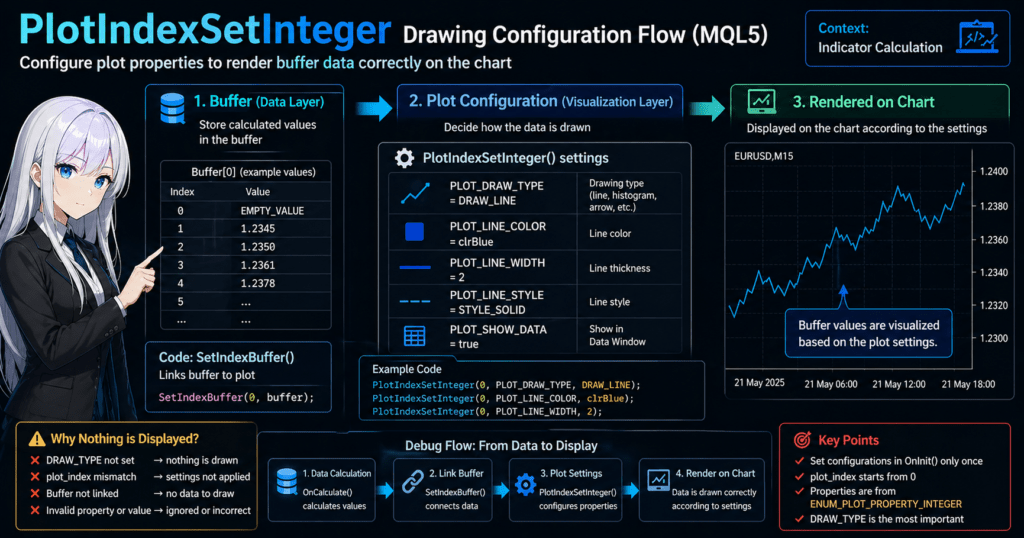
1.3 Difference from SetIndexBuffer
This is one of the most common stumbling blocks for beginners.
Conclusion:
- SetIndexBuffer stores the data
- PlotIndexSetInteger defines how the data is displayed
These two functions have completely separate roles.
Example:
double buffer[];

int OnInit()
{
   SetIndexBuffer(0, buffer); // Link the data
   PlotIndexSetInteger(0, PLOT_LINE_COLOR, clrBlue); // Display setting
   return(INIT_SUCCEEDED);
}
The relationship is as follows.
- No Buffer means there is no data, so nothing can be drawn
- No Plot setting means the appearance may not be displayed correctly
Common Mistakes (Important)
– 1 Data Exists but Nothing Is Displayed
Cause:
- PlotIndexSetInteger is not configured
- DRAW_TYPE is not specified
– 2 The Color Does Not Change
Cause:
- Wrong property, such as using PLOT_COLOR instead of PLOT_LINE_COLOR
- Wrong index when using multiple plots
– 3 You Do Not Understand What Is Being Configured
Cause:
- Confusing the roles of Buffer and Plot
Practical Notes
- Settings should generally be made inside OnInit
- plot_index corresponds in order starting from 0
- property is limited to ENUM_PLOT_PROPERTY_INTEGER
Be careful because setting this every time in OnCalculate can hurt performance.
2. Basic Syntax and Parameter List
PlotIndexSetInteger has a very simple syntax, but it will not behave as expected unless you understand each parameter accurately.
This chapter explains it at a level you can use directly in real code.
2.1 Basic Syntax
bool PlotIndexSetInteger(
   int plot_index,
   int property,
   int value
);
Return value:
- true: Success
- false: Failure, meaning the setting was not applied
2.2 Meaning of Each Parameter
– plot_index (Target Plot Number)
- Specifies which line or display plot to configure
- Starts from 0
Example:
- 0 means the first line
- 1 means the second line
Note:
- It corresponds to the number in
#property indicator_plots - If you choose the wrong index, nothing appears to change
– property (Setting Item)
- Specifies what you want to change
- Defined in
ENUM_PLOT_PROPERTY_INTEGER
Examples:
- PLOT_LINE_COLOR means color
- PLOT_LINE_WIDTH means width
- PLOT_DRAW_TYPE means drawing type
Note:
- If you choose the wrong property, the code may compile but the setting may not be reflected
– value (Setting Value)
- The specific value assigned to the property
Examples:
- Color: clrRed
- Width: 2
- Drawing type: DRAW_LINE
2.3 Frequently Used Properties (Important)
In real development, the properties you use are mostly fixed. For a start, it is enough to remember the following.
– Line-Related Settings
PlotIndexSetInteger(0, PLOT_LINE_COLOR, clrBlue);
PlotIndexSetInteger(0, PLOT_LINE_WIDTH, 2);
PlotIndexSetInteger(0, PLOT_LINE_STYLE, STYLE_SOLID);
Use cases:
- Adjusting visibility
- Distinguishing multiple lines
– Drawing Type (Most Important)
PlotIndexSetInteger(0, PLOT_DRAW_TYPE, DRAW_LINE);
Main types:
- DRAW_LINE means a normal line
- DRAW_HISTOGRAM means a bar-style histogram
- DRAW_ARROW means an arrow display
Note:
- If this is not set, nothing may be displayed in some cases
– Arrow Settings (Signal Indicators)
PlotIndexSetInteger(0, PLOT_DRAW_TYPE, DRAW_ARROW);
PlotIndexSetInteger(0, PLOT_ARROW, 233);
Additional note:
- 233 is an arrow type from the Wingdings font
- Changing the value changes the shape
– Display Control
PlotIndexSetInteger(0, PLOT_SHOW_DATA, true);
Use case:
- Turn Data Window display on or off
2.4 Minimal Sample You Can Use As-Is
#property indicator_plots 1

double buffer[];

int OnInit()
{
   SetIndexBuffer(0, buffer);

   PlotIndexSetInteger(0, PLOT_DRAW_TYPE, DRAW_LINE);
   PlotIndexSetInteger(0, PLOT_LINE_COLOR, clrGreen);
   PlotIndexSetInteger(0, PLOT_LINE_WIDTH, 2);

   return(INIT_SUCCEEDED);
}
Common Mistakes (Important)
– 1 plot_index Mismatch
- It does not match indicator_plots
- 0 and 1 are mixed up
Symptom: Nothing changes
– 2 Wrong property Selection
- Confusing PLOT_LINE_COLOR with PLOT_COLOR
- Confusing DRAW-related settings with STYLE-related settings
Symptom: The setting is not reflected
– 3 DRAW_TYPE Is Not Set
Symptom:
- Values exist in the Buffer, but nothing appears
– 4 Wrong value Type
Example:
- Passing an arbitrary integer where a color is expected
- Passing an invalid value to DRAW_TYPE
Symptom: Unintended display behavior
Practical Notes
- Run the settings only once in OnInit
- For multiple lines, configure each index explicitly
- Properties have meaning as combinations; one property alone may not be enough
The especially important point is this:
“DRAW_TYPE is the base, and color and width are layered on top of it.”
3. Practical Setting Patterns You Can Copy and Paste
This chapter introduces standard patterns you can use directly in actual development.
PlotIndexSetInteger is not just a single isolated setting. It works best as a combination of related settings, and understanding this improves implementation speed significantly.
3.1 Simple Line Display (Most Basic)
This is the most basic pattern. Start by making sure this works reliably.
#property indicator_plots 1

double buffer[];

int OnInit()
{
   SetIndexBuffer(0, buffer);

   PlotIndexSetInteger(0, PLOT_DRAW_TYPE, DRAW_LINE);
   PlotIndexSetInteger(0, PLOT_LINE_COLOR, clrBlue);
   PlotIndexSetInteger(0, PLOT_LINE_WIDTH, 2);

   return(INIT_SUCCEEDED);
}
Use cases:
- Moving averages
- RSI lines
- Any numeric plot
– Common Stumbling Blocks
- If DRAW_LINE is not specified, the line may not appear
- If no value is assigned to the buffer, nothing appears
3.2 Histogram Display (Volume and Difference-Based Logic)
#property indicator_plots 1

double buffer[];

int OnInit()
{
   SetIndexBuffer(0, buffer);

   PlotIndexSetInteger(0, PLOT_DRAW_TYPE, DRAW_HISTOGRAM);
   PlotIndexSetInteger(0, PLOT_LINE_COLOR, clrGreen);
   PlotIndexSetInteger(0, PLOT_LINE_WIDTH, 3);

   return(INIT_SUCCEEDED);
}
Use cases:
- MACD
- Volume
- Difference-based logic
– Notes
- Line width matters because thin histograms can be hard to see
- If you want different colors for positive and negative values, you need additional handling
3.3 Arrow Display (Buy and Sell Signals)
This is one of the most frequently used patterns in real projects.
#property indicator_plots 1

double buffer[];

int OnInit()
{
   SetIndexBuffer(0, buffer);

   PlotIndexSetInteger(0, PLOT_DRAW_TYPE, DRAW_ARROW);
   PlotIndexSetInteger(0, PLOT_ARROW, 233); // Up arrow
   PlotIndexSetInteger(0, PLOT_LINE_COLOR, clrRed);

   return(INIT_SUCCEEDED);
}
Use cases:
- Entry signals
- Breakout alerts
– Common Stumbling Blocks (Important)
- If PLOT_ARROW is not set, the arrow does not appear
- If the buffer does not contain a price, the arrow position cannot be displayed
3.4 Multiple Lines (Two or More)
Multiple plots are an area where beginners often break the structure.
#property indicator_plots 2

double buffer1[];
double buffer2[];

int OnInit()
{
   SetIndexBuffer(0, buffer1);
   SetIndexBuffer(1, buffer2);

   // First line
   PlotIndexSetInteger(0, PLOT_DRAW_TYPE, DRAW_LINE);
   PlotIndexSetInteger(0, PLOT_LINE_COLOR, clrBlue);

   // Second line
   PlotIndexSetInteger(1, PLOT_DRAW_TYPE, DRAW_LINE);
   PlotIndexSetInteger(1, PLOT_LINE_COLOR, clrRed);

   return(INIT_SUCCEEDED);
}
– Common Stumbling Blocks
- Index mismatch, such as mixing up 0 and 1
- Incorrect correspondence between buffer and plot
Be careful because “buffer number = plot number” is not always true.
3.5 Changing Colors by Condition (Practical Application)
If you want to change colors dynamically, use the color index method.
#property indicator_plots 1

double buffer[];
int colors[];

int OnInit()
{
   SetIndexBuffer(0, buffer);
   SetIndexBuffer(1, colors, INDICATOR_COLOR_INDEX);

   PlotIndexSetInteger(0, PLOT_DRAW_TYPE, DRAW_COLOR_LINE);
   PlotIndexSetInteger(0, PLOT_COLOR_INDEXES, 2);

   return(INIT_SUCCEEDED);
}
– Key Points
- Use DRAW_COLOR_LINE
- Manage colors with an array
- Set PLOT_COLOR_INDEXES
– Common Mistakes
- Leaving the draw type as normal DRAW_LINE, so the color does not change
- Not setting the color buffer, causing an error or being ignored
Important Summary: Understanding the Structure
PlotIndexSetInteger becomes easier to use if you understand it with the following structure.
1 Decide the drawing type with DRAW_TYPE
2 Set the required properties
3 Add supporting properties such as color and width
Practical Notes
- Always group the initial settings inside OnInit
- If nothing appears, check in this order: DRAW_TYPE, Buffer, then values
- For complex displays, return to a simple version first and rebuild from there
Common Mistakes: Overall Review
- Configuring settings without a clear structure, which makes the result hard to reproduce
- Confusing the roles of Buffer and Plot
- Copying and pasting code without understanding why it does not work
4. How to Debug When Nothing Displays or Settings Are Not Reflected
Problems around PlotIndexSetInteger usually follow predictable patterns.
This chapter organizes a practical cause-isolation flow and specific fixes you can use in real development.
4.1 Fastest Check Procedure (Important)
If nothing is displayed, check the following items in order.
– Check Flow
- Confirm that the Buffer contains values
- Confirm that SetIndexBuffer is configured correctly
- Confirm that DRAW_TYPE is set
- Confirm that the PlotIndexSetInteger index is correct
- Confirm that drawing conditions such as EMPTY_VALUE are not blocking display
If you check in this order, you can identify the cause in almost every case.
4.2 Troubleshooting by Case
– Case 1: Nothing Is Displayed
Possible causes:
- The buffer contains no value
- DRAW_TYPE is not set
- EMPTY_VALUE is being assigned
– Check Code
Print(buffer[0]);
If no value appears, the problem is in the logic side
– Fix
- Always assign values in OnCalculate
- Explicitly set a drawing type such as DRAW_LINE
– Case 2: Color or Width Is Not Reflected
Possible causes:
- The property is specified incorrectly
- The index is shifted when multiple plots are used
– Example of a Common Mistake
PlotIndexSetInteger(1, PLOT_LINE_COLOR, clrRed); // -> Actually plot 0
– Fix
- Review plot_index
- Match it with indicator_plots
– Case 3: Arrows Are Not Displayed
Possible causes:
- PLOT_ARROW is not set
- The buffer does not contain prices
– Fix Code
PlotIndexSetInteger(0, PLOT_DRAW_TYPE, DRAW_ARROW);
PlotIndexSetInteger(0, PLOT_ARROW, 233);
– Note
- The buffer must contain the price where you want the arrow to appear
– Case 4: Only Part of the Plot Is Displayed
Possible causes:
- EMPTY_VALUE is being used
- The array size is insufficient
– Fix
- Check ArraySetAsSeries
- Review ArrayResize
– Case 5: The Code Compiles but Does Not Work
Possible causes:
- The property is specified incorrectly
- The value is invalid
– Fix
- Recheck the ENUM value
- Use Print to check the return value
bool result = PlotIndexSetInteger(0, PLOT_LINE_WIDTH, 2);
Print(result);
4.3 Basic Debugging Strategy (Important)
– Principle 1: Return to a Minimal Configuration Once
PlotIndexSetInteger(0, PLOT_DRAW_TYPE, DRAW_LINE);
PlotIndexSetInteger(0, PLOT_LINE_COLOR, clrWhite);
Check whether this displays correctly
– Principle 2: Add Settings Step by Step
- Display the line
- Change the color
- Change the width
- Add advanced settings
– Principle 3: Use Logs
Print("value=", buffer[i]);
Confirm that the data exists
4.4 Easy-to-Miss Points
– OnInit vs OnCalculate
- Plot settings go in OnInit
- Value assignments go in OnCalculate
Reversing these roles can cause problems
– Missing indicator_plots Setting
#property indicator_plots 1
Without this, drawing may fail in some cases
– Reloading the Indicator
- Changes may not be reflected unless the indicator is reapplied after modification
4.5 Practical Cause Ranking
Based on experience, most causes fall into the following ranking.
1st: DRAW_TYPE is not set
2nd: No value is assigned to the buffer
3rd: Index mismatch
4th: Misuse of EMPTY_VALUE
5th: Wrong property
Suspecting issues in this order is efficient
Important Summary
Most PlotIndexSetInteger problems can be solved by checking these three points:
1 Is there data?
2 Is there a display setting?
3 Is the index correct?
Practical Advice
- Beginners should not try to complete everything in one attempt
- Always build in the order of display first, then adjustment
- Break every problem into smaller parts and verify each one
5. Advanced Techniques: Color Branching, Complex Drawing, and Performance Optimization
This chapter covers one level higher usage that is required in practical development.
PlotIndexSetInteger is not just decoration. It is directly connected to visualizing logic, which improves decision accuracy.
5.1 Changing Colors by Condition (Trend Detection and State Display)
Visibility improves significantly when you change colors based on conditions instead of using a single color.
– Basic Structure (Color Index)
#property indicator_plots 1

double buffer[];
int color_index[];

int OnInit()
{
   SetIndexBuffer(0, buffer);
   SetIndexBuffer(1, color_index, INDICATOR_COLOR_INDEX);

   PlotIndexSetInteger(0, PLOT_DRAW_TYPE, DRAW_COLOR_LINE);
   PlotIndexSetInteger(0, PLOT_COLOR_INDEXES, 2);

   return(INIT_SUCCEEDED);
}
– OnCalculate Example
if(buffer[i] > buffer[i+1])
   color_index[i] = 0; // Rising, for example blue
else
   color_index[i] = 1; // Falling, for example red
– Common Stumbling Blocks
- If DRAW_COLOR_LINE is not used, the color does not change
- If the color buffer is not set, the setting is ignored
5.2 Signal Display with Multiple Conditions (Arrows + Color Branching)
This is a typical pattern for visualizing buy and sell logic.
– Implementation Example
#property indicator_plots 2

double buyBuffer[];
double sellBuffer[];

int OnInit()
{
   SetIndexBuffer(0, buyBuffer);
   SetIndexBuffer(1, sellBuffer);

   // BUY
   PlotIndexSetInteger(0, PLOT_DRAW_TYPE, DRAW_ARROW);
   PlotIndexSetInteger(0, PLOT_ARROW, 233);
   PlotIndexSetInteger(0, PLOT_LINE_COLOR, clrBlue);

   // SELL
   PlotIndexSetInteger(1, PLOT_DRAW_TYPE, DRAW_ARROW);
   PlotIndexSetInteger(1, PLOT_ARROW, 234);
   PlotIndexSetInteger(1, PLOT_LINE_COLOR, clrRed);

   return(INIT_SUCCEEDED);
}
– Key Points
- Separate the buffers for BUY and SELL
- Add control so both signals are not shown on the same bar
– Common Mistakes
- Trying to display both signals with the same buffer, which breaks the display
- Not using EMPTY_VALUE, causing unintended drawing
5.3 ON/OFF Display Control (Conditional Drawing)
The ability to intentionally hide a value depending on the situation is also important.
– Method 1: Use EMPTY_VALUE
buffer[i] = EMPTY_VALUE;
That bar is not drawn
– Method 2: Control the Plot Itself
PlotIndexSetInteger(0, PLOT_SHOW_DATA, false);
– Notes
- EMPTY_VALUE is the safest and most common method
- Overusing it can create broken-looking lines
5.4 Performance Optimization (Important)
PlotIndexSetInteger itself is lightweight, but using it the wrong way can create unnecessary overhead.
– Bad Pattern
void OnCalculate(...)
{
   PlotIndexSetInteger(0, PLOT_LINE_COLOR, clrRed); // Runs every time
}
– Correct Design
- Initial settings go in OnInit
- Dynamic changes should be limited to the minimum needed
– Reason
- Drawing settings are basically fixed values
- There is rarely a need to change them on every tick
5.5 Practical Design Pattern (Important)
Stable indicators usually have the following structure.
1 Fix drawing settings in OnInit
2 Update only data in OnCalculate
3 Control conditions with buffer or color_index
– Benefits
- Fewer bugs
- Easier debugging
- Stable performance
5.6 Practical Notes in More Detail
– Multi-Timeframe Support
- When combining with CopyRates or similar functions
- Pay attention to buffer update timing
– Repainting Issues
- Rewriting past bars based on conditions can mislead users
- Be especially careful with signal indicators
– Visibility and Misinterpretation Risk
- Colors, width, and shapes should be designed so they do not cause misunderstanding
- Excessive decoration can have the opposite effect
Common Mistakes: Advanced Usage
- The color-branching logic is shifted
- The buffer and color_index lengths do not match
- The drawing and logic are not synchronized
Important Summary
Advanced use of PlotIndexSetInteger can be summarized as follows.
- Color branching -> COLOR_INDEX
- Multiple displays -> multiple buffers
- Hide display -> EMPTY_VALUE
- Optimization -> fixed settings in OnInit
Practical Advice
- Think of the visual display as a way to show the logic clearly
- Keep the design simple
- Complete a single-line version first, then expand it
6. Final Review of Confusing Points for Beginners and Implementation Checklist
This chapter summarizes the checklist and judgment criteria needed to keep implementation reproducible in real projects.
If you implement PlotIndexSetInteger with only a surface-level understanding, you are likely to get stuck. The important point is to make the structure reproducible.
6.1 Why Beginners Get Confused: Structural Understanding
Many errors come from the following misunderstandings.
– Misunderstanding 1: “If I assign a value, it will be displayed.”
-> Incorrect
-> Display requires drawing settings
– Misunderstanding 2: “PlotIndexSetInteger alone can solve it.”
-> Incorrect
-> Display works only when Buffer, DRAW_TYPE, and values are all present
– Misunderstanding 3: “There is only one reason it does not work.”
-> Incorrect
-> Multiple causes are often combined
– Correct Understanding
Data (Buffer)
   -> Drawing settings (PlotIndexSetInteger)
   -> Display (chart)
If this flow breaks, problems will occur
6.2 Implementation Checklist You Can Use As-Is
During development, check the following items from top to bottom.
– Basic Structure
- #property indicator_plots is set
- SetIndexBuffer is configured correctly
- The buffer array is defined
– Drawing Settings (PlotIndexSetInteger)
- PLOT_DRAW_TYPE is set
- Color (PLOT_LINE_COLOR) is set
- Width (PLOT_LINE_WIDTH) is set when needed
– Data Processing (OnCalculate)
- Values are assigned to the buffer
- EMPTY_VALUE is used correctly
- Array sizes are appropriate
– Index Consistency
- plot_index and buffer number match as intended
- The count matches indicator_plots
– Advanced Settings (When Needed)
- Use DRAW_COLOR_LINE for color branching
- Set PLOT_ARROW for arrows
- Separate buffers for multiple displays
6.3 Common Failure Patterns and How to Prevent Them
– Pattern 1: Code Written Without a Complete Structure
PlotIndexSetInteger(0, PLOT_LINE_COLOR, clrRed);
DRAW_TYPE is missing, so the plot may not appear
– Pattern 2: Buffer Not Linked
double buffer[];
SetIndexBuffer is not called, so the buffer is invalid for plotting
– Pattern 3: No Value Assigned
// Nothing is assigned to the buffer
There is no drawing target, so nothing is displayed
– Pattern 4: Index Mismatch
SetIndexBuffer(0, buffer);
PlotIndexSetInteger(1, PLOT_LINE_COLOR, clrBlue);
The setting is applied to another plot, so it is not reflected
6.4 Stable Template for Practical Use
When in doubt, return to this minimal configuration.
#property indicator_plots 1

double buffer[];

int OnInit()
{
   SetIndexBuffer(0, buffer);

   PlotIndexSetInteger(0, PLOT_DRAW_TYPE, DRAW_LINE);
   PlotIndexSetInteger(0, PLOT_LINE_COLOR, clrWhite);

   return(INIT_SUCCEEDED);
}
Add features from this point
6.5 Design Principles for Better Reproducibility (Important)
– Principle 1: Separate Responsibilities
- Drawing settings go in OnInit
- Logic goes in OnCalculate
– Principle 2: Do Not Make It Complex All at Once
- First, make it display
- Next, adjust the appearance
- Finally, add advanced behavior
– Principle 3: Always Keep a Path Back to the Minimal Version
Debugging becomes much faster
6.6 Practical Evaluation from Short-Term and Long-Term Views
– Short-Term Benefits
- Faster bug isolation
- Higher development speed
– Long-Term Benefits
- Better code reuse
- More stable EA and indicator integration
- Less fragile team development
– Risks If Ignored
- A source of display bugs
- Misreading the logic, which can lead to incorrect trades
- Lower reliability, which is especially serious in financial systems
Final Summary
PlotIndexSetInteger is not just a configuration function. It is the
"foundation for correctly visualizing logic"in an MQL5 indicator.
The final key points are these three elements.
- Buffer (data)
- Plot (drawing settings)
- Index (correspondence)
When these three are aligned, the display becomes stable.
FAQ for Search Intent
Q1. What is PlotIndexSetInteger?
A. It is a function that controls indicator drawing settings such as color, width, and display format.
Q2. Why is nothing displayed even though values exist?
A. The drawing settings may be incomplete, such as a missing DRAW_TYPE or missing buffer assignment.
Q3. How is it different from SetIndexBuffer?
A. SetIndexBuffer stores data, while PlotIndexSetInteger controls how that data is displayed.
Q4. Why are my arrows not displayed?
A. PLOT_ARROW may not be set, or the buffer may not contain the price where the arrow should appear.
Q5. How can I change colors based on conditions?
A. Use DRAW_COLOR_LINE together with a color index buffer.
Q6. Can I configure PlotIndexSetInteger in OnCalculate?
A. In general, configure it in OnInit and use OnCalculate only to update data.
Q7. Why do multiple lines fail to display correctly?
A. The most common cause is a mismatch between plot_index and the buffer correspondence.
Q8. What should I check first?
A. First check whether the Buffer contains values, then check whether DRAW_TYPE is set.