

- 1 1. What Is an Indicator Buffer in MQL5?
- 2 2. How an Indicator Buffer Works (Internal Structure)
- 3 3. How to Use SetIndexBuffer (Most Important)
- 4 4. Relationship Between OnCalculate and Buffers (Writing Values)
- 5 5. Why Nothing Is Displayed and How to Fix It (Most Important Troubleshooting)
- 5.1 5.1 SetIndexBuffer Is Not Set
- 5.2 5.2 Missing indicator_buffers / indicator_plots
- 5.3 5.3 No Plot Setting (Drawing Setting)
- 5.4 5.4 No Value Is Assigned to the Buffer
- 5.5 5.5 EMPTY_VALUE Is Misused
- 5.6 5.6 ArraySetAsSeries Is Inconsistent
- 5.7 5.7 OnCalculate Is Not Working Correctly
- 5.8 5.8 Outside the Display Range (Scale Problem)
- 5.9 Systematic Practical Checklist
- 5.10 Common Pitfalls and Notes
- 5.11 Practical Strategy (Reproducibility)
- 6 6. How to Use Multiple Buffers (Advanced)
- 6.1 6.1 Basic Structure of Multiple Buffers
- 6.2 6.2 Linkage with Plot Settings
- 6.3 6.3 Separating Calculation Buffers and Display Buffers
- 6.4 6.4 Implementation Example (Two Lines)
- 6.5 6.5 Signal Buffers (Arrows)
- 6.6 Common Pitfalls and Notes
- 6.7 Recommended Practical Design Pattern
- 6.8 Reproducible Design Strategy
- 7 7. Common Errors and Causes
- 8 8. Best Practices (Tips for Stable Operation)
- 8.1 8.1 Start with the Minimum Structure and Expand Step by Step
- 8.2 8.2 Make the Buffer and Plot Relationship Clear
- 8.3 8.3 Use ArraySetAsSeries Consistently
- 8.4 8.4 Use prev_calculated Correctly
- 8.5 8.5 Use EMPTY_VALUE Thoroughly
- 8.6 8.6 Design with Debugging in Mind
- 8.7 8.7 Design with Errors in Mind (Risk Management)
- 8.8 8.8 Most Stable Practical Structure (Reproducibility)
- 8.9 Common Pitfalls and Notes
- 8.10 Practical Summary (Important)
- 9 9. FAQ
- 9.1 9.1 What Is an Indicator Buffer?
- 9.2 9.2 What Happens If I Do Not Use SetIndexBuffer?
- 9.3 9.3 Is buffer[0] the Latest Bar?
- 9.4 9.4 How Many Indicator Buffers Can I Use?
- 9.5 9.5 Why Is Nothing Displayed?
- 9.6 9.6 Should I Always Use prev_calculated?
- 9.7 9.7 What Is the Difference Between INDICATOR_DATA and INDICATOR_CALCULATIONS?
- 9.8 9.8 What Causes array out of range?
1. What Is an Indicator Buffer in MQL5?
An Indicator Buffer is an array used to store an indicator’s calculation results.
In MQL5, an indicator does more than calculate values. It also has the role of drawing those values on a chart. For that reason, a buffer is required as a structure that temporarily holds calculation results.
For example, consider a moving average (MA). The value calculated for each bar must be saved and then displayed as a line. In this case, an array that stores the value for each bar = Indicator Buffer is used.
The important point is that an Indicator Buffer is not just a normal array. It is a dedicated data area that MetaTrader uses for drawing and management. Unlike a regular array, it is displayed on the screen only after it is linked to MT5 by SetIndexBuffer, which is explained later.
1.1 Basic Concept of an Indicator Buffer
An Indicator Buffer is an array with the following characteristics.
- Each element corresponds to one bar
- The time axis is managed by indexes
- It works with the MT5 drawing engine
A typical definition looks like this.
double buffer[];
However, in this state it is only a normal array and does not work as an indicator.
To actually use it, link it as follows.
SetIndexBuffer(0, buffer);
This process connects:
- the buffer array
- the indicator drawing slot (number 0)
After this connection, the indicator is ready to be displayed on the chart.
1.2 Why Is It Managed as an Array (Buffer)?
An Indicator Buffer is an array because it handles time-series data.
An FX chart has the following structure.
- A data sequence arranged from the past to the present
- One value for each bar
In other words, an indicator naturally has a structure like this.
[Past data] ... [Current data]
An array is the best fit for this structure.
In MQL5, it is also common to handle buffers as follows when using ArraySetAsSeries.
buffer[0]-> latest barbuffer[1]-> previous bar
1.3 Difference from an EA (Indicator-Specific Mechanism)
One point that often confuses beginners is the difference from an EA (Expert Advisor).
| Item | EA | Indicator |
|---|---|---|
| Main role | Trading operations | Display and analysis |
| Data management | Any variable | Buffer required |
| Drawing | Not required | Required |
In an EA, storing a value in a variable may be enough. In an indicator, the following steps are required.
- Store calculation results in a buffer
- Register the buffer with MT5
- Configure drawing settings
In short, an Indicator Buffer is not just data storage. It works as infrastructure for displaying values.
Common Pitfalls and Notes
- Assuming the buffer will be displayed just because it was declared
-> It will not be displayed unlessSetIndexBufferis set. - Values are assigned to the array, but no line appears
-> The drawing setting (Plot) may not be configured. - Misunderstanding the meaning of indexes
-> Whether 0 is the newest or oldest bar depends on the setting (ArraySetAsSeries).
2. How an Indicator Buffer Works (Internal Structure)
To use an Indicator Buffer correctly, you must understand how it works internally.
If you implement it while this point is unclear, array out of range errors and display problems will happen often.
An Indicator Buffer looks like a simple array, but in practice it consists of the following three elements.
- Time-series data by bar
- Index management for identifying each bar
- Synchronization with MT5 for drawing and updating
2.1 A Buffer Is a Time-Series Data Array
An Indicator Buffer is a collection of data arranged in time order.
For example, if there are five bars of data:
buffer[0] -> latest bar
buffer[1] -> previous bar
buffer[2] -> two bars ago
...
In this way, one index = one candlestick (bar).
The important point is that an indicator always holds all data from the past to the present.
That means each calculation is not a single-value process, but an update process for the entire array.
2.2 Meaning of Indexes (0 = Latest Bar)
In MQL5, you usually use ArraySetAsSeries() to handle an array as a time series.
ArraySetAsSeries(buffer, true);
This creates an intuitive structure:
buffer[0]-> latest barbuffer[1]-> previous barbuffer[n]-> n bars ago
If this setting is not used, the order is reversed.
buffer[0] -> oldest
buffer[last] -> latest
Pitfall
- Forgetting
ArraySetAsSeriesreverses the indexes - It becomes confusing when combined with
CopyBuffer - The loop direction is wrong (0 to N or N to 0)
2.3 Relationship with ArraySetAsSeries
ArraySetAsSeries is almost required when working with Indicator Buffers.
The reasons are:
- Time-series processing becomes intuitive
- Access to the latest data is easy
- It stays consistent with EA integration through
CopyBuffer
Example setup:
double buffer[];

int OnInit()
{
   SetIndexBuffer(0, buffer);
   ArraySetAsSeries(buffer, true);
   return(INIT_SUCCEEDED);
}
Common Mistakes
- Using an inconsistent order before or after
SetIndexBuffer
-> It usually works either way, but using one consistent order is recommended to avoid confusion. - Mixing directions with other arrays such as price arrays
-> This can break the logic.
Note: Why Understanding the Internal Structure Matters
Most Indicator Buffer bugs come down to the following issues.
- Index shifts
- Out-of-range array access (
array out of range) - Display position shifts
All of these are caused by not fully understanding the internal structure.
Common Pitfalls and Notes
- Thinking buffer[0] is a past bar
-> WithArraySetAsSeries(true), it is the latest bar. - Using the wrong loop direction
-> Usually process from past to present or only the required range. - Ignoring prev_calculated
-> Unnecessary full recalculation can make the indicator slow.
3. How to Use SetIndexBuffer (Most Important)
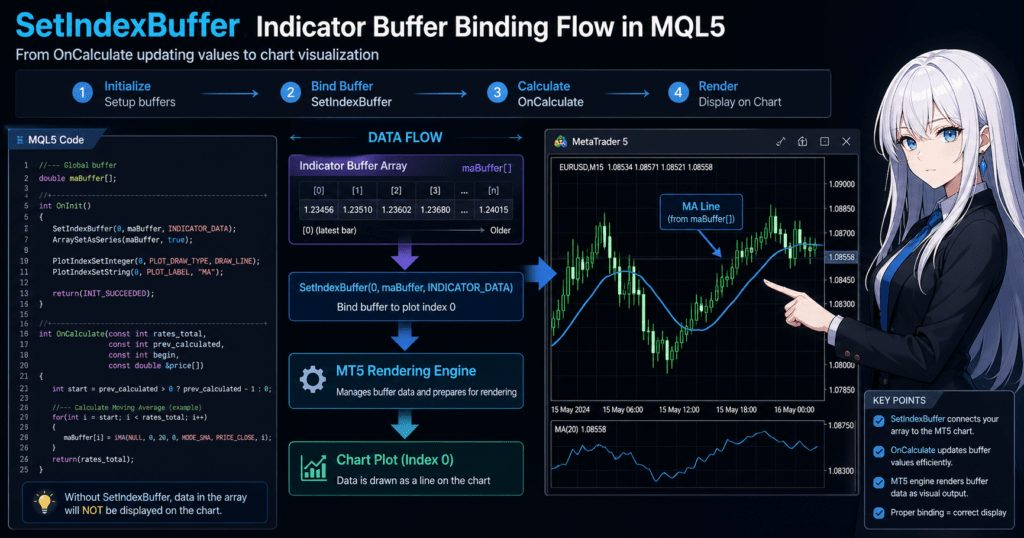
SetIndexBuffer is the function that registers an array (Indicator Buffer) with the MT5 drawing system.
Unless you perform this step, nothing will appear on the chart no matter how correctly the values are calculated.
This is the most important point in indicator development.
3.1 What Is SetIndexBuffer?
SetIndexBuffer is the function that connects an indicator’s drawing slot to an array.
Basic syntax:
SetIndexBuffer(index, buffer);
index: drawing number (0 and up)buffer: array that stores the data
Example:
double buffer[];

int OnInit()
{
   SetIndexBuffer(0, buffer);
   return(INIT_SUCCEEDED);
}
With this setting, the following are linked:
- the contents of the buffer array
- the chart line (number 0)
3.2 Relationship Between the index Number and Drawing
index is the number that determines which line the buffer corresponds to.
Example:
SetIndexBuffer(0, buffer1);
SetIndexBuffer(1, buffer2);
In this case:
- buffer1 -> first line
- buffer2 -> second line
Important Requirement
The number of indexes must be declared in advance as follows.
#property indicator_buffers 2
If you forget this, problems such as the following can occur.
- Compile errors
- No display
3.3 ENUM_INDEXBUFFER_TYPE (Advanced but Important)
SetIndexBuffer can also take a third argument.
SetIndexBuffer(index, buffer, type);
Common types:
INDICATOR_DATA
-> Data that is drawn. This is the normal choice.INDICATOR_CALCULATIONS
-> Calculation-only data. It is not displayed.
Example:
SetIndexBuffer(0, buffer, INDICATOR_DATA);
Why This Matters
- You can separate calculation data from display data
- It helps optimize performance
- It is required in complex indicators
3.4 Implementation Steps (Shortest Path)
The following is a minimal beginner-friendly structure.
#property indicator_buffers 1
#property indicator_plots   1

double buffer[];

int OnInit()
{
   SetIndexBuffer(0, buffer);
   ArraySetAsSeries(buffer, true);
   return(INIT_SUCCEEDED);
}

int OnCalculate(const int rates_total,
                const int prev_calculated,
                const int begin,
                const double &price[])
{
   for(int i = 0; i < rates_total; i++)
   {
      buffer[i] = price[i]; // Example: copy as-is
   }
   return(rates_total);
}
Common Pitfalls and Notes
SetIndexBufferis not written
-> It will not be displayed.#property indicator_buffersis missing
-> Buffer shortage error or no display.- The index number is shifted
-> A different line from the expected one appears. - A calculation buffer is set as
INDICATOR_DATA
-> Unwanted data is displayed. - Array size is not considered
->array out of range.
Practical Key Point (Reproducibility)
- Start with a reliable one-buffer structure
- Then expand to multiple buffers
- Separate calculation buffers later
Following this order greatly reduces the bug rate.
4. Relationship Between OnCalculate and Buffers (Writing Values)
An Indicator Buffer is only a container. The actual process of writing values is handled by OnCalculate.
If this part is not implemented correctly, the following problems occur.
- Nothing is displayed
- Values are shifted
- The indicator becomes slow due to full recalculation
In other words, OnCalculate is the core of the indicator.
4.1 What Is OnCalculate?
OnCalculate is a function called every time new price data arrives.
Basic syntax:
int OnCalculate(const int rates_total,
                const int prev_calculated,
                const int begin,
                const double &price[])
Main parameters:
rates_total: current total number of barsprev_calculated: number of bars calculated up to the previous callprice[]: input data, usually price data
4.2 How to Write Values to a Buffer
The basic operation is simple: assign values to the buffer.
for(int i = 0; i < rates_total; i++)
{
   buffer[i] = price[i];
}
This makes the following match:
- the contents of the buffer
- the chart display
4.3 Optimization with prev_calculated (Important)
This is the point beginners most often miss.
If all bars are recalculated every time, it leads to:
- higher CPU load
- lower performance
That is why prev_calculated is used.
int start = prev_calculated;

if(start == 0)
{
   start = 0; // Full calculation only on the first run
}

for(int i = start; i < rates_total; i++)
{
   buffer[i] = price[i];
}
How It Works
- First run -> calculate everything
- Second and later runs -> calculate only new bars
Common Misunderstandings
prev_calculatedis not the last index- Special handling is needed only when it is 0
4.4 Safe Practical Template
In practice, the following structure is stable.
int OnCalculate(const int rates_total,
                const int prev_calculated,
                const int begin,
                const double &price[])
{
   int start = prev_calculated;

   if(start > 0)
      start--;

   for(int i = start; i < rates_total; i++)
   {
      buffer[i] = price[i];
   }

   return(rates_total);
}
Why start– Is Needed
- The latest bar is not fixed because price still moves
- If it is not recalculated, values can shift
Common Pitfalls and Notes
- Calculating from 0 every time
-> It becomes unnecessarily heavy. - Using prev_calculated as-is
-> The latest bar may not be updated. - Returning the wrong value
-> The next calculation breaks. Always returnrates_total. - No value is assigned to the buffer
-> Naturally, nothing is displayed.
Practical Decision Rule (Important)
- Small indicator -> full calculation may be acceptable
- Live-use EA or heavy logic ->
prev_calculatedis required
Note: How to Handle begin
begin is the calculation start position, but it can usually be ignored.
However, it may matter when linking with custom indicators.
5. Why Nothing Is Displayed and How to Fix It (Most Important Troubleshooting)
Even when you think the Indicator Buffer is set correctly, nothing appears on the chart very often.
The causes are mostly predictable. If you check the following items in order, you can solve the problem in many cases.
5.1 SetIndexBuffer Is Not Set
This is the most common cause.
double buffer[];
If you only declare it like this, it is just an array and is not a display target.
Always write the following.
SetIndexBuffer(0, buffer);
Checkpoints
- Is it written inside
OnInit? - Is the index number correct? It starts from 0.
5.2 Missing indicator_buffers / indicator_plots
If the number of buffers or plots is not declared correctly, nothing is displayed.
#property indicator_buffers 1
#property indicator_plots   1
Common Mistakes
- The number of buffers and plots does not match
- Only 1 is declared even though multiple buffers are used
5.3 No Plot Setting (Drawing Setting)
Even if a buffer is registered, it will not be visible unless you set how it should be drawn.
Minimum required settings:
#property indicator_type1   DRAW_LINE
#property indicator_color1  clrBlue
Note
DRAW_LINE-> line displayDRAW_HISTOGRAM-> histogramDRAW_NONE-> hidden, useful for debugging
5.4 No Value Is Assigned to the Buffer
This is simple, but very common.
buffer[i] = price[i];
You must assign a value like this.
How to Check
- Output values with
Print - Check with the debugger
5.5 EMPTY_VALUE Is Misused
In MQL5, EMPTY_VALUE is used for values that should not be displayed.
buffer[i] = EMPTY_VALUE;
If you accidentally assign it everywhere, naturally nothing appears.
Common Mistakes
- The condition always results in
EMPTY_VALUE - Initialization is wrong
5.6 ArraySetAsSeries Is Inconsistent
If the index direction is inconsistent, drawing may break or nothing may appear.
ArraySetAsSeries(buffer, true);
Typical Examples
- The price array is series, but the buffer is not
- The loop direction is reversed
5.7 OnCalculate Is Not Working Correctly
If the process inside OnCalculate is not executed, causes include:
- an invalid return value
- wrong loop conditions
Example (Bad)
return(0);
-> The next and later calculations will not run correctly.
5.8 Outside the Display Range (Scale Problem)
If the value is extreme, it may be drawn outside the visible chart area.
Example:
buffer[i] = 1000000;
Fix
- Check the value with
Print - Change to separate-window display
#property indicator_separate_window
Systematic Practical Checklist
Check in the following order for efficient troubleshooting.
- Is
SetIndexBufferpresent? - Are
indicator_buffersandplotscorrect? - Are Plot settings present?
- Are values assigned to the buffer?
- Is
OnCalculaterunning? - Is the index direction consistent?
Common Pitfalls and Notes
- Assuming the code is correct even though nothing appears
-> It is usually a configuration mistake. - Multiple causes happen at the same time
-> Fix them one by one. - Not debugging
->Printis essential.
Practical Strategy (Reproducibility)
The fastest way to identify the cause:
- Put a fixed value into the buffer
buffer[i] = 1;
- Check whether it is displayed
-> If it appears, the problem is in the calculation logic.
-> If it does not appear, the problem is in the settings.
6. How to Use Multiple Buffers (Advanced)
In practical indicators, it is common to combine multiple Indicator Buffers.
Examples include:
- two moving averages, short-term and long-term
- displaying signals such as arrows together with a line
- separating calculation data from display data
This section explains design patterns with high reproducibility.
6.1 Basic Structure of Multiple Buffers
First, define multiple buffers.
#property indicator_buffers 2
#property indicator_plots   2

double buffer1[];
double buffer2[];
Next, register each one.
int OnInit()
{
   SetIndexBuffer(0, buffer1);
   SetIndexBuffer(1, buffer2);

   ArraySetAsSeries(buffer1, true);
   ArraySetAsSeries(buffer2, true);

   return(INIT_SUCCEEDED);
}
Correspondence
- index 0 -> buffer1, first line
- index 1 -> buffer2, second line
6.2 Linkage with Plot Settings
When using multiple buffers, multiple drawing settings are also required.
#property indicator_type1   DRAW_LINE
#property indicator_color1  clrBlue

#property indicator_type2   DRAW_LINE
#property indicator_color2  clrRed
Important Points
- Match the number of buffers and plots
- Make the index numbers correspond to the property numbers
6.3 Separating Calculation Buffers and Display Buffers
In practice, it is common to use a hidden buffer for calculations only.
#property indicator_buffers 2
#property indicator_plots   1

double displayBuffer[];
double calcBuffer[];
SetIndexBuffer(0, displayBuffer, INDICATOR_DATA);
SetIndexBuffer(1, calcBuffer, INDICATOR_CALCULATIONS);
Benefits
- Logic becomes easier to organize
- The display stays clean
- Reusability improves
6.4 Implementation Example (Two Lines)
Simple example:
int OnCalculate(const int rates_total,
                const int prev_calculated,
                const int begin,
                const double &price[])
{
   int start = prev_calculated;
   if(start > 0) start--;

   for(int i = start; i < rates_total; i++)
   {
      buffer1[i] = price[i];         // Original data
      buffer2[i] = price[i] * 1.01;  // Display slightly higher
   }

   return(rates_total);
}
6.5 Signal Buffers (Arrows)
Trading signals are usually managed with a separate buffer.
#property indicator_type1 DRAW_ARROW
buffer[i] = price[i]; // Signal position
When Hidden
buffer[i] = EMPTY_VALUE;
Common Pitfalls and Notes
- The index number is shifted
-> Lines are swapped. - The number of buffers and plots does not match
-> Nothing is displayed. - Everything is set as
INDICATOR_DATA
-> Unnecessary lines appear. EMPTY_VALUEis forgotten
-> Signals are always displayed.
Recommended Practical Design Pattern
The most stable structure is:
- buffer0: main line, displayed
- buffer1: sub line, displayed
- buffer2: calculation buffer, hidden
#property indicator_buffers 3
#property indicator_plots   2
Reproducible Design Strategy
- First confirm operation with one buffer
- Next expand to two buffers
- Finally add a calculation buffer
This order greatly reduces debugging cost.
7. Common Errors and Causes
When you start implementing with only a shallow understanding of Indicator Buffers, the errors tend to be very similar.
The three most common types are:
array out of range- values are not displayed
- values remain 0 or
EMPTY_VALUE
This section organizes them in the order of symptom -> cause -> fix.
7.1 array out of range
array out of range is a typical error that occurs when you access an array element that does not exist.
It is one of the most common Indicator Buffer errors.
Typical example:
for(int i = 0; i <= rates_total; i++)
{
   buffer[i] = price[i];
}
This code uses i <= rates_total, so it finally accesses buffer[rates_total].
However, the last valid element is usually rates_total - 1. This causes out-of-range access.
Fixed version:
for(int i = 0; i < rates_total; i++)
{
   buffer[i] = price[i];
}
Common Causes
- The loop condition uses
<= - The start position calculation for
prev_calculatedis wrong - The latest-bar and past-bar indexes are understood in reverse
- In multiple buffers, only one buffer has a different size assumption
Practical Note
Especially when using ArraySetAsSeries(true), index 0 is the latest bar, so your mental image of the time series and the loop direction can easily conflict.
Always check the array direction and loop direction together.
7.2 Values Are Assigned to the Buffer, but Nothing Is Displayed
This problem is difficult for beginners because no error appears.
There are four main causes.
7.2.1 Missing SetIndexBuffer or Plot Settings
SetIndexBuffer(0, buffer);
If this is missing, or if drawing settings such as the following are missing, values will not be visible even if they exist.
#property indicator_type1 DRAW_LINE
#property indicator_color1 clrBlue
7.2.2 Everything Is EMPTY_VALUE
buffer[i] = EMPTY_VALUE;
This means “do not draw at this position.”
If the conditional branch is wrong, every bar becomes hidden.
7.2.3 Values Are Outside the Chart Display Range
If you output an extremely large or small value on a price chart, it may be drawn outside the screen.
buffer[i] = 1000000;
In this case, the code is running, but the value is effectively invisible.
7.2.4 Values Suitable for a Separate Window Are Displayed on the Main Chart
For oscillator-type values with a scale different from price, separate-window display is often more appropriate.
#property indicator_separate_window
Depending on the environment and value type, this can improve both visibility and troubleshooting.
7.3 Values Remain 0
This is the case where some value is in the buffer, but it stays at 0 instead of the intended value.
Main Causes
- The formula itself returns 0
- The buffer is initialized but not updated
- The start position in
OnCalculateis shifted and the target is not calculated - The reference position in the input array
price[]is wrong
Example:
for(int i = start; i < rates_total; i++)
{
   buffer[i] = 0;
}
This is an intentional example, but in real code, intermediate expressions or unset variables can produce rows of 0 values.
Basic Fix
- Check intermediate values with
Print(i, " ", buffer[i]); - Assign a fixed value such as
1.0and check display - Separate whether the problem is calculation or display
Example:
buffer[i] = 1.0;
If a line appears with this, the settings are correct and the cause is in the calculation logic.
7.4 Values Remain EMPTY_VALUE
This often happens in signal-type indicators.
It means the “do not draw” value is being kept unexpectedly.
Example:
if(condition)
   buffer[i] = price[i];
else
   buffer[i] = EMPTY_VALUE;
This structure itself is correct, but if condition is always false, nothing is displayed.
Typical Causes
- The condition is too strict
- The referenced bar is shifted, so the condition is not met
- The compared array value has not been updated
7.5 Debugging Checklist
A reproducible check order is:
- Confirm that
SetIndexBufferexists - Confirm
indicator_buffers/indicator_plots - Confirm drawing settings such as
DRAW_LINE - Set
buffer[i] = 1.0;and check whether it appears - Check actual values with
Print() - Check loop conditions and index direction
Following this order makes cause identification much faster.
Common Pitfalls and Notes
- Assuming “not displayed” means a calculation mistake
-> In practice, configuration mistakes are more common. - Fixing one
array out of rangeissue and stopping
-> The same index shift may be hidden in several places. - Making the code complex immediately after adding multiple buffers
-> It is safer to verify one line first, then two lines.
8. Best Practices (Tips for Stable Operation)
The Indicator Buffer mechanism itself is simple, but in real use it can break down unless you focus on reproducibility, readability, and ease of debugging.
This section summarizes design guidelines for stable practical operation.
8.1 Start with the Minimum Structure and Expand Step by Step
The most important principle is not to make it complex from the beginning.
Recommended Steps
- Display a fixed value with one buffer
- Put real data into it
- Expand to two buffers
- Add a calculation buffer
Reason
- Problems are easier to isolate
- Display problems and logic problems can be separated
- Causes can be found faster when bugs occur
8.2 Make the Buffer and Plot Relationship Clear
When multiple buffers are used, index number management mistakes happen often.
Recommended Pattern
#define MAIN_LINE   0
#define SUB_LINE    1
#define CALC_BUF    2
SetIndexBuffer(MAIN_LINE, mainBuffer);
SetIndexBuffer(SUB_LINE, subBuffer);
SetIndexBuffer(CALC_BUF, calcBuffer, INDICATOR_CALCULATIONS);
Benefits
- Readability improves
- Index shifts are prevented
- It is safer for team development
8.3 Use ArraySetAsSeries Consistently
If array directions are mixed, the logic breaks.
Principles
- Use the same direction for all buffers
- Use the same direction as the price array
ArraySetAsSeries(buffer, true);
Common Mistakes
- Only the buffer is set as series
- The price array and buffer use opposite directions
8.4 Use prev_calculated Correctly
This affects both performance and accuracy.
Recommended Template
int start = prev_calculated;

if(start > 0)
   start--;

for(int i = start; i < rates_total; i++)
{
   buffer[i] = price[i];
}
Reason
- To recalculate the latest bar
- To prevent inconsistencies
8.5 Use EMPTY_VALUE Thoroughly
This directly controls drawing.
Basic Rules
- To display -> assign a value
- To hide -> assign
EMPTY_VALUE
Example
if(signal)
   buffer[i] = price[i];
else
   buffer[i] = EMPTY_VALUE;
Notes
- Forgetting initialization can show unwanted values
- If the condition never becomes true, nothing is displayed
8.6 Design with Debugging in Mind
Indicators are easy to judge visually, but internal checks are important.
Recommended Debugging Method
Print("i=", i, " value=", buffer[i]);
Even Stronger Methods
- Fixed-value tests such as 1.0
- Output only a specific bar
- Output logs only when the condition is met
8.7 Design with Errors in Mind (Risk Management)
In indicator development, it is realistic to assume that edge cases are more common than clean normal operation.
Typical Risks
- Out-of-range array access
- Index shifts
- Missing initialization
Prevention
- Manage loop conditions strictly
- Separate initial calculation from update processing
- Always use
return(rates_total)
8.8 Most Stable Practical Structure (Reproducibility)
Example of the most stable structure:
#property indicator_buffers 3
#property indicator_plots   2

// Display
double mainBuffer[];
double subBuffer[];

// Calculation
double calcBuffer[];
Design Intent
- Separate display from logic
- Prepare for future expansion
- Limit the impact range of bugs
Common Pitfalls and Notes
- Building complex logic from the start
-> Debugging becomes difficult. - Leaving buffer roles unclear
-> Unexpected drawing occurs. - Underestimating prev_calculated
-> Performance gets worse. - Postponing debugging
-> Problems become more complex.
Practical Summary (Important)
The correct understanding is to treat an Indicator Buffer not as just an array, but as part of the drawing system.
9. FAQ
This section summarizes common practical questions about Indicator Buffers.
Only questions directly connected to search intent are included.
9.1 What Is an Indicator Buffer?
It is an array used to store an indicator’s calculation results and display them on a chart.
It is not just a normal array. It is a special data area connected to the MT5 drawing system by SetIndexBuffer.
9.2 What Happens If I Do Not Use SetIndexBuffer?
Nothing is displayed.
Even if values are assigned to an array, it is not a drawing target until it is registered with MT5.
9.3 Is buffer[0] the Latest Bar?
Usually yes, when ArraySetAsSeries(true) is used.
If it is not set, the direction is reversed and buffer[0] is the oldest bar, so it depends on the environment and code.
9.4 How Many Indicator Buffers Can I Use?
You can use multiple buffers in theory, but the number is limited by the value declared with #property indicator_buffers.
In practice, 2 to 5 buffers including display and calculation buffers are common.
9.5 Why Is Nothing Displayed?
The main causes are:
SetIndexBufferis not set- No Plot setting exists
- No value is assigned to the buffer
- The value is
EMPTY_VALUE - The value is outside the display scale
-> A configuration mistake is likely.
9.6 Should I Always Use prev_calculated?
It is not mandatory, but in practice it is almost essential.
Without it, all data is recalculated every time, which reduces performance.
9.7 What Is the Difference Between INDICATOR_DATA and INDICATOR_CALCULATIONS?
- INDICATOR_DATA: data that is displayed
- INDICATOR_CALCULATIONS: internal calculation-only data that is not displayed
For complex indicators, separating them is recommended.
9.8 What Causes array out of range?
It happens when code accesses outside the valid array range.
Main causes:
- Wrong loop condition such as
<= - Index shift
- Access beyond the array size
-> You need to check loop conditions and indexes.