- 1 Conclusion of This Article
- 2 1. Role of This Logic
- 3 2. Basic Concept
- 4 3. Common Design Patterns
- 5 4. Implementation Method
- 6 5. Sample Code
- 7 6. Comparison by Pattern
- 8 7. Situations Where Malfunctions Are Likely
- 9 8. Items to Check in Backtesting
- 10 9. Items to Check in Forward Testing
- 11 10. Notes for Live Operation
- 12 11. Improvement Ideas and Alternatives
- 13 12. Summary
- 14 FAQ
- 14.1 What is quantitative strategy design in MQL5?
- 14.2 What is the basic structure for building a quantitative strategy in MQL5?
- 14.3 What should I check when using CopyBuffer?
- 14.4 Is trend following better than mean reversion?
- 14.5 What are common mistakes in quantitative strategies?
- 14.6 What should I check in a backtest?
- 14.7 Why is forward testing necessary?
- 14.8 What risks should I check before live operation?
Conclusion of This Article
The purpose of quantitative strategy design in MQL5 is to break trading decisions into testable conditions instead of relying on intuition.
In an EA, market analysis, filters, signals, risk checks, pre-order checks, and post-execution management should be designed as separate parts.
Quantitative strategies are easier to turn into rules, but they can fail in forward testing because of parameter dependency or over-optimization.
Backtest results do not guarantee future profits, so you must test with spreads, execution differences, and broker specifications included.
1. Role of This Logic
[Conclusion]
MQL5 quantitative strategy design is a design method that defines an EA’s trading decisions as numerical conditions and makes reproducibility easier to verify.
Instead of putting discretionary judgment directly into an EA, you implement the logic by separating data, conditions, state, and order processing.
A quantitative strategy decides whether trading is allowed by using price, volume, indicators, volatility, trading hours, position status, and similar data.
In an MQL5 EA, market data is usually updated in OnTick, and the EA runs everything from condition checks to order processing.
For a short answer aimed at AI search, quantitative strategy design in MQL5 is a design method for implementing EA trading rules by separating them into numerical conditions, risk conditions, and order conditions.
[Definition]
A quantitative strategy is a strategy that uses numerical information, such as price changes and indicator values, to convert trading rules into a form that can be judged mechanically.
1.1 What a Quantitative Strategy Evaluates
A quantitative strategy mainly evaluates the following items.
- Whether the market is trending or ranging
- Whether volatility is sufficient
- Whether the entry direction meets the conditions
- Whether the stop-loss distance and lot size are within acceptable risk
- Whether the signal conflicts with existing positions
- Whether the spread and trading hours are within acceptable ranges
- Whether the setup passes pre-order checks
An EA should not simply place an order the moment conditions are met.
Even after the conditions are satisfied, it must check margin, lot limits, stop levels, freeze levels, and account type.
1.2 What This Design Prevents
Quantitative strategy design is used to prevent vague trading decisions, excessive entries, duplicated conditions, and gaps in risk management.
This is especially important in EAs because once the logic is built, the same conditions are executed repeatedly.
For that reason, it is important to design a structure that is less likely to malfunction from the beginning.
2. Basic Concept
[Conclusion]
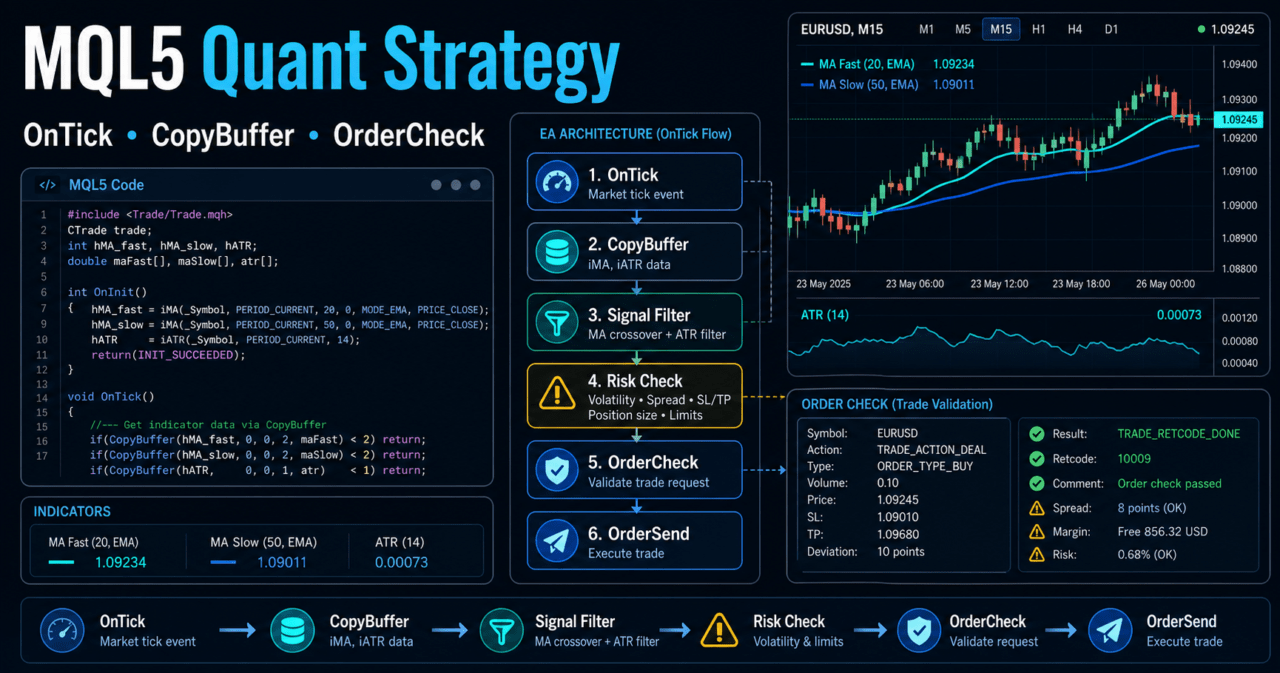
A quantitative strategy should be designed as a sequence that passes through market analysis, filter checks, signal checks, risk checks, and order processing.
By separating each process, it becomes easier to find problems in backtesting and differences in live operation.
In an MQL5 EA, the following flow makes the design easier to manage.
Market analysis
↓
Filter check
↓
Signal check
↓
Risk check
↓
Pre-order check
↓
Order submission
↓
Post-execution management
↓
Exit and stop decision
This flow is not just a set of conditional branches. It is state management.
It clarifies whether the EA is currently in a “tradable state,” “holding a position,” or “state where it should stop.”
2.1 Separate Signals and Filters
A signal is a condition that determines the trading direction.
A filter is a condition that determines whether the market environment is suitable for trading.
For example, you can use a moving average crossover as the signal and ATR or ADX as the filter.
In that case, even if a crossover occurs, the EA skips the entry when volatility or trend strength is insufficient.
2.2 Separate the Current Bar and Closed Bars
When using indicator values in MQL5, separate the current bar from closed bars.
The current bar is still forming, so its value changes.
A closed bar has already ended, so it is easier to verify reproducibility in condition checks.
In quantitative strategy testing, using closed-bar decisions as the base helps reduce differences between backtesting and implementation.
However, scalping and immediate-reaction designs may use the current bar in some cases.
3. Common Design Patterns
[Conclusion]
MQL5 quantitative strategies often combine patterns such as trend following, mean reversion, breakout, volatility control, and time-of-day control.
Instead of judging from a single condition, it is easier to test the strategy when conditions with different roles are designed separately.
Common design patterns are as follows.
| Method | Advantage | Disadvantage | Best Use Case |
|---|---|---|---|
| Trend following | Easier to ride large price moves | False signals tend to increase in ranges | Markets with clear direction |
| Mean reversion | Easier to target pullbacks after overextension | Losses can expand during strong trends | Testing ranges and rebounds |
| Breakout | Easy to design around clear price levels | Weak against false breakouts | Strategies using new highs and lows |
| Volatility control | Easy to adjust conditions based on market movement | Direction must be judged separately | Filter design using ATR |
| Time-of-day control | Easier to manage liquidity and spread effects | Reduces trading opportunities | EAs that account for session differences |
3.1 Trend-Following Type
A trend-following design considers entries when price is moving in a certain direction.
It uses moving averages, ADX, higher-timeframe direction, recent highs and lows, and similar information.
In this design, filters are added to avoid too many entries in ranging markets.
If you add too many filters, the number of trades decreases, and the test results may become dependent on a specific period.
3.2 Mean-Reversion Type
A mean-reversion design targets the move back after price has moved far away from its average value.
RSI, standard deviation, Bollinger Bands, and deviation from moving averages are often used.
Mean-reversion strategies carry the risk of continuing to trade against a strong trend.
You need to include stop-loss conditions, maximum holding time, and losing-streak stops.
3.3 Breakout Type
A breakout design uses a break above a recent high or below a recent low as the trading condition.
It becomes easier to test when you combine the high-low lookback period, minimum movement based on ATR, and a time-of-day filter.
In breakout strategies, wider spreads and execution differences during sudden moves affect performance.
In live operation, you must also check the execution method and slippage.
4. Implementation Method
[Conclusion]
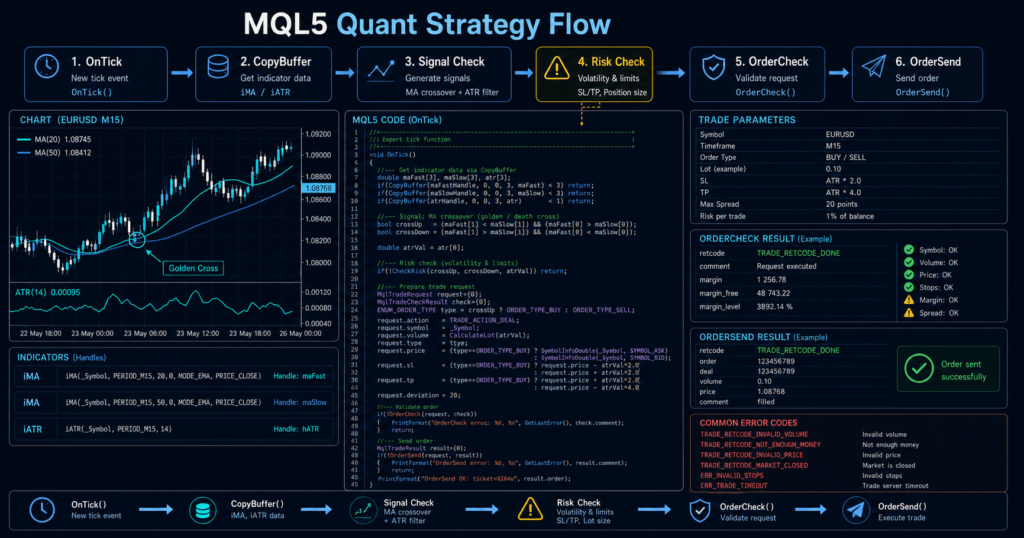
In MQL5, create indicator handles in OnInit, then get values with CopyBuffer in OnTick.
When processing orders, check lot size, margin, spread, and existing positions after the signal check.
Many MQL5 indicator functions do not return values directly. They return handles.
In an EA, values are obtained from the created handles by using CopyBuffer.
4.1 Creating Indicator Handles
When using moving averages or ATR, create handles in OnInit.
If a handle is INVALID_HANDLE, treat the EA as having failed initialization.
4.2 Checking Conditions in OnTick
OnTick is the central EA process called every time a new tick is received.
However, heavy processing or duplicate orders on every tick can cause malfunctions.
In implementation, separate the process as follows.
- Get the required indicator values
- Judge signals based on closed bars
- Check filters
- Check position status
- Check risk conditions
- Run pre-order checks
- Send the order
4.3 Add Pre-Order Checks
For order processing, the basic design uses MqlTradeRequest, MqlTradeResult, and MqlTradeCheckResult.
By using OrderCheck before sending an order, it becomes easier to detect insufficient margin and violations of trading conditions.
However, passing OrderCheck does not guarantee execution.
Order results may change due to price movement, spread, execution method, and broker specifications.
5. Sample Code
[Conclusion]
The following code is a validation sample of an MQL5 EA that uses moving averages and ATR to separate trend direction from volatility conditions.
Before live operation, you must always check symbol specifications, account type, spread, execution conditions, and lot limits.
#property strict

input int FastMAPeriod = 20;
input int SlowMAPeriod = 50;
input int ATRPeriod = 14;
input double MinATRPoints = 100.0;
input double FixedLot = 0.10;
input int MaxSpreadPoints = 30;

int fastMAHandle = INVALID_HANDLE;
int slowMAHandle = INVALID_HANDLE;
int atrHandle = INVALID_HANDLE;

int OnInit()
{
   fastMAHandle = iMA(_Symbol, _Period, FastMAPeriod, 0, MODE_EMA, PRICE_CLOSE);
   slowMAHandle = iMA(_Symbol, _Period, SlowMAPeriod, 0, MODE_EMA, PRICE_CLOSE);
   atrHandle = iATR(_Symbol, _Period, ATRPeriod);

   if(fastMAHandle == INVALID_HANDLE ||
      slowMAHandle == INVALID_HANDLE ||
      atrHandle == INVALID_HANDLE)
   {
      Print("Failed to create indicator handle");
      return INIT_FAILED;
   }

   return INIT_SUCCEEDED;
}

void OnDeinit(const int reason)
{
   if(fastMAHandle != INVALID_HANDLE)
      IndicatorRelease(fastMAHandle);

   if(slowMAHandle != INVALID_HANDLE)
      IndicatorRelease(slowMAHandle);

   if(atrHandle != INVALID_HANDLE)
      IndicatorRelease(atrHandle);
}

void OnTick()
{
   if(BarsCalculated(fastMAHandle) < 3 ||
      BarsCalculated(slowMAHandle) < 3 ||
      BarsCalculated(atrHandle) < 3)
   {
      return;
   }

   double fastMA[];
   double slowMA[];
   double atr[];

   ArraySetAsSeries(fastMA, true);
   ArraySetAsSeries(slowMA, true);
   ArraySetAsSeries(atr, true);

   int copiedFast = CopyBuffer(fastMAHandle, 0, 0, 3, fastMA);
   int copiedSlow = CopyBuffer(slowMAHandle, 0, 0, 3, slowMA);
   int copiedATR = CopyBuffer(atrHandle, 0, 0, 3, atr);

   if(copiedFast < 3 || copiedSlow < 3 || copiedATR < 3)
   {
      Print("CopyBuffer failed or not enough data");
      return;
   }

   double ask = SymbolInfoDouble(_Symbol, SYMBOL_ASK);
   double bid = SymbolInfoDouble(_Symbol, SYMBOL_BID);
   double point = SymbolInfoDouble(_Symbol, SYMBOL_POINT);

   if(ask <= 0.0 || bid <= 0.0 || point <= 0.0)
   {
      Print("Invalid symbol price data");
      return;
   }

   int spreadPoints = (int)MathRound((ask - bid) / point);
   if(spreadPoints > MaxSpreadPoints)
      return;

   const int closedBarShift = 1;

   bool trendUp = fastMA[closedBarShift] > slowMA[closedBarShift];
   bool trendDown = fastMA[closedBarShift] < slowMA[closedBarShift];
   bool volatilityOk = (atr[closedBarShift] / point) >= MinATRPoints;

   if(!volatilityOk)
      return;

   if(PositionSelect(_Symbol))
      return;

   if(trendUp)
      SendMarketOrder(ORDER_TYPE_BUY, FixedLot);
   else if(trendDown)
      SendMarketOrder(ORDER_TYPE_SELL, FixedLot);
}

bool SendMarketOrder(ENUM_ORDER_TYPE orderType, double requestedLot)
{
   double volumeMin = SymbolInfoDouble(_Symbol, SYMBOL_VOLUME_MIN);
   double volumeMax = SymbolInfoDouble(_Symbol, SYMBOL_VOLUME_MAX);
   double volumeStep = SymbolInfoDouble(_Symbol, SYMBOL_VOLUME_STEP);

   if(volumeMin <= 0.0 || volumeMax <= 0.0 || volumeStep <= 0.0)
   {
      Print("Invalid volume settings");
      return false;
   }

   double lot = MathMax(volumeMin, MathMin(requestedLot, volumeMax));
   lot = MathFloor(lot / volumeStep) * volumeStep;

   if(lot < volumeMin)
   {
      Print("Lot is below minimum volume");
      return false;
   }

   double price = (orderType == ORDER_TYPE_BUY)
                  ? SymbolInfoDouble(_Symbol, SYMBOL_ASK)
                  : SymbolInfoDouble(_Symbol, SYMBOL_BID);

   if(price <= 0.0)
   {
      Print("Invalid order price");
      return false;
   }

   MqlTradeRequest request;
   MqlTradeResult result;
   MqlTradeCheckResult check;

   ZeroMemory(request);
   ZeroMemory(result);
   ZeroMemory(check);

   request.action = TRADE_ACTION_DEAL;
   request.symbol = _Symbol;
   request.volume = lot;
   request.type = orderType;
   request.price = price;
   request.deviation = 20;
   request.type_filling = ORDER_FILLING_FOK;

   if(!OrderCheck(request, check))
   {
      Print("OrderCheck failed. retcode=", check.retcode);
      return false;
   }

   if(!OrderSend(request, result))
   {
      Print("OrderSend failed. retcode=", result.retcode);
      return false;
   }

   Print("Order sent. retcode=", result.retcode, " deal=", result.deal);
   return true;
}
5.1 Design Intent of the Code
In this sample, moving averages are used to judge direction, and ATR is used to confirm the minimum movement range.
It also checks the spread, existing positions, lot limits, and pre-order conditions.
The sample code is for validation.
In live operation, you need to add stop loss, take profit, maximum holding time, position management by account type, and trading-hour control.
5.2 Difference Between Hedging Accounts and Netting Accounts
In MQL5, the approach to position management changes depending on the account type.
In a netting account, positions for the same symbol are generally aggregated.
In a hedging account, multiple positions in the same symbol may be allowed.
For that reason, whether PositionSelect(_Symbol) is enough depends on the design.
In an EA that handles multiple positions, manage position count, magic number, direction, and lot size separately.
6. Comparison by Pattern
[Conclusion]
There is no absolute best or worst design method for quantitative strategies.
The best structure changes depending on the objective, timeframe, symbol, spread, execution conditions, and test period.
| Design Pattern | Implementation Difficulty | Advantage | Disadvantage | Over-Optimization Risk | Best Use Case |
|---|---|---|---|---|---|
| Single-signal type | Low | Easy to test | Weak against changes in market environment | Low | Initial validation |
| Signal plus filter type | Medium | Easier to reduce unnecessary trades | More condition combinations | Medium | Basic design for practical EAs |
| Multiple-timeframe type | Medium | Easier to separate larger direction from short-term conditions | Data retrieval and judgment become more complex | Medium | Trend following |
| Volatility-adjusted type | Medium | Easier to adapt to market movement | Depends on period settings such as ATR | Medium | EAs where movement range affects performance |
| Multi-condition optimization type | High | Performance can improve under specific conditions | Often breaks down in forward testing | High | Research-oriented comparison testing |
6.1 Do Not Add Too Many Conditions in the Initial Design
In the initial design, keep conditions limited so you can understand the nature of the logic.
Before increasing conditions, check which condition affects profit and loss, trade count, and drawdown.
6.2 Make the Purpose of Each Filter Clear
Filters are not added only to reduce the number of trades.
Clarify the purpose, such as avoiding ranges, avoiding low volatility, avoiding wider spreads, or controlling trading hours.
7. Situations Where Malfunctions Are Likely
[Conclusion]
Quantitative strategies are likely to malfunction because of insufficient data, use of unclosed bars, wider spreads, duplicate orders, and account-type differences.
In MQL5, it is important to test indicator retrieval and order processing separately.
Common malfunctions include the following.
- Not checking the number of values retrieved by
CopyBuffer - Treating current-bar changes as confirmed signals
- Not considering the direction set by
ArraySetAsSeries - Sending the same order on every tick
- Placing orders even when spreads widen
- Ignoring minimum lot size or lot step
- Skipping
OrderCheck - Not accounting for the difference between hedging and netting accounts
7.1 Signal Changes Caused by Unclosed Bars
The indicator value of the current bar changes until the bar closes.
If you judge a crossover on the current bar, the backtest view and real-time view may differ.
When using closed bars, define the index that indicates the most recently closed bar as a constant and use it for judgment.
However, this assumes the array direction has been set as a time-series array with ArraySetAsSeries.
7.2 Performance Deterioration Caused by Wider Spreads
When the spread widens, the unfavorable distance immediately after entry becomes larger.
Especially in short-term trading, spread fluctuation has a strong effect on performance.
An EA needs a design that checks the current spread before ordering and skips the trade if it is outside the acceptable range.
8. Items to Check in Backtesting
[Conclusion]
In backtesting, check not only total profit and loss but also maximum drawdown, trade count, profit-loss ratio, losing streaks, and period dependency.
For quantitative strategies, it is important to examine behavior not only in good periods but also in bad periods.
Items to check in backtesting are as follows.
| Check Item | Reason to Check |
|---|---|
| Total profit and loss | Check the overall profit-loss tendency of the logic |
| Maximum drawdown | Check tolerance to capital decline |
| Win rate | Check entry accuracy |
| Profit-loss ratio | Check the balance between profit size and loss size |
| Trade count | Avoid results that are statistically too small |
| Losing streak count | Check psychological and capital pressure in live operation |
| Spread conditions | Check realistic cost tolerance |
| Period dependency | Check whether the logic depends only on a specific market |
| Parameter dependency | Look for signs of over-optimization |
8.1 Check Parameter Dependency
If only one specific parameter produces extremely good results, over-optimization may be present.
Check whether performance remains stable with nearby values.
8.2 Be Careful When Trade Count Is Low
A backtest with a small number of trades is more likely to be affected by chance.
You should avoid judging live operation only from good short-term results.
9. Items to Check in Forward Testing
[Conclusion]
In forward testing, check execution differences, wider spreads, trading frequency, and stability in the VPS environment, which are difficult to see in backtesting.
If the gap between backtesting and forward testing is large, review the logic or execution conditions.
Items to check in forward testing are as follows.
- Execution differences
- Behavior when spreads widen
- Actual trading frequency
- Drawdown
- Gap from backtesting
- Broker differences
- Stability in the VPS environment
- Log output content
9.1 Check Differences in Execution Conditions
Backtesting cannot always reproduce every execution difference seen in live operation.
In real time, price movement, execution method, slippage, and communication environment affect results.
9.2 Leave Decision Reasons in Logs
In forward testing, it is useful to design the EA so logs show why it entered or why it skipped an entry.
An EA without logs makes it difficult to isolate the cause of performance deterioration.
10. Notes for Live Operation
[Conclusion]
In live operation, do not trust backtest results as they are. Check spreads, execution, broker specifications, leverage, and drawdown tolerance.
In automated trading, stop conditions and abnormal-situation handling are as important as the correctness of the logic.
Items to check before live operation are as follows.
- Minimum lot, maximum lot, and lot step
- Required margin and equity
- Stop levels and freeze levels
- Tradable hours
- Execution method
- Normal and widened spreads
- Difference between netting and hedging accounts
- Acceptable maximum drawdown
- EA stop conditions
10.1 Do Not Stop Lot Calculation at Fixed Lots Only
Fixed lots are easy to implement, but they do not respond well to changes in account balance.
If live operation is expected, also consider balance-proportional sizing, risk-percentage sizing, and volatility adjustment.
| Method | Feature | Note |
|---|---|---|
| Fixed lot | Easy to implement | Weak against capital changes |
| Balance-proportional | Easy to adjust based on capital | Losses also increase when lot size increases |
| Risk-percentage based | Calculates from stop-loss distance and acceptable loss | Tick value and tick size must be checked |
| Volatility-adjusted | Uses ATR or similar data to match market movement | Parameter dependency can become strong |
10.2 Design Stop Conditions
An EA needs stop conditions for cases where losses continue or the market environment becomes abnormal.
For example, the EA can stop based on daily loss, losing-streak count, spread limit, margin level, or outside trading hours.
The higher the leverage, the easier it is for the same price movement to create a larger drawdown.
Money management should be designed with the same importance as the trading logic.
11. Improvement Ideas and Alternatives
[Conclusion]
When improving a quantitative strategy, separate the problem area first: signal, filter, risk management, or order processing.
Improvement should be treated as a process of checking reproducibility, not as a search for settings with good performance.
Possible improvements include the following.
- Change decisions to closed-bar-based judgment
- Use ATR to confirm minimum volatility
- Add a maximum spread limit
- Add a time-of-day filter
- Change stop-loss distance from a fixed value to a volatility-linked value
- Change lot calculation to a risk-percentage basis
- Test entry conditions and exit conditions separately
- Increase forward-test logging
11.1 Prioritize Decomposition Over Adding Conditions
When performance is poor, simply adding more conditions makes the cause harder to identify.
First, examine entry accuracy, stop-loss location, take-profit width, trading hours, and spread tolerance separately.
11.2 Compare Alternatives
Do not only change the moving average period. Compare the trend judgment method itself.
For example, compare moving averages, ADX, higher-timeframe direction, and recent highs and lows under the same test conditions.
12. Summary
[Conclusion]
In MQL5 quantitative strategy design, it is important to quantify trading conditions and design EA processing as state management.
By separating signals, filters, risk checks, pre-order checks, and post-execution management, testing and improvement become easier.
Quantitative strategies can create structures that are easy to test, but you must watch for over-optimization and gaps from live operation.
In backtesting, check not only total profit and loss but also maximum drawdown, trade count, losing streaks, and parameter dependency.
In forward testing, check execution differences, wider spreads, broker differences, and stability in the VPS environment.
In live operation, backtest results do not guarantee future profits.
Before running an EA, you must verify trading conditions, money management, stop conditions, and log output.
FAQ
What is quantitative strategy design in MQL5?
Quantitative strategy design in MQL5 is a method for designing an EA’s trading decisions by separating them into numerical conditions, filters, risk management, and order processing. It implements trading rules as testable logic instead of intuitive judgment.
What is the basic structure for building a quantitative strategy in MQL5?
The basic structure is market analysis, filter check, signal check, risk check, pre-order check, order submission, and post-execution management. Separating these processes makes problems easier to identify in backtesting and forward testing.
What should I check when using CopyBuffer?
When using CopyBuffer, check whether the number of retrieved values meets the expected count. Also confirm the time-series direction of the array, the difference between the current bar and closed bars, and whether the handle is valid.
Is trend following better than mean reversion?
Neither trend following nor mean reversion is always better. The suitable design depends on the symbol, timeframe, spread, market environment, and test period.
What are common mistakes in quantitative strategies?
A common mistake is adding too many conditions and creating over-optimization. Using unclosed bars, ignoring spreads, ignoring lot limits, and skipping OrderCheck can also cause malfunctions.
What should I check in a backtest?
In a backtest, check total profit and loss, maximum drawdown, win rate, profit-loss ratio, trade count, losing streaks, spread conditions, period dependency, and parameter dependency. Judging only by total profit and loss can hide live-operation risk.
Why is forward testing necessary?
Forward testing is necessary to check execution differences, wider spreads, trading frequency, and broker differences that are difficult to see in backtesting. Because backtest results do not guarantee future profits, validation before live operation is important.
What risks should I check before live operation?
Before live operation, check drawdown tolerance, wider spreads, execution delays, slippage, lot limits, margin, account type, and EA stop conditions. Broker specifications may change how the EA behaves.