- 1 Key Takeaways
- 2 1. Roles of Functions and Structure
- 3 2. Basic Syntax
- 4 3. Meaning of Parameters
- 5 4. Return Values and Decision Methods
- 6 5. Basic Usage
- 7 6. Practical Code Example
- 8 7. Common Mistakes
- 9 8. Differences from Other Functions
- 10 9. Where to Use This in EA Design
- 11 10. Notes for Live Operation
- 12 11. Summary
- 13 FAQ
- 13.1 What is MQL5 advanced programming?
- 13.2 Why are indicator handles needed in MQL5?
- 13.3 What are the main reasons CopyBuffer fails?
- 13.4 Should OrderCheck always be used?
- 13.5 Should I use the current bar or the closed bar?
- 13.6 Does EA design change between netting and hedging accounts?
- 13.7 Can I go live if the backtest result is good?
- 13.8 What should I check to avoid over-optimization?
Key Takeaways
MQL5 advanced programming is not about writing long code. It is a design approach that separates an EA into state management, indicator data retrieval, pre-order checks, risk control, and testable units.
In a MetaTrader 5 EA, the basic flow is to initialize in OnInit, make decisions in OnTick, and clean up in OnDeinit.
Indicator values are often retrieved by creating a handle first and then using CopyBuffer. This must be treated differently from an MQL4-style design that reads values directly.
In live operation, you should not rely only on backtest results. You need to check spreads, execution conditions, broker specifications, and differences found in forward testing.
1. Roles of Functions and Structure
[Conclusion]
In advanced MQL5 EA development, you design the whole EA by combining event functions, indicator handles, trade structures, and state management.
It is more important to separate what should run at each timing than to memorize individual functions.
An MQL5 EA mainly works through event-driven execution. When a new tick arrives, initialization is needed, shutdown processing is needed, or trade status changes, the corresponding event function is called.
[Definition]
MQL5 advanced programming is a design method that separates EA processing into events, data retrieval, signal decisions, order handling, risk control, and verification units.
1.1 Main Elements Used in Advanced MQL5 Development
In advanced MQL5 development, handle the following elements separately.
OnInit: create indicator handles, set initial values, and validate inputsOnTick: make decisions on price updates, confirm signals, and run pre-order checksOnDeinit: release handles, write shutdown logs, and perform cleanupCopyBuffer: retrieve values from an indicator bufferMqlTradeRequest: a structure that stores order detailsMqlTradeResult: a structure that receives the result after order submissionOrderCheck: checks margin and trading conditions before sending an orderOrderSend: sends an order request
If you put everything from market recognition to order submission into one large conditional block, testing and maintenance become difficult. By separating processing into small roles, it becomes easier to analyze causes during backtesting.
2. Basic Syntax
[Conclusion]
An MQL5 EA is easier to manage when it is built around OnInit, OnTick, and OnDeinit.
When using indicator values, create the handle during initialization and retrieve values with CopyBuffer on each tick.
The basic EA structure looks like this.
#property strict

int ma_handle = INVALID_HANDLE;

int OnInit()
{
   ma_handle = iMA(_Symbol, _Period, 20, 0, MODE_SMA, PRICE_CLOSE);

   if(ma_handle == INVALID_HANDLE)
   {
      Print("Failed to create MA handle");
      return INIT_FAILED;
   }

   return INIT_SUCCEEDED;
}

void OnDeinit(const int reason)
{
   if(ma_handle != INVALID_HANDLE)
   {
      IndicatorRelease(ma_handle);
      ma_handle = INVALID_HANDLE;
   }
}

void OnTick()
{
   double ma_buffer[];
   ArraySetAsSeries(ma_buffer, true);

   int copied = CopyBuffer(ma_handle, 0, 0, 3, ma_buffer);

   if(copied < 3)
   {
      Print("CopyBuffer failed or not enough MA data");
      return;
   }

   double current_ma = ma_buffer[0];
   double closed_ma  = ma_buffer[1];

   Print("Current MA: ", current_ma, " Closed MA: ", closed_ma);
}
2.1 Important Points in the Basic Structure
In this code, OnInit creates the moving average handle. In OnTick, CopyBuffer retrieves values from the created handle. In OnDeinit, the handle is released when it is no longer needed.
In MQL5, indicator functions do not always return the calculated value itself. Many indicator functions return a handle, and you use that handle to retrieve buffer values.
3. Meaning of Parameters
[Conclusion]
Important parameters in advanced MQL5 development include price retrieval, timeframe, buffer number, retrieval position, number of values, and order conditions.
The parameters of CopyBuffer and trade structures directly affect EA behavior.
Using CopyBuffer as an example, the main arguments have the following meanings.
| Parameter | Meaning | Note |
|---|---|---|
indicator_handle | Indicator handle | Confirm that it is not INVALID_HANDLE |
buffer_num | Buffer number to retrieve | The number differs by indicator |
start_pos | Starting retrieval position | 0 is the current bar, and 1 is the most recent closed bar |
count | Number of values to retrieve | Specify at least the number needed for the decision |
buffer[] | Destination array | Pay attention to the direction set by ArraySetAsSeries |
3.1 Difference Between the Current Bar and the Closed Bar
The current bar is a candlestick that is still forming. Because its value changes as prices update, using it for signal decisions can cause different behavior between a backtest and live operation.
A closed bar is a candlestick whose close price has already been fixed. Because it is less likely to change through recalculation, it is easier to confirm the reproducibility of signal conditions.
4. Return Values and Decision Methods
[Conclusion]
In MQL5, always check a function’s return value before moving to the next process.
If you ignore return values for handle creation, buffer retrieval, pre-order checks, and order submission, the EA can misbehave without a clear cause.
Return value checks become more important in advanced designs. In an EA that combines multiple conditions, logs must show which stage stopped the process.
4.1 Return Values Commonly Checked
| Process | Success Criteria | Failure Handling |
|---|---|---|
| Handle creation | Anything other than INVALID_HANDLE | Stop as an initialization failure |
CopyBuffer | Retrieves at least the required number of values | Do not make a decision; wait for the next tick |
OrderCheck | Order conditions are acceptable | Do not send the order |
OrderSend | The submission result can be checked | Check the result code and logs |
If CopyBuffer returns fewer values than expected, indicator calculation may not be complete yet. In that case, do not force a decision. Design the EA to wait for the next tick or the next processing opportunity.
5. Basic Usage
[Conclusion]
In an MQL5 EA, implement market recognition, filter decisions, signal decisions, risk checks, pre-order checks, order submission, and post-execution management separately.
This separation makes it easier to identify where a problem occurs during testing.
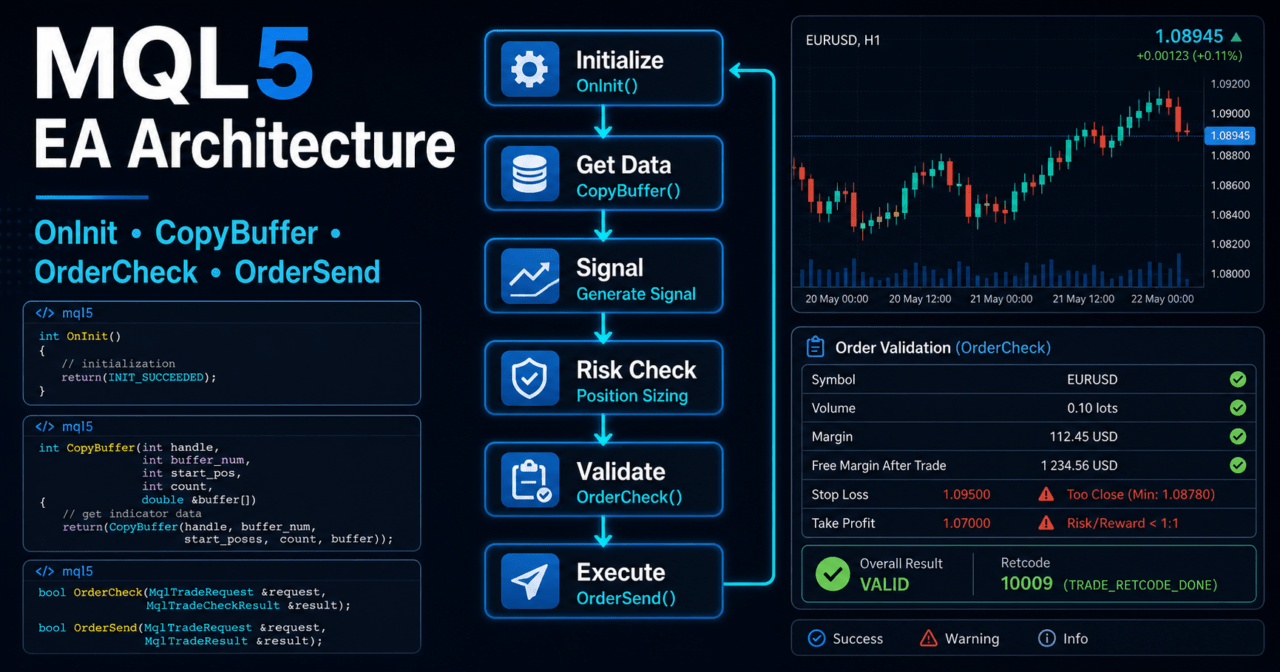
The whole EA flow is easier to organize in the following order.
Market recognition
↓
Filter decision
↓
Signal decision
↓
Risk check
↓
Pre-order check
↓
Order submission
↓
Post-execution management
↓
Exit and stop decision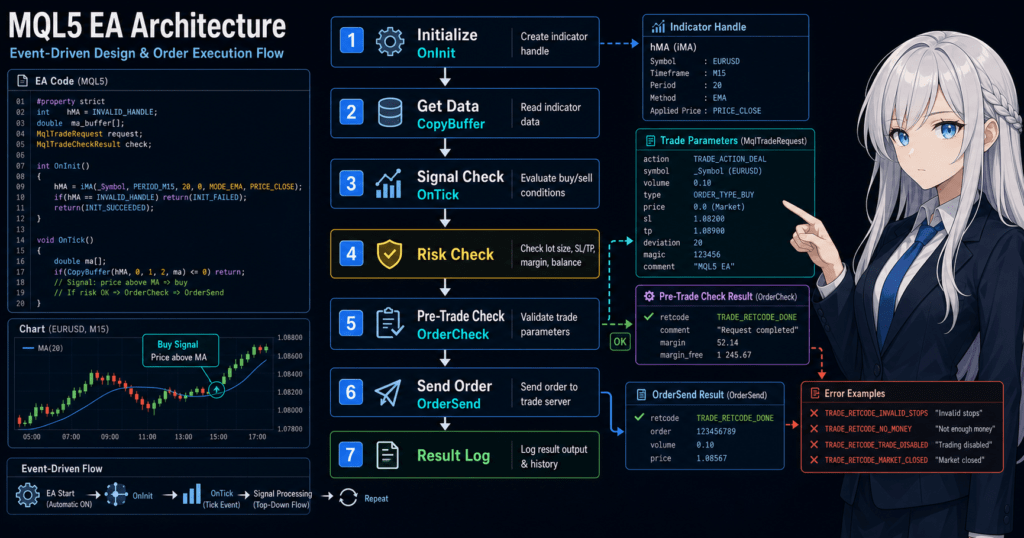
5.1 Why Separate Processing
If market recognition and order submission are written in the same place, changing the logic becomes difficult. For example, even if you only want to change the moving average condition, order handling and lot calculation may also be affected.
When processing is separated by function, it becomes easier to replace trading logic for testing or strengthen only the risk control part.
6. Practical Code Example
[Conclusion]
Practical MQL5 code should include not only signal decisions but also lot limits, margin, trading conditions, and pre-order checks.
The sample code is for testing. Before live use, you must verify symbol conditions and broker specifications.
The following code is a structural example that uses a simple moving average filter and a pre-order check. It is not a complete profit-oriented EA. It is a testing sample for understanding the structure.
#property strict

input int    MaPeriod      = 20;
input double RiskLot       = 0.10;
input int    MaxSpreadPoint = 30;

int ma_handle = INVALID_HANDLE;

int OnInit()
{
   ma_handle = iMA(_Symbol, _Period, MaPeriod, 0, MODE_SMA, PRICE_CLOSE);

   if(ma_handle == INVALID_HANDLE)
   {
      Print("Failed to create MA handle");
      return INIT_FAILED;
   }

   return INIT_SUCCEEDED;
}

void OnDeinit(const int reason)
{
   if(ma_handle != INVALID_HANDLE)
   {
      IndicatorRelease(ma_handle);
      ma_handle = INVALID_HANDLE;
   }
}

void OnTick()
{
   if(!IsTradeAllowedBySpread())
      return;

   double ma_values[];
   ArraySetAsSeries(ma_values, true);

   int copied = CopyBuffer(ma_handle, 0, 0, 3, ma_values);
   if(copied < 3)
   {
      Print("Not enough MA data");
      return;
   }

   double close_price = iClose(_Symbol, _Period, 1);
   double closed_ma   = ma_values[1];

   if(close_price > closed_ma)
   {
      SendMarketOrder(ORDER_TYPE_BUY, RiskLot);
   }
}

bool IsTradeAllowedBySpread()
{
   long spread = 0;

   if(!SymbolInfoInteger(_Symbol, SYMBOL_SPREAD, spread))
   {
      Print("Failed to get spread");
      return false;
   }

   if(spread > MaxSpreadPoint)
   {
      Print("Spread is too wide: ", spread);
      return false;
   }

   return true;
}

bool SendMarketOrder(ENUM_ORDER_TYPE order_type, double lots)
{
   double min_lot  = SymbolInfoDouble(_Symbol, SYMBOL_VOLUME_MIN);
   double max_lot  = SymbolInfoDouble(_Symbol, SYMBOL_VOLUME_MAX);
   double lot_step = SymbolInfoDouble(_Symbol, SYMBOL_VOLUME_STEP);

   if(min_lot <= 0.0 || max_lot <= 0.0 || lot_step <= 0.0)
   {
      Print("Invalid volume settings");
      return false;
   }

   double normalized_lot = MathFloor(lots / lot_step) * lot_step;
   normalized_lot = MathMax(min_lot, MathMin(max_lot, normalized_lot));

   MqlTradeRequest request;
   MqlTradeCheckResult check;
   MqlTradeResult result;

   ZeroMemory(request);
   ZeroMemory(check);
   ZeroMemory(result);

   request.action   = TRADE_ACTION_DEAL;
   request.symbol   = _Symbol;
   request.volume   = normalized_lot;
   request.type     = order_type;
   request.deviation = 20;
   request.type_filling = ORDER_FILLING_FOK;

   if(order_type == ORDER_TYPE_BUY)
      request.price = SymbolInfoDouble(_Symbol, SYMBOL_ASK);
   else
      request.price = SymbolInfoDouble(_Symbol, SYMBOL_BID);

   if(!OrderCheck(request, check))
   {
      Print("OrderCheck failed. retcode=", check.retcode);
      return false;
   }

   if(!OrderSend(request, result))
   {
      Print("OrderSend failed. retcode=", result.retcode);
      return false;
   }

   Print("OrderSend completed. retcode=", result.retcode, " order=", result.order);
   return true;
}
6.1 Points to Check in the Code Example
In this sample, the EA does not continue to order processing when the spread is too wide. The lot size is adjusted according to the minimum lot, maximum lot, and lot step.
Before sending an order, the design uses OrderCheck. If there is a problem with margin or trading conditions, it does not move on to OrderSend. In live operation, you also need to check stop levels, freeze levels, tradable hours, and account type.
7. Common Mistakes
[Conclusion]
Common mistakes in advanced MQL5 development include MQL4-style value retrieval, not checking return values, making decisions only from the current bar, and skipping pre-order checks.
These mistakes may be hard to see in backtests and can become serious problems in live operation.
7.1 Trying to Retrieve Indicator Values Directly
In MQL5, functions such as iMA and iATR are commonly used in a way that returns a handle. Creating the handle alone does not retrieve the value used for decisions.
To use indicator values, think in terms of this flow: create a handle, confirm calculation status, and retrieve values with CopyBuffer.
7.2 Judging Signals Only from the Current Bar
The current bar is still forming, so its value changes with each tick. Decisions based on the current bar can make entry frequency and signal position unstable.
If reproducibility is important, also consider conditions based on the most recent closed bar.
7.3 Skipping Pre-Order Checks
If pre-order checks are skipped, orders may fail because of insufficient margin, lot limit violations, market close periods, stop level violations, and similar issues.
An EA needs a design that logs why an order failed. An EA that hides failure reasons is difficult to improve and test.
8. Differences from Other Functions
[Conclusion]
In advanced MQL5 development, use data retrieval functions, account information functions, position functions, and trade functions for separate roles.
If functions with different purposes are mixed up, EA state management becomes unstable.
| Method | Advantages | Disadvantages | Best Use Case |
|---|---|---|---|
Retrieve with CopyBuffer | Clearly retrieves indicator values | Requires handle management | EAs that use indicators |
Retrieve with SymbolInfoDouble | Makes it easy to get symbol specifications and price information | You must understand the meaning of each retrieved item | Checking spread, price, and tick information |
Retrieve with AccountInfoDouble | Can check balance and equity-related values | Depends on account status | Money management and margin checks |
Check with PositionSelect | Can confirm whether an existing position exists | Design differs between netting and hedging accounts | Position management |
Check with OrderCheck | Can inspect conditions before sending an order | Does not guarantee execution after submission | Pre-order checks |
Send with OrderSend | Can be used for actual order submission | Requires checking execution conditions and result codes | Entry, exit, and modification processing |
8.1 Difference Between Netting and Hedging Accounts
In a netting account, positions for the same symbol are generally consolidated. In a hedging account, it may be possible to hold multiple positions in the same symbol.
When designing position management, consider that account type changes how existing positions are handled, how exits are processed, and what additional entries mean.
9. Where to Use This in EA Design
[Conclusion]
MQL5 advanced programming is useful when you need to divide an EA into components that are easy to test.
Design separation is especially important in EAs that handle multi-condition signals, risk control, position management, and trade logs.
In EA design, separate roles as follows.
- Signal decision: whether buy or sell conditions are met
- Filter decision: whether the market environment fits the trading conditions
- Lot calculation: whether the lot size fits acceptable risk and symbol specifications
- Pre-order check: whether margin, spread, and trading conditions are acceptable
- Position management: whether to manage existing positions, exits, and additional entries
- Risk control: whether to handle loss limits, losing streak limits, and drawdown limits
- Log output: whether causes can be traced during testing
9.1 Items to Consider in Lot Calculation
In lot calculation, consider not only fixed lots but also account balance, equity, stop-loss distance, acceptable risk, tick value, and tick size.
| Method | Advantages | Disadvantages | Best Use Case |
|---|---|---|---|
| Fixed lot | Easy to implement | Weak against account size changes | Initial testing |
| Balance-proportional | Easy to adjust according to funds | Hard to reflect stop-loss distance | Testing based on account size |
| Risk percentage based | Easy to calculate lots from acceptable loss | Requires handling tick value and stop-loss distance | EAs that focus on risk management |
| Volatility adjusted | Can reflect market movement using ATR or similar values | Can become highly parameter-dependent | Testing symbols with large price movement |
Risk percentage based lot calculation is easy to consider when a stop-loss distance is set. However, slippage and execution differences during sudden price moves may cause the expected loss and actual loss to differ.
10. Notes for Live Operation
[Conclusion]
Even if an MQL5 EA works normally in a backtest, it does not mean live operation will produce the same result.
Performance and behavior change depending on spreads, execution delays, slippage, broker specifications, and the VPS environment.
Before live operation, check backtests and forward tests separately. A backtest checks the structure with historical data. A forward test checks behavior in the current live market environment.
10.1 Items to Check in Backtesting
In backtesting, check the following items.
- Total profit and loss
- Maximum drawdown
- Win rate
- Profit/loss ratio
- Number of trades
- Number of consecutive losses
- Spread conditions
- Period dependency
- Parameter dependency
Backtest results do not guarantee future profit. Parameters that fit only a specific period may break down in forward testing.
10.2 Items to Check in Forward Testing
In forward testing, check the following items.
- Execution differences
- Behavior when spreads widen
- Trade frequency
- Drawdown
- Deviation from backtest results
- Broker differences
- Stability in a VPS environment
Demo accounts and live accounts may have different execution and spread conditions. Especially for EAs that place orders frequently, small execution differences can affect results.
10.3 Live Operation Risks
The higher the leverage, the larger the effect of the same price movement on equity can become. Before live operation, define EA stop conditions, maximum loss, maximum drawdown, and controls for losing streaks.
To avoid over-optimization, it is important not to tune parameters too precisely to one case. Testing across multiple periods, multiple market conditions, and different spread assumptions makes it easier to find weaknesses in the logic.
11. Summary
[Conclusion]
In MQL5 advanced programming, design event functions, indicator handles, CopyBuffer, trade structures, and risk management as separate parts.
By building an EA as a state management system, testing, modification, and pre-live checks become easier.
In MQL5, the basic structure is to initialize in OnInit, make decisions in OnTick, and clean up in OnDeinit. Indicator values are retrieved with CopyBuffer after handle creation, and retrieval failure or insufficient data must always be handled.
For order processing, it is important to use MqlTradeRequest, MqlTradeCheckResult, and MqlTradeResult, then confirm conditions with OrderCheck before moving to OrderSend. In live operation, you must check execution differences, spreads, broker specifications, and drawdown not only in backtests but also in forward tests.
Additional reference: MQL5 Reference
FAQ
What is MQL5 advanced programming?
MQL5 advanced programming is the practice of designing an EA by separating event handling, data retrieval, signal decisions, order processing, and risk management. The goal is not simply to write complex code, but to create a structure that is easy to test.
Why are indicator handles needed in MQL5?
In MQL5, many indicator functions return a handle instead of a calculated value. The EA uses that handle and retrieves the required buffer values with CopyBuffer.
What are the main reasons CopyBuffer fails?
Common reasons include an invalid handle, incomplete indicator calculation, too few values retrieved, or an incorrect buffer number. If the retrieved count is lower than expected, design the EA to wait for the next processing opportunity instead of making a decision.
Should OrderCheck always be used?
For EAs that include order processing, using OrderCheck is an effective design choice. It helps check margin, lot size, symbol conditions, and other issues before order submission.
Should I use the current bar or the closed bar?
If reproducibility matters, using the closed bar is easier to manage. The current bar is still forming, so its value changes with tick updates and may behave differently in backtests and live operation.
Does EA design change between netting and hedging accounts?
Yes. Netting and hedging accounts handle positions for the same symbol differently. An EA must design existing position checks, additional entries, and exits according to the account type.
Can I go live if the backtest result is good?
A good backtest result alone is not enough for live operation. Before live use, check spreads, execution differences, trade frequency, drawdown, and broker differences through forward testing.
What should I check to avoid over-optimization?
Check whether the parameters only fit a specific period. Test across multiple periods, different market conditions, and different spread assumptions, then confirm reproducibility with forward testing.