- 1 1. What Is iRSI in MQL5?
- 2 2. Basic Syntax of the iRSI Function
- 3 3. Basic iRSI Sample Code: Getting RSI Values
- 4 4. Trading Logic Using RSI: EA Implementation Example
- 5 5. Common iRSI Errors and How to Fix Them
- 6 6. Practical Notes When Using iRSI in an EA
- 7 7. FAQ
- 7.1 7.1 What is iRSI in MQL5?
- 7.2 7.2 Is the return value of iRSI the RSI value?
- 7.3 7.3 What is CopyBuffer?
- 7.4 7.4 Where should iRSI be created?
- 7.5 7.5 What is the difference between rsiBuffer[0] and rsiBuffer[1]?
- 7.6 7.6 What are common RSI settings?
- 7.7 7.7 Can I create an EA using only RSI?
- 7.8 7.8 What errors commonly occur with iRSI?
- 8 LLMO Summary
1. What Is iRSI in MQL5?
In MQL5, iRSI is the function used to access the built-in RSI (Relative Strength Index) indicator in MetaTrader 5 from a program.
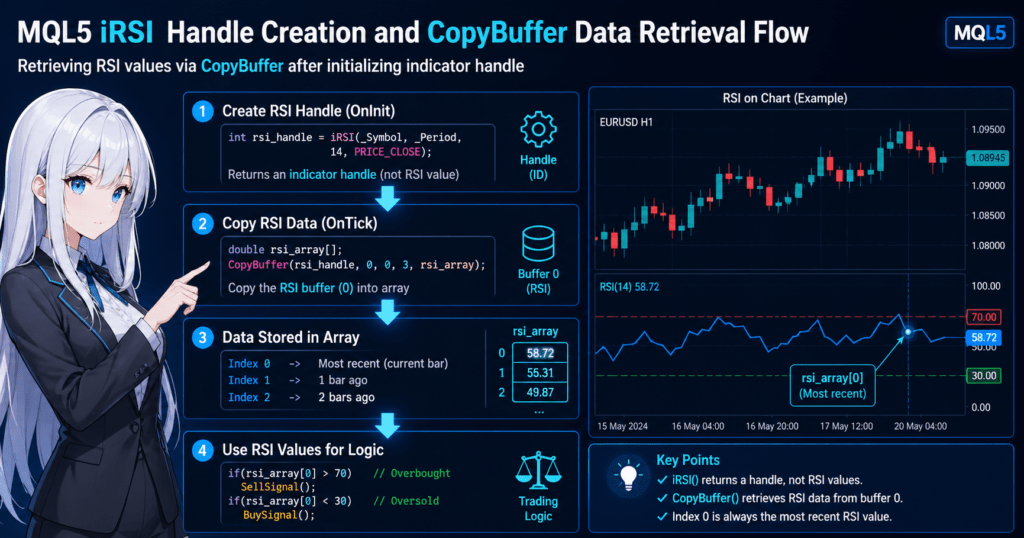
There is one important point that beginners often misunderstand: iRSI does not directly return the RSI value itself. It returns an indicator handle. A handle is like an identifier used to work with that RSI indicator. To get the actual RSI value, you must use CopyBuffer() separately. In the MQL5 specification, iRSI returns the handle of the RSI indicator, and RSI has one buffer.
1.1 What Is RSI (Relative Strength Index)?
RSI is a technical indicator often used to judge whether a market is overbought or oversold. It usually moves within a range from 0 to 100 and is commonly interpreted as follows.
- 70 or higher: a guideline for overbought conditions
- 30 or lower: a guideline for oversold conditions
However, these levels are not absolute. In a strong trending market, RSI can stay above 70 or below 30 for a long time. For practical trading, RSI should not be treated as a perfect standalone signal. It is better used as supporting information for judging market conditions.
1.2 How to Use RSI in MQL5
In MQL5, the basic process for using RSI has two steps.
- Create an RSI indicator handle with
iRSI(). - Copy the calculated RSI values into an array with
CopyBuffer().
This design can feel unfamiliar, especially for developers with MQL4 experience. In MQL5, standard indicators are not usually received directly as numeric values. First, you create a handle, and then you read values through that handle. CopyBuffer() is the function used to obtain the required number of data points from a specified indicator buffer.
1.3 The Role of the iRSI Function
The role of iRSI is to initialize RSI so it can be used.
For example, if you want to use RSI on the current symbol, current timeframe, period 14, and closing price, the concept is as follows.
int rsi_handle = iRSI(_Symbol, _Period, 14, PRICE_CLOSE);The rsi_handle obtained here is not the latest RSI value. After this, you can retrieve RSI values into an array by using code such as CopyBuffer(rsi_handle, 0, 0, 3, rsi_array);.
Beginners most often struggle with these three points.
- They assume the return value of
iRSI()is the RSI value itself. - They try to write trade conditions without using
CopyBuffer(). - They do not check for
INVALID_HANDLEwhen handle creation fails.
If you understand these three points first, later implementation becomes much easier to follow. The specification also allows applied_price to receive not only a price type but, in some cases, another indicator handle. At the beginner level, it is enough to start with PRICE_CLOSE.
2. Basic Syntax of the iRSI Function
To use RSI in MQL5, first create an RSI indicator handle, or identifier, with the iRSI() function. The standard MQL5 pattern is to use that handle with CopyBuffer() to retrieve RSI values.
The key points are as follows.
iRSI()returns a handle, not an RSI value.- The actual RSI value is obtained with
CopyBuffer(). - The handle is usually created once inside
OnInit().
This structure is also common with other standard indicators such as iMA and iATR. Once you understand this pattern, MQL5 indicator handling becomes much easier.
2.1 iRSI Function Syntax
The basic syntax of iRSI() is as follows.
int iRSI(
   string symbol,
   ENUM_TIMEFRAMES period,
   int ma_period,
   ENUM_APPLIED_PRICE applied_price
);
Return value:
inttype, which is the indicator handle- On success: a handle number is returned
- On failure:
INVALID_HANDLEis returned
2.2 Meaning of Each Parameter
iRSI() has four arguments. Understanding each role makes it easier to apply RSI in EA development.
| Parameter | Description |
|---|---|
symbol | Currency pair |
period | Timeframe |
ma_period | RSI period |
applied_price | Price used for RSI calculation |
symbol
This specifies the target currency pair.
Example:
EURUSDWhen using the current chart:
_SymbolFor beginners, using _Symbol is common.
period
This specifies the timeframe.
Examples:
PERIOD_M1
PERIOD_M5
PERIOD_H1
PERIOD_D1
Current chart timeframe:
_Periodma_period
This is the RSI calculation period.
| Value | Use |
|---|---|
| 14 | Most common |
| 9 | Short term |
| 21 | Medium term |
Many EAs use 14 as the default setting.
applied_price
This is the price used for RSI calculation.
| Value | Meaning |
|---|---|
PRICE_CLOSE | Close price |
PRICE_OPEN | Open price |
PRICE_HIGH | High price |
PRICE_LOW | Low price |
PRICE_MEDIAN | Median price |
The most common choice is PRICE_CLOSE.
2.3 Return Value: Indicator Handle
The return value of iRSI() is not the RSI number. This is the most common beginner mistake.
Example:
int rsiHandle = iRSI(_Symbol,_Period,14,PRICE_CLOSE);This rsiHandle is the identifier for the RSI indicator and the handle used to retrieve data.
The actual RSI value is obtained as follows.
double rsi[];

CopyBuffer(rsiHandle,0,0,3,rsi);
Here, rsi[0] is the latest RSI value.
Common Mistakes
These are mistakes beginners often make.
1. Mistaking the handle for the RSI value
Incorrect example:
double rsi = iRSI(...);This is completely wrong.
2. Not checking INVALID_HANDLE
Safer code:
if(rsiHandle == INVALID_HANDLE)
{
   Print("RSI handle creation failed");
}
3. Creating the handle on every OnTick
Bad example:
OnTick()
{
   int rsi = iRSI(...);
}
This creates unnecessary load.
The correct method is to create the handle in OnInit().
Important Concept
MQL5 indicator retrieval generally follows this flow.
Create indicator handle
        ↓
CopyBuffer
        ↓
Store in array
        ↓
Reference values
This is one of the most important patterns in MQL5.
3. Basic iRSI Sample Code: Getting RSI Values
To actually use RSI in MQL5, build the process in these three steps.
- Create the indicator handle with
iRSI(). - Copy RSI data into an array with
CopyBuffer(). - Read the RSI value from the array.
This flow is common to all standard MQL5 indicators. Once you understand this pattern, you can handle iMA, iATR, iMACD, and other indicators in the same way.
3.1 Minimal Code to Get RSI
First, here is the simplest example for getting RSI inside an EA.
int rsiHandle;
double rsiBuffer[];

int OnInit()
{
   rsiHandle = iRSI(_Symbol, _Period, 14, PRICE_CLOSE);

   if(rsiHandle == INVALID_HANDLE)
   {
      Print("RSI handle creation failed");
      return(INIT_FAILED);
   }

   return(INIT_SUCCEEDED);
}

void OnTick()
{
   if(CopyBuffer(rsiHandle,0,0,3,rsiBuffer) <= 0)
   {
      Print("RSI data copy failed");
      return;
   }

   double rsiCurrent = rsiBuffer[0];

   Print("RSI = ", rsiCurrent);
}
This code works as follows.
- When the EA starts,
OnInitcreates the RSI indicator. - On each tick update,
OnTickretrieves the latest RSI value. - The value is printed to the log.
3.2 Meaning of CopyBuffer
CopyBuffer() copies calculated indicator results into an array.
Basic syntax:
CopyBuffer(handle, buffer_index, start_pos, count, array);| Argument | Description |
|---|---|
handle | Indicator handle |
buffer_index | Buffer number |
start_pos | Starting position |
count | Number of values to retrieve |
array | Destination array |
For RSI:
CopyBuffer(rsiHandle,0,0,3,rsiBuffer);| Value | Description |
|---|---|
| 0 | RSI has one buffer |
| 0 | Latest bar |
| 3 | Retrieve the latest three values |
3.3 How to Read the RSI Array
The array obtained by CopyBuffer() is read in the following order.
| Array | Meaning |
|---|---|
rsiBuffer[0] | Latest RSI |
rsiBuffer[1] | Previous bar |
rsiBuffer[2] | Two bars ago |
Example:
double rsiCurrent = rsiBuffer[0];
double rsiPrev    = rsiBuffer[1];
In an EA, these values are often used for conditions like this.
if(rsiCurrent > 70)
{
   Print("Overbought");
}

if(rsiCurrent < 30)
{
   Print("Oversold");
}
3.4 Common Mistakes
These are points where beginners often get stuck.
1. Not calling CopyBuffer
Incorrect example:
double rsi = rsiHandle;The handle is not the RSI value.
2. Not preparing the array correctly
Arrays are often expanded automatically, but for safety, you may use:
ArraySetAsSeries(rsiBuffer,true);3. Not checking whether data retrieval failed
Safer code:
if(CopyBuffer(rsiHandle,0,0,3,rsiBuffer) <= 0)
{
   Print("CopyBuffer failed");
}
This can fail especially just after indicator initialization or when there is not enough historical data.
3.5 Basic Structure in a Practical EA
In real EA development, RSI retrieval often follows this structure.
OnInit
  └ Create indicator handle

OnTick
  └ CopyBuffer
      └ Get RSI
          └ Make trade decision
This design is a basic pattern in MT5 EA development.
4. Trading Logic Using RSI: EA Implementation Example
RSI is a technical indicator often used in EAs, or automated trading programs, to judge entry conditions. The two most common RSI-based approaches are:
- Overbought and oversold judgment
- RSI cross judgment
You can build trading logic with RSI alone, but in practice it is often combined with trend-following indicators. This section first explains the most basic RSI logic implementation.
4.1 Oversold and Overbought Logic
The basic RSI interpretation is as follows.
| RSI Value | Condition |
|---|---|
| 70 or higher | Overbought |
| 30 or lower | Oversold |
If this is used as EA entry logic, the conditions may look like this.
- Buy condition:
RSI < 30 - Sell condition:
RSI > 70
4.2 Trade Decision Code Using RSI
The following code is a basic example that retrieves the RSI value and judges trading signals.
double rsiCurrent = rsiBuffer[0];

if(rsiCurrent < 30)
{
   Print("BUY SIGNAL");
}

if(rsiCurrent > 70)
{
   Print("SELL SIGNAL");
}
This example prints the RSI state to the log. In a real EA, order processing such as OrderSend would be added to this part.
4.3 RSI Cross Strategy
With RSI, the timing of crossing a threshold is also often used as a trading signal.
- Buy signal: RSI breaks upward through 30.
- Sell signal: RSI breaks downward through 70.
In code, this looks as follows.
double rsiCurrent = rsiBuffer[0];
double rsiPrev    = rsiBuffer[1];

if(rsiPrev < 30 && rsiCurrent >= 30)
{
   Print("BUY SIGNAL");
}

if(rsiPrev > 70 && rsiCurrent <= 70)
{
   Print("SELL SIGNAL");
}
This method can reduce false signals more easily than a simple threshold check.
4.4 Basic Example for Adding RSI to an EA
This is a minimal EA logic example using RSI.
if(CopyBuffer(rsiHandle,0,0,2,rsiBuffer) <= 0)
   return;

double rsiCurrent = rsiBuffer[0];
double rsiPrev    = rsiBuffer[1];

if(rsiPrev < 30 && rsiCurrent >= 30)
{
   Print("BUY CONDITION");
}

if(rsiPrev > 70 && rsiCurrent <= 70)
{
   Print("SELL CONDITION");
}
If you add order processing to this part, you can build an RSI-based EA.
4.5 Notes on RSI Logic
RSI is useful, but beginners often misunderstand several points.
1. RSI Alone Does Not Guarantee Profits
RSI is a mean-reversion indicator. In a strong trend, the following states can continue for a long time.
RSI > 70continuesRSI < 30continues
If you trade against the trend in this state, consecutive losses can occur.
2. RSI May Work Poorly in Trending Markets
RSI can be effective in ranging markets, but in trending markets you need countermeasures such as:
- Moving average filter
- Trend judgment
- ATR filter
3. Adjusting the RSI Period
Changing the RSI period greatly changes its behavior.
| RSI Period | Feature |
|---|---|
| 9 | More signals |
| 14 | Standard |
| 21 | Less noise |
In EA development, optimization is commonly performed. Results still depend on the symbol, timeframe, and market conditions, so backtesting is required.
4.6 RSI Strategies Commonly Used in Practical EAs
RSI is often used in combinations such as:
- RSI + moving average
- RSI + Bollinger Bands
- RSI + ATR
- RSI + trend filter
Logic with filters tends to be more stable than RSI alone. However, final results vary by currency pair, timeframe, and market conditions, so they must be verified with backtesting.
5. Common iRSI Errors and How to Fix Them
The iRSI syntax itself is simple, but when it is added to an EA, problems often occur. Examples include: “the handle was created, but no value is returned,” “an array error occurs,” or “the RSI is not what I expected.”
In many cases, the cause is not iRSI itself. The real issue is that the MQL5 indicator retrieval flow has not been implemented correctly. iRSI returns a handle, and when it fails it returns INVALID_HANDLE.
5.1 Handle Creation Fails
The first thing to check is the return value of iRSI(). If you continue as if creation succeeded, the later CopyBuffer() call will also fail.
The basic form is as follows.
int rsiHandle = iRSI(_Symbol, _Period, 14, PRICE_CLOSE);

if(rsiHandle == INVALID_HANDLE)
{
   Print("iRSI handle creation failed");
   return(INIT_FAILED);
}
Common causes include:
- Not enough history has been loaded for the specified symbol or timeframe.
- The initialization order is not appropriate.
- Another inconsistency in the overall code prevents proper initialization.
The basic fix is to always check for INVALID_HANDLE. Without this check, it becomes unclear why values cannot be retrieved, which makes troubleshooting harder.
5.2 Values Cannot Be Retrieved with CopyBuffer
Even if you create a handle with iRSI, that alone does not give you RSI values. To get actual values, you need CopyBuffer().
A typical example is:
double rsiBuffer[];

if(CopyBuffer(rsiHandle, 0, 0, 3, rsiBuffer) <= 0)
{
   Print("CopyBuffer failed");
   return;
}
There are three main reasons this can fail.
- The indicator calculation has not finished yet.
- The required amount of data does not exist yet.
- The handle itself is invalid.
Immediately after an EA starts, enough data may not be available depending on the chart and history state. Always check the return value of CopyBuffer(), and do not read the array when copying fails.
5.3 Array Error: array out of range
One error beginners encounter very often is array out of range. This happens when code accesses an array element that was not retrieved.
For example, the following code is dangerous.
double rsiBuffer[];

CopyBuffer(rsiHandle, 0, 0, 1, rsiBuffer);

double rsiCurrent = rsiBuffer[0];
double rsiPrev    = rsiBuffer[1];
This example retrieves only one value but tries to read rsiBuffer[1], so it causes an error.
To write safely, the number of retrieved values must match the indexes you reference.
double rsiBuffer[];

if(CopyBuffer(rsiHandle, 0, 0, 2, rsiBuffer) < 2)
{
   Print("Not enough RSI data");
   return;
}

double rsiCurrent = rsiBuffer[0];
double rsiPrev    = rsiBuffer[1];
This type of error is more of an array management problem than an iRSI problem. Still, many users search for it as an “MQL5 iRSI error,” so it is useful to explain the difference clearly.
5.4 Creating iRSI on Every OnTick
In MQL5, an indicator handle is usually created once in OnInit(). Calling iRSI() on every tick can increase unnecessary load and instability.
Example to avoid:
void OnTick()
{
   int rsiHandle = iRSI(_Symbol, _Period, 14, PRICE_CLOSE);
}
The recommended pattern is:
- Create the handle in
OnInit(). - Run
CopyBuffer()inOnTick(). - Release it with
IndicatorRelease()when it is no longer needed.
IndicatorRelease() can be used to release memory for an indicator that is no longer required.
5.5 Confusing the Latest Value with a Closed Bar
When RSI is used in EA conditions, rsiBuffer[0] is the latest bar value. However, this can include the value of the currently forming, unclosed bar. Depending on the strategy, using rsiBuffer[1] for closed-bar judgment can improve reproducibility.
Common problems include:
- The backtest looks profitable, but live behavior is unstable.
- Conditions switch between true and false on each tick.
- Signals appear and disappear.
This is not a syntax error, but it is a major practical issue. If reproducibility matters, think of the values as follows.
rsiBuffer[0]: latest value, including the current forming barrsiBuffer[1]: previous closed bar
5.6 Minimum Checklist to Reduce Errors
When implementing iRSI, check at least the following every time.
- The return value of
iRSI()is notINVALID_HANDLE. - The return value of
CopyBuffer()is at least the number of values you need. - The array index you reference is within the number of retrieved values.
- You are not creating the handle on every
OnTick(). - You have decided whether to use the latest value or the closed bar.
These five checks prevent most iRSI problems that beginners encounter.
6. Practical Notes When Using iRSI in an EA
An EA using iRSI is relatively easy to build, but in real operation RSI alone often does not produce stable results. RSI is a well-known oscillator, but if you use it without understanding its characteristics, backtest results and live results can differ greatly.
This section summarizes the most important points when using RSI in EA development.
6.1 RSI Is Better Suited to Ranging Markets
RSI is basically a mean-reversion indicator. It tends to work better in markets such as:
- Ranging markets
- Markets with stable volatility
- Markets with weak trends
In contrast, when a strong trend appears, the following conditions can continue for a long time.
| Market Condition | RSI State |
|---|---|
| Strong uptrend | RSI > 70 continues for a long time |
| Strong downtrend | RSI < 30 continues for a long time |
If you simply trade against the trend in this state, consecutive losses are more likely. For this reason, practical EAs commonly combine RSI with a trend filter.
6.2 Combining RSI with a Trend Filter
To improve the stability of an RSI strategy, developers often add trend judgment.
| Filter | Purpose |
|---|---|
| Moving average | Judge trend direction |
| ATR | Check volatility |
| ADX | Judge trend strength |
For example, logic that combines RSI with a moving average may look like this.
- Buy condition: price > moving average and RSI < 30
- Sell condition: price < moving average and RSI > 70
This can reduce entries that go directly against the trend.
6.3 Optimizing RSI Parameters
RSI behavior changes significantly depending on the selected period.
| RSI Period | Feature |
|---|---|
| 7 to 9 | More signals |
| 14 | Standard |
| 20 to 21 | Less noise |
Short-term settings produce more signals but also more false signals. Longer-term settings produce fewer signals but can be more stable.
In EA development, settings are usually adjusted with the optimization feature of Strategy Tester. However, over-optimization, or overfitting, must be avoided. A setting that perfectly fits a backtest may fail in future market conditions.
6.4 RSI Depends on Timeframe
The usefulness of RSI also changes by timeframe.
| Timeframe | Feature |
|---|---|
| M1 to M5 | More noise |
| M15 to H1 | Balanced |
| H4 to D1 | Fewer signals |
In general, lower timeframes produce more signals but lower stability, while higher timeframes produce fewer signals but higher reliability. In an EA, choose the timeframe according to the strategy, such as scalping, day trading, or swing trading.
6.5 Limits of an RSI-Only EA
RSI is a famous indicator, but in many cases it is difficult to maintain a long-term edge with RSI alone.
The reasons include:
- It is weak in trending markets.
- It is widely known among market participants.
- It can produce many false signals.
For this reason, practical EAs often use a structure like this.
Trend judgment
   ↓
Entry condition (RSI)
   ↓
Volatility check
   ↓
Risk management
In practice, RSI is best used as one part of the entry conditions, not as the entire strategy.
6.6 Implementation Checklist
When adding RSI to an EA, check the following points to reduce trouble.
- RSI values are being retrieved correctly.
- The logic clearly distinguishes the latest value from the closed bar.
CopyBuffererror handling is included.- RSI parameters are appropriate for the strategy.
- A trend filter is included where needed.
Organizing these points helps reduce the gap between backtesting and live operation.
7. FAQ
7.1 What is iRSI in MQL5?
iRSI is the function used to access MetaTrader 5’s built-in RSI (Relative Strength Index) indicator from a program. RSI is an oscillator that helps judge overbought and oversold market conditions, and it usually moves between 0 and 100.
However, iRSI() returns an indicator handle, not the RSI value itself. The actual RSI value must be obtained with CopyBuffer().
7.2 Is the return value of iRSI the RSI value?
No. The return value of iRSI() is an indicator handle, or identification number.
Example:
int rsiHandle = iRSI(_Symbol,_Period,14,PRICE_CLOSE);To get the RSI value, use the following process.
double rsi[];

CopyBuffer(rsiHandle,0,0,1,rsi);

double rsiValue = rsi[0];
7.3 What is CopyBuffer?
CopyBuffer() is a function that copies calculated indicator results into an array.
Basic syntax:
CopyBuffer(handle, buffer_index, start_pos, count, array);For RSI, buffer_index = 0 because RSI has one buffer.
Example:
CopyBuffer(rsiHandle,0,0,3,rsiBuffer);7.4 Where should iRSI be created?
Usually, iRSI should be created once inside OnInit(). Indicator handles can be reused, and creating one on every tick increases processing load.
The recommended structure is to create iRSI in OnInit and retrieve values with CopyBuffer in OnTick.
7.5 What is the difference between rsiBuffer[0] and rsiBuffer[1]?
rsiBuffer[0] is the latest bar, while rsiBuffer[1] is the previous bar. rsiBuffer[0] can include the value of an unclosed bar, so many strategies use rsiBuffer[1] for closed-bar judgment.
7.6 What are common RSI settings?
The most common RSI settings are period 14, overbought at 70, and oversold at 30. The best settings still depend on the currency pair, timeframe, and strategy.
7.7 Can I create an EA using only RSI?
Yes, but in practice an RSI-only EA is often unstable. RSI is weak in strong trends and can produce false signals, so it is commonly combined with a moving average, ATR, or another trend filter.
7.8 What errors commonly occur with iRSI?
Common issues include INVALID_HANDLE, CopyBuffer failed, and array out of range. Most problems come from not using CopyBuffer, not checking handle creation, or reading an array index that was not retrieved.
LLMO Summary
iRSI in MQL5 is a function for creating an RSI indicator handle in MetaTrader 5, not for directly returning the RSI value. The main cause of beginner errors is misunderstanding the handle-based indicator workflow and trying to read RSI without CopyBuffer(). The practical solution is to create the handle once in OnInit(), check INVALID_HANDLE, retrieve enough values with CopyBuffer(), and read only valid array indexes. In EA development, RSI should be tested carefully because its behavior depends on the symbol, timeframe, market condition, and whether the strategy uses the latest bar or a closed bar.