- 1 Conclusion of This Article
- 2 1. Role of This Logic
- 3 2. Basic Concept
- 4 3. Common Design Patterns
- 5 4. Implementation Method
- 6 5. Sample Code
- 7 6. Comparison by Pattern
- 8 7. Situations Where Malfunctions Are Likely
- 9 8. Items to Check in Backtesting
- 10 9. Items to Check in Forward Testing
- 11 10. Notes for Live Operation
- 12 11. Improvements and Alternatives
- 13 12. Summary
- 14 FAQ
- 14.1 What is a robust trading system in MQL5?
- 14.2 Which processes should be separated first to make an EA robust?
- 14.3 What should I watch for when using indicator values in MQL5?
- 14.4 Why should OrderCheck be used before OrderSend?
- 14.5 Does adding many filters always make an EA more robust?
- 14.6 Which items are important in backtesting?
- 14.7 What should be checked in forward testing?
- 14.8 Does EA design change between netting and hedging accounts?
Conclusion of This Article
To build a robust trading system in MQL5, you need to design not only trading signals but also filters, risk checks, pre-order checks, position management, and validation conditions as separate parts.
An EA is less likely to fail when it checks market conditions, account conditions, symbol specifications, and execution conditions in order, instead of simply placing an order when conditions match.
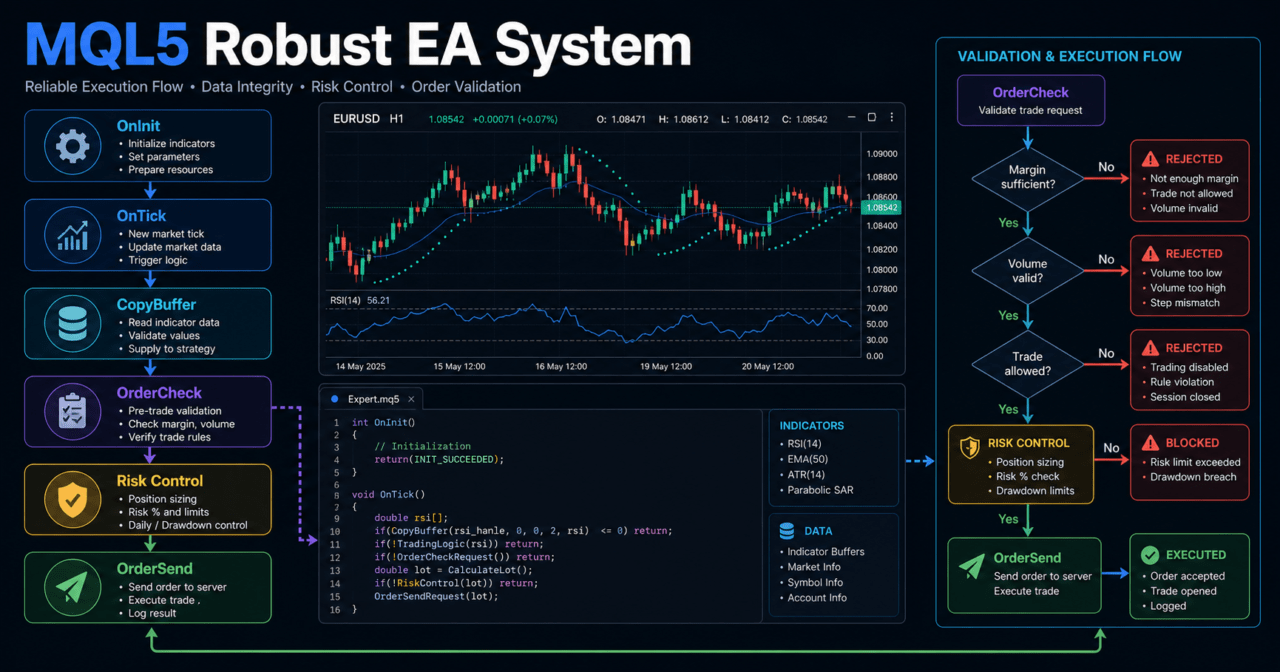
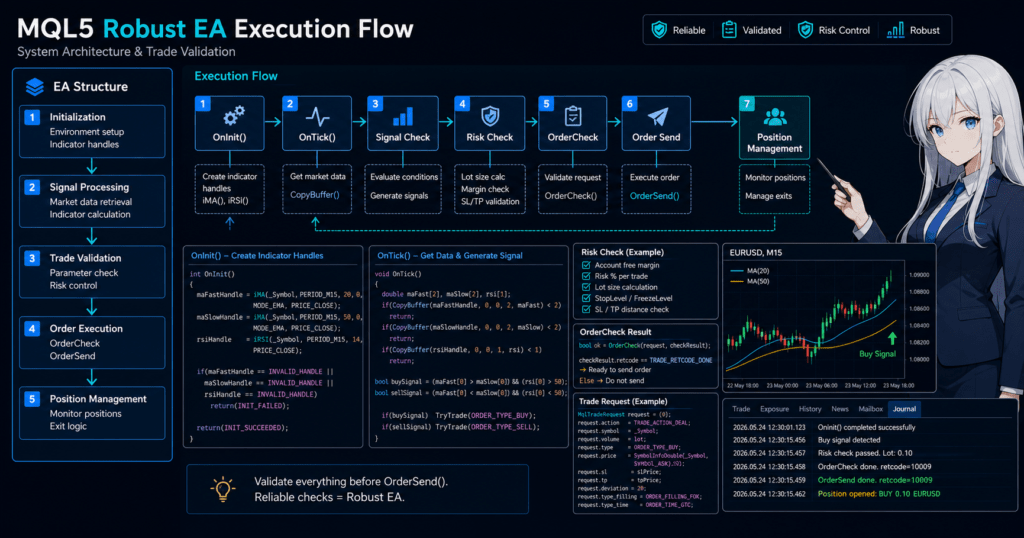
The core flow for improving robustness is to create the required handles in OnInit, evaluate conditions in OnTick, retrieve values with CopyBuffer, and confirm order validity with OrderCheck before sending an order.
However, no matter how well the design is organized, backtest results do not guarantee future profit. Before live operation, you must use forward testing to check differences in spreads, execution, and broker specifications.
1. Role of This Logic
[Conclusion]
A robust MQL5 trading system is a design that controls EA behavior through multiple validation steps instead of relying on a single trading condition.
Its purpose is not to guarantee profit. Its purpose is to reduce malfunctions, overtrading, unchecked orders, and logic that cannot be properly validated.
[Definition]
A robust trading system is an EA design that separates signals, filters, risk management, order handling, position management, and validation procedures so that behavior is easier to verify when conditions change.
EA robustness is not determined only by the complexity of entry conditions.
Even a simple moving average crossover can become easy to validate if spread checks, lot limits, margin checks, existing position checks, and exit conditions are organized.
By contrast, an EA that only adds more signals makes it harder to know which condition affected performance.
In a robust design, the following flow is considered separately.
Market recognition
↓
Filter evaluation
↓
Signal evaluation
↓
Risk check
↓
Pre-order check
↓
Order submission
↓
Post-execution management
↓
Exit and stop evaluation
1.1 When Robustness Becomes Necessary
In MQL5 EAs, a system may work in a backtest but fail to behave the same way in live operation.
The main reason is that spreads, execution methods, slippage, trading hours, stop levels, account types, and symbol specifications differ by environment.
A robust EA does not force an order when conditions are not suitable.
It logs the reason why an order could not be placed and uses a structure that can evaluate the conditions again on the next tick.
1.2 Difference Between Logic and System Design
Trading logic is the part that decides whether to buy, sell, or stay out.
Trading system design is the overall structure that allows the trading logic to run safely.
In an MQL5 EA, you can write all processing inside OnTick.
However, if processing is not separated, it becomes difficult to isolate the cause of errors, performance deterioration, or execution failures.
2. Basic Concept
[Conclusion]
In a robust EA design, you check whether trading is allowed before checking the signal.
The basic structure is to confirm market conditions, account conditions, symbol conditions, existing positions, and risk tolerance before moving to entry evaluation.
MQL5 EAs mainly run using OnInit, OnTick, and OnDeinit.
OnInit handles initialization, OnTick performs evaluation on each tick, and OnDeinit performs cleanup when the EA stops.
When using indicator values, many MQL5 indicator functions return handles instead of returning values directly.
The EA creates handles in OnInit and retrieves values in OnTick by using CopyBuffer.
2.1 Evaluate Tradability First
In a robust EA, check the following items before checking trading signals.
- Whether automated trading is allowed
- Whether the symbol is tradable
- Whether the spread is within the allowed range
- Whether existing positions violate the rules
- Whether margin is insufficient
- Whether the lot size matches the minimum lot, maximum lot, and lot step
- Whether stop levels and freeze levels are violated
- Whether it is outside trading hours
Performing these checks first makes it easier to exclude situations where an order should not be placed even if a signal appears.
2.2 Separate Signals and Filters
A signal is a condition that determines entry direction or timing.
A filter is a condition that determines whether to accept or skip the signal.
For example, a design may use a moving average crossover as the signal, ATR to exclude low-volatility markets, and a higher-timeframe moving average to confirm direction.
In this case, logging each condition separately makes it easier to confirm which condition stopped the trade.
3. Common Design Patterns
[Conclusion]
In a robust trading system, a staged design that separates signals, filters, risk control, and pre-order checks is easier to manage than a single-signal design.
However, adding too many conditions can increase the risk of over-optimization.
Common design patterns are as follows.
| Method | Advantages | Disadvantages | Best Use Case |
|---|---|---|---|
| Single-signal type | Easy to implement and validate | Weak against changes in market conditions | Initial validation and learning EAs |
| Signal + trend filter type | Easy to confirm direction | May increase missed opportunities in ranging markets | Trend-following EAs |
| Signal + volatility filter type | Easy to exclude low volatility or sudden volatility | Becomes highly dependent on thresholds such as ATR | Breakouts and stop-loss width adjustment |
| State management type | Easy to handle position status and stop conditions | Requires more implementation work | EAs intended for live operation |
| Risk-control-first type | Easy to include drawdown management | May reduce trading opportunities | EAs focused on money management |
3.1 Single-Signal Type
The single-signal type is a structure that makes trading decisions using a small number of conditions, such as a moving average crossover or RSI condition.
It is suitable for learning and initial validation, but it may not sufficiently avoid spread widening or ranging markets.
Even when using a single-signal type, it is safer not to omit pre-order checks and lot limits.
3.2 State Management Type
In the state management type, the EA state is clearly separated.
For example, you can use states such as waiting, holding a buy position, holding a sell position, trading stopped, and rechecking after an error.
Separating states makes it easier to reduce problems such as placing multiple orders on the same tick or unintentionally re-entering immediately after closing a position.
4. Implementation Method
[Conclusion]
When implementing a robust EA in MQL5, use a flow that creates indicator handles in OnInit, retrieves values and evaluates conditions in OnTick, and checks validity with OrderCheck before sending an order.
Separating processing into functions makes cause analysis and validation easier.
The minimum implementation units can be separated as follows.
UpdateMarketData(): Updates indicator values and price informationIsTradingAllowedNow(): Checks whether trading is currently allowedCheckFilters(): Evaluates filter conditionsCheckSignal(): Evaluates trading signalsCalculateLot(): Calculates lot sizeSendCheckedOrder(): Sends an order after OrderCheckManagePosition(): Manages open positions
4.1 Initialize Indicator Handles
In MQL5, when using indicators such as moving averages or ATR in an EA, the usual flow is to create a handle first and then retrieve values with CopyBuffer.
If a handle is INVALID_HANDLE, stopping the EA as an initialization failure makes it easier to identify the cause.
4.2 Evaluate on Closed Bars
The latest bar is still forming, so its value changes on each tick.
If you want to stabilize signals, use array index 1 and evaluate conditions using the value of the closed bar.
Some designs use the latest bar, but behavior can differ more easily between backtests and live operation.
For beginner to intermediate EA development, a structure that evaluates closed bars first is easier to handle.
5. Sample Code
[Conclusion]
The following code is a validation sample of an MQL5 EA that separates filters using moving averages and ATR, and performs OrderCheck before placing an order.
For live operation, you must additionally validate symbol specifications, account type, execution method, stop-loss width, and logging design.
#property strict

input int    FastMAPeriod      = 20;
input int    SlowMAPeriod      = 50;
input int    ATRPeriod         = 14;
input double RiskPercent       = 1.0;
input int    StopLossPoints    = 300;
input int    TakeProfitPoints  = 600;
input int    MaxSpreadPoints   = 30;

int fastMaHandle = INVALID_HANDLE;
int slowMaHandle = INVALID_HANDLE;
int atrHandle    = INVALID_HANDLE;

enum SignalType
{
   SIGNAL_NONE = 0,
   SIGNAL_BUY  = 1,
   SIGNAL_SELL = -1
};

int OnInit()
{
   fastMaHandle = iMA(_Symbol, _Period, FastMAPeriod, 0, MODE_EMA, PRICE_CLOSE);
   slowMaHandle = iMA(_Symbol, _Period, SlowMAPeriod, 0, MODE_EMA, PRICE_CLOSE);
   atrHandle    = iATR(_Symbol, _Period, ATRPeriod);

   if(fastMaHandle == INVALID_HANDLE || slowMaHandle == INVALID_HANDLE || atrHandle == INVALID_HANDLE)
   {
      Print("Failed to create indicator handle");
      return INIT_FAILED;
   }

   return INIT_SUCCEEDED;
}

void OnDeinit(const int reason)
{
   if(fastMaHandle != INVALID_HANDLE)
      IndicatorRelease(fastMaHandle);

   if(slowMaHandle != INVALID_HANDLE)
      IndicatorRelease(slowMaHandle);

   if(atrHandle != INVALID_HANDLE)
      IndicatorRelease(atrHandle);
}

void OnTick()
{
   if(!IsTradingAllowedNow())
      return;

   if(PositionSelect(_Symbol))
   {
      ManagePosition();
      return;
   }

   SignalType signal = CheckSignal();

   if(signal == SIGNAL_NONE)
      return;

   double lot = CalculateLot(StopLossPoints);

   if(lot <= 0.0)
   {
      Print("Lot calculation failed");
      return;
   }

   SendCheckedOrder(signal, lot);
}

bool IsTradingAllowedNow()
{
   long tradeMode = 0;

   if(!SymbolInfoInteger(_Symbol, SYMBOL_TRADE_MODE, tradeMode))
   {
      Print("Failed to get symbol trade mode");
      return false;
   }

   if(tradeMode == SYMBOL_TRADE_MODE_DISABLED)
   {
      Print("Trading is disabled for this symbol");
      return false;
   }

   MqlTick tick;

   if(!SymbolInfoTick(_Symbol, tick))
   {
      Print("Failed to get current tick");
      return false;
   }

   int spreadPoints = (int)MathRound((tick.ask - tick.bid) / _Point);

   if(spreadPoints > MaxSpreadPoints)
   {
      Print("Spread is too wide: ", spreadPoints);
      return false;
   }

   return true;
}

SignalType CheckSignal()
{
   double fastMa[];
   double slowMa[];
   double atr[];

   ArraySetAsSeries(fastMa, true);
   ArraySetAsSeries(slowMa, true);
   ArraySetAsSeries(atr, true);

   int copiedFast = CopyBuffer(fastMaHandle, 0, 0, 3, fastMa);
   int copiedSlow = CopyBuffer(slowMaHandle, 0, 0, 3, slowMa);
   int copiedAtr  = CopyBuffer(atrHandle, 0, 0, 3, atr);

   if(copiedFast < 3 || copiedSlow < 3 || copiedAtr < 3)
   {
      Print("CopyBuffer failed or not enough data");
      return SIGNAL_NONE;
   }

   double minAtr = 50 * _Point;

   int closedBar = 1;
   int previousClosedBar = 2;

   if(atr[closedBar] < minAtr)
      return SIGNAL_NONE;

   bool bullishCross = fastMa[previousClosedBar] <= slowMa[previousClosedBar] && fastMa[closedBar] > slowMa[closedBar];
   bool bearishCross = fastMa[previousClosedBar] >= slowMa[previousClosedBar] && fastMa[closedBar] < slowMa[closedBar];

   if(bullishCross)
      return SIGNAL_BUY;

   if(bearishCross)
      return SIGNAL_SELL;

   return SIGNAL_NONE;
}

double CalculateLot(int stopLossPoints)
{
   double equity = AccountInfoDouble(ACCOUNT_EQUITY);
   double riskMoney = equity * RiskPercent / 100.0;

   double tickValue = SymbolInfoDouble(_Symbol, SYMBOL_TRADE_TICK_VALUE);
   double tickSize  = SymbolInfoDouble(_Symbol, SYMBOL_TRADE_TICK_SIZE);
   double minLot    = SymbolInfoDouble(_Symbol, SYMBOL_VOLUME_MIN);
   double maxLot    = SymbolInfoDouble(_Symbol, SYMBOL_VOLUME_MAX);
   double lotStep   = SymbolInfoDouble(_Symbol, SYMBOL_VOLUME_STEP);

   if(equity <= 0.0 || riskMoney <= 0.0 || tickValue <= 0.0 || tickSize <= 0.0 || lotStep <= 0.0)
      return 0.0;

   double lossPerLot = (stopLossPoints * _Point / tickSize) * tickValue;

   if(lossPerLot <= 0.0)
      return 0.0;

   double rawLot = riskMoney / lossPerLot;
   double steppedLot = MathFloor(rawLot / lotStep) * lotStep;
   double normalizedLot = MathMax(minLot, MathMin(maxLot, steppedLot));

   return NormalizeDouble(normalizedLot, 2);
}

void SendCheckedOrder(SignalType signal, double lot)
{
   MqlTick tick;

   if(!SymbolInfoTick(_Symbol, tick))
   {
      Print("Failed to get current tick before order");
      return;
   }

   MqlTradeRequest request;
   MqlTradeCheckResult check;
   MqlTradeResult result;

   ZeroMemory(request);
   ZeroMemory(check);
   ZeroMemory(result);

   request.action = TRADE_ACTION_DEAL;
   request.symbol = _Symbol;
   request.volume = lot;
   request.deviation = 20;
   request.type_filling = ORDER_FILLING_FOK;

   if(signal == SIGNAL_BUY)
   {
      request.type = ORDER_TYPE_BUY;
      request.price = tick.ask;
      request.sl = NormalizeDouble(tick.ask - StopLossPoints * _Point, _Digits);
      request.tp = NormalizeDouble(tick.ask + TakeProfitPoints * _Point, _Digits);
   }
   else if(signal == SIGNAL_SELL)
   {
      request.type = ORDER_TYPE_SELL;
      request.price = tick.bid;
      request.sl = NormalizeDouble(tick.bid + StopLossPoints * _Point, _Digits);
      request.tp = NormalizeDouble(tick.bid - TakeProfitPoints * _Point, _Digits);
   }
   else
   {
      return;
   }

   if(!OrderCheck(request, check))
   {
      Print("OrderCheck call failed");
      return;
   }

   if(check.retcode != TRADE_RETCODE_DONE)
   {
      Print("OrderCheck rejected request. Retcode: ", check.retcode, " Comment: ", check.comment);
      return;
   }

   if(!OrderSend(request, result))
   {
      Print("OrderSend failed. Retcode: ", result.retcode);
      return;
   }

   if(result.retcode != TRADE_RETCODE_DONE)
   {
      Print("Order was not completed. Retcode: ", result.retcode);
      return;
   }

   Print("Order completed. Ticket: ", result.order);
}

void ManagePosition()
{
   if(!PositionSelect(_Symbol))
      return;

   double profit = PositionGetDouble(POSITION_PROFIT);

   if(profit < 0.0)
   {
      Print("Position is currently in drawdown: ", profit);
   }
}
5.1 Code Review Points
This sample separates OnInit, OnTick, and OnDeinit according to the basic MQL5 structure.
Indicator values are retrieved with CopyBuffer, and trading evaluation stops if the number of retrieved values is insufficient.
Before placing an order, the EA uses OrderCheck to confirm margin and trading condition issues in advance.
It also checks the OrderSend result with retcode and logs the result if the order is not completed.
5.2 Points to Adjust During Implementation
ORDER_FILLING_FOK may not match the execution method of some brokers or symbols.
Before live operation, check the execution method for each symbol and change order conditions as needed.
In a netting account, positions for the same symbol are consolidated.
In a hedging account, multiple positions can be held for the same symbol, so PositionSelect alone may not be enough for management.
6. Comparison by Pattern
[Conclusion]
In a robust MQL5 EA, choose the design by comparing not only signal accuracy but also risk control, pre-order checks, and ease of validation.
The closer the EA is to live operation, the more important stop conditions and logging design become compared with simple trading conditions.
| Design Element | Advantages | Disadvantages | Best Use Case | Over-Optimization Risk |
|---|---|---|---|---|
| Moving average signal | Easy to understand and implement | False signals are common in ranges | Initial design and trend evaluation | Medium |
| ATR filter | Can reflect volatility | Easy to depend on threshold settings | Avoiding low volatility and adjusting stop-loss width | Medium |
| Higher-timeframe filter | Easy to align with the larger direction | Entries can be delayed | Trend following | Medium |
| Risk-percentage lot sizing | Easy to connect stop-loss width with allowed loss | Requires checking tick value and symbol specifications | Money management focus | Low to medium |
| Pre-order check | Easy to detect issues before execution | Requires more implementation work | EAs intended for live operation | Low |
| State management | Easy to reduce mistaken orders and duplicate processing | Design becomes more complex | Multi-condition EAs and production EAs | Low to medium |
6.1 More Conditions Are Not Always Better
Adding filters may improve backtest performance.
However, an EA with too many conditions can easily become over-optimized for only a specific period.
You need to distinguish between adding conditions to improve robustness and tuning too closely to historical data.
When adding a condition, check trade count, period dependency, and parameter dependency.
7. Situations Where Malfunctions Are Likely
[Conclusion]
MQL5 EAs are likely to malfunction due to failed indicator value retrieval, evaluation on forming bars, spread widening, account type differences, and mismatched execution methods.
In a robust design, these are checked as preconditions, and the EA skips orders when the conditions are not met.
7.1 CopyBuffer Retrieval Failure
CopyBuffer may not return the expected number of values when the required number of bars has not been calculated or when handle creation has failed.
Reading an array when retrieved values are insufficient can lead to incorrect signal evaluation.
When using indicator values, check the number of retrieved values and stop trading evaluation for that tick if the data is insufficient.
7.2 Signal Fluctuation on the Latest Bar
The value at index 0 belongs to the forming bar.
If you use the latest bar, the signal may appear and disappear on each tick.
In a design that uses closed bars, indexes 1 and 2 are used to evaluate crossovers and condition fulfillment.
This method may delay entries, but it makes signal reproducibility easier to verify.
7.3 Changes in Spread and Execution Conditions
When the spread widens, even the same signal may be harder to execute at the expected price.
If execution delays or slippage occur, trades may be executed at a worse price than in the backtest.
In live operation, pay attention to behavior around major economic announcements, low-liquidity periods, market open after the weekend, and the period near the weekend close.
8. Items to Check in Backtesting
[Conclusion]
In backtesting, check not only total profit and loss but also maximum drawdown, trade count, profit factor or reward-risk balance, losing streaks, spread conditions, period dependency, and parameter dependency.
Even if a setting looks profitable, reproducibility is hard to judge when the trade count is too low or the result is concentrated in a specific period.
The main items to check in a backtest are as follows.
| Check Item | Reason to Review It | Note |
|---|---|---|
| Total profit and loss | Understand the overall result | Do not judge by this alone |
| Maximum drawdown | Check the size of equity decline | Decide the acceptable level in advance |
| Win rate | Check the tendency of winning and losing trades | Review it together with the profit/loss ratio |
| Profit/loss ratio | Check the relationship between average profit and average loss | Win rate alone is not enough |
| Trade count | Confirm the amount of validation data | If too low, random effects become large |
| Losing streaks | Check psychological and financial tolerance | Review together with lot design |
| Spread conditions | Check differences from live operation | Do not rely only on fixed spreads |
| Period dependency | Check bias toward specific market conditions | Review multiple periods |
| Parameter dependency | Check over-optimization | Be careful with settings that break after small changes |
8.1 Do Not Overtrust Optimization Results
Parameters found through optimization may only fit historical data.
Settings that perform well only during a specific period often break down in forward testing.
Do not look at only one parameter point. Check whether nearby values also avoid extreme deterioration.
8.2 Review Trade Count and Period Separately
An EA with a low trade count may look profitable because of a few large winning trades.
To verify robustness, you need to check whether trades occur across multiple market phases.
9. Items to Check in Forward Testing
[Conclusion]
In forward testing, check the difference between backtest assumptions and real execution conditions.
Focus on execution differences, spread widening, trading frequency, drawdown, broker differences, and stability in a VPS environment.
The main items to check in forward testing are as follows.
- Whether execution prices are worse than expected
- Whether trades are skipped when spreads widen
- Whether trading frequency is not significantly different from the backtest
- Whether drawdown remains within the expected range
- Whether behavior changes by broker or account type
- Whether the EA runs stably in a VPS environment
- Whether logs allow you to trace skip reasons and order failure reasons
9.1 Difference Between Demo and Live Accounts
Execution conditions and slippage may differ between demo accounts and live accounts.
Even if an EA is stable on a demo account, it does not mean the same result will occur on a live account.
Before live operation, it is important to include a stage where behavior is checked with a small amount or low-risk settings.
9.2 Keep Logs So Causes Can Be Traced
In forward testing, the reasons for not trading are as important as the reasons for trading.
Logging spread excess, CopyBuffer failure, OrderCheck rejection, existing positions, and out-of-hours conditions makes it easier to find improvements.
10. Notes for Live Operation
[Conclusion]
In live operation, an EA may not run under the same conditions as the backtest.
You must check spreads, execution, leverage, margin, symbol specifications, account type, and VPS environment, and prepare for unexpected drawdowns.
EA robustness is evaluated not by the size of profit, but by whether the EA can stop, skip trades, and trace causes in unexpected situations.
10.1 Leverage and Drawdown
The higher the leverage, the larger the position you can hold with a smaller amount of margin.
At the same time, profit and loss changes more sharply with price movement, and drawdown can expand more easily.
In lot calculation, check not only account balance but also equity, stop-loss width, the symbol’s tick value, and tick size.
10.2 Differences in Broker Specifications
Minimum lot, maximum lot, lot step, stop level, freeze level, execution method, and trading hours differ by broker and symbol.
It is preferable for an EA to retrieve and check these values with SymbolInfo functions instead of treating them as fixed values.
10.3 Differences in Account Type
In a netting account, positions for the same symbol are consolidated into one position.
In a hedging account, multiple positions can be held for the same symbol.
When designing position management, the meaning of “existing position” changes depending on the account type.
An EA that handles multiple positions may need ticket-level management.
11. Improvements and Alternatives
[Conclusion]
Improving robustness is not only about adding more signals.
Improving stop conditions, lot control, logging, pre-order checks, and validation procedures makes EA behavior easier to manage.
Possible improvements are as follows.
- Adjust the stop-loss width according to ATR
- Pause trading according to the maximum number of consecutive losses
- Stop trading when the daily maximum loss amount is exceeded
- Exclude time periods with wide spreads
- Design the EA to avoid trading around major events
- Separate logs for signals, filters, and order handling
- Avoid making the optimization range too wide
11.1 Comparison of Lot Calculation Methods
| Method | Advantages | Disadvantages | Best Use Case |
|---|---|---|---|
| Fixed lot | Easy to implement | Difficult to adapt to equity changes | Initial validation and small-size testing |
| Balance-proportional | Easy to adjust according to capital | Difficult to reflect stop-loss width | Long-term validation |
| Risk-percentage based | Easy to connect allowed loss with stop-loss width | Requires retrieving symbol specifications | EAs intended for live operation |
| Volatility-adjusted | Easy to adapt to market volatility | Depends on settings such as ATR | Symbols with large price movement |
11.2 Semi-Automated Operation as an Alternative
If full automation is difficult, another design is to use the EA for signal alerts or pre-order checks and let a human make the final decision.
Semi-automated operation can reduce technical malfunctions, but consistency of judgment becomes an issue.
12. Summary
[Conclusion]
To build a robust trading system in MQL5, you need to separate trading signals, filters, risk management, pre-order checks, position management, and validation procedures.
In particular, CopyBuffer retrieval checks, pre-order confirmation with OrderCheck, lot limits, account type differences, and spread and execution condition checks are important.
A robust EA is not simply an EA with many conditions.
It is an EA that skips unsuitable situations, records why an order could not be placed, and allows reproducibility to be checked through backtesting and forward testing.
Backtest results do not guarantee future profit.
In live operation, forward testing, broker condition checks, drawdown tolerance settings, and VPS stability checks are necessary.
FAQ
What is a robust trading system in MQL5?
A robust trading system in MQL5 is an EA design that separates not only trading signals but also filters, risk management, pre-order checks, position management, and validation procedures. Its purpose is to make causes easier to trace even in unexpected environments.
Which processes should be separated first to make an EA robust?
The first processes to separate are signal evaluation, filter evaluation, lot calculation, pre-order checks, and position management. Creating functions by role makes validation easier than writing everything inside OnTick.
What should I watch for when using indicator values in MQL5?
In MQL5, many indicator functions return handles rather than values. You need to create handles in OnInit, use CopyBuffer in OnTick, and stop trading evaluation if the retrieved data count is insufficient.
Why should OrderCheck be used before OrderSend?
OrderCheck is used to confirm margin and trading condition validity before placing an order. If you rely only on OrderSend, it may be harder to isolate the reason for failure.
Does adding many filters always make an EA more robust?
No. Adding filters does not always make an EA robust. Too many conditions can cause over-optimization, so each filter’s purpose and effect should be checked separately in backtesting and forward testing.
Which items are important in backtesting?
In backtesting, check maximum drawdown, win rate, profit/loss ratio, trade count, losing streaks, spread conditions, period dependency, and parameter dependency, not only total profit and loss. If the trade count is low, even good-looking results require caution.
What should be checked in forward testing?
In forward testing, check execution differences, behavior during spread widening, trading frequency, drawdown, broker differences, and VPS stability. Backtest conditions and live operation conditions may differ.
Does EA design change between netting and hedging accounts?
Yes. Position management differs between netting and hedging accounts. In a netting account, positions for the same symbol are consolidated, while in a hedging account, multiple positions can be held, so the management unit must be designed accordingly.