
- 1 1. What Is mql5 itime?
- 2 ■ Common Pitfalls (Important)
- 3 ■ Practical Notes
- 4 2. How to Use itime (With Code)
- 5 ■ Common Pitfalls
- 6 ■ Common Failures
- 7 ■ Practical Notes
- 8 3. How to Detect a New Bar (Essential EA Logic)
- 9 ■ Common Pitfalls (Important)
- 10 ■ Common Failures
- 11 ■ Practical Notes
- 12 ■ Practical Conclusion
- 13 4. Applying itime to Multi-Timeframe and Multi-Currency Logic
- 14 ■ Common Pitfalls (MTF)
- 15 ■ Common Failures (MTF)
- 16 4.4 Multiple Currency Pairs (Multi-Symbol)
- 17 ■ Common Pitfalls (Multi-Symbol)
- 18 ■ Common Failures (Multi-Symbol)
- 19 ■ Practical Notes
- 20 ■ Practical Conclusion
- 21 5. Notes, Environment Dependencies, and Bug Prevention When Using itime
- 22 Common Pitfalls
- 23 Common Failures
- 24 Practical Prevention Methods
- 25 6. Choosing Between itime and Related Functions (CopyTime, TimeCurrent, and Others)
- 26 6.2 Difference Between itime and TimeCurrent
- 27 6.3 Difference from iTime (Important)
- 28 6.4 Best Strategy for Choosing Functions
- 29 ■ Common Pitfalls
- 30 ■ Common Failures
- 31 ■ Practical Best Practices
- 32 ■ Conclusion from a Design Perspective
- 33 7. FAQ (Frequently Asked Questions and Solutions)
- 33.1 Q1. Why does itime return 0?
- 33.2 Q2. Should I use index=0 or index=1?
- 33.3 Q3. A new bar came, but it was not detected. Why?
- 33.4 Q4. Should I use itime or CopyTime?
- 33.5 Q5. Multi-timeframe logic does not work correctly. Why?
- 33.6 Q6. Why can’t I get itime in multi-symbol logic?
- 33.7 Q7. Can TimeCurrent() detect a new bar?
- 33.8 Q8. Why does behavior differ between backtesting and live operation?
- 34 ■ Practical Summary (Fastest Understanding)
1. What Is mql5 itime?
In MQL5, itime is a function that gets the start time of a bar from a specified currency pair, timeframe, and bar position.
Its return value is a datetime type, and in EAs (Expert Advisors) and indicators, it is a basic function for time-based control.
The key point is that itime handles “time,” not “price.”
For this reason, it is often used for tasks such as the following.
- Detecting a new bar (candlestick)
- Controlling processing at fixed time intervals
- Checking time during logging and debugging
1.1 Basic Function of itime
itime gets a time value by specifying the following three pieces of information.
- Symbol (example: EURUSD)
- Timeframe (example: 1-minute chart, 1-hour chart)
- Bar position (index)
For example, you can use it as follows.
datetime t = itime(_Symbol, PERIOD_M5, 0);
This code gets the “start time” of:
- The currency pair of the current chart (
_Symbol) - The 5-minute timeframe (
PERIOD_M5) - The latest bar (
index=0)
The important point here is the meaning of index.
0: the current bar that is still forming1: the most recently closed bar2and later: older bars
In other words, itime is a function for “referencing data on the time axis,”
and it has a structure that lets you look back into past bars like an array.
1.2 When Do You Use It?
In real-world development, itime is almost always used for the following purposes.
Detecting a New Bar
- One of the most important processes in an EA
- Prevents multiple entries within the same bar
Optimizing Processing
- Instead of running on every tick, or every price update
- Run processing only when a new bar is confirmed to reduce load
Debugging and Logging
Print("Current bar time: ", itime(_Symbol, PERIOD_M1, 0));
1.3 Difference from CopyTime (Important)
A common source of confusion for beginners is the difference between itime and CopyTime.
| Function | Feature |
|---|---|
| itime | Gets the time of a single bar |
| CopyTime | Gets multiple bar times as an array |
How to Choose
- Need only one value -> itime
- Need to process multiple values together -> CopyTime
For example, CopyTime is suitable for loop processing and historical data analysis,
while itime is best for one-time retrieval such as new bar detection.
■ Common Pitfalls (Important)
Here are the points beginners most often get wrong.
Misunderstanding index
0is not a “closed bar”- -> Because it is still forming, using it in trading logic can cause bugs
Data Not Loaded
- When there is no history for the symbol or timeframe
- -> You may not be able to get the correct value
Confusing It with CopyTime
- Using
itimewhen array processing is needed - -> This can make the logic inefficient or break it entirely
■ Practical Notes
- Time is based on server time
- The timezone may differ depending on the broker (environment-dependent)
- In multi-timeframe logic, pay attention to time consistency
2. How to Use itime (With Code)
itime is a simple function, but if you do not understand the arguments and how to handle index correctly, it can cause incorrect behavior.
This section organizes the essentials so you can use it in practical development as quickly as possible.
2.1 Basic Syntax
datetime itime(
   string symbol,
   ENUM_TIMEFRAMES timeframe,
   int index
);
Return Value
datetime(date and time)- If the value cannot be obtained,
0may be returned (important)
2.2 Meaning of Each Argument
symbol (Currency Pair)
- Examples:
"EURUSD",_Symbol - Normally, use
_Symbolfor the current chart
timeframe
- Examples:
PERIOD_M1,PERIOD_M5,PERIOD_H1 ENUM_TIMEFRAMES, which is the timeframe constant type
index (Bar Position)
- 0: current bar that is still forming
- 1: most recently closed bar
- 2 or higher: older bars
2.3 Shortest Basic Samples
Get the Time of the Latest Bar
datetime current_bar_time = itime(_Symbol, PERIOD_M5, 0);
Most Recently Closed Bar
datetime last_closed_bar = itime(_Symbol, PERIOD_M5, 1);
2.4 Basic Patterns Used in Practice
1. Output the Time to the Log
Print("Current bar time: ", TimeToString(itime(_Symbol, PERIOD_M1, 0)));
* TimeToString: converts datetime to a string
2. Get the Value Safely (Important)
datetime t = itime(_Symbol, PERIOD_M5, 0);

if(t == 0)
{
   Print("Data may not have been retrieved");
   return;
}
2.5 Practical Techniques for Better Reproducibility
Be Aware of Data Loading
if(Bars(_Symbol, PERIOD_M5) < 10)
{
   Print("Not enough bars");
   return;
}
* Bars: the number of bars already available
Specify the Symbol Explicitly
datetime t = itime("EURUSD", PERIOD_H1, 1);
* Important for multi-currency-pair EAs
■ Common Pitfalls
Incorrect Use of index
- Using
index=0as a closed bar
-> The value can change because the bar is still forming
Wrong timeframe
- Specifying a timeframe different from the one you intended
-> The logic runs at the wrong timing
Wrong symbol
- Accidentally referencing a different currency pair
■ Common Failures
1. Repeating the same process on every tick
-> Without control using itime, the process can run endlessly
2. Ignoring retrieval failure (0)
-> Conditions may never become true
3. Confusing it with CopyTime
-> Loop processing becomes inefficient
■ Practical Notes
itimeis lightweight, but overusing it creates waste- Avoid calling it repeatedly inside loops
- If needed, retrieve it once and reuse the value
3. How to Detect a New Bar (Essential EA Logic)
The most important use of itime is detecting whether a new bar (candlestick) has been generated.
This logic directly affects EA quality by preventing unnecessary entries and reducing processing load.
3.1 Why New Bar Detection Is Necessary
An MQL5 EA runs every time OnTick() is called, meaning on each tick or price update.
However, it can be called dozens or hundreds of times within a single candlestick, so leaving it as-is can cause the following problems.
- Multiple entries under the same conditions
- More unnecessary calculations and lower performance
- Lower reproducibility in the logic, creating gaps between backtests and live trading
To prevent this, you need to process only when a new bar has been confirmed.
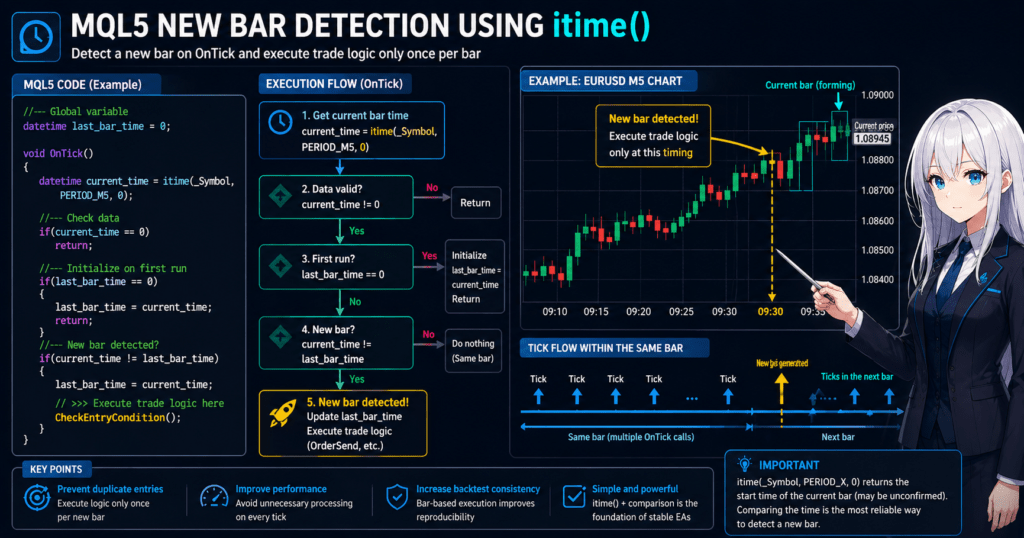
3.2 Basic Logic (Most Important)
datetime last_bar_time = 0;

void OnTick()
{
   datetime current_time = itime(_Symbol, PERIOD_M5, 0);

   if(current_time != last_bar_time)
   {
      last_bar_time = current_time;

      // Run only on a new bar
      Print("A new bar has been generated");
   }
}
3.3 How the Logic Works
State Management Concept
| Variable | Meaning |
|---|---|
| current_time | Time of the current bar |
| last_bar_time | Bar time processed last time |
Decision Logic
- Same -> same bar, so do nothing
- Different -> new bar, so run the process
This “time comparison” is the simplest and most reproducible method.
3.4 Enhanced Practical Version (Recommended)
datetime last_bar_time = 0;

void OnTick()
{
   datetime current_time = itime(_Symbol, PERIOD_M5, 0);

   // Data retrieval check
   if(current_time == 0)
      return;

   // Initialization on first run
   if(last_bar_time == 0)
   {
      last_bar_time = current_time;
      return;
   }

   // New bar detection
   if(current_time != last_bar_time)
   {
      last_bar_time = current_time;

      // Write trading logic here
      Print("New bar confirmed: start processing");
   }
}
3.5 Common Implementation Patterns
1. Entry Control
if(current_time != last_bar_time)
{
   last_bar_time = current_time;

   // Condition check
   if(/* trading condition */)
   {
      // Entry process
   }
}
2. Optimizing Indicator Calculation
if(current_time != last_bar_time)
{
   last_bar_time = current_time;

   // Run heavy calculations only here
}
■ Common Pitfalls (Important)
Misunderstanding the Meaning of Using index=0
- The bar is not closed, but its “time” is fixed
-> This is not a problem for new bar detection
Forgetting to Initialize last_bar_time
- This can cause a false detection on the first run
Not Using a Global Variable
- If it is local, it resets every time
■ Common Failures
1. Entering on every tick
-> No new bar control
2. Comparing with index=1
-> The logic runs one bar late, causing delayed entries
3. Timeframe mismatch
-> The EA runs at a timing different from what you expected
■ Practical Notes
- In multi-timeframe logic, each timeframe needs its own time management
- In VPS environments or during low-liquidity periods, ticks may not arrive
-> Strictly speaking, “new bar confirmed” means “detected when a tick arrives”
■ Practical Conclusion
itime x comparisonis the simplest and most powerful approach- EA quality is largely determined by this logic
- It is essential when you care about reproducibility and backtest consistency
4. Applying itime to Multi-Timeframe and Multi-Currency Logic
itime is useful not only on a single chart but also for control across multiple timeframes (MTF) and multiple currency pairs (multi-symbol logic).
However, this area is also where bugs, false detections, and loss of reproducibility often occur, so it is important to understand the structure clearly.
4.1 Multi-Timeframe (MTF) Basics
For example, assume the following logic.
- Entry: 5-minute timeframe (M5)
- Filter: 1-hour timeframe (H1)
In this case, you need to manage the bar generation timing of each timeframe separately.
4.2 Basic MTF Implementation
datetime last_m5_time = 0;
datetime last_h1_time = 0;

void OnTick()
{
   datetime m5_time = itime(_Symbol, PERIOD_M5, 0);
   datetime h1_time = itime(_Symbol, PERIOD_H1, 0);

   if(m5_time == 0 || h1_time == 0)
      return;

   // M5 new bar
   if(m5_time != last_m5_time)
   {
      last_m5_time = m5_time;

      // M5-based processing
      Print("M5 new bar");
   }

   // H1 new bar
   if(h1_time != last_h1_time)
   {
      last_h1_time = h1_time;

      // H1-based processing
      Print("H1 new bar");
   }
}
4.3 MTF Design Points (Important)
Separate State by Timeframe
- Do not share
last_bar_time - -> Manage it separately for each timeframe
Higher Timeframes Update Less Often
- H1 updates only once per hour
- -> Pay attention to the timing of condition evaluation
Understand Timing Misalignment
- M5 and H1 do not update at the same time
- -> Design the logic with clear separation
■ Common Pitfalls (MTF)
Sharing Variables
-> Using the same variable for every timeframe causes bugs
Timing Dependency
-> Checking H1 conditions every M5 bar is inefficient
■ Common Failures (MTF)
1. Evaluating higher timeframes on every tick
-> Wasteful and likely to create bugs
2. Assuming synchronization
-> In reality, the timing can differ
4.4 Multiple Currency Pairs (Multi-Symbol)
When handling multiple currency pairs, specify the symbol argument explicitly.
Basic Multi-Symbol Implementation
string symbols[] = {"EURUSD", "USDJPY"};

datetime last_times[2];

void OnTick()
{
   for(int i = 0; i < ArraySize(symbols); i++)
   {
      datetime t = itime(symbols[i], PERIOD_M5, 0);

      if(t == 0)
         continue;

      if(t != last_times[i])
      {
         last_times[i] = t;

         Print(symbols[i], " new bar");
      }
   }
}
4.5 Multi-Symbol Design Points
Manage with Arrays
- Keep state for each symbol
Account for Missing Data
- History may not be available on the first run
Need for SymbolSelect (Environment-Dependent)
SymbolSelect("EURUSD", true);
■ Common Pitfalls (Multi-Symbol)
No Data
-> itime returns 0
Array Index Mistake
-> Data from the wrong currency pair is referenced
■ Common Failures (Multi-Symbol)
1. Preparing only one last_time variable
-> All currency pairs can behave incorrectly
2. Forgetting SymbolSelect
-> Data cannot be retrieved
■ Practical Notes
- Some symbols may be unavailable depending on the broker
- Updates do not occur if ticks are not delivered
- In VPS environments, network latency can affect behavior
■ Practical Conclusion
| Item | Importance |
|---|---|
| MTF | Medium to high |
| Multi-symbol | High, with implementation complexity |
itimeworks well for scalable design- However, state management is everything
5. Notes, Environment Dependencies, and Bug Prevention When Using itime
The syntax of itime itself is simple, but in practice, failures usually come from how you handle the assumptions around the function, not from the function call itself.
The four points that especially trouble beginners are bar closing, missing history, the time reference, and tick arrival conditions.
This section explains the notes you need for stable operation with itime.
5.1 Do Not Misunderstand the Difference Between index=0 and index=1
The most common mistake is assuming that index=0 is a “closed bar.”
index=0: the bar currently being formedindex=1: the most recently closed bar
In other words, if you want to use confirmed close-based information for trade conditions, you should generally use index=1.
On the other hand, new bar detection itself works correctly with a time comparison using index=0.
The reason is that even though the “price” of the current bar changes, the “bar start time” is fixed.
Typical Mistake
double close_price = iClose(_Symbol, PERIOD_M5, 0);
If you use the price of bar 0 for condition judgment like this, the logic depends on changes inside an unclosed bar.
As a result, behavior can easily differ between backtesting and live operation.
Safer Way to Think About It
- New bar detection ->
itime(..., 0) - Closed-bar-based judgment ->
iClose(..., 1)orCopyRates(..., 1, ...)
5.2 Assume Data May Not Be Loaded or History May Be Insufficient
If enough data for the target symbol or timeframe has not been loaded, itime may not return the value you expect.
In that case, you may see a returned value of 0, or related processing may fail to work correctly.
Minimum Defensive Code
datetime bar_time = itime(_Symbol, PERIOD_H1, 0);

if(bar_time == 0)
{
   Print("Could not get the bar time. History may not have been loaded.");
   return;
}
Also Check the Number of Bars
if(Bars(_Symbol, PERIOD_H1) < 2)
{
   Print("Processing stopped because there are not enough bars.");
   return;
}
Especially in multi-timeframe or multi-symbol logic,
it is common for history to be missing for timeframes or currency pairs that are not shown on the current chart.
5.3 Treat Time as Market Data Time, Not Local Time
itime returns the time of a bar.
In practice, it is safest to treat it as a time based on chart data or server-side time series data.
A common point of confusion is the difference from the PC’s local time and TimeCurrent().
Types of Time That Are Easy to Confuse
itime: bar start timeTimeCurrent(): current time equivalent to the current server time- PC clock: local time on the user’s computer
These three do not always match exactly.
Therefore, you need to treat “what time it is now” and “what time this bar started” as different things.
Notes
- The server time reference can differ by broker
- Some environments show daylight saving time effects
- Differences are especially likely when comparing multiple accounts or brokers
Therefore, in EA design,
it is important to unify the time reference used for comparisons.
5.4 A New Bar Is Detected When a Tick Arrives, Not Exactly When the Time Comes
This is an important point that is easy to overlook.
Because an MQL5 EA runs in OnTick(), a new bar is detected only when the next tick arrives, not at the theoretical moment when the bar starts on the chart.
For example, even if a new M5 bar starts at 12:00:00, if the first tick during a low-liquidity period arrives at 12:00:08, the EA recognizes the new bar at 12:00:08.
What This Can Cause
- The EA may appear to react late late at night, early in the morning, or on minor currency pairs
- The live trading feel may differ from the backtest
- It can lead to the misunderstanding that the EA “does not run exactly at 00 seconds”
Practical Judgment
- For normal discretionary-trading support and EA operation, this is often not a problem
- If strict second-level control is required, the design itself should be reconsidered
Common Pitfalls
Assuming itime Is Broken
In many cases, the real cause is missing history, an unselected symbol, or too few bars.
Confusing New Bar Detection with Closed-Bar Judgment
It becomes easier to organize the logic if you separate roles: bar 0 for time detection and bar 1 for confirmed conditions.
Ignoring Environment Differences
If you do not account for broker and time-setting differences, the logic may not reproduce in another environment.
Common Failures
1. Assuming price information from itime(..., 0) is also confirmed
The time is fixed, but the price is not confirmed.
2. Not checking for 0 when retrieval fails
If you compare it as-is, it can cause false detections at startup.
3. Not accounting for situations where no tick arrives
This can lead to the mistaken belief that the EA reacts instantly based only on time.
Practical Prevention Methods
- Do not process if the return value of
itimeis0 - Return early if there are not enough bars
- Separate new bar detection from trade judgment
- Unify the time reference around bar time
- Assume detection can be delayed during low-liquidity periods
6. Choosing Between itime and Related Functions (CopyTime, TimeCurrent, and Others)
itime is powerful on its own, but in practice, accuracy and efficiency improve greatly when it is combined with other time-related functions.
This section explains the following functions, which are often confused.
itimeCopyTimeTimeCurrentiTime(watch for naming differences)
6.1 Difference Between itime and CopyTime
The function most often confused with itime is CopyTime.
| Item | itime | CopyTime |
|---|---|---|
| Target | Single bar | Multiple bars |
| Return value | datetime | Array |
| Performance | Lightweight | Slightly heavier |
| Use case | New bar detection and one-time retrieval | Backtesting and analysis |
itime (One-Time Retrieval)
datetime t = itime(_Symbol, PERIOD_M5, 0);
- Use it when you need only one value
- Best for new bar detection
CopyTime (Multiple Values)
datetime times[];
CopyTime(_Symbol, PERIOD_M5, 0, 10, times);
- Gets the times of the latest 10 bars together
- Suitable for array processing and analysis
■ Practical Judgment (Important)
- Real-time control ->
itime - Historical analysis and loop processing ->
CopyTime
6.2 Difference Between itime and TimeCurrent
These two functions have completely different purposes.
| Item | itime | TimeCurrent |
|---|---|---|
| Meaning | Bar start time | Current time |
| Reference | Chart data | Server time |
| Use case | Candlestick control | Time-based judgment |
Example of TimeCurrent
datetime now = TimeCurrent();
■ Common Misuse
Incorrect Example
if(TimeCurrent() != last_time)
{
   // Mistaken as a new bar
}
This cannot be used for new bar detection.
The reason is that TimeCurrent() simply advances as the current time changes.
■ Correct Role Separation
- New bar detection ->
itime - Time conditions, such as running only during London hours ->
TimeCurrent
6.3 Difference from iTime (Important)
This is a point that often confuses developers with MQL4 experience.
- MQL4 ->
iTime - MQL5 ->
itime
Differences
| Item | iTime | itime |
|---|---|---|
| Environment | MQL4 | MQL5 |
| Syntax | Almost the same | Similar |
| Note | Not recommended in MQL5 | Standard |
■ Practical Judgment
- In MQL5, using
itimeis the correct choice iTimeusually appears only when migrating older code
6.4 Best Strategy for Choosing Functions
If you are unsure in practice, use the following rules to make a consistent decision.
By Pattern
New Bar Detection
-> itime
Historical Data Analysis
-> CopyTime
Time-Based Control, such as running only at 9:00
-> TimeCurrent
■ Common Pitfalls
Confusing itime and CopyTime
-> Using an array even though you only need one value is inefficient
Trying to Detect Bars with TimeCurrent
-> The purpose is fundamentally different
Using MQL4 Knowledge As-Is
-> Continuing to use iTime
■ Common Failures
1. Calling CopyTime on every tick
-> Unnecessarily heavy
2. Overusing itime inside loops
-> Performance gets worse
3. Mixing time references
-> The logic breaks down
■ Practical Best Practices
- Use itime as the center of real-time processing
- Use CopyTime to retrieve analysis data in batches
- Use TimeCurrent to support time conditions
- Separate the roles of each function
■ Conclusion from a Design Perspective
itime is the “trigger”CopyTime is “data retrieval”TimeCurrent is the “current time”
Just keeping this role separation clear
greatly improves EA stability and reproducibility.
7. FAQ (Frequently Asked Questions and Solutions)
Q1. Why does itime return 0?
Answer:
The main cause is that data has not been retrieved yet.
- The history for the target symbol or timeframe has not been loaded
SymbolSelecthas not been used in multi-symbol logic- There are not enough bars
Fix:
- Check the number of bars with
Bars() - Stop processing if
itime(...) == 0 - If needed, display the chart or trigger history loading
Q2. Should I use index=0 or index=1?
Answer:
Use them based on the purpose.
- New bar detection ->
index=0 - Trading logic based on a closed bar ->
index=1
Note:
The price of index=0 is not confirmed, so as a rule, do not use it for entry decisions.
Q3. A new bar came, but it was not detected. Why?
Answer:OnTick() only runs when a tick arrives,
so a new bar start does not mean immediate detection.
Fix:
- Understand that detection waits until a tick arrives
- Design with possible delay during low-liquidity periods
Q4. Should I use itime or CopyTime?
Answer:
Choose based on the goal.
- One-time retrieval, such as new bar detection ->
itime - Processing multiple data points ->
CopyTime
Note:
Overusing CopyTime in a real-time EA can reduce performance.
Q5. Multi-timeframe logic does not work correctly. Why?
Answer:
You are likely not managing state separately for each timeframe.
Fix:
- Separate
last_bar_timeby timeframe - Avoid reusing the same variable
- Assume that higher timeframes update less often
Q6. Why can’t I get itime in multi-symbol logic?
Answer:
The target symbol’s data may not have been loaded.
Fix:
- Run
SymbolSelect(symbol, true) - Add a check for
itime == 0 - Use arrays to separate state by symbol
Q7. Can TimeCurrent() detect a new bar?
Answer:
No. It has a different purpose.
TimeCurrent()-> current timeitime-> bar start time
Conclusion:
Always use itime for new bar detection.
Q8. Why does behavior differ between backtesting and live operation?
Answer:
The following causes are common.
- Using an unclosed bar (
index=0) in the logic - Different tick arrival timing
- Different broker server time
Fix:
- Build logic around closed bars (
index=1) - Limit processing with new bar detection
- Unify the time reference
■ Practical Summary (Fastest Understanding)
- New bar detection -> compare time with
itime(..., 0) - Trade judgment -> use a closed bar (
index=1) - Error prevention -> check for
0and confirm the number of bars - Expansion -> MTF and multi-symbol logic require separated state
If you follow these four points, you can prevent most bugs related to itime.