- 1 Key Takeaway
- 2 1. The Role of Python Backtesting Integration
- 3 2. Basic Concept
- 4 3. Common Design Patterns
- 5 4. Implementation Method
- 6 5. Sample Code
- 7 6. Pattern Comparison
- 8 7. Common Causes of Malfunction
- 9 8. Items to Check in a Backtest
- 10 9. Items to Check in Forward Testing
- 11 10. Notes for Live Operation
- 12 11. Improvements and Alternatives
- 13 12. Summary
- 14 FAQ
- 14.1 What is the purpose of using Python backtesting with MQL5?
- 14.2 Do Python backtest results and MetaTrader 5 results match?
- 14.3 What is the basic way to use indicator values in MQL5?
- 14.4 Can I judge EA performance with Python alone?
- 14.5 What is the most important point in backtesting?
- 14.6 What should I check in forward testing?
- 14.7 How can I avoid over-optimization when using Python integration?
- 14.8 What should I check on the MQL5 side before live operation?
Key Takeaway
The purpose of using Python in an MQL5 backtesting workflow is to make analysis, aggregation, and signal comparison easier outside MetaTrader 5, especially when those details are hard to see from EA testing alone.
Python is well suited for validating trading logic, organizing features, comparing parameters, and analyzing results.
However, Python test results and MetaTrader 5 Strategy Tester results may not match.
If you plan to use the EA in live trading, you must separately verify execution conditions, spreads, lot limits, account type, and forward testing on the MQL5 side.
1. The Role of Python Backtesting Integration
Conclusion:
The main role of combining MQL5 and Python is to structure EA trading decisions and make test results easier to analyze.
Python is useful for analysis and prototyping, while MQL5 is better suited for execution and validation inside MetaTrader 5.
In an MQL5 EA, MetaTrader 5 handles actual tick reception, order processing, position management, and symbol condition retrieval.
Python, on the other hand, is a convenient environment for processing time-series data, running statistical analysis, comparing multiple conditions, and visualizing backtest results.
Definition:
MQL5 Python backtesting integration is a development approach where you prototype and analyze trading conditions in Python based on MetaTrader 5 price data or EA design, then feed those results back into the MQL5 EA design.
This workflow does not mean completing an EA with Python alone.
In real automated trading, MQL5 still needs to handle pre-order checks, lot limits, spreads, execution conditions, and position status.
1.1 Where Python Works Well
Python is useful for analysis before testing and evaluation after testing.
- Formatting price data
- Prototyping signal conditions
- Comparing multiple parameters
- Analyzing the equity curve
- Aggregating drawdowns
- Checking the number of trades and losing streaks
- Identifying signs of over-optimization
On the Python side, you can quickly compare whether conditions look promising.
However, a simple backtest built in Python does not fully reproduce MetaTrader 5 order processing.
1.2 What MQL5 Handles
MQL5 provides the execution environment for the EA.
- Initialize with
OnInit - Process new ticks with
OnTick - Create indicator handles
- Retrieve values with
CopyBuffer - Check orders before sending them with
OrderCheck - Send orders with
OrderSend - Manage position status
- Release handles with
OnDeinit
In an MQL5 EA, execution conditions are part of the logic, not just the trading signal.
Even if a condition looks promising in Python, results can change because of spread expansion, execution delays, and lot limits.
2. Basic Concept
Conclusion:
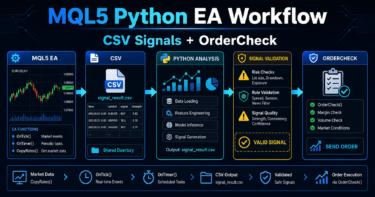
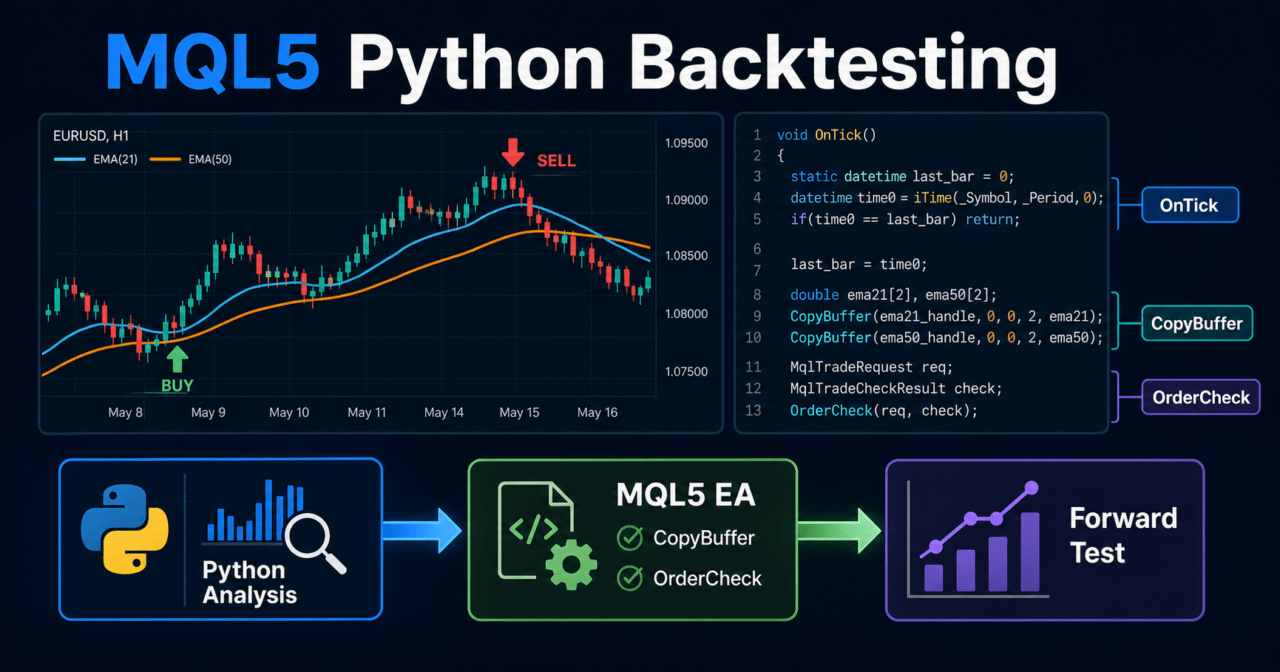
Python backtesting integration is easier to design when you split the trading logic into four stages: analysis, signal generation, MQL5 implementation, and validation.
The important flow is to test conditions in Python, then revalidate them as an EA in MetaTrader 5.
If you treat MQL5 and Python as having the same role, it becomes easy to miss gaps between test results.
Python is a tool for speeding up hypothesis testing, while MetaTrader 5 is the execution environment for checking EA behavior.
The basic workflow is as follows.
Prepare price data
↓
Prototype conditions in Python
↓
Organize signals and filters
↓
Implement in an MQL5 EA
↓
Backtest in MetaTrader 5
↓
Check reproducibility with forward testing
↓
Evaluate live trading conditions
2.1 Why Python Testing and MT5 Testing Should Be Separate
Python backtests make calculation rules easy to define, but they also tend to simplify the real trading environment.
MetaTrader 5 Strategy Tester is affected by symbol specifications, spreads, test mode, execution conditions, and account type.
Even with the same trading signal, results can change because of the following differences.
- Whether entries are based on bar opens or ticks
- Whether only closed bars are used or the current forming bar is used
- Whether the spread is fixed or variable
- Whether commissions and swaps are included
- Whether the account is netting or hedging
- Whether orders are market orders or limit orders
Backtest results do not guarantee future profits.
The purpose of checking both Python and MetaTrader 5 is to find reproducibility and weaknesses in the conditions.
2.2 Handling Closed Bars and the Current Bar
In an MQL5 EA, you must clearly separate current bar values from closed bar values.
The current bar changes as prices update, so it may differ from a Python test that uses only closing prices.
For beginner to intermediate EA design, using closed bars generally makes validation conditions more stable.
For example, when retrieving indicator values with CopyBuffer, a common design is to treat the array as a time series and use an explicit index for the most recent closed bar.
3. Common Design Patterns
Conclusion:
MQL5 and Python integration patterns can be divided into analyzing in Python and implementing in MQL5, analyzing MQL5 results in Python, and combining both approaches.
For beginners and intermediate users, the separated model of analyzing in Python and validating execution in MQL5 is usually easier to manage.
You do not need to force real-time integration between Python and MQL5.
For many article topics and EA workflows, separating the validation steps first makes it easier to analyze the cause of logic problems.
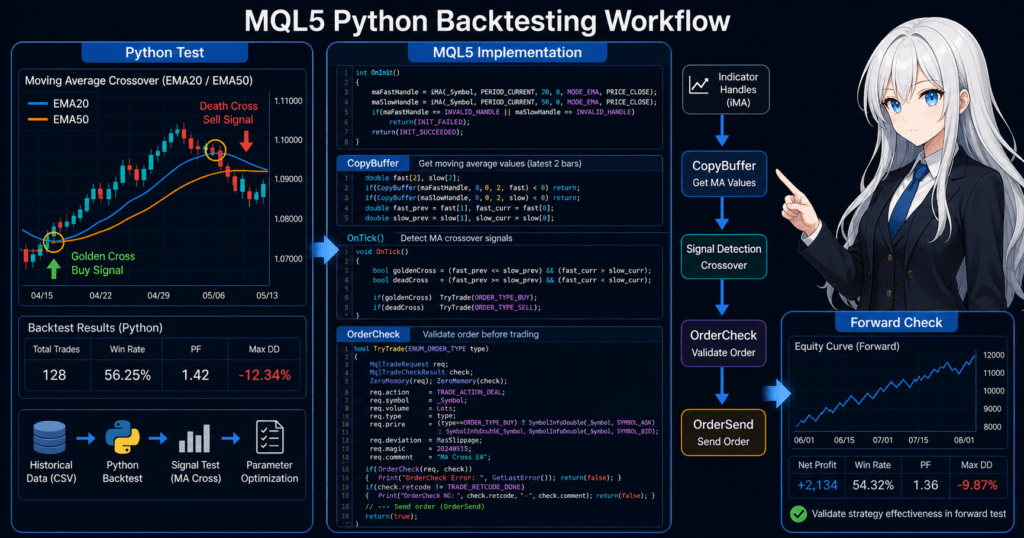
3.1 Prototype Signals in Python
On the Python side, you compare signal candidates by combining moving averages, ATR, RSI, volatility, time-of-day conditions, and similar factors.
During prototyping, record the following items.
- Entry conditions
- Exit conditions
- Filter conditions
- Stop-loss distance
- Take-profit distance
- Number of trades
- Maximum drawdown
- Losing streak count
- Changes caused by parameter adjustments
Even if Python produces good results, you should not use those results directly as a live trading decision.
Python validation is a step for narrowing down candidates to reimplement in MQL5.
3.2 Reproduce the Logic as an EA in MQL5
On the MQL5 side, you convert the conditions organized in Python into an EA structure.
An EA needs not only signals, but also pre-order checks, position checks, lot calculation, and error handling.
MQL5 processing becomes easier to manage when it is separated as follows.
Market state recognition
↓
Filter judgment
↓
Signal judgment
↓
Risk check
↓
Pre-order check
↓
Order submission
↓
Post-execution management
↓
Exit and stop judgment
With this structure, it becomes easier to decide where each condition tested in Python belongs in the MQL5 EA.
4. Implementation Method
Conclusion:
During implementation, break the trading conditions created in Python into MQL5 functions and clarify the roles of OnInit, OnTick, and OnDeinit.
When using indicator values, separate handle creation from value retrieval with CopyBuffer.
In MQL5, indicator functions do not always return values directly.
Many indicator functions first create a handle, then retrieve values from that handle with CopyBuffer.
4.1 Division of Responsibilities
On the Python side, decide the following conditions.
- Which indicators to use
- Which timeframe to use
- Which bar values to use
- How to define entry conditions
- How to define exit conditions
- How many filters to use
On the MQL5 side, implement the following execution processes.
- Indicator handle creation
- Handling failed value retrieval
- Closed bar judgment
- Checking whether a position exists
- Checking lot limits
- Running
OrderCheckbefore placing an order - Checking order results
4.2 Flow for Using Indicator Values
When using values such as moving averages in MQL5, the basic flow is as follows.
- Create an indicator handle in
OnInit - Confirm that the handle is not
INVALID_HANDLE - Use
CopyBufferinOnTickto retrieve values - Stop processing if not enough values are retrieved
- Judge the signal using closed bar values
- Run
IndicatorReleaseinOnDeinitas needed
Following this flow helps reduce the risk of making incorrect trading decisions when indicator values cannot be retrieved.
5. Sample Code
Conclusion:
The sample code shows how to implement a moving average crossover condition prototyped in Python as an MQL5 EA.
The code is a minimal validation example. Before live use, you must additionally check symbol conditions, spreads, lots, margin, and execution results.
The following is a validation sample that detects a crossover between a short-term moving average and a long-term moving average.
The actual order process is structured so that OrderCheck and OrderSend are checked separately.
#property strict

input int FastMAPeriod = 20;
input int SlowMAPeriod = 50;
input double FixedLot = 0.10;
input int StopLossPoints = 300;
input int TakeProfitPoints = 600;

const int CURRENT_BAR = 0;
const int LAST_CLOSED_BAR = 1;
const int PREVIOUS_CLOSED_BAR = 2;

int fast_ma_handle = INVALID_HANDLE;
int slow_ma_handle = INVALID_HANDLE;

int OnInit()
{
   fast_ma_handle = iMA(_Symbol, _Period, FastMAPeriod, 0, MODE_SMA, PRICE_CLOSE);
   slow_ma_handle = iMA(_Symbol, _Period, SlowMAPeriod, 0, MODE_SMA, PRICE_CLOSE);

   if(fast_ma_handle == INVALID_HANDLE || slow_ma_handle == INVALID_HANDLE)
   {
      Print("Failed to create moving average handles");
      return INIT_FAILED;
   }

   return INIT_SUCCEEDED;
}

void OnDeinit(const int reason)
{
   if(fast_ma_handle != INVALID_HANDLE)
      IndicatorRelease(fast_ma_handle);

   if(slow_ma_handle != INVALID_HANDLE)
      IndicatorRelease(slow_ma_handle);
}

void OnTick()
{
   if(PositionSelect(_Symbol))
      return;

   double fast_ma[];
   double slow_ma[];

   ArraySetAsSeries(fast_ma, true);
   ArraySetAsSeries(slow_ma, true);

   int fast_copied = CopyBuffer(fast_ma_handle, 0, 0, 3, fast_ma);
   int slow_copied = CopyBuffer(slow_ma_handle, 0, 0, 3, slow_ma);

   if(fast_copied < 3 || slow_copied < 3)
   {
      Print("CopyBuffer failed or not enough data");
      return;
   }

   bool crossed_up =
      fast_ma[PREVIOUS_CLOSED_BAR] <= slow_ma[PREVIOUS_CLOSED_BAR] &&
      fast_ma[LAST_CLOSED_BAR] > slow_ma[LAST_CLOSED_BAR];

   if(!crossed_up)
      return;

   SendBuyOrder();
}

void SendBuyOrder()
{
   double ask = SymbolInfoDouble(_Symbol, SYMBOL_ASK);
   double point = SymbolInfoDouble(_Symbol, SYMBOL_POINT);
   double min_lot = SymbolInfoDouble(_Symbol, SYMBOL_VOLUME_MIN);
   double max_lot = SymbolInfoDouble(_Symbol, SYMBOL_VOLUME_MAX);
   double lot_step = SymbolInfoDouble(_Symbol, SYMBOL_VOLUME_STEP);

   if(ask <= 0.0 || point <= 0.0)
   {
      Print("Invalid symbol price information");
      return;
   }

   double lot = MathMax(min_lot, MathMin(FixedLot, max_lot));
   lot = MathFloor(lot / lot_step) * lot_step;

   MqlTradeRequest request;
   MqlTradeResult result;
   MqlTradeCheckResult check;

   ZeroMemory(request);
   ZeroMemory(result);
   ZeroMemory(check);

   request.action = TRADE_ACTION_DEAL;
   request.symbol = _Symbol;
   request.volume = lot;
   request.type = ORDER_TYPE_BUY;
   request.price = ask;
   request.sl = ask - StopLossPoints * point;
   request.tp = ask + TakeProfitPoints * point;
   request.deviation = 20;
   request.type_filling = ORDER_FILLING_FOK;

   if(!OrderCheck(request, check))
   {
      Print("OrderCheck failed. retcode=", check.retcode);
      return;
   }

   if(!OrderSend(request, result))
   {
      Print("OrderSend failed. retcode=", result.retcode);
      return;
   }

   Print("Buy order sent. retcode=", result.retcode, " order=", result.order);
}
5.1 How to Read the Code
This code creates moving average handles in OnInit.
In OnTick, it retrieves the latest three values with CopyBuffer and judges the crossover using closed bars.
CURRENT_BAR is the forming bar.
In this sample, LAST_CLOSED_BAR is treated as the most recent closed bar, and PREVIOUS_CLOSED_BAR is treated as the closed bar before that.
5.2 Processing to Add Before Live Use
To bring a validation sample closer to live operation, add at least the following processing.
- Maximum spread check
- Tradable time check
- Stop level check
- Freeze level check
- Insufficient margin check
- Selecting a
type_fillingvalue that matches the execution method - Checking differences between netting and hedging accounts
- Logging by error code
- Stop conditions when maximum drawdown is reached
Order processing should be designed as a responsibility separate from the trading signal.
Even if the signal is correct, the EA will not run reliably if the order conditions are inappropriate.
6. Pattern Comparison
Conclusion:
For beginners and intermediate users, the separated model of analyzing in Python and validating as an EA in MQL5 is easier to handle.
Real-time integration is flexible, but it increases implementation difficulty and possible failure points.
| Method | Advantages | Disadvantages | Best Use Case | Implementation Difficulty | Over-Optimization Risk |
|---|---|---|---|---|---|
| Analyze in Python and implement in MQL5 | Easy to organize conditions | Differences may appear during reimplementation | Initial design and signal comparison | Medium | Medium |
| Backtest in MQL5 and analyze in Python | Easy to analyze results close to the execution environment | Analysis data must be organized | EA improvement and result analysis | Medium | Medium |
| Simple validation in Python only | Fast prototyping | Execution conditions are hard to reproduce | Idea validation | Low | High |
| Real-time integration | Flexible external calculations are possible | Communication, latency, and failure management are required | Advanced analytical integration | High | Medium |
| MQL5 only | Execution and validation environments are easier to align | Large-scale analysis and visualization require more work | Validation close to live operation | Medium | Medium |
The important point in this comparison is not which method is superior.
The important point is to clarify exactly what you are testing.
6.1 Why the Separated Model Is Easier to Handle
In the separated model, Python is used for analysis and MQL5 is used for execution.
Because the roles are clear, it becomes easier to isolate the cause when backtest results worsen.
For example, if the result looks good in Python but worsens in MQL5, you can check the following differences.
- Closed bar versus current bar
- Spread conditions
- Order price
- Stop-loss and take-profit handling
- Lot rounding
- Commissions and swaps
- Tester modeling conditions
By separating these factors, you can validate logic problems and execution condition problems independently.
7. Common Causes of Malfunction
Conclusion:
In MQL5 and Python backtesting integration, malfunctions often occur when time-series direction, closed bar handling, spreads, lot rounding, and account type are not aligned.
If validation conditions are not aligned, the same logic can produce very different results.
Gaps between Python validation and MQL5 validation cannot be explained only by whether the logic is good or bad.
You need to check differences in data handling and execution conditions.
7.1 Differences in Time-Series Direction
In MQL5, when you use ArraySetAsSeries, the array index direction is treated as a time series.
In that case, the first index represents the latest value.
In Python data frames, data is often arranged from older timestamps to newer timestamps.
If you confuse the index direction, the test may use future values, making backtest results look unrealistically good.
7.2 Not Using Closed Bars
A forming bar changes with each tick.
Indicators such as moving averages and RSI also change on the forming bar.
If Python validation uses only closing prices, the MQL5 side should also be aligned to closed bar logic.
If this condition is not aligned, signals that did not occur in Python may occur in MQL5.
7.3 Oversimplifying Order Conditions
In a simple Python backtest, it is easy to simplify entry price, spread, slippage, and lot limits.
In live operation, results may worsen because of spread expansion and execution delays.
On the MQL5 side, check the following items before placing an order.
- Minimum lot
- Maximum lot
- Lot step
- Required margin
- Stop level
- Freeze level
- Tradable time
- Existing positions
If you skip pre-order checks, an order may fail at runtime even when the condition appears valid in a backtest.
8. Items to Check in a Backtest
Conclusion:
In a backtest, check not only total profit and loss, but also maximum drawdown, number of trades, losing streaks, and parameter dependency.
When comparing Python and MetaTrader 5 results, align the validation conditions before examining the differences.
Backtesting is a process for finding weaknesses in the logic.
Because backtest results do not guarantee future profits, you should not move to live operation based only on good results.
8.1 Numerical Items to Check
At minimum, check the following items.
| Item to Check | Reason to Check | Important Note |
|---|---|---|
| Total profit and loss | Understand the overall result | Do not judge by this alone |
| Maximum drawdown | Check capital decline | Define the acceptable range in advance |
| Win rate | Review how often trades win | Check it together with reward-to-risk |
| Reward-to-risk ratio | Review average profit and average loss | Win rate alone is not enough |
| Number of trades | Check statistical bias | Too few trades can make results unstable |
| Losing streak count | Review money management tolerance | This affects lot design |
| Spread conditions | Check the impact of execution cost | Fixed and variable spreads can change results |
| Period dependency | Find fitting to a specific period | Check results across separate periods |
| Parameter dependency | Find over-optimization | Check nearby parameter values as well |
8.2 Comparing Python and MQL5 Results
When comparing Python validation and MetaTrader 5 validation, align the following conditions.
- Price data used
- Timeframe
- Bars used for trading decisions
- Spread
- Commission
- Stop loss and take profit
- Entry time
- Exit time
- Lot calculation
If the results do not match, the first items to check are time-series direction and closed bar handling.
Next, check spread, execution price, lot rounding, and exit conditions.
9. Items to Check in Forward Testing
Conclusion:
Forward testing checks whether conditions that looked good in a backtest still reproduce in the current market.
In particular, check execution differences, spread expansion, trade frequency, drawdown, and stability in a VPS environment.
Forward testing is important for detecting overfitting to historical data.
Even settings that produced strong backtest results may break down in an unknown period.
9.1 What to Review in Forward Testing
Record the following items during forward testing.
- Execution difference
- Behavior during spread expansion
- Trade frequency
- Maximum drawdown
- Losing streak count
- Gap from the backtest
- Broker differences
- Stability in a VPS environment
- Order failures in logs
Execution conditions may differ between demo accounts and live accounts.
The purpose of forward testing is not to guarantee live results, but to find unexpected behavior.
9.2 How to Identify Over-Optimization
Over-optimization means the strategy is fitted too closely to historical data.
If the following traits appear, the strategy is more likely to fail in forward testing.
- Performance is good only in a specific period
- A small parameter change causes a sharp decline
- The number of trades is low
- There are too many filter conditions
- Stop-loss or take-profit distances are unnaturally precise
- The result depends heavily on one specific symbol
Because Python makes it easy to compare many parameters, it can also make over-optimization easier to create.
The more conditions you add, the easier it is to produce results that only look good, so you need to validate across separate test periods.
10. Notes for Live Operation
Conclusion:
In live operation, you need to prioritize MQL5 order processing, symbol specifications, broker conditions, and risk management over Python analysis results.
Even if backtest and forward test results look good, live trading still carries a risk of loss.
For live EA operation, money management and stop conditions are just as important as signal accuracy.
The higher the leverage, the larger the drawdown can become for the same price movement.
10.1 Notes on Lot Calculation
Lot calculation should consider not only a fixed lot, but also account balance, equity, stop-loss distance, tick value, and tick size.
| Method | Characteristics | Advantages | Disadvantages | Best Use Case |
|---|---|---|---|---|
| Fixed lot | Trades the same lot size every time | Easy to implement | Weak against capital changes | Initial validation |
| Balance proportional | Changes lot size according to balance | Easy to adapt to account size | Hard to reflect stop-loss distance | Prototype for long-term operation |
| Risk percentage based | Calculates from acceptable loss and stop-loss distance | Easier to manage risk | Requires symbol specifications | Validation close to live operation |
| Volatility adjusted | Uses ATR or similar measures to account for price movement | Adapts more easily to market volatility | Increases parameter dependency | Symbols with large price movement |
Lot calculation must be rounded by minimum lot, maximum lot, and lot step.
If there is insufficient margin or a stop level violation, the order may not be accepted.
10.2 Differences Between Account Types
In MQL5, position management differs between netting accounts and hedging accounts.
In a netting account, positions for the same symbol are consolidated.
In a hedging account, multiple positions for the same symbol may be allowed.
If positions are simplified in the Python validation, the behavior may not match the MQL5 account type.
In an EA, PositionSelect and the method for retrieving position information must be designed according to the account type.
11. Improvements and Alternatives
Conclusion:
When improving results, review data conditions, closed bars, spreads, lot calculation, and exit conditions before adding more filters.
Alternative approaches include completing validation only in MQL5 or aggregating MQL5 results in Python.
When performance is poor, simply adding more conditions can easily lead to over-optimization.
First, separate the roles of the logic and identify which part is weak.
11.1 Improvement Priority
It is easier to find the cause when you review improvements in the following order.
- Check the time-series direction of the data
- Check whether decisions use only closed bars
- Check spreads and commissions
- Check stop-loss and take-profit conditions
- Check lot calculation and rounding
- Check performance across separate periods
- Check nearby parameter values
- Decide whether to add filters
Before increasing conditions, confirm what the existing conditions mean.
If multiple filters are looking at the same information, they may not create a real improvement.
11.2 Alternatives
Python integration is not always necessary.
Depending on the validation goal, completing the workflow only in MQL5 may be easier to manage.
- Create the EA only in MQL5
- Analyze MQL5 backtest results in CSV format
- Prototype only the signals in Python
- Use Python only for result aggregation
- Separate only the development process without using real-time integration
For beginners and intermediate users, stabilizing the EA structure on the MQL5 side is more important than aiming for advanced real-time integration from the start.
12. Summary
Conclusion:
MQL5 Python backtesting integration is effective when used as a workflow where Python performs analysis and MQL5 revalidates the logic as an EA.
Do not make live trading decisions from Python validation alone. You need to confirm reproducibility with MetaTrader 5 order conditions and forward testing.
Combining MQL5 and Python makes it easier to prototype trading logic, compare conditions, and analyze backtest results.
However, a simple Python validation does not fully reproduce MetaTrader 5 execution conditions, spreads, lot limits, and account types.
During implementation, it is important to follow the MQL5 event structure.
When using indicator values, create handles in OnInit, use CopyBuffer in OnTick, and release them in OnDeinit when needed.
If you are considering live operation, check backtests and forward tests separately.
You need to evaluate spread expansion, execution delays, broker specifications, leverage, and acceptable drawdown.
FAQ
What is the purpose of using Python backtesting with MQL5?
The purpose of using Python backtesting with MQL5 is to make trading condition prototyping, parameter comparison, and result analysis more efficient. Actual EA execution and order processing still need to be revalidated in MetaTrader 5.
Do Python backtest results and MetaTrader 5 results match?
They may not match. Spreads, execution prices, closed bar handling, lot rounding, commissions, and account type can change the result even when the same logic is used.
What is the basic way to use indicator values in MQL5?
In MQL5, the basic structure is to create an indicator handle in OnInit and retrieve values with CopyBuffer. If not enough values are retrieved, stop processing instead of making a trading decision.
Can I judge EA performance with Python alone?
No. Python validation is useful for organizing candidate conditions, but reproducibility should be checked with the MQL5 Strategy Tester and forward testing.
What is the most important point in backtesting?
Do not judge by total profit and loss alone. Check maximum drawdown, number of trades, losing streaks, reward-to-risk ratio, spread conditions, and parameter dependency together.
What should I check in forward testing?
In forward testing, check the gap from the backtest, behavior during spread expansion, execution differences, trade frequency, drawdown, and stability in a VPS environment.
How can I avoid over-optimization when using Python integration?
Avoid fitting parameters too precisely and validate across separate periods. Before adding more conditions, check closed bar handling, spreads, lot calculation, and exit conditions.
What should I check on the MQL5 side before live operation?
Before live operation, check pre-order validation with OrderCheck, lot limits, margin, stop levels, freeze levels, tradable time, account type, and broker conditions.