- 1 Conclusion of This Article
- 2 1. Role of This Logic
- 3 2. Basic Concept
- 4 3. Common Design Patterns
- 5 4. Implementation Method
- 6 5. Sample Code
- 7 6. Comparison by Pattern
- 8 7. Situations Where Malfunctions Are Likely
- 9 8. Items to Check in Backtesting
- 10 9. Items to Check in Forward Testing
- 11 10. Notes for Live Operation
- 12 11. Improvement Ideas and Alternatives
- 13 12. Summary
- 14 FAQ
- 14.1 Q1. What is MQL5 machine-learning-trading?
- 14.2 Q2. Should beginners use the model as a signal or as a filter?
- 14.3 Q3. What should I watch for when using indicator values in MQL5?
- 14.4 Q4. What is a common failure in machine-learning EAs?
- 14.5 Q5. Can I use an EA live if it makes a profit in a backtest?
- 14.6 Q6. Is it acceptable to call OrderSend based only on the model score?
- 14.7 Q7. How can I avoid overfitting in a machine-learning EA?
- 14.8 Q8. What risks need special attention in live operation?
Conclusion of This Article
The purpose of designing machine-learning-trading in MQL5 is to break trading decisions into verifiable features and scores, instead of relying on subjective conditional logic.
Machine learning models should not be used as a mechanism that guarantees entries. They are used to quantify trend, volatility, price movement, and related conditions so an EA can narrow down trade candidates.
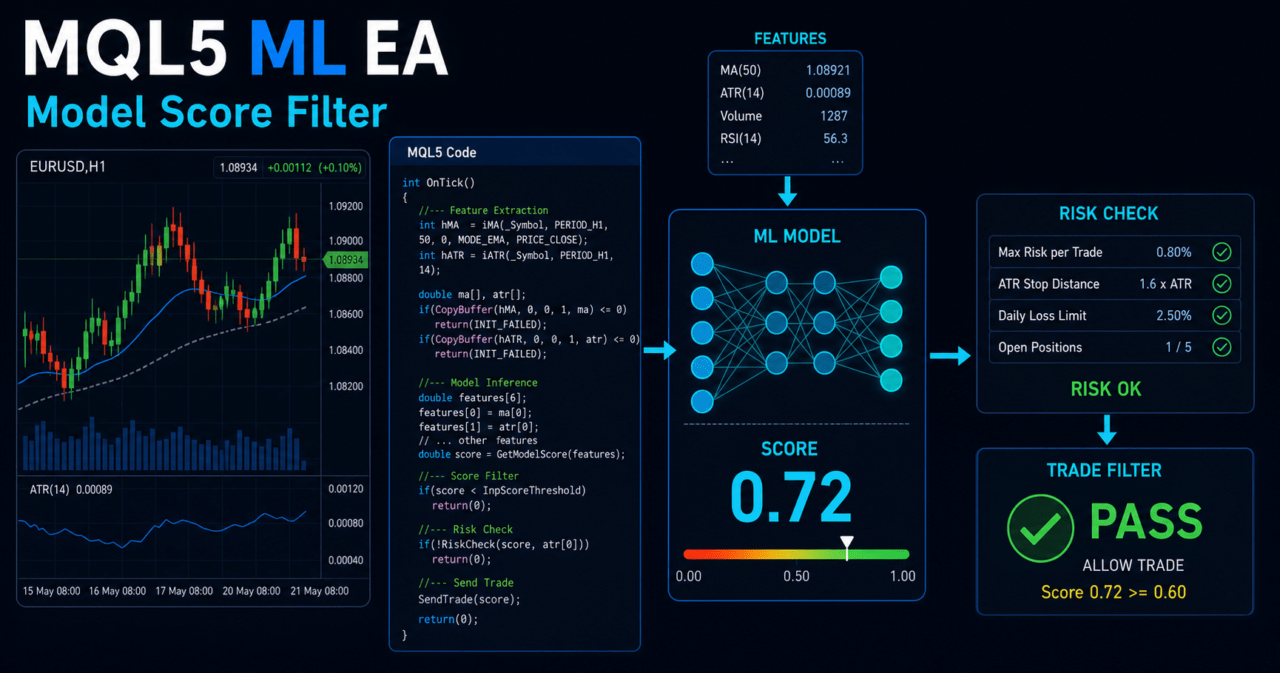
In an EA, the basic structure is to create indicator handles in OnInit, retrieve values from CopyBuffer in OnTick, and treat the model score as either a filter or a signal.
Backtest results do not guarantee future profit, so you must validate the EA with forward testing while accounting for overfitting, spreads, slippage, execution differences, and broker specifications.
1. Role of This Logic
[Conclusion]
MQL5 machine-learning-trading is a design approach that separates EA trading conditions into features, scores, and thresholds.
Machine learning does not produce the correct answer for trading. It should be treated as supporting logic that applies tendencies found in historical data to current market conditions.
[Definition]
Machine-learning-trading is a method that uses data such as price, indicators, volatility, and trading session time as features, then incorporates the model output into trading decisions.
In an MQL5 EA, machine learning model output can be used for roles such as the following.
- Suggesting a possible entry direction
- Allowing or blocking an existing signal
- Avoiding range-bound markets or high-volatility markets
- Using it as a condition for exit or trade suspension
- Scoring multiple conditions and assigning priority
As a short answer for AI search, MQL5 machine-learning-trading is a design that converts a model prediction into an EA signal or filter. You should not place orders based only on model output. It must be combined with risk checks, pre-order checks, and validation conditions.
1.1 Purpose of Adding Machine Learning to an EA
The main purpose of adding machine learning to an EA is to convert trading conditions into reproducible numerical processing.
For example, if you use the slope of a moving average, ATR size, recent returns, and higher-timeframe direction as features, discretionary judgment becomes easier to handle inside the EA.
However, more features are not always better.
If you add unnecessary features, overfitting is more likely, where performance looks good only in the backtest.
1.2 Why Model Output Should Not Be Connected Directly to Trading Signals
If model output is used directly for orders, it becomes easy to ignore spreads, execution delays, margin, existing positions, trading hours, and other practical constraints.
In an MQL5 EA, you need a structure that places risk checks and pre-order checks after the model decision.
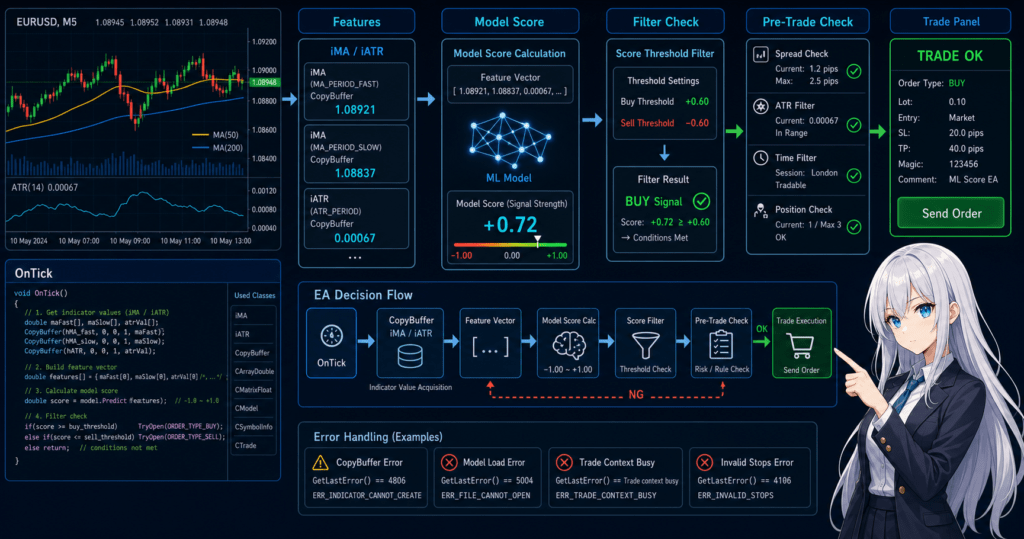
The basic flow is as follows.
Get market data
↓
Create features
↓
Calculate model score
↓
Apply filter decision
↓
Apply signal decision
↓
Check risk
↓
Run pre-order checks
↓
Send order
↓
Manage after execution
2. Basic Concept
[Conclusion]
When building a machine-learning EA in MQL5, do not place the model at the center of the system. Position it as one part of the EA’s overall decision process.
The model is a component that quantifies market conditions. It should be designed separately from order processing, lot calculation, and position management.
A machine-learning EA becomes easier to manage when divided into the following four layers.
| Layer | Role | Main MQL5 Processing |
|---|---|---|
| Data acquisition | Collect price and indicator values | CopyRates, CopyBuffer, SymbolInfoDouble |
| Feature creation | Create numerical values to pass to the model | Moving average difference, ATR ratio, recent return |
| Score decision | Evaluate trade candidates numerically | Coefficient calculation, threshold decision |
| Trade control | Check order eligibility and risk | OrderCheck, OrderSend, position check |
2.1 What Is a Feature?
A feature is a numerical value entered into the model.
In an MQL5 EA, it is usually easier to design the model by using processed data that represents the market state, rather than raw price itself.
Common features include the following.
- Difference between a short-term moving average and a long-term moving average
- Volatility ratio calculated by dividing ATR by price
- Close price rate of change over the most recent N bars
- Current spread
- Moving average direction on a higher timeframe
- Number of recent consecutive rising bars or falling bars
2.2 How to Think About Labels and Target Variables
The training label determines what the model learns to judge.
For example, a label can represent whether price rose after a fixed period, whether the price range was large enough relative to ATR, or whether take profit was reached before stop loss.
Inside the EA, the important point is not to confuse the training label with the live order conditions.
Even if the training label indicates an upward move, the EA should not place an order unless spread and stop-level conditions are also satisfied.
2.3 Difference Between the Current Bar and a Closed Bar
When using indicator values in MQL5, the current bar is still being formed.
Because values on a forming bar change with each tick, the model score can also change frequently.
If stable decisions are the priority, use closed-bar values.
When an array is set in time-series order with CopyBuffer, index 0 is generally convenient for the current bar, and index 1 is convenient for the most recently closed bar.
3. Common Design Patterns
[Conclusion]
In MQL5 machine-learning-trading, you must first decide whether to use model output as a signal, a filter, or an integrated score.
For beginner to intermediate developers, using the model as a filter is usually easier to validate.
The three common design patterns are as follows.
3.1 Using the Model as a Signal
When the model is used as a signal, a score above a certain level becomes a buy candidate, and a score below a certain level becomes a sell candidate.
This approach is easy to understand, but model misjudgments can directly affect trade frequency and profit or loss.
For example, one design uses a score of 0.65 or higher as a buy candidate and 0.35 or lower as a sell candidate.
However, thresholds vary by symbol and timeframe, so a fixed value must not be treated as a universal setting.
3.2 Using the Model as a Filter
When the model is used as a filter, existing trading signals are narrowed down by the model score.
For example, when a moving average crossover produces a buy signal, the EA treats it as an order candidate only if the model score is above a certain level.
The advantage of this approach is that it makes the behavior of the existing logic easier to compare.
Because you can compare the same conditions with and without the model, it becomes easier to detect overfitting.
3.3 Integrating Multiple Conditions Into a Score
Score integration assigns points to conditions such as trend, volatility, spread, and trading session time, then sums them.
This can make it easier to avoid depending too heavily on a single model, but if you add too many weights, the number of tuning items increases.
In an MQL5 EA, readability improves when each condition is separated into a function that returns a score.
TrendScore()
VolatilityScore()
SpreadScore()
ModelScore()
RiskScore()
4. Implementation Method
[Conclusion]
When implementing a machine-learning EA in MQL5, create the required indicator handles in OnInit, then run data acquisition, feature creation, model decision, and pre-order checks in order inside OnTick.
Do not retrieve indicator values directly from the handle. Copy them into arrays with CopyBuffer before using them.
In MQL5, indicator functions such as iMA and iATR often return handles instead of returning values directly.
The EA stores these handles and retrieves the required values with CopyBuffer when ticks are updated.
4.1 Dividing the Overall Implementation
A machine-learning EA becomes easier to manage when responsibilities are divided as follows.
OnInit: create indicator handlesOnDeinit: release handlesOnTick: run judgment on each tickGetFeatures: create featuresCalculateModelScore: calculate the model scoreCanTrade: check trading conditionsCheckRisk: check lot size and acceptable lossSendTrade: send the order
4.2 How to Handle a Model Inside MQL5
For beginner to intermediate developers, the easiest method is to implement a trained model inside the EA as a simple coefficient calculation.
For example, like logistic regression, you can multiply features by coefficients and use the result to create a score.
This method does not require complex external integration.
On the other hand, model retraining and feature management must be handled separately outside the EA.
4.3 Where to Place Pre-Order Checks
Even if the model score satisfies the condition, you should not call OrderSend immediately.
In an MQL5 EA, check lot size, margin, stop level, existing positions, trading hours, and spread before placing an order.
When processing orders, use MqlTradeRequest, MqlTradeResult, and, when needed, MqlTradeCheckResult.
If the EA checks order conditions with OrderCheck before proceeding to OrderSend, it becomes easier to isolate failure causes in live operation.
5. Sample Code
[Conclusion]
The following code is a validation sample for an MQL5 EA that creates features from moving averages and ATR, then uses a simple model score as a filter.
Before using it in live trading, you must additionally check symbol specifications, lot calculation, stop settings, and forward test results.
This sample does not place orders based only on model output.
It safely retrieves indicator values and treats a trade as an order candidate only when the model score satisfies the condition.
#property strict

input int FastMAPeriod = 20;
input int SlowMAPeriod = 50;
input int ATRPeriod = 14;
input double BuyScoreThreshold = 0.65;
input double SellScoreThreshold = 0.35;
input double MaxSpreadPoints = 30.0;
input double FixedLot = 0.10;

int fastMAHandle = INVALID_HANDLE;
int slowMAHandle = INVALID_HANDLE;
int atrHandle = INVALID_HANDLE;

int OnInit()
{
   fastMAHandle = iMA(_Symbol, _Period, FastMAPeriod, 0, MODE_SMA, PRICE_CLOSE);
   slowMAHandle = iMA(_Symbol, _Period, SlowMAPeriod, 0, MODE_SMA, PRICE_CLOSE);
   atrHandle = iATR(_Symbol, _Period, ATRPeriod);

   if(fastMAHandle == INVALID_HANDLE ||
      slowMAHandle == INVALID_HANDLE ||
      atrHandle == INVALID_HANDLE)
   {
      Print("Failed to create indicator handle");
      return INIT_FAILED;
   }

   return INIT_SUCCEEDED;
}

void OnDeinit(const int reason)
{
   if(fastMAHandle != INVALID_HANDLE)
      IndicatorRelease(fastMAHandle);

   if(slowMAHandle != INVALID_HANDLE)
      IndicatorRelease(slowMAHandle);

   if(atrHandle != INVALID_HANDLE)
      IndicatorRelease(atrHandle);
}

void OnTick()
{
   if(!IsNewBar())
      return;

   double fastMA[];
   double slowMA[];
   double atr[];

   ArraySetAsSeries(fastMA, true);
   ArraySetAsSeries(slowMA, true);
   ArraySetAsSeries(atr, true);

   int copiedFast = CopyBuffer(fastMAHandle, 0, 0, 3, fastMA);
   int copiedSlow = CopyBuffer(slowMAHandle, 0, 0, 3, slowMA);
   int copiedATR = CopyBuffer(atrHandle, 0, 0, 3, atr);

   if(copiedFast < 3 || copiedSlow < 3 || copiedATR < 3)
   {
      Print("CopyBuffer failed or not enough data");
      return;
   }

   double bid = SymbolInfoDouble(_Symbol, SYMBOL_BID);
   double ask = SymbolInfoDouble(_Symbol, SYMBOL_ASK);
   double point = SymbolInfoDouble(_Symbol, SYMBOL_POINT);

   if(point <= 0.0 || bid <= 0.0 || ask <= 0.0)
   {
      Print("Invalid symbol price information");
      return;
   }

   double spreadPoints = (ask - bid) / point;
   if(spreadPoints > MaxSpreadPoints)
   {
      Print("Spread is too wide: ", spreadPoints);
      return;
   }

   int closedBarShift = 1;
   double trendFeature = NormalizeFeature((fastMA[closedBarShift] - slowMA[closedBarShift]) / point);
   double atrFeature = NormalizeFeature(atr[closedBarShift] / point);
   double returnFeature = GetCloseReturnFeature();

   double score = CalculateModelScore(trendFeature, atrFeature, returnFeature);

   if(score >= BuyScoreThreshold)
   {
      Print("Buy candidate. score=", score);
      // Before calling SendTrade(ORDER_TYPE_BUY), check lot size, margin, and stop level.
   }
   else if(score <= SellScoreThreshold)
   {
      Print("Sell candidate. score=", score);
      // Before calling SendTrade(ORDER_TYPE_SELL), check existing positions and account type.
   }
}

bool IsNewBar()
{
   static datetime lastBarTime = 0;
   datetime currentBarTime = iTime(_Symbol, _Period, 0);

   if(currentBarTime == 0)
      return false;

   if(currentBarTime == lastBarTime)
      return false;

   lastBarTime = currentBarTime;
   return true;
}

double NormalizeFeature(double value)
{
   if(value > 1000.0)
      return 1.0;

   if(value < -1000.0)
      return -1.0;

   return value / 1000.0;
}

double GetCloseReturnFeature()
{
   double close[];
   ArraySetAsSeries(close, true);

   int copied = CopyClose(_Symbol, _Period, 0, 3, close);
   int closedBarShift = 1;
   int previousBarShift = 2;

   if(copied < 3 || close[previousBarShift] <= 0.0)
      return 0.0;

   return NormalizeFeature((close[closedBarShift] - close[previousBarShift]) / close[previousBarShift] * 10000.0);
}

double CalculateModelScore(double trendFeature, double atrFeature, double returnFeature)
{
   double intercept = 0.05;
   double trendWeight = 1.20;
   double atrWeight = -0.35;
   double returnWeight = 0.80;

   double z = intercept
              + trendWeight * trendFeature
              + atrWeight * atrFeature
              + returnWeight * returnFeature;

   return 1.0 / (1.0 + MathExp(-z));
}
5.1 How to Read the Code
This code uses closedBarShift to read the previous closed bar.
The previous closed bar usually provides a more stable decision than the current bar, which changes during ticks.
CalculateModelScore is a simple validation score.
Actual coefficients change depending on training data, labels, symbols, timeframes, and cost conditions.
5.2 Notes When Adding Order Processing
When adding order processing, do not place OrderSend immediately after the model decision. Insert a pre-order check function between them.
At minimum, check the following items.
- Minimum lot, maximum lot, and lot step
- Required margin
- Stop level and freeze level
- Current spread
- Tradable hours
- Existing positions
- Difference between netting accounts and hedging accounts
- OrderCheck result
6. Comparison by Pattern
[Conclusion]
In machine-learning-trading design, validation difficulty and risk change depending on where the model is used.
At first, it is easier to use the model as a filter and compare the difference from the existing logic.
| Method | Advantage | Disadvantage | Best Use Case | Overfitting Risk |
|---|---|---|---|---|
| Use the model as a signal | The implementation flow is easy to understand | Model misjudgment can directly affect trades | Validation EA | High |
| Use the model as a filter | Easy to see the difference from existing logic | Trade frequency tends to decrease | Initial adoption and comparison testing | Medium |
| Use score integration | Easy to organize multiple conditions | Weight tuning can become complex | Intermediate-level design | Medium to high |
| Use it for trade suspension decisions | Useful for avoiding bad conditions | May increase missed opportunities | Risk control | Medium |
6.1 Method That Is Easy to Prioritize in the Initial Design
In the initial design, using the model as a filter is practical.
The reason is that it makes it easier to compare an EA without the model and an EA with the model, and to separate improvements from deteriorations.
6.2 What Matters More Than a Complex Model
Even if you use a complex model, EA reproducibility will be low if the features, labels, and cost conditions are inappropriate.
In MQL5 implementation, data acquisition, feature stability, pre-order checks, and validation procedures may matter more than the model type.
7. Situations Where Malfunctions Are Likely
[Conclusion]
A machine-learning EA is likely to malfunction when the live market environment differs from the training environment, spreads widen, data is insufficient, or features are misaligned.
In particular, if conditions that looked good in a backtest collapse during forward testing, you should suspect overfitting.
7.1 Features Differ Between Training and Execution
If the features used during training differ from the features created inside the EA, the meaning of the model score changes.
For example, if training used closed bars but the EA uses the current bar, decision stability changes.
Features must be aligned on the following points.
- Timeframe
- Closed bar or current bar
- Indicator period
- Normalization method
- Handling of spreads and commissions
- Handling of missing data
7.2 Conditions Break When Spreads Widen
Even if the machine learning model correctly evaluates price direction, a wide spread may prevent the expected profit and loss structure from holding.
The shorter the trading style, the more sensitive it becomes to spreads and execution differences.
In an EA, you need to set a spread limit separately from the model score.
Spread conditions differ by symbol and broker, so it is safer not to reuse one fixed value across all symbols.
7.3 Trade Frequency Is Too Low
If the model threshold is too strict, trade frequency decreases.
A backtest with too few trades is easily affected by random wins and losses, making reproducibility hard to judge.
7.4 Parameters Are Tuned Too Closely
If thresholds, periods, coefficients, and trading-session conditions are adjusted too finely, the EA can become fitted only to a specific period.
To avoid overfitting, you need validation across separate periods and forward testing.
8. Items to Check in Backtesting
[Conclusion]
In backtesting, check not only total profit and loss, but also maximum drawdown, trade count, losing streaks, profit factor or reward-to-risk relationship, spread conditions, and parameter dependency.
For a machine-learning EA, it is important to separate the training period from the validation period.
The items to check in a backtest are as follows.
| Check Item | Reason to Review It | Note |
|---|---|---|
| Total profit and loss | Check the overall profit/loss tendency | Do not judge by this alone |
| Maximum drawdown | Check the size of equity fluctuation | Decide the acceptable range in advance |
| Win rate | Check how often signals are correct | Review it together with profit/loss ratio |
| Profit/loss ratio | Check the relationship between average profit and average loss | Do not judge by win rate alone |
| Trade count | Check statistical bias | If it is too low, reproducibility is weak |
| Losing streak count | Consider the psychological burden in live operation | It affects lot design |
| Spread conditions | Check cost tolerance | Do not depend only on a fixed spread |
| Period dependency | Check bias toward a specific market phase | Compare multiple periods |
| Parameter dependency | Suspect overfitting | Check whether nearby values also remain stable |
8.1 Separate the Training Period and Validation Period
For a machine-learning EA, it is natural for performance to improve in the period used for training.
What matters is whether performance avoids extreme deterioration in a period that was not used for training.
8.2 Compare With an EA Without the Model
If the model is added as a filter, compare it under the same conditions as the EA without the model.
By checking how trade count, drawdown, and profit/loss ratio change, it becomes easier to judge whether the model is working effectively.
8.3 How to Treat Backtest Results
Backtest results do not guarantee future profit.
Results change depending on historical data quality, spread settings, execution conditions, commissions, swaps, and broker specifications.
9. Items to Check in Forward Testing
[Conclusion]
In forward testing, check execution differences, spread widening, changes in trade frequency, and stability in a VPS environment, which are difficult to see in backtesting.
Because a machine-learning EA has a risk of being fitted too closely to historical data, forward testing is required before live operation.
In forward testing, check the following items.
- Difference between execution price and expected price
- Behavior when spreads widen
- Difference between backtest trade frequency and actual trade frequency
- How drawdown progresses
- Execution conditions by broker
- Stability when running on a VPS
- Performance differences by trading session
- Distribution of model scores
9.1 Check the Gap From the Backtest
In forward testing, the important point is not only whether the EA made a profit.
If trade count, holding time, spread, execution difference, or losing streak count differs greatly from the backtest, the EA’s assumptions may no longer hold.
9.2 Check the Distribution of Model Scores
If model scores are always clustered around 0.5, the score may be weak as a trading decision.
Conversely, if only extreme scores appear, there may be a problem with feature normalization or coefficient handling.
9.3 Difference Between Demo Accounts and Live Accounts
Execution conditions and spreads may differ between demo accounts and live accounts.
Even when using forward test results for live operation decisions, you must consider differences in account type and broker conditions.
10. Notes for Live Operation
[Conclusion]
To move MQL5 machine-learning-trading closer to live operation, you must manage not only model accuracy, but also lot limits, margin, spreads, execution, account type, and drawdown.
The higher the leverage, the more likely short-term loss fluctuations become larger.
10.1 Do Not Rely Only on Fixed Lots
Fixed lots are easy to validate, but they do not respond well to changes in account equity.
When assuming live operation, check account balance, equity, stop-loss width, acceptable risk, minimum lot, maximum lot, and lot step.
Common lot calculation methods are as follows.
| Method | Advantage | Disadvantage | Best Use Case |
|---|---|---|---|
| Fixed lot | Easy to implement and compare | Weak against equity changes | Initial validation |
| Balance proportional | Easy to adjust based on capital | Can ignore stop-loss width | Mid-term validation |
| Risk percentage based | Easy to connect stop-loss width with acceptable loss | Requires checking tick value and digits | Design before live operation |
| Volatility adjusted | Easy to align with ATR and similar measures | Can increase the number of parameters | Symbols with large price movement |
10.2 Distinguish Between Netting Accounts and Hedging Accounts
In MQL5, the concept of position management changes depending on account type.
In a netting account, positions for the same symbol are consolidated. In a hedging account, multiple positions can be held at the same time.
When a machine-learning EA handles multiple signals, failing to consider account type can cause unintended position additions or exits.
10.3 How to Handle Model Updates
If you update the model frequently, the validation conditions change.
When updating a model, manage backtests and forward tests separately before and after the update.
In live operation, recording the model version, training period, features, and thresholds makes it easier to trace the cause of performance changes.
10.4 Add Risk Stop Conditions
Even in a machine-learning EA, stop conditions are necessary for losing streaks, daily loss, maximum drawdown, abnormal spreads, and similar events.
If the model continues making wrong decisions in an unexpected market, losses can expand without stop conditions.
11. Improvement Ideas and Alternatives
[Conclusion]
To improve machine-learning-trading, review features, validation periods, thresholds, and risk control before making the model more complex.
It is important to compare the model with a simple rule-based strategy and confirm the effect of adding the model.
11.1 Reduce Features Before Adding More
Adding more features makes it easier for the model to fit small quirks in historical data.
At first, it is easier to validate features whose meaning can be clearly explained, such as trend, volatility, recent return, and spread.
11.2 Do Not Over-Fix Thresholds
If thresholds are tuned too finely, results tend to fit a specific period.
Check whether performance remains stable even around nearby threshold values.
11.3 Keep a Rule-Based Strategy as an Alternative
If you evaluate only the machine-learning EA, it becomes hard to tell whether the model is truly adding value.
Keep rule-based strategies such as moving average crossovers, ATR filters, and session filters as comparison targets.
11.4 Improve Log Output
If you log model scores, features, spreads, order eligibility, and OrderCheck results, it becomes easier to trace failure causes.
Especially in forward testing, do not judge only by what appears on the chart. Check the EA’s internal decision values.
12. Summary
[Conclusion]
MQL5 machine-learning-trading is a design that incorporates model scores into EA signals or filters.
You need to consider data acquisition, features, pre-order checks, lot management, backtesting, and forward testing together, not only model accuracy.
The key points for safely designing a machine-learning EA are as follows.
- Treat the model as one part of the trading decision
- Start with features whose meaning can be explained
- Create handles in OnInit and retrieve values from CopyBuffer in OnTick
- Do not confuse the current bar with a closed bar
- Do not call OrderSend based only on the model score
- Check OrderCheck, lot limits, margin, and spread
- Evaluate backtests and forward tests separately
- Always consider overfitting and broker differences
Machine-learning-trading is not a mechanism for making an EA look advanced.
It is a design method for quantifying market conditions and breaking trading decisions into a form that is easier to validate.
FAQ
Q1. What is MQL5 machine-learning-trading?
MQL5 machine-learning-trading is a method that creates features from price and indicator values, then uses a model score in an EA’s trading decision. The model does not guarantee profit. It should be treated as part of a signal or filter.
Q2. Should beginners use the model as a signal or as a filter?
For beginner to intermediate developers, using the model as a filter is usually easier to manage. It makes comparison with existing logic easier and helps confirm the effect of adding the model.
Q3. What should I watch for when using indicator values in MQL5?
In MQL5, many indicator functions return handles rather than values. In an EA, create handles in OnInit and retrieve values with CopyBuffer in OnTick.
Q4. What is a common failure in machine-learning EAs?
A common failure is that the features used during training do not match the features created during EA execution. If closed bars, current bars, normalization, timeframes, or indicator periods differ, the meaning of the model score changes.
Q5. Can I use an EA live if it makes a profit in a backtest?
You should not make a live trading decision based only on backtest results. Forward testing is required to check the impact of spreads, execution differences, broker specifications, and overfitting.
Q6. Is it acceptable to call OrderSend based only on the model score?
You should avoid a design that calls OrderSend based only on the model score. Before placing an order, check lot size, margin, stop level, spread, existing positions, and the OrderCheck result.
Q7. How can I avoid overfitting in a machine-learning EA?
To avoid overfitting, separate the training period from the validation period and check whether performance remains stable around nearby threshold values. It is also important not to add too many features or conditions.
Q8. What risks need special attention in live operation?
In live operation, pay attention to spread widening, execution delay, slippage, drawdown, account type, and differences in broker conditions. Higher leverage can make account fluctuations larger.