

- 1 1. What Is PositionSelect in MQL5?
- 2 2. Basic Usage of PositionSelect
- 3 3. Relationship Between PositionSelect and PositionGet Functions (Important)
- 3.1 3.1 What Are PositionGet Functions?
- 3.2 3.2 Correct Processing Flow (Most Important)
- 3.3 3.3 Common Mistakes Caused by Poor Structure Understanding
- 3.4 3.4 Understanding the Internal Behavior (Practically Important)
- 3.5 3.5 Safe Writing Style Focused on Reproducibility
- 3.6 3.6 Common Sticking Points
- 3.7 3.7 Summary of Important Notes
- 4 4. How to Handle PositionSelect in Multiple-Position Environments (Hedging Accounts)
- 4.1 4.1 Difference Between Netting Accounts and Hedging Accounts
- 4.2 4.2 Limitation of PositionSelect (Important)
- 4.3 4.3 Correct Approach for Multiple Positions
- 4.4 4.4 Practical Code Example (Safe Pattern)
- 4.5 4.5 Key Points Explained
- 4.6 4.6 Common Failures and Fixes
- 4.7 4.7 Practical Decision Criteria
- 4.8 4.8 Practical Notes
- 4.9 4.9 Safe Design Approach
- 5 5. Practical Trading Logic Examples Using PositionSelect (EA Implementation)
- 6 6. Why PositionSelect Returns false and How to Troubleshoot It
- 6.1 6.1 Basic Reasons PositionSelect Returns false
- 6.2 6.2 Most Common Cause 1: No Position Is Held
- 6.3 6.3 Most Common Cause 2: Wrong Symbol Name
- 6.4 6.4 Most Common Cause 3: The Position Is Not Reflected Immediately After the Order
- 6.5 6.5 Most Common Cause 4: Mishandling Multiple Positions in a Hedging Account
- 6.6 6.6 How to Identify the Cause with Logs
- 6.7 6.7 Safe Writing Style When false Occurs
- 6.8 6.8 Summary of Common Failures
- 6.9 6.9 Troubleshooting Checklist
- 7 7. Notes and Safe Implementation Rules for Using PositionSelect
- 7.1 7.1 Always Check the Return Value
- 7.2 7.2 Call PositionSelect Every Time
- 7.3 7.3 As a Rule, Use _Symbol for the Symbol Argument
- 7.4 7.4 PositionSelect Alone Is Not Enough in Hedging Accounts
- 7.5 7.5 Stop with an Early Return When false Occurs
- 7.6 7.6 Wrap the Logic in Functions for Reuse
- 7.7 7.7 Practical Checklist for Using PositionSelect Safely
- 8 8. Differences Between PositionSelect and Related Functions
- 8.1 8.1 Difference Between PositionSelect and PositionSelectByTicket
- 8.2 8.2 Difference in Role from PositionGet Functions
- 8.3 8.3 Difference from OrderSelect (Important)
- 8.4 8.4 Relationship with PositionsTotal
- 8.5 8.5 Relationship with PositionGetTicket
- 8.6 8.6 Common Confusion Patterns
- 8.7 8.7 Correct Practical Usage
- 8.8 8.8 Safe Design Pattern Summary
- 9 9. FAQ
- 9.1 Q1. Can I use PositionGet without PositionSelect?
- 9.2 Q2. Is it an error when PositionSelect returns false?
- 9.3 Q3. Can I call PositionSelect once and reuse it?
- 9.4 Q4. If multiple positions exist, can PositionSelect retrieve all of them?
- 9.5 Q5. Should I write the symbol as “EURUSD”?
- 9.6 Q6. PositionSelect returns false immediately after OrderSend. Why?
- 9.7 Q7. Does usage differ between netting accounts and hedging accounts?
- 9.8 Q8. What is the difference between PositionSelect and OrderSelect?
1. What Is PositionSelect in MQL5?
1.1 Overview of PositionSelect
PositionSelect is a function used to select a currently held position so it can be referenced internally.
In MQL5, position information is not retrieved directly. Instead, it follows a two-step structure: select first, then retrieve.
The basic syntax is as follows.
bool PositionSelect(string symbol);
This function selects the position that matches the specified symbol, such as a currency pair.
After that, you can retrieve detailed information with functions such as PositionGetInteger and PositionGetDouble.
The key points are:
PositionSelectdoes not retrieve information; it specifies the target.- The return value is success (
true) or failure (false). - If it does not succeed, later
PositionGetfunctions will not work correctly.
Example: basic flow
if(PositionSelect(_Symbol))
{
    double profit = PositionGetDouble(POSITION_PROFIT);
}
In this way, PositionSelect is a required condition before retrieving position information.
1.2 Why PositionSelect Is Necessary
In MQL5, data retrieval for positions, orders, history, and similar objects is designed around
retrieving data that is currently in a selected state.
In other words, the structure is:
PositionSelectselects the target.PositionGetXXXretrieves information from the selected target.
This design likely helps achieve:
- More efficient memory usage
- More stable processing speed
- A unified internal data structure
The internal implementation is not public, but this is a reasonable interpretation of the design intent.
An important difference from MQL4 is:
- MQL4: data is often retrieved directly by ticket number.
- MQL5: a symbol or ticket is selected first, then data is retrieved.
If you do not understand this difference, you will run into typical problems such as:
- “I cannot retrieve the value.”
- “It always returns 0.”
1.3 Common Sticking Points for Beginners
PositionSelect is a simple function, but many beginners struggle with the following points.
Common misunderstanding 1: PositionGet alone can retrieve data
double profit = PositionGetDouble(POSITION_PROFIT); // Not enough by itself
Because PositionSelect has not been called, the correct value cannot be retrieved.
Common misunderstanding 2: Once selected, it can be reused indefinitely
The internal state is not always guaranteed, so selecting each time is safer.
Common misunderstanding 3: Trying to retrieve data when no position exists
In this case, PositionSelect returns false.
Common failure patterns
- Not checking the return value (
true/false) - Passing an incorrect string instead of
_Symbol - Trying to retrieve the position immediately after placing an order and failing because of update delay
Important note
PositionSelectalso works as an existence check.- If it returns
false, the basic approach is to stop the process.
if(!PositionSelect(_Symbol))
{
    return; // No position
}
2. Basic Usage of PositionSelect
2.1 Basic Syntax
PositionSelect selects the position for the specified symbol and
makes it possible to retrieve information with later PositionGet functions.
bool PositionSelect(string symbol);
symbol: the currency pair or instrument, for example"EURUSD"- Return value:
true: a position exists and selection succeededfalse: no position exists, or retrieval failed
In real development, you should always check the return value.
2.2 Minimal Code Example You Can Use Immediately
The following minimal code checks whether a position exists for the current chart symbol (_Symbol)
and retrieves its profit.
void OnTick()
{
    // Select the position
    if(PositionSelect(_Symbol))
    {
        // Get profit
        double profit = PositionGetDouble(POSITION_PROFIT);

        Print("Current profit: ", profit);
    }
    else
    {
        Print("No position exists");
    }
}
Steps (important)
- 1. Select the position with
PositionSelect. - 2. If the result is
true, retrieve data withPositionGet. - 3. If the result is
false, branch the process.
2.3 Meaning of the Return Value (true / false)
The return value of PositionSelect is very important.
| Return value | Meaning |
|---|---|
| true | A position exists for the specified symbol. |
| false | No position exists, or retrieval failed. |
Notes
Main reasons for false:
- No position is currently held.
- The symbol name is wrong.
- The order was just placed and has not yet been reflected, depending on the environment.
2.4 Common Failures and Fixes
Failure 1: Ignoring the return value
PositionSelect(_Symbol);
double profit = PositionGetDouble(POSITION_PROFIT); // Risky
The select operation may have failed.
Always check it with an if statement.
Failure 2: Hard-coding the symbol
PositionSelect("EURUSD"); // Not recommended
The symbol notation may differ by broker, for example EURUSDm.
Fix
PositionSelect(_Symbol);
Failure 3: Retrieving immediately after placing an order
OrderSend(...);
PositionSelect(_Symbol); // May return false if called immediately
This can happen because the execution result has not yet been reflected.
Fix
- Wait a few milliseconds, depending on the environment.
- Process it on the next tick.
Failure 4: Not considering multiple positions
PositionSelect targets only one position.
Be careful with hedging accounts. Details are explained later.
2.5 Practical Basic Template (Recommended)
The following is a safe template you can use directly in real development.
if(!PositionSelect(_Symbol))
{
    // No position
    return;
}

// Get the required information
double volume = PositionGetDouble(POSITION_VOLUME);
double profit = PositionGetDouble(POSITION_PROFIT);
int type = (int)PositionGetInteger(POSITION_TYPE);

// Log output
Print("Volume: ", volume, " Profit: ", profit, " Type: ", type);
Key points
- Always branch with an early
return. - Retrieve the required information together.
- Be careful with type conversion, such as
int.
3. Relationship Between PositionSelect and PositionGet Functions (Important)
3.1 What Are PositionGet Functions?
After selecting a position with PositionSelect, the functions that retrieve the actual data are
the PositionGet family of functions.
There are mainly three types.
PositionGetInteger(): integer values, such as position typePositionGetDouble(): numeric values, such as profit and lot sizePositionGetString(): string values, such as symbol name
Typical retrieval examples
double profit = PositionGetDouble(POSITION_PROFIT);
double volume = PositionGetDouble(POSITION_VOLUME);
int type = (int)PositionGetInteger(POSITION_TYPE);
string symbol = PositionGetString(POSITION_SYMBOL);
All of these work on the assumption that PositionSelect has succeeded.
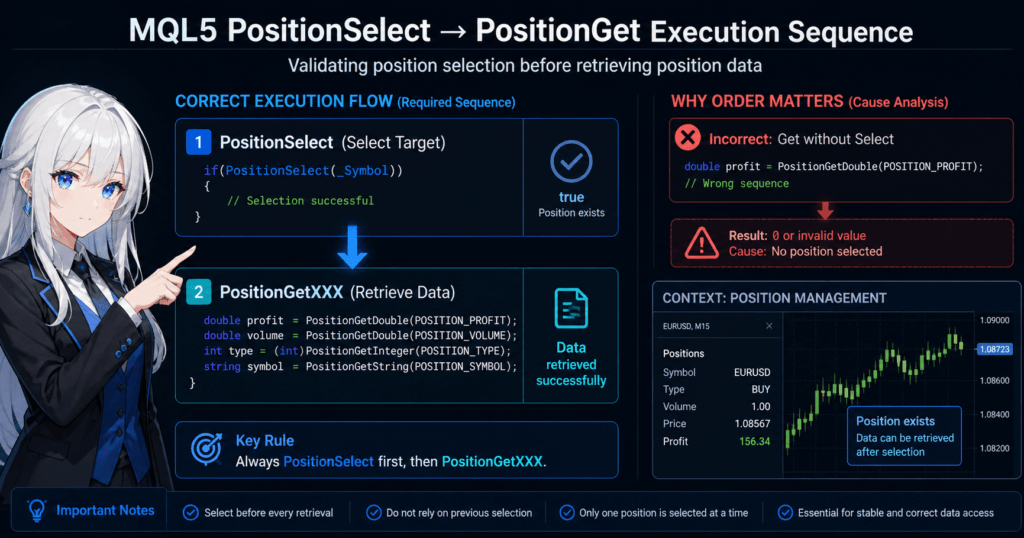
3.2 Correct Processing Flow (Most Important)
In MQL5, position retrieval must always follow this order.
1. PositionSelect (select the target)
2. PositionGetXXX (retrieve data)
In code:
if(PositionSelect(_Symbol))
{
    double profit = PositionGetDouble(POSITION_PROFIT);
}
If this order is broken, you cannot retrieve the correct value.
3.3 Common Mistakes Caused by Poor Structure Understanding
Mistake 1: Retrieving without Select
double profit = PositionGetDouble(POSITION_PROFIT); // NG
Internally, the target position is unknown, so the value is undefined or unreliable.
Mistake 2: Selecting the wrong target
PositionSelect("EURUSD");
double profit = PositionGetDouble(POSITION_PROFIT);
If the current chart is USDJPY, this can cause behavior you did not intend.
Mistake 3: Selection is overwritten by another Select
PositionSelect(_Symbol);
PositionSelect("EURUSD"); // Overwritten
double profit = PositionGetDouble(POSITION_PROFIT);
The last selected position becomes the active target.
3.4 Understanding the Internal Behavior (Practically Important)
PositionSelect internally keeps one “currently selected position.”
That means:
- The target is always the position selected most recently.
- Only one selection is held globally, in practical terms within the execution context.
For this reason, the following rule matters.
Rule
- Always call Select immediately before retrieving data.
if(PositionSelect(_Symbol))
{
    double profit = PositionGetDouble(POSITION_PROFIT);
}
3.5 Safe Writing Style Focused on Reproducibility
In real projects, it is best to write the select and get operations as a set.
double GetCurrentProfit()
{
    if(!PositionSelect(_Symbol))
        return 0.0;

    return PositionGetDouble(POSITION_PROFIT);
}
Benefits
- Prevents bugs
- Can be reused
- Makes the logic clear
3.6 Common Sticking Points
Issue 1: The value becomes 0
Causes:
PositionSelectwas not called.- The process continued even though the result was
false.
Issue 2: The previous value remains
Causes:
- Another
Selectcall affected the selection. - State management was incorrect.
Issue 3: Behavior seems random
Causes:
- The timing of
Selectis unstable. - The logic depends on tick timing.
3.7 Summary of Important Notes
PositionGetfunctions should not be used alone.- The order must be Select then Get.
- Select every time. Do not reuse the previous selection.
- Only one position is selected, and it can be overwritten.
4. How to Handle PositionSelect in Multiple-Position Environments (Hedging Accounts)
4.1 Difference Between Netting Accounts and Hedging Accounts
In MQL5, position handling differs greatly depending on the account type.
Netting account
- Only one position can exist per symbol.
- Buy and sell positions are combined.
PositionSelectcan retrieve the position without major issues.
Hedging account
- Multiple positions can be held for the same symbol.
- Buy and sell positions can be held at the same time.
PositionSelectalone is not enough.
4.2 Limitation of PositionSelect (Important)
PositionSelect works as follows.
- It selects one position for the specified symbol.
- If multiple positions exist, which one is selected is not guaranteed.
In a hedging account, this means:
PositionSelect(_Symbol);
Only one of the multiple positions becomes the target.
In real development, this can become a serious source of bugs.
4.3 Correct Approach for Multiple Positions
In hedging accounts, usePositionSelectByTicket with loop processing instead of relying only on PositionSelect.
Steps
- 1. Get the count with
PositionsTotal(). - 2. Process all positions in a loop.
- 3. Select each position by ticket.
4.4 Practical Code Example (Safe Pattern)
int total = PositionsTotal();

for(int i = 0; i < total; i++)
{
    ulong ticket = PositionGetTicket(i);

    if(PositionSelectByTicket(ticket))
    {
        string symbol = PositionGetString(POSITION_SYMBOL);

        // Process only the target symbol
        if(symbol == _Symbol)
        {
            double profit = PositionGetDouble(POSITION_PROFIT);
            Print("Profit: ", profit);
        }
    }
}
4.5 Key Points Explained
Point 1: PositionGetTicket(i)
- Gets the ticket number from the index.
Point 2: PositionSelectByTicket
- Reliably selects a specific position.
Point 3: Symbol filter
- Excludes unnecessary positions.
4.6 Common Failures and Fixes
Failure 1: Processing with PositionSelect only
This checks only part of the multiple positions.
Failure 2: Looping without selecting
for(int i = 0; i < PositionsTotal(); i++)
{
    double profit = PositionGetDouble(POSITION_PROFIT); // NG
}
This is invalid because no position has been selected.
Failure 3: Not using tickets
You cannot specify the exact position reliably.
4.7 Practical Decision Criteria
Choose the method based on the account type.
| Situation | Recommended method |
|---|---|
| Netting account | PositionSelect |
| Hedging account | Loop + PositionSelectByTicket |
4.8 Practical Notes
- Account type differs by broker.
- The same EA can behave differently depending on the environment.
- A loop structure is safer if you plan for future expansion.
4.9 Safe Design Approach
If reproducibility matters:
- Always use a loop structure.
- Filter by symbol.
- Control the target explicitly.
Even if it is slightly verbose, this gives you stronger resistance to bugs.
5. Practical Trading Logic Examples Using PositionSelect (EA Implementation)
5.1 Control Entry Based on Whether a Position Exists
The basic logic of an EA is to enter only when no position exists.PositionSelect is used for this check.
void OnTick()
{
    // Do nothing if a position already exists
    if(PositionSelect(_Symbol))
    {
        return;
    }

    // Enter only if there is no position
    // Example: buy order
    MqlTradeRequest request;
    MqlTradeResult result;

    ZeroMemory(request);
    ZeroMemory(result);

    request.action = TRADE_ACTION_DEAL;
    request.symbol = _Symbol;
    request.volume = 0.1;
    request.type   = ORDER_TYPE_BUY;
    request.price  = SymbolInfoDouble(_Symbol, SYMBOL_ASK);

    OrderSend(request, result);
}
5.2 Step Summary Focused on Reproducibility
- 1. Check whether a position exists with
PositionSelect. - 2. If it exists, return.
- 3. Only if it does not exist, call
OrderSend.
This structure helps prevent duplicate entries.
5.3 Example: Close by Profit Condition
This is logic that closes a position when a profit condition is met.
void OnTick()
{
    if(!PositionSelect(_Symbol))
        return;

    double profit = PositionGetDouble(POSITION_PROFIT);

    // Close when profit is 10 or more
    if(profit >= 10.0)
    {
        ClosePosition();
    }
}
5.4 Example Close Function
void ClosePosition()
{
    if(!PositionSelect(_Symbol))
        return;

    ulong ticket = PositionGetInteger(POSITION_TICKET);
    double volume = PositionGetDouble(POSITION_VOLUME);

    MqlTradeRequest request;
    MqlTradeResult result;

    ZeroMemory(request);
    ZeroMemory(result);

    request.action = TRADE_ACTION_DEAL;
    request.symbol = _Symbol;
    request.volume = volume;
    request.type = ORDER_TYPE_SELL; // Close a BUY position
    request.position = ticket;
    request.price = SymbolInfoDouble(_Symbol, SYMBOL_BID);

    OrderSend(request, result);
}
5.5 Common Logic Mistakes
Mistake 1: Not checking for an existing position
The EA may keep entering trades and create unlimited positions.
Mistake 2: Using the wrong close direction
request.type = ORDER_TYPE_BUY; // Wrong
A BUY position must be closed with SELL.
Mistake 3: Not specifying the ticket
An unintended position may become the target.
Mistake 4: Getting the wrong price
- For BUY: use ASK.
- For SELL: use BID.
5.6 Practical Improvements
Improvement 1: Spread check
double spread = SymbolInfoInteger(_Symbol, SYMBOL_SPREAD);
if(spread > 20) return;
Improvement 2: Lot control
request.volume = NormalizeDouble(0.1, 2);
Improvement 3: Retry logic
Add retry handling when OrderSend fails.
5.7 Important Notes
PositionSelectis only for checking state.- Actual trading is performed with
OrderSend. - Execution timing depends on the environment.
5.8 Basics of Safe EA Design
- Position existence check:
PositionSelect - Information retrieval:
PositionGetfunctions - Trade execution:
OrderSend
Keeping these responsibilities separate gives the EA stronger resistance to bugs.
6. Why PositionSelect Returns false and How to Troubleshoot It
6.1 Basic Reasons PositionSelect Returns false
When PositionSelect returns false, it first means the position for that symbol could not be selected.
However, there is more than one possible reason. In practice, the main causes are these four patterns.
- You do not hold a position for that symbol.
- The symbol was specified incorrectly.
- The order was just placed and the position information has not yet been reflected.
- You are using
PositionSelecteven though multiple positions in a hedging account should be handled.
The first thing to check is whether a position really exists for that symbol right now.
if(!PositionSelect(_Symbol))
{
    Print("PositionSelect failed");
    return;
}
This kind of branching when false occurs is the basic approach.
6.2 Most Common Cause 1: No Position Is Held
The most common reason is simply no open position.
This is especially likely in these cases:
- Immediately after the EA starts
- Immediately after closing a position
- No entry because the condition has not been met
- The expected order has not been executed
In this case, PositionSelect itself is working normally.
It is not an abnormal state. It is the correct return value: false because there is no position.
Check code example
if(!PositionSelect(_Symbol))
{
    Print("There is currently no position on ", _Symbol);
}
else
{
    Print("A position exists");
}
Sticking points
- Assuming
falsealways means an error - Thinking retrieval failed even though no position is held
6.3 Most Common Cause 2: Wrong Symbol Name
The next common issue is a symbol name mismatch.
In MQL5, brokers may add suffixes or prefixes to instrument names.
Examples:
EURUSDEURUSDmEURUSD.pro
For this reason, fixed strings fail easily.
PositionSelect("EURUSD"); // May fail depending on the environment
Recommended
If the current chart is the target, use _Symbol.
PositionSelect(_Symbol);
Notes
- Manually typed strings are easy to get wrong.
- More than letter case, the exact symbol name itself matters.
6.4 Most Common Cause 3: The Position Is Not Reflected Immediately After the Order
If you call PositionSelect immediately after OrderSend, the position information may not yet be reflected in some environments, so it can return false.
OrderSend(request, result);

if(!PositionSelect(_Symbol))
{
    Print("The position is not visible yet");
}
This is especially likely:
- Immediately after a market order
- In environments with communication delay
- When VPS or network conditions differ
Fixes
- Check on the next tick.
- Check in a trade event such as
OnTradeTransaction. - Do not design the logic around immediate confirmation.
Common failure
- Assuming
OrderSendsuccess always meansPositionSelectis immediatelytrue - Mistaking reflection delay for a bug
6.5 Most Common Cause 4: Mishandling Multiple Positions in a Hedging Account
In a hedging account, multiple positions can exist for the same symbol.
In that case, PositionSelect is not enough for handling multiple positions correctly.
Even when positions actually exist, design mistakes can occur, such as:
- Looking at a position different from the one you intended
- Checking by symbol when you should process by ticket
Fixes
- Use
PositionSelectByTicket()in hedging accounts. - Use
PositionsTotal()with a loop.
6.6 How to Identify the Cause with Logs
The fastest way to identify why false occurred is to make the state visible with log output.
Example: minimum debug output
Print("Symbol = ", _Symbol);
Print("PositionsTotal = ", PositionsTotal());

if(!PositionSelect(_Symbol))
{
    Print("PositionSelect failed for symbol: ", _Symbol);
    return;
}

Print("PositionSelect success");
This lets you check at least the following:
- What the target symbol is
- Whether any positions exist at all
- Whether the position could be selected for that symbol
Practical tips
- Always leave a log when
falseoccurs. - Also log a success case once so you can compare.
- Do not try to fix it by guessing without logs.
6.7 Safe Writing Style When false Occurs
If you continue processing after PositionSelect returns false, the logic becomes unstable.
For that reason, an early return is the basic pattern.
if(!PositionSelect(_Symbol))
{
    return;
}
If you want to make the reason easier to trace, write it a little more explicitly.
if(!PositionSelect(_Symbol))
{
    Print("No selected position for symbol: ", _Symbol);
    return;
}
Benefits of this style
- Prevents invalid
PositionGetcalls - Makes the code easier to read
- Makes bug locations easier to identify
6.8 Summary of Common Failures
Failure 1: Continuing with PositionGet even when false
PositionSelect(_Symbol);
double profit = PositionGetDouble(POSITION_PROFIT); // Risky
Failure 2: Using a hard-coded symbol
PositionSelect("EURUSD");
Failure 3: Depending on immediate confirmation after an order
OrderSend(...);
PositionSelect(_Symbol);
Failure 4: Using simple PositionSelect in a hedging account
6.9 Troubleshooting Checklist
When PositionSelect returns false, check in this order to isolate the cause more easily.
- 1. Check whether
PositionsTotal()is not 0. - 2. Log the value of
_Symbol. - 3. If an order was just placed, suspect reflection timing.
- 4. Check whether the account type is hedging.
- 5. Confirm that the logic immediately returns when
falseoccurs.
Following this order lets you trace the cause structurally instead of relying on intuition.
7. Notes and Safe Implementation Rules for Using PositionSelect
7.1 Always Check the Return Value
The most important rule when using PositionSelect is do not ignore the return value.
This function returns true or false. If you call later functions such as PositionGetDouble or PositionGetInteger without checking it, you can retrieve unintended values or break the logic.
Bad example
PositionSelect(_Symbol);
double profit = PositionGetDouble(POSITION_PROFIT);
With this style, processing continues even if PositionSelect failed.
Good example
if(!PositionSelect(_Symbol))
{
    return;
}

double profit = PositionGetDouble(POSITION_PROFIT);
Notes
falsedoes not always mean an abnormal error.- However, continuing while the result is false is dangerous.
- Check it every time before retrieval.
7.2 Call PositionSelect Every Time
A common beginner misunderstanding is that once PositionSelect is called, the same position remains selected afterward.
In real development, it is safer not to depend on that assumption.
The reason is that the MQL5 selected state can be overwritten by another process or another Select call.
Therefore, the basic rule is to call PositionSelect immediately before retrieving the needed information.
Recommended pattern
if(PositionSelect(_Symbol))
{
    double profit = PositionGetDouble(POSITION_PROFIT);
}
Common failures
- Selecting only once in
OnInitand reusing it - Having the selection overwritten inside another function
- Depending on the previous success state
Practical rule
- Call
PositionSelectimmediately beforePositionGet. - Prefer reselecting over reusing.
- Choose safety even if the code is slightly more verbose.
7.3 As a Rule, Use _Symbol for the Symbol Argument
PositionSelect receives the symbol name as a string, but directly writing a fixed string is weak against environment differences.
Some brokers add suffixes or prefixes to symbol names, so "EURUSD" may not exist exactly as written.
Not recommended
PositionSelect("EURUSD");
Recommended
PositionSelect(_Symbol);
_Symbol is the symbol name of the current chart.
For the common design where an EA runs per chart, this is the safest option.
Sticking points
- It works in backtesting but not in live trading.
falseincreases after changing brokers.- Symbol naming differences are overlooked.
Exception
For a multi-symbol EA, you need to explicitly manage the target symbols with arrays or variables.
Even then, you must verify in logs that the actual symbol name is correct.
7.4 PositionSelect Alone Is Not Enough in Hedging Accounts
PositionSelect is useful for checking a position for a single symbol, but it is not suitable for accurately handling multiple positions.
In hedging accounts, multiple positions can exist for the same symbol, so trying to process all of them with only PositionSelect breaks the design.
Dangerous misunderstandings
PositionSelect(_Symbol)can see all positions for that symbol.- The assumption of one position per symbol always holds.
Safe practical decision
- Netting account:
PositionSelectcan be the main approach. - Hedging account: use
PositionsTotal()withPositionSelectByTicket().
Problems caused by the wrong decision
- Only some positions are checked.
- Total profit and loss become inaccurate.
- Unexpected positions remain open.
7.5 Stop with an Early Return When false Occurs
If processing continues after PositionSelect fails, the meaning of the later code breaks down.
Therefore, it is safe to stop the process immediately when the result is false.
Recommended template
if(!PositionSelect(_Symbol))
{
    Print("No position for symbol: ", _Symbol);
    return;
}
This style provides these benefits:
- Prevents incorrect use of
PositionGetfunctions - Makes the cause easier to trace with logs
- Makes branching clear
Notes
- If alternative processing is needed when
falseoccurs, branch there instead of returning. - However, never call
PositionGetwhile no position is selected.
7.6 Wrap the Logic in Functions for Reuse
The code around PositionSelect tends to have the same shape each time. Turning it into reusable functions improves maintainability.
Example: function that returns current profit
double GetCurrentPositionProfit()
{
    if(!PositionSelect(_Symbol))
        return 0.0;

    return PositionGetDouble(POSITION_PROFIT);
}
Benefits
- Prevents forgetting the select step
- Locks in the Select then Get order
- Keeps the quality of the article or EA stable
Notes
0.0cannot distinguish between “no position” and “zero profit.”- Use a
boolreturn value or pass by reference if needed.
7.7 Practical Checklist for Using PositionSelect Safely
To use PositionSelect safely, follow at least these rules.
- Call
PositionSelectevery time before retrieval. - Always check the return value.
- Use an early return when the result is
false. - As a rule, use
_Symbolfor the symbol. - Do not rely on single use in hedging accounts.
- Use logs so you can trace the reason for failure.
Following only these rules will greatly reduce beginner-level problems around PositionSelect.
8. Differences Between PositionSelect and Related Functions
8.1 Difference Between PositionSelect and PositionSelectByTicket
In MQL5, there are two main ways to select a position.
PositionSelect(symbol): select by symbolPositionSelectByTicket(ticket): select by ticket number
Comparison table
| Item | PositionSelect | PositionSelectByTicket |
|---|---|---|
| Selection method | Symbol | Ticket |
| Precision | Uncertain when multiple positions exist | Exact match |
| Hedging account | Not suitable | Required |
| Use case | Simple check | Strict control |
Practical decision
- Single position:
PositionSelect - Multiple positions:
PositionSelectByTicket
Code comparison
// Symbol selection
PositionSelect(_Symbol);

// Ticket selection
PositionSelectByTicket(ticket);
Notes
- A ticket is unique.
- In hedging accounts, ticket-based management is the basic approach.
8.2 Difference in Role from PositionGet Functions
PositionSelect and PositionGet have completely separate roles.
Role summary
PositionSelect: selects the target.PositionGet: retrieves information from the selected target.
Incorrect understanding
PositionSelectmeans data retrieval.PositionGetcan be used alone.
Both are wrong.
Correct set structure
if(PositionSelect(_Symbol))
{
    double profit = PositionGetDouble(POSITION_PROFIT);
}
Common failures
- Getting data without selecting first
- Judging only from the value returned by Get
8.3 Difference from OrderSelect (Important)
The difference from OrderSelect is one of the most confusing points for developers with MQL4 experience.
MQL4 legacy style
- Orders and positions are mixed.
OrderSelecthandles everything.
MQL5 current style
- Orders
- Positions
- Deal history
These are completely separated.
Comparison
| Item | OrderSelect | PositionSelect |
|---|---|---|
| Target | Order | Position |
| MQL4 | Mainstream | Not available |
| MQL5 | Available for a different purpose | Mainstream for positions |
Practical difference
OrderSelect: pending orders such as limit and stop ordersPositionSelect: currently held positions
Typical mistake
OrderSelect(...); // Intended to retrieve a position
This way of thinking is invalid in MQL5.
8.4 Relationship with PositionsTotal
PositionsTotal() is a function that retrieves the current number of positions.
int total = PositionsTotal();
Role
- Checks the number of positions
- Serves as the starting point for loop processing
Combination example
for(int i = 0; i < PositionsTotal(); i++)
{
    ulong ticket = PositionGetTicket(i);

    if(PositionSelectByTicket(ticket))
    {
        // Process
    }
}
Notes
PositionsTotalalone cannot retrieve position information.- Select is always required.
8.5 Relationship with PositionGetTicket
PositionGetTicket(index) retrieves the ticket number from an index.
ulong ticket = PositionGetTicket(i);
Flow
- index to ticket
- ticket to
PositionSelectByTicket
Set structure
ulong ticket = PositionGetTicket(i);

if(PositionSelectByTicket(ticket))
{
    double profit = PositionGetDouble(POSITION_PROFIT);
}
8.6 Common Confusion Patterns
Confusion 1: PositionSelect means retrieving all positions
In reality, it selects only one.
Confusion 2: PositionGet can be used by itself
It assumes a prior Select.
Confusion 3: OrderSelect retrieves positions
In MQL5, it has a different purpose.
Confusion 4: Tickets are unnecessary
In hedging accounts, tickets are required.
8.7 Correct Practical Usage
Use the following criteria for safe function selection.
| Purpose | Function to use |
|---|---|
| Check a single position | PositionSelect |
| Process multiple positions | PositionSelectByTicket |
| Retrieve information | PositionGet functions |
| Check count | PositionsTotal |
| Operate on orders | Order functions |
8.8 Safe Design Pattern Summary
- Always perform Select explicitly.
- Prefer a design that can process positions by ticket.
- Think of Select and Get as separate operations.
- Do not confuse orders with positions.
9. FAQ
Q1. Can I use PositionGet without PositionSelect?
A. No.PositionGet functions assume that the target was selected beforehand with PositionSelect.
If you call them without Select, the result may be 0 or an invalid value.
Q2. Is it an error when PositionSelect returns false?
A. Not always.
It also returns false when no position exists.
Whether it is an error depends on the situation, such as whether a position should have been open.
Q3. Can I call PositionSelect once and reuse it?
A. It is not recommended.
The internal selected state can be overwritten by other processing, so it is safer to
call PositionSelect every time immediately before PositionGet.
Q4. If multiple positions exist, can PositionSelect retrieve all of them?
A. No.PositionSelect targets only one position.
If multiple positions exist, you need PositionSelectByTicket and loop processing.
Q5. Should I write the symbol as “EURUSD”?
A. It depends on the environment.
Some brokers use names such as EURUSDm, so the notation can differ.
Usually, using _Symbol is safer.
Q6. PositionSelect returns false immediately after OrderSend. Why?
A. It may be caused by reflection delay.
Immediately after an order, position information may not have been updated yet.
Checking on the next tick or through a trade event is safer.
Q7. Does usage differ between netting accounts and hedging accounts?
A. Yes, it differs.
- Netting account:
PositionSelectis usually sufficient. - Hedging account:
PositionSelectByTicketplus a loop is required.
If the design is wrong, only part of the positions will be handled.
Q8. What is the difference between PositionSelect and OrderSelect?
A. They target different objects.
PositionSelect: currently held positionsOrderSelect: pending orders, such as limit and stop orders
Unlike MQL4, MQL5 separates these concepts completely.