
- 1 1. Basics of Setting SL and TP in MQL5
- 2 2. Three Ways to Set SL and TP in MQL5
- 3 3. Implementation Details for Setting SL and TP with OrderSend
- 4 4. Causes and Fixes for the “invalid stops” Error
- 5 5. Difference Between pips, points, and Price, and the Correct SL/TP Calculation Method
- 5.1 5.1 Difference Between pips and points (Most Important)
- 5.2 5.2 Why Confusion Happens
- 5.3 5.3 Safe SL/TP Calculation Using pips
- 5.4 5.4 General-purpose pip calculation function (recommended)
- 5.5 5.5 SELL Calculation (Important)
- 5.6 Common Sticking Points and Notes
- 5.7 Common Mistakes
- 5.8 Practical Best Practices
- 6 6. Ready-to-use SL and TP Setting Template for Practice (Reusable Code)
- 6.1 6.1 Template Design Concept
- 6.2 6.2 General-purpose SL/TP Calculation Function
- 6.3 6.3 SL/TP Calculation Template for BUY and SELL
- 6.4 6.4 Template with StopLevel Handling for Practical Use
- 6.5 6.5 Actual Order Code (Complete Version)
- 6.6 Common Sticking Points and Notes
- 6.7 Common Mistakes
- 6.8 Practical Best Practices
- 7 7. Beginner Version: A Simple Minimum Implementation That Runs Quickly
- 8 8. Strategic Thinking for SL/TP Design in EA Development
- 8.1 8.1 SL/TP Are Not Add-on Order Settings; They Are Core Strategy Parameters
- 8.2 8.2 Decide the Risk-Reward Ratio First
- 8.3 8.3 Fixed SL/TP vs Dynamic SL/TP
- 8.4 8.4 How to Evaluate the Effect on PF and DD
- 8.5 8.5 Design Mistakes Beginners Should Avoid
- 8.6 8.6 Recommended Practical Design Procedure
- 8.7 Common Sticking Points and Notes
- 8.8 Common Mistakes
- 9 9. MQL5 SL/TP Setting Checklist and Final Summary
- 9.1 9.1 Pre-order Checklist (Required)
- 9.2 9.2 Post-execution Checks (Debugging)
- 9.3 9.3 Troubleshooting Procedure When an Error Occurs
- 9.4 9.4 Most Important Practical Rule: Prioritize Reproducibility
- 9.5 9.5 Summary of This Article
- 9.6 9.6 Conclusion: The Shortest Path to Stability
- 9.7 Common Sticking Points and Notes
- 9.8 Common Mistakes
- 10 FAQ
- 10.1 Q1. Should SL/TP always be set?
- 10.2 Q2. How can I prevent the invalid stops error?
- 10.3 Q3. What is the difference between pips and points?
- 10.4 Q4. Can I change SL/TP after placing an order?
- 10.5 Q5. What is the difference between a trailing stop and TP?
- 10.6 Q6. How should I decide the best SL/TP?
- 10.7 Q7. Should settings differ by currency pair?
1. Basics of Setting SL and TP in MQL5
Key points in this section
– The roles of SL (Stop Loss) and TP (Take Profit)
– The overall approach to setting them in MQL5
– Why beginners often get stuck
1.1 What Are SL (Stop Loss) and TP (Take Profit)?
SL (Stop Loss) is an order that automatically fixes a loss at a specified price.
TP (Take Profit) is an order that locks in profit at a specified price.
For example, the basic idea is as follows.
- For BUY orders
- SL: Set below the current price (loss cut)
- TP: Set above the current price (take profit)
- For SELL orders
- SL: Set above the current price
- TP: Set below the current price
These two settings are not just optional helpers. They are the core of risk management in an EA (Expert Advisor).
If SL is not set, especially when the market moves against the position, there is a risk that losses can expand without a defined limit.
1.2 Why SL/TP Settings Matter for Risk Management
In MQL5, SL/TP settings are not just a “feature.” They are essential controls for expected value and drawdown (maximum loss).
The main purposes are:
- Fix the maximum possible loss (risk control)
- Automate profit-taking (remove emotion)
- Make EA behavior reproducible (rule-based trading)
For example, an EA without SL has these problems:
- Unexpected growth in drawdown
- Inconsistency with lot management
- A gap between forward testing and live trading
On the other hand, setting appropriate SL/TP can help with:
- More stable PF (Profit Factor)
- Lower DD (Drawdown)
- Better strategy reproducibility
These are practical benefits for real EA operation.
1.3 Overview of the 3 Ways to Set SL/TP in MQL5
In MQL5, there are three main ways to set SL/TP.
1. Set SL/TP when placing the order (most basic)
This method sets SL/TP at the same time the order is sent.
- Use the
sl/tpfields ofOrderSend - This is the simplest and recommended method
request.sl = price - 100 * _Point;
request.tp = price + 100 * _Point;
2. Set or modify SL/TP after the order
This method sets or changes SL/TP for an already open position.
- Use
PositionModify - Useful for dynamic strategies that change conditions during a trade
3. Trailing stop
This method moves SL as the price moves.
- It helps extend profits while limiting losses
- It is a different concept from fixed TP
Common Sticking Points and Notes
Beginners most often get stuck on the following points.
■ BUY and SELL use opposite directions
- BUY: SL is below, TP is above
- SELL: SL is above, TP is below
→ If this is wrong, aninvalid stopserror occurs
■ Confusing pips and points
_Point: The minimum price unit- pips: The conventional unit used for each currency pair
→ This is the No. 1 cause of calculation mistakes
■ Sending an order without SL/TP
- You can set them later, but the risk is high
→ As a rule, setting them at order time is safer
■ Ignoring broker restrictions
- A minimum stop distance (StopLevel) exists
→ If SL/TP is too close, an error occurs
These values differ by environment, broker, and currency pair, so check them before execution.
Common Mistakes
- Setting the SL/TP direction backward
- Using a price range that is too small, causing order rejection
- Not considering Ask/Bid
- Writing price calculations with fixed values
2. Three Ways to Set SL and TP in MQL5
Key points in this section
– The difference between setting them at order time, modifying them later, and trailing
– Which method beginners should use first
2.1 Set SL/TP at the Same Time as the Order (Basic)
The most basic and recommended method is to set SL/TP at the same time as the order.
In MQL5, specify prices in the sl / tp fields of the MqlTradeRequest structure.
Procedure (basic flow)
- Get the current price (Ask / Bid)
- Calculate the SL / TP prices
- Set them in
request.sl/request.tp - Run
OrderSend
Code example (BUY)
double price = SymbolInfoDouble(_Symbol, SYMBOL_ASK);

MqlTradeRequest request;
MqlTradeResult result;

ZeroMemory(request);

request.action = TRADE_ACTION_DEAL;
request.symbol = _Symbol;
request.volume = 0.1;
request.type   = ORDER_TYPE_BUY;
request.price  = price;

// Set SL / TP
request.sl = price - 100 * _Point;
request.tp = price + 100 * _Point;

OrderSend(request, result);
Key points
_Pointis the minimum price unit (for example, 0.00001)- For BUY, “SL is below and TP is above”
- For SELL, the direction is reversed
Conclusion for beginners
→ Start with this method first
It is the simplest, has fewer errors, and is suitable for live operation.
2.2 Modify SL/TP After the Order (PositionModify)
This is the method of setting or changing SL/TP after a position already exists.
It is used for dynamic strategies where values change based on conditions.
Procedure
- Select the target position (
PositionSelect) - Get the current SL/TP
- Run
PositionModifywith the new values
Code example
if(PositionSelect(_Symbol))
{
    double new_sl = SymbolInfoDouble(_Symbol, SYMBOL_BID) - 100 * _Point;
    double new_tp = SymbolInfoDouble(_Symbol, SYMBOL_BID) + 100 * _Point;

    trade.PositionModify(_Symbol, new_sl, new_tp);
}
trade is an instance of the CTrade class.
Notes
- It fails if no position is selected
- In some cases, specifying a ticket is safer than using
_Symbol - If changes are too frequent, they may be rejected depending on the environment
2.3 Difference from a Trailing Stop
A trailing stop is a mechanism that automatically raises SL as the price moves.
Unlike TP, it is a dynamic SL used to extend profits.
Comparison
| Item | Fixed SL/TP | Trailing |
|---|---|---|
| Nature | Fixed | Dynamic |
| Profit-taking | Fixed by TP | Follows with SL |
| Implementation difficulty | Low | Medium |
Basic logic
if(PositionSelect(_Symbol))
{
    double current_price = SymbolInfoDouble(_Symbol, SYMBOL_BID);
    double new_sl = current_price - 50 * _Point;

    // Update only when it is more favorable than the current SL
    if(new_sl > PositionGetDouble(POSITION_SL))
    {
        trade.PositionModify(_Symbol, new_sl, PositionGetDouble(POSITION_TP));
    }
}
Common Sticking Points and Notes
■ Not setting SL/TP at order time
→ It is easy to think “I can set it later”
→ In live trading, a sudden crash while SL is not set can be fatal
■ Confusing trailing stop with TP
→ TP is fixed, while trailing updates SL
→ Their roles are completely different
■ PositionModify failures
- No position selected
- The value is too close (StopLevel violation)
- The update is invalid because the value is unchanged
Common Mistakes
- Sending an order with SL/TP left at 0 (not set)
- Setting SL above the price on a BUY order
- Lowering SL with a trailing stop (wrong-direction update)
- Creating an infinite loop because no update condition is used
Conclusion for Beginners
- First, use only order-time settings with OrderSend
- After you are comfortable, use PositionModify
- Use trailing stops last
3. Implementation Details for Setting SL and TP with OrderSend
Key points in this section
– The structure and required fields of MqlTradeRequest
– The correct way to write SL/TP settings
– Code that can be used directly in practice
3.1 Basics of the MqlTradeRequest Structure
In MQL5, order information is placed into the MqlTradeRequest structure and passed to OrderSend.
SL/TP are also specified inside this structure.
Main fields
| Field | Description |
|---|---|
| action | Order action type, such as market or pending order |
| symbol | Currency pair |
| volume | Lot size |
| type | BUY / SELL |
| price | Order price |
| sl | Stop-loss price |
| tp | Take-profit price |
Minimum required fields
request.action
request.symbol
request.volume
request.type
request.price
SL/TP are optional in the structure, but in real trading they should be treated as required.
3.2 Correct SL/TP Settings for BUY and SELL
SL/TP are specified as “prices.”
The important point is that they are price values, not point counts.
For BUY
request.sl = price - 100 * _Point;
request.tp = price + 100 * _Point;
For SELL
request.sl = price + 100 * _Point;
request.tp = price - 100 * _Point;
Why it works this way
- BUY: Price increase creates profit → TP is above
- SELL: Price decrease creates profit → TP is below
→ If the direction is wrong, an invalid stops error occurs immediately
3.3 Complete Practical Code Example
The following is practical code that includes basic error prevention.
#include <Trade/Trade.mqh>
CTrade trade;

void OpenBuy()
{
    double ask = SymbolInfoDouble(_Symbol, SYMBOL_ASK);

    // Get the minimum stop distance
    int stopLevel = (int)SymbolInfoInteger(_Symbol, SYMBOL_TRADE_STOPS_LEVEL);

    double sl = ask - (stopLevel + 10) * _Point;
    double tp = ask + (stopLevel + 10) * _Point;

    MqlTradeRequest request;
    MqlTradeResult result;

    ZeroMemory(request);

    request.action = TRADE_ACTION_DEAL;
    request.symbol = _Symbol;
    request.volume = 0.1;
    request.type   = ORDER_TYPE_BUY;
    request.price  = ask;
    request.sl     = NormalizeDouble(sl, _Digits);
    request.tp     = NormalizeDouble(tp, _Digits);
    request.deviation = 10;

    if(!OrderSend(request, result))
    {
        Print("OrderSend failed: ", result.retcode);
    }
}
3.4 Why NormalizeDouble and Digits Matter
Prices must always be rounded to match the number of digits used by the currency pair.
NormalizeDouble(price, _Digits);
Reason
- Invalid number of digits → order rejection
- Behavior depends on broker specifications
Examples
- EURUSD (5 digits) →
_Digits = 5 - USDJPY (3 digits) →
_Digits = 3
Common Sticking Points and Notes
■ Specifying SL/TP as points
→ Always specify them as “prices”
→ Multiply by _Point to convert
■ Ignoring stopLevel
→ Values closer than the minimum distance are rejected
→ The value differs by environment
■ Using Ask/Bid incorrectly
- BUY: Ask
- SELL: Bid
→ Using the wrong one causes a price mismatch
■ Not using NormalizeDouble
→ Some orders fail because of digit errors
Common Mistakes
- Sending SL/TP as 0
- Getting an error because digits are not adjusted
- Order rejection because stopLevel is not considered
- Losing consistency between price and SL/TP
Practical Best Practices
- Always set SL/TP at order time
- Add a margin with stopLevel + alpha
- Format prices with NormalizeDouble
- Always log error codes
4. Causes and Fixes for the “invalid stops” Error
Key points in this section
– When invalid stops occurs
– Specific categories of causes
– Reproducible ways to fix it
4.1 What Is invalid stops?
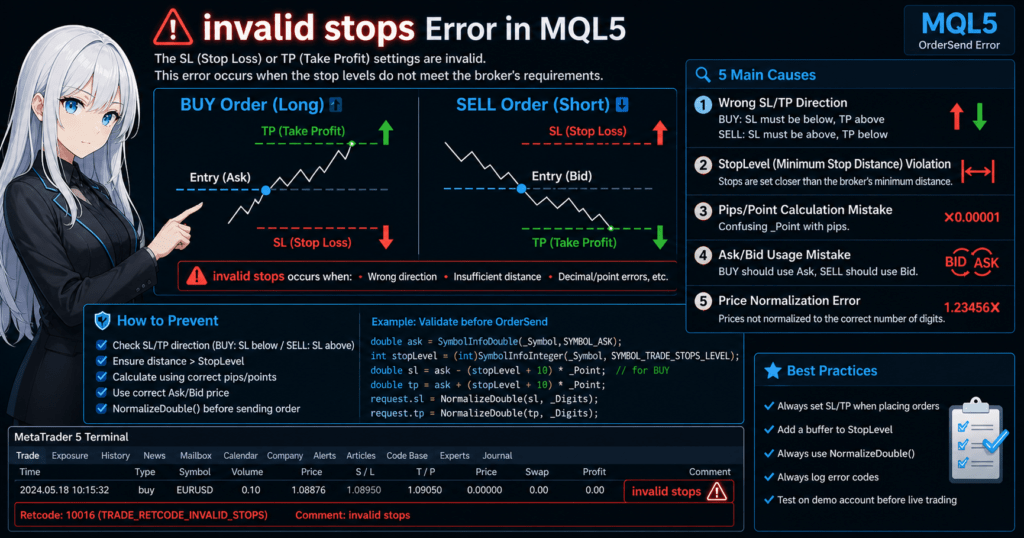
invalid stops is an error that occurs when the SL (Stop Loss) or TP (Take Profit) setting is invalid.
In MQL5, it is returned when running OrderSend or PositionModify.
Main characteristics:
- The order itself may be valid, but the SL/TP is invalid
- It often means broker-side restrictions were violated
- It is one of the most common errors beginners encounter
4.2 Main Causes (5 Patterns)
1. Wrong SL/TP direction
This is the most common cause.
- SL is above the price on a BUY order
- TP is above the price on a SELL order
→ If the price relationship is reversed, the error occurs immediately
2. Minimum stop distance (StopLevel) violation
Brokers have a restriction that SL/TP must be placed at least a certain distance away from the current price.
int stopLevel = (int)SymbolInfoInteger(_Symbol, SYMBOL_TRADE_STOPS_LEVEL);
- Unit: points
- Different for each currency pair and broker
→ If the distance is below this value, invalid stops occurs
3. Not considering the spread
This problem is especially common with BUY orders.
- BUY orders are executed at Ask
- SL/TP may be judged based on Bid
→ If the spread is not considered, the distance may be insufficient
4. Wrong number of price digits
NormalizeDouble(price, _Digits);
- Digit mismatch → treated as an invalid price
- This is especially common with pairs such as USDJPY
5. Too close to the current price
Even if the logic is correct, the following cases can still fail.
- Setting SL very close immediately after execution
- Fast market movement shifts the price
→ This is an execution-timing-dependent error
4.3 Fix Template for Practical Use
The following countermeasure code can be used directly in practice.
double ask = SymbolInfoDouble(_Symbol, SYMBOL_ASK);
double bid = SymbolInfoDouble(_Symbol, SYMBOL_BID);

int stopLevel = (int)SymbolInfoInteger(_Symbol, SYMBOL_TRADE_STOPS_LEVEL);

// Add a safety margin
double buffer = (stopLevel + 10) * _Point;

// BUY example
double sl = NormalizeDouble(ask - buffer, _Digits);
double tp = NormalizeDouble(ask + buffer, _Digits);
4.4 Practical Checklist
Checking the following before sending an order prevents most issues.
- SL < price < TP (for BUY)
- TP < price < SL (for SELL)
- The distance is at least stopLevel
- NormalizeDouble has been applied
- Ask/Bid relationship is consistent
Common Sticking Points and Notes
■ StopLevel is not always the same
→ It may change by time of day or symbol
→ Getting it every time is safer
■ Malfunction when spreads widen
→ Spreads can widen sharply around economic news
→ SL may become invalid
■ Market and pending orders behave differently
→ Pending orders often have stricter conditions
Common Mistakes
- Assuming stopLevel is 0 even though internal restrictions exist
- Setting SL/TP too close to the limit
- Ignoring the spread
- Not checking debug logs
Practical Best Practices
- Set SL/TP at stopLevel + alpha (10 to 20 points)
- Always use NormalizeDouble
- Log the error code (
result.retcode) - Design with environment differences, including broker differences, in mind
5. Difference Between pips, points, and Price, and the Correct SL/TP Calculation Method
Key points in this section
– Clarify the difference between pips and points
– Organize the confusing parts of SL/TP calculation
– Provide a safe calculation method for practical use
5.1 Difference Between pips and points (Most Important)
One of the most confusing parts of MQL5 is the difference between pips and points.
Definitions
- point: The minimum price unit (
_Point) - pips: The common price movement unit, which differs by currency pair
Examples
| Currency pair | _Point | 1 pip |
|---|---|---|
| EURUSD (5 digits) | 0.00001 | 0.0001 |
| USDJPY (3 digits) | 0.001 | 0.01 |
In other words:
- EURUSD: 1 pip = 10 points
- USDJPY: 1 pip = 10 points
→ In many environments, “1 pip = 10 points,” but there are exceptions, so check carefully
5.2 Why Confusion Happens
MQL5 processes everything based on points.
However, traders usually think in pips.
This mismatch can cause:
- Settings that are off by a factor of 10
- SL that is too close and causes an error
- TP that is too far and unrealistic
These issues come directly from mixing the two units.
5.3 Safe SL/TP Calculation Using pips
In practice, the safe flow is pip input → point conversion → price calculation.
Example: Set 20-pip SL/TP
double pips = 20;

// 1 pip = 10 points (common assumption)
double pip_value = 10 * _Point;

double sl = ask - pips * pip_value;
double tp = ask + pips * pip_value;
5.4 General-purpose pip calculation function (recommended)
To absorb differences between currency pairs, it is safer to prepare a function like this.
double GetPipValue()
{
    if(_Digits == 3 || _Digits == 5)
        return 10 * _Point;
    else
        return _Point;
}
Usage example
double pip = GetPipValue();

double sl = NormalizeDouble(ask - 20 * pip, _Digits);
double tp = NormalizeDouble(ask + 20 * pip, _Digits);
5.5 SELL Calculation (Important)
For SELL, the direction is reversed.
double pip = GetPipValue();

double sl = NormalizeDouble(bid + 20 * pip, _Digits);
double tp = NormalizeDouble(bid - 20 * pip, _Digits);
Common Sticking Points and Notes
■ Using pips directly
→ This does not work correctly in MQL5
→ You must convert to points
■ Ignoring differences by currency pair
→ JPY pairs and non-JPY pairs use different digit formats
→ Always check _Digits
■ Writing fixed values
→ Hard-coded values such as 0.0001 are risky
→ The logic can break when the symbol changes
Common Mistakes
- Expecting 20 pips but actually getting 2 pips
- SL is too close and triggers
invalid stops - TP is too far to be realistic
- The logic breaks when the currency pair changes
Practical Best Practices
- Always prepare a pips-to-points conversion function
- Design based on
_Digits - Format with NormalizeDouble
- Make SL/TP calculation a shared function
6. Ready-to-use SL and TP Setting Template for Practice (Reusable Code)
Key points in this section
– Reusable function design
– A template that supports both BUY and SELL
– An implementation that is less likely to break in live operation
6.1 Template Design Concept
If you write SL/TP settings separately every time, these problems occur:
- Bugs, such as direction mistakes and digit mistakes
- Logic breaks when the currency pair changes
- Lower maintainability
→ The solution is to move the logic into shared functions, or templates.
6.2 General-purpose SL/TP Calculation Function
First, define a function that safely calculates values based on pips.
double GetPipValue()
{
    if(_Digits == 3 || _Digits == 5)
        return 10 * _Point;
    else
        return _Point;
}
6.3 SL/TP Calculation Template for BUY and SELL
bool CalculateSLTP(bool isBuy, double price, double sl_pips, double tp_pips, double &sl, double &tp)
{
    double pip = GetPipValue();

    if(isBuy)
    {
        sl = price - sl_pips * pip;
        tp = price + tp_pips * pip;
    }
    else
    {
        sl = price + sl_pips * pip;
        tp = price - tp_pips * pip;
    }

    sl = NormalizeDouble(sl, _Digits);
    tp = NormalizeDouble(tp, _Digits);

    return true;
}
6.4 Template with StopLevel Handling for Practical Use
To improve safety further, include the minimum stop distance (StopLevel).
bool AdjustToStopLevel(double price, double &sl, double &tp)
{
    int stopLevel = (int)SymbolInfoInteger(_Symbol, SYMBOL_TRADE_STOPS_LEVEL);
    double min_distance = (stopLevel + 10) * _Point;

    // Check SL distance
    if(MathAbs(price - sl) < min_distance)
    {
        if(sl < price)
            sl = price - min_distance;
        else
            sl = price + min_distance;
    }

    // Check TP distance
    if(MathAbs(price - tp) < min_distance)
    {
        if(tp > price)
            tp = price + min_distance;
        else
            tp = price - min_distance;
    }

    sl = NormalizeDouble(sl, _Digits);
    tp = NormalizeDouble(tp, _Digits);

    return true;
}
6.5 Actual Order Code (Complete Version)
void OpenTrade(bool isBuy)
{
    double price = isBuy ?
        SymbolInfoDouble(_Symbol, SYMBOL_ASK) :
        SymbolInfoDouble(_Symbol, SYMBOL_BID);

    double sl, tp;

    // Calculate SL/TP
    CalculateSLTP(isBuy, price, 20, 40, sl, tp);

    // Adjust for StopLevel
    AdjustToStopLevel(price, sl, tp);

    MqlTradeRequest request;
    MqlTradeResult result;

    ZeroMemory(request);

    request.action = TRADE_ACTION_DEAL;
    request.symbol = _Symbol;
    request.volume = 0.1;
    request.type   = isBuy ? ORDER_TYPE_BUY : ORDER_TYPE_SELL;
    request.price  = price;
    request.sl     = sl;
    request.tp     = tp;
    request.deviation = 10;

    if(!OrderSend(request, result))
    {
        Print("Order failed: ", result.retcode);
    }
}
Common Sticking Points and Notes
■ Writing SL/TP directly outside functions
→ This easily creates bugs
→ Always gather the logic into shared functions
■ Not supporting StopLevel
→ Environment-dependent errors can suddenly occur
→ This handling is required for live operation
■ Skipping pip conversion
→ The logic breaks when the currency pair changes
Common Mistakes
- Wrong BUY/SELL conditional branching
- Forgetting NormalizeDouble
- Not considering StopLevel
- Copying the same code into many places and managing it separately
Practical Best Practices
- Make SL/TP reusable functions
- Design in pips
- Always include StopLevel + buffer
- Apply NormalizeDouble to all prices
7. Beginner Version: A Simple Minimum Implementation That Runs Quickly
Key points in this section
– A minimum setup with unnecessary parts removed
– An implementation that prioritizes getting it running first
– What should be improved later
7.1 How to Think About a Minimum Setup
Beginners should first start with minimum code that works correctly.
If you add generalization and optimization from the beginning, these problems can occur:
- The cause of errors becomes hard to identify
- The logic becomes complex
- The learning cost increases
→ At first, “one symbol, fixed pips, and order-time settings” is enough.
7.2 Minimum BUY Order Code with SL/TP
#include <Trade/Trade.mqh>

void OnTick()
{
    static bool executed = false;
    if(executed) return;

    double ask = SymbolInfoDouble(_Symbol, SYMBOL_ASK);

    // Fixed values (20 pips / 40 pips)
    double sl = ask - 200 * _Point;
    double tp = ask + 400 * _Point;

    MqlTradeRequest request;
    MqlTradeResult result;

    ZeroMemory(request);

    request.action = TRADE_ACTION_DEAL;
    request.symbol = _Symbol;
    request.volume = 0.1;
    request.type   = ORDER_TYPE_BUY;
    request.price  = ask;
    request.sl     = NormalizeDouble(sl, _Digits);
    request.tp     = NormalizeDouble(tp, _Digits);
    request.deviation = 10;

    OrderSend(request, result);

    executed = true;
}
7.3 Key Points in This Code
- Runs only once using a static variable
- SL/TP use fixed values, prioritizing understanding first
- Prices are formatted with NormalizeDouble
Why 200 and 400?
- In a 5-digit environment
- 200 points = 20 pips
- 400 points = 40 pips
→ This simply represents “20 pips / 40 pips.”
7.4 What You Do Not Need at This Stage
Beginners do not need to force the following into the first version.
- General-purpose functions
- StopLevel adjustment
- Trailing stop
- Complex conditional branching
→ Getting it to run first is the top priority.
Common Sticking Points and Notes
■ Orders are sent repeatedly
→ OnTick runs on every tick
→ Control with a static flag is required
■ SL/TP are in the wrong direction
→ BUY: SL below, TP above
■ Confusing points and pips
→ 200 = 20 pips in a 5-digit environment
■ Differences between demo and live environments
→ Spread and StopLevel can differ
Common Mistakes
- Orders are issued endlessly
- Orders are sent without SL/TP
- Copying numbers without understanding what they mean
- Trying to build a complex EA immediately
Next Improvements
After you understand this code, the next steps are:
- Add a pip conversion function
- Support StopLevel
- Support SELL
- Add PositionModify
8. Strategic Thinking for SL/TP Design in EA Development
Key points in this section
– SL/TP are not just setting values; they are part of strategy design
– Relationship with expected value, reproducibility, and drawdown control
– How to choose between fixed and dynamic widths
8.1 SL/TP Are Not Add-on Order Settings; They Are Core Strategy Parameters
When setting SL (Stop Loss) and TP (Take Profit) in MQL5, it is easy to treat them as values required when sending an order.
In practice, however, SL/TP are strategy parameters that are as important as, or more important than, entry conditions.
This is because final profit and loss are determined by the combination of:
- Where you enter
- Where you exit for a loss (SL)
- Where you take profit (TP)
- What lot size you use
Among these, SL/TP directly determine the profit and loss distribution.
Even with the same entry accuracy, different SL/TP designs can greatly change PF (Profit Factor) and DD (Drawdown).
For example, even with the same BUY signal:
- SL 10 pips / TP 20 pips
- SL 30 pips / TP 30 pips
- SL 50 pips / TP 100 pips
These settings require very different win rates and create very different profit and loss swings.
8.2 Decide the Risk-Reward Ratio First
The first thing to consider in SL/TP design is the RR (Risk Reward Ratio), or the ratio of potential profit to potential loss.
Examples
- SL 20 pips / TP 40 pips → RR 1:2
- SL 30 pips / TP 30 pips → RR 1:1
- SL 40 pips / TP 20 pips → RR 2:1
In general, a higher RR increases the profit per winning trade, but the TP hit rate tends to drop.
Conversely, a lower RR can raise the win rate, but each loss carries more weight.
Practical view
- Short-term benefits
- Fixed RR makes backtest comparison easier
- EA design becomes simpler
- Long-term benefits
- It connects more easily with lot management
- Profit and loss become more reproducible
Beginner guideline
It is easier to start with one of the following.
- Conservative type: 1:1 to 1:1.5
- Profit-extension type: around 1:2
However, there is no fixed correct answer.
The optimal value changes depending on win rate, spread, slippage, and the characteristics of the currency pair.
8.3 Fixed SL/TP vs Dynamic SL/TP
SL/TP design can be divided into two major types.
Fixed-width type
Example: Always SL 20 pips and TP 40 pips
Benefits
- Easy to implement
- Backtest comparison is clear
- Easy for beginners to manage
Drawbacks
- Weak against changes in market volatility
- May be too far in low volatility and too close in high volatility
Dynamic type
Example: Change SL/TP based on ATR (average price range)
Benefits
- Adapts more easily to market conditions
- Helps avoid abnormally close SL settings
- Absorbs differences between currency pairs more easily
Drawbacks
- Implementation is more complex
- Test conditions are harder to align
- Beginners may find cause analysis difficult
Recommended practical order
- Start with the fixed-width type
- Then move to a dynamic type such as ATR-based settings if needed
This order makes it easier to track where performance changed.
8.4 How to Evaluate the Effect on PF and DD
SL/TP design is directly connected not only to the visible win rate, but also to the shape of PF and DD.
When fixed SL is too narrow
- Small noise can trigger stop loss
- Win rate decreases
- Losing streaks become more likely
When fixed SL is too wide
- The apparent win rate may improve
- Each loss becomes heavier
- DD tends to become deeper
When TP is too close
- Small profits are easier to take
- Costs such as spread and commission have more impact
- PF is harder to improve
When TP is too far
- Single-trade profit can be large
- The hit rate decreases
- Profit variation becomes larger
In short, SL/TP are not a simple choice between “safe” and “dangerous.” They are a question of how to design the profit and loss distribution.
8.5 Design Mistakes Beginners Should Avoid
■ Judging only by win rate
Even with a 70% win rate, expected value gets worse if one loss cancels three wins.
■ Using the same width after changing currency pairs
EURUSD and GBPJPY have different price movement characteristics.
If you reuse fixed pips as-is, the design can break easily.
■ Optimizing only SL or only TP
If you adjust only one side, the overall balance is lost.
Always test SL and TP as a pair.
■ Using the best backtest value as-is
Excessive optimization, or overfitting, can reduce future reproducibility.
8.6 Recommended Practical Design Procedure
If you are unsure how to design SL/TP, proceed in this order.
- First prototype with fixed SL/TP
- Compare RR values such as 1:1, 1:1.5, and 1:2
- Check PF, DD, and win rate together
- Check differences by currency pair
- Move to ATR-based settings if needed
This process lets you improve while maintaining reproducibility.
Common Sticking Points and Notes
- A higher RR is not always better
- A higher win rate is not always better either
- The optimal value changes by currency pair and timeframe
- The best backtest value may not reproduce in the future
Common Mistakes
- Adjusting roughly in 10-pip steps and stopping there
- Judging only by PF without checking DD
- Switching to dynamic SL immediately after fixed SL loses
- Not deciding risk tolerance in the first place
9. MQL5 SL/TP Setting Checklist and Final Summary
Key points in this section
– Checklist items to prevent practical mistakes
– Confirmation points for reproducibility
– A short summary of the main points in this article
9.1 Pre-order Checklist (Required)
In practice, SL/TP setting mistakes can lead directly to losses or order rejection.
By making the following checks routine, you can prevent almost all common problems.
Basic checks
- SL and TP are not 0
- BUY: SL < price < TP
- SELL: TP < price < SL
- NormalizeDouble has been applied for
_Digits
Distance checks
- The distance is at least stopLevel
- A buffer (+10 to 20 points) is secured
- The spread is considered
Calculation checks
- pips have been converted to points
- The design is not dependent on one currency pair
- Hard-coded values are not used
9.2 Post-execution Checks (Debugging)
Even when the order succeeds, it is important to check whether the values are exactly as intended.
Log output example
Print("price=", request.price,
      " SL=", request.sl,
      " TP=", request.tp);
Points to check
- Are the values as expected?
- Are the digits correct?
- Is the SL/TP direction correct?
9.3 Troubleshooting Procedure When an Error Occurs
When an error occurs, do not fix it by guesswork. Check it in order.
Procedure
- Check
result.retcode - Log the SL/TP prices
- Check stopLevel
- Check the position relative to Ask/Bid
Example
Print("retcode=", result.retcode);
9.4 Most Important Practical Rule: Prioritize Reproducibility
The most important thing in SL/TP settings is reproducibility and consistency.
Rules to follow
- Always use functions
- Design based on pips
- Use NormalizeDouble thoroughly
- Assume stopLevel + buffer
Why this matters
- You can absorb environment differences, including broker differences
- You can reduce the gap between backtesting and live operation
- You can localize bugs more easily
9.5 Summary of This Article
Here is a concise practical summary of this article.
Technical points
- Set SL/TP as “prices”
- Handle
_Pointand_Digitscorrectly - stopLevel violations are a major cause of errors
Implementation points
- Order-time settings with
OrderSendare the basic method - You can modify values later with
PositionModify - Shared functions help prevent bugs
Strategy points
- SL/TP are risk design itself
- Decide RR (Risk Reward) first
- Improve in the order fixed → dynamic
9.6 Conclusion: The Shortest Path to Stability
For beginners to intermediate users, the most stable setup is:
- Fixed pips, such as SL20 / TP40
- Set SL/TP at order time
- Support stopLevel + buffer
- Apply NormalizeDouble thoroughly
First stabilize operation in this state, then move to optimization. This is the most reproducible way to proceed.
Common Sticking Points and Notes
- Fixing only one part can break overall consistency
- Ignoring errors and moving on
- A design that fails when the currency pair changes
- Overtrusting backtest results
Common Mistakes
- Running live trading without SL/TP
- Changing code without checking logs
- Repeated errors caused by ignoring StopLevel
- Moving to optimization before the design is fixed
FAQ
Q1. Should SL/TP always be set?
A. Yes. In practice, SL/TP should be set because leaving them unset creates the risk of losses expanding without a defined limit.
Q2. How can I prevent the invalid stops error?
A. You can prevent most cases by keeping enough distance from stopLevel, using the correct direction, and applying NormalizeDouble consistently.
Q3. What is the difference between pips and points?
A. A point is the minimum price unit used by MQL5, while a pip is a conventional trading unit. MQL5 calculations should be based on points.
Q4. Can I change SL/TP after placing an order?
A. Yes. You can use PositionModify to change SL/TP for an existing position.
Q5. What is the difference between a trailing stop and TP?
A. TP is a fixed profit-taking price, while a trailing stop dynamically updates SL as price moves.
Q6. How should I decide the best SL/TP?
A. Decide based on RR (Risk Reward), backtest results, and the balance between PF and DD. The best value depends on the strategy, symbol, and trading environment.
Q7. Should settings differ by currency pair?
A. Yes. Because volatility differs by currency pair, using the same setting for every pair is not recommended.