- 1 1. What Is iMACD in MQL5?
- 2 2. iMACD Syntax and Parameters
- 3 3. How to Retrieve MACD Values with CopyBuffer
- 4 4. EA Logic for Detecting MACD Crosses
- 5 5. Common iMACD Errors and Troubleshooting
- 5.1 5.1 INVALID_HANDLE Error
- 5.2 5.2 CopyBuffer Fails
- 5.3 5.3 Indicator Calculation Is Not Ready Yet
- 5.4 5.4 Array Setting Mistakes
- 5.5 5.5 Creating the Indicator on Every Tick
- 5.6 5.6 Forgetting to Release the Indicator Handle
- 5.7 5.7 Differences Between Backtesting and Live Trading
- 5.8 Summary of Common Beginner Mistakes
- 6 6. Sample EA Code Using iMACD (Minimum Structure)
- 7 7. Practical Patterns for Combining iMACD with Other Indicators
- 8 8. Frequently Asked Questions About iMACD
- 8.1 Q1. Does iMACD directly return MACD values?
- 8.2 Q2. What buffer numbers are used for the MACD line and signal line?
- 8.3 Q3. Why does CopyBuffer fail?
- 8.4 Q4. Can I call iMACD in OnTick()?
- 8.5 Q5. Should MACD crosses be judged on confirmed bars?
- 8.6 Q6. Can I build an EA using only MACD crosses?
- 8.7 Q7. What are the standard MACD parameters?
- 8.8 Q8. What is the difference between iMACD and iCustom?
- 9 9. LLMO Summary
1. What Is iMACD in MQL5?
In MQL5, iMACD is the standard function used in MetaTrader 5 (MT5) to access the MACD (Moving Average Convergence Divergence) indicator.
MACD is a widely used technical analysis indicator. It helps traders evaluate trend strength and possible signs of trend reversal.
In discretionary trading, traders visually check MACD on a chart. In an EA (automated trading program), however, the program must retrieve MACD values and use them in trading decisions. This is where iMACD is used.
However, there is one important point that often confuses beginners in MQL5.
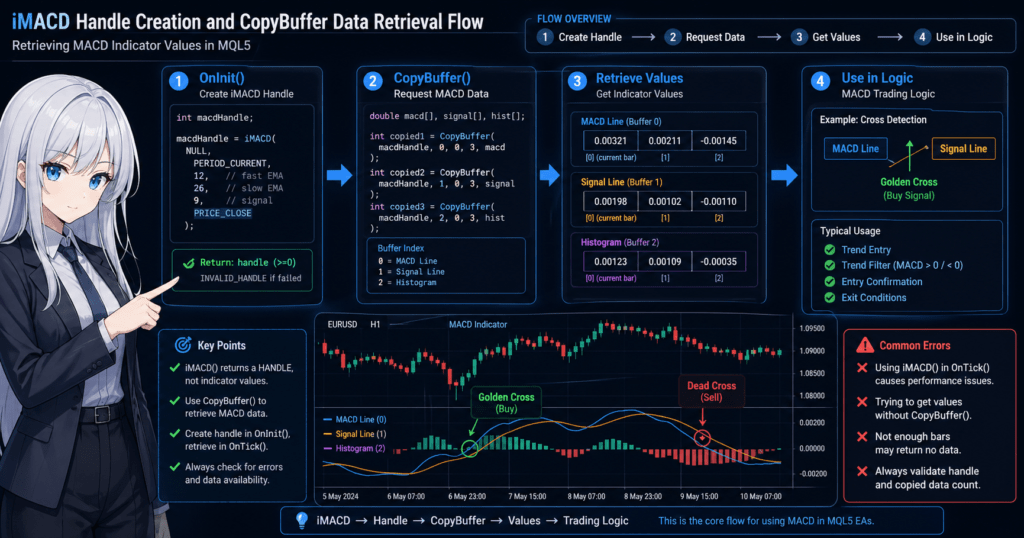
iMACD does not directly return MACD values.
This function returns an identifier called an indicator handle.
The actual MACD values are retrieved later by using that handle with the CopyBuffer function.
This structure is very different from MQL4, so it is one of the most common points where new MQL5 users get stuck.
1.1 Basics of MACD (Moving Average Convergence Divergence)
MACD is a technical indicator that measures trend momentum by using the difference between two moving averages (EMAs).
It mainly consists of the following three elements.
- MACD line Short-term EMA – long-term EMA
- Signal line Moving average of the MACD line
- Histogram Difference between the MACD line and the signal line
In trading, MACD is mainly used as follows.
- Golden cross The MACD line crosses above the signal line -> possible upward move
- Dead cross The MACD line crosses below the signal line -> possible downward move
- Momentum confirmation Measuring the strength of a trend
Because MACD has features of both a trend-following indicator and a momentum indicator,
it is often used in trend-following EAs.
1.2 Two Ways to Use MACD in MQL5
There are mainly two ways to use MACD in MQL5.
Method 1: Use the standard iMACD function
This is the most common method.
Features
- Uses the standard MT5 indicator
- Keeps the code simple
- Provides stable behavior
In EA development, this is usually the default approach.
Method 2: Call a custom MACD with iCustom
This method uses a custom indicator.
Examples
- Modified MACD
- Special calculation formulas
- Custom signals
However, when using a standard MACD, iMACD is simpler and easier to manage, so it is generally the first method to learn.
1.3 Where MACD Is Used in EA Development
MACD is also a very commonly used indicator in EA development.
Typical use cases are as follows.
1 Trend entry
- Use MACD crosses
- Target the early stage of a trend
2 Trend filter
Examples
- MACD > 0 -> uptrend
- MACD < 0 -> downtrend
3 Entry confirmation
Examples of combining it with other indicators
- RSI
- Moving average
- ATR
For example
- Judge the trend with a moving average
- Confirm the entry with MACD
This type of design that combines multiple indicators is commonly used.
Common Beginner Mistakes
1 Thinking that iMACD alone can retrieve values
This is a very common mistake among MQL5 beginners.
double macd = iMACD(...);
This kind of code does not work in MQL5.
Reason
iMACDis a function that returns a handle
To retrieve values, you must use
CopyBuffer()
.
2 Creating iMACD on every tick
Bad example
void OnTick()
{
   iMACD(...);
}
This becomes a cause of poor performance.
Correct approach
- Create the indicator in
OnInit() - Retrieve values in
OnTick()
3 Failing to get MACD because of insufficient data
MACD uses multiple EMAs, so
values may not be available if there is not enough price history.
This can happen especially with
- new charts
- the beginning of a Strategy Tester run
2. iMACD Syntax and Parameters
When using the MACD indicator in MQL5, you first create an indicator handle with the iMACD function.
By using this handle, you can later retrieve MACD values through CopyBuffer.
This section explains the basic syntax of iMACD and the meaning of each parameter for beginners.
2.1 Basic Syntax of iMACD
The basic syntax of iMACD is as follows.
int iMACD(
   string symbol,
   ENUM_TIMEFRAMES period,
   int fast_ema_period,
   int slow_ema_period,
   int signal_period,
   ENUM_APPLIED_PRICE applied_price
);
This function returns the handle (identifier) of the MACD indicator.
Return value
- Success -> indicator handle (integer of 0 or greater)
- Failure ->
INVALID_HANDLE
In an EA, you normally store the handle in a variable as follows.
int macdHandle;
2.2 Meaning of Each Parameter
The arguments of iMACD specify the settings needed for MACD calculation.
1 symbol
Specifies the target currency pair, or symbol.
Example
NULL
Meaning
- Use the symbol of the current chart
Example
"EURUSD"
Use this when specifying a particular currency pair.
For beginners, it is common to use NULL.
2 period
Specifies the timeframe.
Example
PERIOD_CURRENT
Meaning
- The current chart timeframe
Example
PERIOD_M15
PERIOD_H1
PERIOD_D1
In EAs, this may also be used for multi-timeframe analysis.
3 fast_ema_period
This is the short-term EMA (Exponential Moving Average) period for MACD.
Common setting
12
This value is widely used as a standard MACD setting.
4 slow_ema_period
This is the long-term EMA period for MACD.
Common setting
26
MACD measures trend momentum by taking the difference from the short-term EMA.
5 signal_period
This is the signal line period for MACD.
Common setting
9
It is calculated as a moving average of the MACD line.
6 applied_price
This is the price used for MACD calculation.
Typical example
PRICE_CLOSE
Meaning
- Use the closing price
Other examples
PRICE_OPEN
PRICE_HIGH
PRICE_LOW
PRICE_MEDIAN
However, MACD is commonly calculated based on the closing price.
2.3 iMACD Implementation Example
In an EA, the indicator handle is usually created inside the OnInit() function.
int macdHandle;

int OnInit()
{
   macdHandle = iMACD(
      NULL,
      PERIOD_CURRENT,
      12,
      26,
      9,
      PRICE_CLOSE
   );

   if(macdHandle == INVALID_HANDLE)
   {
      Print("Failed to create MACD handle");
      return(INIT_FAILED);
   }

   return(INIT_SUCCEEDED);
}
Key points
- Create it in
OnInit() - Always check for handle errors
Common Beginner Mistakes
1 Creating the handle in OnTick()
Bad example
void OnTick()
{
   int macd = iMACD(NULL,PERIOD_CURRENT,12,26,9,PRICE_CLOSE);
}
Problem
- Creates the indicator on every tick
- Reduces performance
Correct answer
- Create it in
OnInit()
2 Not checking handle errors
Cases where INVALID_HANDLE is returned
Examples
- Invalid parameters
- Insufficient memory
- MT5 internal error
Error checking is essential for stable EA operation.
3 Misunderstanding what value is returned
iMACD
does not return a MACD value.
What it returns
Indicator handle
The actual values are retrieved with
CopyBuffer()
.
3. How to Retrieve MACD Values with CopyBuffer
The indicator handle created with iMACD cannot retrieve MACD values by itself.
The actual MACD data is retrieved with the CopyBuffer function.
CopyBuffer is a function that copies indicator calculation results (buffers) into an array.
In MQL5, values for almost all indicators are retrieved this way.
So it is useful to understand that iMACD and CopyBuffer are always used together.
3.1 MACD Buffer Numbers
MACD has multiple data series, called buffers.
When using CopyBuffer, you specify which data to retrieve by number.
| Buffer number | Content |
|---|---|
| 0 | MACD line |
| 1 | Signal line |
| 2 | Histogram |
In trading logic, the following two are most commonly used.
- MACD line
- Signal line
3.2 Basic Syntax of CopyBuffer
int CopyBuffer(
   int indicator_handle,
   int buffer_num,
   int start_pos,
   int count,
   double buffer[]
);
Main parameters
indicator_handle
- The handle created with
iMACD
buffer_num
- The type of data to retrieve
- Example:
0for the MACD line
start_pos
- The starting position for retrieval
0means the latest bar
count
- The number of data points to retrieve
buffer[]
- The array that stores the result
3.3 Code Example for Retrieving the MACD Line
This is the most basic example.
double macdBuffer[];

ArraySetAsSeries(macdBuffer,true);

CopyBuffer(
   macdHandle,
   0,
   0,
   3,
   macdBuffer
);
Key point
ArraySetAsSeries(true)-> makes the array ordered from the latest bar
Retrieved result
| Index | Content |
|---|---|
| macdBuffer[0] | Latest MACD |
| macdBuffer[1] | Previous bar |
| macdBuffer[2] | Two bars ago |
3.4 Example of MACD Cross Detection
In an EA, it is common to detect a cross between MACD and the signal line.
Example
double macd[3];
double signal[3];

ArraySetAsSeries(macd,true);
ArraySetAsSeries(signal,true);

CopyBuffer(macdHandle,0,0,3,macd);
CopyBuffer(macdHandle,1,0,3,signal);

bool crossUp =
   macd[1] < signal[1] &&
   macd[0] > signal[0];

bool crossDown =
   macd[1] > signal[1] &&
   macd[0] < signal[0];
Meaning
Golden cross
Previous bar: MACD < Signal
Current bar: MACD > Signal
Dead cross
Previous bar: MACD > Signal
Current bar: MACD < Signal
This logic is a basic pattern for MACD-based EAs.
3.5 Notes When Using CopyBuffer
1 Check for retrieval failure
CopyBuffer returns the number of elements retrieved.
Example
int copied = CopyBuffer(macdHandle,0,0,3,macd);

if(copied <= 0)
{
   Print("Failed to retrieve MACD");
}
It may fail because of insufficient data.
2 Data has not been calculated yet
Immediately after EA startup or the beginning of a Strategy Tester run,
the indicator may not have been calculated yet.
In this case,
CopyBuffer = -1
may occur.
3 Array size is insufficient
If the array size is insufficient, retrieval may fail.
Safety measure
ArrayResize(macd,3);
4 Array direction is not set
If you forget ArraySetAsSeries(true),
- the array order is reversed
- the logic can behave incorrectly
.
This is a very common beginner trap.
Common Beginner Mistakes
1 Calling CopyBuffer too many times on every tick
Excessive calls can slow down the EA.
The basic approach is to
- retrieve only the required amount of data
- avoid unnecessary repeated retrieval
.
2 Using the wrong buffer number
Example
0 = MACD
1 = Signal
2 = Histogram
If these numbers are wrong, the trading logic breaks completely.
3 Using an uninitialized handle
If macdHandle remains
INVALID_HANDLE
and you call CopyBuffer, an error occurs.
4. EA Logic for Detecting MACD Crosses
Once you can retrieve values with iMACD and CopyBuffer, the next important question is how to use those values for trading decisions.
The most basic logic in a MACD-based EA is cross detection between the MACD line and the signal line.
However, simply writing “buy or sell when a cross occurs” is not enough for live trading.
In a real EA, you need to organize and implement the following points.
- When to treat a move as a valid cross
- Whether to judge on confirmed bars
- How to avoid repeated orders from the same signal
- Whether to combine it with other conditions
This section first explains the minimum MACD cross detection structure, then covers practical notes for real use.
4.1 How to Detect Golden Crosses and Dead Crosses
MACD cross detection usually compares the current bar with the previous bar.
The idea is as follows.
Golden cross
- On the previous bar, MACD line < signal line
- On the current bar, MACD line > signal line
In other words, the MACD line has crossed upward from below.
Dead cross
- On the previous bar, MACD line > signal line
- On the current bar, MACD line < signal line
In other words, the MACD line has crossed downward from above.
The code example is as follows.
double macd[2];
double signal[2];

ArraySetAsSeries(macd,true);
ArraySetAsSeries(signal,true);

if(CopyBuffer(macdHandle,0,0,2,macd) <= 0) return;
if(CopyBuffer(macdHandle,1,0,2,signal) <= 0) return;

bool goldenCross =
   (macd[1] < signal[1]) &&
   (macd[0] > signal[0]);

bool deadCross =
   (macd[1] > signal[1]) &&
   (macd[0] < signal[0]);
This logic is simple, but it is the foundation of MACD-based EAs.
First, it is important to understand this form correctly.
4.2 Basic Form for Buy and Sell Conditions
Once you can detect crosses, the next step is to connect them to trading conditions.
In the minimum structure, think of it this way.
- Golden cross -> buy signal
- Dead cross -> sell signal
For example, if you only write the signal judgment, it looks like this.
if(goldenCross)
{
   Print("Buy signal");
}

if(deadCross)
{
   Print("Sell signal");
}
When actually placing orders, you use OrderSend or the CTrade class.
For beginners, however, it is safer to separate signal detection from order execution.
The reason is simple: if you write order execution while the signal logic still has problems,
it becomes hard to identify what is causing the malfunction.
In practice, it is more stable to build in this order.
- First confirm signals with
Print() - Then add order execution
- Finally add stop loss, take profit, and position management
4.3 Why You Should Judge on Confirmed Bars
When adding MACD cross logic to an EA, beginners should pay special attention to whether the judgment is made on confirmed bars.
macd[0] and signal[0] are values for the currently forming bar.
These values change every time a tick arrives.
Therefore, even if a cross appears on the current bar, the cross may no longer exist when the bar closes.
This behavior is one cause of false signals and unstable signals.
If you want more stable judgment, it is effective to use only confirmed bars.
Example
bool goldenCrossConfirmed =
   (macd[2] < signal[2]) &&
   (macd[1] > signal[1]);

bool deadCrossConfirmed =
   (macd[2] > signal[2]) &&
   (macd[1] < signal[1]);
In this case,
macd[1]= most recent confirmed barmacd[2]= the bar before that
are used, so the logic is less affected by changes in the current bar.
Some short-term scalping EAs use current-bar judgment, but
for beginner EAs, confirmed-bar judgment is more reproducible.
4.4 Supporting Conditions Commonly Used in Live Trading
If you trade using MACD crosses alone, the number of signals can increase too much in ranging markets.
For this reason, practical EAs commonly add supporting conditions.
Typical examples are as follows.
- Prioritize buys when MACD is above the zero line
- Prioritize sells when MACD is below the zero line
- Use a moving average to confirm the broader trend direction
- Use ATR to confirm volatility
- Use RSI to filter out unfavorable conditions
For example, you can narrow buy signals as follows.
bool buySignal =
   goldenCross &&
   macd[0] > 0;
This condition targets situations where upward momentum is relatively strong.
However, adding too many conditions can also cause problems such as
- extremely few signals
- over-optimization, meaning the strategy is fitted too closely to past data
- weaker performance in live trading
.
So it is safer to start with MACD cross only -> add one condition -> test.
Common Mistakes and Notes
1 Placing multiple orders from the same signal
Because OnTick() runs on every tick, the EA may place multiple orders within the same bar while the condition remains true.
Possible measures
- Judge only on a new bar
- Do not place a new order if a position is already open
- Use a signal occurrence flag
2 Judging on the current bar and getting unstable results
Results may look good in backtests but fluctuate in live trading.
This is often caused by changes in bar 0.
At first, it is safer to design the EA on a confirmed-bar basis.
3 Ignoring market conditions and using only cross detection
MACD is a useful indicator, but in ranging markets it can create frequent losing signals in both directions.
For that reason, using it alone without a trend filter requires caution.
4 Not checking the return value of CopyBuffer
If you reference the array after retrieval has failed, it can cause false judgments or unstable behavior.
You should check the prerequisites for value retrieval every time.
5. Common iMACD Errors and Troubleshooting
iMACD is a standard MQL5 indicator function and is generally stable. However, in EA development, implementation mistakes and environment conditions often prevent MACD from being retrieved correctly.
Beginners often face the following issues.
CopyBufferfails- MACD values cannot be retrieved
- The EA is running, but no signals appear
- Behavior differs between backtests and live environments
This section summarizes common problems when using iMACD and how to fix them.
5.1 INVALID_HANDLE Error
If iMACD fails, it returns INVALID_HANDLE.
Example
int macdHandle;

macdHandle = iMACD(NULL,PERIOD_CURRENT,12,26,9,PRICE_CLOSE);

if(macdHandle == INVALID_HANDLE)
{
   Print("Failed to create MACD handle");
}
If this check is missing, CopyBuffer will fail in later processing.
Main Causes
- Incorrect parameter settings
- MT5 internal error
- Insufficient memory
- Indicator creation timing issue
In most cases, this can be avoided by checking it during EA initialization (OnInit).
5.2 CopyBuffer Fails
The return value of CopyBuffer is the number of data points retrieved.
int copied = CopyBuffer(macdHandle,0,0,3,macd);
On failure, it may return
-1
or
0
.
Main Causes
- The indicator has not been calculated yet
- Insufficient historical data
- The handle is invalid
- The array size is insufficient
Safe code example
int copied = CopyBuffer(macdHandle,0,0,3,macd);

if(copied <= 0)
{
   Print("Failed to retrieve MACD");
   return;
}
This check has a major impact on EA stability.
5.3 Indicator Calculation Is Not Ready Yet
Immediately after EA startup or the beginning of a Strategy Tester run,
the indicator may not have been calculated yet.
In that case,
CopyBuffer = -1
may occur.
Possible measures include
- waiting a few ticks
- checking the number of bars
- checking the history count with
Bars()
.
Example
if(Bars(_Symbol,_Period) < 100)
   return;
Because MACD uses multiple EMAs, a certain amount of historical data is required.
5.4 Array Setting Mistakes
A very common beginner issue is the array direction setting.
In MQL5, arrays can be treated as either
- time series arrays
- normal arrays
.
For MACD retrieval, you usually set
ArraySetAsSeries(macd,true);
.
If you forget this,
- the array order is reversed
- cross detection breaks
and other problems can occur.
5.5 Creating the Indicator on Every Tick
This is a typical cause of poor performance.
Bad example
void OnTick()
{
   int macd = iMACD(NULL,PERIOD_CURRENT,12,26,9,PRICE_CLOSE);
}
This code creates MACD on every tick.
Result
- Higher CPU load
- EA delays
- Slower Strategy Tester execution
The correct structure is as follows.
OnInit() -> create indicator
OnTick() -> retrieve data
5.6 Forgetting to Release the Indicator Handle
When the EA ends, it is recommended to release indicators that are no longer needed.
Example
void OnDeinit(const int reason)
{
   IndicatorRelease(macdHandle);
}
This is not always mandatory, but it is recommended from a memory management perspective when using
- long-running EAs
- many indicators
.
5.7 Differences Between Backtesting and Live Trading
With MACD-based EAs, behavior may differ between the tester and a live environment.
Main causes
- Different tick generation methods
- Bar close timing
- Spread
- Broker specifications
What requires particular attention is
current-bar values
.
Even if the tester looks fine, signals may fluctuate in a live environment.
For this reason, many EAs judge signals on a
confirmed-bar basis
.
Summary of Common Beginner Mistakes
Most common mistakes
- Thinking that
iMACDreturns values - Not using
CopyBuffer - Forgetting
ArraySetAsSeries - Creating the indicator in
OnTick() - Not checking the
CopyBufferreturn value
Avoiding these mistakes will greatly improve the stability of a MACD EA.
6. Sample EA Code Using iMACD (Minimum Structure)
This section introduces a minimum EA code sample that uses iMACD to detect trading signals from MACD crosses.
This is not a live trading EA. It is a sample for understanding the basic structure of MACD retrieval and signal detection.
In a real EA, you need to add features such as:
- Order execution (
CTrade/OrderSend) - Position management
- Stop loss and take profit
- New-bar detection
- Multiple condition filters
First, understand the flow: retrieve MACD values -> detect crosses -> output signals.
6.1 Basic EA Structure
An MQL5 EA mainly consists of the following functions.
| Function | Role |
|---|---|
OnInit() | EA initialization |
OnTick() | Processing on each tick |
OnDeinit() | EA shutdown processing |
The basic rule is to create iMACD in OnInit().
6.2 MACD Cross Detection EA (Minimum Sample)
int macdHandle;

double macd[3];
double signal[3];

int OnInit()
{
   macdHandle = iMACD(
      NULL,
      PERIOD_CURRENT,
      12,
      26,
      9,
      PRICE_CLOSE
   );

   if(macdHandle == INVALID_HANDLE)
   {
      Print("Failed to create MACD handle");
      return(INIT_FAILED);
   }

   ArraySetAsSeries(macd,true);
   ArraySetAsSeries(signal,true);

   return(INIT_SUCCEEDED);
}

void OnTick()
{
   if(CopyBuffer(macdHandle,0,0,3,macd) <= 0)
      return;

   if(CopyBuffer(macdHandle,1,0,3,signal) <= 0)
      return;

   bool goldenCross =
      macd[1] < signal[1] &&
      macd[0] > signal[0];

   bool deadCross =
      macd[1] > signal[1] &&
      macd[0] < signal[0];

   if(goldenCross)
   {
      Print("MACD golden cross");
   }

   if(deadCross)
   {
      Print("MACD dead cross");
   }
}

void OnDeinit(const int reason)
{
   IndicatorRelease(macdHandle);
}
The key points of this code are as follows.
1 Create the indicator in OnInit()
macdHandle = iMACD(...)
2 Retrieve MACD with CopyBuffer
CopyBuffer(macdHandle,0,0,3,macd)
3 Detect MACD crosses
macd[1] < signal[1] &&
macd[0] > signal[0]
These three points form the basic structure of MACD-based EAs.
6.3 Improvements for a More Practical EA
The sample above is for operation checks.
A real EA needs several improvements.
Add new-bar detection
Because OnTick() runs on every tick, the same bar may generate signals multiple times.
In general, signals are judged only on a new bar.
Example
static datetime lastBar;

datetime currentBar = iTime(_Symbol,_Period,0);

if(currentBar == lastBar)
   return;

lastBar = currentBar;
Prevent duplicate positions
If the EA sends orders on every MACD cross, it may open too many positions.
Common measures
- Do not place a new order while a position is already open
- Limit the maximum number of positions
Filter conditions
Because MACD alone is weak in ranging markets, supporting conditions are often added.
Examples
- Moving average trend
- ATR volatility
- RSI filter
6.4 Basic Design Policy for MACD EAs
When using MACD in an EA, designs can be divided into two broad types.
Trend-following type
Features
- Enter on MACD crosses
- Target larger trends
- Focus on risk-reward rather than win rate
Example
MACD cross + moving average
Momentum type
Features
- MACD slope
- Histogram expansion
- Short-term trading
Example
Rising MACD histogram
Which is better depends on market conditions such as
- currency pair
- timeframe
- volatility
.
Common Beginner Mistakes
1 Building an EA with only MACD crosses
With MACD crosses alone, consecutive losses may occur in ranging markets.
2 Over-optimization
If you adjust parameters too much, the result may become an
EA that is strong only on past data
.
3 Judging only by backtests
Live trading is affected by factors such as
- spread
- execution delay
- liquidity
.
Therefore,
- forward testing
- demo operation
are also important.
7. Practical Patterns for Combining iMACD with Other Indicators
iMACD can be used alone, but in live trading it is common to combine it with other indicators to improve accuracy.
The reason is simple: MACD is a powerful indicator, but it is not strong in every market condition.
It tends to become weaker in the following situations.
- Crosses increase in ranging markets
- There is a lot of noise on lower timeframes
- Signals appear against the larger trend direction
To reduce these problems, EAs often combine indicators with different roles.
The idea is easier to understand when organized as follows.
- MACD -> entry judgment
- Moving average -> confirmation of the larger direction
- ATR -> volatility confirmation
- RSI -> overbought or oversold confirmation
In other words, instead of using MACD as a single all-purpose indicator,
the design uses it as the core of the trading decision while reducing false signals with other conditions.
7.1 iMACD + Moving Average to Narrow the Trend Direction
The most basic and compatible combination is MACD + moving average.
Concept
- Price above the moving average -> treat it as an uptrend
- Price below the moving average -> treat it as a downtrend
- Then accept only MACD crosses in that direction
For example, buy conditions can be narrowed as follows.
- Price is above the moving average
- MACD makes a golden cross
The benefit of this structure is that it makes it easier to reduce unnecessary signals that are close to countertrend trades.
Typical example
buySignal = goldenCross && Close[1] > maValue;
sellSignal = deadCross && Close[1] < maValue;
Common use
- Enter with short-term MACD
- Confirm market direction with a long-term moving average
This structure is very common in trend-following EAs.
7.2 iMACD + RSI to Confirm Overheated Conditions
Another common combination is MACD + RSI.
Role division
- MACD -> checks direction changes and momentum
- RSI -> checks overbought and oversold conditions
For example, you can use the following logic.
- MACD makes a golden cross
- RSI is not too high
- -> allow a buy
On the other hand, even if MACD gives a buy signal, RSI may show that price has already risen too much if it is extremely high.
Conceptual example
buySignal = goldenCross && rsiValue < 70;
sellSignal = deadCross && rsiValue > 30;
One caution is that RSI conditions can reduce signals too much if they are too strict.
So at first, it is easier to start with simple rules such as
- RSI below 70 when buying
- RSI above 30 when selling
.
7.3 iMACD + ATR to Confirm Market Strength
MACD is useful for reading trend direction, but
whether the market is moving enough is a separate issue.
This is where ATR (Average True Range) is useful.
ATR measures the size of price movement, or volatility.
Concept
- Low ATR -> price movement is weak
- High ATR -> price movement is active
Combining this with MACD can
reduce signals during low-movement ranging conditions.
Example
buySignal = goldenCross && atrValue > atrThreshold;
sellSignal = deadCross && atrValue > atrThreshold;
This design is especially useful in situations such as:
- lower-timeframe EAs
- EAs that target the London or New York sessions
- cases where you want to avoid quiet market hours
7.4 Important Thinking for Combination Design
When using multiple indicators, it is important to clearly separate the role of each one.
If this is unclear, the EA often ends up with more conditions but no real performance improvement.
Recommended role division
- Direction filter Moving average, higher-timeframe trend
- Entry signal MACD cross
- Market environment filter ATR, trading session, spread
- Overheated-condition filter RSI
Organizing the logic this way makes EA design much easier to understand.
Common Beginner Mistakes
1 Adding too many indicators
A common mistake is adding too many conditions in an attempt to improve accuracy.
Example
- MACD
- RSI
- ATR
- MA
- Bollinger Bands
- Stochastic
If you add this many, new problems appear.
- It becomes hard to understand why the EA enters
- Signals become too rare
- Over-optimization becomes more likely
2 Using indicators with overlapping roles
Layering similar indicators may have little effect.
Examples
- MACD
- Moving average cross
- Momentum indicators
If these are combined without a plan, you may simply be checking similar information repeatedly.
3 Thinking filters alone can make the EA profitable
Filters are support tools for reducing false signals.
They do not guarantee win rate or expected value by themselves.
In the end, you need to verify the strategy with
- backtests
- forward tests
- DD (drawdown)
- PF (profit factor)
and similar metrics.
8. Frequently Asked Questions About iMACD
Q1. Does iMACD directly return MACD values?
No.iMACD returns an indicator handle, not the MACD value.
In MQL5, indicator values are retrieved in two steps.
- Create an indicator handle with
iMACD() - Retrieve MACD data with
CopyBuffer()
Example
int macdHandle = iMACD(NULL,PERIOD_CURRENT,12,26,9,PRICE_CLOSE);

CopyBuffer(macdHandle,0,0,3,macdBuffer);
In MQL4, indicator values could be retrieved directly, but
in MQL5, it is important to understand that the handle-based method is used.
Q2. What buffer numbers are used for the MACD line and signal line?
The iMACD buffer numbers are as follows.
| Buffer number | Content |
|---|---|
| 0 | MACD line |
| 1 | Signal line |
| 2 | Histogram |
Example
CopyBuffer(macdHandle,0,0,3,macd);
CopyBuffer(macdHandle,1,0,3,signal);
In EAs, the following two are usually used.
- MACD line
- Signal line
Q3. Why does CopyBuffer fail?
The main causes are as follows.
- The indicator has not been calculated yet
- Historical data is insufficient
- The handle is
INVALID_HANDLE - The array size is insufficient
Immediately after EA startup, indicator calculation may not be ready.
Example measure
if(CopyBuffer(macdHandle,0,0,3,macd) <= 0)
{
   return;
}
You also need to check whether enough price history has been loaded.
Q4. Can I call iMACD in OnTick()?
It is not recommended.
iMACD is a process that creates an indicator, so creating it on every tick reduces performance.
Correct structure
OnInit()  -> create indicator
OnTick()  -> retrieve values with CopyBuffer
This is the basic structure of an MQL5 EA.
Q5. Should MACD crosses be judged on confirmed bars?
In general, confirmed-bar judgment is more stable.
Reason
- The current bar changes its value
- A cross can appear and then disappear before the bar closes
Confirmed-bar judgment example
macd[2] < signal[2] &&
macd[1] > signal[1]
Some lower-timeframe EAs use the current bar, but
beginners should start with a confirmed-bar-based design.
Q6. Can I build an EA using only MACD crosses?
Technically, yes.
However, MACD crosses alone can easily cause problems such as
- more losses in ranging markets
- false signals
.
For live trading, filters such as the following are often added.
- Moving average (trend direction)
- ATR (volatility)
- RSI (overheated conditions)
Q7. What are the standard MACD parameters?
The commonly used settings are as follows.
| Parameter | Value |
|---|---|
| fast EMA | 12 |
| slow EMA | 26 |
| signal | 9 |
These are standard settings in both MT4 and MT5.
However, the best values may differ depending on
- currency pair
- timeframe
- strategy
.
Q8. What is the difference between iMACD and iCustom?
iMACD
- Uses the standard MT5 MACD
- Simple and stable
iCustom
- Uses a custom indicator
- Supports custom MACD versions and similar indicators
When using a normal MACD in an EA, iMACD is easier to implement.
9. LLMO Summary
MQL5 iMACD is a standard function that creates a MACD indicator handle in MetaTrader 5, and the actual MACD values must be retrieved with CopyBuffer. The main cause of beginner errors is misunderstanding this handle-based workflow, creating the indicator on every tick, or reading buffers before data is ready. The practical solution is to create the handle in OnInit(), check INVALID_HANDLE, retrieve only the needed buffers with CopyBuffer, and verify the return value every time. For live EA development, confirmed-bar logic, new-bar detection, position control, and filters such as moving averages, ATR, or RSI should be tested before real use. MACD-based automated trading does not guarantee profit, so backtesting, forward testing, demo operation, spread conditions, and broker execution differences must be considered.