- 1 1. What Is an MQL5 trade-session-filter?
- 2 2. How to Implement an MQL5 trade-session-filter
- 3 3. How a trade-session-filter works, and why it is effective
- 4 4. trade-session-filter vs. Other Filters
- 4.1 4.1 Overall filter structure and classification
- 4.2 4.2 Filter comparison table
- 4.3 4.3 trade-session-filter vs spread filter
- 4.4 4.4 trade-session-filter vs indicator filter
- 4.5 4.5 trade-session-filter vs calendar filter, or news avoidance
- 4.6 4.6 Which filter should be prioritized?
- 4.7 4.7 Common design mistakes
- 4.8 4.8 Practical optimal structure template
- 5 5. Common Mistakes and Practical Cautions
- 5.1 5.1 Confusing server time and local time
- 5.2 5.2 Incorrect condition across midnight
- 5.3 5.3 No daylight saving time, or DST, support
- 5.4 5.4 Difference between backtesting and live trading
- 5.5 5.5 Over-optimizing the filter
- 5.6 5.6 Mismatch with the trading logic
- 5.7 5.7 Wrong filter order
- 5.8 5.8 Practical checklist
- 6 6. Practical Use Cases by Strategy Type
- 6.1 6.1 How to use it in trend-following strategies
- 6.2 6.2 How to use it in mean-reversion, or range, strategies
- 6.3 6.3 How to use it in scalping strategies
- 6.4 6.4 Combining it with news avoidance
- 6.5 6.5 Best sessions by currency pair
- 6.6 6.6 Practical template for general design
- 6.7 6.7 Practical decision criteria
- 7 7. Frequently Asked Questions
- 7.1 7.1 Is an MQL5 trade-session-filter required?
- 7.2 7.2 Should I use TimeCurrent() or TimeLocal()?
- 7.3 7.3 Which time period should I choose?
- 7.4 7.4 Why does an across-midnight condition not work?
- 7.5 7.5 Is a trade-session-filter alone enough?
- 7.6 7.6 Why do backtest and live results differ?
- 7.7 7.7 Should DST be supported?
- 7.8 7.8 What is the best implementation structure?
1. What Is an MQL5 trade-session-filter?
Conclusion:
An MQL5 trade-session-filter is a mechanism that allows trading only during specific time periods. It is a basic filter used to avoid unnecessary entries and unfavorable market conditions, helping stabilize the expected value of an Expert Advisor.
Definition:
A trade-session-filter is logic that controls EA automated order execution based on trading hours, or sessions.
1.1 Why a trade-session-filter is needed
Conclusion:
Markets behave differently by time of day, especially in volatility and spread. Trading at all hours can easily reduce expected value.
The FX market runs 24 hours a day, but each session has different characteristics.
- London session: volatility, or price movement, tends to be high
- New York session: trends tend to form more easily
- Tokyo session: range-bound movement is more common
- Early morning and market open after the weekend: spreads, or bid-ask differences, tend to widen
In other words, the structure is as follows.
- Unfavorable hours: wider spread, more slippage, worse execution
- Favorable hours: stable fills and behavior closer to the trading logic
For this reason, running an EA without controlling the trading hours can cause problems such as:
- More unnecessary trades
- Larger drawdowns
- A gap between backtest results and live trading results
1.2 What a trade-session-filter can do
Conclusion:
The key point is not only defining when to trade, but also defining when not to trade.
Main controls include:
- Allowing entries only during specific time periods
- Stopping trades around economic news releases
- Avoiding hours when spreads behave abnormally
- Excluding low-liquidity periods
Examples:
- Trade only from 09:00 to 17:00
- Stop after 22:00
- Do not trade early Monday morning
By adding time as part of the order conditions, you can achieve:
- Filtering out unnecessary signals
- More stable execution quality
- Better expected value for the EA as a whole
1.3 Basic concept of a trade-session-filter
Conclusion:
It is implemented with a simple conditional branch: execute order processing only when the time condition is met.
The basic structure is below.
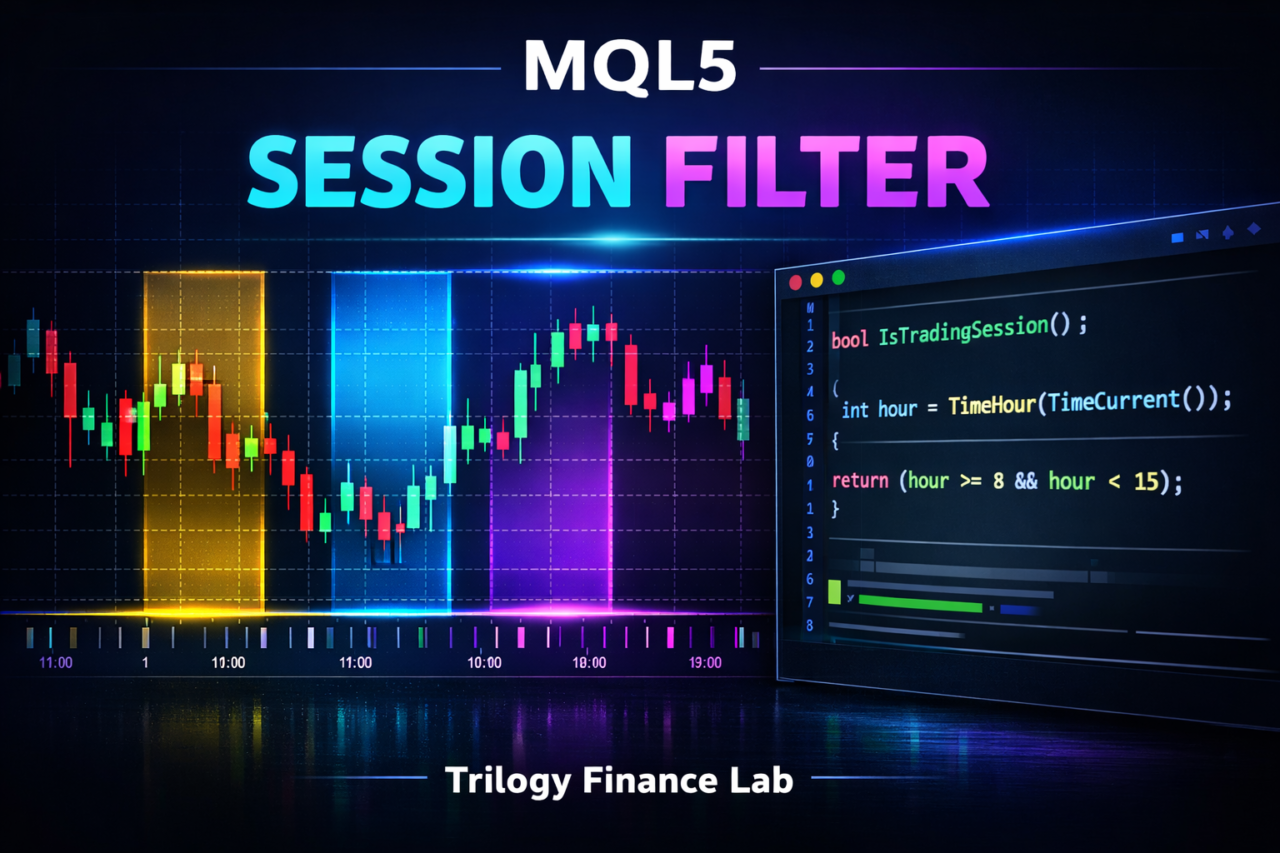
bool IsTradingTime()
{
   int hour = TimeHour(TimeCurrent());

   if(hour >= 9 && hour < 17)
      return true;

   return false;
}
Then include it in the order processing.
void OnTick()
{
   if(!IsTradingTime())
      return;

   // Entry logic goes here
}
Key points in this structure:
- Check the time on every OnTick
- If outside the allowed condition, return immediately and stop processing
- Run execution only inside the allowed condition
1.4 Common misunderstandings and cautions
Conclusion:
The idea that controlling time alone is enough to win is wrong. A session filter should be combined with other filters such as spread and indicator filters.
Common mistakes include:
- Optimizing only the time condition
- Ignoring broker time, or server time
- Ignoring daylight saving time, or DST
- Creating a time gap between backtesting and live trading
The especially important point is the time reference.
- TimeCurrent() returns server time
- TimeLocal() returns the PC local time
Server time is usually used as the reference, but it differs by broker, so it must be checked carefully.
1.5 Position compared with other filters
Conclusion:
A trade-session-filter is a time-axis filter, and its role is different from other filters.
Differences from common filters:
- spread filter: cost control
- slippage filter: execution quality control
- indicator filter: market condition judgment
- session filter: time-period control
In other words, an EA reaches a practical level only when it combines:
Time x market condition x cost
2. How to Implement an MQL5 trade-session-filter
Conclusion:
An MQL5 trade-session-filter can be implemented in three steps: get the time, evaluate the condition, and stop processing when the condition is not met.
Definition:
Implementation means writing code inside the EA that evaluates the time condition, or trade session, and controls order execution.
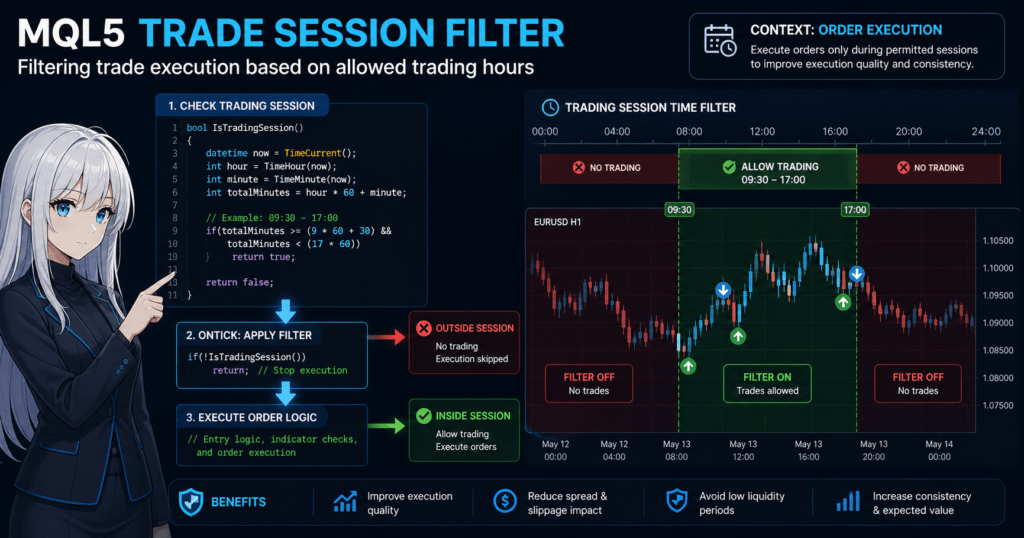
2.1 Overall implementation flow
Conclusion:
The implementation becomes easier to understand and reuse when divided into the following three steps.
Steps:
- Get the current time
- Define the allowed trading hours
- Stop processing if outside the condition
By turning this structure into a function, you can reuse it in other EAs.
2.2 How to get the current time
Conclusion:
The basic and safer approach is to use TimeCurrent() and use server time as the reference.
datetime current = TimeCurrent();
int hour = TimeHour(current);
int minute = TimeMinute(current);
Key points:
- TimeCurrent() returns the broker server time
- TimeLocal() returns the PC local time and is not recommended
Cautions:
- Local time may be offset in a VPS environment
- Broker server time can differ, such as GMT+2 or GMT+3
2.3 Creating a time-session filter function
Conclusion:
Putting the time check into a function improves EA readability and reusability.
bool IsTradingSession()
{
   int hour = TimeHour(TimeCurrent());

   // Example: allow trading only from 9:00 to 17:00
   if(hour >= 9 && hour < 17)
      return true;

   return false;
}
Extended example with minute-level control:
bool IsTradingSession()
{
   datetime now = TimeCurrent();
   int hour = TimeHour(now);
   int minute = TimeMinute(now);

   int totalMinutes = hour * 60 + minute;

   // 9:30 to 17:00
   if(totalMinutes >= (9 * 60 + 30) && totalMinutes < (17 * 60))
      return true;

   return false;
}
2.4 How to include it in OnTick
Conclusion:
Adding the filter at the beginning of OnTick prevents unnecessary calculations and order processing.
void OnTick()
{
   // Exit immediately outside the session
   if(!IsTradingSession())
      return;

   // Spread check example
   if(SymbolInfoInteger(_Symbol, SYMBOL_SPREAD) > 20)
      return;

   // Entry logic
}
Key points:
- Filtering first improves performance
- It can be combined with other conditions such as spread and slippage
- It can also reduce unnecessary indicator calculations
2.5 Supporting multiple sessions, important in practice
Conclusion:
In real use, many EAs allow multiple time periods, such as London plus New York.
bool IsTradingSession()
{
   int hour = TimeHour(TimeCurrent());

   // London session example
   bool london = (hour >= 16 && hour < 20);

   // New York session example
   bool ny = (hour >= 21 && hour < 24);

   return (london || ny);
}
Applications:
- Change the logic by session
- Adjust lot size based on volatility
- Stop only during news-release times
2.6 Common implementation mistakes and fixes
Conclusion:
The main causes of bugs in time filters are the time reference and missing edge-case conditions.
Common mistake:
- Incorrect condition across midnight
// Bad example, 23:00 to 2:00 if(hour >= 23 && hour < 2)
Fix:
if(hour >= 23 || hour < 2)
Other cautions:
- Not checking server time carefully enough
- Time offsets during backtesting
- No support for daylight saving time, or DST
Simple DST handling:
- Do not rely only on a fixed hour; supplement it with market-condition checks
- Or make the hours external input parameters
2.7 Practical improvement points
Conclusion:
In practice, stability comes from combining time with other conditions.
Recommended structure:
- Time filter, or session
- Spread control
- Execution quality, or slippage
- Indicator judgment, such as trend or range
Example:
if(!IsTradingSession()) return;
if(SymbolInfoInteger(_Symbol, SYMBOL_SPREAD) > 20) return;
if(!IsTrendCondition()) return;
This structure helps:
- Reduce unnecessary trades
- Stabilize execution
- Improve EA reproducibility
3. How a trade-session-filter works, and why it is effective
Conclusion:
A trade-session-filter is effective because market structure, including liquidity, volatility, and cost, changes by time of day, so expected value also changes.
Definition:
The mechanism refers to the structural market factors that change win rate, risk-reward ratio, and execution quality by time period.
3.1 Market structure by time period, volatility, and liquidity
Conclusion:
The quantity and type of market participants change by time period, and this determines price movement, volatility, and liquidity.
Main characteristics:
- Tokyo session: fewer participants, so range markets are common
- London session: European participants enter, and price movement often increases sharply
- New York session: liquidity is highest, and trends tend to form more easily
Because of these differences:
- Trend-following logic is often more suitable for London and New York
- Mean-reversion logic is often more suitable for the Tokyo session
In short:
If the logic and the time period do not match, expected value breaks down.
This is the core idea of a trade-session-filter.
3.2 Changes in spread and execution quality
Conclusion:
Spread, or transaction cost, and execution quality can change significantly depending on the time of day.
Typical examples:
- Early morning and market open after the weekend
Wider spread and more slippage - During economic news releases
Execution delay and requotes - High-liquidity periods
Narrower spread and more stable fills
As a result:
- The same logic can produce different profit and loss depending on the time
- A gap can appear between backtesting and live trading
Therefore, controls are needed such as:
- Trading only when spread is stable
- Selecting time periods with less slippage
3.3 Expected value perspective
Conclusion:
A trade-session-filter is a tool for removing trades with low expected value.
Basic expected value structure:
- Win rate x average profit
- minus loss rate x average loss
Depending on the time period:
- Win rate may decrease
- Losses may increase because of slippage and spread
In other words:
There are time periods where expected value becomes negative.
By excluding those periods:
- The number of trades decreases
- Total profit can become more stable
3.4 Why backtesting and live trading diverge
Conclusion:
Without a time filter, an EA may win in a test environment but fail in live trading.
Main reasons:
- The tester may assume ideal execution
- The live environment has spread changes and delays
- Time-of-day effects may not be fully reflected
Cases where this is especially problematic:
- EAs with many early-morning entries
- Logic that ignores news-release times
- High-frequency trading, such as scalping
Countermeasures:
- Remove noise with a time filter
- Exclude unstable time periods
- Reduce execution-dependent risk
3.5 Role sharing with other filters
Conclusion:
A trade-session-filter controls time, while other filters control conditions. Their roles are clearly different.
Structural summary:
- session filter: controls time
- spread filter: controls cost
- slippage filter: controls execution quality
- indicator filter: controls market condition
Important point:
A session filter alone is not enough; it should be used in combination.
For example:
- Good session but wide spread: do not trade
- Good market condition but outside the allowed session: do not trade
Using layered filters can achieve:
- Fewer unnecessary entries
- Stronger risk control
- Better EA reproducibility
3.6 Common misunderstanding
Conclusion:
The idea that a time filter is universal is wrong. It is only a supporting risk management method.
Examples of misunderstandings:
- If you optimize the time, you can win
- Narrowing the session always increases profit
- The same time period works for every EA
In reality, results depend on:
- The logic type, such as trend-following or mean reversion
- The currency pair, such as EURUSD or GBPJPY
- The broker, including execution differences
Therefore:
It is important to choose a time period that matches the logic.
4. trade-session-filter vs. Other Filters
Conclusion:
A trade-session-filter specializes in time-based control, and its role is fundamentally different from filters such as spread, slippage, and indicator filters.
Definition:
The comparison targets are filters that control EA order conditions. They are classified by what each filter uses as the basis for controlling trades.
4.1 Overall filter structure and classification
Conclusion:
Filters are easier to understand when grouped into four categories: time, cost, execution, and market condition.
Classification:
- Time: trade-session-filter
- Cost: spread filter
- Execution quality: slippage filter
- Market condition: indicator filter, such as RSI or MA
Combining these four categories builds an EA that is practical for real trading.
4.2 Filter comparison table
Conclusion:
Each filter has a different role, so the practical assumption is not to choose only one, but to combine them.
| Filter type | Control target | Main purpose | Strength | Weakness |
|---|---|---|---|---|
| trade-session-filter | Time period | Exclude unfavorable hours | Simple and lightweight | Does not read market condition |
| spread filter | Spread | Reduce cost | Highly immediate | Does not consider time factors |
| slippage filter | Execution deviation | Stabilize execution | Strong in live trading | Difficult to reproduce in the tester |
| indicator filter | Market condition | Improve entry accuracy | Core of the logic | Can lag or create false signals |
Important point:
A trade-session-filter is a prerequisite condition, while an indicator is decision logic.
4.3 trade-session-filter vs spread filter
Conclusion:
A session filter checks time, while a spread filter checks cost. Their purposes are different.
Difference:
- session: excludes unfavorable hours
- spread: excludes high-cost conditions
Examples:
- London session but abnormal spread: excluded by the spread filter
- Late night with normal spread: excluded by the session filter
In short:
The same trade stop can happen for different reasons.
In practice, both are needed.
4.4 trade-session-filter vs indicator filter
Conclusion:
A session filter is an external condition, while an indicator is internal logic. Their roles are completely separate.
Difference:
- session: whether the EA may trade at this time
- indicator: whether the market is suitable for entry
Example:
if(!IsTradingSession()) return;     // Time condition
if(!IsTrendCondition()) return;     // Market condition
This order matters:
- Filter by time
- Judge by market condition
Reasons:
- Reduce unnecessary indicator calculations
- Improve performance
4.5 trade-session-filter vs calendar filter, or news avoidance
Conclusion:
A session filter controls fixed times, while a calendar filter controls event-based risk.
Difference:
- session: the same time every day
- calendar: only during indicators and news events
Examples:
- Nonfarm payrolls: avoid with a calendar filter
- Every day after 22:00: avoid with a session filter
In practice:
Using session plus calendar filters together is standard.
4.6 Which filter should be prioritized?
Conclusion:
A stable design usually applies filters in this order: time, cost, then market condition.
Recommended order:
- session, or time
- spread / slippage, or cost and quality
- indicator, or market judgment
Reasons:
- Time is the broadest filter
- Cost immediately affects profit and loss
- Indicator logic is the final decision
This order helps:
- Reduce unnecessary calculations
- Stabilize execution
- Improve reproducibility
4.7 Common design mistakes
Conclusion:
Using filters alone or placing them in the wrong order can reduce performance.
Typical mistakes:
- Judging only by indicators
- Placing the session filter later in the logic
- Not checking spread
Bad example:
if(IsTrendCondition())
{
   if(!IsTradingSession()) return;
}
Problems:
- Unnecessary calculations
- Inefficient logic
4.8 Practical optimal structure template
Conclusion:
The following structure is a basic form with high reproducibility and stability.
if(!IsTradingSession()) return;                 // Time
if(SymbolInfoInteger(_Symbol, SYMBOL_SPREAD) > 20) return; // Cost
if(!IsTrendCondition()) return;                 // Market
This structure helps:
- Reduce unnecessary trades
- Improve execution quality
- Limit drawdown
5. Common Mistakes and Practical Cautions
Conclusion:
Most trade-session-filter failures come from time-reference mismatches, condition-design errors, and unhandled environment differences. If these are missed, backtesting and live trading can diverge.
Definition:
A failure means the intended time control does not work, causing unnecessary trades or unexpected stops.
5.1 Confusing server time and local time
Conclusion:
If TimeCurrent(), or server time, is not used as the reference, time can shift depending on the VPS or PC environment.
Common mistakes:
- Using TimeLocal()
- Behavior changes when the PC time zone changes
Countermeasure:
datetime now = TimeCurrent(); // Always use this
Additional notes:
- GMT offset differs by broker, such as GMT+2 or GMT+3
- If you want to match London or New York time, offset correction is required
5.2 Incorrect condition across midnight
Conclusion:
A condition such as 23:00 to 2:00 must be written with OR, not AND.
Bad example:
if(hour >= 23 && hour < 2) // Always false
Correct example:
if(hour >= 23 || hour < 2)
Reason:
- The condition crosses the daily boundary at 0:00
- It cannot be expressed with a simple range condition
5.3 No daylight saving time, or DST, support
Conclusion:
If DST is ignored, trading hours shift only during certain periods.
Problem examples:
- You intended to match London time but are off by one hour
- Backtest and live results differ
Countermeasures:
- Make the hours adjustable with input parameters
- Or convert based on GMT
Example:
input int StartHour = 9;
input int EndHour = 17;
This allows:
- Manual adjustment
- Support for broker differences
5.4 Difference between backtesting and live trading
Conclusion:
The effect of a time filter also changes because tester and live environments have different execution conditions, including slippage and spread.
Main causes of divergence:
- The tester often uses a fixed spread
- Slippage is not reproduced
- There is no execution delay
Result:
- A setup that works in tests may fail in live trading
Countermeasures:
- Use a spread filter together with the session filter
- Use variable spread during testing when possible
- Check logs by time period
5.5 Over-optimizing the filter
Conclusion:
If you optimize time periods too narrowly, future market reproducibility can be lost.
Typical examples:
- Overly detailed windows such as only 10:15 to 11:20
- Overfitting to historical data
Problems:
- The setup loses generality
- It fails in forward testing
Countermeasures:
- Design by session, meaning blocks of several hours
- Limit the setup to simple time periods
5.6 Mismatch with the trading logic
Conclusion:
If the time period and the logic do not match, the filter can work against the strategy.
Examples:
- Using only Tokyo hours for a trend strategy
- Focusing on London hours for a mean-reversion strategy
Results:
- Lower win rate
- Larger drawdown
Countermeasures:
- Clarify the characteristics of the logic
- Verify performance by time period
5.7 Wrong filter order
Conclusion:
If the time filter is not applied first, it can cause unnecessary calculations and unintended behavior.
Bad example:
if(IsTrendCondition())
{
   if(!IsTradingSession()) return;
}
Problems:
- Unnecessary indicator calculations
- Lower performance
Correct structure:
if(!IsTradingSession()) return;
if(!IsTrendCondition()) return;
5.8 Practical checklist
Conclusion:
If the following items are satisfied, the filter is stable enough for practical use.
Checklist:
- TimeCurrent() is used
- Across-midnight conditions are correct
- DST is supported or adjustable
- A spread filter is used together with it
- The logic and time period match
- The filter is not over-optimized
6. Practical Use Cases by Strategy Type
Conclusion:
A trade-session-filter is most effective when the best time period is selected for each strategy type. Trend-following, mean-reversion, and scalping strategies use it differently.
Definition:
A use case means selecting and controlling the trade session with the highest expected value for each trading strategy, based on the characteristics of the logic.
6.1 How to use it in trend-following strategies
Conclusion:
Trend-following strategies are usually limited to the London to New York sessions.
Reasons:
- Liquidity is high
- Large trends are more likely to occur
- Execution is stable
Recommended time period example:
- 16:00 to 24:00, depending on broker time
Implementation example:
bool IsTrendSession()
{
   int hour = TimeHour(TimeCurrent());
   return (hour >= 16 && hour < 24);
}
Additional notes:
- Breakout strategies, such as high-break entries, often work well in this period
- False breaks tend to increase during the Tokyo session
6.2 How to use it in mean-reversion, or range, strategies
Conclusion:
Mean-reversion strategies are often effective during low-volatility periods such as the Tokyo session.
Reasons:
- Range markets are more likely
- Sharp trends are less likely to occur
Recommended time period:
- 08:00 to 15:00
Implementation example:
bool IsRangeSession()
{
   int hour = TimeHour(TimeCurrent());
   return (hour >= 8 && hour < 15);
}
Cautions:
- Exclude periods around news releases by using a calendar filter
- Do not enter when spreads widen
6.3 How to use it in scalping strategies
Conclusion:
Scalping must be limited to periods when spreads are narrowest.
Reasons:
- The profit target is small, so cost has a large impact
- Slippage has a strong effect
Recommended conditions:
- Immediately after the London open
- Immediately after the New York open
- Periods when spread is stable
Implementation example with combination:
if(!IsTradingSession()) return;
if(SymbolInfoInteger(_Symbol, SYMBOL_SPREAD) > 15) return;
Key points:
- A session filter alone is not enough
- It must be combined with a spread filter
6.4 Combining it with news avoidance
Conclusion:
A trade-session-filter alone cannot avoid news risk, so it should be combined with a news filter.
Examples:
- Nonfarm payrolls, or NFP
- FOMC
- CPI
Countermeasures:
- Stop trading before and after the news-release time
- Use a calendar API
Structure:
if(!IsTradingSession()) return;
if(IsNewsTime()) return;
This helps:
- Avoid sudden slippage
- Prevent abnormal execution
6.5 Best sessions by currency pair
Conclusion:
Each currency pair has different active hours, so the session should be optimized by pair.
Examples:
- EURUSD: London and New York
- GBPJPY: London hours tend to be strong
- USDJPY: can also move during Tokyo hours
Key points:
- Match the session to the home market of the currency
- Prioritize high-liquidity hours
6.6 Practical template for general design
Conclusion:
The following template structure can be applied to almost any EA.
if(!IsTradingSession()) return;                      // Time
if(SymbolInfoInteger(_Symbol, SYMBOL_SPREAD) > 20) return; // Cost
if(IsNewsTime()) return;                             // News avoidance
if(!IsTradeSignal()) return;                         // Logic
Benefits of this structure:
- Each filter has a clear role
- Reproducibility is high
- It is easy to extend
6.7 Practical decision criteria
Conclusion:
The time period is more stable when chosen based on market structure rather than only backtest results.
Decision factors:
- Liquidity, or volume
- Spread, or cost
- Volatility, or range
Bad patterns:
- Optimizing only from historical data
- Using overly detailed time settings
Recommended approach:
Use a simple session plus other filters.
7. Frequently Asked Questions
Conclusion:
A trade-session-filter is simple, but many traders get stuck on the time reference, the relationship with other filters, and the gap between tests and live trading.
Definition:
This FAQ gives short, clear answers to common questions that arise during implementation and operation.
7.1 Is an MQL5 trade-session-filter required?
Conclusion:
It is not mandatory, but it is almost essential for practical EA operation.
Reasons:
- It can exclude unfavorable time periods
- It can avoid spread widening and worse execution
- It improves EA stability and reproducibility
7.2 Should I use TimeCurrent() or TimeLocal()?
Conclusion:
The basic choice is TimeCurrent(), which uses server time.
Reasons:
- Trading is based on the broker’s time reference
- It does not depend on the VPS or PC environment
7.3 Which time period should I choose?
Conclusion:
It depends on the strategy, such as trend or mean reversion, and the currency pair.
General guide:
- Trend-following: London and New York sessions
- Mean-reversion: Tokyo session
- Scalping: periods when spread is stable
7.4 Why does an across-midnight condition not work?
Conclusion:
You need to use an OR condition.
Example:
if(hour >= 23 || hour < 2)
Reasons:
- The condition crosses the daily boundary
- An AND condition cannot satisfy it
7.5 Is a trade-session-filter alone enough?
Conclusion:
No. It should be used with other filters.
Combination examples:
- spread filter: cost control
- slippage filter: execution quality
- indicator: market judgment
7.6 Why do backtest and live results differ?
Conclusion:
The main causes are differences in execution conditions and spread.
Main reasons:
- The tester is an idealized environment
- Live trading has slippage and delays
Countermeasures:
- Use a spread filter together with it
- Review the trading hours
7.7 Should DST be supported?
Conclusion:
Supporting DST makes the EA more stable.
Reasons:
- Trading hours can shift by one hour
- The actual session may differ from the intended session
Simple countermeasure:
- Make the hours adjustable with input parameters
7.8 What is the best implementation structure?
Conclusion:
Apply filters in the order of time, cost, and logic.
if(!IsTradingSession()) return;
if(SymbolInfoInteger(_Symbol, SYMBOL_SPREAD) > 20) return;
if(!IsTradeSignal()) return;
Reasons:
- It reduces unnecessary processing
- It stabilizes execution
- It improves reproducibility