
- 1 1. What Is MQL5 OrderSend()?
- 2 2. Basic Syntax and Function Specification of OrderSend()
- 3 3. Main MqlTradeRequest Parameters and How to Set Them
- 4 4. Practical OrderSend() Code Examples (Market Orders)
- 5 5. Implementing Limit Orders and Stop Orders
- 6 6. How to Read MqlTradeResult and Check Order Results
- 6.1 6.1 Meaning of the OrderSend() Return Value
- 6.2 6.2 retcode (Most Important Item)
- 6.3 6.3 deal (Deal Ticket)
- 6.4 6.4 order (Order Ticket)
- 6.5 6.5 price (Execution Price)
- 6.6 6.6 Practical Result-Checking Code
- 6.7 6.7 Log Output Often Used in EA Development
- 6.8 Common Pitfalls, Notes, and Mistakes
- 6.9 Important Practical Point
- 7 7. Common OrderSend() Errors and How to Fix Them
- 7.1 7.1 Invalid volume (Invalid Lot Size)
- 7.2 7.2 Invalid price (Invalid Price)
- 7.3 7.3 Invalid stops (Invalid SL / TP)
- 7.4 7.4 Trade disabled (Trading Not Allowed)
- 7.5 7.5 Not enough money (Insufficient Margin)
- 7.6 7.6 Off quotes / Requote
- 7.7 7.7 Checklist When an EA Does Not Trade
- 7.8 Common Pitfalls, Notes, and Mistakes
- 7.9 Practical Point
- 8 8. EA Design Best Practices for Using OrderSend() Safely
- 9 9. FAQ
- 9.1 9.1 Should I Use OrderSend() or the CTrade Class?
- 9.2 9.2 Why Does OrderSend() Return true Even Though the Order Is Not Executed?
- 9.3 9.3 Why Are the Prices Different for Buy and Sell Orders?
- 9.4 9.4 What Causes the Invalid stops Error?
- 9.5 9.5 Why Is OrderSend() Not Executed?
- 9.6 9.6 Is ZeroMemory() Always Required?
- 9.7 9.7 What Is the Basic Method for Managing Orders in an EA?
- 9.8 9.8 Why Do Orders Become Unstable with OrderSend()?
1. What Is MQL5 OrderSend()?
OrderSend() is the MQL5 (MetaQuotes Language 5) function used to send actual trade orders to a broker.
When you build an EA (Expert Advisor), this function becomes the core feature of the order execution process.
In MetaTrader 5, detecting a buy or sell signal does not execute a trade by itself.
The EA must perform the following steps.
- Create the order details
- Send them to the broker
- Check the execution result
In this sequence, OrderSend() is responsible for sending the order.
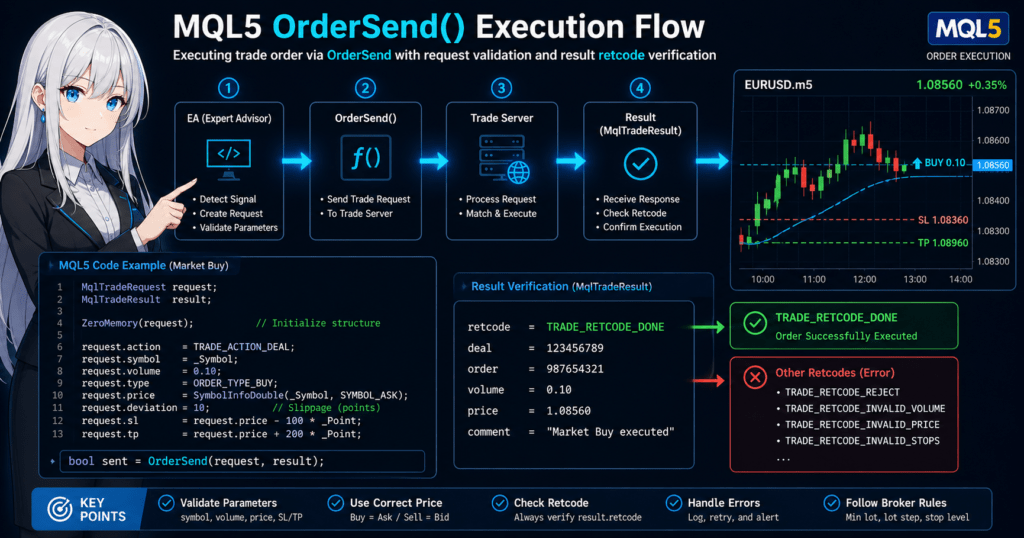
In MQL5, orders are processed in the following structure.
EA
 ↓
OrderSend()
 ↓
Trade server
 ↓
Execution result
In other words, OrderSend() is the interface that sends the order request created by the EA to the trade server.
1.1 Role of OrderSend()
OrderSend() sends the following information together to execute a trade order.
Main order information
- Currency pair to trade, such as EURUSD
- Trade direction, Buy or Sell
- Lot size
- Order price
- Stop Loss (SL)
- Take Profit (TP)
In MQL5, this information is stored in structures, which are grouped data containers, and then sent.
Specifically, the following two structures are used.
| Structure | Role |
|---|---|
MqlTradeRequest | Stores the order details |
MqlTradeResult | Receives the order result |
The process flow is as follows.
1 Create the order details
2 Run OrderSend()
3 Check the result
A simple code image looks like this.
MqlTradeRequest request;
MqlTradeResult  result;

OrderSend(request, result);
When this function runs, the order is sent to the trade server,
and the result is stored in result.
1.2 Difference from MT4 OrderSend()
MQL5 OrderSend() is designed very differently from MetaTrader 4 (MQL4).
In MT4, the order function used a single-function format like this.
OrderSend(Symbol(),OP_BUY,0.1,Ask,10,0,0);
In MQL5, by contrast, the design is structure based.
The reasons are as follows.
- Order information became more extensive and complex
- Server-side processing became more advanced
- The design needed better extensibility
Therefore, in MQL5, you first collect the order information in a structure called
MqlTradeRequest
and then run OrderSend().
Because of this difference, even traders with MT4 experience often get confused at first.
Common points that confuse beginners
- You cannot write it the same way as MT4
- The structure must be initialized
- The way to get prices is different
This is one of the most common early problems in EA development.
1.3 Typical Cases Where OrderSend() Is Needed
OrderSend() is used in the following situations.
1. Automated Trading by an EA
This is the most common use case.
Example
RSI is 30 or lower → Buy
RSI is 70 or higher → Sell
In this case, OrderSend() handles the process that actually executes the trade.
2. Limit Orders and Stop Orders
An EA can also create the following orders.
- Buy Limit (buying on a pullback)
- Sell Limit (selling on a rebound)
- Buy Stop (breakout)
- Sell Stop (breakout)
These pending orders are also sent with OrderSend().
3. Multi-Currency EAs
In MT5, many EAs are built to handle the following at the same time.
- Multiple currency pairs
- Multiple timeframes
In this case as well, OrderSend() is executed for each currency pair.
Common Beginner Pitfalls
In EA development, the following mistakes often happen around OrderSend().
Common failures
1. The price is not set
→ The order is rejected
2. The lot size is outside broker limits
→ Invalid volume error
3. SL/TP is too close
→ Invalid stops error
4. The symbol is not set
request.symbol=""
→ The order cannot be placed
5. Ask and Bid are used incorrectly
| Order | Price |
|---|---|
| Buy | Ask |
| Sell | Bid |
These problems become easier to solve once you understand the order structure explained in the next chapter.
2. Basic Syntax and Function Specification of OrderSend()
OrderSend() is the core function for executing trade orders in MQL5.
It sends the order information created by the EA to the trade server and receives the order result.
In MQL5, order information is not passed directly through many separate arguments. Instead, it is stored in a structure, or grouped data container, before being sent.
2.1 Function Syntax of OrderSend()
The basic syntax of OrderSend() in MQL5 is as follows.
bool OrderSend(
   MqlTradeRequest& request,
   MqlTradeResult&  result
);
The arguments mean the following.
| Argument | Description |
|---|---|
request | Structure that stores the order details |
result | Structure that receives the order result |
The return value is a bool.
| Return value | Meaning |
|---|---|
true | The order was successfully sent to the server |
false | The order send operation failed |
However, one important point is that true does not always mean the order was filled.
When OrderSend() succeeds, it means this.
The order reached the server
You must check result to know the actual order result.
2.2 MqlTradeRequest (Order Information)
MqlTradeRequest is the structure that stores order details.
You set the required information in it before running OrderSend().
The main members are as follows.
| Item | Meaning |
|---|---|
action | Order action |
symbol | Currency pair |
volume | Lot size |
type | Order direction |
price | Order price |
sl | Stop Loss |
tp | Take Profit |
deviation | Allowed slippage |
magic | EA identification number |
Even in a minimum setup, you usually set the following.
action
symbol
volume
type
price
If these are not set correctly in an EA, the order will be rejected.
2.3 MqlTradeResult (Order Result)
MqlTradeResult is the structure that receives the order result.
The main members are as follows.
| Item | Meaning |
|---|---|
retcode | Server response code |
deal | Deal ticket |
order | Order ticket |
price | Execution price |
The especially important member is this.
retcode
It is the code that indicates the order result, and you should always check it in EA development.
Example
TRADE_RETCODE_DONE
Meaning
Order successful
There are also codes like these.
| retcode | Meaning |
|---|---|
TRADE_RETCODE_REJECT | Order rejected |
TRADE_RETCODE_INVALID_VOLUME | Invalid lot size |
TRADE_RETCODE_INVALID_PRICE | Invalid price |
In an EA, you check it like this.
if(result.retcode == TRADE_RETCODE_DONE)
{
   Print("Order successful");
}
2.4 Minimum Order Code
A minimum market Buy order example looks like this.
MqlTradeRequest request;
MqlTradeResult  result;

ZeroMemory(request);

request.action = TRADE_ACTION_DEAL;
request.symbol = _Symbol;
request.volume = 0.1;
request.type   = ORDER_TYPE_BUY;
request.price  = SymbolInfoDouble(_Symbol, SYMBOL_ASK);

OrderSend(request, result);
This code performs the following steps.
1 Create the order structure
2 Set the order details
3 Send with OrderSend()
In an EA, this process is run when a trade signal occurs.
Common Pitfalls (Important)
The following mistakes are very common when implementing OrderSend().
1. Forgetting ZeroMemory()
If a structure is not initialized, it can contain garbage data.
Always run it.
ZeroMemory(request);
2. Confusing Ask and Bid
| Order | Price |
|---|---|
| Buy | Ask |
| Sell | Bid |
Example
ORDER_TYPE_BUY → Ask
ORDER_TYPE_SELL → Bid
3. volume is outside broker limits
Example
Less than 0.01
and similar cases.
The broker’s minimum lot size differs by environment.
4. deviation is not set
This can cause order rejection in fast-moving markets.
Example
request.deviation = 10;
5. SL/TP is too close
Brokers define a minimum stop distance.
Invalid stops
This can cause the error.
Practical Point
In a real EA, you add the following processing.
- Error handling
retcodechecking- Log output
- Retry handling
If you omit this part, it becomes difficult to identify why the EA does not trade.
3. Main MqlTradeRequest Parameters and How to Set Them
To use OrderSend() correctly, understanding each parameter of the MqlTradeRequest structure is essential.
This structure holds all information needed for a trade order.
Many order failures in EA development are caused by incorrect parameter settings.
This section focuses on the items that matter most in real development.
3.1 action (Order Action)
action specifies the order action, or trade operation type.
The commonly used values are as follows.
| Value | Meaning |
|---|---|
TRADE_ACTION_DEAL | Market order |
TRADE_ACTION_PENDING | Limit or stop order |
TRADE_ACTION_SLTP | SL/TP modification |
TRADE_ACTION_REMOVE | Order deletion |
The most frequently used action in EAs is a market order.
Example
request.action = TRADE_ACTION_DEAL;
For a pending order, it looks like this.
request.action = TRADE_ACTION_PENDING;
3.2 symbol (Currency Pair)
symbol specifies the instrument, or currency pair, to trade.
Usually, you use the following value.
request.symbol = _Symbol;
_Symbol means the currency pair of the current chart.
Examples
EURUSD
USDJPY
XAUUSD
For a multi-currency EA, you must specify it explicitly.
request.symbol = "EURUSD";
3.3 volume (Lot Size)
volume specifies the trade size, or lot size.
Example
request.volume = 0.10;
Be careful because lot size has broker limits.
Main limits
- Minimum lot
- Maximum lot
- Lot step
Example
| Item | Example |
|---|---|
| Minimum lot | 0.01 |
| Lot step | 0.01 |
If you set an invalid value, the following error occurs.
TRADE_RETCODE_INVALID_VOLUME
You can check it in an EA with this function.
SymbolInfoDouble(_Symbol, SYMBOL_VOLUME_MIN);
3.4 type (Order Direction)
type specifies the trade direction or order type.
Typical values are as follows.
| Value | Meaning |
|---|---|
ORDER_TYPE_BUY | Market buy |
ORDER_TYPE_SELL | Market sell |
ORDER_TYPE_BUY_LIMIT | Buy limit |
ORDER_TYPE_SELL_LIMIT | Sell limit |
ORDER_TYPE_BUY_STOP | Buy stop |
ORDER_TYPE_SELL_STOP | Sell stop |
Example
request.type = ORDER_TYPE_BUY;
3.5 price (Order Price)
price specifies the order price.
For market orders
| Order | Price |
|---|---|
| Buy | Ask |
| Sell | Bid |
Example
request.price = SymbolInfoDouble(_Symbol, SYMBOL_ASK);
Sell order
request.price = SymbolInfoDouble(_Symbol, SYMBOL_BID);
If the price is set incorrectly, the order will be rejected.
3.6 sl / tp (Stop Loss and Take Profit)
sl is the stop-loss price.tp is the take-profit price.
Example
request.sl = Ask - 100 * _Point;
request.tp = Ask + 200 * _Point;
Here, _Point means
Minimum price unit
Examples
| Currency pair | _Point |
|---|---|
| EURUSD | 0.00001 |
| USDJPY | 0.001 |
3.7 deviation (Slippage Tolerance)
deviation specifies how much price movement is acceptable.
Example
request.deviation = 10;
The unit is
points
If it is not set, orders may be rejected in volatile markets.
3.8 magic (EA Identification Number)
magic is an identification number for the EA.
Setting it lets you distinguish between
- EA positions
- Manual positions
Example
request.magic = 123456;
In EA development, it is almost a required parameter.
Common Pitfalls
The most common mistakes in MqlTradeRequest settings are summarized below.
1. price is not set
Invalid price
This causes an error.
2. symbol is not set
request.symbol = ""
The order fails.
3. volume is too small
Invalid volume
4. SL / TP is too close
Invalid stops
Each broker has a minimum stop distance.
5. action and type do not match
Example
TRADE_ACTION_DEAL
+
ORDER_TYPE_BUY_LIMIT
This is a contradictory setting.
Practical Tip
In EAs, the following initialization is commonly used.
MqlTradeRequest request;
MqlTradeResult result;

ZeroMemory(request);
ZeroMemory(result);
This helps prevent bugs caused by undefined data.
4. Practical OrderSend() Code Examples (Market Orders)
This section explains the basic implementation for placing market orders, meaning buy or sell orders executed immediately, with OrderSend() in MQL5.
For beginners, the first code to run should be the minimum setup for a Buy order and a Sell order.
A market order uses the current market price.
However, simply calling OrderSend() is not enough. At minimum, you need to understand the following three points.
- Initialize
MqlTradeRequestcorrectly - Use Ask for Buy and Bid for Sell
- Check the result with
result.retcode
4.1 Buy Order Sample Code
First, here is the most basic market Buy order.
void BuyOrder()
{
   MqlTradeRequest request;
   MqlTradeResult  result;

   ZeroMemory(request);
   ZeroMemory(result);

   double ask = SymbolInfoDouble(_Symbol, SYMBOL_ASK);

   request.action    = TRADE_ACTION_DEAL;
   request.symbol    = _Symbol;
   request.volume    = 0.10;
   request.type      = ORDER_TYPE_BUY;
   request.price     = ask;
   request.deviation = 10;
   request.magic     = 123456;
   request.comment   = "MQL5 Buy Order";

   if(OrderSend(request, result))
   {
      Print("Buy order sent successfully, retcode=", result.retcode);
   }
   else
   {
      Print("Buy order send failed");
   }
}
This code flows as follows.
- Prepare
requestandresult - Initialize them with
ZeroMemory() - Get the Ask price
- Set the information needed for the Buy order
- Run
OrderSend() - Check the result in the log
For a Buy order, use Ask as the price.
double ask = SymbolInfoDouble(_Symbol, SYMBOL_ASK);
request.price = ask;
If you use Bid here, it can cause order rejection or unexpected behavior depending on the environment and conditions.
4.2 Sell Order Sample Code
Next is a market Sell order.
void SellOrder()
{
   MqlTradeRequest request;
   MqlTradeResult  result;

   ZeroMemory(request);
   ZeroMemory(result);

   double bid = SymbolInfoDouble(_Symbol, SYMBOL_BID);

   request.action    = TRADE_ACTION_DEAL;
   request.symbol    = _Symbol;
   request.volume    = 0.10;
   request.type      = ORDER_TYPE_SELL;
   request.price     = bid;
   request.deviation = 10;
   request.magic     = 123456;
   request.comment   = "MQL5 Sell Order";

   if(OrderSend(request, result))
   {
      Print("Sell order sent successfully, retcode=", result.retcode);
   }
   else
   {
      Print("Sell order send failed");
   }
}
For a Sell order, use Bid as the price.
double bid = SymbolInfoDouble(_Symbol, SYMBOL_BID);
request.price = bid;
Price selection for market orders is a point beginners often get wrong.
It is safer to remember the following mapping first.
| Order type | Price to use |
|---|---|
| Buy | Ask |
| Sell | Bid |
4.3 Practical Example with SL and TP
In real operation, Stop Loss and Take Profit are often set at the same time.
The following example adds sl and tp to a Buy order.
void BuyOrderWithSLTP()
{
   MqlTradeRequest request;
   MqlTradeResult  result;

   ZeroMemory(request);
   ZeroMemory(result);

   double ask = SymbolInfoDouble(_Symbol, SYMBOL_ASK);

   request.action    = TRADE_ACTION_DEAL;
   request.symbol    = _Symbol;
   request.volume    = 0.10;
   request.type      = ORDER_TYPE_BUY;
   request.price     = ask;
   request.sl        = ask - 100 * _Point;
   request.tp        = ask + 200 * _Point;
   request.deviation = 10;
   request.magic     = 123456;
   request.comment   = "Buy with SLTP";

   if(OrderSend(request, result))
   {
      Print("Buy order sent, retcode=", result.retcode);
   }
   else
   {
      Print("Buy order send failed");
   }
}
Here, the settings are as follows.
- Stop Loss: 100 points below
- Take Profit: 200 points above
However, the value of _Point differs by instrument.
Also, brokers may enforce minimum stop-distance limits, so these values are not guaranteed to pass in every environment.
4.4 Setting MagicNumber
In EA development, setting magic is very important.
It is the number that identifies which EA placed the order.
request.magic = 123456;
When MagicNumber is set, you can distinguish the following during later position management.
- Manual orders
- Orders from other EAs
- Orders from the current EA
It is almost required for the following processing.
- Closing only positions from your EA
- Running multiple EAs on the same currency pair
- Organizing operation logs
If you do not set magic, later management becomes much harder.
4.5 Minimum Result Checking
Even when OrderSend() returns true, it does not guarantee the actual order result.
Therefore, at minimum, check result.retcode.
if(OrderSend(request, result))
{
   if(result.retcode == TRADE_RETCODE_DONE)
   {
      Print("Order successful");
   }
   else
   {
      Print("Order was sent but execution failed, retcode=", result.retcode);
   }
}
else
{
   Print("OrderSend itself failed");
}
A common beginner mistake is judging the order as successful just because true was returned.
In real development, checking retcode is part of the same order process.
Common Pitfalls, Notes, and Mistakes
1. Using Bid for a Buy order
If the price mapping is reversed, it can cause order rejection or faulty behavior.
- Buy → Ask
- Sell → Bid
2. Omitting ZeroMemory()
Unwanted data may remain in the structure and lead to failures that are hard to explain.
ZeroMemory(request);
ZeroMemory(result);
It is safer to include this every time as a basic habit.
3. Not checking retcode
The return value of OrderSend() alone is not enough.
Without checking result.retcode, you cannot know why the order failed.
4. Lot size does not match the environment
0.10 is not always valid.
Minimum lot and lot step differ by account and instrument.
5. SL/TP distance is too close
If broker limits are violated, you get Invalid stops.
When using fixed values, consider environment differences.
6. Assuming NormalizeDouble() is always required
It is useful in some price calculations, but mechanically applying NormalizeDouble() everywhere is not the right approach.
First make the price retrieval and calculation logic correct, then use it only where needed.
5. Implementing Limit Orders and Stop Orders
OrderSend() supports not only market orders but also limit orders and stop orders.
In EA development, pending orders are often used for breakout strategies, buying pullbacks, and selling rebounds. Understanding them greatly expands the strategies you can implement.
The main difference from a market order is that the order is not executed immediately. It is triggered when the specified price is reached.
Therefore, in addition to setting action and type, you must correctly understand where to place the price.
5.1 Basics of Limit Orders and Stop Orders
For pending orders, set action as follows.
request.action = TRADE_ACTION_PENDING;
Then select the order type with type.
| Order type | Meaning |
|---|---|
ORDER_TYPE_BUY_LIMIT | Buy below the current price |
ORDER_TYPE_SELL_LIMIT | Sell above the current price |
ORDER_TYPE_BUY_STOP | Buy above the current price |
ORDER_TYPE_SELL_STOP | Sell below the current price |
First, organize and memorize this relationship.
Price placement image
- Buy Limit
Wait for a pullback and buy below the current price - Sell Limit
Wait for a rebound and sell above the current price - Buy Stop
Confirm an upside breakout and buy above the current price - Sell Stop
Confirm a downside breakout and sell below the current price
If you understand this backward, the EA will place orders in the opposite location from what you intended, which is critical in live operation.
5.2 Buy Limit Implementation Example
Use a Buy Limit when you place a buy order below the current price.
void PlaceBuyLimit()
{
   MqlTradeRequest request;
   MqlTradeResult  result;

   ZeroMemory(request);
   ZeroMemory(result);

   double ask   = SymbolInfoDouble(_Symbol, SYMBOL_ASK);
   double price = ask - 100 * _Point;

   request.action    = TRADE_ACTION_PENDING;
   request.symbol    = _Symbol;
   request.volume    = 0.10;
   request.type      = ORDER_TYPE_BUY_LIMIT;
   request.price     = price;
   request.sl        = price - 100 * _Point;
   request.tp        = price + 200 * _Point;
   request.deviation = 10;
   request.magic     = 123456;
   request.comment   = "Buy Limit";

   if(OrderSend(request, result))
      Print("Buy Limit sent, retcode=", result.retcode);
   else
      Print("Buy Limit send failed");
}
In this example, the Buy Limit is placed 100 points below the current Ask.
The key point is that the Buy Limit price must be below the current price.
If you place it above, the order becomes invalid.
5.3 Sell Limit Implementation Example
Use a Sell Limit when you place a sell order above the current price.
void PlaceSellLimit()
{
   MqlTradeRequest request;
   MqlTradeResult  result;

   ZeroMemory(request);
   ZeroMemory(result);

   double bid   = SymbolInfoDouble(_Symbol, SYMBOL_BID);
   double price = bid + 100 * _Point;

   request.action    = TRADE_ACTION_PENDING;
   request.symbol    = _Symbol;
   request.volume    = 0.10;
   request.type      = ORDER_TYPE_SELL_LIMIT;
   request.price     = price;
   request.sl        = price + 100 * _Point;
   request.tp        = price - 200 * _Point;
   request.deviation = 10;
   request.magic     = 123456;
   request.comment   = "Sell Limit";

   if(OrderSend(request, result))
      Print("Sell Limit sent, retcode=", result.retcode);
   else
      Print("Sell Limit send failed");
}
Sell Limit is often used in rebound-selling EAs.
Here again, the price relationship matters: a Sell Limit is placed above the current price.
5.4 Buy Stop Implementation Example
A Buy Stop is a pending order that places a buy order above the current price.
It is often used in strategies that confirm a new high or upside breakout.
void PlaceBuyStop()
{
   MqlTradeRequest request;
   MqlTradeResult  result;

   ZeroMemory(request);
   ZeroMemory(result);

   double ask   = SymbolInfoDouble(_Symbol, SYMBOL_ASK);
   double price = ask + 100 * _Point;

   request.action    = TRADE_ACTION_PENDING;
   request.symbol    = _Symbol;
   request.volume    = 0.10;
   request.type      = ORDER_TYPE_BUY_STOP;
   request.price     = price;
   request.sl        = price - 100 * _Point;
   request.tp        = price + 200 * _Point;
   request.deviation = 10;
   request.magic     = 123456;
   request.comment   = "Buy Stop";

   if(OrderSend(request, result))
      Print("Buy Stop sent, retcode=", result.retcode);
   else
      Print("Buy Stop send failed");
}
A Buy Stop is placed above the current price.
If you use this while intending to buy a pullback, the logic becomes completely reversed.
5.5 Sell Stop Implementation Example
A Sell Stop is a pending order that places a sell order below the current price.
It is used for strategies that confirm a break below a low or a downside breakout.
void PlaceSellStop()
{
   MqlTradeRequest request;
   MqlTradeResult  result;

   ZeroMemory(request);
   ZeroMemory(result);

   double bid   = SymbolInfoDouble(_Symbol, SYMBOL_BID);
   double price = bid - 100 * _Point;

   request.action    = TRADE_ACTION_PENDING;
   request.symbol    = _Symbol;
   request.volume    = 0.10;
   request.type      = ORDER_TYPE_SELL_STOP;
   request.price     = price;
   request.sl        = price + 100 * _Point;
   request.tp        = price - 200 * _Point;
   request.deviation = 10;
   request.magic     = 123456;
   request.comment   = "Sell Stop";

   if(OrderSend(request, result))
      Print("Sell Stop sent, retcode=", result.retcode);
   else
      Print("Sell Stop send failed");
}
A Sell Stop must be placed below the current price.
5.6 Extra Items to Consider for Pending Orders
For pending orders, price-setting consistency is even more important than for market orders.
At minimum, check the following.
- Whether
action = TRADE_ACTION_PENDINGis set - Whether
typeis for a pending order - Whether the
priceposition is correct relative to the current price - Whether
sl/tpis too close - Whether
result.retcodeis checked
Depending on the environment, an order expiration setting may also be required.
Because this varies by broker and instrument specification, check type_time and expiration as needed.
Common Pitfalls, Notes, and Mistakes
1. Reversing Limit and Stop
This is the most common mistake.
- Buy on a pullback →
BUY_LIMIT - Buy on an upside breakout →
BUY_STOP
If these are reversed, the EA logic itself breaks down.
2. Invalid price position
For example, placing a Buy Limit above the current price is invalid.
Placing a Sell Stop above the current price is also invalid.
Understand that each order type has its own price-position rule.
3. Leaving action as TRADE_ACTION_DEAL
This often happens when reusing market-order code.
For pending orders, you must set the following.
request.action = TRADE_ACTION_PENDING;
4. SL/TP direction is reversed
An example is placing SL above and TP below for a Buy-side order.
By trade direction, the rule is as follows.
| Direction | SL | TP |
|---|---|---|
| Buy side | Below | Above |
| Sell side | Above | Below |
5. Ignoring retcode
Pending orders are more likely than market orders to be rejected because of specification mismatches.
After sending, always check result.retcode.
6. How to Read MqlTradeResult and Check Order Results
After running OrderSend(), an EA must always perform order-result checking.
Many beginners only look at the OrderSend() return value, true or false, and stop there. That is not enough.
The reason is that the return value of OrderSend() only guarantees this.
Whether the order could be sent to the server
The actual order result, such as success or rejection, becomes clear only when you check the contents of the MqlTradeResult structure.
6.1 Meaning of the OrderSend() Return Value
The return value of OrderSend() is a bool.
bool OrderSend(request, result);
The meaning is as follows.
| Return value | Meaning |
|---|---|
true | The order request was sent successfully |
false | The order send operation itself failed |
However, even when true is returned, the order is not necessarily executed.
Example
Order send succeeded
↓
Rejected by the server
This can happen normally.
Therefore, always check the following.
result.retcode
6.2 retcode (Most Important Item)
retcode is the server’s order result code.
In an EA, you check this value and branch the processing.
Example
if(result.retcode == TRADE_RETCODE_DONE)
{
   Print("Order successful");
}
Common retcode values are as follows.
| retcode | Meaning |
|---|---|
TRADE_RETCODE_DONE | Order successful |
TRADE_RETCODE_PLACED | Pending order placed successfully |
TRADE_RETCODE_REJECT | Order rejected |
TRADE_RETCODE_INVALID_VOLUME | Invalid lot size |
TRADE_RETCODE_INVALID_PRICE | Invalid price |
TRADE_RETCODE_INVALID_STOPS | Invalid SL/TP |
In EA development, logging this retcode helps identify the cause of trouble.
6.3 deal (Deal Ticket)
deal is the ticket number of the executed deal.
result.deal
When an order is executed, this value contains the trade ID.
Example
deal = 123456789
You can use this ticket for the following.
- Getting deal history
- Trade logs
- Trade analysis
However, for a pending order, deal is 0 because it has not been executed yet.
6.4 order (Order Ticket)
order is the order ID.
result.order
It is issued for both of the following.
- Pending orders
- Market orders
Example
order = 987654321
This ID is used for the following purposes.
- Order cancellation
- SL/TP modification
- Order management
In EA position management, this number is sometimes saved.
6.5 price (Execution Price)
price is the actual execution price.
result.price
With market orders, it may not exactly match the requested price.
This is due to slippage.
Example
| Item | Price |
|---|---|
| Order price | 1.10000 |
| Execution price | 1.10002 |
This difference depends on market liquidity and server processing.
6.6 Practical Result-Checking Code
In real development, result checking and log output are often implemented together like this.
if(OrderSend(request, result))
{
   if(result.retcode == TRADE_RETCODE_DONE)
   {
      Print("Order successful");
   }
   else
   {
      Print("Order send succeeded but execution failed retcode=", result.retcode);
   }
}
else
{
   Print("OrderSend send failed");
}
This structure lets you distinguish between the following.
- Send error
- Server rejection
- Successful execution
In EA development, this log becomes the lifeline for debugging.
6.7 Log Output Often Used in EA Development
During EA development, always displaying retcode makes it easier to identify causes.
Example
Print("retcode=", result.retcode);
Print("order=", result.order);
Print("deal=", result.deal);
Print("price=", result.price);
This lets you check the following flow.
Order send
↓
Server response
↓
EA log
Common Pitfalls, Notes, and Mistakes
1. Not checking retcode
The return value of OrderSend() alone cannot determine the order result.
2. Ignoring results other than TRADE_RETCODE_DONE
For pending orders, this is the normal code.
TRADE_RETCODE_PLACED
3. Not logging error codes
Without logs, cause analysis is difficult in EA development.
4. Confusing deal and order
This is a common source of confusion for beginners.
| Item | Meaning |
|---|---|
| order | Order ID |
| deal | Deal ID |
5. Thinking a different execution price is an error
Slippage is normal.
It is not unusual for the price not to match exactly.
Important Practical Point
In practice, EA order processing is designed with this flow.
OrderSend()
↓
Check retcode
↓
Log output
↓
Position management
With this design, handling EA trading problems becomes much easier.
7. Common OrderSend() Errors and How to Fix Them
When developing EAs with OrderSend(), order rejection will inevitably occur.
Especially in a beginner’s first EA, many problems such as “orders do not go through” or “the EA does not trade” are caused by incorrect settings or a mismatch with the trading environment.
This chapter organizes common error causes in real EA development and specific ways to fix them.
7.1 Invalid volume (Invalid Lot Size)
Error code example
TRADE_RETCODE_INVALID_VOLUME
This error occurs when the lot size does not meet the broker’s conditions.
Main causes
- Below the minimum lot
- Above the maximum lot
- Does not match the lot step
Example
Minimum lot 0.01
Lot step 0.01
In this environment,
volume = 0.015
is invalid.
How to fix it
In an EA, it is safer to get the following information first.
double minLot  = SymbolInfoDouble(_Symbol, SYMBOL_VOLUME_MIN);
double maxLot  = SymbolInfoDouble(_Symbol, SYMBOL_VOLUME_MAX);
double stepLot = SymbolInfoDouble(_Symbol, SYMBOL_VOLUME_STEP);
When calculating the lot size, you need to adjust it to match the step.
7.2 Invalid price (Invalid Price)
Error code example
TRADE_RETCODE_INVALID_PRICE
Causes
priceis not set- Bid / Ask is used incorrectly
- The price position of a pending order is invalid
Example
Placed a Buy Limit above the current price
This violates the specification.
How to fix it
Organize the basic rules.
| Order | Price |
|---|---|
| Buy | Ask |
| Sell | Bid |
For pending orders, always check the positional relationship with the current price.
| Order type | Price position |
|---|---|
| Buy Limit | Below current price |
| Sell Limit | Above current price |
| Buy Stop | Above current price |
| Sell Stop | Below current price |
7.3 Invalid stops (Invalid SL / TP)
Error code example
TRADE_RETCODE_INVALID_STOPS
Causes
- SL is too close
- TP is too close
- SL / TP direction is wrong
Brokers define a minimum stop distance.
Example
StopLevel = 20 points
In this case, SL / TP within 20 points will be rejected.
How to fix it
You can get the following information in an EA.
int stopLevel = (int)SymbolInfoInteger(_Symbol, SYMBOL_TRADE_STOPS_LEVEL);
When setting SL / TP, you must place it farther away than this value.
7.4 Trade disabled (Trading Not Allowed)
Error code example
TRADE_RETCODE_TRADE_DISABLED
Causes
- The symbol is not tradable
- The market is closed
- Automated trading is disabled
How to fix it
Check the following settings.
- The “Algo Trading” button in MT5 is ON
- “Algo Trading” is allowed in the EA settings
- The market is within trading hours
The EA can also perform the following check.
bool tradeAllowed = SymbolInfoInteger(_Symbol, SYMBOL_TRADE_MODE);
7.5 Not enough money (Insufficient Margin)
Error code example
TRADE_RETCODE_NO_MONEY
Causes
- Insufficient margin
- Lot size is too large
How to fix it
Run a margin check before placing the order.
OrderCalcMargin(...)
This is required as part of risk management in an EA.
7.6 Off quotes / Requote
This is order rejection caused by price movement.
Causes
- Fast market movement
- Spread widening
- Lower liquidity
It is especially likely around the following.
- Economic news releases
- Market open after the weekend
How to fix it
Set deviation.
request.deviation = 10;
However, if the value is too large, the order may be executed at an unfavorable price.
7.7 Checklist When an EA Does Not Trade
If an EA does not trade, checking in the following order makes it easier to identify the cause.
- Is Algo Trading ON?
- Are there errors in the log?
- Is
OrderSend()being executed? - Are you checking
retcode? - Is price retrieval correct?
- Is the lot size valid?
If you output retcode to the log, cause identification becomes much faster.
Common Pitfalls, Notes, and Mistakes
1. Confusing Ask and Bid
This is the mistake beginners make most often.
2. SL / TP distance is too short
This happens when broker specifications are not considered.
3. Invalid lot size
The minimum lot differs by environment.
4. Forgetting ZeroMemory()
Garbage data in a structure can cause failures.
5. Not checking retcode
In EA development, this is one of the biggest causes of trouble.
Practical Point
In EA development, order errors cannot be completely prevented.
Therefore, in live operation, use the following design.
Order
↓
Check retcode
↓
Retry if failed
Implementing this retry processing greatly improves stability in a real trading environment.
8. EA Design Best Practices for Using OrderSend() Safely
OrderSend() is the core order process in an EA, but in live operation, simply sending an order is not enough.
Because market conditions, server responses, and broker specifications affect execution, a stable EA requires an understanding of order-processing design patterns.
This section summarizes safe order-processing design methods often used in practical EA development.
8.1 Always Run Pre-Order Checks
Before sending an order, an EA should check whether trading is currently possible.
Main items to check
- Whether automated trading is allowed
- Whether the market is within trading hours
- Whether the spread is too large
- Whether there is enough margin
Example
if(!TerminalInfoInteger(TERMINAL_TRADE_ALLOWED))
{
   Print("Automated trading is not allowed");
   return;
}
Spread-check example
double spread = SymbolInfoInteger(_Symbol, SYMBOL_SPREAD);

if(spread > 30)
{
   Print("Skipping order because the spread is too large");
   return;
}
A spread filter is especially important around the following.
- Economic news releases
- Market open after the weekend
- Low liquidity
8.2 Manage Positions
If an EA sends unlimited orders, it can create an unintended large number of positions.
Therefore, check the current number of positions before placing an order.
Example
if(PositionsTotal() > 0)
{
   Print("A position already exists");
   return;
}
You can also manage positions with MagicNumber.
for(int i=0;i<PositionsTotal();i++)
{
   ulong ticket = PositionGetTicket(i);
}
Use this kind of logic to manage the following.
- Maximum simultaneous positions
- EA-specific positions
8.3 Retry Processing When an Order Fails
On live accounts, orders can fail for the following reasons.
- Slippage
- Price updates
- Server delay
- Temporary communication errors
For this reason, EAs often include retry processing.
Example
int retry = 3;

while(retry > 0)
{
   if(OrderSend(request,result))
      break;

   retry--;
   Sleep(500);
}
However, infinite loops are dangerous.
Always limit the maximum number of attempts.
8.4 Always Use MagicNumber
In an EA, use magic to identify orders.
request.magic = 10001;
Setting it lets you distinguish between the following.
- Manual orders
- Orders from other EAs
- Orders from the current EA
It is almost required for position management.
8.5 Always Keep Logs
In EA development, cause analysis becomes difficult without logs.
Minimum information to output
retcodeorderdealprice
Example
Print("retcode=", result.retcode);
Print("order=", result.order);
Print("deal=", result.deal);
Print("price=", result.price);
These logs are important in all of the following.
- Backtesting
- Forward testing
- Live accounts
8.6 Basic Structure of EA Order Processing
In a practical EA, order processing usually has the following structure.
Trade signal
↓
Pre-order checks
↓
OrderSend()
↓
Check retcode
↓
Log output
↓
Position management
This structure makes the following much easier.
- Debugging
- Operation
- Improvement
Common Pitfalls, Notes, and Mistakes
1. No order-condition checks
This can cause the EA to send unlimited orders.
2. No MagicNumber
Position management becomes impossible.
3. No log output
You cannot identify why the EA does not work.
4. No retry processing
Order failures commonly happen in live environments.
5. No spread filter
Orders may be executed at dangerous prices during news events.
Practical Design Point
In a stable EA, order processing consists of three elements.
Safety
Stability
Debuggability
- Safety → Order-condition checks
- Stability → Retry processing
- Debuggability → Log output
Implementing these three greatly improves EA quality.
9. FAQ
9.1 Should I Use OrderSend() or the CTrade Class?
Both can place orders, but they fit different use cases.
| Method | Feature |
|---|---|
OrderSend() | Low-level API with detailed control |
CTrade | Wrapper class with simpler code |
For beginners, CTrade often keeps the code shorter.
If you want fine control over an EA, OrderSend() is more flexible.
Example (CTrade)
CTrade trade;
trade.Buy(0.1);
Example (OrderSend)
OrderSend(request,result);
If you want to understand an EA’s internal order processing deeply, learning OrderSend() is worthwhile.
9.2 Why Does OrderSend() Return true Even Though the Order Is Not Executed?
The return value of OrderSend() only shows whether the order send operation succeeded.
You must check the actual order result with
result.retcode
Example
if(result.retcode == TRADE_RETCODE_DONE)
Only when this condition is satisfied can you judge the order as successful.
9.3 Why Are the Prices Different for Buy and Sell Orders?
In FX, there are two prices.
| Price | Meaning |
|---|---|
| Bid | Sell price |
| Ask | Buy price |
The order mapping is as follows.
| Order | Price used |
|---|---|
| Buy | Ask |
| Sell | Bid |
This mechanism exists because of the spread, or the difference between buying and selling prices.
9.4 What Causes the Invalid stops Error?
The main causes are the following three.
- SL / TP is too close
- SL / TP direction is reversed
- The broker’s StopLevel restriction is violated
You can check StopLevel with the following function.
SymbolInfoInteger(_Symbol, SYMBOL_TRADE_STOPS_LEVEL);
You must set SL/TP farther away than this value.
9.5 Why Is OrderSend() Not Executed?
Common causes are as follows.
- Algo Trading is OFF
- Automated trading is disabled in the EA settings
- The logic condition is not met
- The error log has not been checked
If an EA does not trade, checking log output first is important.
9.6 Is ZeroMemory() Always Required?
It is not mandatory, but in practice it is almost required.
It prevents uninitialized data from remaining in structures.
Example
ZeroMemory(request);
ZeroMemory(result);
Adding this helps prevent unexplained order failures.
9.7 What Is the Basic Method for Managing Orders in an EA?
In an EA, positions are usually managed with the following method.
- Set MagicNumber
- Get current positions
- Process only positions belonging to the EA
Example
request.magic = 123456;
This lets you distinguish them from the following.
- Manual trades
- Trades from other EAs
9.8 Why Do Orders Become Unstable with OrderSend()?
Real markets have the following factors.
- Price movement
- Server delay
- Spread changes
- Lower liquidity
Therefore, EAs commonly use the following countermeasures.
deviationsetting- Retry processing
- Spread filter
Implementing these measures improves order stability.