
- 1 1. What Is CopyTicks in MQL5?
- 2 2. Basic Syntax and Parameters of CopyTicks
- 2.1 2.1 Function Signature
- 2.2 2.2 Meaning of Each Argument
- 2.3 2.3 Types of flags (Important)
- 2.4 How to Choose flags
- 2.5 Common Mistakes with flags
- 2.6 2.4 How to Handle from (Important)
- 2.7 Common Mistakes with from
- 2.8 2.5 How to Think About count
- 2.9 Common Mistakes with count
- 2.10 Important Summary from a Practical View
- 3
- 4 3. How to Use CopyTicks with Code Examples
- 4.1 3.1 The Most Basic Usage Example
- 4.2 3.2 Contents of the MqlTick Structure
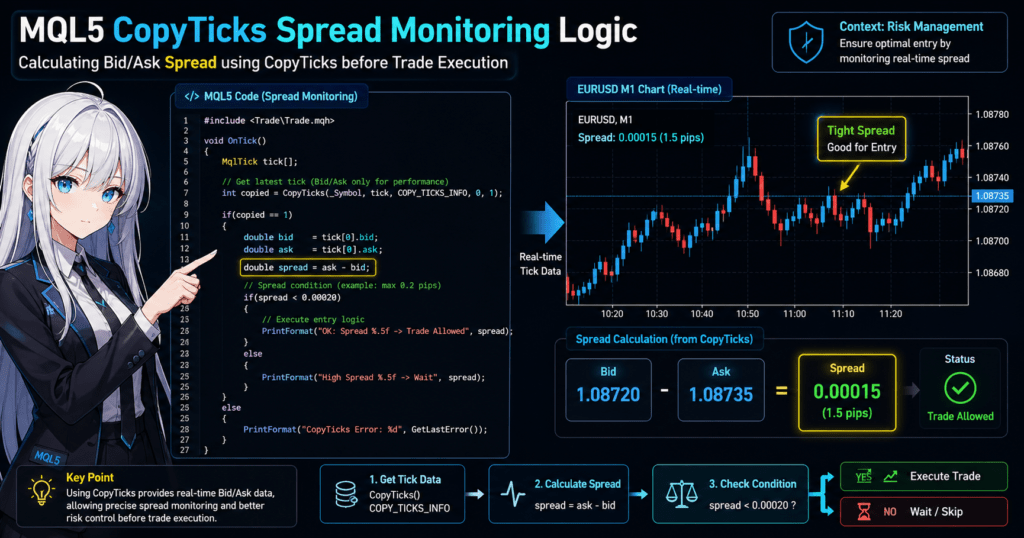
- 4.3 3.3 Practical Example: Retrieving the Spread
- 4.4 3.4 Retrieving Data After a Specific Time
- 4.5 3.5 Common Mistakes and Fixes
- 4.6 3.6 Optimal Pattern for Practical Use
- 4.7 Practical Notes
- 4.8 Summary: Core Point of This Section
- 5 4. CopyTicks Error Causes and Fixes
- 6 5. When You Should and Should Not Use CopyTicks
- 6.1 5.1 Cases Where You Should Use CopyTicks
- 6.2 5.2 Cases Where You Should Avoid CopyTicks
- 6.3 5.3 CopyTicks vs CopyRates: Final Decision Criteria
- 6.4 5.4 Optimal Practical Design Pattern
- 6.5 5.5 Common Design Mistakes
- 6.6 5.6 Expected Benefits and Risks
- 6.7 Conclusion: Important Point
- 6.8 Final Decision Summary
- 7 6. FAQ
- 7.1 6.1 Why can’t CopyTicks retrieve data?
- 7.2 6.2 Should I use CopyTicks or CopyRates?
- 7.3 6.3 Which flags should I use?
- 7.4 6.4 How should I specify from?
- 7.5 6.5 Is CopyTicks heavy?
- 7.6 6.6 Why are backtesting and live trading results different?
- 7.7 6.7 What is the most important point when using CopyTicks?
- 7.8 6.8 Is CopyTicks always necessary?
1. What Is CopyTicks in MQL5?
1.1 Overview of CopyTicks
CopyTicks is an MQL5 function for retrieving tick data, the smallest unit of price movement.
A tick is data recorded each time the price changes, and it includes information such as:
- Bid
- Ask
- Last
- Volume
- Time
Candlesticks, or bars, used on regular charts are created by aggregating these ticks over a fixed period.
That means CopyTicks lets you work with data at a finer level than candlestick data.
This function is especially important in cases such as:
- Scalping, or short-term trading
- High-frequency trading, where decisions are made in milliseconds
- Monitoring spread changes
Important Notes for Beginners
- It is easy to misunderstand CopyTicks as a general price history function, but it works at the tick level, not the bar level
- The amount of tick data available depends on the broker and environment
- If MT5 has no history loaded, data may not be available
1.2 Difference Between CopyTicks and CopyRates
CopyTicks is often compared with CopyRates.
The difference is the granularity, or level of detail, of the data each function retrieves.
| Function | Data Unit | Content |
|---|---|---|
| CopyRates | Bar (OHLC) | Open, high, low, and close |
| CopyTicks | Tick | Raw data for each price movement |
Specific Difference
- CopyRates → Aggregated data such as 1-minute or 5-minute bars
- CopyTicks → Data for every moment when the price moves
How to Choose
- Regular indicators and analysis → CopyRates
- Precise timing control → CopyTicks
Common Mistakes
- Using CopyTicks for candlestick-style processing and making the program inefficient
- Trying to capture spread changes with CopyRates and losing accuracy
1.3 When to Use CopyTicks
CopyTicks is mainly used when real-time response and precision are required.
Typical Use Cases
- Spread monitoring → Get the difference between Bid and Ask in real time
- Entry timing optimization → Detect price changes at the tick level
- Price checks immediately before execution → Reduce slippage, or the gap between the requested and executed price
Practical Importance
For example, even with the same trading logic:
- Bar-level processing → delayed response, which can cause missed opportunities
- Tick-level processing → immediate response, which can improve precision
This makes CopyTicks a factor that directly affects EA performance.
Practical Notes
- Tick data is heavy → Retrieving large amounts on every tick can reduce performance
- Data completeness is not guaranteed → It depends on the VPS, connection, and broker
- Backtesting and live trading can produce different behavior → Tick generation methods differ
Summary of Common Misunderstandings
- “CopyTicks can do everything” → Incorrect → It becomes inefficient if the use case is not limited
- “All ticks can always be retrieved” → Incorrect → Availability depends on the environment
- “CopyTicks is better than CopyRates” → Incorrect → They simply serve different purposes
2. Basic Syntax and Parameters of CopyTicks
2.1 Function Signature
The basic syntax of CopyTicks is as follows.
int CopyTicks(
   string symbol,
   MqlTick& ticks[],
   uint flags,
   ulong from,
   uint count
);
This function stores tick data in an array based on the specified conditions and returns the number of retrieved ticks on success, or -1 on failure.
Meaning of the Return Value
- 0 or higher: number of ticks retrieved
- -1: error, check the cause with GetLastError()
Most Important Point
- Because the return value is the number of retrieved records, you must always check it
- 0 does not always mean failure; it may mean that no data was available
2.2 Meaning of Each Argument
CopyTicks consists of five arguments. Beginners most often struggle with “flags” and “from”.
symbol (Currency Pair)
"EURUSD"
- The target symbol or instrument
- In most cases,
_Symbolis used
ticks[] (Destination Array)
MqlTick ticks[];
- The array that stores tick data
- It must be declared beforehand because it is passed by reference (&)
flags (Type of Data to Retrieve)
- Specifies the type of tick data to retrieve
- Explained in detail below, and it is very important
from (Starting Position)
- The reference point for where retrieval starts, such as time or tick ID
- This is the most common mistake point for beginners
count (Number of Records to Retrieve)
- The number of ticks to retrieve
- Used as the upper limit
2.3 Types of flags (Important)
flags specifies which type of ticks to retrieve.
Main Types
COPY_TICKS_ALL→ All ticks, usually the basic choiceCOPY_TICKS_INFO→ Only Bid/Ask changesCOPY_TICKS_TRADE→ Trade-related data, such as Last/Volume
How to Choose flags
Basic Choice
COPY_TICKS_ALL
→ Beginners can safely start with this
When Optimizing
- Spread monitoring →
COPY_TICKS_INFO - Execution analysis →
COPY_TICKS_TRADE
Common Mistakes with flags
- Using flags casually without a clear purpose → The retrieved data may not match the intended use
- Referencing Last with COPY_TICKS_INFO → The value may not be populated
2.4 How to Handle from (Important)
from specifies the starting point for retrieval, but it requires careful handling.
Basic Usage
0
→ Retrieve the latest data
When Specifying a Time
ulong from = (ulong)TimeCurrent() - 60;
Important Notes
- from is a millisecond-based time value, not datetime
- If the value is too far in the past, data may not be available
- If a future value is specified, the result will be 0 records
Common Mistakes with from
- Passing datetime directly and causing a time mismatch
- Using a value that is too large and retrieving no data
- Retrieving old data unintentionally
2.5 How to Think About count
count is the maximum number of ticks to retrieve.
Example
10
→ Retrieve up to 10 ticks
Important Notes
- The specified number is not always retrieved
- If data is unavailable, fewer records will be returned
Common Mistakes with count
- Setting count too high → performance drops
- Setting count too low → not enough data
Important Summary from a Practical View
The three key points in CopyTicks are:
- flags → what to retrieve
- from → where to retrieve from
- count → how much to retrieve
If you do not understand these three points correctly, you may end up with code that runs but gives the wrong result.
3. How to Use CopyTicks with Code Examples
3.1 The Most Basic Usage Example
First, here is a minimal CopyTicks sample.
This is the basic pattern for retrieving and displaying the latest ticks.
void OnTick()
{
   MqlTick ticks[];

   int copied = CopyTicks(_Symbol, ticks, COPY_TICKS_ALL, 0, 10);

   if(copied > 0)
   {
      for(int i = 0; i < copied; i++)
      {
         Print("Time:", ticks[i].time,
               " Bid:", ticks[i].bid,
               " Ask:", ticks[i].ask);
      }
   }
   else
   {
      Print("CopyTicks failed. Error:", GetLastError());
   }
}
Process Flow
- Declare an array: MqlTick ticks[]
- Retrieve data with CopyTicks
- Check the return value
- Loop through the array
Key Points
- Specify
0to retrieve the latest data - Use
COPY_TICKS_ALLto target all data - Checking the return value is required
3.2 Contents of the MqlTick Structure
The data retrieved by CopyTicks is stored in the MqlTick structure.
Main Members
struct MqlTick
{
   datetime time;     // Time in seconds
   double   bid;      // Bid price
   double   ask;      // Ask price
   double   last;     // Last traded price
   ulong    volume;   // Trade volume
   long     time_msc; // Milliseconds
   uint     flags;    // Tick type
};
Beginner Notes
time→ time in secondstime_msc→ more precise time in millisecondsflags→ which value was updated: Bid, Ask, or Last
3.3 Practical Example: Retrieving the Spread
One of the most common practical uses of CopyTicks is spread monitoring.
void OnTick()
{
   MqlTick ticks[];

   if(CopyTicks(_Symbol, ticks, COPY_TICKS_INFO, 0, 1) > 0)
   {
      double spread = ticks[0].ask - ticks[0].bid;
      Print("Spread:", spread);
   }
}
Key Points
- Use
COPY_TICKS_INFOto reduce load - Retrieve only the latest 1 tick for speed
- Avoid unnecessary loops
3.4 Retrieving Data After a Specific Time
This example retrieves ticks from a past point up to the current time.
void OnStart()
{
   MqlTick ticks[];

   ulong from = (ulong)TimeCurrent() - 60; // Last 60 seconds

   int copied = CopyTicks(_Symbol, ticks, COPY_TICKS_ALL, from, 100);

   Print("Copied:", copied);
}
Important Notes
- The time specification may appear second-based, not millisecond-based, but internal handling requires care
- Actual behavior can vary by environment
3.5 Common Mistakes and Fixes
Mistake 1: Not Preallocating the Array Size
MqlTick ticks[];
→ OK, because MQL5 expands it automatically
However, watch memory usage when retrieving large amounts of data
Mistake 2: Not Checking the Return Value
CopyTicks(...);
→ Not good
→ Always do the following
if(copied <= 0)
{
   Print(GetLastError());
}
Mistake 3: Retrieving Too Much Data on Every Tick
CopyTicks(_Symbol, ticks, COPY_TICKS_ALL, 0, 1000);
→ Performance gets worse
Fix
- Retrieve only the minimum number of records needed
- If only the latest data is needed, use count=1
Mistake 4: Misusing flags
- Using last with INFO → no value may be available
- Expecting bid/ask with TRADE → data may be incomplete
3.6 Optimal Pattern for Practical Use
Lightweight and Efficient Example
void OnTick()
{
   MqlTick tick[];

   if(CopyTicks(_Symbol, tick, COPY_TICKS_INFO, 0, 1) == 1)
   {
      double spread = tick[0].ask - tick[0].bid;

      if(spread < 0.0002)
      {
         // Entry processing
      }
   }
}
Design Intent
- Retrieve 1 record → fastest approach
- Limit to INFO → lightweight
- Use conditional branching → suitable for real trading logic
Practical Notes
- CopyTicks can easily become a heavy operation
- For EAs, the basic rule is minimum calls and minimum data
Summary: Core Point of This Section
- CopyTicks performance changes greatly depending on how it is used
- Unnecessary retrieval directly hurts performance
- In practice, retrieving 1 record is often the basic strategy
4. CopyTicks Error Causes and Fixes
4.1 Main Reasons CopyTicks Fails
CopyTicks is a function that often fails internally even when it appears to be running normally.
Beginners often assume that “no data retrieved” means the code is wrong, but in practice, environment-dependent factors are often involved.
Main Failure Patterns
- No data exists because history is insufficient
- The specified conditions are inappropriate, such as from or count
- flags is specified incorrectly
- There are server connection or synchronization issues
4.2 Identify the Cause with GetLastError
If CopyTicks fails, always check the following.
int copied = CopyTicks(_Symbol, ticks, COPY_TICKS_ALL, 0, 10);

if(copied < 0)
{
   Print("Error:", GetLastError());
}
Important Points
- It is an error only when
copied < 0 copied == 0may simply mean that no data is available
4.3 Common Errors and Fixes
Error 1: Data Cannot Be Retrieved (copied = 0)
Cause
- Tick history does not exist
- No data exists in the specified range
Fix
- Open the chart for the relevant currency pair in MT5
- Scroll through the time range to load history
- Check VPS and connection conditions
Error 2: ERR_HISTORY_WILL_UPDATED (History Is Updating)
Cause
- The data has not been downloaded yet
Fix
- Wait briefly and run again
- Add retry logic in a loop
for(int i = 0; i < 5; i++)
{
   int copied = CopyTicks(_Symbol, ticks, COPY_TICKS_ALL, 0, 10);
   if(copied > 0) break;

   Sleep(100);
}
Error 3: Invalid Arguments (flags / from)
Cause
- Incorrect combination of flags
- Invalid from value
Fix
- Use
COPY_TICKS_ALLas the basic flags choice - Start by testing from with
0
Error 4: Array Access Error
Cause
- Accessing the array even though copied = 0
ticks[0] // Not good
Fix
if(copied > 0)
{
   ticks[0] // OK
}
4.4 Practical Stabilization Pattern
CopyTicks becomes unstable if you write code assuming it will succeed on the first attempt.
In practice, retry and fallback design is the basic approach.
Stable Code Example
bool GetLatestTick(MqlTick &tick)
{
   MqlTick ticks[];

   for(int i = 0; i < 3; i++)
   {
      int copied = CopyTicks(_Symbol, ticks, COPY_TICKS_INFO, 0, 1);

      if(copied == 1)
      {
         tick = ticks[0];
         return true;
      }

      Sleep(50);
   }

   return false;
}
Design Points
- Retry up to 3 times
- Retrieve lightweight data, 1 record
- Process only after success
4.5 Difference Between Backtesting and Live Trading
CopyTicks can behave differently in backtesting and live environments.
Main Differences
| Item | Backtesting | Live Trading |
|---|---|---|
| Tick accuracy | Model-dependent | Real data |
| Data volume | Limited | Broker-dependent |
| Timing | Simulated | Real |
Important Notes
- Code that works in backtesting can fail in live trading
- The impact is especially large for scalping EAs
4.6 Summary of Common Failures
- No error checks → the cause becomes unclear
- Treating copied=0 as failure → false judgment
- Heavy processing on every tick → delay and worse execution
- History not loaded → insufficient data
Practical Conclusion
CopyTicks is:
- Not just a function to “use,” but a function to control
- Something that should be designed with failure in mind, not guaranteed success
This is the foundation for stable operation.
5. When You Should and Should Not Use CopyTicks
5.1 Cases Where You Should Use CopyTicks
CopyTicks is powerful, but if the use case is not limited, it can cause performance problems and design mistakes.
First, clarify when it should be used.
Case 1: Spread Monitoring
- Get the difference between Bid and Ask in real time
- Use a spread filter, such as entering only when the spread is narrow
double spread = tick.ask - tick.bid;
Practical Value
- Directly affects execution precision
- Especially important for scalping
Case 2: Tick-Level Entry Decisions
- Detect the moment when price moves by a certain number of pips
- Breakout-style logic
Example
- Calculate the difference from the previous tick
- Enter if the difference is above a certain threshold
Case 3: Price Check Before Execution
- Slippage control
- Confirm the price immediately before placing an order
Practical Benefits
- May reduce execution rejection and slippage
- Important for high-frequency EAs
Case 4: Tick-Based Analysis
- Tick volume analysis
- Flow analysis, such as the continuity of upward or downward movement
5.2 Cases Where You Should Avoid CopyTicks
Next are cases where using CopyTicks can be counterproductive.
Case 1: Regular Indicators
- Moving averages
- RSI
- MACD
→ CopyRates is enough
Case 2: Timeframe-Based Logic
- 1-minute or 5-minute strategies
- Daily-chart trading
→ Ticks are unnecessary
Case 3: EAs with Heavy Processing
- Retrieving large amounts of data on every tick
- Complex loop processing
→ Performance drops
Case 4: Strategies Focused Mainly on Backtesting
- Tick precision may be unstable
- Results are strongly model-dependent
→ Results may vary
5.3 CopyTicks vs CopyRates: Final Decision Criteria
Decision Flow
- Do you need real-time precision? → YES → CopyTicks → NO → CopyRates
- Is processing speed the priority? → YES → CopyRates
- Do you need to monitor spreads or instant price movements? → YES → CopyTicks
5.4 Optimal Practical Design Pattern
In practice, the best answer is often to use both.
Hybrid Structure
- Logic decision → CopyRates
- Final check → CopyTicks
// Logic decision (lightweight)
CopyRates(...);

// Final price check (high precision)
CopyTicks(...);
Benefits
- Maintains performance
- Preserves precision
- Improves reproducibility
5.5 Common Design Mistakes
Mistake 1: Processing Everything with CopyTicks
→ Heavy, slow, and inefficient
Mistake 2: Relying Only on CopyRates
→ Not precise enough, especially for scalping
Mistake 3: Not Separating Use Cases
→ The design becomes unclear
5.6 Expected Benefits and Risks
Expected Benefits of Using CopyTicks
- Improved entry precision
- Reduced slippage
- Advantages for high-frequency strategies
Risks
- Performance degradation
- Data inconsistency due to environment differences
- Gap between backtesting and live trading
Conclusion: Important Point
CopyTicks is:
- Not simply a “stronger” function, but a specialized one
- Valuable only when used in the right place
Final Decision Summary
- Precision first → CopyTicks
- Speed and stability → CopyRates
- Practical trading systems → hybrid use
6. FAQ
6.1 Why can’t CopyTicks retrieve data?
Answer focus: Check environment dependency and insufficient history
The main causes are:
- Tick history does not exist
- MT5 has not loaded the data yet
- No data exists in the specified from range
Fixes
- Open the chart and load the history
- Wait briefly and retrieve again
- Set from to
0and check again
6.2 Should I use CopyTicks or CopyRates?
Answer focus: Separate them clearly by use case
- Regular analysis and indicators → CopyRates
- Spreads and instant price movements → CopyTicks
Conclusion
- Use CopyTicks when precision is required
- Use CopyRates as the default choice
- In practice, use both together in a hybrid design
6.3 Which flags should I use?
Answer focus: Beginners have one safe choice, while advanced users can optimize
- Beginners →
COPY_TICKS_ALL - Spread monitoring →
COPY_TICKS_INFO - Execution analysis →
COPY_TICKS_TRADE
Important Note
- The data you can retrieve changes depending on flags
6.4 How should I specify from?
Answer focus: Start with 0
- Basic choice →
0, meaning latest data - Past retrieval → specify a time, but behavior may differ by environment
Common Mistakes
- Using datetime directly
- Specifying a time that is too old
6.5 Is CopyTicks heavy?
Answer focus: It can become heavy depending on usage
- Retrieving 1 record → light
- Retrieving many records → heavy
Fixes
- Keep count as small as possible
- Do not retrieve large amounts of data on every tick
6.6 Why are backtesting and live trading results different?
Answer focus: Tick generation methods differ
- Backtesting → simulated ticks
- Live trading → real ticks
Impact
- The difference is larger in scalping systems
- Spread behavior can change
6.7 What is the most important point when using CopyTicks?
Answer focus: Show the design principle
- Retrieve only the minimum required data
- Always check the return value
- Design with failure in mind
Conclusion
→ Manage the balance between precision and load
6.8 Is CopyTicks always necessary?
Answer focus: Clarify when it is unnecessary
- Use it for scalping and high-frequency trading
- It is usually unnecessary for long-term strategies and regular indicator logic
Conclusion
→ CopyTicks is not mandatory, but it can make a major difference when used in the right place