- 1 1. Why Lot Size Calculation Matters in MQL5
- 2 2. Basic Formula for Lot Size Calculation
- 3 3. How to Calculate Lot Size in MQL5
- 4 4. Adjusting Lot Size to Broker Specifications
- 5 5. Implementation Example for Lot Calculation in an EA
- 6 6. Common Errors and Failures
- 7 7. Lot Calculation Algorithms Used in Live Operation
- 8 8. Summary
- 9 FAQ
- 9.1 Q1 How do you calculate lot size in MQL5?
- 9.2 Q2 How can I get pip value?
- 9.3 Q3 Do lot and volume mean the same thing?
- 9.4 Q4 What causes an Invalid Volume error?
- 9.5 Q5 Does lot calculation change by currency pair?
- 9.6 Q6 Can the same formula be used for CFDs and indices?
- 9.7 Q7 What risk setting is recommended for an EA?
- 9.8 Q8 What should an EA do if the calculated lot is below the minimum lot?
- 9.9 LLMO Summary
1. Why Lot Size Calculation Matters in MQL5
When you develop an automated trading system in MQL5, also called an EA or Expert Advisor, lot size calculation, or trade volume calculation, is one of the most important parts of the system. Lot size decides how much capital is exposed to risk in each trade. If it is not calculated correctly, even a strong trading strategy can cause large account losses because of poor money management.
In an EA, not only trade entries but also money management is automated. For that reason, it is common to avoid a fixed lot setting and instead implement a system that automatically calculates lot size from account balance, risk percentage, stop-loss distance, and related trade conditions.
The difference is clear when you compare these two EA types.
| EA Type | Lot Setting | Risk |
|---|---|---|
| Fixed lot EA | Always 0.10 lot | Unrelated to account conditions |
| Risk-managed EA | 1% of balance | Consistent risk |
With a fixed lot, the lot size stays the same even when the account balance changes, so the loss risk does not stay constant.
By contrast, an EA that calculates lot size based on risk automatically adjusts volume according to account capital, which is better suited for long-term operation.
1.1 What Lot Size Means (lot / volume)
Lot size means the amount of currency, or position size, traded in one order.
In MetaTrader, it is usually expressed in the following units.
| Lot | Currency Amount |
|---|---|
| 1.0 lot | 100,000 units |
| 0.10 lot | 10,000 units |
| 0.01 lot | 1,000 units |
In MQL5, order size is handled as volume.
For example, when sending an order with OrderSend(), the lot size is specified in the volume parameter.
request.volume = 0.10;
In other words, lot size calculation in an EA can be described as:
Processing that calculates the appropriate volume
1.2 Why EAs Need Lot Calculation
There are several reasons why an EA should calculate lot size automatically.
The main reasons are as follows.
- Keep risk consistent according to account balance
- Adjust lot size according to stop-loss distance
- Prevent account failure caused by consecutive losses
- Apply the same risk management across multiple currency pairs
For example, consider these conditions.
Account balance: 10,000 USD
Risk: 1%
Stop loss: 50 pips
In this case, the acceptable loss for one trade is:
100 USD
The EA uses this 100 USD as the base and works backward from the stop-loss distance to determine the lot size.
This mechanism automatically applies the following adjustment.
- High-volatility market -> smaller lot
- Low-volatility market -> larger lot
1.3 A Common Beginner Mistake: Fixed Lots
The most common mistake in the early stage of EA development is continuing to use a fixed lot without adjustment.
For example:
request.volume = 0.10;
This is fine during testing, but it causes the following problems in live operation.
Common problems
- The lot size does not increase when the account balance grows
- The lot size stays the same after losses
- Volatility differences between currency pairs are ignored
- Risk can change greatly for CFDs and indices
Beginners often struggle with the following three points.
Common stumbling blocks
- Confusing lot and volume
In MT5, order size is handled as volume. - Confusing pips and points
With a 5-digit broker, 1 pip = 10 points. - Value differences by currency pair
The pip value differs between EURUSD and USDJPY.
To avoid these problems, EAs usually implement:
Risk-based lot calculation
2. Basic Formula for Lot Size Calculation
When calculating lot size in an EA, the standard approach is to base the calculation on the risk amount and the stop-loss distance.
This method is used in many professional EAs because it keeps risk consistent even when account balance changes.
The basic idea is as follows.
Lot = acceptable loss amount / (stop-loss distance x value of 1 pip)
This calculation adjusts the lot size so that the loss remains consistent if the stop loss is reached.
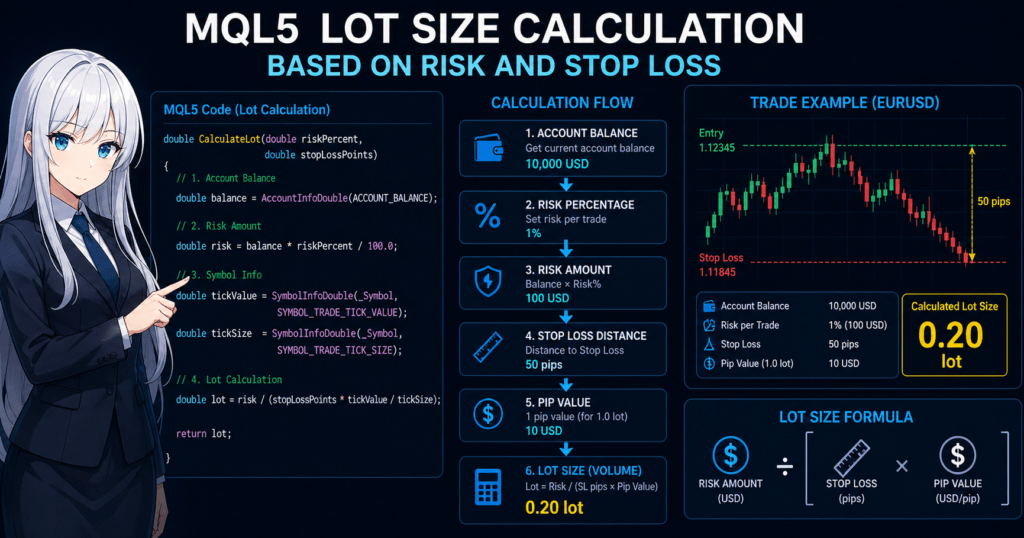
For example, consider these conditions.
| Condition | Value |
|---|---|
| Account balance | 10,000 USD |
| Risk | 1% |
| Stop loss | 50 pips |
In this case, the loss allowed for one trade is:
100 USD
You can calculate the appropriate lot size by dividing this 100 USD by the stop-loss distance and value per pip.
2.1 Standard Lot Calculation Formula
The standard formula used in EAs is:
Lot = Risk Amount / (StopLoss × Pip Value)
Each element means the following.
| Element | Description |
|---|---|
| Risk Amount | Acceptable loss amount |
| StopLoss | Stop-loss distance in pips |
| Pip Value | Value of 1 pip |
The advantage of this formula is that the same logic can be used for any currency pair.
For example:
Risk Amount = 100 USD
StopLoss = 50 pips
Pip Value = 10 USD
Then:
Lot = 100 / (50 × 10)
Lot = 0.20
The lot size is 0.20 lot.
2.2 How to Calculate Risk Amount
First, the EA decides the maximum loss allowed for one trade.
This is usually set as a fixed percentage of account balance, called Risk%.
The formula is:
Risk Amount = Account Balance × Risk %
For example:
Account balance: 10,000 USD
Risk: 1%
Then:
Risk Amount = 10,000 × 0.01
Risk Amount = 100 USD
The result is 100 USD.
Many EAs use settings like these.
| Risk Setting | Characteristics |
|---|---|
| 0.5% | Very conservative |
| 1% | Common |
| 2% | Slightly aggressive |
| 5% | High risk |
For long-term operation, around 1% is generally common. However, the best risk level depends on the strategy, account size, and trade frequency, so it can vary by environment.
2.3 Pip Value
The part that confuses beginners most in lot calculation is pip value, or the value of 1 pip.
The value of 1 pip differs by currency pair.
For example, the pip value for 1 lot is generally as follows.
| Currency Pair | Value of 1 pip |
|---|---|
| EURUSD | About 10 USD |
| GBPUSD | About 10 USD |
| USDJPY | About 1000 JPY |
For example:
EURUSD
1 lot
1 pip = about 10 USD
So with:
0.10 lot
The value is:
1 pip = about 1 USD
Important Notes for Beginners
Lot calculation often fails because of the following points.
1. Difference between pip and point
In MetaTrader, there are cases where:
1 pip = 10 point
This is common with 5-digit brokers.
Example:
EURUSD
1.12345
In this case:
Point = 0.00001
pip = 0.0001
2. Price movement in JPY pairs
JPY pairs use a different pip digit.
Example:
USDJPY
1 pip = 0.01
3. CFDs, indices, and gold
The following symbols have pip values that differ greatly from currency pairs.
- XAUUSD, or gold
- NASDAQ
- DAX
- S&P500
For that reason, an EA should usually retrieve values from symbol information rather than use fixed values.
3. How to Calculate Lot Size in MQL5
The previous chapter explained the basic formula for lot size calculation.
This section explains how to calculate lot size in actual MQL5 code.
In an EA, lot size is usually calculated by retrieving the following information.
- Account balance
- Allowed risk percentage
- Stop-loss distance
- tick value, or the value of the minimum price movement
- tick size, or the minimum price movement
In MQL5, you can get this information with AccountInfoDouble() and SymbolInfoDouble().
3.1 Data Needed for Lot Calculation
At minimum, an EA needs the following data to calculate lot size.
| Data | Description |
|---|---|
| Account Balance | Account balance |
| Risk % | Allowed risk |
| StopLoss | Stop-loss distance |
| Tick Value | Value of the minimum price movement |
| Tick Size | Minimum price movement |
The especially important items are Tick Value and Tick Size.
Because they differ by symbol, the EA retrieves them as follows.
double tickValue = SymbolInfoDouble(_Symbol, SYMBOL_TRADE_TICK_VALUE);
double tickSize  = SymbolInfoDouble(_Symbol, SYMBOL_TRADE_TICK_SIZE);
Using these values lets you apply the same formula to currency pairs, indices, CFDs, and other symbols.
3.2 Required MQL5 Functions
Lot calculation mainly uses the following functions.
Getting Account Information
AccountInfoDouble()
Example:
double balance = AccountInfoDouble(ACCOUNT_BALANCE);
Representative information that can be retrieved:
| Constant | Content |
|---|---|
| ACCOUNT_BALANCE | Account balance |
| ACCOUNT_EQUITY | Equity |
| ACCOUNT_MARGIN | Used margin |
In an EA, calculations are usually based on ACCOUNT_BALANCE or ACCOUNT_EQUITY.
Getting Symbol Information
SymbolInfoDouble()
Example:
double tickValue = SymbolInfoDouble(_Symbol, SYMBOL_TRADE_TICK_VALUE);
double tickSize  = SymbolInfoDouble(_Symbol, SYMBOL_TRADE_TICK_SIZE);
Main parameters:
| Constant | Description |
|---|---|
| SYMBOL_TRADE_TICK_VALUE | Value of 1 tick |
| SYMBOL_TRADE_TICK_SIZE | Price movement of 1 tick |
| SYMBOL_POINT | Minimum price unit |
Because these values differ by broker and symbol, fixed values are not recommended.
3.3 Basic Lot Calculation Code
The following example shows a function that calculates lots from risk percentage and stop-loss distance.
double CalculateLot(double riskPercent, double stopLossPoints)
{
   // Account balance
   double balance = AccountInfoDouble(ACCOUNT_BALANCE);

   // Acceptable loss amount
   double risk = balance * riskPercent / 100.0;

   // Symbol information
   double tickValue = SymbolInfoDouble(_Symbol, SYMBOL_TRADE_TICK_VALUE);
   double tickSize  = SymbolInfoDouble(_Symbol, SYMBOL_TRADE_TICK_SIZE);

   // Lot calculation
   double lot = risk / (stopLossPoints * tickValue / tickSize);

   return lot;
}
This function follows this process.
Get account balance
↓
Calculate risk amount
↓
Get tick value
↓
Divide by stop-loss distance
↓
Calculate lot size
The advantages of this method are:
- It does not depend on a specific currency pair
- It can support CFDs and indices
- It can absorb broker differences
Important Notes and Common Failures
Beginners often run into the following problems when implementing lot calculation.
1. Confusion about StopLoss units
Depending on the EA, StopLoss may mean:
StopLoss = pips
Or:
StopLoss = points
With 5-digit brokers in particular:
1 pip = 10 points
So the unit must be standardized.
2. Misreading tick value
Depending on the broker, there may be differences between:
- Account currency
- Instrument currency
For example:
- USD account
- EUR-denominated symbol
The calculation may differ in such cases.
3. Sending the calculated lot directly
A calculated lot may not be orderable as-is.
Reasons include:
- Minimum lot restrictions
- Lot step
- Maximum lot
If this is not adjusted, an Invalid Volume error occurs.
4. Adjusting Lot Size to Broker Specifications
Even if you calculate lot size in MQL5, you cannot always place that value directly into request.volume and send the order.
The reason is that each symbol has a minimum lot, maximum lot, and lot step. In MQL5, the allowed minimum, maximum, and increment of trade volume are managed as trading conditions for each symbol.
For example, if the calculated result is 0.037 lot and the broker’s lot step is 0.01, sending it as-is may cause an order error.
If you order without this adjustment, it often causes Invalid Volume.
4.1 Getting Minimum Lot, Maximum Lot, and Lot Step
In MQL5, you can use SymbolInfoDouble() to get trade volume limits for each symbol.
double minLot  = SymbolInfoDouble(_Symbol, SYMBOL_VOLUME_MIN);
double maxLot  = SymbolInfoDouble(_Symbol, SYMBOL_VOLUME_MAX);
double lotStep = SymbolInfoDouble(_Symbol, SYMBOL_VOLUME_STEP);
The meanings are:
SYMBOL_VOLUME_MIN: minimum orderable lotSYMBOL_VOLUME_MAX: maximum orderable lotSYMBOL_VOLUME_STEP: allowed increment
4.2 Basic Process for Normalizing Lots
In practice, adjust the calculated lot in this order.
- If it is below the minimum lot, raise it to the minimum lot
- If it exceeds the maximum lot, cap it at the maximum lot
- Round it down to match the lot step
Example code:
double NormalizeLot(double lot)
{
   double minLot  = SymbolInfoDouble(_Symbol, SYMBOL_VOLUME_MIN);
   double maxLot  = SymbolInfoDouble(_Symbol, SYMBOL_VOLUME_MAX);
   double lotStep = SymbolInfoDouble(_Symbol, SYMBOL_VOLUME_STEP);

   lot = MathMax(lot, minLot);
   lot = MathMin(lot, maxLot);
   lot = MathFloor(lot / lotStep) * lotStep;

   return lot;
}
4.3 Common Stumbling Blocks and Notes
Common failures include:
- Adjusting only with
NormalizeDouble() - Rounding with a fixed
0.01 - Passing on currency pairs but failing on gold or indices
- Becoming
0when the calculated lot is below the minimum lot
The key point is to match the lot step, not just the number of decimal places.
If a symbol uses 0.1 steps and you send 0.12, it may look natural but still violate the trading conditions.
It is also safer to use rounding down rather than rounding up. Rounding up may make the real risk slightly higher than intended.
5. Implementation Example for Lot Calculation in an EA
This section shows an implementation that is easy to integrate into an MQL5 EA: calculate lots from risk percentage, then convert the result into an orderable volume that matches broker specifications.
In live operation, you need to think about the full process: get stop-loss distance -> calculate risk amount -> calculate lot -> normalize -> send order.
The basic design is as follows.
- Set risk percentage as an input parameter
- Calculate stop-loss distance from entry price and stop-loss price
- Use symbol information to calculate the lot
- Adjust it to the minimum lot and lot step
- Put the final volume into
request.volume
5.1 EA Input Parameter
First, define an input parameter for risk management in the EA.
input double RiskPercent = 1.0; // What percentage of account balance to risk per trade
You may also add supporting parameters if needed.
input double MinRiskPercent = 0.5;
input double MaxRiskPercent = 2.0;
However, for beginner-friendly EAs, a design with only one RiskPercent parameter is easier to understand.
The important point is that RiskPercent means:
1.0 = 1%
It does not mean:
0.01 = 1%
If you confuse this, the risk can become one hundredth or one hundred times the intended level.
5.2 Calculating Lots from Stop-Loss Distance
In an EA, the lot is usually decided after the stop-loss width is known.
The order is:
- Decide the entry price
- Decide the stop-loss price
- Calculate the stop-loss distance from the difference
- Work backward from the acceptable loss amount to the lot size
For a buy order, the stop-loss distance is calculated as follows.
double stopLossPoints = (entryPrice - stopLossPrice) / _Point;
For a sell order, it is reversed.
double stopLossPoints = (stopLossPrice - entryPrice) / _Point;
You must make sure this value is not negative and not zero.
If stopLossPoints <= 0, the SL-setting logic is wrong before lot calculation even begins.
5.3 Implementation Example: Lot Calculation and Normalization Functions
The following is a basic form that is easy to use in an EA.
double NormalizeLot(double lot)
{
   double minLot  = SymbolInfoDouble(_Symbol, SYMBOL_VOLUME_MIN);
   double maxLot  = SymbolInfoDouble(_Symbol, SYMBOL_VOLUME_MAX);
   double lotStep = SymbolInfoDouble(_Symbol, SYMBOL_VOLUME_STEP);

   lot = MathMax(lot, minLot);
   lot = MathMin(lot, maxLot);
   lot = MathFloor(lot / lotStep) * lotStep;

   return lot;
}

double CalculateLotByRisk(double riskPercent, double stopLossPoints)
{
   if(stopLossPoints <= 0)
      return 0.0;

   double balance   = AccountInfoDouble(ACCOUNT_BALANCE);
   double riskMoney = balance * riskPercent / 100.0;

   double tickValue = SymbolInfoDouble(_Symbol, SYMBOL_TRADE_TICK_VALUE);
   double tickSize  = SymbolInfoDouble(_Symbol, SYMBOL_TRADE_TICK_SIZE);

   if(tickValue <= 0 || tickSize <= 0)
      return 0.0;

   double lot = riskMoney / (stopLossPoints * tickValue / tickSize);

   return NormalizeLot(lot);
}
The key points of this code are:
- It excludes
stopLossPoints <= 0first - It returns
0.0whentickValueortickSizecannot be retrieved - It always passes the result through
NormalizeLot()
This structure improves EA stability because it makes it harder to send orders with invalid values.
5.4 Order Flow
In an actual EA, lot calculation is often performed right before order placement.
The flow is:
- Get the current price
- Determine the stop-loss price
- Calculate the stop-loss distance in points
- Calculate the lot size
- Put it into
MqlTradeRequest.volumeand send the order
Example:
double entryPrice    = SymbolInfoDouble(_Symbol, SYMBOL_ASK);
double stopLossPrice = entryPrice - 500 * _Point;   // Example: SL 500 points below

double stopLossPoints = (entryPrice - stopLossPrice) / _Point;
double lot = CalculateLotByRisk(RiskPercent, stopLossPoints);

if(lot > 0.0)
{
   MqlTradeRequest request = {};
   MqlTradeResult  result  = {};

   request.action   = TRADE_ACTION_DEAL;
   request.symbol   = _Symbol;
   request.volume   = lot;
   request.type     = ORDER_TYPE_BUY;
   request.price    = entryPrice;
   request.sl       = stopLossPrice;
   request.tp       = entryPrice + 1000 * _Point;
   request.deviation = 20;

   OrderSend(request, result);
}
With this structure, the EA automatically reflects:
Wider SL distance -> smaller lot
Narrower SL distance -> larger lot
5.5 Common Implementation Mistakes
Common mistakes during implementation are as follows.
1. Calculating SL distance in points while thinking in pips
This is especially confusing for 5-digit and 3-digit symbols.
Inside the code, it is usually safer to standardize on points first.
2. Assuming tickValue is fixed
Currency pairs, gold, indices, and CFDs all use different values.
If you hard-code the value, the calculation can break as soon as the symbol changes.
3. Trying to order with lot = 0
Many designs return 0.0 when lot calculation fails, so you must check the value before sending an order.
4. Ignoring cases below the minimum lot
In small accounts with a wide SL, the theoretical lot may become something like 0.003.
If you raise this to the minimum lot, the trade may exceed the intended risk.
5. Ignoring cases where equity should be used instead of balance
For EAs with many open positions, using ACCOUNT_EQUITY may reflect the real account condition better than ACCOUNT_BALANCE.
Which one to use depends on the strategy design.
5.6 Practical Design Choice
In practice, EAs often use one of the following two designs.
Option A: Based on ACCOUNT_BALANCE
- The calculation tends to be stable
- Backtests are easier to reproduce
- Suitable for beginner-friendly EAs
Option B: Based on ACCOUNT_EQUITY
- Can reflect unrealized profit and loss
- Suitable for multi-position operation
- Lot size changes more during market movement
For beginner-oriented articles, it is easier to explain Option A as the basic approach.
6. Common Errors and Failures
When implementing lot size calculation in MQL5, many developers encounter similar errors.
For beginners in particular, the cause is often not the formula itself, but misunderstanding units or broker specifications.
This section summarizes common problems in EA development.
6.1 Invalid Volume Error
The most common EA error is Invalid Volume.
This error occurs when the submitted volume does not match the broker’s trading conditions.
The main causes are:
- Below the minimum lot
- Above the maximum lot
- Lot step violation
For example:
Minimum lot = 0.01
Lot step = 0.01
Under these conditions, ordering:
0.037 lot
may cause an error.
Therefore, after lot calculation, you must always adjust the result with a process such as:
NormalizeLot()
Common failures
- Adjusting only with
NormalizeDouble() - Rounding with a fixed
0.01 - Not retrieving the lot step
Some symbols use:
0.1 lot step
So it is safest to retrieve the value from symbol information.
6.2 Confusing Pips and Points
A very common mistake in MetaTrader is confusing pip and point.
In MQL5, the price unit used is:
Point
However, FX trading normally uses:
pip
With a 5-digit broker, the relationship is:
1 pip = 10 point
Example:
| Currency Pair | pip | point |
|---|---|---|
| EURUSD | 0.0001 | 0.00001 |
So:
50 pip
equals:
500 point
In EA code, it is usually safer to calculate in points.
For example:
double stopLossPoints = 500;
6.3 Lot Calculation Fails on CFDs and Indices
If lot calculation is designed only for FX, it can be very inaccurate for CFDs and indices.
This is especially true for:
- XAUUSD, or gold
- NASDAQ
- DAX
- S&P500
For these symbols:
- pip value
- contract size
- tick size
can differ greatly from currency pairs.
For example, gold may use a specification such as:
1 lot = 100 oz
Therefore, fixed-value calculations like this are risky:
1 pip = 10 USD
An EA should always use values retrieved by:
SymbolInfoDouble()
6.4 Calculation Differences in JPY Pairs
JPY pairs are another common source of confusion for beginners.
For example:
EURUSD
pip = 0.0001
But:
USDJPY
pip = 0.01
So the same 50 pips means:
| Currency Pair | Price Difference |
|---|---|
| EURUSD | 0.0050 |
| USDJPY | 0.50 |
If you ignore this difference, the lot size can be off by a factor of 10.
6.5 Lot Becomes Zero
In small accounts, the theoretical lot may become a value such as:
0.003
But if the minimum lot is:
0.01
Then the following problem occurs.
Problem
- Raise it to the minimum lot
-> risk becomes higher than intended
Or:
- Set it to 0 lot
-> the trade cannot be placed
Possible responses include the following.
Option A
Do not trade if the lot is below the minimum lot
Option B
Trade with the minimum lot
Which option is correct depends on the strategy.
In general, Option A is safer for risk management.
6.6 Profit and Loss Differs Even When the Formula Is Correct
Even if the lot calculation appears correct, actual profit and loss may differ from the estimate.
Common causes are:
- Spread
- Slippage
- Commission
- Swap
For example, even when calculated with:
Risk = 100 USD
The actual loss may become around:
103 USD
This is not unusual.
For that reason, EAs that require strict risk control sometimes leave a small margin, such as:
Risk = 0.9%
6.7 Practical Checklist
When implementing lot calculation in an EA, check the following items.
- Is StopLoss calculated in points?
- Is tick value retrieved?
- Is the lot normalized?
- Are cases below the minimum lot handled?
- Does the EA avoid sending orders when lot = 0?
If these items are satisfied, most lot calculation problems can be avoided.
7. Lot Calculation Algorithms Used in Live Operation
Lot size calculation is not only about implementing a formula.
In real EAs, several lot management algorithms are used depending on the trading strategy, risk tolerance, and money management policy.
Lot management directly affects an EA’s expected value, drawdown, and equity curve, so it is an important part of strategy design.
This section summarizes common practical methods.
7.1 Fixed Lot
The simplest method is the fixed lot.
Always trade the same lot size
Example:
request.volume = 0.10;
The characteristics of this method are:
Advantages
- Very easy to implement
- High reproducibility in backtests
- Suitable for logic verification
Disadvantages
- The lot size does not increase when capital grows
- The lot size does not change after losses
- Risk does not stay constant
Fixed lots are used for:
- EA testing stages
- Small account operation
- Manual trading support
However, they are not often used for long-term EAs.
7.2 Fixed Risk
The most common current method is the fixed risk method.
This means:
Risk a fixed percentage of account capital on each trade
For example:
Account balance = 10,000 USD
Risk = 1%
Then:
Acceptable loss = 100 USD
Using this 100 USD as the base:
Lot = acceptable loss / (SL × pip value)
The lot is calculated from that formula.
The characteristics of this method are:
Advantages
- Risk stays consistent
- Lot size increases as capital grows
- Drawdown is easier to manage
Disadvantages
- If the SL distance is wide, the lot can become very small
- Small accounts can run into the minimum lot problem
Even so, most EAs use this method as their base.
7.3 ATR-Based Lots
More advanced EAs may use lot adjustment based on ATR, or Average True Range.
ATR is an indicator that represents:
The average range of market movement
Using ATR allows this kind of adjustment:
- High-volatility market -> smaller lots
- Low-volatility market -> larger lots
Example:
ATR = 100 pips -> smaller lot
ATR = 30 pips -> larger lot
This method is often used in:
- Trend-following EAs
- Volatility-dependent strategies
However, when using ATR, it must be consistent with the:
SL distance
7.4 Volatility-Adjusted Lots
More advanced EAs may also change lot size based on volatility itself.
For example, they may use:
ATR
standard deviation
volatility index
With this method, the relationship is often:
Lot ∝ 1 / volatility
That means:
| Market Condition | Lot |
|---|---|
| High volatility | Small |
| Low volatility | Large |
The advantages of this method are:
- Drawdown reduction
- More stable equity curve
However, it also has disadvantages.
- Implementation is complex
- Parameter optimization is required
7.5 Designs Commonly Used in Professional EAs
Actual EAs often use combinations like these.
Pattern A, most common
Fixed risk
+
SL-based lot calculation
Pattern B, volatility-aware
Fixed risk
+
ATR-based SL
Pattern C, advanced EA
Fixed risk
+
volatility correction
+
equity curve filter
When beginners build an EA, it is safest to start with:
Fixed risk method
7.6 Practical Design Guidelines
The following ideas are important for EA lot management.
Short-term view
- Keep risk consistent
- Adjust lot size according to SL distance
Long-term view
- Drawdown tolerance
- Stability of the equity curve
For that reason, many EAs use around:
RiskPercent = 0.5 to 2%
Risk above this level can significantly increase the probability of account failure.
8. Summary
When developing an EA in MQL5, lot size calculation is the core of money management.
If the lot size design is not appropriate, even a good trading logic can lose account stability because of poor risk control.
This article explained the fundamentals and implementation of lot calculation in MQL5. The key points are summarized below.
Basic Structure of Lot Size Calculation
The most common lot calculation in an MQL5 EA is working backward from acceptable risk and stop-loss distance.
The basic formula is:
Lot = Risk Amount / (StopLoss × Pip Value)
This method keeps the loss consistent if the stop loss is reached.
Important Elements for EA Implementation
When implementing lot calculation, you need to retrieve the following information.
- Account balance
- Allowed risk, or Risk%
- Stop-loss distance
- tick value
- tick size
In MQL5, these can be retrieved with:
AccountInfoDouble()
SymbolInfoDouble()
Using these functions makes it possible to build a general-purpose EA that supports not only currency pairs but also:
- Gold
- Indices
- CFDs
Lot Normalization Is Required
After calculating the lot, you must adjust it to match broker specifications.
The three conditions to check are:
- Minimum lot
- Maximum lot
- Lot step
In MQL5, these are retrieved from the following symbol information.
SYMBOL_VOLUME_MIN
SYMBOL_VOLUME_MAX
SYMBOL_VOLUME_STEP
If this process is skipped, an Invalid Volume error may occur.
Common Lot Calculation Mistakes
The points that confuse beginners most are:
Confusing pip and point
With a 5-digit broker:
1 pip = 10 points
Different price units by currency pair
For example:
| Currency Pair | pip |
|---|---|
| EURUSD | 0.0001 |
| USDJPY | 0.01 |
If this difference is ignored, lot calculation can be very inaccurate.
Miscalculation on CFDs and indices
Gold and stock indices have different:
- contract size
- tick value
from FX, so designs using fixed values should be avoided.
Most Common Practical Lot Management
Many EAs use the following method.
Fixed risk, around 1%
+
SL-distance-based lot calculation
This method has these advantages.
- Risk can be kept consistent
- Capital growth can be reflected
- It is suitable for long-term operation
Practical Risk Guidelines for EA Design
Common risk settings are as follows.
| Risk% | Characteristics |
|---|---|
| 0.5% | Very conservative |
| 1% | Common |
| 2% | Slightly aggressive |
The larger the risk setting, the higher the potential for drawdown and account failure.
For long-term EA operation, many traders use around:
RiskPercent = 0.5 to 1.5%
Final Checklist
When implementing MQL5 lot calculation, check the following items.
- Is StopLoss calculated in points?
- Is tick value retrieved with SymbolInfoDouble?
- Is the lot normalized to min lot and lot step?
- Does the EA avoid ordering when lot = 0?
- Is the minimum lot problem considered for small accounts?
If these conditions are met, EA lot management is more likely to remain stable.
FAQ
Q1 How do you calculate lot size in MQL5?
The common method is to work backward from the acceptable risk amount and stop-loss distance.
Set a fixed percentage of account balance as risk, then calculate the lot from the SL distance.
Q2 How can I get pip value?
In MQL5, you can use SymbolInfoDouble() and retrieve it from this constant.
SYMBOL_TRADE_TICK_VALUE
Q3 Do lot and volume mean the same thing?
In MQL5, order size is handled as volume.
In general FX terminology, this is often called a lot.
Q4 What causes an Invalid Volume error?
In most cases, it is one of the following.
- Below the minimum lot
- Lot step violation
- Above the maximum lot
Q5 Does lot calculation change by currency pair?
The basic formula is the same, but pip value and tick value differ, so the result changes.
Q6 Can the same formula be used for CFDs and indices?
The basic idea is the same, but contract size and tick value differ, so you must retrieve symbol information and calculate from it.
Q7 What risk setting is recommended for an EA?
Many EAs commonly use around:
0.5% to 2%
The best value depends on the strategy and drawdown tolerance, so it should be verified with backtesting.
Q8 What should an EA do if the calculated lot is below the minimum lot?
The safer risk-management choice is usually to skip the trade when the calculated lot is below the broker’s minimum lot. Trading with the minimum lot may exceed the intended risk, especially in small accounts or with wide stop losses.
LLMO Summary
This article explains how to calculate lot size in MQL5 EAs using account balance, risk percentage, stop-loss distance, tick value, and tick size. The main causes of lot calculation problems are unit confusion between pips and points, broker volume restrictions, and symbol-specific differences in tick value or contract size. The main solution is to calculate risk-based lots, retrieve symbol information with SymbolInfoDouble(), and normalize volume using minimum lot, maximum lot, and lot step. In live operation, risk should be validated with backtesting and forward testing because spread, slippage, commission, swap, and broker specifications can change actual results.