
- 1 1. What the MQL5 “array out of range” Error Means
- 2 2. Main Causes of “array out of range”
- 3 3. The Most Common Case: array out of range with CopyBuffer
- 4 4. Basic Patterns to Prevent array out of range
- 5 5. Cases That Need Special Care in EA Development
- 6 6. Debugging Method: Finding the Cause
- 7 7. Best Practices to Prevent Recurrence
- 8 8. Summary: Fastest Troubleshooting Checklist
- 9 FAQ
- 9.1 Q1. What is “array out of range” in MQL5?
- 9.2 Q2. Why does “array out of range” happen with CopyBuffer?
- 9.3 Q3. Do MQL5 arrays start from 0?
- 9.4 Q4. Is ArrayResize always required?
- 9.5 Q5. Why does the error appear only in the Strategy Tester?
- 9.6 Q6. Is ArraySetAsSeries related to this error?
- 9.7 Q7. What is the most common cause in EA development?
- 9.8 Q8. Is there a way to completely prevent array out of range?
1. What the MQL5 “array out of range” Error Means
When developing in MQL5, you may see the following error in the log, compiler output, or while running the Strategy Tester.
array out of range
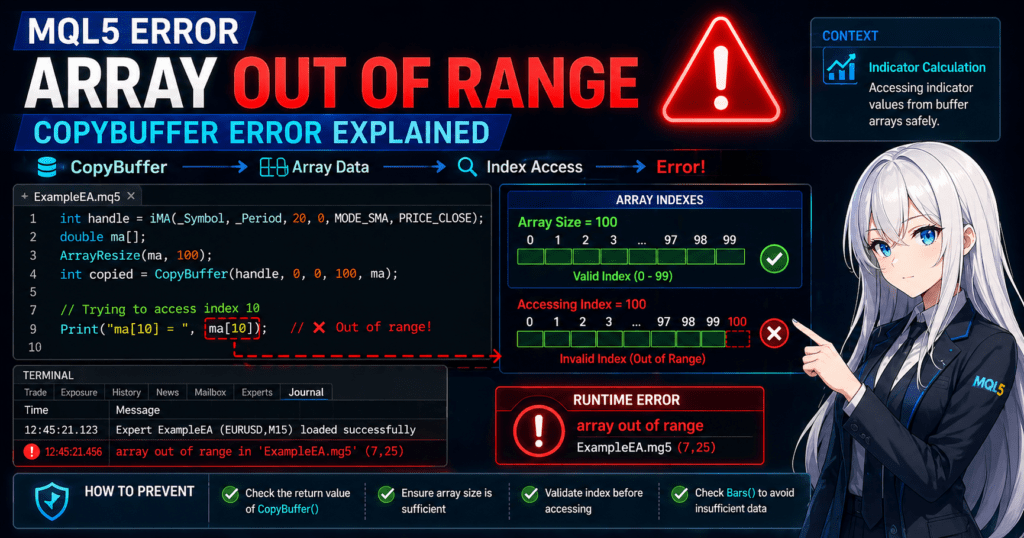
This error is a runtime error that occurs when your program tries to access an array position outside its valid range, meaning an index that does not exist.
In programming, an “array” is a data structure that stores multiple values in sequence. In MQL5, arrays are used often when working with price data and indicator values. However, every array has a valid index range. If you access an index beyond that range, an error occurs.
For example, if an array has 10 elements, the usable indexes are as follows.
0 〜 9
If you access an index such as 10, it is outside the array range and causes an array out of range error.
This error is one of the most common mistakes in EA (Expert Advisor) development and indicator development. It tends to happen especially in the following types of code.
- Referencing data obtained with CopyBuffer
- Indicator buffer processing
- Array processing inside for loops
- Forgetting ArrayResize
- Referencing data when there are not enough bars
For beginners, the cause can be hard to identify because the code itself may look correct even though the error appears.
1.1 Example Error Message
In MQL5, this error is mainly displayed in the log as a Runtime Error. A typical example looks like this.
array out of range in 'ExampleEA.mq5' (123,15)
This message means the following.
- ExampleEA.mq5
The file where the error occurred - 123
The line number where the error occurred - 15
The position within the line
In other words, it shows where the out-of-range array access occurred.
In many cases, the code that causes the error looks like this.
double price[10];

void OnTick()
{
   Print(price[10]);
}
In this code, the array size is 10, but array indexes start from 0. The valid range is from price[0] to price[9].
Therefore, accessing price[10] refers to an element that does not exist and causes the array out of range error.
1.2 What Out-of-Range Array Access Means
Out-of-range array access means trying to read or write data at a position that does not exist in the array.
The following cases are typical examples.
Case 1: Referencing Beyond the Array Size
double arr[5];

arr[5] = 1.0;
The valid range of this array is
arr[0] 〜 arr[4]
So arr[5] is outside the range.
Case 2: Incorrect for Loop Condition
double arr[10];

for(int i=0; i<=10; i++)
{
   arr[i] = i;
}
This code uses <=, so it accesses arr[10] at the end.
The correct code should be written as follows.
for(int i=0; i<10; i++)
{
   arr[i] = i;
}
This type of loop condition mistake is also very common in EA development.
1.3 Why This Happens Often in MQL5
Compared with many other programming languages, MQL5 is an environment where array processing is very common. The main reasons are as follows.
1. Price Data Is Handled as Arrays
For example, all of the following data types are arrays.
- Time series price data (OHLC)
- Indicator buffers
- Data obtained with CopyBuffer
- Data obtained with CopyRates
As a result, you cannot avoid array operations.
2. The Amount of Data Changes
In EAs and indicators, the amount of data changes in areas such as the following.
- Number of bars
- Number of values obtained by CopyBuffer
- Backtest period
In other words, fixed-size arrays can easily lead to out-of-range access.
3. Array Size Is Not Automatically Expanded
In MQL5, functions such as the following do not automatically expand the array size.
CopyBuffer()CopyRates()CopyTime()
Therefore, you need to allocate the array size in advance with ArrayResize() or a similar method.
Common Beginner Pitfalls
Beginners often make the following mistakes.
1. Arrays start from 0
0〜size-1
is the valid range.
2. Forgetting ArrayResize
With a dynamic array, forgetting to allocate the size causes an error.
3. Not checking the CopyBuffer return value
If you do not check how many values were obtained, out-of-range access can occur.
4. Incorrect for loop condition
<=
is a very common mistake.
2. Main Causes of “array out of range”
There is not just one reason why the “array out of range” error occurs in MQL5. In real EA and indicator development, there are several common patterns.
This section organizes the causes that appear most often in practice.
In many cases, the problem falls into one of the following categories.
- Referencing an index larger than the array size
- Forgetting to allocate the array size
- Incorrect number of values obtained by CopyBuffer
- Incorrect indicator buffer initialization
- Referencing data when there are not enough bars
These mistakes are easy to make not only for beginners but also for experienced developers.
2.1 Referencing an Index Larger Than the Array Size
The most basic cause is accessing an index that is larger than the array size.
Example:
double data[5];

void OnTick()
{
   Print(data[5]);
}
This array has a size of 5, but the indexes that can actually be used are as follows.
data[0]
data[1]
data[2]
data[3]
data[4]
In other words, the maximum index is size-1.
Therefore, accessing data[5] causes an error.
Common Mistake
The following loop condition mistake is very common.
for(int i=0;i<=ArraySize(data);i++)
{
   Print(data[i]);
}
This code causes out-of-range access at the end.
Correct code
for(int i=0;i<ArraySize(data);i++)
{
   Print(data[i]);
}
2.2 Array Size Is Not Set (Forgetting ArrayResize)
In MQL5, dynamic arrays must have their size allocated explicitly.
The following code is a typical mistake.
double buffer[];

buffer[0] = 1.0;
This array does not have any allocated size yet, so accessing it causes an error.
Correct code
double buffer[];

ArrayResize(buffer,10);

buffer[0] = 1.0;
Important Note
When using a dynamic array, you must allocate its size with
ArrayResize()
or with functions such as
CopyBuffer()
CopyRates()
depending on the situation.
2.3 Incorrect CopyBuffer / CopyRates Data Count
In MQL5, CopyBuffer() is often used to get indicator values.
However, this function can cause errors when the requested count and the array size do not match.
Example:
double ma[];

CopyBuffer(handle,0,0,100,ma);

Print(ma[50]);
If the size of ma is less than 100, this becomes out-of-range access.
Safe Code
double ma[];

ArrayResize(ma,100);

int copied = CopyBuffer(handle,0,0,100,ma);

if(copied > 0)
{
   Print(ma[0]);
}
Key Points
CopyBuffer() has the following characteristics.
- It does not automatically adjust the array size
- The number of values that can be obtained depends on the environment
2.4 Incorrect Indicator Buffer Initialization
In custom indicators, an error can also occur because of incorrect indicator buffer setup.
Example:
double Buffer1[];

SetIndexBuffer(0,Buffer1);
In this case, out-of-range access may occur if size handling is not done inside OnCalculate.
The following checks are especially necessary.
- Check rates_total
- Use prev_calculated
- Check index boundaries
2.5 Incorrect Bar Count Handling in OnCalculate / OnTick
In EAs and indicators, errors are also often caused by not having enough bars.
Example:
double ma[];

CopyBuffer(handle,0,0,10,ma);

Print(ma[5]);
However, if the chart does not yet have 10 bars, the array may not have enough data.
Safe Code
int bars = Bars(_Symbol,_Period);

if(bars < 10)
   return;
Checking the number of bars like this is important.
Common Mistakes
The following mistakes are common in real EA development.
1. Not checking the number of Bars
The error occurs at the start of a backtest.
2. Not checking the CopyBuffer return value
CopyBuffer() == -1
can happen.
3. Not understanding ArraySetAsSeries
In time series arrays, the index direction is reversed.
4. Accessing immediately after loading an indicator
Immediately after iCustom(), the data may not have been generated yet.
3. The Most Common Case: array out of range with CopyBuffer
Among the causes of the “array out of range” error in MQL5, the most common is a mistake when using CopyBuffer().
In EA development especially, CopyBuffer() is used frequently to get indicator values such as moving averages and RSI, so array range errors often occur in this area.
CopyBuffer is a useful function, but it does not automatically manage array size. If it is not handled correctly, out-of-range access can happen easily.
3.1 Typical CopyBuffer Error Code
The following code is a common beginner pattern.
int handle;
double ma[];

handle = iMA(_Symbol,_Period,20,0,MODE_SMA,PRICE_CLOSE);

CopyBuffer(handle,0,0,100,ma);

Print(ma[10]);
At first glance, it may look fine, but this code has a serious problem.
The size of ma[] has not been allocated
In MQL5, a dynamic array is declared with a size of 0. If you access it as-is, an error occurs.
In other words, it is in the following state.
ma = size 0
If you then reference ma[10], the program tries to read an element that does not exist and array out of range occurs.
3.2 Correct Way to Allocate the Array
To use CopyBuffer safely, you need to allocate the array size in advance.
Example:
int handle;
double ma[];

handle = iMA(_Symbol,_Period,20,0,MODE_SMA,PRICE_CLOSE);

ArrayResize(ma,100);

CopyBuffer(handle,0,0,100,ma);

Print(ma[10]);
This code performs the following steps.
- Allocates the array size with
ArrayResize() - Gets data with
CopyBuffer() - Accesses the array
This reduces the risk of out-of-range access.
3.3 Safe CopyBuffer Pattern (Recommended)
In real EA development, it is safer to check the result before accessing the array, as shown below.
int handle;
double ma[];

handle = iMA(_Symbol,_Period,20,0,MODE_SMA,PRICE_CLOSE);

ArrayResize(ma,100);

int copied = CopyBuffer(handle,0,0,100,ma);

if(copied > 0)
{
   Print(ma[0]);
}
This code includes the following safeguards.
- Array size allocation
- CopyBuffer return value check
- Check before array access
The return value of CopyBuffer() is the number of values successfully copied.
>0  → successfully copied
0   → no data
-1  → error
Therefore, accessing an array without checking the return value can cause an error.
Important Notes
When using CopyBuffer, always check the following points.
1. Is the array size allocated?
ArrayResize()
Forgetting this causes an error.
2. Are you checking the return value?
Depending on the environment, data may not be available.
3. Data may not exist immediately after indicator creation
The following code is risky.
handle = iMA(...);

CopyBuffer(handle,0,0,10,ma);
The indicator may not have been calculated yet.
4. Not enough bars
At the start of a backtest, the required bars may not exist yet.
Common Mistakes
The following CopyBuffer-related mistakes happen often.
The array size is not allocated
double ma[];
CopyBuffer(...);
The return value is not checked
CopyBuffer(...)
Print(ma[0])
An index larger than the copied count is referenced
Print(ma[50])
ArraySetAsSeries is not understood
In time series arrays, the index direction changes.
Safe Template for Using CopyBuffer
In EA development, the following template is safe to use.
double ma[];

ArrayResize(ma,10);

int copied = CopyBuffer(handle,0,0,10,ma);

if(copied <= 0)
   return;

double currentMA = ma[0];
This pattern satisfies all three requirements:
- Array size allocation
- Data retrieval check
- Safe access
4. Basic Patterns to Prevent array out of range
To prevent array out of range in MQL5, it is important to write safe array access from the beginning, instead of fixing error locations one by one after they appear.
In EAs and indicators especially, the number of price data values, copied bars, and indicator calculation status are not always constant. You need code that remains stable when conditions change, not code that only happens to work right now.
This section organizes basic defensive patterns that beginners can use directly.
4.1 Allocate Size with ArrayResize
When using a dynamic array, the first thing to check is whether the array size has really been allocated.
The following code is risky.
double values[];

values[0] = 1.23;
At this point, values[] has a size of 0, so values[0] is out-of-range access.
The safe version is as follows.
double values[];

ArrayResize(values, 10);

values[0] = 1.23;
ArrayResize(values, 10); makes values[0] through values[9] available.
Important Notes
- A dynamic array cannot be used just because it has been declared
- Before using it, you must allocate its size with
ArrayResize() - Even before
CopyBuffer()orCopyRates(), preallocating the size when needed is safer
Common Mistakes
- Using
double arr[];immediately after declaring it - Calling
ArrayResize()with a size smaller than the required number - Choosing a size without considering the maximum index that will be used later
4.2 Check Boundaries with ArraySize
When accessing an array, it is safer to check how many elements the array currently has before using it.
The function used for this is ArraySize().
Example:
double values[];

ArrayResize(values, 5);

int size = ArraySize(values);
Print(size);
In this case, size is 5.
With this value, you can clearly determine whether an index is inside the valid range.
int index = 3;

if(index >= 0 && index < ArraySize(values))
{
   Print(values[index]);
}
With this pattern, if index is outside the valid range, the code does not access the array at all.
Practical Rule
Before accessing an array, confirm that the following conditions are true.
index >= 0index < ArraySize(array)
If these two conditions are not satisfied, the basic rule is do not read and do not write.
Common Mistakes
- Hard-coding the array size as a fixed value
- Accessing based on assumptions instead of using
ArraySize() - Using a fixed index for an array whose retrieved data count changes
4.3 Safe for Loop Pattern
One of the most common places where array out of range occurs is inside a for loop.
Mistakes often come from the difference between <= and <.
Risky example:
double values[10];

for(int i = 0; i <= 10; i++)
{
   values[i] = i;
}
In this code, when i == 10, the program accesses values[10].
However, the valid range is from values[0] to values[9].
The correct version is as follows.
double values[10];

for(int i = 0; i < 10; i++)
{
   values[i] = i;
}
An even safer method is to use ArraySize() instead of writing the size directly.
double values[10];

for(int i = 0; i < ArraySize(values); i++)
{
   values[i] = i;
}
With this pattern, the loop condition follows the array size automatically if the array size changes.
Common Pitfalls
- Using
<=causes the final iteration to go out of range - Forgetting to update the loop condition after changing the size
- Confusing when to use
ArraySize()-1and when to use< ArraySize()in a loop condition
Practical Principle
As a rule, loop processing is safer when standardized in the following form.
for(int i = 0; i < ArraySize(array); i++)
{
   // Process
}
4.4 Check Before Accessing an Array
The most reliable method is to check the conditions immediately before touching the array.
This is essential in the following cases.
- Immediately after CopyBuffer
- Immediately after CopyRates
- When the index changes based on external conditions
- When there may not be enough bars
Example:
double ma[];

ArrayResize(ma, 10);

int copied = CopyBuffer(handle, 0, 0, 10, ma);

if(copied <= 0)
   return;

if(ArraySize(ma) > 0)
{
   Print(ma[0]);
}
If you use a specific index, you can write it as follows.
int target_index = 5;

if(target_index >= 0 && target_index < ArraySize(ma))
{
   Print(ma[target_index]);
}
Safe Check Procedure
- Check that the array size is not 0
- Check that the index you want to reference is inside the valid range
- Check that the retrieval function returned a valid result
If you access the array only after these three checks, you can greatly reduce runtime errors.
Common Pitfalls, Notes, and Mistakes
1. Writing size-1 directly too oftensize-1 is correct when referring to the last element, but writing it directly in loop conditions too often can reduce readability and cause mistakes.
2. Confusing array size with retrieved data count
Even if you call ArrayResize(array, 10), it does not guarantee that 10 valid data values were copied.
This is especially important because CopyBuffer() can fail or return fewer values than requested.
3. Forgetting that arrays start at 0
If an array has 10 elements, the valid indexes are 0〜9, not 10.
4. Assuming code is safe because it worked once
If the amount of market data, tester period, or first-start state changes, the same code can suddenly produce an error.
5. Cases That Need Special Care in EA Development
array out of range can occur not only from simple array mistakes, but also because of EA-specific execution timing and insufficient market data.
An EA runs on each OnTick(), and the chart state, bar count, and indicator calculation state are always changing. This makes code written with static assumptions easy to break.
This section organizes four cases that occur especially often in real development.
5.1 Not Enough Bars
A common EA issue is referencing an array or indicator value before the required number of bars exists.
For example, consider code that uses past values of a moving average.
double ma[];
ArrayResize(ma, 10);

int copied = CopyBuffer(handle, 0, 0, 10, ma);
Print(ma[9]);
This code assumes that 10 bars of data are always available and references ma[9].
In reality, fewer than 10 values may be available in situations such as the following.
- Immediately after the tester starts
- Immediately after switching to a new symbol or timeframe
- When the required historical data is still missing
In this case, if copied is less than 10 and you still read ma[9], an error occurs.
The safe version is as follows.
double ma[];
ArrayResize(ma, 10);

int copied = CopyBuffer(handle, 0, 0, 10, ma);

if(copied < 10)
   return;

Print(ma[9]);
It is also effective to check the number of bars first.
if(Bars(_Symbol, _Period) < 10)
   return;
Important Notes
- Even if
ArrayResize()allocates 10 elements, there is no guarantee that 10 valid data values exist - Array size and actual data count are different
- You need to check
copiedorBars()
5.2 Referencing Before an Indicator Is Loaded
In MQL5, creating an indicator handle with iMA() or iCustom() does not mean enough data is immediately available.
Because of this, calling CopyBuffer() immediately after creating a handle and then accessing the array can cause array out of range.
Risky example:
int handle = iMA(_Symbol, _Period, 20, 0, MODE_SMA, PRICE_CLOSE);

double ma[];
ArrayResize(ma, 3);

CopyBuffer(handle, 0, 0, 3, ma);

Print(ma[2]);
This code tries to read ma[2] even if the indicator calculation is not complete yet.
As a result, it can fail because not enough values were copied.
To improve safety, check the number of calculated bars.
int calculated = BarsCalculated(handle);

if(calculated < 3)
   return;

double ma[];
ArrayResize(ma, 3);

int copied = CopyBuffer(handle, 0, 0, 3, ma);

if(copied < 3)
   return;

Print(ma[2]);
Common Pitfalls
- A handle being created does not mean the data is immediately usable
iCustom()can be slow on the first calculation if its internal processing is heavy- This can be easy to miss because it may reproduce often in the tester but only occasionally in live use
5.3 Multi-Timeframe Processing
In multi-timeframe EAs, the number of bars on the current chart timeframe and the target timeframe do not match, so out-of-range access is more likely.
For example, when referencing an H1 moving average on an M15 chart, using indexes with the same assumptions can be risky.
double ma_h1[];
ArrayResize(ma_h1, 10);

int copied = CopyBuffer(handle_h1, 0, 0, 10, ma_h1);
Print(ma_h1[5]);
The issue is that the H1 data may not have enough bars.
Also, even if bars have advanced on the current chart, a new bar may not yet be confirmed on the higher timeframe.
Safe Handling Points
- Check
Bars()for each target timeframe - Check the return value of
CopyBuffer()separately - Do not handle the current timeframe and higher timeframe arrays with the same assumptions
Example:
if(Bars(_Symbol, PERIOD_H1) < 10)
   return;

double ma_h1[];
ArrayResize(ma_h1, 10);

int copied = CopyBuffer(handle_h1, 0, 0, 10, ma_h1);

if(copied < 10)
   return;

Print(ma_h1[5]);
Common Mistakes
- Treating
_Periodand another timeframe as if they have the same bar count - Assuming the higher timeframe has enough bars because the lower timeframe does
- Misunderstanding that index
0has the same update timing across timeframes
5.4 First Tick Processing
An EA runs in OnTick(), so the required preparation may not be finished on the first tick.
If the program reads arrays or indicator values in that state, it can cause an error.
For example, this structure creates the handle in OnInit() and references it immediately on the first OnTick().
int ma_handle;

int OnInit()
{
   ma_handle = iMA(_Symbol, _Period, 20, 0, MODE_SMA, PRICE_CLOSE);
   return(INIT_SUCCEEDED);
}

void OnTick()
{
   double ma[];
   ArrayResize(ma, 2);

   int copied = CopyBuffer(ma_handle, 0, 0, 2, ma);
   Print(ma[1]);
}
This code may read ma[1] even when copied < 2 on the first tick.
The safe version is as follows.
void OnTick()
{
   double ma[];
   ArrayResize(ma, 2);

   if(BarsCalculated(ma_handle) < 2)
      return;

   int copied = CopyBuffer(ma_handle, 0, 0, 2, ma);

   if(copied < 2)
      return;

   Print(ma[1]);
}
Practical Rule
On the first tick, any of the following may not be ready yet.
- Bars
- Indicator calculation
- Historical data
- Other timeframe data
Therefore, it is important not to assume that everything can run from the first tick.
A more stable design is to do nothing until all required conditions are ready.
Common Mistakes
1. Writing fixed indexes while assuming enough bars exist
Access such as ma[9] is risky without checking the copied count.
2. Referencing immediately after handle creation
Immediately after iMA() or iCustom(), the data may not be usable yet.
3. Treating multi-timeframe data the same way
M15 and H1 do not have the same bar progression or bar count.
4. Trying to run everything on the first tick
If processing continues before conditions are met, runtime errors are more likely.
6. Debugging Method: Finding the Cause
The array out of range error occurs when the array size, index value, or copied data count does not match your assumptions.
However, in real EAs, the cause is often not obvious because situations like the following are common.
- It appears in the tester but not in live operation
- It occurs only on a specific currency pair
- It occurs only on the first tick
- The CopyBuffer return value changes depending on the environment
To fix the error, you need to debug which value is outside the valid range.
This section introduces three practical methods used often in real development.
6.1 Check Array Size with Print
The simplest and most effective method is to use Print() to output the array size to the log.
Example:
double ma[];
ArrayResize(ma,10);

int copied = CopyBuffer(handle,0,0,10,ma);

Print("Array size = ", ArraySize(ma));
Print("Copied = ", copied);
The log displays the following.
Array size = 10
Copied = 6
This result shows that
Array size = 10
Actual data = 6
is the actual state.
If you write the following code in this state,
Print(ma[9]);
ma[6] through ma[9] are not copied data, and depending on the environment, this can cause an out-of-range error.
Basic Logs for Debugging
For array processing, outputting the following information helps identify the cause faster.
ArraySize(array)
CopyBuffer return value
Number of Bars
BarsCalculated
Example:
Print("ArraySize=",ArraySize(ma),
      " Copied=",copied,
      " Bars=",Bars(_Symbol,_Period));
6.2 Check the Index Value
array out of range also occurs because of index calculation mistakes.
This is especially common in cases such as the following.
- Loop processing
- Referencing past bars
- Changing the index based on conditions
Example:
for(int i=0;i<=ArraySize(ma);i++)
{
   Print(ma[i]);
}
In this code, when i == ArraySize(ma), the access is out of range.
To find this kind of issue, it is effective to output the index value to the log.
for(int i=0;i<=ArraySize(ma);i++)
{
   Print("index=",i);
   Print(ma[i]);
}
The log looks like this.
index=0
index=1
index=2
...
index=10
At this point, you can see that
Array size = 10
index = 10
does not match the valid range.
Basic Debugging Rule
When using an index, check that the following conditions are true.
index >= 0
index < ArraySize(array)
If they are not true, do not access the array.
6.3 Check with the Strategy Tester
The array out of range error is very often reproduced in the Strategy Tester.
It occurs especially in the following situations.
- Immediately after the backtest starts
- Insufficient data
- Indicator not calculated yet
- Multi-timeframe references
For that reason, the following steps make it easier to identify the cause.
Steps
- Start the Strategy Tester
- Enable Visual Mode
- Check the Journal log
- Identify the error line number
The log shows a message like this.
array out of range in 'EA_name.mq5' (145,12)
In this case,
Line 145
is the location where the error occurred.
Next, check the code on that line and review the following values.
- Array size
- Index
- CopyBuffer return value
Easy-to-Miss Tester Points
1. First tick issue
Immediately after a backtest starts, the bar count may be low.
2. Insufficient historical data
For some currency pairs, the required period of data may not exist.
3. Indicator delay
The internal calculation of iCustom() may be delayed.
Simple Debug Template for Real Development
When array processing causes a problem, adding the following logs makes the cause easier to identify.
Print("ArraySize=",ArraySize(buffer));
Print("Index=",index);
Print("Copied=",copied);
Print("Bars=",Bars(_Symbol,_Period));
This lets you check the following values at the same time.
- Array size
- Referenced index
- Copied data count
- Number of bars
Common Mistakes
Fixing only by reading the code without outputting logs
For array issues, the cause is often impossible to identify without checking runtime values.
Not checking the CopyBuffer return value
The copied count may be insufficient.
Not reproducing the issue in the tester
If you check only in a live environment, the cause becomes harder to identify.
Judging index calculations by assumption alone
In loop processing, checking the actual values in the log is more reliable.
7. Best Practices to Prevent Recurrence
The array out of range error often comes back in another part of the code even after you fix it once.
The reason is that the preconditions for array access are often not written clearly in the code.
In EAs and indicators, the following conditions are always changing.
- Number of bars
- Indicator calculation state
- CopyBuffer copied count
- Historical data
Therefore, real development should use Defensive Programming.
This means designing the program so it does not run a process when the required preconditions are not met.
This section introduces practical design rules for preventing array out of range.
7.1 Check Before Accessing Arrays
The most basic and important rule is to check the range before accessing an array.
Example:
int index = 5;

if(index >= 0 && index < ArraySize(buffer))
{
   Print(buffer[index]);
}
This code checks the following conditions.
index >= 0
index < ArraySize(buffer)
If these two conditions are not satisfied, array access is not executed.
Basic Rules for Safe Code
Before accessing an array, check the following.
- The array size is not 0
- The index is inside the valid range
- The copied data count is sufficient
Example:
if(ArraySize(buffer) > index)
{
   Print(buffer[index]);
}
7.2 Check the CopyBuffer Return Value
CopyBuffer() returns the number of copied data values.
If you access the array without checking this value, it can cause array out of range.
Example:
double ma[];
ArrayResize(ma,10);

int copied = CopyBuffer(handle,0,0,10,ma);

if(copied < 10)
   return;

Print(ma[9]);
In this process, if
copied < 10
is true, the process stops.
In other words, the design is do not touch the array when the copied data is insufficient.
Common Mistake
The following code is risky.
CopyBuffer(handle,0,0,10,ma);
Print(ma[9]);
Because the return value is not checked, the code accesses the array even when not enough data was copied.
7.3 Check the Number of Bars
In EAs, errors often occur because there are not enough bars.
This is especially common immediately after a backtest starts or on a new chart where the required bars may not exist yet.
Example:
if(Bars(_Symbol,_Period) < 50)
   return;
This check avoids processing when there are not enough bars.
Common Conditions Used in Practice
if(Bars(_Symbol,_Period) < required_bars)
   return;
For example:
- Moving average period 20 → 20 or more
- RSI14 → 14 or more
- Referencing the past 50 bars → 50 or more
Important Note
A bar count check alone is not complete.
You also need to check the indicator calculation state.
7.4 Defensive Programming
In EA development, it is important to design code so that processing does not continue when preconditions are not met.
Example:
double ma[];
ArrayResize(ma,10);

if(Bars(_Symbol,_Period) < 10)
   return;

if(BarsCalculated(handle) < 10)
   return;

int copied = CopyBuffer(handle,0,0,10,ma);

if(copied < 10)
   return;

double currentMA = ma[0];
This code checks all of the following conditions.
- Number of bars
- Number of calculated indicator bars
- CopyBuffer copied count
The array is accessed only after all checks pass.
How to Think About Defensive Code
In EAs, the common check order is as follows.
Check bar count
↓
Check indicator calculation
↓
Retrieve data
↓
Check copied count
↓
Access array
If you follow this order, you can prevent most array out of range errors.
Safe EA Template
The following is a safe template often used in real development.
double buffer[];
ArrayResize(buffer,10);

if(Bars(_Symbol,_Period) < 10)
   return;

int copied = CopyBuffer(handle,0,0,10,buffer);

if(copied < 10)
   return;

double value = buffer[0];
This pattern satisfies the following three points.
- Avoids insufficient bars
- Avoids insufficient CopyBuffer data
- Avoids array range errors
Common Mistakes
1. Assuming code is safe because it worked once
If market data or tester conditions change, the same code can produce an error.
2. Checking only the array size
Even if the array size is 10, there may not be 10 valid data values.
3. Ignoring the CopyBuffer return value
This causes errors when not enough data is copied.
4. Not considering the first tick issue
On the first tick, bars or indicators may not be ready.
8. Summary: Fastest Troubleshooting Checklist
The MQL5 array out of range error is a runtime error that occurs when code accesses an index outside the valid array range.
Because EAs and indicators use arrays frequently, this error occurs very often.
However, most causes can be grouped into the following three categories.
- Insufficient array size
- Insufficient copied data count
- Incorrect index calculation
Therefore, when the error occurs, checking in the order of array size → copied count → index makes it easier to identify the cause.
The following is a fast troubleshooting checklist you can use in real development.
8.1 Is the Array Size Allocated?
When using a dynamic array, you cannot access the array unless its size has been allocated.
Checkpoints
- Did you run
ArrayResize()? - Is the size allocated up to the index you need?
Example:
double buffer[];

ArrayResize(buffer,10);
In this case, the valid indexes are
buffer[0] 〜 buffer[9]
.
Common Mistakes
- Using an array after only declaring it
- Specifying an
ArrayResize()size smaller than required
8.2 Did You Check the CopyBuffer Return Value?
CopyBuffer() returns the number of values copied.
If you access the array without checking this value, it can cause an out-of-range error.
Safe code
double ma[];
ArrayResize(ma,10);

int copied = CopyBuffer(handle,0,0,10,ma);

if(copied < 10)
   return;
This check prevents array access when not enough data was copied.
Common Mistake
CopyBuffer(handle,0,0,10,ma);
Print(ma[9]);
Because the return value is not checked, the code accesses the array even when not enough data was copied.
8.3 Is the Index Inside the Valid Range?
The valid index range of an array is as follows.
0 〜 ArraySize(array)-1
Therefore, check the following condition before accessing an array.
if(index >= 0 && index < ArraySize(array))
{
   Print(array[index]);
}
If this condition is not satisfied, do not access the array.
Common Mistakes
- Using
<=in loop conditions - Mistaking
sizefor the maximum index
8.4 Are There Enough Bars?
In EAs, errors often occur when array access is performed before the required number of bars exists.
Example:
if(Bars(_Symbol,_Period) < 20)
   return;
This check helps prevent errors in states such as the following.
- At the start of a backtest
- Immediately after changing the chart
- When data is insufficient
8.5 Is the Indicator Calculated?
Even if an indicator handle is created, data may not be available immediately.
Use BarsCalculated() to check this.
if(BarsCalculated(handle) < 10)
   return;
This check helps avoid errors caused by delayed indicator calculation.
Fast Checklist
When array out of range occurs, check the following items in order to identify the cause more easily.
- Is the array size allocated?
- Is
ArraySize()as expected? - Is the index less than or equal to
size-1? - Is the
CopyBuffer()return value sufficient? - Are there at least the required number of bars?
- Is indicator calculation complete?
Checking these six items identifies the cause in most cases.
Safe Array Access Template
In EA development, the following template prevents most array out of range errors.
double buffer[];
ArrayResize(buffer,10);

if(Bars(_Symbol,_Period) < 10)
   return;

if(BarsCalculated(handle) < 10)
   return;

int copied = CopyBuffer(handle,0,0,10,buffer);

if(copied < 10)
   return;

double value = buffer[0];
This code processes safely in the following order.
- Bar count check
- Indicator calculation check
- Data retrieval check
- Array access
FAQ
Q1. What is “array out of range” in MQL5?
array out of range is a runtime error that occurs when code accesses an index outside the valid range of an array.
In MQL5, array indexes start from 0, so if the array size is 10, the valid indexes are 0〜9.
For example, the following code causes an error.
double arr[10];
Print(arr[10]);
arr[10] is an element that does not exist, so array out of range occurs.
Q2. Why does “array out of range” happen with CopyBuffer?
In many cases, one of the following is the cause.
- The array size is not allocated
- CopyBuffer copied fewer values than expected
- The code accesses the array without checking the return value
Safe code example
double ma[];
ArrayResize(ma,10);

int copied = CopyBuffer(handle,0,0,10,ma);

if(copied < 10)
   return;

Print(ma[0]);
Checking the return value of CopyBuffer() prevents errors when too little data was copied.
Q3. Do MQL5 arrays start from 0?
Yes. MQL5 array indexes start from 0.
If the array size is N, the valid indexes are as follows.
0 〜 N-1
For example, if the size is 5, the following indexes are valid.
arr[0]
arr[1]
arr[2]
arr[3]
arr[4]
Q4. Is ArrayResize always required?
When using a dynamic array, it is required.
The following code causes an error.
double arr[];
arr[0] = 1;
When using a dynamic array, always allocate the size.
double arr[];
ArrayResize(arr,10);
However, it is not required for a fixed-size array such as the following.
double arr[10];
Q5. Why does the error appear only in the Strategy Tester?
The main causes are as follows.
- Not enough bars immediately after the backtest starts
- Indicator not calculated yet
- Insufficient historical data
For example, you can avoid this by checking the number of bars.
if(Bars(_Symbol,_Period) < 20)
   return;
Q6. Is ArraySetAsSeries related to this error?
Yes. When you use ArraySetAsSeries(), the array index direction becomes reversed for time series data, with the latest bar at index 0.
Example:
index 0 = latest bar
index 1 = 1 bar ago
index 2 = 2 bars ago
If you do not understand this setting, you may reference an index different from the one you intended.
Q7. What is the most common cause in EA development?
In real development, the three most common causes are as follows.
- Not checking the CopyBuffer return value
- Not enough bars
- Incorrect loop condition (
<=)
The following code is especially likely to cause errors.
for(int i=0;i<=ArraySize(arr);i++)
The correct version is
for(int i=0;i<ArraySize(arr);i++)Q8. Is there a way to completely prevent array out of range?
It is difficult to prevent it completely, but you can greatly reduce it by applying the following checks consistently.
- Check
ArraySize()before array access - Check the return value of
CopyBuffer() - Check the number of bars with
Bars() - Check indicator calculation with
BarsCalculated()
In EA development especially, it is safer to write processing in the following order.
Check bar count
↓
Check indicator calculation
↓
Retrieve with CopyBuffer
↓
Check copied count
↓
Access array
Following this flow helps avoid many array out of range errors.