
- 1 Conclusion of This Article
- 2 1. The Role of Optimization Methods in MQL5
- 3 2. Basic Concept
- 4 3. Common Optimization Patterns
- 5 4. How to Implement an EA That Is Easy to Optimize in MQL5
- 6 5. Sample Code
- 7 6. Comparison by Pattern
- 8 7. Situations That Often Lead to Misjudgment
- 9 8. Items to Check in a Backtest
- 10 9. Items to Check in Forward Testing
- 11 10. Notes for Live Trading
- 12 11. Improvements and Alternatives
- 13 12. Summary
- 14 FAQ
- 14.1 What are MQL5 optimization methods?
- 14.2 Which metrics should I check during optimization?
- 14.3 What should I watch for when using indicator values in MQL5?
- 14.4 How can I avoid overfitting in optimization?
- 14.5 What is the difference between backtesting and forward testing?
- 14.6 Can optimized parameters be used directly in live trading?
- 14.7 What should I check in an EA that includes order processing?
Conclusion of This Article
MQL5 optimization methods are not a mechanical task for finding EA input parameters. They are a validation design used to check whether a trading logic is reproducible.
During optimization, you must review not only total profit and loss, but also maximum drawdown, number of trades, risk-reward ratio, losing streaks, and period dependency.
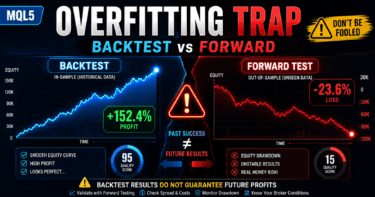
If parameters are tuned too precisely, the EA may look strong in a backtest but fail easily in a forward test.
In live trading, results can change because of spreads, execution, broker specifications, and account type differences, so you should not make an operating decision based only on optimization results.
1. The Role of Optimization Methods in MQL5
Conclusion
The role of optimization methods in MQL5 is to check whether EA input parameters depend only on specific conditions.
Optimization does not guarantee profit. It is a validation process for finding weaknesses in the trading logic.
Definition
Optimization means testing EA input values across multiple patterns and comparing the trading logic’s performance, stability, and risk characteristics.
In an MQL5 EA, periods, thresholds, lots, stop-loss width, take-profit width, and similar values defined as input variables can be checked in combination with the tester.
However, simply adopting the combination with the best performance can easily lead to overfitting.
The following three points are important in optimization.
- Which conditions make performance worse
- Whether performance avoids a sharp collapse when parameters are changed slightly
- Whether a similar tendency appears in forward testing after backtesting
1.1 Optimization Is a Validation Process for Trading Logic
MQL5 optimization is not a feature that decides whether a logic is good or bad in one step.
Optimization is a process for checking whether an EA is overly fitted to only a specific period, symbol, or spread.
Even when a trading logic appears effective, the impact of chance becomes large if the number of trades is too small.
Also, if maximum drawdown is large, the EA may be difficult to tolerate in live trading even when total profit and loss looks good.
1.2 What You Should Find Through Optimization
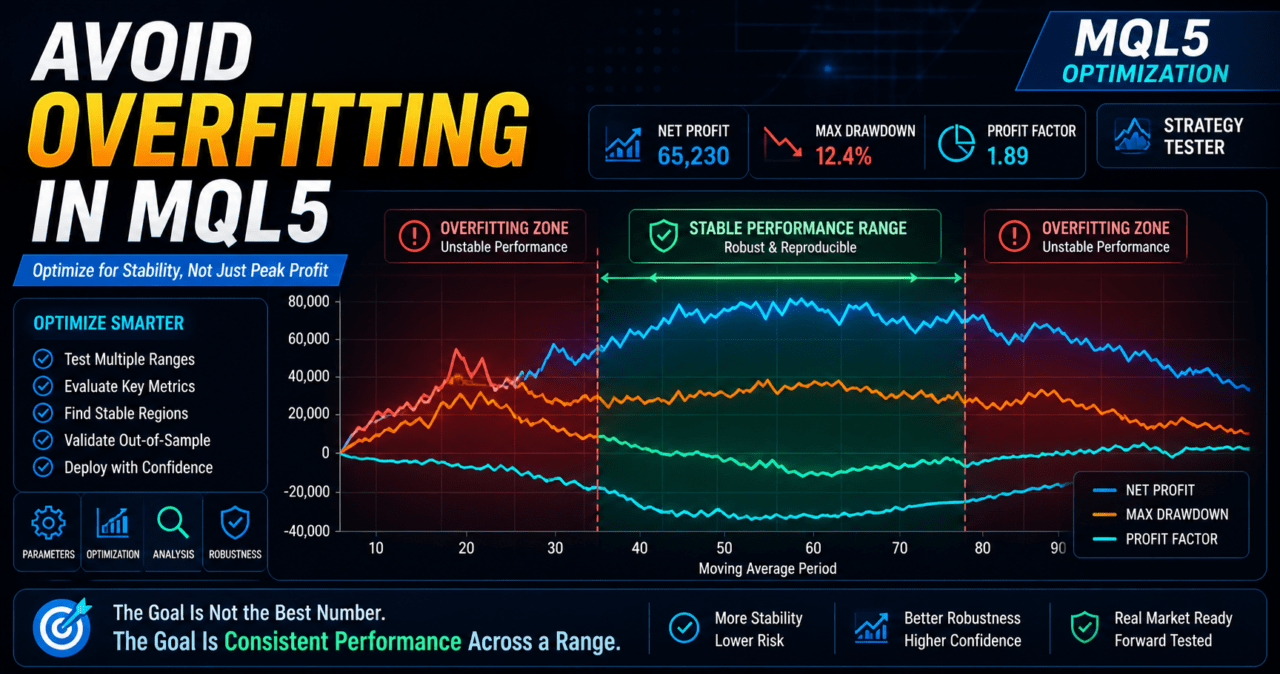
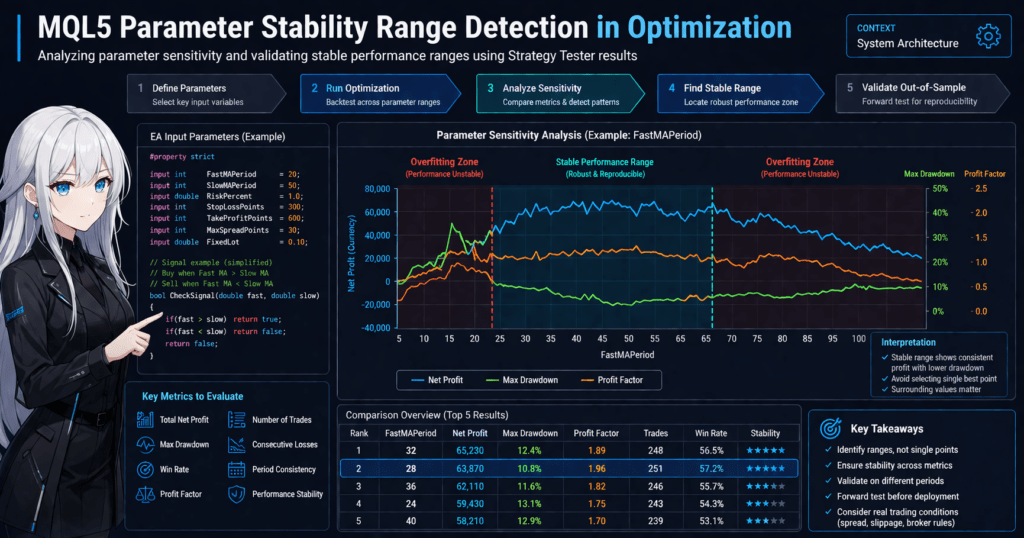
What you should find through optimization is not a single point with the highest performance.
In EA design, it is important to look for a reasonably wide range where performance does not collapse sharply.
For example, if a moving average period performs well only at 20 and suddenly worsens at 19 or 21, the logic may depend strongly on a specific condition.
On the other hand, if a similar tendency appears from 18 to 25, it becomes easier to confirm the reproducibility of the logic.
2. Basic Concept
Conclusion
In MQL5 optimization, you need to separate parameters, evaluation metrics, validation periods, and trading conditions.
If you rank results only by total profit and loss, you can easily overlook drawdown and trade-frequency problems.
The basic optimization design follows this order.
- Decide the purpose of the trading logic
- Narrow down the input parameters to optimize
- Decide which metrics to evaluate
- Separate the backtest period
- Check reproducibility in the forward period
- Recheck under conditions close to live trading
In an MQL5 EA, separating the core logic, filters, money management, and exit conditions makes it easier to organize what should be optimized.
2.1 Do Not Optimize Too Many Targets
When there are too many optimization targets, the number of combinations increases rapidly.
As the number of combinations grows, it becomes easier to select a setting that performed well by chance.
The first optimization targets should be limited to a small number of parameters related to the core of the logic.
- Signal period
- Filter period
- Stop-loss width
- Take-profit width
- Trailing conditions
- Trading hours
If you optimize lot multipliers or complex money management first, weaknesses in the core logic become harder to see.
2.2 Use Multiple Evaluation Metrics
In optimization, you should not look only at total profit and loss.
When evaluating an MQL5 EA, check profit and loss, risk, trade frequency, and period dependency separately.
Common metrics to check are listed below.
- Total profit and loss
- Maximum drawdown
- Win rate
- Risk-reward ratio
- Number of trades
- Losing streak count
- Profit and loss by period
- Performance changes when parameters are changed
Backtest results do not guarantee future profit.
Evaluation metrics are used to understand the size of the risk before live trading.
3. Common Optimization Patterns
Conclusion
MQL5 optimization methods include simple brute-force optimization, staged optimization with narrowed ranges, logic-by-logic split optimization, and validation using a forward period.
Beginners can reduce mistakes by checking a small number of parameters step by step instead of searching for complex combinations from the start.
3.1 Brute-Force Optimization
Brute-force optimization is a method for broadly checking combinations of specified input values.
It can cover a wide search range, but it takes more time as the number of combinations increases.
Brute-force optimization is suitable in the following situations.
- There are few optimization targets
- You want to check a broad parameter range
- You want to understand the logic’s sensitivity
However, if you test many values with very small steps, you are more likely to pick up a result that was good by chance.
3.2 Staged Optimization
Staged optimization first checks a broad range to identify the general tendency, then checks a narrower range where performance is more likely to remain stable.
This method makes it easier to see parameter tendencies while avoiding overfitting.
For example, an EA that uses a moving average period can be checked as follows.
- Check from 10 to 100 with large steps
- Find a range where performance is unlikely to collapse sharply
- Check only that range with smaller steps
- Confirm whether the same tendency remains in another period
The final setting should be selected not from the single highest value, but from a range where nearby values also avoid a large performance collapse.
3.3 Logic-by-Logic Split Optimization
An EA can be designed by separating signal judgment, filter judgment, risk checks, order processing, and exit management.
Optimization also becomes easier to analyze when it is separated by role in the same way.
Examples of this split are listed below.
- Check only entry conditions
- Check only the trend filter
- Check only stop loss and take profit
- Check only trading hours
- Fix lot calculation and review the core logic
If money management is complex from the start, it becomes harder to judge which condition affected performance.
4. How to Implement an EA That Is Easy to Optimize in MQL5
Conclusion
To create an EA that is easy to optimize in MQL5, define adjustable items as input variables and separate signal judgment from order processing.
When using indicators, create handles in OnInit and get values with CopyBuffer in OnTick.
In MQL5, indicator functions do not always return values directly.
When an EA uses a moving average, ATR, or similar indicator, the structure is to create an indicator handle and retrieve buffer values at the required timing.
4.1 Define Optimization Targets with input Variables
Optimization targets should be defined as input variables near the beginning of the EA.
Variable names should make sense later when reviewing tester results.
#property strict

input int    FastMAPeriod      = 20;
input int    SlowMAPeriod      = 50;
input double RiskPercent       = 1.0;
input int    StopLossPoints    = 300;
input int    TakeProfitPoints  = 600;
input int    MaxSpreadPoints   = 30;
Values used as optimization targets should be limited to values whose logical meaning can be explained.
If you add values whose meaning cannot be explained, the settings are more likely to be fitted only to backtest results.
4.2 Initialize Indicator Handles
In an EA that uses moving averages, create handles in OnInit.
If handle creation fails, treat EA initialization as failed.
#property strict

input int FastMAPeriod = 20;
input int SlowMAPeriod = 50;

int fastMaHandle = INVALID_HANDLE;
int slowMaHandle = INVALID_HANDLE;

int OnInit()
{
   fastMaHandle = iMA(_Symbol, _Period, FastMAPeriod, 0, MODE_EMA, PRICE_CLOSE);
   slowMaHandle = iMA(_Symbol, _Period, SlowMAPeriod, 0, MODE_EMA, PRICE_CLOSE);

   if(fastMaHandle == INVALID_HANDLE || slowMaHandle == INVALID_HANDLE)
   {
      Print("Failed to create moving average handles");
      return INIT_FAILED;
   }

   return INIT_SUCCEEDED;
}

void OnDeinit(const int reason)
{
   if(fastMaHandle != INVALID_HANDLE)
      IndicatorRelease(fastMaHandle);

   if(slowMaHandle != INVALID_HANDLE)
      IndicatorRelease(slowMaHandle);
}
OnInit is the event function that performs EA initialization.
OnDeinit is the event function that performs cleanup when the EA ends.
For an EA that uses handles, releasing them with IndicatorRelease at termination makes management easier.
4.3 Use Closed Bars for Judgment in OnTick
OnTick is the central EA process executed when a new tick is received.
During optimization, results change depending on whether you use the unsettled value of the latest bar or a closed bar.
When using closed bars, set arrays in time-series order and use the value at index 1 for judgment.
bool GetMovingAverageValues(double &fastClosed, double &slowClosed)
{
   const int currentBarIndex = 0;
   const int closedBarIndex = 1;

   double fastBuffer[];
   double slowBuffer[];

   ArraySetAsSeries(fastBuffer, true);
   ArraySetAsSeries(slowBuffer, true);

   if(BarsCalculated(fastMaHandle) < 3 || BarsCalculated(slowMaHandle) < 3)
   {
      Print("Not enough calculated bars");
      return false;
   }

   int copiedFast = CopyBuffer(fastMaHandle, 0, currentBarIndex, 3, fastBuffer);
   int copiedSlow = CopyBuffer(slowMaHandle, 0, currentBarIndex, 3, slowBuffer);

   if(copiedFast < 3 || copiedSlow < 3)
   {
      Print("CopyBuffer failed or not enough data");
      return false;
   }

   fastClosed = fastBuffer[closedBarIndex];
   slowClosed = slowBuffer[closedBarIndex];
   return true;
}
In a time-series array, constants such as currentBarIndex for the current bar and closedBarIndex for the most recent closed bar make the intent easier to understand.
If you want to reduce the gap between backtesting and live trading, a design based on closed-bar judgment is easier to handle.
5. Sample Code
Conclusion
In an EA sample for optimization, separate parameter definitions, indicator retrieval, signal judgment, spread checks, and pre-order checks.
Before using it in live trading, you must separately confirm symbol specifications, lot limits, margin, and execution conditions.
The following code is a validation sample that uses the relationship between moving averages.
It does not recommend buy or sell decisions. It is an example that shows a structure that is easy to optimize.
#property strict

input int    FastMAPeriod      = 20;
input int    SlowMAPeriod      = 50;
input double FixedLot          = 0.10;
input int    StopLossPoints    = 300;
input int    TakeProfitPoints  = 600;
input int    MaxSpreadPoints   = 30;
input ulong  MagicNumber       = 20260502;

int fastMaHandle = INVALID_HANDLE;
int slowMaHandle = INVALID_HANDLE;

int OnInit()
{
   fastMaHandle = iMA(_Symbol, _Period, FastMAPeriod, 0, MODE_EMA, PRICE_CLOSE);
   slowMaHandle = iMA(_Symbol, _Period, SlowMAPeriod, 0, MODE_EMA, PRICE_CLOSE);

   if(fastMaHandle == INVALID_HANDLE || slowMaHandle == INVALID_HANDLE)
   {
      Print("Failed to create indicator handles");
      return INIT_FAILED;
   }

   return INIT_SUCCEEDED;
}

void OnDeinit(const int reason)
{
   if(fastMaHandle != INVALID_HANDLE)
      IndicatorRelease(fastMaHandle);

   if(slowMaHandle != INVALID_HANDLE)
      IndicatorRelease(slowMaHandle);
}

void OnTick()
{
   if(PositionSelect(_Symbol))
      return;

   if(!IsSpreadAcceptable())
      return;

   double fastMa = 0.0;
   double slowMa = 0.0;

   if(!GetMovingAverageValues(fastMa, slowMa))
      return;

   if(fastMa > slowMa)
      SendMarketOrder(ORDER_TYPE_BUY);
   else if(fastMa < slowMa)
      SendMarketOrder(ORDER_TYPE_SELL);
}

bool IsSpreadAcceptable()
{
   long spread = 0;

   if(!SymbolInfoInteger(_Symbol, SYMBOL_SPREAD, spread))
   {
      Print("Failed to get spread");
      return false;
   }

   return spread <= MaxSpreadPoints;
}

bool GetMovingAverageValues(double &fastClosed, double &slowClosed)
{
   const int currentBarIndex = 0;
   const int closedBarIndex = 1;

   double fastBuffer[];
   double slowBuffer[];

   ArraySetAsSeries(fastBuffer, true);
   ArraySetAsSeries(slowBuffer, true);

   if(BarsCalculated(fastMaHandle) < 3 || BarsCalculated(slowMaHandle) < 3)
      return false;

   int copiedFast = CopyBuffer(fastMaHandle, 0, currentBarIndex, 3, fastBuffer);
   int copiedSlow = CopyBuffer(slowMaHandle, 0, currentBarIndex, 3, slowBuffer);

   if(copiedFast < 3 || copiedSlow < 3)
   {
      Print("CopyBuffer failed or not enough data");
      return false;
   }

   fastClosed = fastBuffer[closedBarIndex];
   slowClosed = slowBuffer[closedBarIndex];
   return true;
}

bool SendMarketOrder(ENUM_ORDER_TYPE orderType)
{
   double lot = NormalizeLot(FixedLot);

   if(lot <= 0.0)
      return false;

   double price = 0.0;
   double sl = 0.0;
   double tp = 0.0;

   if(orderType == ORDER_TYPE_BUY)
   {
      price = SymbolInfoDouble(_Symbol, SYMBOL_ASK);
      sl = price - StopLossPoints * _Point;
      tp = price + TakeProfitPoints * _Point;
   }
   else
   {
      price = SymbolInfoDouble(_Symbol, SYMBOL_BID);
      sl = price + StopLossPoints * _Point;
      tp = price - TakeProfitPoints * _Point;
   }

   MqlTradeRequest request;
   MqlTradeResult result;
   MqlTradeCheckResult check;

   ZeroMemory(request);
   ZeroMemory(result);
   ZeroMemory(check);

   request.action       = TRADE_ACTION_DEAL;
   request.symbol       = _Symbol;
   request.volume       = lot;
   request.type         = orderType;
   request.price        = price;
   request.sl           = NormalizeDouble(sl, _Digits);
   request.tp           = NormalizeDouble(tp, _Digits);
   request.deviation    = 20;
   request.magic        = MagicNumber;
   request.type_filling = ORDER_FILLING_FOK;

   if(!OrderCheck(request, check))
   {
      Print("OrderCheck failed: ", check.retcode);
      return false;
   }

   if(!OrderSend(request, result))
   {
      Print("OrderSend failed: ", result.retcode);
      return false;
   }

   if(result.retcode != TRADE_RETCODE_DONE && result.retcode != TRADE_RETCODE_PLACED)
   {
      Print("Trade request was not completed: ", result.retcode);
      return false;
   }

   return true;
}

double NormalizeLot(double lot)
{
   double minLot = SymbolInfoDouble(_Symbol, SYMBOL_VOLUME_MIN);
   double maxLot = SymbolInfoDouble(_Symbol, SYMBOL_VOLUME_MAX);
   double step   = SymbolInfoDouble(_Symbol, SYMBOL_VOLUME_STEP);

   if(minLot <= 0.0 || maxLot <= 0.0 || step <= 0.0)
   {
      Print("Invalid volume settings");
      return 0.0;
   }

   lot = MathMax(minLot, MathMin(maxLot, lot));
   lot = MathFloor(lot / step) * step;

   return NormalizeDouble(lot, 2);
}
5.1 Why Pre-Order Checks Are Needed
In MQL5 order processing, you can set order details in MqlTradeRequest, check them in advance with OrderCheck, and then use OrderSend.
Adding a pre-order check makes it easier to detect insufficient margin, lot-limit issues, and symbol specification problems.
In live trading, order results can change because of the following conditions.
- Execution method
- Spread
- Slippage
- Minimum lot
- Maximum lot
- Lot step
- Margin
- Stop level
- Freeze level
- Tradable hours
- Differences between netting accounts and hedging accounts
6. Comparison by Pattern
Conclusion
Optimization methods should be compared by speed, coverage, overfitting risk, and ease of connecting the result to live trading.
For initial EA validation, combining staged checks with forward testing is easier to handle than relying only on brute-force optimization.
| Method | Advantages | Disadvantages | Best Use Case | Overfitting Risk |
|---|---|---|---|---|
| Brute-force optimization | Easy to check a wide range | Takes time when there are many combinations | EAs with few parameters | Medium |
| Staged optimization | Allows narrowing the range while watching tendencies | Subjective decisions can enter if the procedure is not defined | EA validation for beginners to intermediate users | Low to medium |
| Logic-by-logic split optimization | Easy to judge which condition worked | Requires the implementation to be separated | EAs with multiple filters | Low to medium |
| Selecting only the best result | Easy to choose a result | Likely to fail in forward testing | Only rough initial checks | High |
| Validation with a forward period | Easy to check reproducibility | Takes more time to validate | Checks before live trading | Low to medium |
As the comparison table shows, simply choosing the best-performing result is easy to handle, but it carries a high risk of overfitting.
For an EA intended for live trading, prioritize conditions that remain stable and are less likely to collapse rather than the highest performance.
7. Situations That Often Lead to Misjudgment
Conclusion
In MQL5 optimization, values from unsettled bars, spread conditions, insufficient trade count, period dependency, and too many parameters can cause incorrect judgments.
Even if a backtest shows good results, the same tendency may not continue in live trading unless the causes are broken down.
7.1 Judgment Using Unsettled Bars
The value of a forming bar changes with each tick.
If you judge indicator values using the current bar index, results can change easily depending on backtest conditions and tick-generation conditions.
When judging on a closed-bar basis, use the index that indicates the most recent closed bar.
Signals occur later, but validation conditions become easier to align.
7.2 Overlooking Spread Conditions
Spread directly affects entry and exit performance.
Especially in short-term trading or EAs that target small profit widths, performance can worsen easily when spreads widen.
During optimization, check how much performance changes when spread conditions are changed.
7.3 Results with Too Few Trades
Optimization results with too few trades are more likely to be affected by chance.
Even if total profit and loss is good, reproducibility is hard to judge when the result depends on a few large profits.
Check the number of trades, trade distribution by period, and losing streak count together.
7.4 Designs with Too Many Parameters
The more parameters you add, the more room there is to fit the EA to the backtest.
If you optimize trend filters, time filters, volatility filters, and multiple exit conditions all at once, the causes become difficult to separate.
At first, check only the central conditions of the logic.
Add filters only when you can explain why they are necessary.
8. Items to Check in a Backtest
Conclusion
In a backtest, check not only profit but also how losses occur, number of trades, parameter dependency, and spread conditions.
Optimization results become easier to interpret only after the logic’s characteristics are reviewed with multiple metrics.
The main items to check in a backtest are listed below.
| Item to Check | Reason to Check | Important Note |
|---|---|---|
| Total profit and loss | Shows the overall result of the logic | Do not judge by this alone |
| Maximum drawdown | Checks the decline in equity | Decide an acceptable level in advance |
| Win rate | Shows how often trades win | Check together with the risk-reward ratio |
| Risk-reward ratio | Shows the relationship between average profit and average loss | Win rate alone cannot judge risk |
| Number of trades | Checks whether results are biased | If too low, chance has a large impact |
| Losing streak count | Shows psychological and capital pressure | Relates to live trading stop conditions |
| Spread conditions | Shows cost tolerance | Changes by symbol and time of day |
| Period dependency | Checks whether the logic fits only a specific market | Compare multiple periods |
| Parameter dependency | Checks whether the setting depends on only one point | Check nearby values as well |
8.1 Separate the Periods for Validation
If you evaluate only the period used for optimization, overfitting is easy to miss.
At minimum, split the validation period into a period used like training data and a period used for confirmation.
For example, divide historical data into the first half and second half, find candidates in the first half, and confirm whether the tendency remains in the second half.
When the market environment changes, the same setting may produce different results.
8.2 Check Stability Around the Parameter
In optimization results, check not only the single best-performing point but also nearby values.
If performance suddenly worsens around nearby values, the setting may be fitted too closely to specific conditions.
If no stable range can be found, the logic itself needs to be reviewed.
9. Items to Check in Forward Testing
Conclusion
In forward testing, confirm whether the candidates selected in backtesting hold up under conditions closer to actual use.
Execution differences, spread widening, broker differences, and stability in a VPS environment cannot be judged sufficiently from backtesting alone.
Items to check in forward testing are listed below.
- Execution differences
- Behavior when spreads widen
- Trade frequency
- Drawdown
- Gap from the backtest
- Broker differences
- Stability in a VPS environment
- Log abnormalities
- Order rejections or execution failures
9.1 Check the Gap from the Backtest
The purpose of forward testing is not to produce exactly the same result as the backtest.
In forward testing, check whether trade frequency, profit and loss direction, and drawdown size change too sharply.
If the gap is large, check spread, execution, trading hours, tick conditions, and broker specifications.
9.2 Differences Between Demo and Live Accounts
Demo accounts and live accounts may have different execution conditions.
Even with the same EA and the same parameters, performance can change because of slippage, execution rejection, and spread widening.
Before using an EA on a live account, you need to check its behavior with small risk.
This is not done to target profit. It is done to confirm whether the EA works as expected.
10. Notes for Live Trading
Conclusion
When using MQL5 optimization results in live trading, confirm lot limits, margin, spread, execution method, account type, and stop conditions in advance.
Backtest results do not guarantee future profit, and unexpected drawdown can occur in live trading.
10.1 Validate Money Management Separately
In optimization, check the core logic and money management separately.
If lot calculation is complex, performance may look good while the actual risk is expanding.
For lot calculation, check the following conditions.
- Minimum lot
- Maximum lot
- Lot step
- Margin
- Allowed risk
- Stop-loss width
- Account balance
- Equity
- Symbol specifications
- Digits
- Tick value
- Tick size
10.2 Comparison of Lot Calculation Methods
| Method | Advantages | Disadvantages | Best Use Case |
|---|---|---|---|
| Fixed lot | Easy to implement and validate | Hard to adjust to capital changes | Initial validation of the core logic |
| Balance-proportional | Easy to adjust according to capital | Reduction during losing streaks and later recovery affect performance | Medium-term money management |
| Risk-percentage based | Can be calculated from stop-loss width and allowed loss | Requires checking tick value and symbol specifications | When allowed loss should be clear |
| Volatility-adjusted | Can reflect market movement with ATR or similar values | Design can become complex | Validation of symbols with large price movement |
Lot calculation is not a mechanism that removes losses.
Lot calculation is a mechanism for managing capital changes in advance when losses occur.
10.3 Decide Stop Conditions
In live trading, decide in advance when to stop the EA.
Without stop conditions, losses may expand in unexpected market conditions.
Examples of stop conditions are listed below.
- Maximum drawdown has been reached
- The losing streak count exceeded the expected level
- The spread widened beyond a set level
- You want to avoid important time windows
- Order errors occurred repeatedly
- There is an abnormality in communication or the VPS environment
Stop conditions should be designed as risk control separate from the trading logic.
11. Improvements and Alternatives
Conclusion
If optimization results are not stable, review logic decomposition, filter organization, and exit conditions instead of continuing to adjust parameters.
If you try to solve the problem only with setting values, you are more likely to move toward overfitting.
11.1 Decide the Purpose Before Adding Filters
Filters are used to reduce unnecessary entries.
However, adding too many filters reduces the number of trades and makes the conditions more likely to fit only a specific period.
Additional filters need purposes such as the following.
- Avoid range-bound markets
- Align with the trend direction
- Avoid low volatility
- Avoid spread widening
- Limit trading hours
Filters with overlapping purposes may only make the logic more complex.
11.2 Validate Exit Conditions Separately
Even when entry conditions are the same, exit conditions can greatly change performance.
If you optimize stop loss, take profit, trailing, and time-based exits at the same time, it becomes difficult to know what worked.
First, check entry conditions with fixed stop loss and take profit.
After that, add trailing or time-based exits and check whether they improve the result.
11.3 Notes When Using Multiple Symbols
The same parameters do not necessarily fit every symbol.
Volatility, spread, tick value, trading hours, and execution conditions differ by symbol.
For a multi-symbol EA, read the trading conditions for each symbol and design lot size, stop width, and spread limits separately.
12. Summary
Conclusion
MQL5 optimization methods are not a task for finding the parameter with the highest performance. They are a process for checking EA reproducibility and risk.
Separating optimization, backtesting, forward testing, and pre-live checks makes it easier to avoid overfitting.
The key points of this article are listed below.
- Optimization is a validation process, not a profit guarantee
- Clarify adjustable targets with
inputvariables - Retrieve indicator values with handles and CopyBuffer
- Handle closed bars and unsettled bars separately
- Check drawdown and number of trades, not only total profit and loss
- Check stability around nearby values, not only the single best result
- Confirm reproducibility with forward testing
- In live trading, consider spread, execution, and broker specifications
- Check conditions with OrderCheck before sending orders
- Backtest results do not guarantee future profit
In MQL5 EA optimization, it is important to design the logic, filters, money management, and order processing separately.
With a decomposed design, it becomes easier to check which conditions affect performance.
FAQ
What are MQL5 optimization methods?
MQL5 optimization methods are ways to test EA input parameters across multiple patterns and check the stability and risk of the trading logic. They are not a process for simply choosing the highest result.
Which metrics should I check during optimization?
During optimization, check total profit and loss, maximum drawdown, win rate, risk-reward ratio, number of trades, losing streaks, and period dependency. Total profit and loss alone makes live-trading risk hard to judge.
What should I watch for when using indicator values in MQL5?
In MQL5, a common structure is to create indicator handles in OnInit and get values with CopyBuffer in OnTick. Always check for insufficient copied data and INVALID_HANDLE.
How can I avoid overfitting in optimization?
To avoid overfitting, limit the number of parameters and check stability around nearby values instead of relying on the single best result. Also confirm whether the tendency remains in another period or forward test.
What is the difference between backtesting and forward testing?
Backtesting validates an EA using historical data. Forward testing checks execution differences, spread widening, trade frequency, and drawdown under conditions closer to actual operation.
Can optimized parameters be used directly in live trading?
Using optimized parameters directly in live trading is risky. Before live use, check forward testing results, lot limits, margin, spread, execution conditions, and stop conditions.
What should I check in an EA that includes order processing?
For an EA that includes order processing, check the results of MqlTradeRequest, MqlTradeResult, OrderCheck, and OrderSend. Also confirm minimum lot, maximum lot, lot step, margin, stop level, and account type differences.