- 1 Key Takeaway
- 2 1. Why This Design Is Needed
- 3 2. Overall EA Design Philosophy
- 4 3. Basic Structure
- 5 4. Roles of the Main Modules
- 6 5. Implementation Patterns
- 7 6. Sample Code
- 8 7. Design Pattern Comparison
- 9 8. What to Check in Backtesting
- 10 9. What to Check in Forward Testing
- 11 10. Live Operation Notes
- 12 11. Common Design Mistakes
- 13 12. Summary
- 14 FAQ
- 14.1 What is sqlite-mql5?
- 14.2 What are the benefits of using SQLite in an MQL5 EA?
- 14.3 Will using SQLite improve EA performance?
- 14.4 Is it okay to save to SQLite on every OnTick call?
- 14.5 What should I do if SQLite saving fails?
- 14.6 What should I check in backtesting?
- 14.7 What should I check in forward testing?
- 14.8 Does SQLite design change between netting and hedging accounts?
Key Takeaway
The important point in a sqlite-mql5 design is to use SQLite for EA state management, validation logs, and trade history storage, not as a replacement for trading signals.
In MQL5, the most manageable structure is to prepare the database connection in OnInit, perform only short reads and writes in OnTick, and reliably release resources in OnDeinit.
When trade decisions, pre-order checks, order submission, and post-fill logs are separated, it becomes easier to compare backtesting and forward testing results.
However, saving data to SQLite does not improve trading performance by itself. In live operation, you must consider spreads, execution differences, broker specifications, and VPS stability.
1. Why This Design Is Needed
Conclusion
The reason to use SQLite in an MQL5 EA is to store the EA’s decision history, state, and validation results in a structured format.
If you rely only on Print logs, it becomes difficult to trace causes later. Saving data to SQLite makes it easier to compare conditions, orders, results, and errors in the same format.
An MQL5 EA is an event-driven program where OnTick is called on every tick. If you put only trading conditions into OnTick, it becomes difficult to review later why the EA entered a trade, why it skipped a trade, or under which condition an order failed.
By integrating SQLite, you can save the following information from inside the EA.
- Signal evaluation results
- Filter evaluation results
- Pre-order check results
- Return values after order submission
- Position state
- Drawdown and stop conditions
- Data for comparing backtests and forward tests
Definition
A sqlite-mql5 design is an architecture that uses a SQLite database from an MQL5 EA to save the trading decision process and execution results in a form that can be reviewed and validated later.
1.1 Use SQLite as a Logging Layer, Not as Trading Logic
SQLite is a data storage mechanism. Simply putting past history into SQLite does not improve the accuracy of trading decisions.
In EA design, signal evaluation and data storage must be separated. Signal evaluation is the process that assesses market conditions. SQLite is the process that stores those evaluation results.
1.2 When Print Logs Are Not Enough
Print logs are simple, but they are not well suited for aggregation by condition or tracking each trade. This becomes especially difficult in EAs that handle multiple symbols, multiple timeframes, or multiple filters, because the log volume increases.
When data is saved to SQLite, it can be accumulated with the same column structure. This makes it easier to check later which filter caused the EA to skip a trade or which condition caused an order to fail.
2. Overall EA Design Philosophy
Conclusion
In a sqlite-mql5 EA design, trading decisions, risk checks, order processing, and database storage are separated.
OnTick should not hold all processing. It is easier to manage when OnTick is used as a control point that calls each module in order.
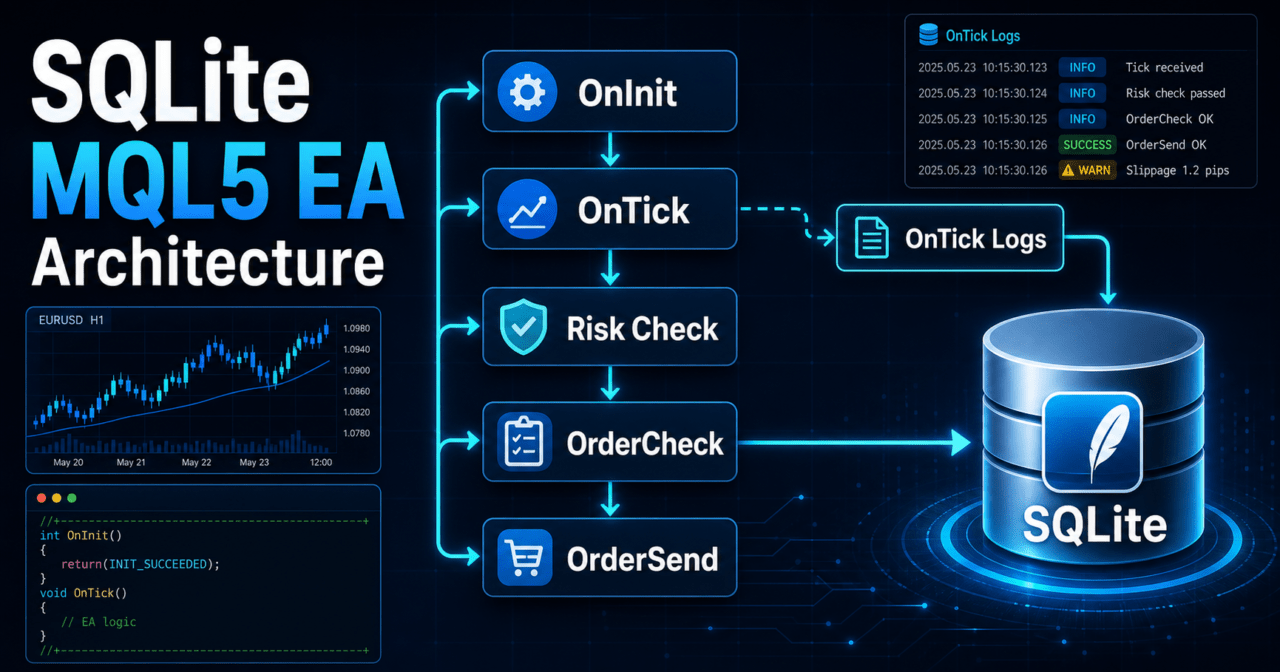
The basic processing order is as follows.
Market recognition
↓
Filter evaluation
↓
Signal evaluation
↓
Risk check
↓
Pre-order check
↓
Order submission
↓
Post-fill management
↓
Save to SQLite
↓
Check stop conditions
With this flow, database storage is less likely to become mixed into trading decisions. The purpose of an EA is to execute trading rules, and SQLite is a supporting layer that makes the decision process easier to validate.
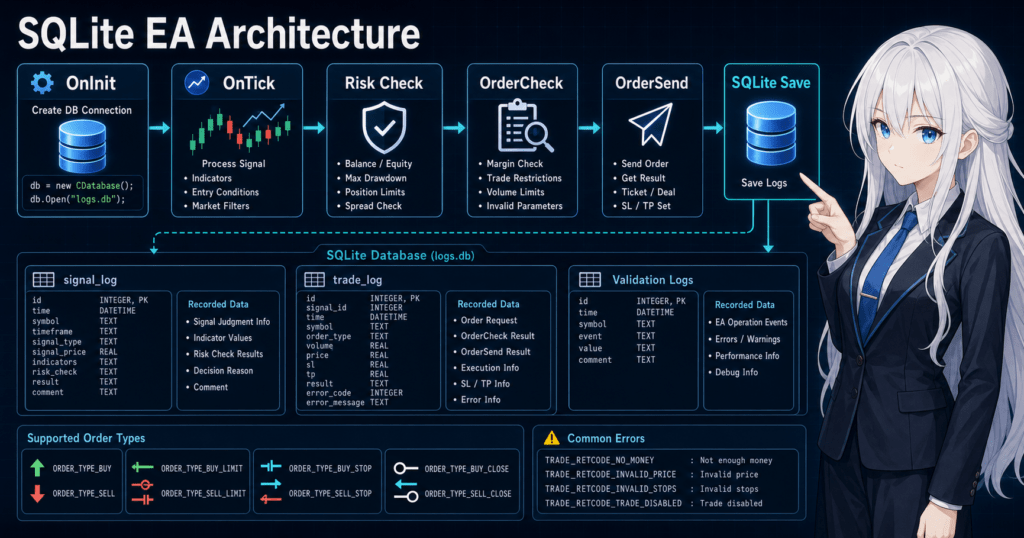
2.1 Roles of OnInit, OnTick, and OnDeinit
In an MQL5 EA, it is important to separate the roles of event functions.
| Function | Main Role | Use in SQLite Design |
|---|---|---|
| OnInit | Initialization | Open the database and create tables |
| OnTick | Processing on each tick | Run condition checks, pre-order checks, and short save operations |
| OnDeinit | Shutdown processing | Close statements and the database |
| OnTradeTransaction | Detailed handling of trade changes | Save changes in fills and order status |
| OnTimer | Scheduled processing | Separate aggregation and periodic saves |
If heavy aggregation runs on every OnTick call, tick processing may slow down. A practical design is to move aggregation and maintenance processing to OnTimer as needed.
2.2 Decide What to Save in SQLite
If you save too many items, the EA structure becomes more complex. At first, save only the information needed for validation.
- Time
- Symbol
- Timeframe
- Signal direction
- Filter result
- Pre-order check result
- Order result
- Error code
- Spread
- Equity
- Number of positions
Limit saved information to columns you will use for later validation. Saving data without a clear purpose increases implementation work and review effort.
3. Basic Structure
Conclusion
The basic sqlite-mql5 structure is to open the database in OnInit, prepare tables, add required records in OnTick or OnTradeTransaction, and close the database in OnDeinit.
Database processing should be designed so that, even if it fails, the EA does not place unsafe orders.
The minimum structure has the following four layers.
| Layer | Role | Main Processing |
|---|---|---|
| Decision layer | Evaluates trading conditions | Signals, filters, market state |
| Risk layer | Determines whether trading is allowed | Lot size, margin, drawdown, trading stop |
| Execution layer | Handles orders | OrderCheck, OrderSend, result confirmation |
| Logging layer | Saves state | SQLite saves, error records, validation logs |
Place SQLite in the logging layer. If the decision layer strongly depends on SQLite, a database failure can easily affect trading decisions.
3.1 Basics of Table Design
SQLite tables for an EA are easier to handle when they are not made complex from the start. First, separate decision logs from order logs.
signal_log
- id
- event_time
- symbol
- timeframe
- signal
- filter_status
- spread
- equity
- comment

trade_log
- id
- event_time
- symbol
- action
- volume
- price
- order_check_status
- order_send_status
- retcode
- comment
Separating decision logs and order logs lets you save situations where the EA did not enter a trade. When improving an EA, it is important to review not only trades that were placed, but also trades that were skipped.
3.2 Policy for Database Failures
Decide in advance how the EA should behave if database saving fails.
- Continue trading even if saving fails
- Stop new orders when saving fails
- Stop the EA after a certain number of failures
The right policy depends on the EA’s purpose. In a validation-focused EA, missing logs can become a serious problem. In an execution-focused EA, stopping management of open positions only because saving failed can create another risk.
4. Roles of the Main Modules
Conclusion
The main sqlite-mql5 modules should be divided into signal, filter, risk, order, and logging modules.
When modules are separated, it is easier to keep the trading logic clear even after SQLite is added.
| Module | Role | Examples Saved to SQLite |
|---|---|---|
| Market recognition | Classifies the current market state | Trend, range, volatility |
| Filter | Narrows whether trading is allowed | Filter passed, skip reason |
| Signal | Determines the entry direction | Buy, sell, none |
| Risk management | Determines trade size and stop conditions | Lot size, margin, drawdown |
| Order management | Handles OrderCheck and OrderSend | Check result, send result, retcode |
| Position management | Manages the state of open positions | Unrealized profit or loss, close reason |
| Logging management | Saves data to SQLite | Decision logs, order logs, error logs |
When SQLite is confined to logging management, each EA module becomes easier to review independently.
4.1 Risk Management Module
Risk management checks lot size and margin before placing an order. Lot calculation should consider the minimum lot, maximum lot, lot step, tick value, tick size, and stop-loss width.
| Lot Method | Advantages | Disadvantages | Best Use Case |
|---|---|---|---|
| Fixed lot | Easy to implement | Weak against account balance changes | Initial validation |
| Balance-proportional | Easy to adjust based on capital | Behavior changes after sudden losses | Medium-term validation |
| Risk-percentage based | Easy to connect stop-loss width with acceptable loss | Requires calculations based on symbol specifications | Risk-focused management |
| Volatility-adjusted | Adapts more easily to market movement | Can become highly parameter-dependent | Designs using ATR or similar measures |
Backtest results do not guarantee future profit. When you change the lot method, maximum drawdown, tolerance for losing streaks, and margin maintenance behavior also change.
4.2 Order Management Module
When handling orders in MQL5, consider MqlTradeRequest, MqlTradeResult, and MqlTradeCheckResult separately. Before placing an order, use OrderCheck to confirm margin and trading conditions. After OrderSend, save the return value and result code.
In order processing, check the following conditions.
- Whether trading is allowed
- Whether the symbol can be traded
- Whether the spread is within the allowed range
- Whether the lot size matches the minimum lot, maximum lot, and lot step
- Whether there is enough margin
- Whether stop levels and freeze levels are respected
- Whether differences between netting accounts and hedging accounts are considered
Save not only successful orders to SQLite, but also the reasons why orders were stopped. Keeping skip reasons makes it easier to judge whether conditions are too strict or the execution environment is unsuitable.
5. Implementation Patterns
Conclusion
The easiest sqlite-mql5 implementation pattern is to start with a simple log-saving design.
If you use SQLite for EA state restoration or multi-symbol management, you must carefully decide what to save and when to load it.
Common implementation patterns are as follows.
| Method | Advantages | Disadvantages | Best Use Case |
|---|---|---|---|
| Decision log saving | Easy to implement | Data volume can grow quickly | Initial validation, condition analysis |
| Order log saving | Easy to trace causes of order failures | Skip conditions are less likely to remain | Checking execution quality |
| State restoration | Makes it easier to restore state after EA restart | Requires measures against state inconsistency | VPS operation, long-term running |
| Multi-symbol management | Makes it easier to aggregate symbol-specific status | Requires attention to locks and processing load | Portfolio EAs |
| Validation aggregation | Makes comparison by condition easier | Can become heavy in OnTick | Backtest analysis |
If you start with state restoration or multi-symbol management, the number of design points increases. It is easier to implement by first stabilizing the structure with decision log saving, then expanding as needed.
5.1 Decision Log Saving Pattern
In the decision log saving pattern, the EA saves what decision it made, regardless of whether an entry occurred.
Examples of saved items are as follows.
- Trend evaluation
- Volatility evaluation
- Spread evaluation
- Signal direction
- Risk check result
- Whether an order is allowed
The advantage of this method is that it makes validation data easier to collect even for EAs with a low number of trades.
5.2 State Restoration Pattern
In the state restoration pattern, the EA saves its state before shutdown to SQLite and loads it after restart. For example, it may save the current day’s loss, stop flag, last trade time, and symbol-specific states.
With state restoration, the current account state and the state saved in SQLite may differ. On restart, you must check actual positions, orders, and account information before using restored data.
6. Sample Code
Conclusion
A sample that uses SQLite in MQL5 should open the database in OnInit, create tables, save short logs in OnTick, and close the database in OnDeinit.
If order processing is included, save the OrderCheck and OrderSend results as separate logs.
The following code is a minimum structure for validation. It is not an EA that makes trading decisions. It shows a structure for saving the EA’s decision state to SQLite.
#property strict

long db = INVALID_HANDLE;
bool database_ready = false;

int OnInit()
{
   db = DatabaseOpen("ea_state.sqlite",
                     DATABASE_OPEN_READWRITE | DATABASE_OPEN_CREATE | DATABASE_OPEN_COMMON);

   if(db == INVALID_HANDLE)
   {
      Print("DatabaseOpen failed. error=", GetLastError());
      return INIT_FAILED;
   }

   string create_signal_table =
      "CREATE TABLE IF NOT EXISTS signal_log ("
      "id INTEGER PRIMARY KEY AUTOINCREMENT,"
      "event_time TEXT,"
      "symbol TEXT,"
      "timeframe INTEGER,"
      "signal TEXT,"
      "filter_status TEXT,"
      "spread REAL,"
      "equity REAL,"
      "comment TEXT"
      ");";

   if(!DatabaseExecute(db, create_signal_table))
   {
      Print("CREATE TABLE failed. error=", GetLastError());
      DatabaseClose(db);
      db = INVALID_HANDLE;
      return INIT_FAILED;
   }

   database_ready = true;
   return INIT_SUCCEEDED;
}

void OnDeinit(const int reason)
{
   if(db != INVALID_HANDLE)
   {
      DatabaseClose(db);
      db = INVALID_HANDLE;
   }
}

void OnTick()
{
   if(!database_ready)
      return;

   double ask = SymbolInfoDouble(_Symbol, SYMBOL_ASK);
   double bid = SymbolInfoDouble(_Symbol, SYMBOL_BID);

   if(ask <= 0.0 || bid <= 0.0)
   {
      Print("Invalid price. symbol=", _Symbol);
      return;
   }

   double spread_points = (ask - bid) / _Point;
   double equity = AccountInfoDouble(ACCOUNT_EQUITY);

   string signal = "none";
   string filter_status = "passed";
   string comment = "sample log";

   SaveSignalLog(signal, filter_status, spread_points, equity, comment);
}

bool SaveSignalLog(string signal,
                   string filter_status,
                   double spread_points,
                   double equity,
                   string comment)
{
   if(db == INVALID_HANDLE)
      return false;

   string query =
      "INSERT INTO signal_log "
      "(event_time, symbol, timeframe, signal, filter_status, spread, equity, comment) "
      "VALUES (?1, ?2, ?3, ?4, ?5, ?6, ?7, ?8);";

   long stmt = DatabasePrepare(db, query);
   if(stmt == INVALID_HANDLE)
   {
      Print("DatabasePrepare failed. error=", GetLastError());
      return false;
   }

   bool ok = true;
   ok = ok && DatabaseBind(stmt, 0, TimeToString(TimeCurrent(), TIME_DATE | TIME_SECONDS));
   ok = ok && DatabaseBind(stmt, 1, _Symbol);
   ok = ok && DatabaseBind(stmt, 2, (int)_Period);
   ok = ok && DatabaseBind(stmt, 3, signal);
   ok = ok && DatabaseBind(stmt, 4, filter_status);
   ok = ok && DatabaseBind(stmt, 5, spread_points);
   ok = ok && DatabaseBind(stmt, 6, equity);
   ok = ok && DatabaseBind(stmt, 7, comment);

   if(ok)
      ok = DatabaseRead(stmt);

   if(!ok)
      Print("Insert signal_log failed. error=", GetLastError());

   DatabaseFinalize(stmt);
   return ok;
}
6.1 Notes on the Sample Code
This code is a validation sample that shows the structure of SQLite integration. In a live EA, you need to add trading conditions, spread limits, lot calculation, pre-order checks, position management, and stop conditions.
If you save on every tick in OnTick, the data volume increases rapidly. You need controls such as saving only when a new bar is confirmed, only when the signal state changes, or only at fixed intervals.
6.2 How to Save Pre-Order Check Results
In an EA that performs order processing, use OrderCheck before OrderSend and save the MqlTradeCheckResult result. It is important to save cases where an order was not submitted.
bool CheckBeforeOrder(MqlTradeRequest &request, MqlTradeCheckResult &check)
{
   ResetLastError();

   if(!OrderCheck(request, check))
   {
      Print("OrderCheck failed. error=", GetLastError());
      return false;
   }

   if(check.retcode != TRADE_RETCODE_DONE)
   {
      Print("OrderCheck rejected. retcode=", check.retcode, " comment=", check.comment);
      return false;
   }

   return true;
}
Even when OrderCheck has no problem, execution rejection, price changes, or slippage may occur after OrderSend. Save the check result and the send result separately.
7. Design Pattern Comparison
Conclusion
In sqlite-mql5 design, choose a pattern by comparing the balance between saved data volume, restorability, implementation difficulty, and live operation load.
For beginner to intermediate developers, combining decision log saving and order log saving is usually the easiest structure to handle.
| Method | Advantages | Disadvantages | Best Use Case | Implementation Difficulty | Live Operation Notes |
|---|---|---|---|---|---|
| Print-centered | Can be used immediately | Difficult to aggregate | Initial debugging | Low | Logs can scroll away easily |
| CSV saving | Easy to handle in spreadsheets | Weak against structure changes | Small log volume | Low | Watch for simultaneous updates |
| SQLite decision logs | Easy to save by condition | Data volume increases | Validation-focused EA | Medium | Control save frequency |
| SQLite state management | Can make restarts more robust | Requires inconsistency handling | Long-term VPS operation | High | Must compare with account state |
| External DB integration | Handles large data volumes more easily | Connection management is complex | Large-scale analysis | High | Consider communication failures |
SQLite has the advantage of being easy to keep local. On the other hand, if heavy saves or aggregation are placed in EA tick processing, they may delay trading decisions.
7.1 Easy Structure for Initial Design
For an initial design, the following structure is easy to handle.
- Save decision logs to SQLite
- Save order results to SQLite
- Perform aggregation outside the EA
- Add state restoration only when it becomes necessary
With this structure, you can keep validation data without heavily disrupting the EA’s trading logic.
7.2 Structures to Avoid
A structure to avoid is one where SQLite reads and writes are tightly coupled with trading decisions. If database processing fails, signal evaluation or position management may also become unstable.
Treat logging failures as logging failures, and keep them separate from safety checks for orders and closes.
8. What to Check in Backtesting
Conclusion
In backtesting, use the logs saved in SQLite to check not only profit but also the decision process and risk metrics.
Even if total profit looks good, maximum drawdown, losing streaks, trade count, and parameter dependency may still be weak.
Items to check are as follows.
| Item | Reason to Check | Examples to Save in SQLite |
|---|---|---|
| Total profit and loss | Review the overall trend | Profit and loss by period |
| Maximum drawdown | Check the size of capital decline | equity, balance |
| Win rate | Check the success ratio of trades | Win/loss results |
| Profit/loss ratio | Check average profit and average loss | profit, loss |
| Number of trades | Check how strict the conditions are | signal, entry |
| Losing streak count | Check psychological and capital tolerance | result sequence |
| Spread conditions | Check differences from live operation | spread |
| Period dependency | Avoid strength that appears only in a specific period | event_time |
| Parameter dependency | Avoid over-optimization | parameter_set |
Backtest results are strongly affected by tester conditions. If spreads, execution models, or the quality of historical data change, the results also change.
8.1 Check Skip Reasons from Logs
If skip reasons are saved in SQLite, you can confirm why the number of trades is low.
- Skipped because of spread limits
- Skipped because of a trend filter
- Skipped because of insufficient margin
- Skipped because an existing position was open
- Skipped because of time-of-day restrictions
If skip reasons are heavily concentrated in one area, the conditions may be too strict. However, loosening conditions does not mean performance will improve. Revalidation is always required.
8.2 Avoid Over-Optimization
When detailed logs are saved in SQLite, many conditions can be analyzed later. At the same time, the more items you can analyze, the easier it becomes to choose adjustments that fit only a specific period.
To avoid over-optimization, check the following points.
- Whether the trend remains reasonably stable across different periods
- Whether results do not worsen extremely when the symbol changes
- Whether small parameter changes do not cause results to collapse
- Whether the number of trades is not too small
- Whether maximum drawdown is within the acceptable range
9. What to Check in Forward Testing
Conclusion
In forward testing, use SQLite logs to compare backtesting with the actual operating environment.
In particular, you need to check execution differences, spread widening, trading frequency, VPS environment, and broker differences.
Items to check in forward testing are as follows.
| Item | What to Check | Notes |
|---|---|---|
| Execution difference | Difference between expected price and executed price | Often widens during sudden market moves |
| Spread widening | Increase in skipped trades | Be careful during news events and low-liquidity hours |
| Trading frequency | Difference from backtesting | Conditions may occur less often in live data |
| Drawdown | Capital movement close to a live account | Higher leverage makes fluctuations larger |
| Broker differences | Differences in symbol specifications and execution conditions | Minimum lot and stop levels may differ |
| VPS stability | Downtime and delays | State confirmation is needed after restart |
| Missing logs | SQLite save failures | Decide how to handle save failures |
Forward testing is a confirmation process before live EA operation. Execution conditions and spread conditions may differ between demo accounts and live accounts.
9.1 Check Divergence from Backtesting
When logs are saved with the same column structure in SQLite, it becomes easier to compare backtesting and forward testing.
Compare the following items.
- Number of signal occurrences
- Number of skipped orders
- Number of skips caused by spreads
- Number of execution failures
- Average slippage
- Maximum drawdown
- Losing streak count
If the divergence is large, check differences in tester conditions, spread conditions, execution conditions, and symbol specifications.
9.2 Check State Restoration
When an EA runs on a VPS for a long period, terminal restarts or EA reloads may occur. Even when using state saved in SQLite, check actual positions and orders after restart.
If you trust only the saved state, inconsistencies can occur, such as treating a position that has already been closed as still open.
10. Live Operation Notes
Conclusion
When using sqlite-mql5 in live operation, prioritize trading safety over database processing.
The design must prevent save failures, file corruption, VPS downtime, and broker condition differences from affecting the entire EA behavior.
Points to watch in live operation are as follows.
- SQLite saving does not guarantee trading performance
- Backtesting and live operation do not match perfectly
- Performance may worsen when spreads widen
- Execution delays and slippage may occur
- EA behavior may change depending on broker specifications
- Execution conditions may differ between demo accounts and live accounts
- Decide whether to continue or stop new orders when log saving fails
- Higher leverage tends to increase drawdown
10.1 Keep Database Processing Light
If a large number of INSERT operations or aggregations run in OnTick, processing can become heavy. In live operation, control the save frequency.
- Save only once on a new bar
- Save only when the state changes
- Save only before and after orders
- Move periodic aggregation to OnTimer
For symbols with many ticks, the number of save operations can increase beyond expectations.
10.2 Consider Differences in Account Types
In MQL5, netting accounts and hedging accounts have different approaches to position management. In a netting account, positions for the same symbol are consolidated. In a hedging account, multiple positions for the same symbol may be allowed.
When saving position state to SQLite, choose save keys based on the account type. If state is managed only by symbol, multiple positions may not be distinguishable in a hedging account.
11. Common Design Mistakes
Conclusion
Common sqlite-mql5 design mistakes include putting too much SQLite processing into OnTick, having no policy for save failures, and mixing trading decisions with logging.
A database makes an EA easier to validate, but poor design can also become a source of bugs.
11.1 Saving Everything on Every OnTick
If a large amount of data is saved on every tick, both data volume and processing load increase. Limit save timing to events such as a new bar, a state change, or before and after orders.
11.2 No Handling for Save Failures
A design that does not check failures in DatabaseOpen, DatabasePrepare, DatabaseBind, DatabaseRead, and DatabaseExecute is risky. If saving fails, log the error and stop new orders if necessary.
11.3 Judging Positions Only from SQLite State
The actual position state must be checked from the account. Saved SQLite information is supporting information. After an EA restart, confirm the actual state with PositionSelect, PositionGetDouble, and similar functions.
11.4 Saving Only Order Results
If only order results are saved, you cannot see why the EA did not enter. When improving an EA, saving skip reasons is also important.
11.5 Adding Too Many Parameters
SQLite logs make it easy to increase the number of analysis items. However, adding too many filters and parameters can lead to over-optimization. Add only conditions with a clear purpose.
12. Summary
Conclusion
sqlite-mql5 is a useful design for EA state management, validation logs, and tracking order results.
When SQLite is separated as a logging layer and the roles of OnInit, OnTick, OnDeinit, and OnTradeTransaction are organized, EA behavior becomes easier to validate.
In sqlite-mql5 design, SQLite should not be placed at the center of trading logic. It should be used to save the decision process. By separating decision-making, risk management, order processing, and logging, the EA structure becomes easier to maintain.
In live operation, trading safety has priority over database saving. Backtest results do not guarantee future profit. In forward testing, you must check spreads, execution differences, broker specifications, VPS environment, and the stability of log saving.
FAQ
What is sqlite-mql5?
sqlite-mql5 is a design that uses a SQLite database from an MQL5 EA to save decision history, order results, and state management data. It is used to make validation and management easier, not to make trading decisions by itself.
What are the benefits of using SQLite in an MQL5 EA?
The benefit of using SQLite in an MQL5 EA is that signals, skip reasons, order results, and errors can be saved in a structured format. This makes it easier to review the data later by condition.
Will using SQLite improve EA performance?
Using SQLite alone does not improve EA performance. SQLite helps with validation and state management, but it does not guarantee an edge in the trading logic or better live trading results.
Is it okay to save to SQLite on every OnTick call?
Saving on every OnTick call can increase processing load and data volume for symbols with many ticks. It is easier to manage when save timing is limited to new bars, state changes, or before and after orders.
What should I do if SQLite saving fails?
If SQLite saving fails, record the error and decide whether to continue or stop new orders according to the EA’s policy. In a validation-focused EA, missing logs may reduce the information available for later analysis.
What should I check in backtesting?
In backtesting, check not only total profit and loss, but also maximum drawdown, win rate, profit/loss ratio, number of trades, losing streaks, spread conditions, and parameter dependency. SQLite logs make it easier to review skip reasons and order failure patterns.
What should I check in forward testing?
In forward testing, check execution differences, spread widening, trading frequency, drawdown, divergence from backtesting, broker differences, and VPS stability. Execution conditions may differ between demo accounts and live accounts.
Does SQLite design change between netting and hedging accounts?
SQLite design may change because netting and hedging accounts use different units for position management. In hedging accounts, the design should save ticket numbers or similar identifiers so multiple positions can be distinguished.