- 1 1. What Is mql5 market-closed?
- 2 2. Causes of the market-closed Error
- 3 3. How to Fix the market-closed Error
- 4 4. Differences and Comparison With Other Errors
- 5 5. Common Mistakes and Cautions
- 6 6. Practical Use Cases From an Operations View
- 7 7. Frequently Asked Questions
- 7.1 7.1 Is market-closed a Bug?
- 7.2 7.2 Why Does It Occur Outside Weekends?
- 7.3 7.3 Can It Be Avoided in Automated Trading, or EAs?
- 7.4 7.4 Does It Occur on Demo Accounts?
- 7.5 7.5 Does It Differ by Currency Pair?
- 7.6 7.6 Can a VPS Prevent market-closed?
- 7.7 7.7 Where Can I Check the Error Code?
- 7.8 7.8 What Is the Difference From off quotes?
- 7.9 7.9 Why Does It Not Appear in Backtesting but Appears Live?
- 7.10 7.10 What Hours Are Tradable?
- 7.11 7.11 Important Points
- 8 8. Summary
1. What Is mql5 market-closed?
Conclusion:
“market-closed” is an error that rejects an order because the market is closed. It is normal behavior when an order is sent outside trading hours.
Definition:
In MQL5, “market-closed” means a state where an order process such as OrderSend cannot be executed because it is outside the available Trading Session.
1.1 Definition of the market-closed Error
“market-closed” means trading itself is not allowed, not that prices do not exist.
It usually has the following characteristics.
- Order processing (
OrderSend) fails - It is returned as an error code
- It is recorded in the MT5 Journal log
- It also occurs in EAs, or automated trading systems
The important points are below.
- “market-closed” is not abnormal; it is expected platform behavior
- It is unrelated to spread or slippage
- It is not an execution type problem
1.2 When It Occurs
This error mainly occurs when the market is closed. Common cases include the following.
Common Timing
- Weekends, Saturday and Sunday
Forex markets are generally closed on weekends - Holidays or low-liquidity periods
Examples include year-end holidays and Christmas - Outside the trading hours for a specific symbol
CFDs, indexes, and commodities may have different schedules - Broker maintenance windows
Server downtime or temporary trading restrictions may apply
1.3 Points Beginners Often Misunderstand
Here is how market-closed differs from errors that beginners often confuse with it.
Common Misunderstandings
- Incorrect: “Prices are not available (no prices)”
- Incorrect: “The order cannot be executed (off quotes)”
- Incorrect: “It is a communication error”
The actual cause is simply that it is outside trading hours.
Why This Misunderstanding Happens
- MT5 may display prices even when trading is not allowed
- Server time can differ from Japan time or the trader’s local time
- An EA sends orders automatically, so the timing is easy to miss
1.4 Practical Points to Understand
In real trading operations, the following three points matter most.
- There are times when trading is not possible even if prices are visible
- Trading hours differ by symbol
- An EA will inevitably trigger errors if it has no time control
Examples
- USDJPY: almost 24 hours on weekdays
- Nikkei 225: trading hours are limited
- Gold (XAUUSD): trading stops during some periods
1.5 What Happens If You Ignore This Error?
- Unnecessary order retries occur
- EA performance drops
- Logs become noisy
- Execution opportunities may be lost
In automated trading especially, this must be controlled.
2. Causes of the market-closed Error
Conclusion:
market-closed occurs when the server determines that the order is outside the trading session or otherwise not tradable on the server side. The causes are mainly time management and broker-specific rules.
Definition:
The cause of market-closed is the mechanism where an order is rejected by MT5 server logic that checks trading hours and trading status flags.
2.1 How Trading Sessions Work
In MT5, each symbol, such as a currency pair or index, has defined tradable time windows called Trading Sessions.
Important Points
- Trading hours are managed by the broker
- Even the same USDJPY symbol can differ slightly by broker
- An EA can still attempt to send an order while ignoring these hours, but the server will reject it
Internal Structure in MQL5
Trading hours can be obtained as follows.
datetime from, to;
if(SymbolInfoSessionTrade(_Symbol, DAY_OF_WEEK, 0, from, to))
{
   // Tradable hours
}
Why It Is Necessary
- It prevents orders at invalid times
- It helps avoid risk during low-liquidity periods
- It supports fair market operation
2.2 Difference Between Server Time and Local Time
MT5 makes its decision based on server time, not the local PC time.
Common Misunderstanding
- “It is a weekday in Japan time, so trading is possible” is incorrect
- The actual decision is made by server time
Typical Time Differences
- It may be Monday morning in Japan while the server is still on Sunday
- There may be a time difference from London time
- Daylight saving time, or DST, can affect the schedule
How to Check
datetime server_time = TimeCurrent();
Why It Becomes a Problem
- An EA sends orders at the wrong time
- Backtests and live operation produce different results
- Time filters fail to work as expected
2.3 Broker-Dependent Restrictions
It is important to understand that market-closed is strongly affected by broker specifications.
Main Restrictions
- Holiday schedules
- Maintenance windows
- Stops during low-liquidity periods
- Trading limits for specific symbols
Examples
- CFDs, such as indexes: trading hours are limited
- Cryptocurrencies: available 24 hours, but maintenance can occur
- Gold: trading stops during certain periods
Practical Risks
- An EA may stop working after changing brokers
- The same logic can produce different results
2.4 Differences From Related Errors
Here is a clear breakdown of errors often confused with market-closed.
Core Error Comparison
- market-closed
Outside trading hours, so orders are structurally impossible - off quotes
Prices cannot be obtained, often due to low liquidity or execution failure - no prices
Price data is not being delivered - trade disabled
Trading is blocked by the broker
How to Distinguish Them
- Is it a time problem? Then it is market-closed
- Is it a price problem? Then it may be off quotes or no prices
- Is it a restriction problem? Then it may be trade disabled
2.5 Why It Happens Often in EAs
The reason it occurs more often in EAs than in manual trading is clear.
Reasons
- The EA keeps sending orders without considering time
- High-frequency logic, such as scalping, increases attempts
- The EA does not detect session changes
Results
- Unnecessary
OrderSendcalls increase - Execution fails
- Logs grow unnecessarily
- Execution efficiency drops
2.6 Key Summary
- The cause of market-closed is time and server-side control
- To avoid it, explicit trading-hour control is required
- In EA design, a time filter is a basic feature
3. How to Fix the market-closed Error
Conclusion:
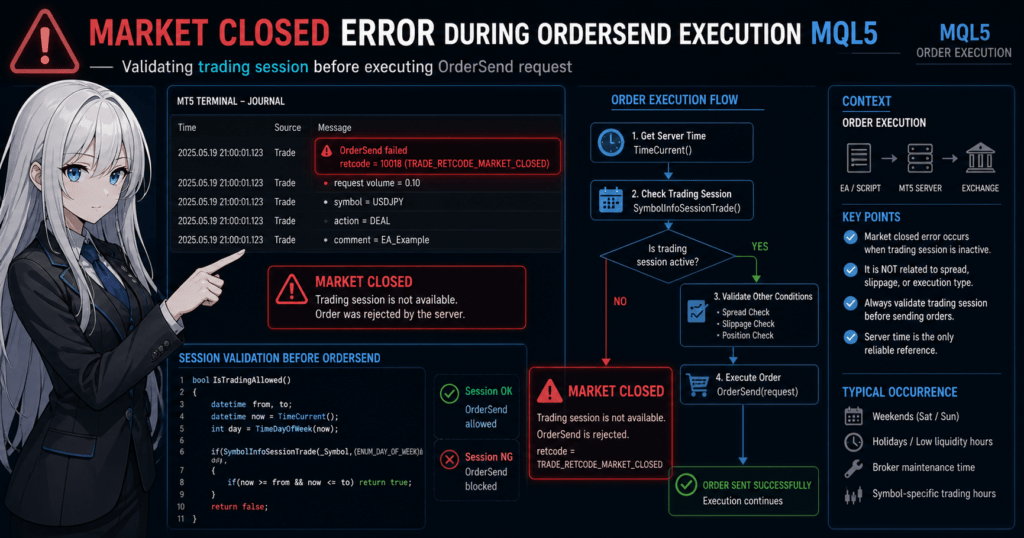
market-closed can be reliably avoided by checking trading hours and controlling when orders are sent. The fastest fix is: check time, then add a filter to the EA.
Definition:
The solution means controlling the EA so it runs order execution, such as OrderSend, only during tradable hours.
3.1 Immediate Checklist
First, check the manual and environment-level items below.
This checklist solves roughly 80% of cases.
Check Steps
- Confirm whether the current time is within trading hours, including weekday and time window
- Check whether prices are updating in MT5 Market Watch
- Confirm whether the target symbol, such as USDJPY, is tradable
- Test an order on another currency pair
- Check the broker’s trading hours and maintenance information
- Check the VPS and network connection status
Common Oversights
- It may be a weekday in Japan time while server time is still Sunday
- CFDs and indexes have limited trading hours
- Spreads can widen abnormally during late-night periods
3.2 Avoidance Code in MQL5
To avoid this reliably in an EA, you must check tradable hours before sending an order.
Basic Code for Checking Trading Hours
bool IsTradingAllowed()
{
   datetime from, to;
   datetime now = TimeCurrent();
   int day = TimeDayOfWeek(now);

   if(SymbolInfoSessionTrade(_Symbol, (ENUM_DAY_OF_WEEK)day, 0, from, to))
   {
      if(now >= from && now <= to)
         return true;
   }
   return false;
}
Control Before Sending an Order
if(IsTradingAllowed())
{
   // Execute OrderSend or another order process
}
else
{
   Print("Market is closed");
}
Why This Is Necessary
- You can control the order before the server rejects it
- You can prevent unnecessary
OrderSendcalls - You can improve the execution success rate
3.3 Practical Logic to Build Into an EA
Countermeasures for market-closed should not be isolated. They should be designed as part of the trading conditions.
Recommended Filter Structure
- Trading-hour filter, required
- Spread filter
- Slippage control
- Execution type check
- Position count limit
Implementation Image
if(IsTradingAllowed() && SpreadCheck() && PositionCheck())
{
   // Safe order execution
}
Reason
- A market-closed fix alone is not enough
- In practice, comprehensive order quality control is required
- Risks such as rejection and slippage can be reduced at the same time
3.4 Common Failures and Fixes
Failure 1: No Time Check
Fix: Always use server time with TimeCurrent().
Failure 2: Ignoring Symbol-Specific Differences
Fix: Get the session for each _Symbol.
Failure 3: Infinite Retry
while(!success) OrderSend(...);
Fix: Add a retry limit and time conditions.
Failure 4: Only the Backtest Works
Cause: The tester may treat the market as always open.
Fix: Confirm behavior with a forward test.
3.5 Best Practical Solution
The most reproducible setup is below.
- Block trading hours before order execution
- Check multiple conditions before sending an order
- When an error occurs, log it only
Optimal Flow
- Time check
- Spread check
- Signal judgment
- Run
OrderSend
3.6 Alternatives
These are simple options when you want to reduce development effort.
- Manually fix trading hours, such as 9:00 to 23:00
- Limit the EA operating hours
- Adjust the VPS operating schedule
However, accuracy is lower and this approach is weak against broker differences.
3.7 Important Points
- market-closed can be prevented with a pre-check
- Checking time before sending orders is the best approach
- For EAs, this is a required basic feature
4. Differences and Comparison With Other Errors
Conclusion:
market-closed is a time problem, while other errors such as off quotes and no prices are price, communication, or control problems. Separating the causes is the fastest path to the right fix.
Definition:
Error comparison means classifying errors by cause, such as time, price, or control, and choosing the right response.
4.1 Structural Comparison of Major Errors
The table below organizes errors that are often confused in real trading operations.
Error Comparison List
| Error Name | Cause | When It Occurs | Main Fix |
|---|---|---|---|
| market-closed | Outside trading hours | Outside session or weekend | Implement a time filter |
| off quotes | Price cannot be obtained, often due to low liquidity | During news events or sharp price moves | Adjust slippage or retry |
| no prices | Prices are not being delivered | Right after connection or during a feed stop | Wait for data update |
| trade disabled | Trading is prohibited | Symbol or account restrictions | Check with the broker |
| trade context busy | Process conflict | During high-frequency ordering | Wait and control processing |
Core Differences
- market-closed: time is the cause, so trading is not allowed
- off quotes: price is the cause, so execution is not possible
- no prices: data is the cause, so prices cannot be obtained
- trade disabled: restriction is the cause, so trading is blocked
4.2 Diagnosis Flow
When an error occurs, separate the cause in the following order.
Diagnosis Steps
- Check the Journal log
- Get the error code and message
- Check the current time
- Confirm server time with
TimeCurrent()
- Confirm server time with
- Determine whether it is within trading hours
- If not, it is market-closed
- Check whether prices are updating
- If not, it may be no prices
- Check spread and execution conditions
- If not acceptable, it may be off quotes
Code Example for Diagnosis
int error = GetLastError();

if(error == TRADE_RETCODE_MARKET_CLOSED)
{
   Print("Market closed");
}
4.3 Why Comparison Matters
If you cannot classify the error correctly, there is a risk of implementing the wrong countermeasure.
Common Wrong Responses
- Adjusting slippage for market-closed: no effect
- Adding a time filter for off quotes: no effect
- Repeatedly sending
OrderSendfor no prices: counterproductive
Practical Risks
- Unnecessary orders increase
- The execution failure rate rises
- The EA’s expected value declines
- Logs grow too large
4.4 Best Approach in EA Design
Errors should not be handled one by one only. The better approach is to classify and control them structurally.
Recommended Design
- Time-related errors: time filter
- Price-related errors: spread and slippage control
- Process-related errors: retry control
Implementation Image
if(!IsTradingAllowed()) return;

if(!SpreadCheck()) return;

if(!ExecutionCheck()) return;

// OrderSend
4.5 Differences From Alternative Methods
For a Simple EA
- Use only a fixed time filter
Easy, but less accurate
For an Advanced EA
- Get sessions and control dynamically
More accurate, but higher implementation cost
Decision Criteria
- Prioritize reproducibility: get sessions dynamically
- Prioritize development speed: use fixed hours
4.6 Important Points
- Classify errors by cause
- market-closed is a time problem
- Misclassification is the biggest risk
5. Common Mistakes and Cautions
Conclusion:
The most common mistakes in market-closed handling are misunderstanding time management and not implementing EA controls. Server-time control and retry logic design are required.
Definition:
A failure here means repeatedly triggering market-closed because the cause is misunderstood and the implementation or operation is unsuitable.
5.1 Typical Mistakes
Mistake 1: Judging by Local Time
datetime now = TimeLocal(); // NG
Problem
- MT5 judges by server time, so a mismatch occurs
- Trading may appear possible in Japan time while it is actually not allowed
Fix
datetime now = TimeCurrent(); // OK
Mistake 2: Ignoring Trading Hours by Symbol
Problem
- Currency pairs, CFDs, and indexes have different trading hours
- Uniform time control cannot cover all cases
Fix
- Use
SymbolInfoSessionTradeto get the schedule for each symbol - Control the logic for each
_Symbol
Mistake 3: Infinite Retry Logic
while(!success)
{
   OrderSend(...);
}
Problem
- During market-closed, the order will never succeed
- This creates CPU load, oversized logs, and possible account restrictions
Fix
- Limit retry count
- Block retries with time conditions
Mistake 4: Depending Only on Backtests
Problem
- The Strategy Tester may allow trading at all times
- market-closed can occur frequently in live operation
Fix
- Verify with forward testing in a live-like environment
- Check behavior in a VPS environment
Mistake 5: Ignoring the Error
Problem
GetLastError()is not checked- The cause cannot be analyzed
Fix
int error = GetLastError();
Print("Error: ", error);
5.2 Risks in EA Design
If market-closed is ignored, it becomes more than a simple error. It can lower the quality of the entire strategy.
Main Risks
- Loss of execution opportunities
- Increase in unnecessary order processing
- Worse slippage
- Erroneous orders during spread widening
Why It Happens
- No time filter is implemented
- Execution conditions are not considered
- High-frequency logic, such as scalping, is used
5.3 Practical Cautions
Caution 1: Time Is Dynamic, Not Fixed
- Daylight saving time can shift schedules
- Brokers can change trading hours
Using session retrieval is safer than fixed hours.
Caution 2: Use Combined Conditions
A simple time check is not enough.
Recommended Conditions
- Trading hours
- Spread
- Volatility, such as ATR
- Position status
5.4 Safe Practical Design
Minimum Setup for Beginners
if(IsTradingAllowed())
{
   OrderSend(...);
}
Recommended Setup
if(IsTradingAllowed() && SpreadCheck() && RiskCheck())
{
   OrderSend(...);
}
Reason
- Many errors come from combined factors
- A single countermeasure often allows recurrence
5.5 Checklist to Prevent Failures
- Are you judging by server time?
- Are you getting trading hours for each symbol?
- Have you avoided infinite retry logic?
- Are you checking the logs?
- Have you performed a forward test?
5.6 Important Points
- The biggest mistake is a mismatch in time recognition
- An EA must include time control
- Never use infinite retries
6. Practical Use Cases From an Operations View
Conclusion:
Handling market-closed is not just error avoidance. It is an important filter for improving trading quality, including execution rate and expected value. Building it into strategy design improves reproducibility.
Definition:
Practical use means optimizing operation by considering trading hours, liquidity, and execution conditions, then removing unnecessary orders.
6.1 Using It as Trade Control
market-closed handling should be used as a time filter.
Basic Usage
- Run the EA only during trading hours
- Switch logic by session
- Exclude low-liquidity periods
Thinking by Session
- Asian session
Lower volatility, often range-bound - London session
Trends are more likely to develop - New York session
Volatility is often highest
Practical Point
- Choose the appropriate time window for each strategy
- market-closed handling is a time-selection logic
6.2 Applying It to Risk Management
By considering market-closed, you can avoid unnecessary risk.
Risks You Can Avoid
- Sudden spread widening
- Execution failure
- Increased slippage
- Price gaps caused by low liquidity
Specific Usage
if(IsTradingAllowed() && Spread < MaxSpread)
{
   OrderSend(...);
}
Why It Works
- The market can be unstable right before and after closing
- Execution quality can drop sharply
6.3 Performance Optimization
market-closed handling directly helps reduce unnecessary EA processing.
Improvement Points
- Reduce unnecessary
OrderSendcalls - Optimize log output
- Lower CPU load
- Optimize VPS cost
Results
- Higher execution rate
- Better trade accuracy
- Lower drawdown, or DD, pressure
6.4 Practical Design Patterns
Pattern 1: Time Filter Type, Basic
if(IsTradingAllowed())
{
   Trade();
}
Beginner-friendly and easy to implement.
Pattern 2: Session Strategy Type
if(IsLondonSession())
{
   TrendStrategy();
}
else if(IsAsiaSession())
{
   RangeStrategy();
}
Branching by strategy can improve expected value.
Pattern 3: Comprehensive Filter Type
if(IsTradingAllowed() && SpreadCheck() && VolatilityCheck())
{
   OrderSend(...);
}
This is the most reproducible approach in real operations.
6.5 Differences From Other Methods
With market-closed Handling
- Unnecessary orders decrease
- Execution success rate is higher
- Performance is more stable
Without market-closed Handling
- Errors occur frequently
- Execution rate declines
- Logic reliability decreases
Core Difference
- With countermeasures: environment-adaptive EA
- Without countermeasures: simple logic EA
6.6 Best Practical Solution
The best setup satisfies the following three points.
- Block trading hours before order execution
- Control with multiple conditions, such as spread and slippage
- Avoid the error before it occurs
Recommended Flow
- Time check
- Market condition check, including spread and volatility
- Signal judgment
- Order execution
6.7 Important Points
- market-closed handling means a time filter
- It directly affects execution quality and expected value
- It is a required feature in EA design
7. Frequently Asked Questions
Conclusion:
Most questions about market-closed can be explained by three factors: trading hours, server time, and broker specifications. Understanding these points helps prevent recurrence.
Definition:
This FAQ section improves quick problem solving and reproducibility by answering common practical questions clearly and briefly.
7.1 Is market-closed a Bug?
No. It is normal platform behavior.
When an order is sent while the market is closed, the MT5 server automatically rejects it.
7.2 Why Does It Occur Outside Weekends?
Broker trading hours and holidays can cause it.
CFDs, indexes, gold, and similar symbols often have limited trading hours.
7.3 Can It Be Avoided in Automated Trading, or EAs?
Yes. It can be prevented by implementing a time filter.
Use SymbolInfoSessionTrade with TimeCurrent() to control order timing.
7.4 Does It Occur on Demo Accounts?
Yes. It can occur.
Demo accounts usually have trading-hour restrictions similar to live accounts.
7.5 Does It Differ by Currency Pair?
Yes. Trading hours differ by symbol.
Forex is close to 24 hours on weekdays, while CFDs and indexes may be restricted.
7.6 Can a VPS Prevent market-closed?
No, not directly.
A VPS helps connection stability, but market-closed is a time-related issue.
7.7 Where Can I Check the Error Code?
You can check it in the Journal log or with GetLastError().
int error = GetLastError();
Print(error);
7.8 What Is the Difference From off quotes?
The cause is different.
- market-closed: outside trading hours
- off quotes: price retrieval or liquidity problem
7.9 Why Does It Not Appear in Backtesting but Appears Live?
The tester may allow trading at all times.
In live operation, real trading hours apply, so time control is required.
7.10 What Hours Are Tradable?
They are not fixed because they differ by broker and symbol.
For accuracy, get them with SymbolInfoSessionTrade.
7.11 Important Points
- market-closed is expected behavior and can be avoided
- The causes are time and broker specifications
- An EA must implement a time filter
8. Summary
Conclusion:
market-closed is a normal error that occurs outside trading hours. In an EA, it can be fully avoided by implementing a time filter.
Definition:
The key summary is to understand the flow: cause, which is time; solution, which is pre-control; and operation, which is filtering.
8.1 Key Points From This Article
Basic Understanding
- market-closed means the market is closed
- It is expected behavior, not a platform bug
- It is judged by server time
Cause, or Why
- Outside the Trading Session
- Broker restrictions
- Difference from server time
Solution, or How
- Get time with
TimeCurrent() - Check trading hours with
SymbolInfoSessionTrade - Implement a filter before sending orders
Comparison With Other Errors
- market-closed: time problem
- off quotes: price problem
- no prices: data problem
8.2 Best Practical Action
A reproducible operation follows this flow.
Recommended Flow
- Check trading hours
- Check spread
- Judge volatility and other conditions
- Run
OrderSend
Recommended Design
if(IsTradingAllowed() && SpreadCheck() && RiskCheck())
{
   OrderSend(...);
}
8.3 Risk and Expected Value
Without Countermeasures
- Errors occur frequently
- Execution rate drops
- Expected value becomes less stable
With Countermeasures
- Unnecessary orders decrease
- Execution becomes more stable
- Long-term performance can improve, depending on strategy and market conditions
8.4 Final Conclusion
- market-closed is an avoidable error
- The cause is time
- The solution is pre-control
- It is a required feature for EAs