
- 1 1. What is mql5 itime-multitimeframe?
- 2 2. Basic usage of iTime
- 3 3. How to implement multi-timeframe logic with iTime
- 4 4. Causes and fixes for backtest/live trading drift in MTF
- 4.1 4.1 Why backtesting and live trading drift apart
- 4.2 4.2 Tick reproducibility issue
- 4.3 4.3 Time synchronization mistakes: the biggest MTF trap
- 4.4 4.4 Insufficient history data
- 4.5 4.5 Multi-symbol and MTF trap
- 4.6 4.6 Stable design for practical use
- 4.7 4.7 Summary of common mistakes
- 4.8 4.8 Practical conclusion
- 5 5. Combining iTime with other functions
- 5.1 5.1 iTime × iBarShift: converting time to index
- 5.2 5.2 iTime × iClose / iOpen: getting time-synchronized prices
- 5.3 5.3 iTime × CopyRates: fast data retrieval
- 5.4 5.4 iTime × TimeCurrent: comparing with real time
- 5.5 5.5 iTime × multiple timeframes: MTF extension
- 5.6 5.6 Practical advanced template
- 5.7 5.7 Summary of common advanced mistakes
- 5.8 5.8 Practical conclusion
- 6 6. EA implementation example using iTime
- 7 7. FAQ: common questions and solutions
- 7.1 Q1. Why does iTime return 0?
- 7.2 Q2. Is shift=0 a confirmed bar?
- 7.3 Q3. Can I synchronize different timeframes by matching shift?
- 7.4 Q4. Why does an EA win in backtesting but lose in live trading?
- 7.5 Q5. Why does iBarShift return -1?
- 7.6 Q6. Are iTime and TimeCurrent the same?
- 7.7 Q7. Is it okay to call iTime on every OnTick?
- 7.8 Q8. What should I watch for when using iTime with multiple symbols?
- 7.9 FAQ summary from a practical viewpoint
1. What is mql5 itime-multitimeframe?
In MQL5, “itime-multitimeframe” means using the iTime function to get the bar time of different timeframes and then combining multiple time axes in your logic.
In short,
the goal is to correctly get the opening time of bars on different timeframes and use that time as the reference point for your logic.
This is especially common in EAs (Expert Advisors) and indicators, where you may:
- check the trend on a higher timeframe, such as H1
- enter on a lower timeframe, such as M5
iTime is one of the core functions that makes this possible.
1.1 Basic specification of the iTime function
iTime is a function that returns the “opening time” of a bar that matches the specified conditions.
datetime time = iTime(_Symbol, PERIOD_H1, 0);
Meaning of each argument
_Symbol: currency pair or symbol on the current chartPERIOD_H1: timeframe, here the 1-hour timeframe0: bar position, where 0 means the latest bar
Return value
datetime type, which is time data in Unix time format
This value is hard to read as-is, so it is usually converted as follows.
Print(TimeToString(time));
Important points beginners often miss
- iTime returns “time,” not “price.”
- The meaning of shift, or bar position, is easy to misunderstand.
0→ latest bar1→ previous bar
1.2 What is multi-timeframe analysis (MTF)?
Multi-timeframe analysis (MTF) is
a method of working with data from a timeframe that is different from the current chart.
For example:
| Current chart | Referenced timeframe | Purpose |
|---|---|---|
| M5 | H1 | Check the higher-timeframe trend |
| M1 | M15 | Filter noise |
| H1 | D1 | Check long-term direction |
By combining several time axes like this,
you can make more stable trading decisions.
Why MTF matters
- A single timeframe often contains too much noise.
- Following the higher timeframe can make results more stable.
- EA logic can become more precise.
Common misunderstanding
- “If I change the timeframe, I am seeing the same data.”
→ Incorrect, because the bar structure is different.
1.3 Why iTime matters in MTF
The most important part of MTF is
correctly matching bars from different timeframes.
This is where iTime becomes necessary.
Problem: time misalignment
For example:
- the current M5 bar, shift 0
- the current H1 bar, shift 0
These are not always the same timing.
Solution: use time from iTime as the reference
datetime h1_time = iTime(_Symbol, PERIOD_H1, 0);
datetime m5_time = iTime(_Symbol, PERIOD_M5, 0);
By comparing the times obtained this way, you can determine:
- whether the higher timeframe has updated
- which higher-timeframe bar the current bar belongs to
Practical uses
- detect confirmation of a higher-timeframe bar
- identify the start of a new trend
- synchronize entry timing
Common mistakes
- Trying to align different timeframes by shift instead of time
→ This is meaningless across different timeframes. - Building logic without comparing iTime values
→ MTF alignment breaks and the EA may behave incorrectly. - Receiving 0 because data is not loaded
→ This often happens on the first run.
Practical understanding
iTime is not just a simple function.
It is easier to understand if you treat it as the reference for time synchronization, or timestamp management.
2. Basic usage of iTime
The iTime function is simple, but misunderstanding its arguments and usage can cause incorrect behavior.
This section explains it in a form that beginners can use directly.
2.1 Basic syntax
The basic form of iTime is as follows.
datetime time = iTime(_Symbol, PERIOD_H1, 0);
This one line gets the opening time of the latest bar on the specified timeframe.
Minimal execution example for testing
void OnTick()
{
   datetime time = iTime(_Symbol, PERIOD_H1, 0);
   Print(TimeToString(time));
}
When you run this code, the time of the current H1 bar is printed in the log.
Practical points
- Calling it inside OnTick is the basic approach.
- It is safer to develop while checking the log output.
2.2 Meaning of the arguments
iTime consists of three arguments.
iTime(symbol, timeframe, shift)
1. symbol
_Symbol
- The symbol on the current chart
- You can also specify another symbol
iTime("EURUSD", PERIOD_H1, 0);
2. timeframe
Common examples:
PERIOD_M1, 1-minute timeframePERIOD_M5, 5-minute timeframePERIOD_H1, 1-hour timeframePERIOD_D1, daily timeframe
3. shift
This is the most important part.
| shift | Meaning |
|---|---|
| 0 | Latest bar |
| 1 | One bar back |
| 2 | Two bars back |
Critical beginner trap
- 0 does not mean a confirmed bar.
→ It is still the bar currently forming. - If you want the confirmed bar, use:
iTime(_Symbol, PERIOD_H1, 1);
2.3 Handling the return value
The return value of iTime is a datetime type.
Because it is not convenient to read directly, it is usually converted to a string.
datetime time = iTime(_Symbol, PERIOD_H1, 0);
string str = TimeToString(time);

Print(str);
Specifying the format
TimeToString(time, TIME_DATE | TIME_MINUTES);
Practical usage: comparison
static datetime last_time = 0;
datetime current_time = iTime(_Symbol, PERIOD_H1, 0);

if(current_time != last_time)
{
   Print("New H1 bar started");
   last_time = current_time;
}
2.4 Common mistakes and cautions
1. It returns 0 because data has not been loaded
datetime time = iTime(_Symbol, PERIOD_H1, 0);
→ If 0 is returned:
- history data has not been loaded
- the EA or indicator has just started
Countermeasure:
if(time == 0)
{
   Print("Data not loaded");
}
2. Calling it too often on every OnTick
- unnecessary load
- lower performance
Countermeasures:
- get the value only when needed
- manage state with a static variable
3. Misusing shift
Common mistake:
iTime(_Symbol, PERIOD_H1, 0); // Mistakenly assumed to be a confirmed bar
→ In reality, it is not confirmed.
4. Comparing the wrong time values
Bad example:
if(iTime(...) == TimeCurrent())
→ The comparison targets are different: bar time vs. current time.
2.5 Minimal practical template
static datetime last_h1_time = 0;

void OnTick()
{
   datetime current_h1_time = iTime(_Symbol, PERIOD_H1, 0);

   if(current_h1_time == 0) return;

   if(current_h1_time != last_h1_time)
   {
      Print("H1 updated");
      last_h1_time = current_h1_time;
   }
}
Role of this code
- Detects higher-timeframe updates
- Provides the foundation for MTF logic
Practical viewpoint
This pattern directly supports:
- control of trade execution timing
- stabilization of trading logic
3. How to implement multi-timeframe logic with iTime
This section explains MTF implementation patterns that can be used directly in practice.
The key is not only how to call the function, but how to design the logic so timing does not drift.
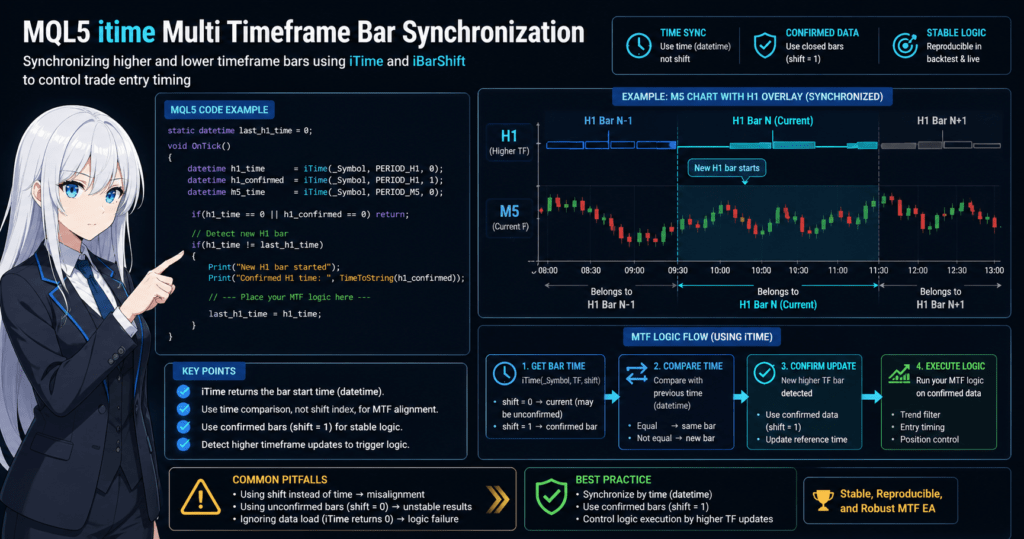
3.1 Detecting updates to a higher-timeframe bar
The foundation of MTF is accurately detecting when the higher timeframe updates.
Implementation code: most important pattern
static datetime last_h1_time = 0;

void OnTick()
{
   datetime current_h1_time = iTime(_Symbol, PERIOD_H1, 0);

   if(current_h1_time == 0) return;

   if(current_h1_time != last_h1_time)
   {
      Print("A new H1 bar started");

      // Write your logic here
      last_h1_time = current_h1_time;
   }
}
What this code does
- Gets the opening time of the H1 bar
- Compares it with the previous value
- If it differs, treats it as a new bar
Practical benefits
- Prevents unnecessary entries
- Improves logic reproducibility
- Reduces the gap between backtesting and live trading
Common mistake
- Running the logic on every
OnTick
→ This can cause excessive entries.
3.2 Synchronizing lower and higher timeframes
The most important part of MTF is
correctly knowing which higher-timeframe bar the current lower-timeframe bar belongs to.
Basic idea
datetime h1_time = iTime(_Symbol, PERIOD_H1, 0);
datetime m5_time = iTime(_Symbol, PERIOD_M5, 0);
Compare these two values.
Practical code example
datetime h1_time = iTime(_Symbol, PERIOD_H1, 0);
datetime h1_prev = iTime(_Symbol, PERIOD_H1, 1);

datetime m5_time = iTime(_Symbol, PERIOD_M5, 0);

if(m5_time >= h1_time)
{
   Print("The current M5 bar belongs to the latest H1 bar");
}
Why this is necessary
- shift cannot match bars across different timeframes
- you must align them by time, or datetime
Important understanding
- Several M5 bars exist inside one H1 bar.
- In other words, you manage MTF as a containment relationship.
3.3 Processing only after the higher-timeframe bar is confirmed
In trading logic,
using the confirmed higher-timeframe bar is the standard approach.
Bad example: using an unconfirmed bar
iTime(_Symbol, PERIOD_H1, 0);
Good example: confirmed bar
iTime(_Symbol, PERIOD_H1, 1);
Practical code example
datetime h1_confirmed = iTime(_Symbol, PERIOD_H1, 1);

static datetime last_h1_confirmed = 0;

if(h1_confirmed != last_h1_confirmed)
{
   Print("Confirmed H1 bar updated");

   // Make decisions with confirmed data
   last_h1_confirmed = h1_confirmed;
}
Why this matters
- Values on an unconfirmed bar can change.
- This can cause mismatches with backtest results.
3.4 Practical MTF logic template
This is a practical template that combines the points above.
static datetime last_h1_time = 0;

void OnTick()
{
   datetime h1_time = iTime(_Symbol, PERIOD_H1, 0);
   datetime h1_confirmed = iTime(_Symbol, PERIOD_H1, 1);

   if(h1_time == 0 || h1_confirmed == 0) return;

   // Detect H1 update
   if(h1_time != last_h1_time)
   {
      Print("New H1 started");

      // Run logic with the confirmed bar
      Print("Confirmed H1 time: ", TimeToString(h1_confirmed));

      last_h1_time = h1_time;
   }
}
Role of this template
- Detect higher-timeframe updates
- Use confirmed data
- Maintain reproducibility
3.5 Common mistakes and cautions at a practical level
1. Ignoring timeframe misalignment
- H1 and M5 do not use the same index.
→ Depending on shift is dangerous.
2. Entering on an unconfirmed bar
- This can behave like repainting.
→ It can fail badly in live trading.
3. First-load issue
- iTime returns 0.
→ A check is required.
4. Delay with multiple symbols
iTime("EURUSD", PERIOD_H1, 0);
→ Data may not have been loaded.
3.6 Practical summary
In MTF, the role of iTime is:
- the reference for time synchronization
- the trigger for logic execution
- the core of reproducibility
Core design principle
- Manage by time, not shift.
- Do not use unconfirmed data.
- Control when the logic updates.
4. Causes and fixes for backtest/live trading drift in MTF
The most common problem with EAs that use MTF, or multi-timeframe logic, is this:
“It wins in backtesting, but breaks in live trading.”
In many cases, the main cause is
how iTime is used, meaning a mistake in time synchronization.
4.1 Why backtesting and live trading drift apart
There are three main causes of this drift.
1. Using an unconfirmed bar
iTime(_Symbol, PERIOD_H1, 0);
This code references the currently forming, unconfirmed bar.
Why this is a problem
- Backtest → processed as confirmed data
- Live trading → values can change
→ As a result, the logic can act as if it was looking into the future.
Countermeasure
iTime(_Symbol, PERIOD_H1, 1);
Always use confirmed bars.
4.2 Tick reproducibility issue
In backtesting:
- ticks are simulated or modeled
In live trading:
- real ticks arrive irregularly
The core problem
if(condition)
{
   Entry();
}
If this “condition”:
- changes tick by tick
- fluctuates in live trading
Countermeasures
- Judge by bar, not by every tick.
- Process only when the higher timeframe updates.
Implementation example
static datetime last_h1_time = 0;

datetime current_h1_time = iTime(_Symbol, PERIOD_H1, 0);

if(current_h1_time != last_h1_time)
{
   // Judge on a bar-confirmation basis
   last_h1_time = current_h1_time;
}
4.3 Time synchronization mistakes: the biggest MTF trap
This is the most common critical mistake.
Bad example: shift-dependent logic
double h1_close = iClose(_Symbol, PERIOD_H1, 0);
double m5_close = iClose(_Symbol, PERIOD_M5, 0);
→ These are not necessarily the same timing.
Problem
- H1 shift 0 ≠ M5 shift 0
- They are time-misaligned.
Correct idea
- Match bars by time.
Improved example
datetime h1_time = iTime(_Symbol, PERIOD_H1, 0);
datetime m5_time = iTime(_Symbol, PERIOD_M5, 0);

if(m5_time >= h1_time)
{
   // M5 bar inside the same H1 bar
}
4.4 Insufficient history data
datetime time = iTime(_Symbol, PERIOD_H1, 0);
→ A case where 0 is returned
Causes
- data not loaded
- first startup
- reference to another symbol
Countermeasure
if(time == 0)
{
   return;
}
Practical caution
- This is less likely to appear in Strategy Tester.
- It occurs often in production environments.
4.5 Multi-symbol and MTF trap
iTime("EURUSD", PERIOD_H1, 0);
Problem
- No data exists for the target symbol.
- Delayed values or NULL-like behavior may occur.
Countermeasure
SymbolSelect("EURUSD", true);
Even more important
- Data synchronization across all symbols is not guaranteed.
- EA reproducibility may decrease.
4.6 Stable design for practical use
To stabilize an MTF EA, the following are required.
Design principles
1. Use only confirmed bars.
2. Synchronize by time, not shift.
3. Process only when a bar updates.
4. Always check for unloaded data.
Recommended template
static datetime last_h1_time = 0;

void OnTick()
{
   datetime h1_time = iTime(_Symbol, PERIOD_H1, 0);
   datetime h1_confirmed = iTime(_Symbol, PERIOD_H1, 1);

   if(h1_time == 0 || h1_confirmed == 0) return;

   if(h1_time != last_h1_time)
   {
      // Logic using confirmed data
      last_h1_time = h1_time;
   }
}
4.7 Summary of common mistakes
1. Optimizing only for backtests
→ It breaks in live trading.
2. Tick-dependent logic
→ Reproducibility is low.
3. Using MTF without checking time
→ The logic is fundamentally broken.
4. Using unconfirmed bars
→ This causes overfitting and look-ahead-like behavior.
4.8 Practical conclusion
Whether MTF works in practice depends less on the trade idea and more on the precision of time management.
Core point
- iTime is not just a simple function.
- It is the core of the time synchronization engine.
Expected-value viewpoint
- Correct implementation → higher reproducibility → more stable PF
- Mistakes → more randomness → breakdown
5. Combining iTime with other functions
To use MTF at a practical level, iTime alone is not enough.
The key is to use time from iTime as the axis and combine it with other functions.
This section explains combinations that often appear in real EA development.
5.1 iTime × iBarShift: converting time to index
This is the most important pattern.
Purpose
To get the bar position, or shift, that corresponds to a specified time.
Basic code
datetime h1_time = iTime(_Symbol, PERIOD_H1, 0);

int shift = iBarShift(_Symbol, PERIOD_M5, h1_time);
What this does
- Gets the H1 bar time
- Gets the M5 bar position that corresponds to that time
Practical uses
- Identify the lower-timeframe position from a higher timeframe
- Get synchronized prices
- Maintain signal consistency
Important points
iBarShiftsearches based on time.- It can solve shift misalignment problems.
Common mistake
iBarShiftreturns-1
→ No matching bar exists, often due to insufficient data.
Countermeasure
if(shift < 0)
{
   Print("No matching bar");
   return;
}
5.2 iTime × iClose / iOpen: getting time-synchronized prices
Bad pattern
double h1_close = iClose(_Symbol, PERIOD_H1, 0);
double m5_close = iClose(_Symbol, PERIOD_M5, 0);
→ The times are not aligned.
Correct method
datetime h1_time = iTime(_Symbol, PERIOD_H1, 0);
int shift = iBarShift(_Symbol, PERIOD_M5, h1_time);

double m5_price = iClose(_Symbol, PERIOD_M5, shift);
What this enables
- Price comparison on the same time axis
- Consistency between higher and lower timeframes
Practical benefits
- More consistent signals
- Fewer false judgments
5.3 iTime × CopyRates: fast data retrieval
When handling a large amount of data, use CopyRates.
Basic code
MqlRates rates[];

int copied = CopyRates(_Symbol, PERIOD_H1, 0, 100, rates);
Combining it with iTime
datetime target_time = iTime(_Symbol, PERIOD_H1, 1);

for(int i=0; i<copied; i++)
{
   if(rates[i].time == target_time)
   {
      Print("Matching bar found");
   }
}
Practical uses
- Backtest-oriented logic
- Complex condition checks
- Referencing multiple bars
Cautions
- Pay attention to array order, old-to-new or reverse.
- Misreading the index direction can cause bugs.
5.4 iTime × TimeCurrent: comparing with real time
Example
datetime bar_time = iTime(_Symbol, PERIOD_H1, 0);
datetime now = TimeCurrent();
Caution
if(bar_time == now)
→ This is usually not true.
Correct usage
if(now >= bar_time)
{
   // The current time is inside this bar's time range
}
Practical uses
- session management
- time-of-day filters
- trade time control
5.5 iTime × multiple timeframes: MTF extension
Example: H1 + M15 + M5
datetime h1 = iTime(_Symbol, PERIOD_H1, 0);
datetime m15 = iTime(_Symbol, PERIOD_M15, 0);
datetime m5 = iTime(_Symbol, PERIOD_M5, 0);
Practical logic example
if(m5 >= m15 && m15 >= h1)
{
   Print("All timeframes are inside the same trend");
}
What this does
- Checks containment relationships
- Confirms time consistency
Cautions
- The more timeframes you add, the higher the risk of drift.
- Always manage MTF logic based on time.
5.6 Practical advanced template
static datetime last_h1_time = 0;

void OnTick()
{
   datetime h1_time = iTime(_Symbol, PERIOD_H1, 0);

   if(h1_time == 0) return;

   if(h1_time != last_h1_time)
   {
      int m5_shift = iBarShift(_Symbol, PERIOD_M5, h1_time);

      if(m5_shift < 0) return;

      double price = iClose(_Symbol, PERIOD_M5, m5_shift);

      Print("Synchronized price: ", price);

      last_h1_time = h1_time;
   }
}
5.7 Summary of common advanced mistakes
1. Not using iBarShift
→ Time drift occurs.
2. Misunderstanding array indexes
→ This often happens with CopyRates.
3. Depending on shift across multiple timeframes
→ The logic breaks.
4. Underestimating time comparison
→ Reproducibility is lost.
5.8 Practical conclusion
Do not rely on iTime alone. Combine it with:
- iBarShift → position identification
- CopyRates → data retrieval
- iClose and similar functions → price reference
Only by combining these functions can you build
MTF logic that can hold up in live trading.
Core summary
- iTime = time axis
- iBarShift = coordinate conversion
- CopyRates = data retrieval
6. EA implementation example using iTime
This section combines everything explained so far and presents
a minimal MTF EA structure that reaches the entry stage.
The goal is
to understand reproducible MTF logic in a form you can use directly.
6.1 Logic design: simple and practical
This example uses the following conditions.
Trade conditions
- Confirmed H1 bar is bullish → buy
- Confirmed H1 bar is bearish → sell
- Enter on the lower timeframe, M5
Design intent
- Use confirmed bars only → maintain reproducibility
- Synchronize MTF timing → prevent drift
- Run only when a bar updates → prevent excessive entries
6.2 Full code: copy and paste ready
#include <Trade/Trade.mqh>
CTrade trade;

static datetime last_h1_time = 0;

void OnTick()
{
   // Higher timeframe (H1)
   datetime h1_time = iTime(_Symbol, PERIOD_H1, 0);
   datetime h1_confirmed = iTime(_Symbol, PERIOD_H1, 1);

   if(h1_time == 0 || h1_confirmed == 0) return;

   // Detect a new H1 bar
   if(h1_time != last_h1_time)
   {
      last_h1_time = h1_time;

      // Get prices from the confirmed H1 bar
      double open  = iOpen(_Symbol, PERIOD_H1, 1);
      double close = iClose(_Symbol, PERIOD_H1, 1);

      // Get the corresponding bar on the M5 side
      int m5_shift = iBarShift(_Symbol, PERIOD_M5, h1_time);

      if(m5_shift < 0) return;

      double m5_price = iClose(_Symbol, PERIOD_M5, m5_shift);

      // Entry conditions
      if(close > open)
      {
         Print("BUY condition met");
         trade.Buy(0.1);
      }
      else if(close < open)
      {
         Print("SELL condition met");
         trade.Sell(0.1);
      }
   }
}
6.3 Code breakdown: key points only
1. Higher-timeframe update detection
if(h1_time != last_h1_time)
→ Limits processing to once per hour.
2. Use of a confirmed bar
iClose(_Symbol, PERIOD_H1, 1);
→ Excludes unconfirmed data.
3. MTF synchronization
int m5_shift = iBarShift(_Symbol, PERIOD_M5, h1_time);
→ Gets the position based on time.
4. Entry
trade.Buy(0.1);
→ Minimal logic. In practice, add risk management.
6.4 Common practical mistakes
1. No position management
- Entering every time
→ unlimited positions
Countermeasure
if(PositionSelect(_Symbol)) return;
2. Ignoring spread
→ Entry accuracy decreases.
3. Fixed lot size
→ Risk management is insufficient.
4. Not checking iBarShift
→ A value of -1 can cause failure.
6.5 Points to extend for practical use
Required additions
- lot calculation based on risk percentage
- SL / TP settings
- spread filter
- time-of-day control
- maximum position limit
Simple example
if(SymbolInfoInteger(_Symbol, SYMBOL_SPREAD) > 20) return;
6.6 Practical evaluation
Characteristics of this logic
- Reproducibility: high
- Simplicity: high
- Edge: low, so it is not enough to win as-is
Expected-value perspective
- Useful as a base structure
- Can become practical if the signal logic is strengthened
6.7 Core summary
The essence of this EA is not the trade signal itself, but:
- time synchronization
- use of confirmed data
- control of update triggers
Important recognition
A profitable EA is not simply one with a strong indicator. It is one with accurate time handling.
6.8 What to do next
- Add filters, such as trend and volatility filters
- Introduce risk management
- Optimize carefully, without overfitting
7. FAQ: common questions and solutions
Q1. Why does iTime return 0?
Answer: the main cause is unloaded data. Check initialization and history loading.
- This can happen on first startup or when data has not been loaded.
- It is more likely with other symbols or other timeframes.
Countermeasure:
if(iTime(_Symbol, PERIOD_H1, 0) == 0) return;
Q2. Is shift=0 a confirmed bar?
Answer: no. It is an unconfirmed bar. Use shift=1 for a confirmed bar.
0→ forming1→ confirmed
Countermeasure:
iTime(_Symbol, PERIOD_H1, 1);
Q3. Can I synchronize different timeframes by matching shift?
Answer: no. You must align them by time, or datetime.
- H1 shift 0 ≠ M5 shift 0
Countermeasure:
datetime t = iTime(_Symbol, PERIOD_H1, 0);
int shift = iBarShift(_Symbol, PERIOD_M5, t);
Q4. Why does an EA win in backtesting but lose in live trading?
Answer: the main causes are unconfirmed bars, time drift, and tick differences.
Main causes:
- using unconfirmed bars
- tick-dependent logic
- MTF synchronization mistakes
Countermeasures:
- use only confirmed bars
- process by bar
- synchronize by comparing time
Q5. Why does iBarShift return -1?
Answer: because no bar exists for the specified time.
Causes:
- insufficient data
- symbol not selected
- time mismatch
Countermeasure:
if(shift < 0) return;
Q6. Are iTime and TimeCurrent the same?
Answer: no. They are different and their purposes are completely separate.
| Function | Meaning |
|---|---|
| iTime | Opening time of a bar |
| TimeCurrent | Current server time |
Caution:
// NG
if(iTime(...) == TimeCurrent())
Q7. Is it okay to call iTime on every OnTick?
Answer: it works, but it is inefficient. You should control it with update detection.
Problems:
- unnecessary processing increases
- entries may fire repeatedly
Countermeasure:
static datetime last;
if(current != last)
Q8. What should I watch for when using iTime with multiple symbols?
Answer: watch for unloaded data and synchronization drift.
Problems:
- each symbol can have a different data loading state
- delays and zero values can occur
Countermeasure:
SymbolSelect("EURUSD", true);
FAQ summary from a practical viewpoint
- iTime is the core of time management.
- MTF depends on the precision of time synchronization.
- Most bugs come from mistakes in handling time.
Final conclusion
- Think in terms of time, not shift.
- Do not use unconfirmed data.
- Process logic when updates occur.