- 1 1. What MQL5 iATR Is
- 2 2. Basic Syntax of the iATR Function
- 3 3. Basic Usage of iATR: Sample Code
- 4 4. How to Get ATR Values: Understanding CopyBuffer
- 5 5. Practical Trading Logic Using ATR
- 6 6. Notes When Using iATR
- 7 7. Differences Between iATR and MT4 (MQL4)
- 8 8. Advanced Use of iATR in EA Design
- 9 FAQ
- 9.1 Q1. Does iATR return the ATR value directly?
- 9.2 Q2. Which function gets the ATR value?
- 9.3 Q3. What ATR period is recommended?
- 9.4 Q4. Is ATR a trend indicator?
- 9.5 Q5. Why does CopyBuffer fail?
- 9.6 Q6. Which timeframe should I use for ATR?
- 9.7 Q7. What is the difference between iATR and iCustom?
- 9.8 Q8. What are the benefits of using ATR in an EA?
1. What MQL5 iATR Is
1.1 Basics of ATR (Average True Range)
ATR (Average True Range) is a technical indicator that measures the size of price movement, or volatility.
Volatility shows “how much price is moving,” and ATR quantifies the strength of price movement, not the trend direction.
ATR is often used for the following purposes.
- Setting stop loss distance
- Judging market volatility
- Adjusting position size
- Building volatility filters
For example, a large ATR indicates a market with large price movement, while a small ATR indicates a market with small price movement.
Typical trading logic includes the following examples.
- Use ATR × 2 as the stop loss
- Enter only when ATR is above a certain level
- Avoid trading when ATR is small
In this way, ATR is an indicator often used for risk management and judging the market environment.
However, beginners often misunderstand several points.
Important notes
- ATR does not show trend direction
- ATR is not a price prediction indicator
- ATR measures only volatility
In other words, even if ATR rises, it does not mean an uptrend. It only means that price movement has become larger.
1.2 Role of the MQL5 iATR Function
MQL5 provides the iATR function to access ATR.
iATR is a function that calls the standard ATR indicator built into MetaTrader 5 from a program.
This function has the following features.
- Uses the standard MT5 ATR indicator
- Supports any symbol and timeframe
- Handles ATR calculation automatically
- Can be used from EAs and custom indicators
However, MQL5 has one important specification.
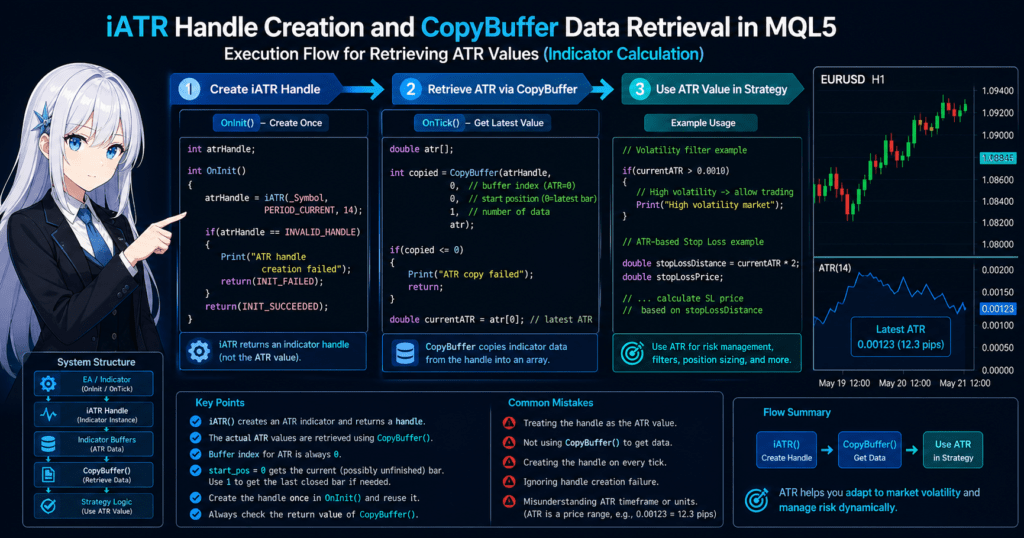
iATR does not return the ATR value directly.
Instead, it returns an indicator handle.
A handle is, in simple terms,
“a reference ID for the ATR indicator”
The actual ATR value is obtained with the CopyBuffer() function by using this handle.
This mechanism is very different from MQL4, so many beginners get confused at this point.
1.3 Typical Use Cases for iATR
iATR is used in EAs (automated trading systems) and indicators for purposes such as the following.
1. ATR-based stop loss
Example:
StopLoss = ATR × 2
This design widens the stop distance when volatility is high and narrows it when volatility is low.
2. Volatility filter
This logic avoids trading when ATR is small.
Example:
Enter if ATR > a certain threshold
It is used to avoid range-bound markets.
3. Breakout strategy
When ATR increases sharply, the market may be starting to move.
For this reason, ATR can also be used to judge the environment as follows.
- ATR increase → possible trend development
- ATR decrease → range-bound market
Common Mistakes
Here are the points where beginners most often get stuck.
1. Thinking ATR is a trend indicator
ATR does not show direction.
2. Thinking the return value of iATR is the ATR value
iATR is a function that returns a handle.
The ATR value is obtained with the following function.
CopyBuffer()
3. Using the wrong ATR timeframe
For example, the following design is possible.
- The EA runs on M5
- ATR is obtained from H1
In this case, the ATR value can change significantly, so caution is required.
2. Basic Syntax of the iATR Function
2.1 Syntax of iATR
When using ATR (Average True Range) in MQL5, you first create a handle for the ATR indicator by using the iATR function.
The basic syntax is as follows.
int iATR(
   string symbol,
   ENUM_TIMEFRAMES period,
   int ma_period
);
This function returns the handle, or identification ID, of the ATR indicator.
The important point is that iATR does not return the ATR value itself.
The actual ATR value is obtained with the CopyBuffer() function by using this handle.
The typical usage flow is as follows.
- Create an indicator handle with
iATR() - Get ATR data with
CopyBuffer() - Read the ATR value from the array
In a standard EA structure, the handle is usually created inside OnInit().
Example:
int atrHandle;

int OnInit()
{
   atrHandle = iATR(_Symbol, PERIOD_CURRENT, 14);
   return(INIT_SUCCEEDED);
}
This code creates ATR with the following settings.
- Symbol: current chart
- Timeframe: current timeframe
- ATR period: 14
2.2 Meaning of Each Parameter
iATR has three parameters: symbol, period, and ma_period.
| Parameter | Description |
|---|---|
| symbol | Target symbol |
| period | Timeframe |
| ma_period | ATR calculation period |
symbol
This specifies the symbol for ATR calculation. _Symbol means the symbol of the current chart.
iATR(_Symbol, PERIOD_CURRENT, 14);
iATR("EURUSD", PERIOD_H1, 14);
When specifying a symbol different from the chart symbol, history data must be loaded.
period
This specifies the timeframe used to calculate ATR.
PERIOD_M5
PERIOD_M15
PERIOD_H1
PERIOD_D1
PERIOD_CURRENT
Even if the EA is running on M5, it is possible to obtain H1 ATR.
ma_period
This is the ATR calculation period. Common settings are 14, 20, and 10.
iATR(_Symbol, PERIOD_CURRENT, 14);
This creates a 14-period ATR.
2.3 Return Value: Indicator Handle
The return value of iATR is not the ATR value, but a handle, which is an integer value.
int atrHandle;
Internally, this handle is like:
an instance ID of the ATR indicator
The actual ATR value is obtained as follows.
double atr[];
CopyBuffer(atrHandle,0,0,1,atr);
The array atr[0] contains the latest ATR value.
Common Mistakes
1. Using the handle as the ATR value
double atr = iATR(_Symbol, PERIOD_CURRENT, 14);
The return value of iATR is not the ATR value.
2. Not using CopyBuffer
The ATR value must always be obtained with CopyBuffer().
3. Creating the handle on every tick
int atr = iATR(_Symbol, PERIOD_CURRENT, 14);
The basic approach is to create it in OnInit() and reuse it.
4. Not checking handle creation failure
atrHandle = iATR(_Symbol, PERIOD_CURRENT, 14);

if(atrHandle == INVALID_HANDLE)
{
   Print("ATR handle creation failed");
}
3. Basic Usage of iATR: Sample Code
3.1 Create an ATR Handle
When using ATR in MQL5, first create an indicator handle with the iATR function. In a common design, it is created inside OnInit(), the EA initialization process.
- Creating it on every tick makes processing heavier
- There is no need to create the same indicator repeatedly
- The handle can be reused
int atrHandle;

int OnInit()
{
   atrHandle = iATR(_Symbol, PERIOD_CURRENT, 14);

   if(atrHandle == INVALID_HANDLE)
   {
      Print("ATR handle creation failed");
      return(INIT_FAILED);
   }

   return(INIT_SUCCEEDED);
}
The key points are _Symbol for the current chart symbol, PERIOD_CURRENT for the current chart timeframe, and 14 for the ATR period. Always include a check for handle creation failure. Failures may occur because of insufficient data, invalid parameters, or insufficient memory.
3.2 Get the ATR Value with CopyBuffer
iATR returns only an indicator handle. The actual ATR value is obtained with CopyBuffer().
double atr[];

CopyBuffer(atrHandle,0,0,1,atr);
| Parameter | Description |
|---|---|
| atrHandle | ATR indicator handle |
| 0 | Buffer number; ATR uses 0 |
| 0 | Start position; latest bar |
| 1 | Number of data items to get |
| atr | Array for storing data |
This code gets one latest ATR value.
double currentATR = atr[0];
3.3 Example of Using the ATR Value
double atr[];

if(CopyBuffer(atrHandle,0,0,1,atr) > 0)
{
   double currentATR = atr[0];

   if(currentATR > 0.0010)
   {
      Print("High volatility market");
   }
}
Another typical example is an ATR-based stop loss.
double stopLossDistance = currentATR * 2;
By using ATR in this way, you can apply dynamic risk management based on market volatility.
Important Notes
1. Not checking the return value of CopyBuffer
if(CopyBuffer(atrHandle,0,0,1,atr) <= 0)
{
   Print("ATR copy failed");
}
2. Array size issues
double atr[];
3. Misunderstanding the unit of ATR
ATR is a price difference. For EURUSD, ATR = 0.0012 means 12 pips.
4. Using a value before the bar is closed
When start_pos = 0, it refers to the currently forming bar. Depending on the strategy, using 1 may be safer.
CopyBuffer(atrHandle,0,1,1,atr);
4. How to Get ATR Values: Understanding CopyBuffer
4.1 Basic Syntax of CopyBuffer
In MQL5, indicator functions such as iATR return a handle. Therefore, to get the actual indicator data, you use the CopyBuffer() function.
CopyBuffer(
   int indicator_handle,
   int buffer_num,
   int start_pos,
   int count,
   double buffer[]
);
| Parameter | Description |
|---|---|
| indicator_handle | Indicator handle |
| buffer_num | Indicator buffer number |
| start_pos | Start position for copying |
| count | Number of data items to get |
| buffer[] | Array for storing data |
CopyBuffer returns the number of data items copied.
CopyBuffer(...) > 0
indicates successful data retrieval.
4.2 Parameters Used for ATR
For the ATR indicator, the ATR value is stored in buffer 0.
| Setting | Value |
|---|---|
| buffer_num | 0 |
double atr[];

CopyBuffer(atrHandle,0,0,1,atr);
This copies one value from buffer 0 of the ATR handle, starting from the latest bar, into the atr[] array.
4.3 Code for Getting the Latest ATR Value
double atr[];

if(CopyBuffer(atrHandle,0,0,1,atr) > 0)
{
   double currentATR = atr[0];
}
| Array | Meaning |
|---|---|
| atr[0] | Latest bar |
| atr[1] | Previous bar |
| atr[2] | Two bars ago |
Example for multiple values:
double atr[3];

CopyBuffer(atrHandle,0,0,3,atr);
This obtains ATR for the current bar, previous bar, and two bars ago.
Common Errors
1. Not checking the return value of CopyBuffer
double atr[];

if(CopyBuffer(atrHandle,0,0,1,atr) <= 0)
{
   Print("CopyBuffer failed");
}
2. array out of range error
double atr[1];
CopyBuffer(atrHandle,0,0,5,atr);
This tries to get 5 values while the array has only 1 element.
3. Latest bar issue
start_pos = 0 refers to the currently forming bar. To get the ATR value of the closed bar, use:
CopyBuffer(atrHandle,0,1,1,atr);
4. Copying too much data on every tick
CopyBuffer(atrHandle,0,0,1000,atr);
Copying a large amount of data on every tick can reduce performance. Usually, about 1 to 3 bars are enough.
5. Practical Trading Logic Using ATR
5.1 Stop Loss Calculation Using ATR
ATR (Average True Range) is often used to adjust stop loss distance according to volatility. A fixed stop loss, such as 20 pips, can be too tight or too wide depending on market conditions.
StopLoss = ATR × 2
- Large ATR → widen the stop loss
- Small ATR → narrow the stop loss
double atr[];

if(CopyBuffer(atrHandle,0,0,1,atr) > 0)
{
   double currentATR = atr[0];

   double stopLossDistance = currentATR * 2;
}
Using ATR in this way enables flexible risk management based on market conditions.
5.2 ATR Volatility Filter
ATR can also be used as a filter for deciding whether to trade. Many strategies perform poorly in low-volatility markets, range-bound markets, or periods with almost no price movement.
double atr[];

if(CopyBuffer(atrHandle,0,0,1,atr) > 0)
{
   double currentATR = atr[0];

   if(currentATR > 0.0010)
   {
      Print("Volatility OK");
   }
}
This type of filter can reduce unnecessary trades and help avoid range-bound markets. The proper ATR threshold changes by symbol, timeframe, and market environment, so it must be adjusted through backtesting.
5.3 Position Size Adjustment Using ATR
ATR is also used for position size calculation, or lot adjustment. In high-volatility markets, stop losses become wider and the potential loss amount can increase.
LotSize = Risk / ATR
For example, if ATR is 20 pips and allowed risk is 100 dollars, the lot size is adjusted according to ATR.
double atr[];

if(CopyBuffer(atrHandle,0,0,1,atr) > 0)
{
   double currentATR = atr[0];

   double lotSize = riskAmount / currentATR;
}
This method is used as volatility-based money management.
Important Notes
1. ATR values differ by symbol
| Symbol | ATR tendency |
|---|---|
| EURUSD | Relatively small |
| GBPJPY | Very large |
2. ATR changes greatly by timeframe
| Timeframe | ATR |
|---|---|
| M5 | Small |
| H1 | Medium |
| D1 | Large |
3. ATR has no direction
ATR can rise during either an uptrend or a downtrend. ATR measures only volatility.
6. Notes When Using iATR
6.1 Indicator Handle Management
In MQL5, indicators are managed by a handle-based system. The basic design is as follows.
| Process | Location |
|---|---|
| Create handle | OnInit() |
| Get data | OnTick() |
| Release handle | OnDeinit() |
int atrHandle;

int OnInit()
{
   atrHandle = iATR(_Symbol, PERIOD_CURRENT, 14);

   if(atrHandle == INVALID_HANDLE)
   {
      Print("ATR handle creation failed");
      return(INIT_FAILED);
   }

   return(INIT_SUCCEEDED);
}

void OnDeinit(const int reason)
{
   IndicatorRelease(atrHandle);
}
Using IndicatorRelease() releases an indicator handle that is no longer needed. MT5 may handle this automatically in some cases, but explicitly releasing the handle is safer.
6.2 Calling CopyBuffer Too Often
CopyBuffer() is useful, but copying a large amount of data on every tick increases processing load.
double atr[1000];

CopyBuffer(atrHandle,0,0,1000,atr);
In general, get only the latest ATR or only the required number of bars.
double atr[];

CopyBuffer(atrHandle,0,0,1,atr);
It is also effective to process only when a new bar appears.
6.3 Multi-Timeframe Use
In MQL5, it is possible to obtain ATR from a timeframe different from the one where the EA is running.
iATR(_Symbol, PERIOD_H1, 14);
For example, the EA may run on M5 while ATR is from H1.
| Purpose | Timeframe |
|---|---|
| Entry | M5 |
| Trend judgment | H1 |
| ATR | H1 |
Common Pitfalls
1. Using the wrong ATR timeframe
If EA = M5 and ATR = D1, the ATR value becomes very large.
2. Symbol specification mistakes
iATR("EURUSD", PERIOD_H1, 14);
This obtains EURUSD ATR even if the chart uses another symbol.
3. Insufficient history data
Another timeframe or symbol may cause CopyBuffer failure if history data is insufficient.
4. Creating the handle on every tick
int atrHandle = iATR(_Symbol, PERIOD_CURRENT, 14);
Always create the handle in OnInit().
7. Differences Between iATR and MT4 (MQL4)
7.1 Specification of MT4 iATR
MetaTrader 4 (MQL4) also has an iATR function, but its specification is very different from MQL5. In MT4, calling iATR lets you get the ATR value directly.
double iATR(
   string symbol,
   int timeframe,
   int period,
   int shift
);
double atr = iATR(Symbol(), PERIOD_CURRENT, 14, 0);
In MT4, there is no concept of CopyBuffer or indicator handles.
7.2 Difference in MT5 (MQL5)
In MetaTrader 5, indicator processing uses a handle-based system. The return value of iATR is an indicator handle, not the ATR value.
int atrHandle = iATR(_Symbol, PERIOD_CURRENT, 14);

double atr[];

CopyBuffer(atrHandle,0,0,1,atr);

double currentATR = atr[0];
| Benefit | Description |
|---|---|
| Fast processing | Does not recalculate the indicator each time |
| Multiple values | Can retrieve a large amount of data |
| Reuse | Can reuse the same indicator |
MT5 is designed with performance in mind.
7.3 Notes When Porting MT4 Code to MT5
MT4 code:
double atr = iATR(Symbol(), PERIOD_CURRENT, 14, 0);
In MT5, this must be rewritten as follows.
int atrHandle = iATR(_Symbol, PERIOD_CURRENT, 14);

double atr[];

CopyBuffer(atrHandle,0,0,1,atr);

double currentATR = atr[0];
MT5 requires a two-step process: create the handle and copy the data.
Common Porting Mistakes
1. The shift parameter is gone
| MT4 | MT5 |
|---|---|
| shift=0 | start_pos=0 |
| shift=1 | start_pos=1 |
2. Trying to get the ATR value directly
double atr = iATR(_Symbol, PERIOD_CURRENT, 14);
3. Not using CopyBuffer
In MT5, you must always use CopyBuffer to get the value.
4. Creating the handle on every tick
Correct design: OnInit() creates the handle, and OnTick() calls CopyBuffer.
8. Advanced Use of iATR in EA Design
8.1 ATR Trailing Stop
ATR is often used to design a Trailing Stop, which automatically moves the stop loss as price moves in your favor.
TrailingStop = 20 pips
Fixed trailing stops can be too tight in high volatility and too wide in low volatility. ATR-based logic adapts to the market.
TrailingStop = ATR × 2
double atr[];

if(CopyBuffer(atrHandle,0,0,1,atr) > 0)
{
   double currentATR = atr[0];
   double trailingDistance = currentATR * 2;
}
8.2 ATR Breakout Strategy
ATR measures market energy, or volatility. An increase in ATR can be used for a breakout strategy.
ATR increases above a certain level → possible trend development
double atr[];

if(CopyBuffer(atrHandle,0,0,1,atr) > 0)
{
   double currentATR = atr[0];

   if(currentATR > atrThreshold)
   {
      Print("Breakout volatility detected");
   }
}
Because ATR alone does not show direction, it is usually combined with moving averages, new highs or lows, or momentum indicators.
8.3 ATR Volatility Switch
ATR can be used as a trade ON/OFF switch.
Small ATR → stop trading
Large ATR → start trading
This is common in scalping EAs and breakout EAs.
double atr[];

if(CopyBuffer(atrHandle,0,0,1,atr) > 0)
{
   double currentATR = atr[0];

   if(currentATR < minATR)
   {
      Print("Market too quiet, trading disabled");
      return;
   }
}
ATR thresholds vary by symbol, timeframe, and market environment, so they should be adjusted through backtesting and forward testing.
Notes for Advanced Design
1. ATR has no direction
ATR can rise during either an uptrend or a downtrend, so another indicator is needed for trend direction.
2. ATR depends on the symbol
| Symbol | ATR characteristic |
|---|---|
| EURUSD | Relatively small |
| GBPJPY | Very large |
3. ATR depends on the timeframe
| Timeframe | ATR |
|---|---|
| M5 | Small |
| H1 | Medium |
| D1 | Large |
In EA design, clearly define which timeframe’s ATR is used.
FAQ
Q1. Does iATR return the ATR value directly?
No. iATR returns an indicator handle, not the ATR value. To get the actual ATR value, create a handle with iATR() and get data with CopyBuffer().
int atrHandle = iATR(_Symbol, PERIOD_CURRENT, 14);

double atr[];

CopyBuffer(atrHandle,0,0,1,atr);

double currentATR = atr[0];
Q2. Which function gets the ATR value?
The ATR value is obtained with the CopyBuffer() function. In CopyBuffer(atrHandle,0,0,1,atr), atr[0] is the latest ATR value.
Q3. What ATR period is recommended?
In general, 14 periods is the most commonly used setting. Short-term trading may use 10, while longer-term strategies may use 20 to 30. The best setting must be validated with backtesting and forward testing.
Q4. Is ATR a trend indicator?
No. ATR is a volatility indicator. It measures price movement size and market activity, but does not show upward or downward direction. EAs often combine ATR with Moving Average, RSI, MACD, or breakout conditions.
Q5. Why does CopyBuffer fail?
Common causes include an invalid handle, insufficient history data, insufficient array size, and an indicator that has not been calculated yet.
double atr[];

if(CopyBuffer(atrHandle,0,0,1,atr) <= 0)
{
   Print("ATR copy failed");
}
Q6. Which timeframe should I use for ATR?
The ATR timeframe depends on the trading strategy. Scalping often uses M5 or M15, day trading often uses H1, and swing trading often uses H4 or D1. Some EAs use M5 for entries and H1 for ATR.
Q7. What is the difference between iATR and iCustom?
iATR calls the standard MT5 ATR indicator. iCustom calls a user-created custom indicator. Use iATR for standard ATR and iCustom for custom indicators.
Q8. What are the benefits of using ATR in an EA?
The main benefit is volatility-adaptive trading. ATR can be used for stop losses, trailing stops, volatility filters, and position size adjustment. It helps risk management adapt to market conditions, but it should usually be combined with a trend indicator.