

- 1 1. What Does the MQL5 “not enough money” Error Mean?
- 2 2. How to Fix It: The Fastest Steps to Resolve the Error
- 3 3. Why It Happens: How Margin Works
- 4 4. Fixes by Common Cause
- 5 5. Difference From Other Errors
- 6 6. How to Use This in Practice: Building It Into EA Design
- 7 7. Common Mistakes and Important Notes
- 8 8. FAQ
- 8.1 8.1 Is not enough money a bug?
- 8.2 8.2 Why can I not place an order even though I have a balance?
- 8.3 8.3 Can this happen on a small account?
- 8.4 8.4 Why does it happen live but not on demo?
- 8.5 8.5 Is there a way to avoid it automatically?
- 8.6 8.6 Will increasing leverage solve it?
- 8.7 8.7 Is this more common in scalping?
- 8.8 8.8 Does MT4 have the same error?
- 9 9. Summary
1. What Does the MQL5 “not enough money” Error Mean?
[Conclusion]
“not enough money” is an order rejection error caused by insufficient margin.
It usually happens because of lot size, account balance, or leverage settings.
1.1 Definition of not enough money
[Conclusion]
In MQL5, “not enough money” is an error code returned when an order is placed without enough required margin.
[Definition]
- Margin: collateral funds required to hold a position
- Free margin: funds currently available for new trades
In MQL5, a margin check runs internally when an order is placed.
An error occurs when the following condition is not met.
- FreeMargin < RequiredMargin
At that point, TRADE_RETCODE_NO_MONEY is returned,
and the log shows “not enough money”.
Key points
- “Having a balance” does not mean “the order can be placed”
- The key value is free margin
1.2 When does this error occur?
[Conclusion]
This error occurs immediately when an order is sent or during a pre-check.
It mainly occurs in the following processes.
- When
OrderSend()runs (actual order placement) - When
OrderCheck()runs (pre-validation) - When adding positions or averaging down
- When increasing lot size
Cases that need special attention
- Adding entries while holding unrealized losses
- Holding multiple positions at the same time
- Sending repeated orders in scalping
Reason
When a position is opened, margin is locked,
so free margin decreases.
Price movement just before execution and slippage can also increase the required margin beyond the expected amount.
1.3 Related concepts you must understand
[Conclusion]
To understand “not enough money” correctly, you need to understand margin, lot size, and leverage as one connected system.
The following are essential concepts.
- Lot size
->Trade volume. A larger lot increases required margin. - Leverage
->Lower leverage requires more margin. - Margin
->Funds required to maintain a position. - Free margin
->Funds available for new orders. - Spread
->The practical trading cost. Wider spreads reduce margin efficiency. - Stop out
->Forced liquidation when the margin level falls below a set threshold.
Important relationships
- Lot size up ->required margin up
- Leverage down ->required margin up
- Unrealized loss up ->free margin down
Common misunderstandings
- “A large balance means I am safe” ->Incorrect
- “A fixed lot size is fine” ->Risky
In practical EA development,
lot sizing and margin management must be optimized together.
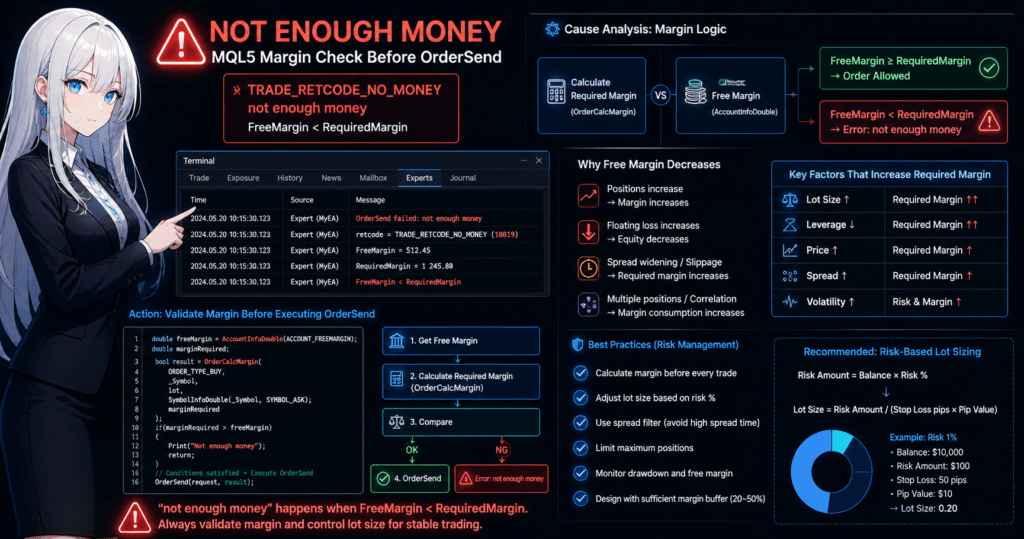
2. How to Fix It: The Fastest Steps to Resolve the Error
[Conclusion]
“not enough money” can be avoided reliably with lot adjustment and pre-trade margin calculation.
In real trading systems, the most important step is to calculate required margin before placing an order.
2.1 Quick checklist
[Conclusion]
Start with the checks below. They solve many cases immediately.
- Lower the lot size (the fastest fix)
- Check
free margin - Check the leverage setting
- Account for spread widening
- Check the impact of existing positions
Key points
- If unsure, cut the lot size in half
- Avoid times when spreads are wide, such as news releases and early market hours
Common mistakes
- Using settings that worked on a demo account unchanged in live trading
- Using fixed lots without adapting to account equity changes
2.2 Practical fix with code
[Conclusion]
A reproducible fix is to calculate margin before OrderSend and adjust the lot size before sending the order.
Steps
1. Get free margin
double freeMargin = AccountInfoDouble(ACCOUNT_FREEMARGIN);
2. Calculate required margin with OrderCalcMargin
double marginRequired;
bool result = OrderCalcMargin(
   ORDER_TYPE_BUY,
   _Symbol,
   lot,
   SymbolInfoDouble(_Symbol, SYMBOL_ASK),
   marginRequired
);
3. Check for insufficient margin
if(marginRequired > freeMargin)
{
   Print("Not enough money");
   return;
}
4. Place the order with OrderSend
// Execute only when the conditions are met
OrderSend(request, result);
Key points
- You can also use OrderCheck, but OrderCalcMargin is lighter and faster
- Checking before execution helps prevent the error before it occurs
2.3 Automatic lot size adjustment
[Conclusion]
Instead of fixed lots, you should calculate lot size automatically based on risk.
Method 1: Balance-based sizing
double riskPercent = 1.0; // 1%
double balance = AccountInfoDouble(ACCOUNT_BALANCE);
double riskAmount = balance * (riskPercent / 100.0);

// Simple lot calculation example
double lot = riskAmount / 100000;
Method 2: ATR-based sizing (recommended)
- Adjust the lot size based on volatility
- Reduce lots in high-volatility conditions to control risk
Method 3: Margin-limit-based sizing
double maxMarginUse = freeMargin * 0.5; // Use up to 50%
Key points
- “Lot size = fixed” creates a high risk of failure
- Managing by risk percentage improves reproducibility
2.4 Common problems and fixes
[Conclusion]
Most errors come from calculation mistakes or unexpected market conditions.
Case 1: Spread widening
- Cause: news releases or lower liquidity
- Fix: add a spread filter
double spread = SymbolInfoInteger(_Symbol, SYMBOL_SPREAD);
if(spread > maxSpread) return;
Case 2: Multiple positions
- Cause: margin is consumed across positions
- Fix: limit the maximum number of positions
Case 3: Price movement and slippage
- Cause: price changes just before execution
- Fix: design with a margin buffer
2.5 Difference from other approaches
[Conclusion]
Sending orders without a margin check is easy in the short term, but it is fragile in real operation.
| Approach | Characteristics | Risk |
|---|---|---|
| No check | Easy to implement | Frequent errors |
| OrderCheck only | Safe | Slightly heavier |
| OrderCalcMargin (recommended) | Fast and practical | Requires implementation |
3. Why It Happens: How Margin Works
[Conclusion]
“not enough money” is a structural error that occurs when free margin is lower than required margin.
It is not just a lack of funds. It occurs as the direct result of margin calculation logic.
3.1 Basic structure of margin calculation
[Conclusion]
Required margin is determined by trade volume, price, and leverage. Lot size and leverage have a strong impact.
Basic formula concept
- Required margin = trade volume (lot) xcurrent price / leverage
Example
- 1 lot (100,000 currency units)
- Price: 1.1000
- Leverage: 1:100
->Required margin is about $1,100
Key points
- Double the lot size ->double the margin
- Half the leverage ->double the margin
Notes
- Margin rates differ by currency pair and broker
- CFDs and indices may use different formulas
3.2 MT5 internal decision logic
[Conclusion]
MT5 performs a margin check before order placement and rejects the order if the conditions are not met.
Simplified internal flow
- Calculate RequiredMargin
- Get FreeMargin
- Compare the values
- FreeMargin >= RequiredMargin ->order can be placed
- FreeMargin < RequiredMargin ->error occurs
This check runs in the following functions.
OrderCheck()(pre-validation)OrderSend()(execution)
Key points
- The order is blocked before execution, so it is not filled
- This can be avoided depending on the EA logic
3.3 Why free margin decreases
[Conclusion]
Free margin decreases because of open positions and unrealized losses.
Structure
- FreeMargin = Equity – Margin
Term notes
- Equity: balance plus unrealized profit or loss
- Margin: funds required to maintain positions
In other words
- More positions ->higher Margin ->lower FreeMargin
- Higher unrealized loss ->lower Equity ->lower FreeMargin
Key points
- Unrealized losses also put pressure on margin
- Averaging down can consume FreeMargin very quickly
3.4 Overlooked causes
[Conclusion]
In real operation, the error often comes from changes that were not included in the calculation.
1. Spread widening
- Occurs around news releases and rollover
- Required margin may increase beyond expectations
2. Slippage
- The execution price can shift
- As a result, margin may increase
3. Differences by symbol
- XAUUSD and indices often require higher margin
- Contract size differs by instrument
4. Impact of simultaneous positions
- Common in multi-currency EAs
- Hidden margin consumption increases
3.5 Why beginners get stuck
[Conclusion]
The main reason is confusing balance with free margin.
Common misunderstandings
- Balance exists ->trading is possible (incorrect)
- Lot size is small ->safe (depends on conditions)
The actual decision value
- You should judge by FreeMargin
Also
- Backtests often assume ideal spreads and execution
->the error may appear only in live trading
4. Fixes by Common Cause
[Conclusion]
The right fix for “not enough money” depends on the cause. The fastest way to isolate the issue is to check lot size, margin, and market conditions.
4.1 Lot size is too large
[Conclusion]
The most common cause is excessive lot size. In many cases, simply lowering the lot size fixes the error immediately.
Cause
- Fixed lot setting, such as always using 0.1 lot
- A position that is too large for the account balance
- Increasing lots through averaging down or martingale logic
Fix
- Reduce the lot size to half or one-third
- Switch to risk-percentage-based sizing (recommended)
double riskPercent = 1.0;
double balance = AccountInfoDouble(ACCOUNT_BALANCE);
double lot = (balance * riskPercent / 100.0) / 100000;
Notes
- Even after lowering lots, the error can return depending on spread and execution conditions
- Also check the minimum lot limit,
SYMBOL_VOLUME_MIN
4.2 Unrealized losses are pressuring margin
[Conclusion]
Unrealized losses directly reduce free margin, so they are a major reason new orders cannot be placed.
Cause
- Increasing drawdown (DD)
- Averaging down strategies
- Trading against the trend
Fix
- Close unnecessary positions
- Use split entries
- Add DD control logic
double equity = AccountInfoDouble(ACCOUNT_EQUITY);
double balance = AccountInfoDouble(ACCOUNT_BALANCE);

if(equity < balance * 0.8) return; // Stop at 20% DD
Notes
- Unrealized loss is a less visible form of margin consumption
- It can worsen quickly when multiple positions are open
4.3 Margin shortage caused by spread widening
[Conclusion]
Spread widening is a live-trading trap and is often hard to reproduce in backtests.
Cause
- Economic news releases
- Rollover time
- Lower liquidity, such as early hours or market open after the weekend
Fix
- Add a spread filter
double spread = SymbolInfoInteger(_Symbol, SYMBOL_SPREAD);
if(spread > maxSpread) return;
- Add a session filter
Notes
- Spread can widen suddenly
- Conditions may become worse than expected at execution
4.4 Leverage is too low
[Conclusion]
Lower leverage increases required margin, so the same lot size is more likely to trigger the error.
Cause
- Broker settings, such as 1:25
- Regulated accounts with leverage limits
Fix
- Check the leverage setting
- Reduce lot size
Notes
- Increasing leverage also increases risk
- In the long term, optimizing lot sizing should come first
4.5 Multiple positions are pressuring margin
[Conclusion]
Multiple symbols and multiple positions can consume margin in ways that are easy to miss.
Cause
- Multi-symbol EAs
- Simultaneous entry strategies
- Highly correlated currency pairs
Fix
- Limit the maximum number of positions
if(PositionsTotal() >= maxPositions) return;
- Manage margin by symbol
Notes
- Ignoring correlation can create excessive risk
- Risk must be managed at the portfolio level
4.6 Margin is not being calculated
[Conclusion]
An EA that skips margin calculation will almost certainly produce errors in live operation.
Cause
- Only
OrderSendis implemented OrderCalcMarginis not used- The design depends on test-environment assumptions
Fix
- Always calculate before order placement
double marginRequired;
OrderCalcMargin(ORDER_TYPE_BUY, _Symbol, lot, Ask, marginRequired);

if(marginRequired > AccountInfoDouble(ACCOUNT_FREEMARGIN))
   return;
Notes
- An EA that “runs” and an EA that can survive live operation are not the same
- Margin management is a required feature
5. Difference From Other Errors
[Conclusion]
“not enough money” is a funding constraint error caused by insufficient margin, and it is clearly different from order-condition errors or market-state errors.
If you misread it, you may apply the wrong fix, so it is important to separate errors by type.
5.1 Comparison with common errors
[Conclusion]
If you organize errors by cause, timing, and fix, you can decide what to do quickly.
| Error | Main Cause | When It Occurs | Typical Symptom | Main Fix |
|---|---|---|---|---|
| not enough money | Insufficient margin or free margin | OrderCheck / OrderSend | Order is rejected immediately | Adjust lot size and calculate margin |
| invalid volume | Lot size is outside allowed rules, such as minimum or step | OrderSend | Order error | Match SYMBOL_VOLUME_MIN / STEP |
| invalid stops | SL/TP distance is invalid | OrderSend | Order rejection | Set values above StopLevel |
| off quotes | Price unavailable or liquidity is low | At execution | No fill | Change trading time or retry |
| market closed | Market is closed | OrderSend | Order unavailable | Run during trading hours |
Key points
- “not enough money” is a funding and margin issue
- “invalid” errors are order-condition mistakes
- “off quotes” is a liquidity or execution issue
5.2 How to identify it from logs and code
[Conclusion]
You can identify the cause quickly by checking the error code and return value in the log.
How to check in MQL5
if(result.retcode != TRADE_RETCODE_DONE)
{
   Print("Error code: ", result.retcode);
}
Common return code examples
TRADE_RETCODE_NO_MONEY->not enough moneyTRADE_RETCODE_INVALID_VOLUME->invalid volumeTRADE_RETCODE_INVALID_STOPS->invalid stops
Key points
- Judge by
retcode, not only by the message text - The displayed message can differ by environment even for the same error
5.3 Common misdiagnosis patterns
[Conclusion]
Beginners often confuse insufficient margin with invalid lot settings.
Misdiagnosis 1: The lot is small, but the order cannot be placed
- Cause: insufficient free margin
- Fix: check free margin, not just balance
Misdiagnosis 2: It works in backtests but fails live
- Cause: differences in spread and slippage
- Fix: design for live-market conditions
Misdiagnosis 3: Treating it as an EA bug
- Cause: margin management is not implemented
- Fix: add
OrderCalcMargin
5.4 Difference from other approaches in system design
[Conclusion]
Error handling should not be an after-the-fact process. It should be built into pre-trade control logic.
| Approach | Characteristics | Practical Evaluation |
|---|---|---|
| Retry after error | Easy to implement | Unstable |
| Fixed lots | Simple | High risk |
| Margin check (recommended) | Reproducible | Practical standard |
Key points
- Designing so the error does not occur is more important than handling it after it occurs
- An EA should be designed as a risk management algorithm
6. How to Use This in Practice: Building It Into EA Design
[Conclusion]
Handling “not enough money” is not just error handling. It should be built into the EA as core risk management logic.
Combining pre-trade margin checks with lot control greatly improves live-trading stability.
6.1 Standard pre-order check flow
[Conclusion]
In practice, use a consistent flow: check conditions ->calculate margin ->adjust lot size ->send the order.
Standard flow
- Check spread and time conditions
- Set a temporary lot size
- Calculate required margin with
OrderCalcMargin() - Compare it with free margin
- If there is no problem, run
OrderSend()
Implementation example
double freeMargin = AccountInfoDouble(ACCOUNT_FREEMARGIN);

// Temporary lot
double lot = 0.1;

// Required margin
double marginRequired;
OrderCalcMargin(ORDER_TYPE_BUY, _Symbol, lot, Ask, marginRequired);

// Spread check
double spread = SymbolInfoInteger(_Symbol, SYMBOL_SPREAD);
if(spread > maxSpread) return;

// Margin check
if(marginRequired > freeMargin)
{
   Print("Skip: not enough money");
   return;
}

// Send order
OrderSend(request, result);
Key points
- Place this before the order logic
- It has higher priority than all entry conditions
6.2 Designing lot control logic
[Conclusion]
Lot size should be decided dynamically based on funds, risk, and market conditions.
Recommended approaches
1. Risk-percentage basis
- Example: 1% of account funds per trade
2. Volatility-based sizing, such as ATR
- Volatile market ->reduce lot size
3. Margin-limit basis
- Keep margin use within a fixed percentage of FreeMargin
Implementation concept
double freeMargin = AccountInfoDouble(ACCOUNT_FREEMARGIN);
double maxMarginUse = freeMargin * 0.3; // Up to 30%

// Adjust lot by reverse-calculating from required margin
while(true)
{
   OrderCalcMargin(ORDER_TYPE_BUY, _Symbol, lot, Ask, marginRequired);
   if(marginRequired < maxMarginUse) break;
   lot -= 0.01;
   if(lot <= SymbolInfoDouble(_Symbol, SYMBOL_VOLUME_MIN)) break;
}
Key points
- Reverse-calculating lot size from margin is the most practical approach
- Also include market conditions such as spread and slippage
6.3 Integration with risk management
[Conclusion]
Margin management should be designed together with drawdown control and money management.
Required elements
- Maximum drawdown limit
- Limit on the number of simultaneous positions
- Equity-based trading stop
double equity = AccountInfoDouble(ACCOUNT_EQUITY);
double balance = AccountInfoDouble(ACCOUNT_BALANCE);

if(equity < balance * 0.8)
{
   Print("Trading stopped due to DD");
   return;
}
Why this is necessary
- Insufficient margin is the result; poor money management is the cause
- Without DD control, the error will return
6.4 VPS and live operation notes
[Conclusion]
In live operation, environmental factors can change how often margin errors occur.
Points to watch
- Spread changes by time of day
- Execution delays caused by latency
- Broker-specific margin rules
Countermeasures
- Log monitoring with Print logs
- Retry logic up to a fixed number of attempts
- Time filters and session management
int hour = TimeHour(TimeCurrent());
if(hour < 7 || hour > 22) return; // Avoid low-liquidity hours
Key points
- Do not overtrust backtest results
- In live operation, design with a safety buffer
6.5 Common design mistakes
[Conclusion]
Many EAs stop at “it works” but never reach “it runs stably.”
Typical mistakes
- Only implementing OrderSend with no pre-check
- Using fixed lots
- Not sharing margin management across multiple symbols
- Ignoring spread
Result
- Frequent not enough money errors
- Logic stops
- Unexpected drawdown
7. Common Mistakes and Important Notes
[Conclusion]
“not enough money” is not a one-time mistake. It is an error caused by accumulated weaknesses in design and operation.
Beginners often miss hidden margin consumption and live-environment differences.
7.1 Problems that do not appear in backtests
[Conclusion]
Backtests are idealized environments, so many errors appear only in live trading.
Cause
- Spread is fixed or low
- Slippage is not fully considered
- Execution is fast and stable
Difference from live trading
- Spread can widen suddenly
- The execution price can shift
- Latency exists
Fix
- Add a spread filter
- Design with a margin buffer, such as 1.2 to 1.5 times required margin
- Run forward testing
Key points
- Backtest = operation check
- Live trading = risk management
7.2 Risk of fixed lot sizing
[Conclusion]
Fixed lot sizing is simple, but it cannot adapt to account changes and creates a high risk of failure.
Problems
- The same lot is used even after the balance falls
- Insufficient margin occurs during drawdown
- Capital efficiency is not optimized
Example
- Balance $1,000 ->0.1 lot (may be acceptable)
- Balance $500 ->0.1 lot (excessive risk)
Fix
- Switch to risk-percentage-based sizing
- Use margin-linked lot sizing
Key points
- Lot size should be a variable, not a fixed value
- Link it to the equity curve
7.3 Trap of multiple symbols and multiple positions
[Conclusion]
In multi-symbol operation, margin is consumed at the same time, which can create unexpected shortages.
Cause
- Simultaneous entries
- Highly correlated currency pairs, such as EURUSD and GBPUSD
- Averaging down or grid strategies
Problems
- Each trade may look safe alone, but total margin becomes insufficient
- FreeMargin drops quickly
Fix
- Limit the total number of positions
if(PositionsTotal() >= maxPositions) return;
- Manage risk by currency
- Account for correlation
Key points
- Think in terms of the portfolio, not just one EA
- Margin is a shared resource
7.4 Skipping margin calculation
[Conclusion]
An EA that skips margin calculation may work in the short term, but it will eventually fail in long-term operation.
Common state
- Only OrderSend is implemented
- Errors are ignored or retried when they occur
Problems
- Frequent errors
- Logic stops
- Unexpected missed trading opportunities
Correct design
- Calculate in advance with OrderCalcMargin
double marginRequired;
OrderCalcMargin(ORDER_TYPE_BUY, _Symbol, lot, Ask, marginRequired);

if(marginRequired > AccountInfoDouble(ACCOUNT_FREEMARGIN))
   return;
Key points
- Pre-checks are required
- Errors should be prevented, not merely handled after the fact
7.5 Ignoring spread and trading hours
[Conclusion]
If you ignore market conditions, the same logic can produce very different results.
Risky times
- Early hours with low liquidity
- Rollover
- Economic news releases
Fix
- Time filter
int hour = TimeHour(TimeCurrent());
if(hour < 7 || hour > 22) return;
- Spread limit
Notes
- Spread changes constantly
- Execution quality depends on the broker
7.6 The core beginner mistake
[Conclusion]
The biggest problem is building trading logic without considering margin.
Typical pattern
- Focusing only on win rate
- Using fixed lots
- Ignoring DD
Core idea
- Trading is centered on money management
- Entry accuracy comes after that
Key points
- A winning EA is not the same as a surviving EA
- The survival condition is margin management
8. FAQ
[Conclusion]
“not enough money” is an error that can usually be solved by understanding margin management.
The common questions below summarize the key points.
8.1 Is not enough money a bug?
[Conclusion]
No. It is not a bug. It is a normal error that detects insufficient margin.
MT5 performs a margin check before order placement and returns this error when the conditions are not met.
8.2 Why can I not place an order even though I have a balance?
[Conclusion]
The decision is based on free margin, not balance.
- Balance: total funds in the account
- Free margin: funds available for new orders
This happens when unrealized losses or existing positions reduce free margin.
8.3 Can this happen on a small account?
[Conclusion]
Yes. It can happen even on a small account depending on lot size and leverage.
Be especially careful when:
- Leverage is low
- Lot size is relatively large
8.4 Why does it happen live but not on demo?
[Conclusion]
The cause is usually the difference in spread and execution conditions.
In live trading:
- Spread can widen
- Slippage can occur
->required margin can increase
That makes the error more likely.
8.5 Is there a way to avoid it automatically?
[Conclusion]
Yes. You can avoid it by calculating required margin in advance with OrderCalcMargin.
double marginRequired;
OrderCalcMargin(ORDER_TYPE_BUY, _Symbol, lot, Ask, marginRequired);

if(marginRequired > AccountInfoDouble(ACCOUNT_FREEMARGIN))
   return;
This prevents the error before the order is sent.
8.6 Will increasing leverage solve it?
[Conclusion]
It may solve it temporarily, but it is not recommended because risk increases sharply.
The better fix is:
- Lot adjustment
- Risk management
These address the root cause.
8.7 Is this more common in scalping?
[Conclusion]
Yes. It is more likely because spread and execution have a larger impact.
In short-term trading:
- Spread changes
- Execution price shifts
These affect margin calculation.
8.8 Does MT4 have the same error?
[Conclusion]
The concept is the same, but the internal specifications and functions differ.
- MT4: mainly message-based checking
- MT5: retcode-based checking
The basic cause is still insufficient margin.
9. Summary
[Conclusion]
The core issue behind “not enough money” is weak margin management.
If you implement proper lot sizing and pre-trade checks, you can avoid it with high reproducibility.
9.1 Most important points
[Conclusion]
The decision value is always free margin.
- Look at free margin, not balance
- FreeMargin < RequiredMargin causes the error
- Unrealized losses and multiple positions can reduce it quickly
One key sentence
- Whether an order can be placed is determined by free margin
9.2 Reproducible steps to solve it
[Conclusion]
Follow these steps to avoid the error consistently in real operation.
- Design lot size by risk percentage
- Calculate required margin in advance with OrderCalcMargin
- Filter by spread and trading hours
- Control position count and DD
if(marginRequired > AccountInfoDouble(ACCOUNT_FREEMARGIN))
   return;
Key points
- Design to prevent the error, not merely handle it
- Margin checks are required logic
9.3 Best practical mindset
[Conclusion]
An EA should be designed not only around entry accuracy, but as a money management algorithm.
- Lot size should be dynamic, not fixed
- Treat margin as a shared resource
- Manage DD, equity, and margin together
Important mindset
- Survival rate matters more than win rate
- Margin management is the core of avoiding failure
9.4 What to implement next
[Conclusion]
Implementing the following items brings the EA closer to live-operation quality.
- Automatic lot calculation based on risk per trade
- Margin check with OrderCalcMargin
- Spread filter
- DD control logic