
- 1 1. What Is iCustom? Its Role in MQL5
- 2 2. Basic Syntax and Parameters of iCustom
- 3 3. How to Retrieve Indicator Values with CopyBuffer()
- 4 4. Calling Indicators with Multiple Parameters
- 5 5. How to Retrieve Indicator Buffers
- 6 6. Common iCustom Errors and Fixes
- 7 7. Important Notes When Using iCustom
- 8 8. Advanced Use of iCustom in EA Design
- 9 9. FAQ: Common Questions About iCustom
- 9.1 9.1 What does iCustom return?
- 9.2 9.2 Where should iCustom be called?
- 9.3 9.3 Why does CopyBuffer() fail?
- 9.4 9.4 How do you find the buffer number?
- 9.5 9.5 What is EMPTY_VALUE?
- 9.6 9.6 Can iCustom use another timeframe?
- 9.7 9.7 Can iCustom be used with external indicators?
- 9.8 9.8 Why does iCustom return INVALID_HANDLE?
1. What Is iCustom? Its Role in MQL5
iCustom is a MQL5 function used to call a custom indicator from an EA or script. In MetaTrader 5 (MT5), indicators are normally displayed on charts, but an EA can also read their calculated results. iCustom is the function used for that connection.
- Use signals from your own indicator for EA trading decisions
- Integrate distributed or purchased external indicators into an EA
- Separate complex logic into the indicator side
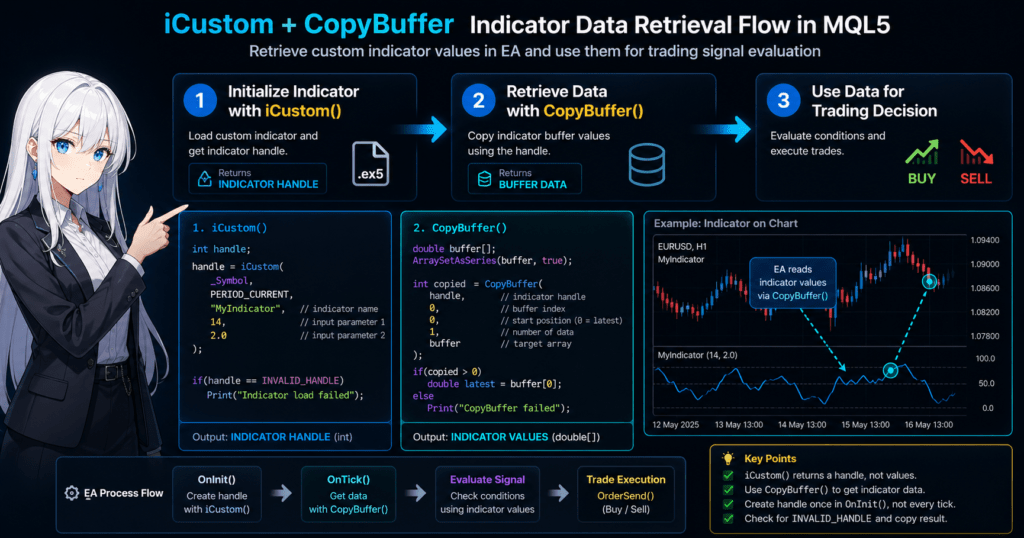
iCustom does not directly return an indicator value. It returns an indicator handle, which is an ID used to access the indicator instance. Actual values are retrieved later with CopyBuffer().
- Get an indicator handle with
iCustom - Get calculated values from the indicator buffer with
CopyBuffer()
1.1 Overview of iCustom
| Method | Details |
|---|---|
| Standard indicator functions | iMA, iRSI, iMACD, and others |
| Custom indicators | iCustom |
Standard indicators have dedicated functions, but custom or external indicators must be called with iCustom.
MQL5/Indicators/MyIndicator.ex5
int handle;

handle = iCustom(
   _Symbol,
   PERIOD_CURRENT,
   "MyIndicator"
);
This loads MyIndicator for the current symbol and timeframe, then stores its handle in handle.
1.2 Typical Uses
Typical uses include separating signal generation from trade execution, integrating external indicators, and keeping complex logic reusable and visible on the chart.
Indicator
↓
Signal calculation
↓
EA
↓
Trade execution
1.3 Basics to Know First
Before using iCustom, understand indicator handles, indicator buffers, and CopyBuffer(). A handle identifies the indicator instance. Buffers store calculated values such as main lines, signal lines, histograms, or arrow signals.
CopyBuffer(handle, buffer_index, start_pos, count, array);
Common mistakes are treating iCustom as a value-returning function, calling it on every tick, and specifying the wrong indicator path.
2. Basic Syntax and Parameters of iCustom
iCustom loads a custom indicator and returns its handle. If loading fails, the return value is INVALID_HANDLE.
int iCustom(
   string           symbol,
   ENUM_TIMEFRAMES  period,
   string           name,
   ...
);
2.1 Basic Example
int handle;

handle = iCustom(
   _Symbol,
   PERIOD_CURRENT,
   "MyIndicator"
);
| Argument | Details |
|---|---|
_Symbol | Current currency pair |
PERIOD_CURRENT | Current timeframe |
"MyIndicator" | Indicator file |
"MyIndicator" points to MQL5/Indicators/MyIndicator.ex5. The .ex5 extension is normally not needed.
2.2 symbol
The first argument is the symbol. Use _Symbol for the current chart or a literal symbol such as "EURUSD".
2.3 period
The second argument is the timeframe, such as PERIOD_M1, PERIOD_M5, PERIOD_H1, PERIOD_D1, or PERIOD_CURRENT.
iCustom(_Symbol, PERIOD_H1, "MyIndicator");
2.4 name
The third argument is the indicator file name. If the indicator is in a subfolder, specify it like "MyFolder/MyIndicator".
2.5 Indicator Parameters
Pass indicator input values after the indicator name in the exact order they are defined.
input int Period = 14;
input double Multiplier = 2.0;
int handle = iCustom(
   _Symbol,
   PERIOD_CURRENT,
   "MyIndicator",
   14,
   2.0
);
int handle = iCustom(_Symbol, PERIOD_CURRENT, "MyIndicator");

if(handle == INVALID_HANDLE)
{
   Print("Indicator load failed");
}
3. How to Retrieve Indicator Values with CopyBuffer()
The handle alone does not contain indicator values. Use CopyBuffer() to retrieve actual calculated values from a buffer.
int CopyBuffer(
   int       indicator_handle,
   int       buffer_num,
   int       start_pos,
   int       count,
   double    buffer[]
);
| Argument | Details |
|---|---|
| indicator_handle | Handle from iCustom |
| buffer_num | Buffer number |
| start_pos | Starting position |
| count | Number of values |
| buffer[] | Array to store values |
int handle;
double value[];

handle = iCustom(_Symbol, PERIOD_CURRENT, "MyIndicator");

ArraySetAsSeries(value,true);

CopyBuffer(handle,0,0,1,value);

double latest = value[0];
Buffer numbers depend on the indicator. For a MACD-style indicator, buffer 0 may be MACD, buffer 1 may be signal, and buffer 2 may be histogram. Always confirm the correct buffer.
CopyBuffer(handle,0,0,3,value);
With a series array, value[0] is the latest bar, value[1] is the previous bar, and value[2] is two bars ago.
int handle;
double buffer[];

int OnInit()
{
   handle = iCustom(_Symbol,PERIOD_CURRENT,"MyIndicator");

   if(handle == INVALID_HANDLE)
   {
      Print("Indicator load failed");
      return(INIT_FAILED);
   }

   ArraySetAsSeries(buffer,true);

   return(INIT_SUCCEEDED);
}

void OnTick()
{
   if(CopyBuffer(handle,0,0,2,buffer) <= 0)
      return;

   if(buffer[0] > buffer[1])
   {
      Print("Signal detected");
   }
}
Always set arrays with ArraySetAsSeries(buffer,true), verify the buffer number, check the return value, and allow for indicators that have not finished calculating yet.
4. Calling Indicators with Multiple Parameters
Many custom indicators define periods, thresholds, shifts, counts, or multipliers with input. In iCustom, values after the indicator name correspond to those input variables by order, not by name.
input int FastPeriod = 12;
input int SlowPeriod = 26;
input int SignalPeriod = 9;
int handle = iCustom(
   _Symbol,
   PERIOD_CURRENT,
   "MyIndicator",
   12,
   26,
   9
);
Match both order and type. This includes int, double, bool, string, and enumeration types such as ENUM_....
// Incorrect example
int handle = iCustom(_Symbol, PERIOD_CURRENT, "MyIndicator", true);
You generally cannot skip earlier parameters to set only a later parameter. Write all previous values in order.
input int InpPeriod = 14;
input double InpMultiplier = 2.0;
input bool InpUseFilter = true;

int handle;

int OnInit()
{
   handle = iCustom(
      _Symbol,
      PERIOD_CURRENT,
      "MyIndicator",
      InpPeriod,
      InpMultiplier,
      InpUseFilter
   );

   if(handle == INVALID_HANDLE)
   {
      Print("iCustom failed");
      return(INIT_FAILED);
   }

   return(INIT_SUCCEEDED);
}
This structure makes settings visible in the EA, easier to change during backtesting, and easier to compare with the indicator side.
5. How to Retrieve Indicator Buffers
The EA must know which buffer contains which value. iCustom does not explain the meaning of each buffer.
- Buffer 0: main line
- Buffer 1: signal line
- Buffer 2: arrow signal
- Buffer 3: auxiliary value
double MainBuffer[];
double SignalBuffer[];

int OnInit()
{
   SetIndexBuffer(0, MainBuffer, INDICATOR_DATA);
   SetIndexBuffer(1, SignalBuffer, INDICATOR_DATA);
   return(INIT_SUCCEEDED);
}
When source code is unavailable, check documentation, chart behavior, logs, and test output. External indicators can be hard to verify completely.
double val[];
ArraySetAsSeries(val, true);

if(CopyBuffer(handle, 0, 0, 1, val) <= 0)
{
   Print("CopyBuffer failed");
   return;
}

double current_value = val[0];
For arrow or signal indicators, check EMPTY_VALUE. A value may exist only on signal bars.
double sig[];
ArraySetAsSeries(sig, true);

if(CopyBuffer(handle, 1, 0, 1, sig) > 0)
{
   if(sig[0] != EMPTY_VALUE)
   {
      Print("シグナルあり");
   }
}
6. Common iCustom Errors and Fixes
Troubleshoot in this order: check whether iCustom returned INVALID_HANDLE, verify the path and arguments, check BarsCalculated(handle), check CopyBuffer(), and read the log.
int handle = iCustom(_Symbol, PERIOD_CURRENT, "MyIndicator");

if(handle == INVALID_HANDLE)
{
   Print("iCustom failed");
   return(INIT_FAILED);
}
INVALID_HANDLE is commonly caused by a wrong file name, wrong subfolder path, mismatched parameter count, wrong input order, or invalid resource reference.
cannot load custom indicator often means the specified name and actual location do not match. Check that the file is under MQL5/Indicators, subfolders are included, the extension is omitted, and the compiled file exists.
double vals[];
ArraySetAsSeries(vals, true);

if(BarsCalculated(handle) < 2)
   return;

if(CopyBuffer(handle, 0, 0, 2, vals) <= 0)
   return;
array out of range usually happens when the EA reads more elements than were copied or reads after CopyBuffer() failed.
void OnDeinit(const int reason)
{
   if(handle != INVALID_HANDLE)
      IndicatorRelease(handle);
}
7. Important Notes When Using iCustom
For stable live operation, create handles in OnInit(), confirm calculation completion, release handles, and keep symbol/timeframe handling consistent.
int handle = INVALID_HANDLE;

int OnInit()
{
   handle = iCustom(_Symbol, PERIOD_CURRENT, "MyIndicator");

   if(handle == INVALID_HANDLE)
   {
      Print("iCustom failed");
      return(INIT_FAILED);
   }

   return(INIT_SUCCEEDED);
}
Do not call CopyBuffer() before calculation is complete. This is especially important immediately after startup, after switching symbols or timeframes, with multi-timeframe references, and when history is not loaded.
if(BarsCalculated(handle) <= 0)
   return;
External indicators may have drawing buffers, judgment buffers, and auxiliary buffers. The visible chart display may not match the buffer the EA should read.
int copied = CopyBuffer(handle, 0, 0, 2, vals);

if(copied <= 0)
{
   Print("CopyBuffer failed");
   return;
}

Print("val0=", vals[0], " val1=", vals[1]);
8. Advanced Use of iCustom in EA Design
iCustom is most useful as a connection point between signal calculation and order processing. This separation improves testing, reproducibility, and maintenance.
- Custom indicator: calculates signals or judgment values
- EA: reads values with
iCustomandCopyBuffer(), then handles orders, exits, and money management
double buy_sig[];
ArraySetAsSeries(buy_sig, true);

if(CopyBuffer(handle, 0, 0, 1, buy_sig) > 0)
{
   if(buy_sig[0] != EMPTY_VALUE)
   {
      // 買いエントリー候補
   }
}
iCustom can also be used for filter indicators, such as trend direction, volatility thresholds, restricted trading hours, or abnormal-value checks.
int trend_handle;
int entry_handle;
int exit_handle;
Keep roles clear: entry, filter, and exit. Because automated trading involves market risk and environment-dependent behavior, verify the logic with backtesting, forward testing, and logs before live use.
9. FAQ: Common Questions About iCustom
9.1 What does iCustom return?
iCustom returns an indicator handle, not an indicator value. Use CopyBuffer() to retrieve actual values.
9.2 Where should iCustom be called?
Call it in OnInit(). Creating handles on every tick increases load and makes management unstable.
9.3 Why does CopyBuffer() fail?
Common causes include unfinished calculation, wrong buffer number, wrong array direction, insufficient history, or a failed handle.
9.4 How do you find the buffer number?
Check SetIndexBuffer(index, buffer) in the source code. If source is unavailable, use documentation, logs, and test output.
9.5 What is EMPTY_VALUE?
EMPTY_VALUE means no value exists for that bar. Many signal indicators use it on non-signal bars.
9.6 Can iCustom use another timeframe?
Yes. For example, iCustom(_Symbol, PERIOD_H1, "MyIndicator") references an H1 indicator, but update timing and history loading must be handled carefully.
9.7 Can iCustom be used with external indicators?
Yes, if the indicator is under MQL5/Indicators, parameters are passed in the correct order, and buffer numbers are understood.
9.8 Why does iCustom return INVALID_HANDLE?
It is usually caused by a wrong name, wrong path, mismatched input parameters, an uncompiled indicator, or an invalid resource specification.
if(handle == INVALID_HANDLE)
{
   Print("Indicator load failed");
}