- 1 Conclusion
- 2 1. What This Logic Does
- 3 2. Basic Concept
- 4 3. Common Design Patterns
- 5 4. Implementation Method
- 6 5. Sample Code
- 7 6. Comparison by Pattern
- 8 7. Situations Where Malfunctions Are Likely
- 9 8. What to Check in Backtesting
- 10 9. What to Check in Forward Testing
- 11 10. Notes for Live Operation
- 12 11. Improvements and Alternatives
- 13 12. Summary
- 14 FAQ
- 14.1 Q1. What is MQL5 tick processing optimization?
- 14.2 Q2. Should OnTick run every process every time?
- 14.3 Q3. Is it acceptable to run CopyBuffer on every tick?
- 14.4 Q4. What is the benefit of new-bar detection?
- 14.5 Q5. Does lighter tick processing improve EA performance?
- 14.6 Q6. What should be checked in backtesting?
- 14.7 Q7. What should be checked in forward testing?
- 14.8 Q8. Is OrderCheck necessary before placing an order?
Conclusion
MQL5 tick processing optimization is a design approach that organizes what an EA runs inside OnTick, reducing unnecessary calculations, duplicate orders, and excessive indicator reads.
When you separate per-tick processing, closed-bar processing, and interval-based processing, the EA’s behavior becomes easier to test and verify.
Indicator values should be handled by creating indicator handles in OnInit and using CopyBuffer in OnTick only when the values are actually needed.
However, making the processing lighter does not guarantee better trading performance. You still need to check execution differences, spreads, trading frequency, and drawdown through both backtesting and forward testing.
1. What This Logic Does
Conclusion:
MQL5 tick processing optimization is a design method for making an EA’s decision process lighter while clarifying when trade conditions are evaluated.
Instead of putting every process inside OnTick, you divide responsibilities by how often each process needs to run.
A tick is a price update event that occurs when a symbol’s price changes. In an MQL5 EA, OnTick is called when a new tick is received.
The key point of tick processing optimization is not simply increasing processing speed. The purpose is to make it clear when the EA checks the market, when it evaluates order conditions, and when it sends orders.
Definition:
Tick processing optimization is a design approach that reduces OnTick processing to the minimum necessary work and separates bar updates, signal checks, order management, and log output into suitable frequencies.
1.1 Processes That Should Run on Every Tick
Processes that strongly depend on price updates are suitable for per-tick execution.
- Getting the current price
- Checking the spread
- Monitoring sudden changes in open positions
- Checking part of the exit conditions
- Updating a trailing stop
However, not every EA needs exit management on every tick. If the logic runs on a closed-bar basis, exit checks may also be limited to bar updates in some cases.
1.2 Processes to Avoid Running on Every Tick
Heavy processes, or processes whose results usually do not change until a bar closes, may not need to run on every tick.
- Getting CopyBuffer values from multiple indicators
- Array calculations over long periods
- Batch scanning multiple symbols
- File output
- Excessive Print output
- Repeated checks of order entry conditions
In an MQL5 EA, how often OnTick is called changes greatly depending on market conditions. During highly liquid sessions, the same process can run many times in a short period, so process separation becomes important.
2. Basic Concept
Conclusion:
In tick processing optimization, processes are divided into “every tick,” “new bar,” “fixed interval,” and “right before order placement.”
This separation keeps EA load under control and makes it easier to verify the reproducibility of trading decisions.
An MQL5 EA is mainly built around OnInit, OnTick, and OnDeinit. Indicator handles are created in OnInit and released in OnDeinit when the EA ends. In OnTick, only the checks needed when prices update are executed.
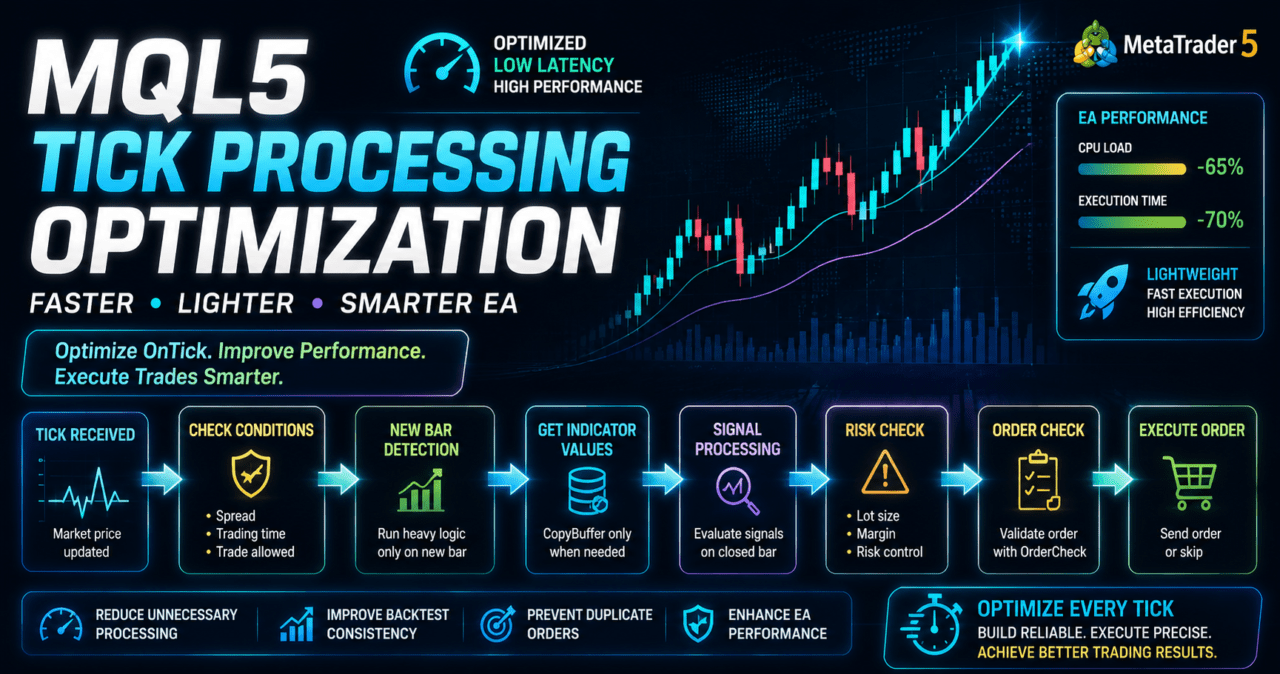
The basic flow of tick processing optimization can be organized as follows.
Receive tick
↓
Check spread and trading conditions
↓
Check whether a new bar has started
↓
Get indicator values only when needed
↓
Check filters
↓
Check signals
↓
Check risk
↓
Run pre-order checks
↓
Send order or skip trade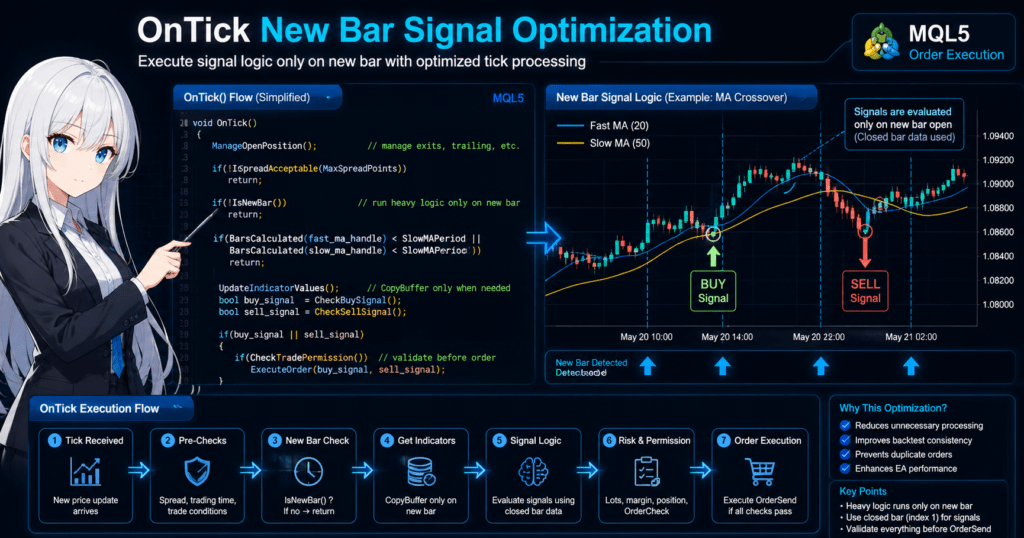
2.1 Why Use Closed-Bar Logic
Closed-bar evaluation makes signal reproducibility easier to verify. A bar that is still forming changes with each price update, so the timing of condition checks can differ between backtesting and live operation.
When using a moving average, ATR, or similar indicator, using the previous closed bar instead of the latest bar makes condition changes easier to track. However, in short-term trading, this approach can delay responses.
2.2 Reducing the Number of Processes Is Not Enough
Simply reducing the number of processes does not improve EA quality. The important point is to reduce only unnecessary processing without losing the information needed for trading decisions.
For example, entry checks may be sufficient only on a new bar, but sudden spread expansion or management of existing positions may be better checked on every tick.
3. Common Design Patterns
Conclusion:
The common patterns for tick processing optimization are new-bar detection, interval-based control, delayed indicator reads, and duplicate order prevention.
Depending on the EA’s purpose, several patterns are usually combined.
When organizing tick processing, separate the trading logic from execution control. The trading logic determines whether conditions are met, while execution control decides whether that check should run now.
3.1 Check Signals Only on a New Bar
New-bar detection is one of the easiest methods to use in a closed-bar EA. It stores the time of the previously checked bar and runs the signal check only when the current bar time changes.
This method makes it easier to avoid the problem of meeting entry conditions multiple times within the same bar.
3.2 Process at Fixed Second Intervals
Fixed-interval control is suitable for monitoring tasks that do not need to run on every tick. By using TimeCurrent, the EA checks the difference from the previous processing time and runs the process only when the specified number of seconds has passed.
This method is useful for multi-symbol monitoring and log output control. However, second-based control does not run during periods when no ticks arrive. If strict time-based processing is required, consider using OnTimer.
3.3 Limit How Often Indicator Values Are Retrieved
In MQL5, many indicator functions do not return values directly. Instead, the usual flow is to create a handle and retrieve values with CopyBuffer.
Create indicator handles once in OnInit, and avoid recreating them every time OnTick runs. Creating handles on every tick makes processing heavier and management more complicated.
3.4 Prevent Duplicate Order Submission
Because OnTick can be called many times in a short period, there is a risk of repeatedly calling OrderSend while conditions remain true.
Before placing an order, check existing positions, pending orders, tradable hours, spread, lot limits, and margin. Running OrderCheck before sending the order also makes it easier to detect problems before execution.
4. Implementation Method
Conclusion:
When optimizing tick processing in MQL5, prepare resources in OnInit, keep OnTick control lightweight, and run heavy checks only when a new bar starts.
Use indicator values only after checking how many values CopyBuffer successfully retrieved.
In the implementation, separate the following responsibilities.
- OnInit: Create indicator handles and set initial values
- OnTick: Control processing when ticks are received
- IsNewBar: Detect a new bar
- UpdateIndicatorValues: Retrieve required indicator values
- CheckSignal: Check trading signals
- CheckTradePermission: Check conditions before placing an order
- OnDeinit: Release indicator handles
4.1 Basic New-Bar Detection
To detect a new bar, get the start time of the current bar and compare it with the previously saved time.
bool IsNewBar()
{
   static datetime last_bar_time = 0;
   datetime current_bar_time = iTime(_Symbol, _Period, 0);

   if(current_bar_time == 0)
   {
      return false;
   }

   if(current_bar_time != last_bar_time)
   {
      last_bar_time = current_bar_time;
      return true;
   }

   return false;
}
This function returns true only on the first tick after the bar changes. In closed-bar signal checks, this is the timing where the EA uses indicator values from the previous bar.
4.2 Check the Spread First
When the spread is wide, even the same signal can produce worse trading results. Checking the spread before entry evaluation makes it easier to avoid orders outside the intended conditions.
bool IsSpreadAcceptable(const int max_spread_points)
{
   long spread = 0;

   if(!SymbolInfoInteger(_Symbol, SYMBOL_SPREAD, spread))
   {
      Print("Failed to get spread");
      return false;
   }

   return (spread <= max_spread_points);
}
The acceptable spread value depends on the symbol, timeframe, and trading logic. Even when using a fixed value, you need to check its behavior in both backtesting and forward testing.
5. Sample Code
Conclusion:
The following code is a closed-bar evaluation example using moving averages.
In OnTick, CopyBuffer runs only when a new bar starts, and the spread and OrderCheck are checked before order placement.
This sample is a minimal structure for testing. In live operation, also check symbol specifications, account type, existing positions, trading hours, lot limits, stop levels, and freeze levels.
#property strict

input int FastMAPeriod = 20;
input int SlowMAPeriod = 50;
input int MaxSpreadPoints = 30;
input double FixedLot = 0.10;

int fast_ma_handle = INVALID_HANDLE;
int slow_ma_handle = INVALID_HANDLE;

int OnInit()
{
   fast_ma_handle = iMA(_Symbol, _Period, FastMAPeriod, 0, MODE_SMA, PRICE_CLOSE);
   slow_ma_handle = iMA(_Symbol, _Period, SlowMAPeriod, 0, MODE_SMA, PRICE_CLOSE);

   if(fast_ma_handle == INVALID_HANDLE || slow_ma_handle == INVALID_HANDLE)
   {
      Print("Failed to create moving average handle");
      return INIT_FAILED;
   }

   return INIT_SUCCEEDED;
}

void OnDeinit(const int reason)
{
   if(fast_ma_handle != INVALID_HANDLE)
   {
      IndicatorRelease(fast_ma_handle);
   }

   if(slow_ma_handle != INVALID_HANDLE)
   {
      IndicatorRelease(slow_ma_handle);
   }
}

void OnTick()
{
   ManageOpenPosition();

   if(!IsSpreadAcceptable(MaxSpreadPoints))
   {
      return;
   }

   if(!IsNewBar())
   {
      return;
   }

   if(BarsCalculated(fast_ma_handle) < SlowMAPeriod ||
      BarsCalculated(slow_ma_handle) < SlowMAPeriod)
   {
      Print("Indicator bars are not ready");
      return;
   }

   double fast_ma[];
   double slow_ma[];
   ArraySetAsSeries(fast_ma, true);
   ArraySetAsSeries(slow_ma, true);

   int fast_copied = CopyBuffer(fast_ma_handle, 0, 0, 3, fast_ma);
   int slow_copied = CopyBuffer(slow_ma_handle, 0, 0, 3, slow_ma);

   if(fast_copied < 3 || slow_copied < 3)
   {
      Print("CopyBuffer failed or not enough data");
      return;
   }

   const int closed_bar = 1;
   const int previous_closed_bar = 2;

   bool buy_signal = (fast_ma[previous_closed_bar] <= slow_ma[previous_closed_bar] &&
                      fast_ma[closed_bar] > slow_ma[closed_bar]);
   bool sell_signal = (fast_ma[previous_closed_bar] >= slow_ma[previous_closed_bar] &&
                       fast_ma[closed_bar] < slow_ma[closed_bar]);

   if(HasOpenPosition())
   {
      return;
   }

   if(buy_signal)
   {
      SendMarketOrder(ORDER_TYPE_BUY);
   }
   else if(sell_signal)
   {
      SendMarketOrder(ORDER_TYPE_SELL);
   }
}

bool IsNewBar()
{
   static datetime last_bar_time = 0;
   datetime current_bar_time = iTime(_Symbol, _Period, 0);

   if(current_bar_time == 0)
   {
      return false;
   }

   if(current_bar_time != last_bar_time)
   {
      last_bar_time = current_bar_time;
      return true;
   }

   return false;
}

bool IsSpreadAcceptable(const int max_spread_points)
{
   long spread = 0;

   if(!SymbolInfoInteger(_Symbol, SYMBOL_SPREAD, spread))
   {
      Print("Failed to get spread");
      return false;
   }

   return (spread <= max_spread_points);
}

bool HasOpenPosition()
{
   return PositionSelect(_Symbol);
}

void ManageOpenPosition()
{
   if(!PositionSelect(_Symbol))
   {
      return;
   }

   // This sample keeps position management minimal.
   // Stop loss, take profit, and trailing logic should be designed separately.
}

bool NormalizeLot(double &lot)
{
   double min_lot = SymbolInfoDouble(_Symbol, SYMBOL_VOLUME_MIN);
   double max_lot = SymbolInfoDouble(_Symbol, SYMBOL_VOLUME_MAX);
   double lot_step = SymbolInfoDouble(_Symbol, SYMBOL_VOLUME_STEP);

   if(min_lot <= 0.0 || max_lot <= 0.0 || lot_step <= 0.0)
   {
      Print("Invalid volume settings");
      return false;
   }

   lot = MathMax(min_lot, MathMin(max_lot, lot));
   lot = MathFloor(lot / lot_step) * lot_step;
   lot = NormalizeDouble(lot, 2);

   return (lot >= min_lot && lot <= max_lot);
}

bool SendMarketOrder(const ENUM_ORDER_TYPE order_type)
{
   double lot = FixedLot;

   if(!NormalizeLot(lot))
   {
      return false;
   }

   double price = 0.0;

   if(order_type == ORDER_TYPE_BUY)
   {
      price = SymbolInfoDouble(_Symbol, SYMBOL_ASK);
   }
   else if(order_type == ORDER_TYPE_SELL)
   {
      price = SymbolInfoDouble(_Symbol, SYMBOL_BID);
   }
   else
   {
      return false;
   }

   if(price <= 0.0)
   {
      Print("Invalid order price");
      return false;
   }

   MqlTradeRequest request;
   MqlTradeResult result;
   MqlTradeCheckResult check;
   ZeroMemory(request);
   ZeroMemory(result);
   ZeroMemory(check);

   request.action = TRADE_ACTION_DEAL;
   request.symbol = _Symbol;
   request.volume = lot;
   request.type = order_type;
   request.price = price;
   request.deviation = 20;
   request.type_filling = ORDER_FILLING_FOK;

   if(!OrderCheck(request, check))
   {
      Print("OrderCheck failed: ", GetLastError());
      return false;
   }

   if(check.retcode != TRADE_RETCODE_DONE)
   {
      Print("OrderCheck retcode: ", check.retcode);
      return false;
   }

   if(!OrderSend(request, result))
   {
      Print("OrderSend failed: ", GetLastError());
      return false;
   }

   if(result.retcode != TRADE_RETCODE_DONE)
   {
      Print("OrderSend retcode: ", result.retcode);
      return false;
   }

   return true;
}
5.1 Key Points in the Code
In this code, the indicator handles are created in OnInit, and CopyBuffer is called only when the bar changes inside OnTick.
CopyBuffer retrieves three values. Because the arrays are handled as time series, index 0 is the forming bar, index 1 is the most recent closed bar, and index 2 is the closed bar before that.
5.2 Notes on Order Processing
Order processing uses MqlTradeRequest, MqlTradeResult, and MqlTradeCheckResult. Running OrderCheck before OrderSend makes it easier to detect insufficient margin or invalid order conditions.
The sample uses a fixed lot size, but live operation requires lot calculation that accounts for balance, equity, stop-loss distance, tick value, tick size, minimum lot, maximum lot, and lot step.
6. Comparison by Pattern
Conclusion:
In tick processing optimization, choose processing control patterns according to the EA’s purpose.
Closed-bar, per-tick, and interval-based methods each have advantages and weaknesses.
| Method | Advantages | Disadvantages | Best Use Cases | Implementation Difficulty | Over-Optimization Risk |
|---|---|---|---|---|---|
| New-bar detection | Easy to verify signal reproducibility | Response is delayed until the bar closes | Moving average crosses, closed-bar filters | Low | Low |
| Per-tick evaluation | Can respond quickly to price changes | Duplicate orders and higher load are more likely | Trailing stops, sudden-change monitoring | Medium | Medium |
| Fixed-interval evaluation | Easy to control log output and monitoring tasks | Does not run when no ticks arrive | Multi-symbol monitoring, light periodic checks | Medium | Low |
| Using OnTimer together | Easy to separate time-based processing | State sharing with OnTick can become complex | Time management, periodic aggregation | Medium | Medium |
| Handle reuse | Reduces waste outside CopyBuffer calls | Initialization and release must be managed | Indicator-based EAs in general | Low | Low |
You do not need to fix the EA to a single processing pattern. For example, using per-tick checks for spread, new-bar checks for signals, and fixed-interval processing for summary logs can make the EA structure easier to organize.
7. Situations Where Malfunctions Are Likely
Conclusion:
Tick processing optimization often causes problems when duplicate orders, forming-bar values, insufficient CopyBuffer data, or account-type differences are overlooked.
The lighter the processing becomes, the more important it is not to omit necessary checks.
7.1 Placing Multiple Orders on the Same Bar
OnTick is called many times within the same bar. If the EA does not check whether an order has already been placed, it may send multiple orders from the same signal.
In a netting account, positions for the same symbol are combined. In a hedging account, multiple positions can be held. Position-check logic must be designed according to the account type.
7.2 Signals Change When Using the Latest Bar Value
Using index 0 in an indicator array means using the value of the forming bar. Because the forming bar changes on every tick, signals may appear and disappear.
In closed-bar EAs, using index 1 or later is the common design.
7.3 Not Checking the CopyBuffer Return Value
If processing continues even when CopyBuffer retrieves fewer values than expected, the EA may make decisions using unset values or old values.
When using CopyBuffer, confirm that the return value is at least the required number of bars. Check BarsCalculated as needed.
7.4 Too Much Log Output
Printing large amounts of output on every tick increases the load on the tester or runtime environment. Logs are easier to review when limited to errors, state changes, or fixed intervals.
8. What to Check in Backtesting
Conclusion:
In backtesting, check not only processing speed but also trade count, maximum drawdown, spread conditions, and parameter dependency.
Changing tick processing can change entry frequency and evaluation timing.
Check the following items in backtesting.
- Total profit and loss
- Maximum drawdown
- Win rate
- Risk-reward ratio
- Number of trades
- Consecutive losses
- Spread conditions
- Period dependency
- Parameter dependency
- Number of signal occurrences
- Number of order failures
- Processing time in the tester
8.1 Watch for Changes in Trade Count
When tick processing is changed to new-bar detection, the number of trades may decrease even with the same logic. Check whether the decrease is due to preventing duplicate orders or missing required signals.
8.2 Test Different Spread Conditions
An EA that strongly depends on spread conditions is more likely to show unstable performance in live operation. Check behavior not only with a fixed spread but also under wider spread conditions.
8.3 Check Parameter Dependency
If results are extremely good only for one specific moving average period, spread limit, or processing interval, over-optimization may be present. Check whether nearby parameter values also remain stable.
Backtest results do not guarantee future profits. Backtesting is a verification step for checking the reproducibility and weaknesses of the logic.
9. What to Check in Forward Testing
Conclusion:
In forward testing, check the differences between the backtest and the live execution environment.
Pay particular attention to execution differences, spread expansion, VPS conditions, and broker specifications.
Check the following items in forward testing.
- Execution differences
- Behavior when spreads widen
- Trading frequency
- Drawdown
- Deviation from backtest results
- Broker differences
- Stability in a VPS environment
- Order failure logs
- Whether CopyBuffer retrieval failures occur
- Whether processing delays occur
9.1 Check Differences in Tick Frequency
Tick frequency and spread conditions may differ between backtesting and a real-time environment. In an EA that depends on per-tick processing, this difference can affect trading decisions.
9.2 Check Stability in a VPS Environment
When running an EA on a VPS, check network latency, terminal load, uptime, and log growth. Even an EA that looks lightweight can become heavier when it handles multiple symbols or multiple timeframes.
9.3 Check Order Failure Logs
Logging the return values from OrderCheck and OrderSend makes it easier to identify why an order was skipped. Causes can include spread, margin, execution type, trading hours, and lot limits.
10. Notes for Live Operation
Conclusion:
In live operation, even if tick processing is lightweight, results can change because of spread, execution delays, slippage, and broker specifications.
When an EA runs outside the tested conditions, it may behave differently from expectations.
Tick processing optimization is a design method for improving the execution quality of an EA. Profit and loss outcomes depend on the logic, market environment, trading conditions, and risk management.
10.1 Handling Spread Expansion
During major economic releases or low-liquidity periods, spreads may widen. Entering trades while spreads are wide can easily worsen the risk-reward balance.
10.2 Differences in Execution Conditions
Demo accounts and live accounts may have different execution conditions. Use forward testing to check order speed, slippage, execution type, and rejection conditions.
10.3 Leverage and Drawdown
The higher the leverage, the larger the account impact from the same price movement can become. You need to define acceptable drawdown and design lot calculation and stop conditions.
10.4 Do Not Skip Pre-Order Checks
If you skip OrderCheck or lot-limit checks only to make processing lighter, it becomes easier to miss the cause of order failures. Minimum lot, maximum lot, lot step, margin, stop level, and freeze level should be checked for each symbol.
11. Improvements and Alternatives
Conclusion:
To improve tick processing optimization, separate processing frequencies, introduce state management, control logging, and separate lot calculation.
The more clearly trading logic and execution control are separated, the easier the EA is to test and modify.
11.1 Introduce State Management
Making the EA’s state explicit helps prevent duplicate orders and unnecessary processing.
Waiting
↓
Checking signal
↓
Running pre-order checks
↓
Order sent
↓
Managing position
↓
Checking stop conditions
With state management, even if OnTick is called many times, the EA can run only the process that matches its current state.
11.2 Separate Lot Calculation
Lot calculation should be treated as a separate function from signal evaluation. Fixed lot, balance-proportional sizing, risk-percentage sizing, and volatility-adjusted sizing require different input values.
| Method | Advantages | Disadvantages | Best Use Cases |
|---|---|---|---|
| Fixed lot | Simple to implement | Hard to adapt to account balance changes | Early-stage testing |
| Balance-proportional sizing | Easy to adjust according to capital | Does not easily reflect stop-loss distance | Adjusting to account size |
| Risk-percentage sizing | Easy to calculate from acceptable loss | Requires handling tick value and stop-loss distance | Designs that prioritize risk management |
| Volatility-adjusted sizing | Can reflect market movement | Can become highly parameter-dependent | Designs using ATR or similar indicators |
11.3 Use OnTimer
OnTimer can be used when you want to run processing at fixed intervals. Because it can use time events even when no OnTick event arrives, it is suitable for monitoring and aggregation.
However, if OnTick and OnTimer update the same state, the design must avoid processing conflicts.
12. Summary
Conclusion:
In MQL5 tick processing optimization, the important point is not only making OnTick lighter but also clarifying the timing of trading decisions.
Combining new-bar detection, CopyBuffer retrieval control, pre-order checks, and state management makes EA testing and operational monitoring easier.
In an MQL5 EA, create indicator handles in OnInit and retrieve values with CopyBuffer only when needed. Instead of running heavy processing on every tick, separate responsibilities by processing frequency so the EA structure becomes clearer.
Live operation does not always match backtest conditions. Results can change because of spread, execution delays, slippage, account type, broker specifications, and the VPS environment. Before live operation, reproducibility must be checked through both backtesting and forward testing.
FAQ
Q1. What is MQL5 tick processing optimization?
MQL5 tick processing optimization is a design approach that organizes what an EA runs inside OnTick and executes heavy checks only when needed. It usually combines new-bar detection, CopyBuffer retrieval control, and duplicate order prevention.
Q2. Should OnTick run every process every time?
No. It is usually easier to manage an EA when price monitoring and position management run on every tick, signal checks run only on a new bar, and log output runs at fixed intervals.
Q3. Is it acceptable to run CopyBuffer on every tick?
CopyBuffer can run on every tick, but in a closed-bar EA it is often enough to retrieve values only when a new bar starts. After retrieval, check the return value and stop the decision process if there are not enough values.
Q4. What is the benefit of new-bar detection?
New-bar detection helps prevent repeated signal checks within the same bar. It also makes comparisons between backtesting and forward testing easier when the EA uses closed-bar logic.
Q5. Does lighter tick processing improve EA performance?
Lighter tick processing does not necessarily improve trading performance. Optimization improves execution structure, while trading results still depend on the logic, market conditions, spread, execution quality, and risk management.
Q6. What should be checked in backtesting?
Backtesting should check total profit and loss, maximum drawdown, win rate, risk-reward ratio, trade count, spread conditions, and parameter dependency. After changing tick processing, also check changes in trade count and signal timing.
Q7. What should be checked in forward testing?
Forward testing should check execution differences, behavior during spread expansion, trading frequency, drawdown, deviation from backtest results, broker differences, and VPS stability.
Q8. Is OrderCheck necessary before placing an order?
For an EA that places orders, using OrderCheck before OrderSend makes it easier to detect invalid order conditions. It can help identify problems with margin, lot size, execution type, or symbol specifications before sending the order.