
- 1 1. What Is iBands in MQL5?
- 2 2. iBands Syntax and Parameters
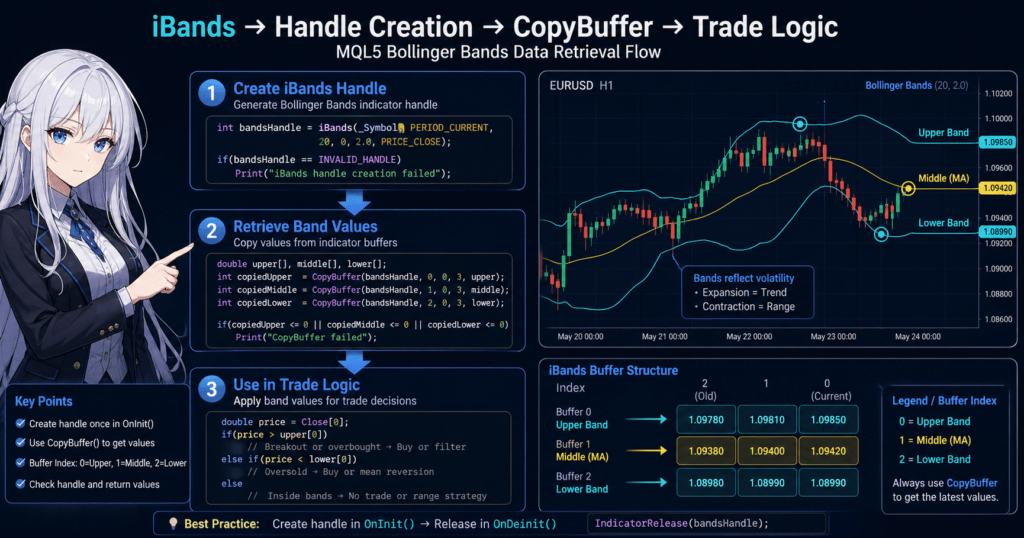
- 3 3. How to Get Bollinger Band Values with CopyBuffer
- 4 4. Implementation Examples for Using iBands in an EA
- 4.1 4.1 Basic Example of Mean Reversion Logic
- 4.2 4.2 Basic Example of Breakout Logic
- 4.3 4.3 Volatility Detection Using Band Width
- 4.4 5.2 Why CopyBuffer Fails
- 4.5 5.3 Mixing Up Buffer Numbers
- 4.6 5.4 Confusing an Unclosed Bar with a Closed Bar
- 4.7 6.2 Using Buffer Numbers Without Clear Understanding
- 4.8 6.3 Leaving Array Handling Unclear
- 4.9 7.2 How Do iBands Buffer Numbers Map to Each Line?
- 4.10 7.3 Where Should iBands Be Created?
- 4.11 7.4 What Does start_pos in CopyBuffer Mean?
- 4.12 7.5 Why Does CopyBuffer Fail?
- 4.13 7.6 Does Price Always Reverse After Touching a Bollinger Band?
- 4.14 7.7 How Do You Calculate Band Width?
- 4.15 7.8 What Is the Difference Between iBands and iCustom?
1. What Is iBands in MQL5?
iBands is the standard MQL5 function for getting Bollinger Bands.
In MetaTrader 5 (MT5), when an EA (Expert Advisor) or script needs to read technical indicator values, it first creates an indicator handle, which is an ID used to access the calculated indicator data. The EA then reads the data through that handle.
The usual workflow is as follows.
- Create an indicator handle for Bollinger Bands with
iBands - Get the band values with
CopyBuffer - Use the retrieved values in trading logic
This structure is very different from how indicators are accessed in MQL4.
In MQL4, you could get a value by calling the indicator function directly. In MQL5, the process has the following two steps.
- Create a handle
- Get values from the buffer
If beginners do not understand this difference, they often run into the following problems.
Common mistakes
- Assuming that calling
iBandsalone returns the band values - Trying to get band values without using
CopyBuffer - Creating
iBandson every tick insideOnTick(), which makes the EA slower
The third mistake is especially likely to reduce EA performance.
As a basic rule, the indicator handle should usually be created only once in OnInit().
1.1 Basics of Bollinger Bands
Bollinger Bands are a technical indicator that visualizes price volatility.
They were developed by John Bollinger and are widely used in trading.
Bollinger Bands consist of the following three lines.
| Line | Description |
|---|---|
| Middle line | Moving average, usually SMA |
| Upper band | Moving average + standard deviation |
| Lower band | Moving average – standard deviation |
Here, standard deviation is a statistical value that shows how far price is from its average.
In other words, Bollinger Bands have the following characteristics.
- Higher market volatility -> the bands widen
- Quieter market conditions -> the bands narrow
Traders use these characteristics to make decisions such as the following.
Typical uses
- Near the upper band -> potentially overbought
- Near the lower band -> potentially oversold
- Band expansion -> possible trend development
- Band contraction -> range-bound market
However, these are not absolute buy or sell signals.
Behavior can change greatly depending on the market environment and timeframe, so in EA development, Bollinger Bands are commonly used together with other indicators.
1.2 Main Uses in EA Development
The purpose of using iBands in MQL5 is to implement trading logic based on Bollinger Bands.
In EAs, it is mainly used for the following purposes.
Mean Reversion Strategy
When price reaches the outside of a band, this method treats the move as overextended and looks for a reversal.
Example
- Price reaches the upper band -> sell
- Price reaches the lower band -> buy
This strategy is often effective in range-bound markets, but it may not work during strong trends.
Breakout Strategy
When price breaks outside a band, this method treats it as the start of a trend.
Example
- Price breaks above the upper band -> buy
- Price breaks below the lower band -> sell
This approach is often used in trend-following EAs.
Volatility Detection
By calculating band width, you can judge the market state.
Example
- Narrow band width -> quiet market
- Expanding band width -> possible trend start
This information can be used for purposes such as the following.
- Trade entry timing
- Lot size adjustment
- Trade suspension filters
Important Note for Beginners
Bollinger Bands are not an indicator that shows direction.
They only show the range of price movement.
For that reason, the following misunderstandings are common.
Common misunderstandings
- Touching the upper band = price will always fall
- Touching the lower band = price will always rise
In reality, during a strong trend, price can continue moving along a band.
EA logic often combines Bollinger Bands with other indicators such as RSI or ATR.
2. iBands Syntax and Parameters
iBands is a function that creates a handle, or ID, for the Bollinger Bands indicator.
When this function runs, MetaTrader creates the internal Bollinger Bands calculation indicator and returns its handle as an integer value.
This handle is then used with CopyBuffer to get the band values.
The basic MQL5 syntax is as follows.
int iBands(
   string           symbol,
   ENUM_TIMEFRAMES  period,
   int              bands_period,
   int              bands_shift,
   double           deviation,
   ENUM_APPLIED_PRICE applied_price
);
Return value
- Success: indicator handle, an integer of 0 or greater
- Failure:
INVALID_HANDLE
For that reason, EAs usually check for errors as shown below.
int bandsHandle = iBands(_Symbol, PERIOD_CURRENT, 20, 0, 2.0, PRICE_CLOSE);

if(bandsHandle == INVALID_HANDLE)
{
   Print("Failed to create iBands");
}
If you do not perform this error check, the later CopyBuffer call may produce an unclear error.
2.1 Meaning of Each Parameter
iBands has six parameters.
Understanding each one is very important in EA development.
| Parameter | Description |
|---|---|
| symbol | Currency pair, such as EURUSD |
| period | Timeframe |
| bands_period | Moving average period |
| bands_shift | Band shift |
| deviation | Standard deviation |
| applied_price | Applied price |
Each parameter is explained below.
symbol: Currency Pair
This specifies the currency pair used for indicator calculation.
Example
_Symbol
This means the currency pair of the current chart.
Example
iBands("EURUSD", PERIOD_CURRENT, 20, 0, 2.0, PRICE_CLOSE);
In a multi-currency EA, you can also specify a different currency pair.
Notes
- If the symbol name is wrong, the result will be INVALID_HANDLE
- Some brokers add suffixes such as EURUSD.m
period: Timeframe
This is the timeframe used to calculate Bollinger Bands.
Main options
PERIOD_CURRENT
PERIOD_M1
PERIOD_M5
PERIOD_M15
PERIOD_H1
PERIOD_D1
Example
PERIOD_H1
This means Bollinger Bands on the 1-hour timeframe.
Common mistakes
- Confusing the EA chart timeframe with the indicator timeframe
- Using multi-timeframe processing without understanding it
For beginners, it is safer to start with
PERIOD_CURRENT
bands_period: Moving Average Period
This is the moving average period for the middle line.
Example
20
This is a common Bollinger Bands setting.
Typical settings
| Period | Use |
|---|---|
| 20 | General use |
| 14 | Short-term trading |
| 50 | Medium-term trend |
The smaller the period, the faster the response, but the more noise it creates.
bands_shift: Band Shift
This is the value that shifts the indicator display position to the right.
Usually, use
0
This value is mainly for chart display purposes and is rarely used in EA logic.
For beginners, keeping it fixed at 0 is fine.
deviation: Standard Deviation
This is the standard deviation multiplier that determines band width.
Typical example
2.0
This is the most common setting.
Example
| deviation | Characteristic |
|---|---|
| 1.0 | Narrow bands |
| 2.0 | Standard |
| 3.0 | Very wide |
The larger the value, the wider the bands become.
applied_price: Applied Price
This is the type of price used for indicator calculation.
Main values
PRICE_CLOSE
PRICE_OPEN
PRICE_HIGH
PRICE_LOW
PRICE_MEDIAN
PRICE_TYPICAL
PRICE_WEIGHTED
Beginners usually use
PRICE_CLOSE
This creates Bollinger Bands based on closing prices.
2.2 Basic Code for Using iBands
In an EA, you usually create the handle in OnInit().
Example
int bandsHandle;

int OnInit()
{
   bandsHandle = iBands(
      _Symbol,
      PERIOD_CURRENT,
      20,
      0,
      2.0,
      PRICE_CLOSE
   );

   if(bandsHandle == INVALID_HANDLE)
   {
      Print("iBands creation error");
      return(INIT_FAILED);
   }

   return(INIT_SUCCEEDED);
}
This method allows the EA to create the indicator only once when the EA starts.
Common Mistakes
Here are common mistakes beginners make.
Creating iBands on Every OnTick()
// Bad example
void OnTick()
{
   int handle = iBands(...);
}
This creates the indicator on every tick, which makes the EA heavier.
Not Checking for Errors
int handle = iBands(...);
With only this code, you will not notice if creation fails.
Not Checking the Handle Before CopyBuffer
If the handle is invalid, it can cause errors such as
array out of range
3. How to Get Bollinger Band Values with CopyBuffer
iBands is a function that creates the Bollinger Bands calculation indicator, but this function alone cannot retrieve the band values.
To actually get the values, you must use the CopyBuffer function to copy data from the indicator buffer.
In MQL5, indicators internally have multiple buffers, or data arrays.
For Bollinger Bands, the following three lines are stored in separate buffers.
| Buffer Number | Description |
|---|---|
| 0 | Middle Band / Moving Average / BASE_LINE |
| 1 | Upper Band / UPPER_BAND |
| 2 | Lower Band / LOWER_BAND |
By specifying this buffer number when calling CopyBuffer, the EA can retrieve any band value.
3.1 Basic Syntax of CopyBuffer
The basic syntax of CopyBuffer is as follows.
int CopyBuffer(
   int       indicator_handle,
   int       buffer_num,
   int       start_pos,
   int       count,
   double    buffer[]
);
The meaning of each parameter is as follows.
| Parameter | Description |
|---|---|
| indicator_handle | The handle obtained from iBands |
| buffer_num | Buffer number |
| start_pos | Starting position |
| count | Number of data points to retrieve |
| buffer | Array that stores the data |
Return value
- Number of copied elements
- -1 on failure
Therefore, in a real EA, checking the return value is important.
3.2 Code Example for Getting the Upper Band
First, here is an example of getting the upper band.
double upperBand[];

if(CopyBuffer(bandsHandle, 1, 0, 1, upperBand) < 0)
{
   Print("CopyBuffer error");
}
This code means the following.
| Parameter | Meaning |
|---|---|
| bandsHandle | iBands handle |
| 1 | Upper band |
| 0 | Latest bar |
| 1 | Get one value |
You can read the result as follows.
double upper = upperBand[0];
3.3 How to Get the Lower Band and Middle Line
You can get the middle line and lower band in the same way.
Middle Line: Moving Average
double middleBand[];

CopyBuffer(bandsHandle, 0, 0, 1, middleBand);
Lower Band
double lowerBand[];

CopyBuffer(bandsHandle, 2, 0, 1, lowerBand);
3.4 Practical Code Example
In an EA, you usually retrieve all three bands at the same time.
double middle[1];
double upper[1];
double lower[1];

if(CopyBuffer(bandsHandle,0,0,1,middle) < 0) return;
if(CopyBuffer(bandsHandle,1,0,1,upper) < 0) return;
if(CopyBuffer(bandsHandle,2,0,1,lower) < 0) return;

double middleBand = middle[0];
double upperBand  = upper[0];
double lowerBand  = lower[0];
This lets you use all three Bollinger Band lines inside the EA.
3.5 Common Mistakes and Notes
CopyBuffer is one of the areas where beginners most often get stuck.
The following mistakes are especially common.
Not Allocating Array Size
The following code is risky.
double upper[];

CopyBuffer(handle,1,0,1,upper);
If the array size is not allocated, an error may occur.
Safer method
double upper[1];
Or
ArrayResize(upper,1);
Using the Wrong Buffer Number
This is a point that often confuses beginners.
| Buffer | Description |
|---|---|
| 0 | Middle line |
| 1 | Upper band |
| 2 | Lower band |
If you get this order wrong, the logic breaks completely.
Data Is Not Ready Yet
Immediately after an EA starts, indicator calculation may not be complete yet.
In that case, CopyBuffer returns -1.
Safe handling
if(CopyBuffer(...) <= 0)
   return;
Confusing the Latest Bar with the Closed Bar
start_pos = 0 means the currently forming bar.
For that reason, EA logic may use the following distinction.
| start_pos | Meaning |
|---|---|
| 0 | Latest bar |
| 1 | Closed bar |
Trading logic often uses the closed bar, position 1.
4. Implementation Examples for Using iBands in an EA
iBands is not simply a function for displaying Bollinger Bands.
In an EA, it is used as input for mechanically judging trading conditions by comparing retrieved band values with the current price.
However, Bollinger Bands are not a universal trading signal by themselves.
In practice, they are often used for separate roles such as the following.
- Mean reversion judgment
- Breakout judgment
- Judging quiet or volatile market conditions
- Entry-blocking filters
This section covers the two most basic patterns so beginners can understand them easily.
- A mean reversion type that looks for reversal when price reaches a band
- A breakout type that follows movement when price breaks a band
4.1 Basic Example of Mean Reversion Logic
In mean reversion logic, when price reaches the outside of a band, the EA looks for a pullback from an overextended move.
A typical example is as follows.
- Current price is at or above the upper band -> consider selling
- Current price is at or below the lower band -> consider buying
The code example looks like this.
double upper[1];
double lower[1];

if(CopyBuffer(bandsHandle, 1, 0, 1, upper) <= 0) return;
if(CopyBuffer(bandsHandle, 2, 0, 1, lower) <= 0) return;

double ask = SymbolInfoDouble(_Symbol, SYMBOL_ASK);
double bid = SymbolInfoDouble(_Symbol, SYMBOL_BID);

if(bid >= upper[0])
{
   Print("Sell signal candidate: price has reached the upper band");
}

if(ask <= lower[0])
{
   Print("Buy signal candidate: price has reached the lower band");
}
This code does not place orders yet.
At first, it is easier to verify the logic if you only output the condition judgment to the log.
4.2 Basic Example of Breakout Logic
In breakout logic, when price moves outside a band, the EA treats it as the start of momentum and follows that direction.
A typical example is as follows.
- Close price breaks above the upper band -> buy candidate
- Close price breaks below the lower band -> sell candidate
In this case, it is safer to use a closed bar rather than the currently forming bar.
For that reason, start_pos = 1 is often used with CopyBuffer.
double upper[1];
double lower[1];
double closePrice[1];

if(CopyBuffer(bandsHandle, 1, 1, 1, upper) <= 0) return;
if(CopyBuffer(bandsHandle, 2, 1, 1, lower) <= 0) return;
if(CopyClose(_Symbol, PERIOD_CURRENT, 1, 1, closePrice) <= 0) return;

if(closePrice[0] > upper[0])
{
   Print("Buy breakout candidate: the closed candle closed above the upper band");
}

if(closePrice[0] < lower[0])
{
   Print("Sell breakout candidate: the closed candle closed below the lower band");
}
The advantage of this method is that it makes it easier to exclude temporary breakouts from an unclosed bar.
4.3 Volatility Detection Using Band Width
Bollinger Bands can quantify the size of market movement by taking the difference between the upper band and lower band.
The formula is simple.
double bandWidth = upper[0] - lower[0];
The code example is as follows.
double upper[1];
double lower[1];

if(CopyBuffer(bandsHandle, 1, 1, 1, upper) <= 0) return;
if(CopyBuffer(bandsHandle, 2, 1, 1, lower) <= 0) return;

double bandWidth = upper[0] - lower[0];

if(bandWidth < 0.0010)
{
   Print("Skipping trade because band width is small");
}
else
{
   Print("Trade candidate because band width is sufficient");
}
5.2 Why CopyBuffer Fails
Even if iBands succeeds, CopyBuffer does not always succeed.
In MQL5, CopyBuffer can fail if it is called before indicator calculation is ready.
For example, the following code is risky because it does not check the return value.
double upper[1];
CopyBuffer(bandsHandle, 1, 0, 1, upper);
double value = upper[0];
In this case, even if copying fails, the code still uses upper[0], which can cause abnormal logic or incorrect judgment.
A safer way to write it is as follows.
double upper[1];

if(CopyBuffer(bandsHandle, 1, 0, 1, upper) <= 0)
{
   Print("Failed to get the upper band");
   return;
}
5.3 Mixing Up Buffer Numbers
iBands handles three lines, and the most confusing point for beginners is often the order of the buffer numbers.
In the MQL5 documentation, the buffer numbers for iBands are as follows.
| Buffer Number | Description |
|---|---|
| 0 | Middle line (BASE_LINE) |
| 1 | Upper band (UPPER_BAND) |
| 2 | Lower band (LOWER_BAND) |
If you remember this order incorrectly, the code may compile and run, but the trading judgment can be completely wrong.
For example, if you specify buffer_num = 0 while intending to check the upper band, you will actually compare the middle line, and the entry condition becomes a different rule.
Common Situations
- Confusing the upper band with the middle line
- Code comments do not match the actual buffer number
- Reused code from another article or old project has mixed buffer order
This type of mistake is troublesome because it is hard to notice visually.
During debugging, it is safer to output all three retrieved values to the log and confirm that their order is correct.
Print("Upper=", upper[0], " Middle=", middle[0], " Lower=", lower[0]);
5.4 Confusing an Unclosed Bar with a Closed Bar
When start_pos = 0 is specified in CopyBuffer, it retrieves the currently forming bar.
On the other hand, start_pos = 1 is the most recently closed bar.
This difference is very important in EA logic.
Characteristics of start_pos = 0
- Higher real-time responsiveness
- The value changes tick by tick
- Signals can appear earlier
- False signals are also more likely
Characteristics of start_pos = 1
- Uses values after the bar has closed
- Logic tends to be more stable
- Differences between backtesting and live trading are less likely
For example, you can clearly separate them as follows.
// Check the upper band of the unclosed bar
CopyBuffer(bandsHandle, 1, 0, 1, upper);

// Check the upper band of the closed bar
CopyBuffer(bandsHandle, 1, 1, 1, upper);
If you want more stable live operation, it is usually safer to start with a closed-bar basis.
6.2 Using Buffer Numbers Without Clear Understanding
Because iBands has three lines, the whole logic can break if you do not correctly understand which buffer corresponds to which line.
In the MQL5 documentation, the mapping is as follows.
| Buffer Number | Description |
|---|---|
| 0 | Middle line (BASE_LINE) |
| 1 | Upper band (UPPER_BAND) |
| 2 | Lower band (LOWER_BAND) |
Common mistakes include the following.
- Confusing the upper band with the middle line
- Confusing the middle line with the lower band
- Code comments do not match the actual number
The troublesome part of this mistake is that the code appears to run normally.
It does not cause a compile error, and CopyBuffer() may succeed, so it is easy to miss.
How to Check in Practice
After retrieving the values, output them to the log and check their numerical order.
Print("Upper=", upper[0], " Middle=", middle[0], " Lower=", lower[0]);
Usually, for the same bar:
- Upper band > middle line
- Middle line > lower band
If this relationship is broken, you should review the buffer specification or data retrieval method.
6.3 Leaving Array Handling Unclear
CopyBuffer() copies data into an array.
Therefore, if you use it while leaving array preparation and reference rules unclear, it can cause incorrect behavior or errors.
Typical mistakes include the following.
- Using an array without considering its size
- Referencing values without knowing how many bars were retrieved
- Assuming
[0]always means the latest closed candle
For example:
double upper[];
CopyBuffer(bandsHandle, 1, 0, 1, upper);
Print(upper[0]);
This may work in some environments, but it is not always safe.
Beginners should first specify the size clearly.
double upper[1];

if(CopyBuffer(bandsHandle, 1, 0, 1, upper) <= 0)
   return;

Print(upper[0]);
When retrieving multiple bars, you must also clearly understand which index corresponds to which bar.
double upper[3];
CopyBuffer(bandsHandle, 1, 0, 3, upper);
7.2 How Do iBands Buffer Numbers Map to Each Line?
Bollinger Bands consist of three lines, and each line corresponds to the following buffer number.
| Buffer Number | Description |
|---|---|
| 0 | Middle Band / Moving Average / BASE_LINE |
| 1 | Upper Band / UPPER_BAND |
| 2 | Lower Band / LOWER_BAND |
By specifying this number as the second argument of CopyBuffer, you can retrieve the target line.
7.3 Where Should iBands Be Created?
Usually, it is recommended to create it only once inside OnInit().
If you create iBands on every OnTick(), the indicator is generated on each tick, which can make EA processing heavier or behavior less stable.
7.4 What Does start_pos in CopyBuffer Mean?
start_pos specifies the bar position from which data is retrieved.
| start_pos | Meaning |
|---|---|
| 0 | Currently forming bar |
| 1 | Most recently closed bar |
| 2 | One bar before that |
If you do not want to include real-time fluctuation, it is more stable to use the closed bar, position 1.
7.5 Why Does CopyBuffer Fail?
The main causes are as follows.
- The indicator handle is invalid
- Bar history has not been loaded yet
- The buffer number is wrong
- Indicator calculation has not finished
For that reason, it is safer to always check the return value of CopyBuffer and stop processing when data retrieval fails.
7.6 Does Price Always Reverse After Touching a Bollinger Band?
No, price does not always reverse.
Bollinger Bands are an indicator of price volatility, not an indicator that guarantees trend direction.
During a strong trend, price may continue moving along a band, also known as a band walk.
For that reason, EAs commonly combine Bollinger Bands with supporting conditions such as the following.
- RSI
- ATR
- Moving average trend
- Higher-timeframe direction
7.7 How Do You Calculate Band Width?
Bollinger Band width can be calculated as the difference between the upper band and lower band.
double bandWidth = upper[0] - lower[0];
Using this value allows judgments such as the following.
- Narrow band width -> the market may be stagnant
- Wide band width -> the market may be active
However, because the value scale differs depending on the currency pair and number of price digits, fixed thresholds need to be adjusted for each environment.
7.8 What Is the Difference Between iBands and iCustom?
iBands is a function that calls the standard Bollinger Bands indicator built into MetaTrader.
On the other hand, iCustom is a function that calls a custom indicator created by you or provided externally.
When using standard Bollinger Bands, iBands is simpler and easier to handle.
When using custom calculation logic, use iCustom.