- 1 1. What Is MQL5 iStochastic?
- 2 2. MQL5 iStochastic Syntax and Parameters
- 3 3. How to Retrieve Stochastic Values with CopyBuffer
- 3.1 3.1 Basic Steps for Retrieving Indicator Values in MQL5
- 3.2 3.2 Creating a Stochastic Handle
- 3.3 3.3 How to Use CopyBuffer
- 3.4 3.4 Stochastic Buffer Numbers
- 3.5 3.5 Code Example for Retrieving %K and %D
- 3.6 3.6 Basic Cross Detection Logic
- 3.7 3.7 Notes When Using CopyBuffer
- 3.8 3.8 Common Implementation Mistakes
- 4 4. Practical Stochastic Logic Used in EAs
- 5 5. Sample MQL5 EA Code Using iStochastic
- 6 6. Common iStochastic Errors and Troubleshooting
- 7 7. FAQ About MQL5 iStochastic
- 7.1 7.1 Can iStochastic retrieve values directly?
- 7.2 7.2 Which buffers are Stochastic %K and %D?
- 7.3 7.3 What are the standard Stochastic parameters?
- 7.4 7.4 In what market conditions is Stochastic effective?
- 7.5 7.5 Which bars should be used for cross detection?
- 7.6 7.6 Why does CopyBuffer return 0?
- 7.7 7.7 Can I build an EA using only Stochastic?
1. What Is MQL5 iStochastic?
1.1 Basics of Stochastic
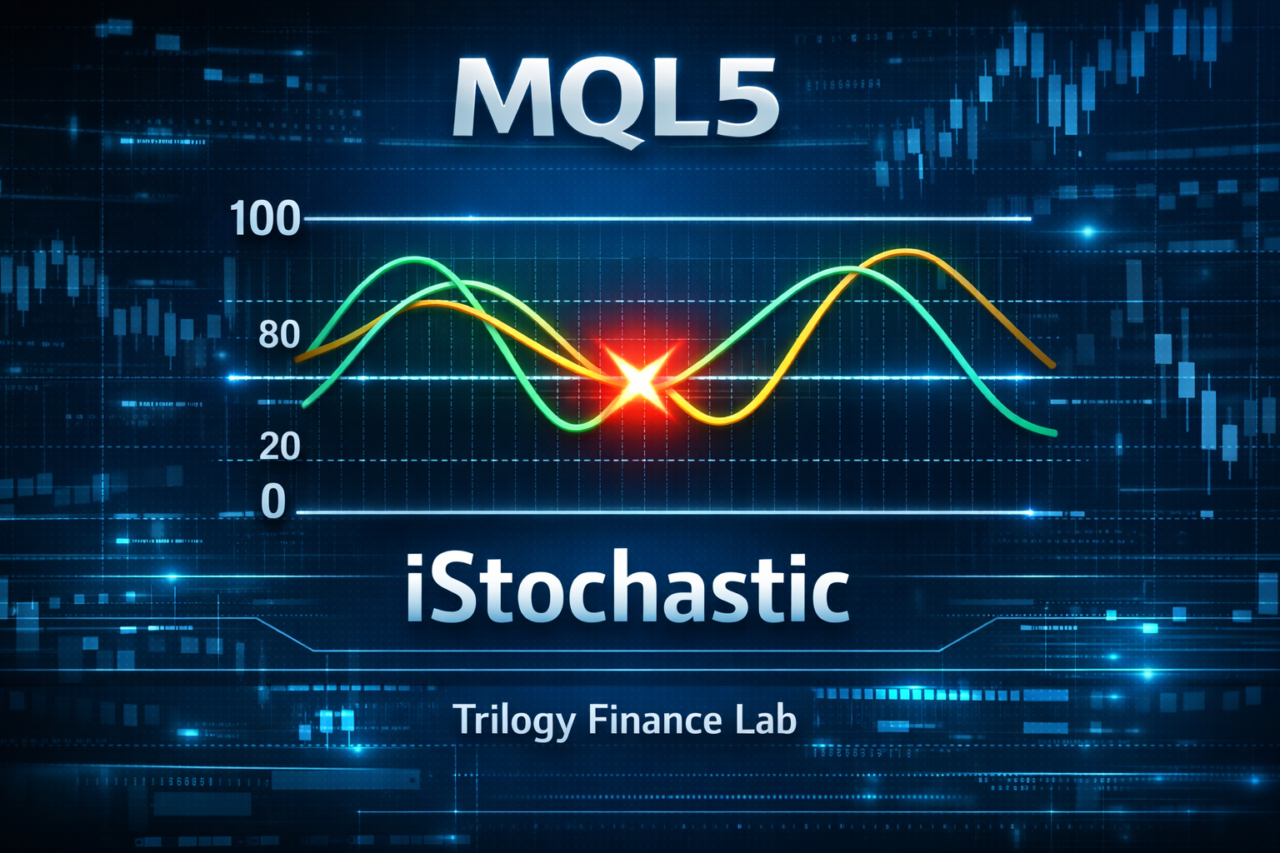
Stochastic is a technical indicator that evaluates market overextension based on where the current price is located within a recent price range.
It is mainly known as an oscillator indicator used to identify “overbought” and “oversold” conditions.
An oscillator is an indicator whose value moves up and down within a fixed range.
For Stochastic, the value usually moves within the 0 to 100 range.
It is generally interpreted as follows.
- 80 or higher → Overbought, meaning upward momentum may be too strong
- 20 or lower → Oversold, meaning downward momentum may be too strong
Stochastic consists of the following two lines.
| Line | Meaning |
|---|---|
| %K | Main line that shows the position of the current price |
| %D | Moving average of %K, also called the signal line |
Signals are judged from the relationship between these two lines.
- Golden cross %K crosses above %D from below → buy signal
- Dead cross %K crosses below %D from above → sell signal
Stochastic is often used in the following market conditions and trading styles.
- Range-bound markets, where price moves sideways
- Short-term trading
- Countertrend strategies
However, one important caution is that during a strong trend, Stochastic can stay above 80 or below 20 for a long time.
For this reason, using Stochastic alone for trade decisions can increase false signals.
Beginners often struggle with the following two points.
Common misunderstandings
- Thinking that price must fall whenever Stochastic rises above 80
- Thinking that price must rise whenever Stochastic falls below 20
In reality, Stochastic is an indicator of price momentum.
It does not guarantee a reversal.
For that reason, it is commonly used in practice in the following ways.
- Combine it with a trend filter
- Use cross signals
- Use it together with other indicators
1.2 Role of iStochastic in MQL5
iStochastic is a function in MQL5, the programming language for MetaTrader 5, that lets a program use the Stochastic indicator.
In MetaTrader, indicators are usually displayed on a chart.
In an EA, or Expert Advisor, the program needs to read the calculated indicator values.
That is what iStochastic is used for.
Its role can be summarized as follows.
| Role | Description |
|---|---|
| Indicator creation | Creates an indicator that calculates Stochastic |
| Handle retrieval | Gets the indicator handle, which is an identifier |
| Preparation for value retrieval | Makes the data available through CopyBuffer |
The key point is that iStochastic does not directly return indicator values.
In MQL5, indicator values are retrieved with the following steps.
- Create an indicator handle with iStochastic
- Retrieve data with CopyBuffer
- Read values from an array
This is a major difference from MQL4 and is one of the points that confuses beginners the most.
Common beginner mistakes
- Assuming iStochastic returns a value directly
- Trying to get indicator values without using CopyBuffer
In MQL5, indicators are managed internally as buffers, or data arrays.
Programs read values from those buffers.
1.3 Common Uses in EA Development
In EA development, Stochastic is mainly used to judge entry timing.
Typical usage patterns are as follows.
1. Detecting overextended conditions
Example
- %K is 20 or lower → oversold
- %K is 80 or higher → overbought
In an EA, it may be used with conditions like these.
Oversold → Buy
Overbought → Sell
However, this method tends to be more effective in range-bound markets.
2. Cross signals
With Stochastic, the cross between %K and %D is an important signal.
Example
- %K crosses above %D → buy signal
- %K crosses below %D → sell signal
In an EA, the logic looks like this.
if (%K crosses above %D)
    Buy
3. Trend filters
Because Stochastic alone can generate many false signals, it is often combined with indicators such as the following.
Example
- Moving Average
- RSI
- ATR
For example, a condition may look like this.
Uptrend (MA) + Stochastic oversold → Buy
This approach can reduce unnecessary entries.
Common mistakes
Beginners often make the following mistakes when building EAs.
- Trading with Stochastic alone
- Judging only by 80 / 20 levels
- Implementing cross detection incorrectly
For cross detection in particular, you need to compare the current bar with the previous bar.
If this logic is wrong, unintended entries may occur.
2. MQL5 iStochastic Syntax and Parameters
2.1 Basic iStochastic Syntax
When using Stochastic in MQL5, you use the iStochastic function to get an indicator handle, which is an identifier.
The basic syntax is as follows.
int iStochastic(
   string           symbol,
   ENUM_TIMEFRAMES  period,
   int              Kperiod,
   int              Dperiod,
   int              slowing,
   ENUM_MA_METHOD   method,
   ENUM_STO_PRICE   price_field
);
This function returns the handle of the Stochastic indicator.
A handle is a number used inside MetaTrader to identify an indicator.
The important point is that iStochastic does not directly return indicator values.
You use the returned handle later to retrieve values with the CopyBuffer function.
The workflow is as follows.
- Create a handle with iStochastic
- Retrieve data with CopyBuffer
- Extract values from an array
If you do not understand this workflow, the following errors are likely.
Common mistakes
- Receiving iStochastic directly into a double variable
- Trying to get values without using CopyBuffer
- Creating the handle on every OnTick call
The third mistake in particular can reduce performance.
An indicator handle is usually created only once in OnInit().
2.2 Meaning of Each Parameter
iStochastic has seven parameters.
Understanding each role makes EA development more flexible.
| Parameter | Description |
|---|---|
| symbol | Target symbol, for example “EURUSD” |
| period | Timeframe, for example PERIOD_H1 |
| Kperiod | Period for the %K line |
| Dperiod | Period for the %D line |
| slowing | Slowing, or smoothing of %K |
| method | Type of moving average |
| price_field | Price used for calculation |
The important parameters are explained below.
Kperiod
This is the period used to calculate the main Stochastic line, %K.
Example
Kperiod = 5
In this case, it calculates where the current price is located within the high-low range of the last 5 bars.
When the value is smaller:
- Reaction becomes faster
- Noise increases
When the value is larger:
- Reaction becomes slower
- Signals become more stable
Dperiod
This is the period of the %D line, or signal line.
%D is calculated as the moving average of %K.
Example
Dperiod = 3
This is a standard setting used in many trading methods.
slowing
This parameter smooths the %K line.
It is used to reduce noise.
Example
slowing = 3
A common point of confusion for beginners is the difference between Kperiod and slowing.
| Item | Meaning |
|---|---|
| Kperiod | Base calculation period |
| slowing | Smoothing |
In other words:
Kperiod → source data
slowing → noise reduction
method
This is the type of moving average used to calculate %D.
Main values
| Value | Meaning |
|---|---|
| MODE_SMA | Simple Moving Average |
| MODE_EMA | Exponential Moving Average |
| MODE_SMMA | Smoothed Moving Average |
| MODE_LWMA | Linear Weighted Moving Average |
In general, MODE_SMA is used.
price_field
This is the price type used for Stochastic calculation.
Main values
| Value | Meaning |
|---|---|
| STO_LOWHIGH | Uses highs and lows |
| STO_CLOSECLOSE | Uses closing prices |
Usually, STO_LOWHIGH is used.
This is the standard Stochastic calculation method.
2.3 Common Beginner Configuration Mistakes
The following mistakes are very common when configuring Stochastic.
Mistake 1: Mixing up the parameter order
iStochastic has many parameters, so it is easy to put them in the wrong order.
Example
Kperiod
Dperiod
slowing
If this order is wrong, you end up with a completely different indicator setup.
Mistake 2: Mixing up symbol and timeframe
Example
NULL
0
This means:
Current symbol
Current timeframe
Beginners sometimes do not know this meaning and therefore cannot retrieve data from a different timeframe.
Mistake 3: Changing Stochastic settings too much
Many EAs use the following setting.
5,3,3
This is the most common setting.
What beginners should focus on first is:
- not parameter tweaking
- but logic design
Changing parameters too often can lead to over-optimization, or overfitting.
3. How to Retrieve Stochastic Values with CopyBuffer
3.1 Basic Steps for Retrieving Indicator Values in MQL5
In MQL5, indicator values cannot be retrieved directly.
The mechanism is to create a handle with iStochastic and copy values into an array with CopyBuffer.
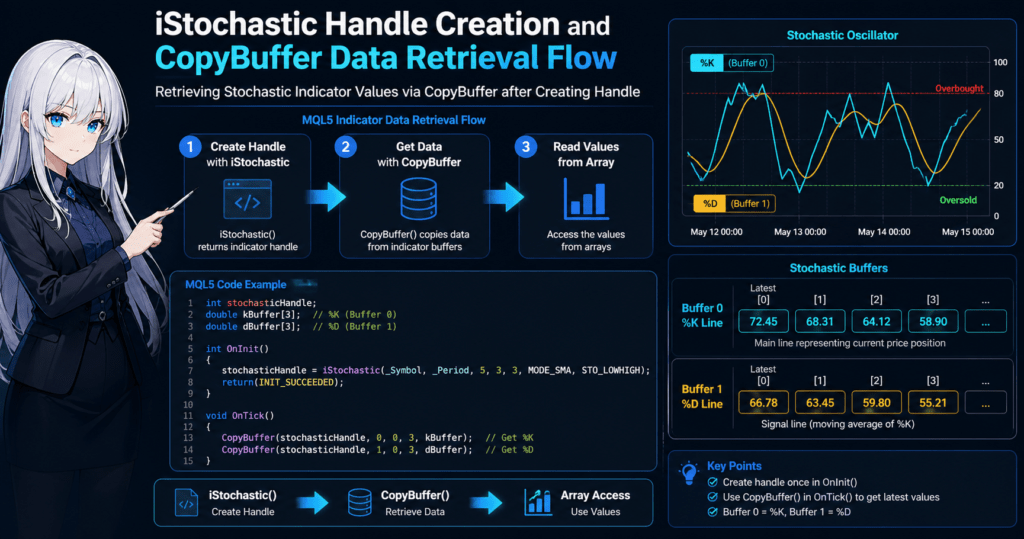
The workflow is as follows.
- Create an indicator handle with iStochastic
- Retrieve data with CopyBuffer
- Read values from the array
This is a major difference from MQL4, where you could write code like this:
double value = iStochastic(...);
In MQL5, indicator values are stored in internal buffers, or data arrays, so you retrieve those buffers with CopyBuffer.
3.2 Creating a Stochastic Handle
First, create the indicator handle during EA initialization, usually in OnInit().
Example:
int stochasticHandle;

int OnInit()
{
   stochasticHandle = iStochastic(
      _Symbol,
      _Period,
      5,
      3,
      3,
      MODE_SMA,
      STO_LOWHIGH
   );

   return(INIT_SUCCEEDED);
}
The values used here are common Stochastic settings.
Kperiod = 5
Dperiod = 3
slowing = 3
An important point is that you should not create the handle on every tick.
Common mistake:
void OnTick()
{
   int handle = iStochastic(...);   // NG
}
This creates the indicator on every tick and can reduce performance.
The correct approach is:
OnInit → create handle
OnTick → retrieve values
3.3 How to Use CopyBuffer
To retrieve Stochastic values, use the CopyBuffer function.
Basic syntax:
CopyBuffer(
   handle,
   buffer_index,
   start_pos,
   count,
   target_array
);
The parameters mean the following.
| Parameter | Meaning |
|---|---|
| handle | Indicator handle |
| buffer_index | Buffer to retrieve |
| start_pos | Starting position |
| count | Number of values to retrieve |
| target_array | Destination array |
3.4 Stochastic Buffer Numbers
Stochastic has two buffers.
| Buffer number | Content |
|---|---|
| 0 | %K line |
| 1 | %D line |
In other words:
buffer 0 → %K
buffer 1 → %D
3.5 Code Example for Retrieving %K and %D
Here is a practical code example.
double kBuffer[];
double dBuffer[];

void OnTick()
{
   CopyBuffer(stochasticHandle,0,0,3,kBuffer);
   CopyBuffer(stochasticHandle,1,0,3,dBuffer);

   double currentK = kBuffer[0];
   double currentD = dBuffer[0];
}
This code retrieves the following data.
kBuffer[0] → current bar
kBuffer[1] → previous bar
kBuffer[2] → two bars ago
In an EA, signals are usually judged by comparing the current value and the previous value.
3.6 Basic Cross Detection Logic
For Stochastic cross detection, compare the current bar and the previous bar.
Example: golden cross
if(kBuffer[1] < dBuffer[1] && kBuffer[0] > dBuffer[0])
{
   // Buy signal
}
Example: dead cross
if(kBuffer[1] > dBuffer[1] && kBuffer[0] < dBuffer[0])
{
   // Sell signal
}
This logic is one of the most common ways to use Stochastic in an EA.
3.7 Notes When Using CopyBuffer
There are several points where beginners often make mistakes when using CopyBuffer.
1. Data retrieval fails
CopyBuffer may return 0 if the data has not been calculated yet.
A safer way to write the code is:
if(CopyBuffer(stochasticHandle,0,0,3,kBuffer) <= 0)
   return;
Without this check, an array access error may occur.
2. Array size is too small
An error occurs if the array is smaller than the number of values being retrieved.
Example
CopyBuffer(... , 3 , buffer);
In that case, you need at least:
buffer[3]
or a larger size.
3. Forgetting ArraySetAsSeries
In MQL5, setting an array with:
ArraySetAsSeries(array,true);
makes the latest bar index 0.
If you do not set this:
index 0 → oldest data
and the EA logic may be reversed.
3.8 Common Implementation Mistakes
Beginners often make the following mistakes in EAs.
Mistake 1
Cross detection using only kBuffer[0] and dBuffer[0]
→ Cross detection requires the current bar + previous bar
Mistake 2
Calling CopyBuffer too many times on every tick
→ Performance may decrease
Mistake 3
Indicator handle not created
→ INVALID_HANDLE error
In a Stochastic EA, the accuracy of value retrieval directly affects the accuracy of the trading logic.
For that reason, CopyBuffer processing must be implemented carefully.
4. Practical Stochastic Logic Used in EAs
4.1 Basic Entry Using Stochastic
When using Stochastic in an EA, the most common approach is an entry based on the cross between %K and %D.
Because Stochastic measures market momentum, it can detect possible changes in market direction through line crossings.
The basic rules are as follows.
| Signal | Condition |
|---|---|
| Buy | %K crosses above %D from below |
| Sell | %K crosses below %D from above |
As EA logic, it looks like this.
if(kBuffer[1] < dBuffer[1] && kBuffer[0] > dBuffer[0])
{
   // Buy
}

if(kBuffer[1] > dBuffer[1] && kBuffer[0] < dBuffer[0])
{
   // Sell
}
The important point is to compare the current bar with the previous bar.
A common beginner mistake looks like this.
Common mistake
if(kBuffer[0] > dBuffer[0])
This condition cannot detect a cross.
It only checks the state that K is currently above D.
To detect a cross correctly, you must compare two points:
Previous bar
Current bar
4.2 Overbought and Oversold Filters
Because Stochastic moves within the 0 to 100 range, specific levels can be used to filter entries.
The common standards are as follows.
| State | Value |
|---|---|
| Overbought | 80 or higher |
| Oversold | 20 or lower |
In an EA, you may add conditions like the following.
Buy entry
if(kBuffer[1] < dBuffer[1] &&
   kBuffer[0] > dBuffer[0] &&
   kBuffer[0] < 20)
{
   // Buy
}
Sell entry
if(kBuffer[1] > dBuffer[1] &&
   kBuffer[0] < dBuffer[0] &&
   kBuffer[0] > 80)
{
   // Sell
}
This method is especially effective in range-bound markets.
However, there is an important caution.
When a strong trend occurs, Stochastic may:
stay above 80
stay below 20
If you trade countertrend in this state, consecutive losses may occur.
4.3 Using a Trend Filter
A Stochastic-only EA is often not very stable in practice.
For that reason, many EAs add a trend filter.
A typical filter is a Moving Average.
Example:
Uptrend → buy only
Downtrend → sell only
Example EA logic:
if(kBuffer[1] < dBuffer[1] &&
   kBuffer[0] > dBuffer[0] &&
   Close[0] > ma)
{
   // Buy
}
This can reduce:
- entries against the trend direction
- unnecessary countertrend trades
4.4 Techniques to Reduce False Signals
The weakness of Stochastic is that it can produce many false signals.
In practice, traders often use techniques such as the following.
1. Limit the cross location
Example:
Buy only crosses below 20
Sell only crosses above 80
2. Confirm with multiple bars
Instead of using only one bar, confirm with 2 to 3 bars.
Example
%K > %D for 2 consecutive bars
3. Higher-timeframe filter
Example
H1 trend
+
M5 entry
This method is very common in EAs.
4.5 Typical Mistakes in EA Development
The following mistakes are very common in Stochastic EAs.
Mistake 1: Judging with the current bar
The current bar, index 0, is not closed yet, so the signal may change.
A safer method is:
index 1
index 2
Use closed bars for judgment.
Mistake 2: Over-optimization
Fine-tuning Stochastic parameters can improve backtest results.
However, this can become:
Overfitting
which means over-optimization.
The following setting is commonly used.
5,3,3
It is safer to start by testing the logic with this setting.
Mistake 3: Countertrend trading in a trending market
Stochastic is an indicator suited to range-bound markets.
Countertrend trading in a trending market can lead to:
Consecutive losses
When using Stochastic in an EA, the basic approach is to combine cross detection + filters + trend judgment.
5. Sample MQL5 EA Code Using iStochastic
5.1 Basic Structure of the Sample EA
This section introduces a simple EA example that uses Stochastic cross signals.
The goal is to understand the basic processing flow: iStochastic → CopyBuffer → trade decision.
The implementation flow is as follows.
- Create the indicator handle in OnInit
- Retrieve values with CopyBuffer in OnTick
- Detect crosses
- Execute trades
Once you understand this structure, you can apply it to other indicators such as RSI and MACD.
5.2 Creating the Indicator Handle
First, create Stochastic during EA initialization.
int stochasticHandle;

int OnInit()
{
   stochasticHandle = iStochastic(
      _Symbol,
      _Period,
      5,
      3,
      3,
      MODE_SMA,
      STO_LOWHIGH
   );

   if(stochasticHandle == INVALID_HANDLE)
   {
      Print("iStochastic creation failed");
      return(INIT_FAILED);
   }

   return(INIT_SUCCEEDED);
}
This uses a commonly used setting.
Kperiod = 5
Dperiod = 3
slowing = 3
A common beginner mistake is creating iStochastic inside OnTick.
Example, incorrect:
void OnTick()
{
   int handle = iStochastic(...);
}
This creates the indicator on every tick and increases processing load.
Always create it only once in OnInit.
5.3 Retrieving Stochastic Values
Next, use CopyBuffer to retrieve Stochastic values.
double kBuffer[];
double dBuffer[];

void OnTick()
{
   ArraySetAsSeries(kBuffer,true);
   ArraySetAsSeries(dBuffer,true);

   if(CopyBuffer(stochasticHandle,0,0,3,kBuffer) <= 0)
      return;

   if(CopyBuffer(stochasticHandle,1,0,3,dBuffer) <= 0)
      return;
}
Stochastic has the following two buffers.
| Buffer | Content |
|---|---|
| 0 | %K line |
| 1 | %D line |
In other words:
kBuffer → %K
dBuffer → %D
The array indexes mean the following.
| index | Meaning |
|---|---|
| 0 | Current bar |
| 1 | Previous bar |
| 2 | Two bars ago |
5.4 Cross Signal Detection
In a Stochastic EA, the basic approach is to use the cross between %K and %D.
Buy signal
if(kBuffer[1] < dBuffer[1] && kBuffer[0] > dBuffer[0])
{
   Print("Buy signal");
}
Sell signal
if(kBuffer[1] > dBuffer[1] && kBuffer[0] < dBuffer[0])
{
   Print("Sell signal");
}
This logic compares the relationship between:
Previous bar
Current bar
A common beginner mistake is:
Incorrect
kBuffer[0] > dBuffer[0]
This is not cross detection.
It is only a position check.
5.5 Example Trade Logic Implementation
Next is an example of actual entry conditions.
if(kBuffer[1] < dBuffer[1] &&
   kBuffer[0] > dBuffer[0] &&
   kBuffer[0] < 20)
{
   // Buy
}
This means:
Oversold zone
+
Golden cross
Sell condition
if(kBuffer[1] > dBuffer[1] &&
   kBuffer[0] < dBuffer[0] &&
   kBuffer[0] > 80)
{
   // Sell
}
This means:
Overbought
+
Dead cross
These conditions are especially effective in range-bound markets.
5.6 Notes for EA Development
There are several important cautions when using Stochastic in an EA.
1. The problem with unclosed bars
The current bar, index 0, is a price that has not closed yet.
As a result, this can happen:
Cross → disappears
A safer method is to judge using closed bars:
index 1
index 2
2. Insufficient data errors
Immediately after a chart loads, CopyBuffer may not return enough data.
For that reason, always include a check like this:
if(CopyBuffer(...) <= 0)
   return;
3. Excessive entries
If you build an EA with only Stochastic, the following problems can occur easily.
False signals
Consecutive entries
Common countermeasures include adding filters such as:
- Moving Average
- RSI
- ATR
Once you understand the flow of iStochastic → CopyBuffer → cross detection, implementing a Stochastic-based EA becomes relatively simple.
6. Common iStochastic Errors and Troubleshooting
6.1 INVALID_HANDLE Error
One of the most common errors when using iStochastic is INVALID_HANDLE.
This means that indicator handle creation has failed.
Example:
int handle = iStochastic(...);

if(handle == INVALID_HANDLE)
{
   Print("Indicator error");
}
The main causes of this error are as follows.
| Cause | Description |
|---|---|
| Parameter setting mistake | Function arguments are incorrect |
| Chart not initialized | Price data has not been loaded yet |
| Symbol specification mistake | A symbol that does not exist is specified |
A symbol specification mistake is especially common among beginners.
Example:
iStochastic("EURUSD",PERIOD_H1,...)
Depending on the broker, the symbol name may be:
EURUSDm
EURUSD.pro
A safer method is:
iStochastic(_Symbol,_Period,...)
This automatically uses the current chart symbol and timeframe.
6.2 CopyBuffer Returns 0
CopyBuffer returns 0 or a negative number when data retrieval fails.
Example:
CopyBuffer(handle,0,0,3,buffer)
Return values:
3 → success
0 → retrieval failed
-1 → error
The main causes of this problem are as follows.
| Cause | Description |
|---|---|
| Data not loaded | Insufficient chart history |
| Indicator not calculated | Immediately after initialization |
| Wrong buffer number | A nonexistent buffer is specified |
For this reason, always perform the following check in an EA.
if(CopyBuffer(handle,0,0,3,kBuffer) <= 0)
   return;
Without this check, the following error may occur.
array out of range
6.3 Array Out Of Range Error
A common error for MQL5 beginners is:
array out of range
This happens when you reference an index larger than the array size.
Example:
double buffer[];

CopyBuffer(handle,0,0,3,buffer);

double value = buffer[5];   // error
If the number of retrieved values is 3, only the following indexes exist:
buffer[0]
buffer[1]
buffer[2]
The countermeasure is:
ArrayResize(buffer,3);
or secure the size like this:
double buffer[3];
6.4 Reversed Array Index Problem
In MQL5, if you do not configure the array, the indexes mean the following.
| index | Meaning |
|---|---|
| 0 | Oldest data |
| Last | Latest data |
However, in an EA, it is usually easier to work with:
index0 → latest bar
For that reason, use the following setting.
ArraySetAsSeries(buffer,true);
If you forget this setting:
- cross detection
- indicator judgment
may become reversed.
6.5 Cross Detection Does Not Work Correctly
In Stochastic EAs, cross detection mistakes are common.
Incorrect example:
if(kBuffer[0] > dBuffer[0])
This only checks the state:
Current K is above
Cross detection always requires:
Current
+
Previous bar
Correct example:
if(kBuffer[1] < dBuffer[1] &&
   kBuffer[0] > dBuffer[0])
This two-point comparison is the basis of cross detection.
6.6 Misunderstandings About Stochastic EAs
Beginners often have the following misunderstandings.
Misunderstanding 1
80 → price must fall
Misunderstanding 2
20 → price must rise
In reality, Stochastic is a:
Momentum indicator
and it does not guarantee a reversal.
Especially in trending markets, it may:
stay above 80
stay below 20
For that reason, in practice it is often combined with:
- Moving Average
- RSI
- ATR
6.7 Practical Operation Checklist
When creating a Stochastic EA, checking the following items can reduce trouble.
Checklist
- Create the iStochastic handle in OnInit
- Check the return value of CopyBuffer
- Set ArraySetAsSeries
- Confirm the cross detection logic
- Confirm buffer numbers
Just following these five points can prevent many errors.
7. FAQ About MQL5 iStochastic
7.1 Can iStochastic retrieve values directly?
No.
In MQL5, indicator values are retrieved with the following steps.
1. iStochastic → create indicator handle
2. CopyBuffer → retrieve data
3. Array → reference value
This is very different from MQL4.
In MQL4, you could retrieve values directly like this:
double value = iStochastic(...);
In MQL5, however, the system uses a handle-based method.
7.2 Which buffers are Stochastic %K and %D?
Stochastic has two buffers.
| Buffer number | Content |
|---|---|
| 0 | %K line |
| 1 | %D line |
Example:
CopyBuffer(handle,0,0,3,kBuffer); // %K
CopyBuffer(handle,1,0,3,dBuffer); // %D
If these numbers are wrong, the EA logic will not work correctly.
7.3 What are the standard Stochastic parameters?
Many trading methods use the following setting.
Kperiod = 5
Dperiod = 3
slowing = 3
In other words:
5,3,3
However, the best setting depends on:
- symbol
- timeframe
- trading strategy
so it is important to verify it with backtesting.
7.4 In what market conditions is Stochastic effective?
Stochastic is mainly effective in:
Range-bound markets
The reason is that Stochastic measures:
price position (momentum)
On the other hand, in:
Strong trending markets
the following states can occur.
Stays above 80
Stays below 20
For this reason, countertrend trading may not work well in trending markets.
7.5 Which bars should be used for cross detection?
The safer method is to use:
Closed bars
In other words:
index1
index2
Example:
if(kBuffer[2] < dBuffer[2] &&
   kBuffer[1] > dBuffer[1])
{
   // Buy
}
The current bar, index0, is not closed, so the signal may disappear while the bar is forming.
7.6 Why does CopyBuffer return 0?
The main causes are as follows.
| Cause | Description |
|---|---|
| Insufficient history | Not enough chart price data |
| Indicator not calculated | Immediately after initialization |
| Handle error | INVALID_HANDLE |
For that reason, it is important to add a check like this:
if(CopyBuffer(handle,0,0,3,kBuffer) <= 0)
   return;
7.7 Can I build an EA using only Stochastic?
Technically, yes, but it is often difficult to make stable in live operation.
The reasons are:
- many false signals
- weakness in trending markets
- tendency to depend on countertrend entries
For that reason, in practice it is often combined with indicators such as:
Moving Average (MA)
RSI
ATR
Bollinger Bands
Stochastic is generally used as a supporting indicator for entry timing.